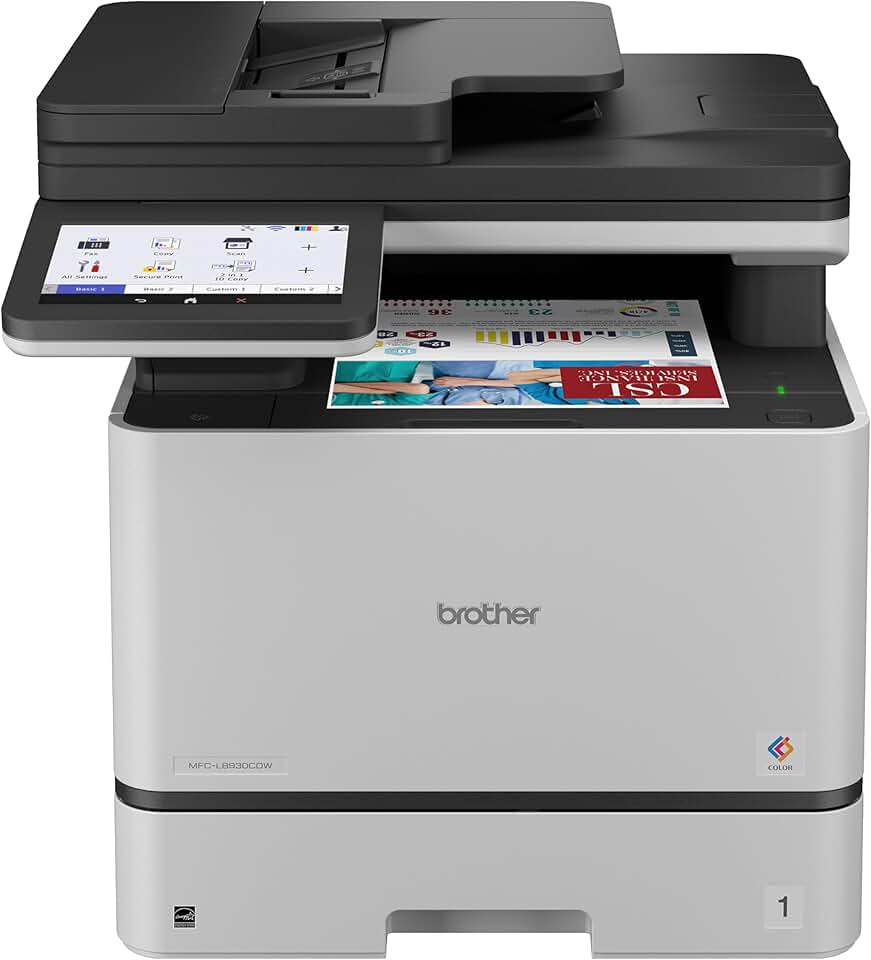
The Brother MFC-L8930CDW stands out as a robust and feature-rich business color laser all-in-one printer designed to meet the demanding needs of modern offices and workgroups. This comprehensive review will delve into its capabilities, performance, and overall value, helping you determine if it’s the right investment for your business.
Quick Summary: Brother MFC-L8930CDW
- Rating: 4.5/5 stars
- Price: $699.99 USD
Key Pros:
- High-speed color and monochrome printing for enhanced productivity.
- Advanced security features, including Secure Function Lock and Active Directory support.
- Low cost per page with high-yield toner cartridges, reducing operational expenses.
- Versatile all-in-one functionality with duplex printing, scanning, and copying.
- Robust paper handling and extensive connectivity options for diverse office needs.
Key Cons:
- Higher initial purchase price compared to entry-level models.
- Substantial physical footprint requires adequate office space.
Table of Contents
Brother MFC-L8930CDW Overview
The Brother MFC-L8930CDW is positioned as a powerhouse multifunction printer (MFP) specifically engineered for small to medium-sized businesses (SMBs) and corporate workgroups. It is designed to handle significant print, scan, copy, and fax volumes with efficiency and reliability. This model emphasizes robust performance, advanced security, and cost-effective operation, making it a compelling choice for professional environments.
This all-in-one device consolidates multiple office functions into a single unit, streamlining workflows and saving valuable office space. Its color laser technology ensures vibrant and professional-quality prints, which are essential for marketing materials, presentations, and client-facing documents. The printer’s duplex capabilities across all functions further enhance productivity and reduce paper consumption.
Connectivity is a strong suit for the MFC-L8930CDW, offering both wired (Ethernet) and wireless (Wi-Fi) options, along with direct USB connectivity. This flexibility allows for seamless integration into various network infrastructures and supports modern mobile printing solutions. Businesses can print from a wide range of devices, including smartphones and tablets, with ease.
Security is a paramount concern for businesses today, and Brother has equipped the MFC-L8930CDW with a comprehensive suite of features to protect sensitive information. From secure print functions to network security protocols, this printer helps safeguard confidential data. These measures are crucial for compliance and maintaining data integrity in a networked office environment.
The operational costs are also a key consideration for any business, and the MFC-L8930CDW addresses this with its high-yield toner cartridges. These cartridges offer a lower cost per page compared to standard yield options, translating into significant savings over the printer’s lifespan. Its ENERGY STAR certification also points to its energy efficiency, further reducing utility expenses.
Furthermore, the printer’s intuitive touchscreen interface simplifies navigation and access to its extensive features. Users can easily configure settings, initiate tasks, and monitor printer status directly from the device. This user-friendly design minimizes the learning curve and maximizes operational efficiency for busy professionals.
In comparison to entry-level laser printers or many inkjet MFPs, the Brother MFC-L8930CDW offers a superior combination of speed, output quality, and enterprise-grade features. It is built to withstand the rigors of a busy office, providing a reliable printing solution that businesses can depend on day in and day out. This makes it an excellent long-term investment for productivity.
Its robust construction and high monthly duty cycle rating underscore its capacity for sustained, high-volume use. This is not a printer for occasional home use; rather, it is engineered for consistent performance in environments where printing is a core part of daily operations. The focus is on uninterrupted workflow and professional output.
The integrated automatic document feeder (ADF) with single-pass duplex scanning is another critical feature for businesses that deal with large volumes of multi-page documents. This capability significantly speeds up scanning and copying processes, allowing employees to focus on more strategic tasks rather than manual document handling. It truly enhances office productivity.
Brother MFC-L8930CDW Key Features & Specs
The Brother MFC-L8930CDW is packed with features designed to optimize office productivity and security. Understanding these specifications is crucial for appreciating the printer’s capabilities and how it can integrate into a business environment. Let’s break down the most important aspects of this versatile machine.
Print Performance and Quality
One of the primary strengths of the MFC-L8930CDW is its impressive print speed. It delivers up to 33 pages per minute (ppm) for both black and color prints, ensuring that large print jobs are completed quickly. The first page out time is also remarkably fast, minimizing waiting times for individual documents.
The print resolution of up to 2400 x 600 dpi ensures crisp text and vibrant, accurate colors. This high quality is vital for professional documents, marketing materials, and presentations where image clarity and color fidelity are paramount. The laser technology provides sharp edges and consistent output from the first page to the last.
Advanced Scanning Capabilities
The automatic document feeder (ADF) can hold up to 70 pages and supports single-pass duplex scanning. This means both sides of a document are scanned simultaneously, dramatically increasing efficiency for multi-page, double-sided originals. Scan speeds are also high, further contributing to office productivity.
The MFC-L8930CDW offers a wide range of scan-to destinations, including email, network folders (SMB/FTP), SharePoint, cloud services (Google Drive, Dropbox, OneDrive), and USB. This flexibility allows users to easily integrate scanned documents into their digital workflows and archives. Optical scan resolution is up to 1200 x 2400 dpi, ensuring detailed digital reproductions.
Copy and Fax Functionality
Copying is just as efficient as printing, with speeds matching the print output at up to 33 cpm for both color and black. The machine supports duplex copying, allowing for two-sided originals to be copied onto two-sided paper. Various copy features like N-in-1 copying, ID copy, and sort functions enhance its utility.
The integrated fax modem offers robust faxing capabilities, including PC-Fax for sending and receiving faxes directly from a computer. It also includes a substantial memory for storing incoming faxes, ensuring no important communication is missed. Fax forwarding and junk fax barriers are also included.
Connectivity and Mobile Printing
Connectivity options are extensive, featuring built-in dual-band Wi-Fi (2.4GHz/5GHz) and Gigabit Ethernet for seamless network integration. A USB interface allows for direct printing from and scanning to USB flash drives. This ensures that the printer can adapt to virtually any office IT setup.
For mobile users, the MFC-L8930CDW supports popular mobile printing solutions like Apple AirPrint, Mopria Print Service, and Brother iPrint&Scan. This allows employees to print documents directly from their smartphones and tablets without needing to install specific drivers or connect to a PC. This flexibility is a significant boost for modern, agile work environments.
Robust Security Features
Brother has prioritized security with the MFC-L8930CDW. Features include Secure Function Lock, which allows administrators to restrict access to specific functions for individual users or groups. Active Directory support simplifies user authentication and management in larger corporate networks.
Network security protocols such as IPsec, SSL/TLS, and 802.1x are supported to protect data transmitted over the network. Secure Print requires a PIN to release print jobs, preventing sensitive documents from being picked up by unauthorized individuals. An optional NFC card reader can also be integrated for enhanced authentication.
Cost-Effectiveness and Paper Handling
The printer is designed for low operating costs, especially when utilizing Brother Genuine high-yield toner cartridges. These cartridges significantly reduce the cost per page, making the MFC-L8930CDW an economical choice for businesses with high print volumes. It is also ENERGY STAR certified, indicating its energy efficiency.
Standard paper capacity includes a 250-sheet paper tray and a 50-sheet multi-purpose tray, accommodating various media types and sizes. Optional lower paper trays can expand the total capacity to 1,050 sheets, reducing the frequency of paper refills. It supports media weights up to 43 lb bond (163 gsm) in the multi-purpose tray, suitable for thicker stocks.
User Interface and Durability
A 7-inch color touchscreen display provides an intuitive user experience, making it easy to navigate menus, access cloud services, and customize settings. The customizable home screen allows users to quickly access frequently used functions, further enhancing efficiency.
With a maximum monthly duty cycle of up to 60,000 pages and a recommended monthly print volume of up to 4,000 pages, the MFC-L8930CDW is built for durability and consistent performance in demanding office environments. Its robust construction ensures a long operational life, providing excellent return on investment.
Pros & Cons
Evaluating any product involves a balanced look at its strengths and weaknesses. The Brother MFC-L8930CDW, while a highly capable machine, is no exception. Here we provide a detailed breakdown of its advantages and potential drawbacks to help you make an informed decision.
Pros of the Brother MFC-L8930CDW
The most significant advantage of the MFC-L8930CDW is its high-speed performance. With print and copy speeds of up to 33 ppm for both black and color, it significantly boosts office productivity. This speed is crucial for meeting tight deadlines and processing large volumes of documents efficiently.
Another strong point is the excellent print quality it delivers. The laser technology ensures crisp, professional-looking text and vibrant, accurate colors at 2400 x 600 dpi resolution. This makes it ideal for producing high-impact marketing materials, detailed reports, and presentations that leave a lasting impression.
The comprehensive security features are a major draw for businesses. With options like Secure Function Lock, Active Directory authentication, and secure print, sensitive information is well-protected. These measures are vital for regulatory compliance and maintaining data confidentiality in a networked environment.
Low cost per page is another compelling benefit, particularly when using high-yield toner cartridges. This economic efficiency translates into substantial savings on consumables over the printer’s operational life. For businesses with high print volumes, this can significantly impact the bottom line.
The versatile all-in-one functionality is incredibly convenient. Having duplex printing, scanning, copying, and faxing capabilities in one unit streamlines workflows and reduces the need for multiple devices. The single-pass duplex ADF further enhances efficiency for scanning two-sided documents.
Robust paper handling is a key asset, with a standard capacity that can be expanded significantly with optional trays. This flexibility accommodates various paper types and sizes, reducing the frequency of refills and supporting diverse printing needs. The multi-purpose tray is great for specialized media.
Finally, the extensive connectivity options including dual-band Wi-Fi, Gigabit Ethernet, and mobile printing support ensure seamless integration into any office environment. This adaptability allows for easy printing from virtually any device, enhancing user convenience and flexibility.
Cons of the Brother MFC-L8930CDW
The primary drawback for some users might be the higher initial purchase price. As a business-grade all-in-one, the MFC-L8930CDW represents a more substantial upfront investment compared to consumer-grade or entry-level laser printers. While justified by its features and durability, it can be a barrier for very small businesses with limited budgets.
Another consideration is its substantial physical footprint. Being a robust multifunction device, it occupies a significant amount of desk or floor space. This might be an issue for smaller offices or home offices where space is at a premium. Users should measure their available space carefully before purchasing.
While the cost per page is low, the toner cartridge replacement process can be somewhat messy, a common characteristic of laser printers. Users need to handle toner carefully to avoid spills. This is a minor inconvenience but worth noting for those accustomed to inkjet systems.
During peak operation, the printer can generate a noticeable amount of noise. While typical for high-speed laser printers, this might be a factor in very quiet office environments or smaller spaces where sound can be more intrusive. It’s generally not disruptive in a typical busy office setting, however.
While the touchscreen is intuitive, some users might find the initial setup process for advanced network features slightly complex without IT assistance. Configuring specific security protocols or integrating with certain cloud services may require a deeper understanding of network administration. Brother’s support resources are generally good, but it’s a point to consider.
Who Should Buy the Brother MFC-L8930CDW?
The Brother MFC-L8930CDW is not a one-size-fits-all printer; it is specifically designed for certain types of users and environments that can truly leverage its advanced capabilities. Understanding its ideal target audience is key to determining if this investment is right for your needs.
Small to Medium Businesses (SMBs) and Workgroups
This printer is an excellent fit for small to medium-sized businesses that require a reliable, high-volume printing solution. Its robust construction and impressive monthly duty cycle mean it can handle the consistent demands of a busy office without faltering. Workgroups within larger organizations will also find its network capabilities and shared functionality highly beneficial.
Businesses that frequently produce marketing materials, client reports, invoices, or presentations will appreciate the high-quality color laser output. The speed ensures that these critical documents are produced quickly, maintaining workflow efficiency. The comprehensive all-in-one features reduce the need for multiple machines, consolidating office equipment.
Offices Prioritizing Security
For organizations where data security is a top priority, the MFC-L8930CDW shines. Its suite of advanced security features, including Secure Function Lock, Active Directory authentication, and secure print, provides peace of mind. This is particularly important for businesses handling sensitive customer data, financial records, or confidential intellectual property.
Legal firms, healthcare providers, and financial institutions, for instance, often face stringent compliance requirements. The printer’s network security protocols and user authentication methods help them meet these obligations. Protecting information throughout its lifecycle, from creation to print, is a core strength of this device.
Users Seeking Low Operating Costs
While the initial cost is higher, businesses focused on long-term operational savings will find the MFC-L8930CDW very appealing. Its compatibility with high-yield toner cartridges dramatically reduces the cost per page, making it highly economical for environments with significant print volumes. The ENERGY STAR certification also contributes to lower electricity bills.
Over several years, the savings on toner and energy can easily offset the higher upfront price, delivering a strong return on investment. This makes it a smart choice for businesses looking to manage their recurring expenses effectively without compromising on performance or quality.
Offices with Diverse Document Handling Needs
Any office that regularly deals with a variety of document types, from standard letters to legal-sized reports and even thicker media, will benefit from this printer’s versatile paper handling. The expandable paper capacity means less time spent refilling trays, and the multi-purpose tray handles specialized media with ease.
The single-pass duplex ADF is a game-changer for scanning and copying multi-page, double-sided documents. This feature alone can save countless hours in offices that process a large volume of paperwork, such as accounting departments, human resources, or legal offices. It transforms paper-based processes into efficient digital workflows.
Who Might Want to Consider Alternatives?
Casual home users or individuals with very low print volumes will likely find the Brother MFC-L8930CDW overkill. Its size, features, and price point are tailored for business environments, and a simpler, less expensive model would be more appropriate for light personal use. Photo enthusiasts should also look elsewhere, as laser printers are not optimized for photographic quality prints.
Businesses with extremely tight initial budgets that cannot justify the upfront investment, even with long-term savings, might need to explore more entry-level options. However, it’s crucial to weigh initial cost against ongoing operational expenses and feature sets when making such decisions.
FAQ about Brother MFC-L8930CDW
Here are some of the most frequently asked questions about the Brother MFC-L8930CDW, addressing common concerns and providing detailed insights into its functionality and usage.
Q1: What is the print speed of the Brother MFC-L8930CDW?
The Brother MFC-L8930CDW boasts an impressive print speed of up to 33 pages per minute (ppm) for both black and color documents. This high speed ensures that large print jobs are processed efficiently, minimizing wait times in busy office environments. It’s designed for productivity.
The first page out time is also very quick, which is beneficial for printing single documents or short runs. This combination of speed and responsiveness makes it an excellent choice for offices with high print demands, keeping workflows smooth and uninterrupted.
Q2: Does the Brother MFC-L8930CDW support duplex scanning and printing?
Yes, the Brother MFC-L8930CDW fully supports both duplex printing and single-pass duplex scanning. Duplex printing allows you to automatically print on both sides of a page, saving paper and reducing environmental impact. This is a standard feature for professional use.
The single-pass duplex scanning feature is particularly efficient, as it scans both sides of a document simultaneously in a single pass through the automatic document feeder (ADF). This significantly speeds up the digitization of multi-page, double-sided documents, making it ideal for archiving or sharing.
Q3: What are the security features of this printer?
The MFC-L8930CDW is equipped with a comprehensive suite of security features to protect sensitive information. Key features include Secure Function Lock, which allows administrators to restrict access to specific printer functions for individual users or groups. This prevents unauthorized usage.
It also supports Active Directory for user authentication, ensuring that only authorized personnel can access the printer’s network features. Secure Print requires a PIN code at the device to release confidential print jobs. Furthermore, network security protocols like IPsec and SSL/TLS encrypt data transmission, safeguarding against eavesdropping and tampering.
Q4: How does its cost per page compare to inkjet printers?
Generally, the Brother MFC-L8930CDW, as a color laser printer, offers a significantly lower cost per page (CPP) compared to most inkjet printers, especially when using high-yield toner cartridges. While the initial investment for a laser printer might be higher, the long-term cost of consumables is typically much lower.
Inkjets often have higher ink costs, particularly for color printing, and their cartridges tend to yield fewer pages. Laser toners, conversely, produce thousands of pages, making them more economical for high-volume printing. This leads to substantial savings over the printer’s lifespan for businesses.
Q5: What mobile printing options are available with the MFC-L8930CDW?
The Brother MFC-L8930CDW offers robust mobile printing capabilities to cater to modern work styles. It supports popular services such as Apple AirPrint, Mopria Print Service, and Brother iPrint&Scan. These allow users to print directly from their smartphones, tablets, and other mobile devices without needing to connect to a computer.
Brother iPrint&Scan is a dedicated app that provides advanced functionality, including printing from and scanning to cloud services directly from your mobile device. This flexibility ensures that employees can print important documents on the go, enhancing productivity and convenience.
Q6: Can the Brother MFC-L8930CDW handle different paper types and sizes?
Yes, the MFC-L8930CDW is designed with versatile paper handling capabilities. It comes with a 250-sheet adjustable paper tray for standard paper sizes and a 50-sheet multi-purpose tray that can accommodate various media types, including envelopes, labels, and thicker paper stocks up to 43 lb bond (163 gsm).
Optional lower paper trays are available to expand the total paper capacity to up to 1,050 sheets, which is ideal for reducing the frequency of paper refills in high-volume environments. This flexibility ensures it can meet diverse document printing requirements for any business.
Q7: Is the Brother MFC-L8930CDW suitable for a home office?
While technically capable of functioning in a home office, the Brother MFC-L8930CDW is primarily designed for small to medium-sized businesses and workgroups with significant printing needs. Its robust features, high print volume capacity, and advanced security might be overkill for a typical home office user.
Its larger physical footprint and higher initial cost also make it less ideal for casual home use. However, if a home office has very high print volumes, requires professional color output, and prioritizes advanced security features, then the MFC-L8930CDW could be a suitable, albeit substantial, investment. For most home users, a more compact and less expensive model would be more appropriate.
Q8: What is the monthly duty cycle of this printer?
The maximum monthly duty cycle for the Brother MFC-L8930CDW is up to 60,000 pages. This figure represents the maximum number of pages a device can print in a month without excessive wear. However, for optimal performance and longevity, Brother recommends a monthly print volume of up to 4,000 pages.
Adhering to the recommended monthly volume ensures the printer operates within its intended design parameters, extending its lifespan and maintaining consistent performance. This high duty cycle indicates its durability and suitability for demanding business environments. For more detailed specifications, you can always visit the official Brother website.
Final Verdict
The Brother MFC-L8930CDW stands out as an exceptional business color laser all-in-one printer that delivers on its promises of speed, quality, and security. For small to medium-sized businesses and demanding workgroups, this device represents a significant upgrade in terms of productivity and operational efficiency. It’s built to perform consistently under pressure, handling high print volumes with ease.
Its blend of rapid print speeds, professional-grade color output, and advanced duplexing capabilities across all functions makes it a workflow powerhouse. The comprehensive security suite provides essential protection for sensitive data, a non-negotiable feature in today’s business landscape. Furthermore, the low cost per page with high-yield toners ensures that the initial investment translates into long-term savings.
While its initial price point and physical size might be considerations for some, these are justified by its robust feature set and durable construction. The intuitive touchscreen interface and versatile connectivity options, including mobile printing, ensure it integrates seamlessly into various office environments and caters to modern work habits.
Ultimately, if your business requires a reliable, secure, and cost-effective multifunction printer capable of handling substantial color and monochrome print volumes, the Brother MFC-L8930CDW is an excellent choice. It’s an investment that pays dividends in enhanced productivity, reduced operating costs, and peace of mind regarding document security. For more details on laser printing technology, consider resources like Wikipedia’s article on laser printers.