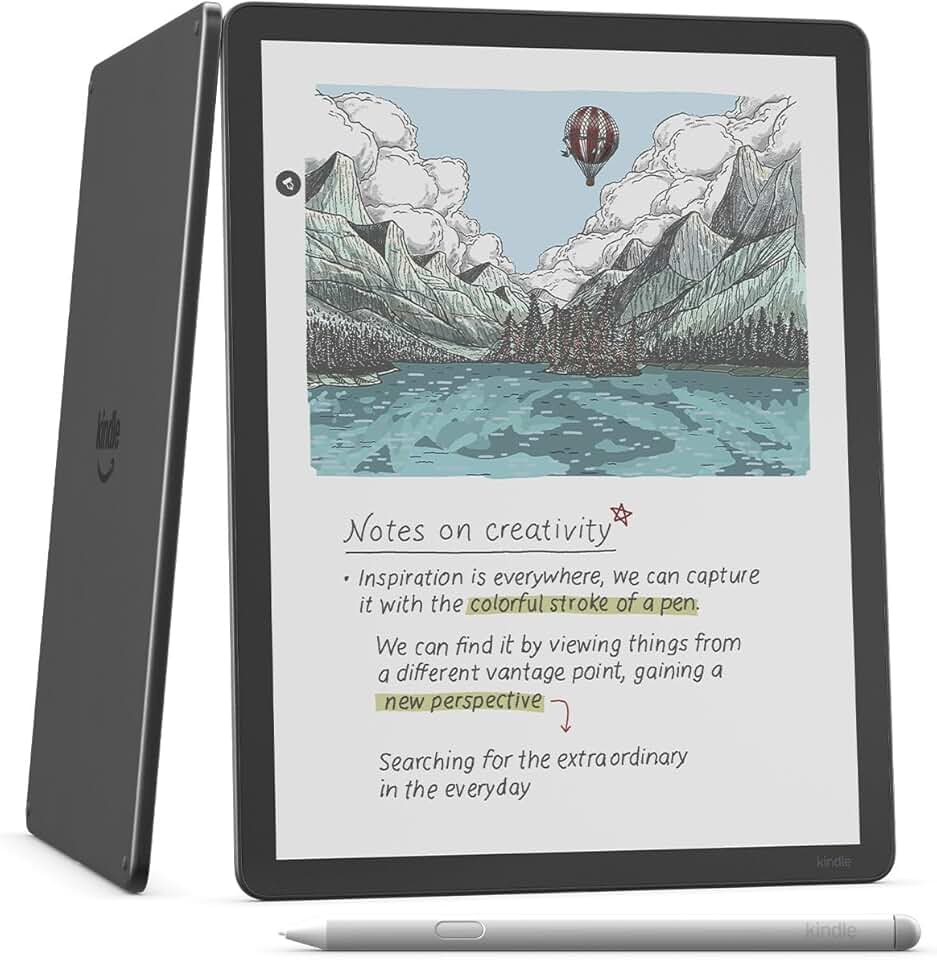
The Kindle Scribe Colorsoft marks a significant leap in e-reader technology, introducing a vibrant 11-inch paper-like color display that redefines digital reading and note-taking. This newest model from Amazon combines the beloved features of the original Kindle Scribe with the groundbreaking addition of color, making it an indispensable tool for students, professionals, and avid readers alike. It promises a distraction-free environment for immersive engagement with your content.
Quick Summary: Kindle Scribe Colorsoft
Here’s a snapshot of what the Kindle Scribe Colorsoft offers:
- Rating: 4.4 out of 5 stars (from 413 reviews)
- Price: $679.99 USD
Key Pros
- Vibrant 11-inch color E-Ink display enhances reading.
- Integrated writing experience with Premium Pen for notes and annotations.
- Exceptional battery life ensures extended usage without frequent charging.
Key Cons
- High price point makes it a significant investment.
- Color fidelity is not on par with LCD/OLED screens, less ideal for rich media.
Table of Contents
Kindle Scribe Colorsoft Overview
The Kindle Scribe Colorsoft represents Amazon’s most ambitious foray into the e-reader market, seamlessly blending the best aspects of traditional e-ink displays with the vibrant appeal of color. This device is not merely an incremental update; it is a fundamental rethinking of what a Kindle can be, moving beyond monochrome text to offer a more engaging and versatile digital canvas. Its primary purpose is to serve as an all-in-one digital notebook, e-reader, and document annotator.
At its core, the Scribe Colorsoft maintains the paper-like reading experience that Kindle users adore, significantly reducing eye strain compared to traditional backlit screens. The addition of color, powered by advanced E-Ink technology, transforms how users interact with content. Imagine reading technical manuals with colored diagrams, children’s books bursting with hues, or annotating PDFs with color-coded highlights and notes.
This model builds upon the foundation laid by the original Kindle Scribe, which introduced writing capabilities to Amazon’s popular e-reader line. The Scribe Colorsoft elevates this experience by allowing for color-based organization and expression in notebooks and documents. It targets a broad audience, from students who need to organize complex study materials to professionals who mark up reports and creative individuals who sketch and brainstorm.
The device’s design emphasizes portability and comfort, featuring a thin and light profile despite its expansive 11-inch display. This makes it easy to carry in a backpack or briefcase, ensuring that your entire library and all your notes are always accessible. The matte finish of the screen mimics the texture of real paper, providing a satisfying tactile experience when writing with the included Premium Pen.
While previous Kindles focused almost exclusively on text-based reading, the Kindle Scribe Colorsoft acknowledges the growing need for digital tools that support visual learning and creative expression. It bridges the gap between dedicated e-readers and more feature-rich, often distracting, tablets. Users can enjoy the benefits of a focused, glare-free display without sacrificing the utility that color brings to many forms of content.
The integration of the Premium Pen is central to the Scribe Colorsoft’s appeal. This stylus offers a natural writing feel, with excellent pressure sensitivity and low latency, making the act of writing on the screen remarkably fluid. Whether you are jotting down quick thoughts, solving equations, or sketching out ideas, the pen-to-paper sensation is surprisingly accurate and responsive, enhancing productivity.
Furthermore, Amazon has committed to continuously improving the software experience, adding new features and functionalities through regular updates. This ensures that the Kindle Scribe Colorsoft remains a relevant and evolving tool, adapting to user feedback and emerging needs. It is more than just a device; it is a platform designed to enhance your digital workflow and reading enjoyment.
The 64GB storage capacity means you can store thousands of books, documents, and notebooks without worrying about running out of space. This is particularly beneficial for users who deal with large PDF files, extensive research materials, or a vast collection of graphic novels and magazines. The ample storage ensures that your entire digital workspace can be carried with you.
In summary, the Kindle Scribe Colorsoft is a testament to innovation in the e-reader space, offering a unique blend of traditional e-ink benefits with modern color capabilities and robust writing tools. It’s designed for those who seek a focused, versatile, and eye-friendly digital environment for reading, learning, and creating. It truly pushes the boundaries of what an e-reader can accomplish.
Kindle Scribe Colorsoft Key Features & Specs
The Kindle Scribe Colorsoft is packed with features that set it apart from other e-readers and even many tablets. Its specifications are carefully chosen to optimize the reading and writing experience, focusing on usability and display quality. Understanding these key features helps to appreciate the thoughtful engineering behind this innovative device.
The standout feature is undoubtedly the 11-inch Paper-like Color Display. This screen utilizes advanced E-Ink technology, offering a glare-free experience that closely mimics reading on actual paper. The color capabilities bring a new dimension to content, allowing for richer visuals in graphic novels, magazines, and educational materials, without the harsh backlight of LCD screens.
The display resolution is optimized for crisp text and clear images, ensuring that both monochrome and color content appear sharp and readable. The front light, which is adjustable and includes a warm light option, allows for comfortable reading in any lighting condition, from bright sunlight to a dimly lit room. This adaptive lighting is crucial for reducing eye strain during long reading sessions.
Included with the device is the Premium Pen. This stylus requires no charging, which is a significant convenience, and offers a natural writing experience with customizable shortcuts. It attaches magnetically to the side of the Scribe Colorsoft, ensuring it’s always within reach when you need it. The pen’s responsiveness and precision are critical for detailed note-taking and accurate annotations.
Storage capacity on the Kindle Scribe Colorsoft is generous, with 64GB available. This ample space is more than enough for thousands of books, numerous notebooks, and a substantial collection of large PDF documents. For users who juggle multiple projects or extensive libraries, this storage ensures that all their essential files are readily accessible on one device.
Battery life is another area where the Scribe Colorsoft truly shines. Thanks to the power-efficient E-Ink display, a single charge can last for weeks, not days, depending on usage. This extended battery performance makes it an ideal companion for travel, long commutes, or extended periods away from a power outlet, providing unparalleled freedom.
The device supports a wide range of document formats, including PDF, EPUB, TXT, RTF, HTML, DOC, DOCX, and more, making it incredibly versatile for both personal and professional use. Users can easily import documents from their computer or cloud services and then annotate them directly on the Scribe Colorsoft. This functionality is invaluable for academic and business environments.
Beyond basic reading and writing, the Scribe Colorsoft offers advanced notebook features. You can create different types of notebooks, organize them into folders, and even convert handwritten notes to text. This digital organization capability significantly streamlines workflows, helping users keep track of their thoughts and ideas efficiently. The ability to share notebooks via email further enhances collaboration.
Connectivity options include Wi-Fi for downloading content and syncing notes across devices. The device also integrates seamlessly with other Amazon services, allowing for easy access to the Kindle Store, Audible (for listening to audiobooks via Bluetooth headphones), and cloud storage for notes. This ecosystem integration provides a comprehensive digital experience.
The physical design of the Scribe Colorsoft is sleek and ergonomic. Its asymmetrical bezel allows for a comfortable grip, making it easy to hold for extended periods with one hand. The build quality feels premium, and the device is designed to be durable for everyday use. Its thoughtful design contributes significantly to the overall user satisfaction.
In summary, the Kindle Scribe Colorsoft combines a large, eye-friendly color display with powerful writing tools, extensive storage, and exceptional battery life. These features collectively create a highly capable and versatile device for anyone looking to enhance their reading, learning, and productivity in a digital format. It represents a significant step forward in e-ink technology.
Pros & Cons of the Kindle Scribe Colorsoft
Every innovative product comes with its own set of advantages and disadvantages, and the Kindle Scribe Colorsoft is no exception. A balanced perspective is essential for potential buyers to make an informed decision. Let’s delve into what makes this device shine and where it might fall short for some users.
Pros of the Kindle Scribe Colorsoft
-
Vibrant 11-inch Color E-Ink Display: This is arguably the biggest selling point. The color screen transforms the reading experience for graphic novels, textbooks, and magazines, making them far more engaging than on a monochrome display. It adds a layer of richness that enhances visual content.
The color technology provides a soft, muted palette that is easy on the eyes, retaining the paper-like quality of E-Ink. It’s excellent for distinguishing elements in diagrams, charts, and colored annotations, offering a more intuitive way to interact with complex documents.
-
Integrated Writing Experience with Premium Pen: The included Premium Pen offers a remarkably natural and responsive writing feel. Its precision and low latency make it ideal for detailed notes, annotations, and even light sketching directly on the screen. The pen requires no charging, which is a huge convenience for continuous use.
The ability to write directly on books, PDFs, and dedicated notebooks greatly enhances productivity for students and professionals. Color-coded notes become a reality, allowing for better organization and recall of information. This feature alone justifies the device for many users.
-
Exceptional Battery Life: True to its Kindle heritage, the Scribe Colorsoft boasts an outstanding battery life that can last for weeks on a single charge. This energy efficiency is a significant advantage over power-hungry tablets, ensuring that the device is ready whenever you are, without constant worry about recharging.
This longevity makes it perfect for extended trips, commutes, or simply for users who prefer not to charge their devices daily. It provides a reliable and consistent user experience, minimizing interruptions caused by a drained battery.
-
Ample 64GB Storage: With 64GB of internal storage, the Scribe Colorsoft offers generous space for a vast library of books, documents, and notebooks. This eliminates concerns about running out of space, especially for users who work with large files or have extensive collections of digital content.
It means you can carry your entire digital office or academic library with you, without having to manage storage constantly. This capacity supports a truly comprehensive and versatile digital workflow, accommodating diverse content types.
-
Paper-like and Glare-Free Display: Despite the addition of color, the screen retains the signature matte, glare-free finish of E-Ink. This makes it comfortable to read outdoors in bright sunlight, a distinct advantage over glossy tablet screens. The tactile feel closely mimics writing on paper, enhancing the overall experience.
This feature is crucial for eye comfort during long reading or writing sessions. It reduces reflections and minimizes eye strain, making the device a superior choice for dedicated readers and note-takers compared to conventional digital displays.
Cons of the Kindle Scribe Colorsoft
-
High Price Point: At $679.99, the Kindle Scribe Colorsoft is a significant investment, placing it in a price bracket similar to entry-level tablets. This cost might be prohibitive for some potential buyers, especially when compared to standard monochrome Kindles or even some budget tablets that offer more versatile app ecosystems.
The premium price reflects the advanced color E-Ink technology and integrated writing features, but it undeniably positions the device as a niche product. Value perception will largely depend on how much a user prioritizes the specific benefits it offers over more general-purpose devices.
-
Color Fidelity Not Comparable to LCD/OLED: While the color display is a major improvement for E-Ink, it’s essential to manage expectations. The colors are muted and less vibrant than what you’d find on an LCD or OLED screen. It’s not designed for high-fidelity media consumption like watching videos or playing graphically intensive games.
The primary benefit of the color is for functional differentiation and enhancing static images, not for rich, dynamic visual experiences. Users expecting tablet-like color vibrancy might be disappointed, as E-Ink technology prioritizes eye comfort and battery life over vivid color reproduction.
-
Limited App Ecosystem: Unlike tablets that run full operating systems with access to vast app stores, the Kindle Scribe Colorsoft runs a proprietary Amazon OS with a curated set of functionalities. This means you cannot install third-party apps for productivity, social media, or entertainment beyond what Amazon provides.
While this limitation contributes to a distraction-free environment, it also means less versatility for users who might want to use the device for a broader range of tasks. Its focus is strictly on reading, writing, and document management within the Amazon ecosystem.
-
Pen Tips Wear Out: The Premium Pen, while excellent for writing, uses replaceable tips that wear down over time with regular use. This incurs an additional, albeit minor, ongoing cost and requires users to keep spare tips on hand. It’s a small detail, but one to be aware of for heavy writers.
The wear and tear are a natural consequence of mimicking a pen-on-paper feel, but it’s a factor that distinguishes it from digital pens used on glass screens, which typically do not require tip replacement. Users should factor this into long-term ownership.
Understanding these pros and cons will help you determine if the Kindle Scribe Colorsoft aligns with your specific needs and expectations. Its strengths lie in its unique blend of e-ink technology with color and writing capabilities, while its limitations are primarily in its price and its specialized, focused functionality.
Who Should Buy the Kindle Scribe Colorsoft?
The Kindle Scribe Colorsoft is a specialized device designed to meet the needs of particular user groups. Its unique combination of a color E-Ink display and advanced writing capabilities makes it an ideal tool for individuals seeking a focused, eye-friendly, and versatile digital notebook and reader. It’s not for everyone, but for its target audience, it offers unparalleled value.
Students and Academics: This device is a dream for students who need to read textbooks, research papers, and lecture notes. The color display makes diagrams, charts, and highlighted sections far more comprehensible and engaging. The ability to annotate directly on PDFs and create color-coded notes in dedicated notebooks is invaluable for studying and organizing complex information.
Imagine highlighting key passages in different colors or sketching out concepts directly on a digital textbook. The distraction-free environment of the Kindle Scribe Colorsoft helps students maintain focus during long study sessions, unlike tablets that constantly tempt with notifications and apps. It can significantly streamline their academic workflow.
Professionals and Researchers: For individuals who regularly review and mark up documents, reports, or contracts, the Scribe Colorsoft offers a highly efficient solution. Lawyers, engineers, doctors, and researchers can benefit from its precise annotation capabilities and the ability to organize vast amounts of information digitally. The large screen is excellent for reviewing detailed documents.
The option to import and export documents, combined with the robust note-taking features, makes it a powerful tool for professional productivity. You can easily sign documents, make editorial suggestions, or brainstorm ideas without printing a single page, contributing to a more sustainable workflow. The long battery life also supports extended work periods.
Avid Readers and Annotators: If you’re a voracious reader who loves to highlight, underline, and make notes in your books, the Kindle Scribe Colorsoft takes this experience to the next level. The color display enhances graphic novels, art books, and magazines, making them more visually appealing. The integrated pen allows for seamless interaction with your content.
For those who prefer to engage deeply with text, adding personal reflections or cross-referencing information, this device provides an intuitive platform. It allows for a more active reading process, transforming passive consumption into an interactive learning or reflective journey. The ability to organize these notes digitally is a huge benefit.
Digital Minimalists Seeking Focus: In an age of constant digital distractions, the Kindle Scribe Colorsoft offers a refreshing alternative. It provides the benefits of a digital device without the endless notifications and app temptations of a tablet or smartphone. Its singular focus on reading and writing fosters a more mindful and productive digital experience.
For individuals looking to reduce screen time on back-lit devices while still leveraging digital tools, this e-reader is an excellent choice. It creates a dedicated space for deep work and immersive reading, helping users reclaim their attention and improve concentration. This makes it an ideal companion for focused tasks.
Artists and Creatives (for light sketching/brainstorming): While not a full-fledged graphics tablet, the Scribe Colorsoft’s color E-Ink display and responsive Premium Pen make it suitable for light sketching, brainstorming, and visual note-taking. Artists can use it to quickly capture ideas, experiment with compositions, or create simple illustrations in a paper-like environment.
It provides a unique medium for digital art that feels more natural than drawing on a glossy screen. The limited color palette can even be seen as a creative constraint, encouraging focus on line work and fundamental design principles. It’s a great tool for initial concepts before moving to more powerful digital art software.
Conversely, those who primarily consume rich multimedia content (videos, games), require a full app ecosystem, or are on a very tight budget might find other devices more suitable. The Scribe Colorsoft excels in its niche, offering a premium, focused experience for specific user needs. Its value proposition is strong for those who align with its core functionalities.
In conclusion, the Kindle Scribe Colorsoft is a powerful and innovative device best suited for individuals who prioritize an eye-friendly, distraction-free environment for reading, writing, and document annotation. Its color E-Ink display and integrated pen offer a unique and highly productive digital experience that caters to academic, professional, and creative demands. It is a premium tool for focused work.
FAQ about the Kindle Scribe Colorsoft
Here are some frequently asked questions about the Kindle Scribe Colorsoft, addressing common concerns and providing detailed insights into its functionality and capabilities. These answers aim to help you better understand what this advanced e-reader offers.
Q1: What is the main difference between the original Kindle Scribe and the Kindle Scribe Colorsoft?
The primary and most significant difference is the display technology. The original Kindle Scribe features a monochrome E-Ink display, meaning all content is shown in shades of black and white. In contrast, the Kindle Scribe Colorsoft integrates an advanced color E-Ink screen, allowing for the display of muted, paper-like colors.
This color capability dramatically enhances the experience for graphic novels, magazines, textbooks with diagrams, and color-coded note-taking. While both offer excellent writing functionality, the Colorsoft provides a richer, more visually engaging environment for a wider range of content. Otherwise, many core features like the writing experience and form factor remain similar.
Q2: How good is the color display on the Kindle Scribe Colorsoft? Is it comparable to a tablet?
The color display on the Kindle Scribe Colorsoft is excellent for E-Ink technology but is not comparable to the vibrant, backlit LCD or OLED screens found on traditional tablets. E-Ink displays prioritize eye comfort, glare reduction, and battery efficiency over vivid color saturation and high refresh rates. The colors are more muted, akin to newsprint or a watercolor painting.
It excels at displaying functional colors for charts, graphs, highlights, and illustrations, making content more digestible and organized. However, for watching videos or viewing high-resolution photographs where color accuracy and vibrancy are paramount, a tablet with an LCD/OLED screen would be a better choice. The Scribe Colorsoft’s color is designed for reading and productivity, not multimedia consumption.
Q3: Can I read and annotate PDFs on the Kindle Scribe Colorsoft?
Yes, absolutely. The Kindle Scribe Colorsoft is an excellent device for reading and annotating PDF documents. You can import PDFs to the device through various methods, including sending them to your Kindle email address, using the Send to Kindle app, or transferring via USB. Once on the device, you can use the Premium Pen to highlight text, write notes in the margins, or draw directly on the document.
The large 11-inch screen provides ample space for viewing PDF content, and the ability to use color for annotations adds a new layer of organization and clarity. This feature is particularly beneficial for students and professionals who frequently work with academic papers, reports, or technical manuals, enhancing their productivity significantly.
Q4: What is the battery life like for the Kindle Scribe Colorsoft with the color screen?
Despite the addition of a color E-Ink display, the Kindle Scribe Colorsoft still boasts an impressive battery life, though it might be slightly less than its monochrome predecessor under heavy color usage. Amazon typically rates Kindle battery life in weeks, not days, and the Colorsoft continues this tradition. Actual battery life will vary based on usage, such as screen brightness, Wi-Fi connectivity, and the frequency of writing.
Generally, you can expect several weeks of usage on a single charge for reading, with regular note-taking potentially reducing it to a few weeks. The energy efficiency of E-Ink technology remains a core advantage, providing a significantly longer charge cycle than typical tablets. This makes it ideal for users who do not want to constantly worry about recharging their device.
Q5: Can I install third-party apps or access a web browser on the Kindle Scribe Colorsoft?
The Kindle Scribe Colorsoft runs on Amazon’s proprietary operating system, which is optimized for reading and writing. It does not support the installation of third-party applications from an app store, unlike Android or iOS tablets. This intentional design choice aims to create a distraction-free environment, focusing solely on core functionalities.
While there is a basic experimental web browser, its functionality is limited and not designed for general web surfing or complex tasks. It’s primarily for accessing Kindle-specific content or simple searches. If you require a device with a broad app ecosystem for social media, gaming, or extensive web browsing, a traditional tablet would be a more suitable option.
Q6: Is the Premium Pen rechargeable, and are the tips replaceable?
No, the Premium Pen included with the Kindle Scribe Colorsoft does not require charging. It operates using EMR (Electro-Magnetic Resonance) technology, drawing power wirelessly from the Scribe’s screen. This means you never have to worry about the pen running out of battery, ensuring continuous writing capability whenever inspiration strikes.
Yes, the pen tips are replaceable. Just like a traditional pencil, the tips will wear down over time with regular use, especially if you write with a firm hand. Amazon sells replacement tips, which are easy to swap out. It’s a good idea to keep a pack of spare tips on hand if you plan to use the writing features extensively, ensuring uninterrupted productivity.
Q7: What kind of content is best suited for the Kindle Scribe Colorsoft’s color display?
The color display of the Kindle Scribe Colorsoft is best suited for content where color adds functional value rather than aesthetic vibrancy. This includes educational textbooks with color-coded sections, scientific papers with diagrams and graphs, and business reports with charts and illustrations. Graphic novels and children’s books also benefit greatly from the subtle color palette, making them more engaging than their monochrome counterparts.
Magazines and digital comics, while not as vibrant as on an LCD, become much more readable and enjoyable with the added color. Essentially, any content that uses color to convey information, differentiate elements, or enhance readability will shine on the Scribe Colorsoft. It’s about enhancing comprehension and organization rather than replicating a multimedia tablet experience.
Q8: Does the Kindle Scribe Colorsoft support Audible audiobooks?
Yes, the Kindle Scribe Colorsoft fully supports Audible audiobooks. You can purchase and download audiobooks directly from the Audible store (an Amazon subsidiary) onto your device. However, since the Scribe Colorsoft does not have built-in speakers, you will need to connect Bluetooth headphones or speakers to listen to audiobooks. This allows you to seamlessly switch between reading and listening, continuing your story wherever you left off. It’s a great feature for multitasking or for those who prefer to listen while on the go.
Final Verdict on the Kindle Scribe Colorsoft
The Kindle Scribe Colorsoft stands as a landmark device in the e-reader landscape, offering a compelling blend of traditional E-Ink benefits with the groundbreaking addition of a color display. It’s clear that Amazon has listened to user feedback, delivering a product that addresses many of the limitations of previous monochrome e-readers, particularly for visual content and advanced note-taking. This device is not just an upgrade; it’s a new category of e-reader.
Its 11-inch paper-like color display is a game-changer for anyone who interacts with visually rich content, from educational textbooks and scientific papers to graphic novels and detailed reports. The subtle, muted colors enhance comprehension and engagement without sacrificing the eye comfort and glare-free experience that E-Ink is known for. This makes it a superior choice for prolonged reading sessions compared to backlit tablets.
The integrated writing experience with the Premium Pen is equally impressive, providing a natural and responsive feel that genuinely mimics pen on paper. The ability to annotate documents, create color-coded notes, and organize thoughts digitally transforms the Scribe Colorsoft into a powerful productivity tool. For students, professionals, and avid annotators, this feature alone justifies the investment.
While the price point of $679.99 is substantial, it reflects the advanced technology and premium features packed into the device. It’s important to view the Kindle Scribe Colorsoft not just as an e-reader, but as a dedicated digital notebook and document management system. Its long battery life and ample 64GB storage further enhance its value proposition, ensuring reliability and capacity for extensive use.
However, potential buyers must set their expectations regarding color vibrancy. The E-Ink color display, while revolutionary for its category, does not offer the vivid, saturated colors of LCD or OLED screens. It is designed for functional color, enhancing readability and organization, rather than for high-fidelity multimedia consumption. This distinction is crucial for avoiding disappointment.
The limited app ecosystem is another consideration. For users seeking a device with broad app versatility for social media, gaming, or extensive web browsing, a traditional tablet would be more appropriate. The Scribe Colorsoft excels by offering a focused, distraction-free environment, which for many, is a significant advantage in today’s always-on digital world.
In conclusion, the Kindle Scribe Colorsoft is an exceptional device for its intended audience. If you are a student, academic, professional, or an avid reader who values an eye-friendly color display for reading and comprehensive, color-coded note-taking, this device is an outstanding investment. It truly elevates the digital reading and writing experience, providing a unique blend of innovation and practicality. It’s a testament to the evolving capabilities of E-Ink technology and a powerful tool for focused productivity.
For those ready to embrace the next generation of e-reading and digital note-taking, the Kindle Scribe Colorsoft offers an impressive and ultimately rewarding experience. It represents a significant step forward in making digital content more interactive and visually engaging without compromising on the core benefits of E-Ink. You can learn more about E-Ink technology here or visit Amazon’s official Kindle page here for more information on their e-reader lineup.