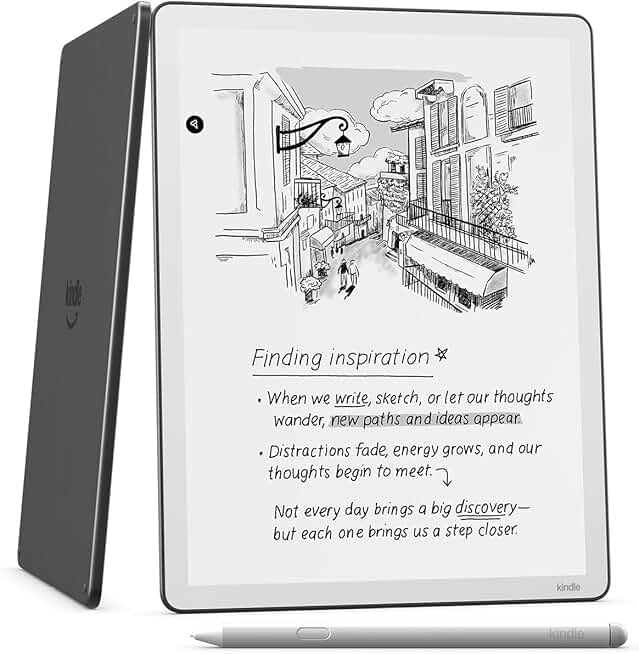
The Kindle Scribe 64GB emerges as a groundbreaking device, seamlessly blending the beloved e-reader experience with the functionality of a digital notebook. This newest model from Amazon aims to redefine how users interact with digital content, offering a large, paper-like display and a responsive premium pen for writing and annotating.
Quick Summary
Rating: 4.4 out of 5 stars
Price: $549.99 USD
Key Pros:
- Excellent paper-like display for reading and writing.
- Premium Pen offers a natural, responsive writing experience.
- Generous 64GB storage for vast libraries and notes.
Key Cons:
- High price point compared to standard e-readers.
- Limited note-taking features compared to dedicated tablets.
Table of Contents
Kindle Scribe 64GB Overview
The Kindle Scribe 64GB represents a significant leap for Amazon’s e-reader lineup, venturing into the burgeoning market of digital notebooks. It combines the core strengths of a Kindle – exceptional readability, long battery life, and access to a vast library – with advanced writing capabilities. This device is designed for those who love to read but also need to annotate, journal, or sketch ideas.
Unlike traditional tablets, the Kindle Scribe maintains the signature E Ink display, which is easy on the eyes and eliminates glare, making it ideal for extended reading sessions. The 11-inch screen provides ample space for both text and handwritten notes, striking a balance between portability and usability.
The included Premium Pen is a standout feature, offering a natural writing sensation without requiring charging. Its magnetic attachment and dedicated eraser make it convenient for quick access and efficient note-taking. This integration of reading and writing tools positions the Kindle Scribe as a versatile companion for students, professionals, and avid readers alike.
In terms of user experience, the Kindle Scribe leverages Amazon’s well-established ecosystem. Users can easily access their Kindle library, sync documents via Send to Kindle, and integrate with services like Microsoft Word for document review. This seamless integration enhances its utility as a productivity tool.
While it carries a higher price tag than standard Kindles, the Kindle Scribe 64GB aims to justify this cost through its dual functionality. It’s not just an e-reader; it’s a dedicated device for engaging with content actively, whether through highlighting, margin notes, or freehand journaling. Its focus remains on a distraction-free, paper-like experience.
Comparing it to other devices, the Kindle Scribe prioritizes simplicity and focus. It lacks the color screen or app ecosystem of an iPad, but this is by design. The E Ink display and single-purpose focus are intended to minimize digital distractions, promoting deeper concentration on reading and writing tasks. This makes it a unique proposition in the crowded tech landscape.
The device’s build quality is robust, featuring a sleek design that is thinner and lighter than many comparable tablets. Its graphite finish gives it a premium feel, and the recycled content certification underscores Amazon’s commitment to environmental responsibility. For more details on Amazon’s Kindle devices, you can visit their official Kindle product page.
Kindle Scribe 64GB Key Features & Specs
The Kindle Scribe 64GB boasts a suite of features designed to enhance both reading and writing experiences. Its core specifications highlight its commitment to a paper-like feel and robust functionality. Understanding these details is crucial for appreciating its value.
11-inch Paper-like Display with Front Light
The centerpiece of the Kindle Scribe is its large 11-inch E Ink display. This screen technology mimics the appearance of real paper, reducing eye strain and allowing comfortable reading in various lighting conditions. The anti-glare finish ensures readability even in bright sunlight, a significant advantage over glossy tablet screens.
An adjustable warm front light allows users to customize the display’s tone, making it more comfortable for nighttime reading. This feature is crucial for maintaining a healthy sleep cycle while enjoying books or working on notes late into the evening. The display’s resolution is also crisp, ensuring text and drawings are clear.
Premium Pen Functionality
The included Premium Pen is a critical component of the Scribe’s appeal. It offers a highly responsive and natural writing experience, feeling remarkably like pen on paper. This is achieved through advanced E Ink technology and precise pen tip design, which minimizes lag and provides tactile feedback.
The Premium Pen features a dedicated eraser on the top and a customizable shortcut button. This button can be configured for quick access to highlighter, pen, or sticky notes, streamlining the note-taking workflow. Critically, the pen never needs charging, ensuring it’s always ready when inspiration strikes, and it attaches magnetically to the device.
Generous 64GB Storage
With 64GB of internal storage, the Kindle Scribe 64GB offers ample space for thousands of books, documents, and notebooks. This eliminates concerns about running out of space, even for extensive libraries or detailed journals. For comparison, a standard e-book typically consumes only a few megabytes, making 64GB exceptionally generous.
This large capacity is particularly beneficial for users who import many PDFs or personal documents, which tend to be larger than standard Kindle books. It also provides peace of mind for those who prefer to keep their entire collection accessible offline. This makes it a powerful tool for academic or professional use where large volumes of reference material are common.
Thinner, Lighter, Faster Design
Amazon has engineered the Kindle Scribe to be remarkably thin and light for its screen size. This ergonomic design makes it comfortable to hold for extended periods, whether reading in bed or taking notes during a meeting. The balanced weight distribution further enhances its usability.
Under the hood, the device boasts a faster processor compared to previous Kindle models, contributing to quicker page turns and more fluid navigation. While E Ink devices inherently have refresh rates different from LCDs, the Scribe’s performance improvements are noticeable in daily use, enhancing overall responsiveness. This contributes to a more seamless and less frustrating user experience.
Writing in Notebooks, Documents, and Books
The Scribe’s software is tailored for versatile writing. Users can create dedicated notebooks for journaling, sketching, or brainstorming ideas. These notebooks offer various templates, including lined, grid, and blank pages, catering to different needs. The ability to categorize and search notebooks further enhances organization.
Beyond standalone notebooks, the Scribe allows direct annotation on books and documents. Users can highlight passages, add sticky notes with handwritten comments, or write directly in the margins of PDFs and imported articles. This feature transforms passive reading into an active, engaging process. The integration with Microsoft Word for reviewing documents is also a professional boon.
Long Battery Life
True to Kindle tradition, the Scribe offers exceptional battery life, often lasting weeks on a single charge. This longevity is a major advantage over power-hungry tablets, freeing users from constant recharging anxieties. The E Ink display’s low power consumption is a key factor here, making it reliable for travel or extended use away from power outlets.
Even with regular pen use, the battery performance remains impressive, ensuring the device is always ready for your next reading or writing session. This reliability is a cornerstone of the Kindle experience, and the Scribe upholds this standard. For more information on E Ink technology, a helpful resource is Wikipedia’s E Ink page.
Pros & Cons
Every product has its strengths and weaknesses, and the Kindle Scribe 64GB is no exception. A balanced look at its advantages and disadvantages helps potential buyers make an informed decision about whether it fits their needs.
Pros of the Kindle Scribe 64GB:
- Superior Paper-like Reading Experience: The 11-inch E Ink display is unmatched for long reading sessions, offering exceptional clarity and reduced eye strain. Its anti-glare properties make it perfect for outdoor use, unlike traditional tablets. The adjustable warm light further enhances comfort in any environment.
- Natural and Responsive Writing with Premium Pen: The included Premium Pen provides a remarkably authentic writing sensation. The lack of lag and the tactile feedback make journaling, annotating, and sketching feel intuitive and fluid. The pen’s magnetic attachment and never-needs-charging design add significant convenience.
- Excellent Battery Life: True to Kindle’s reputation, the Scribe offers weeks of battery life on a single charge. This longevity is a major advantage, ensuring the device is always ready for use without constant recharging worries. It makes it ideal for travel and extended periods away from power sources.
- Generous Storage Capacity: With 64GB of storage, users can store an enormous library of books, PDFs, and countless handwritten notebooks. This capacity eliminates concerns about running out of space, even for academic or professional users with extensive document collections.
- Integration with Amazon Ecosystem: Seamless access to the vast Kindle store, cloud syncing of books and notes, and compatibility with Send to Kindle for personal documents are major benefits. This integration makes managing and accessing content effortless for existing Kindle users.
- Distraction-Free Environment: Unlike multi-purpose tablets, the Scribe focuses solely on reading and writing. This dedicated approach minimizes notifications and other digital distractions, fostering deeper concentration and productivity. It’s a tool built for focus.
- High Build Quality and Ergonomics: The device is well-built, featuring a slim, lightweight design that is comfortable to hold for extended periods. Its balanced weight distribution and premium feel contribute to a pleasant user experience. The graphite finish adds to its sophisticated aesthetic.
Cons of the Kindle Scribe 64GB:
- High Price Point: The Kindle Scribe is significantly more expensive than standard Kindles and even some entry-level tablets. This premium cost might be a barrier for users primarily seeking an e-reader, as its note-taking features come at a higher investment.
- Limited Note-Taking Features Compared to Dedicated Tablets: While excellent for basic notes and annotations, the Scribe’s note-taking software is not as robust or versatile as what’s found on full-fledged tablets with apps like OneNote or GoodNotes. It lacks advanced organizational tools, diverse brush options, or OCR (Optical Character Recognition) for converting handwriting to text.
- No Color Display: As an E Ink device, the Scribe features a monochrome display. This is perfect for text but means it cannot display images or PDFs in color, which might be a drawback for those who read graphic novels, magazines, or academic papers requiring color differentiation.
- No Web Browser or App Store: The Scribe’s operating system is closed, meaning there’s no access to a general web browser or third-party app store. This limitation restricts its functionality beyond reading and note-taking within the Kindle ecosystem, making it less versatile than a tablet.
- Initial Software Limitations: Upon launch, some users noted a few software limitations, such as the inability to convert handwritten notes to text or limited export options for notebooks. While Amazon has addressed some of these with updates, the feature set is still evolving and may not meet all advanced user demands.
Who Should Buy the Kindle Scribe 64GB?
The Kindle Scribe 64GB is a specialized device that caters to a specific segment of users. Understanding its ideal audience is key to determining if it’s the right investment for your needs. It’s not a one-size-fits-all solution, but for certain individuals, it can be an indispensable tool.
Avid Readers Who Annotate Extensively
If you’re someone who loves to read and frequently highlights, underlines, and adds margin notes to your books, the Scribe is tailor-made for you. Its paper-like display and precise Premium Pen make the annotation process feel natural and intuitive. This is particularly beneficial for students, researchers, or anyone who engages deeply with textual content.
Instead of scribbling in physical books or struggling with clunky on-screen keyboards, the Scribe offers a seamless way to capture your thoughts directly on the page. This active reading approach can significantly enhance comprehension and retention, making it a powerful tool for learning and analysis.
Students and Academics
For students, the Scribe can be an invaluable companion for coursework. It allows them to read textbooks, take notes during lectures, and review research papers all on one device. The ability to import PDFs and annotate them directly is a huge advantage for academic work, helping to keep all study materials organized.
The distraction-free environment is another major benefit for students. Without the temptations of social media or gaming apps, the Scribe helps maintain focus on academic tasks. It can be a dedicated study tool, minimizing the urge to multitask and promoting deeper engagement with learning materials.
Professionals Who Review Documents and Brainstorm
Professionals who regularly review documents, mark up reports, or engage in brainstorming sessions will find the Scribe highly useful. The ability to import and annotate Microsoft Word documents, PDFs, and other files makes it an efficient tool for feedback and collaboration. It bridges the gap between digital convenience and the tactile feel of traditional paper review.
Its generous 64GB storage means you can keep numerous projects and reference materials at hand. The notebook feature also provides a private digital space for brainstorming ideas, sketching concepts, or outlining presentations, making it a valuable asset for productivity and creative thinking in a professional setting.
Mid-article CTA for Who Should Buy:
Journalers and Creative Thinkers
If you enjoy journaling, sketching, or simply prefer to jot down thoughts by hand, the Scribe offers a compelling digital alternative. The various notebook templates provide flexibility for different creative outputs, from daily reflections to storyboarding. The tactile experience of the Premium Pen makes the process feel more personal and engaging than typing.
The convenience of having all your journals and sketches stored digitally, accessible and backed up in the cloud, is a significant advantage. It eliminates the clutter of physical notebooks while preserving the essence of handwritten expression. This makes it an excellent tool for maintaining a digital archive of personal or creative work.
Individuals Seeking a Distraction-Free Digital Hub
In an age of constant digital distractions, many users actively seek devices that promote focus. The Kindle Scribe excels in this regard by offering a dedicated environment for reading and writing without the constant pings of social media, emails, or other apps. It’s a tool designed for deep work and immersive engagement.
For those who find themselves easily sidetracked by their smartphones or tablets, the Scribe provides a welcome respite. It fosters a more mindful interaction with digital content, allowing users to concentrate fully on the task at hand, whether it’s understanding a complex text or developing a new idea.
Who Might Not Need the Kindle Scribe 64GB?
Conversely, if your primary need is just an e-reader for casual reading without extensive annotation, a standard Kindle Paperwhite or Oasis might be a more cost-effective choice. If you require a device for graphic design, heavy multimedia consumption, or a full app ecosystem, a traditional tablet like an iPad or Android tablet would be more suitable. The Scribe’s strength lies in its niche as a dedicated reading and writing device.
FAQ about Kindle Scribe 64GB
Prospective buyers often have specific questions about new technology. Here, we address some of the most common inquiries regarding the Kindle Scribe 64GB to provide clarity and aid in the decision-making process.
Q1: Can I convert my handwritten notes to text on the Kindle Scribe?
A1: Initially, this feature was not available, but Amazon has since rolled out updates that allow for handwritten notes to be converted to text. This functionality is primarily available within notebooks and sticky notes, enhancing the utility for those who prefer to type up their thoughts later. It’s a welcome addition that bridges the gap between traditional handwriting and digital text.
Q2: Does the Premium Pen need to be charged?
A2: No, one of the significant advantages of the Premium Pen is that it never needs to be charged. It uses EMR (Electro-Magnetic Resonance) technology, drawing power directly from the Scribe’s screen. This means you never have to worry about the pen running out of battery, ensuring it’s always ready for use when you need it most.
Q3: Can I use the Kindle Scribe for drawing or sketching?
A3: Yes, the Kindle Scribe is capable of drawing and sketching. Its responsive E Ink display and the precise Premium Pen make it a decent tool for basic illustrations, diagrams, and freehand art. While it won’t replace a dedicated drawing tablet with advanced pressure sensitivity and brush options, it’s excellent for casual sketching and visual note-taking.
Q4: How does the 64GB storage compare to other Kindle models?
A4: The 64GB storage on the Kindle Scribe is significantly more generous than most other Kindle models, which typically offer 8GB or 16GB. This large capacity is particularly beneficial for the Scribe’s intended use, allowing for thousands of books, numerous large PDF documents, and extensive handwritten notebooks without concerns about storage limitations.
Q5: Can I import my own PDFs and documents to the Kindle Scribe?
A5: Absolutely. The Kindle Scribe supports importing personal documents, including PDFs, through Amazon’s ‘Send to Kindle’ service. Once imported, you can read them, add sticky notes, and write directly on the pages with the Premium Pen. This feature makes it highly useful for academic papers, work documents, and personal files.
Q6: Does the Kindle Scribe have a web browser?
A6: The Kindle Scribe does have an experimental web browser, similar to other Kindle devices. However, it is very basic and designed primarily for accessing simple web pages for quick lookups, rather than general browsing. The E Ink display is not optimized for dynamic web content, and the browser is not intended for extensive internet use.
Q7: Is the screen durable, and does it scratch easily?
A7: The Kindle Scribe’s screen is designed to be durable, but like any electronic device, it’s not entirely impervious to scratches. It features a hardened glass surface, but using a screen protector and a protective cover is recommended to maintain its pristine condition, especially if you carry it frequently or use it in demanding environments.
Q8: Can I access Audible audiobooks on the Kindle Scribe?
A8: Yes, the Kindle Scribe supports Audible audiobooks. You can connect Bluetooth headphones or speakers to the device and listen to your audiobook library. While it doesn’t have built-in speakers, the Bluetooth connectivity ensures you can enjoy your audio content alongside your reading and writing activities.
Final Verdict
The Kindle Scribe 64GB is an impressive and ambitious device that successfully merges the best aspects of a premium e-reader with the tactile satisfaction of a digital notebook. It stands out in the market for its superior paper-like display, the remarkably natural writing experience offered by the Premium Pen, and its exceptional battery life. For avid readers, students, and professionals who engage deeply with text and require robust annotation capabilities, it offers a compelling and focused solution.
While its price point is higher than standard Kindles, the value proposition lies in its dual functionality and distraction-free environment. The 64GB storage ensures ample space for a lifetime of books and notes, making it a long-term investment for intellectual pursuits. It truly transforms passive reading into an active, engaging process, fostering deeper understanding and creativity.
It’s important to acknowledge its limitations, such as the monochrome display and the absence of a full app ecosystem found in tablets. However, these are deliberate design choices that reinforce its primary purpose: to provide a focused, paper-like experience for reading and writing. For those who prioritize concentration and a natural handwriting feel over multimedia versatility, the Kindle Scribe is an outstanding choice.
Ultimately, if you’re seeking a dedicated device that excels at both consuming and creating content in a distraction-free manner, the Kindle Scribe 64GB is a brilliant piece of technology. It’s a testament to how E Ink can evolve beyond simple reading, offering a powerful tool for learning, productivity, and personal expression. It is truly an impressive addition to the Kindle family, pushing the boundaries of what an e-reader can be.