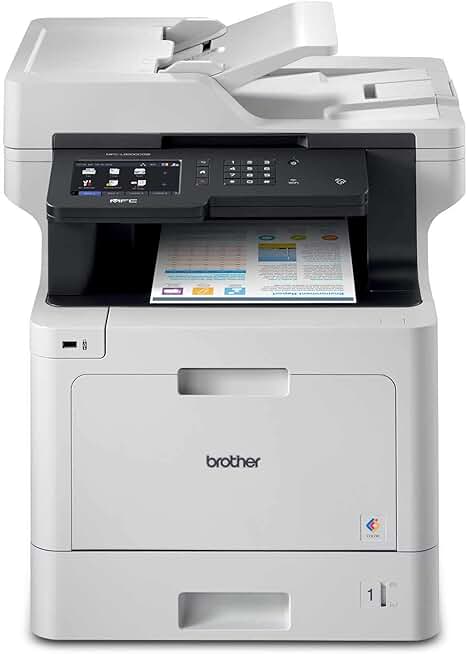
The Brother MFC-L8900CDW Printer stands out as a robust all-in-one color laser printer designed to meet the demanding needs of modern offices and busy workgroups. This comprehensive review delves into its capabilities, performance, and overall value, helping you determine if it’s the right choice for your business or home office setup.
Quick Summary: Brother MFC-L8900CDW Printer
Rating: 4.2/5.0 stars (1923 reviews)
Price: $1085.50 (USD)
Key Pros:
- Fast color and mono print speeds for efficiency.
- Comprehensive all-in-one functionality (print, copy, scan, fax).
- Excellent connectivity options, including wireless and NFC.
Key Cons:
- Higher initial purchase price compared to inkjet alternatives.
- Toner cartridges can be expensive, impacting long-term cost.
Table of Contents
Brother MFC-L8900CDW Printer Overview
The Brother MFC-L8900CDW Printer is positioned as a high-performance, all-in-one color laser printer designed for medium to large workgroups and small businesses with significant printing needs. It aims to deliver efficiency, versatility, and professional-quality output in a single, robust device. This model combines printing, copying, scanning, and faxing capabilities, making it a central hub for document management.
Launched as part of Brother’s business-focused MFC series, this printer has consistently been a popular choice for those seeking reliability and speed. Its design emphasizes ease of use, with a large touchscreen interface and a range of connectivity options to integrate seamlessly into diverse office environments. The printer’s build quality is sturdy, reflecting its intended use in demanding professional settings.
One of the primary selling points of the MFC-L8900CDW is its impressive print speed, which helps businesses maintain productivity even during peak workloads. It handles both color and monochrome documents with equal dexterity, ensuring that all your printing requirements are met without compromise. The device supports various paper types and sizes, adding to its versatility for different tasks, from standard reports to marketing materials.
Beyond basic printing, the advanced scanning features are particularly noteworthy. It includes a dual-sided automatic document feeder (ADF) that can scan both sides of a page in a single pass, drastically reducing the time spent on digitizing documents. This functionality is crucial for modern offices transitioning towards paperless workflows and requiring efficient digital archiving.
The Brother MFC-L8900CDW Printer also boasts advanced security features, which are increasingly vital for businesses handling sensitive information. These features include secure function lock, active directory authentication, and SSL/TLS encryption, providing peace of mind for IT administrators. Such robust security protocols help protect confidential data throughout the printing and scanning processes.
Considering its suite of features and target market, the MFC-L8900CDW is often compared to similar offerings from brands like HP, Canon, and Lexmark. However, Brother often distinguishes itself with a balance of competitive pricing, reliable performance, and user-friendly interfaces. The inclusion of Amazon Dash Replenishment readiness also simplifies toner ordering, ensuring you never run out of supplies unexpectedly.
Understanding the overall ecosystem, Brother provides comprehensive support and driver updates, ensuring the printer remains compatible with evolving operating systems and software. This long-term commitment to product support adds significant value, making the initial investment more sustainable over time. The printer’s intuitive setup process further streamlines its integration into existing network infrastructures.
In essence, the Brother MFC-L8900CDW Printer is more than just a printer; it’s a multifunctional document solution engineered for productivity and security in a business context. Its combination of speed, quality, and advanced features makes it a compelling option for organizations looking to optimize their document workflows and reduce operational bottlenecks. The robust feature set ensures it can handle a wide array of office tasks efficiently.
Brother MFC-L8900CDW Printer Key Features & Specs
The Brother MFC-L8900CDW Printer comes packed with an impressive array of features and specifications designed to enhance productivity and deliver high-quality results. Understanding these details is crucial for appreciating its capabilities and determining its suitability for your specific needs. Let’s break down the core components that make this printer a powerful choice.
Print Speed and Quality
One of the most critical aspects of any business printer is its speed. The MFC-L8900CDW boasts a remarkable print speed of up to 33 pages per minute (ppm) for both color and monochrome documents. This consistent speed ensures that large print jobs are completed quickly, minimizing wait times in a busy office environment.
Print resolution is equally important for professional output. This model offers a maximum print resolution of up to 2400 x 600 dpi, which translates to crisp text and vibrant, accurate colors. Whether you’re printing detailed reports, marketing brochures, or internal documents, the quality remains consistently high, making a strong impression.
All-in-One Functionality
As an all-in-one (MFP) device, the MFC-L8900CDW integrates printing, copying, scanning, and faxing into a single unit. This consolidation saves valuable office space and streamlines workflows by providing a central point for all document-related tasks. Each function is optimized for efficiency and ease of use.
The copier function operates at speeds comparable to printing, maintaining productivity for duplication tasks. It also includes features like N-in-1 copying and ID copy, adding to its versatility. The integrated fax machine supports Super G3 fax speeds, ensuring rapid transmission of documents when traditional faxing is still required.
Advanced Scanning Capabilities
The scanner is a standout feature, equipped with a 70-page capacity automatic document feeder (ADF) that supports single-pass duplex scanning. This means it can scan both sides of a document simultaneously, significantly speeding up the digitization process. The scanner offers resolutions up to 1200 x 2400 dpi (optical) from the flatbed and 600 x 600 dpi from the ADF.
Users can scan to various destinations, including email, network folders, FTP, USB, and cloud services like Google Drive, Dropbox, and OneDrive. This flexibility ensures that digitized documents can be easily integrated into existing digital workflows and shared securely across teams. The inclusion of TWAIN and WIA drivers ensures broad software compatibility for advanced scanning applications.
Connectivity and Networking
Connectivity is a strong suit for the Brother MFC-L8900CDW Printer, offering a variety of options for seamless integration into any network. It supports Gigabit Ethernet for wired connections, ensuring stable and fast data transfer for multiple users. Wireless connectivity (802.11b/g/n) allows for flexible placement and access from mobile devices.
Additionally, it features NFC (Near Field Communication) for tap-to-connect printing from compatible devices, simplifying mobile printing. USB 2.0 is also available for direct printing from flash drives or connecting to a single computer. Support for popular mobile printing solutions like Apple AirPrint, Google Cloud Print, and Brother iPrint&Scan further enhances its accessibility.
Paper Handling
The printer comes standard with a 250-sheet capacity adjustable paper tray and a 50-sheet capacity multi-purpose tray. This combination allows for flexible media handling, accommodating various paper sizes and types, including envelopes and thicker stock. The multi-purpose tray is particularly useful for special print jobs.
For high-volume environments, optional trays are available to expand the total paper capacity up to 1,300 sheets, reducing the frequency of paper refills. The automatic duplex printing feature is standard, enabling double-sided printing to save paper and reduce environmental impact, which is a significant advantage for cost-conscious businesses.
Security Features
Security is paramount in a business setting, and the MFC-L8900CDW addresses this with a suite of robust features. Secure Function Lock allows administrators to restrict access to specific functions for certain users, preventing unauthorized use. Active Directory authentication integrates with existing network security protocols for user validation.
Additionally, the printer supports Secure Print, requiring a PIN to release print jobs, ensuring sensitive documents are only retrieved by the intended recipient. IPsec, SSL/TLS, and other network security protocols safeguard data transmission. This comprehensive security framework helps protect valuable business information from potential breaches.
Display and Usability
A large 7-inch color touchscreen display provides an intuitive user interface, making navigation and operation straightforward. Users can easily access functions, customize settings, and preview documents directly from the panel. The customizable home screen allows for quick access to frequently used features, further enhancing usability.
The printer is also compatible with Brother’s BSI (Brother Solutions Interface) platform, enabling developers to create custom solutions and integrate the printer with existing enterprise systems. This open platform offers significant flexibility for businesses with unique workflow requirements, making the device highly adaptable.
For more detailed technical specifications, you can refer to the official Brother product page.
Pros & Cons
Evaluating any product requires a balanced look at its strengths and weaknesses. The Brother MFC-L8900CDW Printer, while highly capable, also has certain aspects that might not suit every user or budget. Here’s a detailed breakdown of its key advantages and potential drawbacks.
Pros of the Brother MFC-L8900CDW Printer
- Exceptional Print Speed: With 33 ppm for both color and black-and-white, this printer ensures that even large documents are processed quickly. This high speed is crucial for maintaining productivity in busy office environments where time is a critical factor. It significantly reduces bottlenecks during peak printing periods.
- Professional Print Quality: The 2400 x 600 dpi resolution delivers sharp text and vivid, accurate colors. This is vital for producing professional-looking reports, presentations, and marketing materials that reflect well on your business. Graphics and images also come out with impressive clarity and detail.
- Comprehensive All-in-One Functionality: Integrating printing, copying, scanning, and faxing into a single device offers significant convenience and space savings. This multifunctionality means you don’t need separate machines for different tasks, streamlining your office setup. The seamless integration of these functions enhances overall workflow efficiency.
- Advanced Dual-Pass ADF Scanning: The 70-page automatic document feeder with single-pass duplex scanning is a major time-saver for digitizing multi-page documents. It allows you to scan both sides of a page simultaneously, drastically cutting down on the effort and time required for archiving or sharing documents. This feature is a game-changer for paperless initiatives.
- Flexible Connectivity Options: Gigabit Ethernet, Wi-Fi, and NFC provide versatile connection choices, catering to various office setups and mobile users. Whether wired for stability or wireless for flexibility, the printer integrates smoothly into any network. Mobile printing solutions like AirPrint and Google Cloud Print further enhance accessibility.
- Robust Security Features: Features like Secure Function Lock, Active Directory support, and Secure Print protect sensitive information. These security protocols are essential for businesses handling confidential data, ensuring that documents are accessed and printed only by authorized personnel. Data transmission is also safeguarded through encryption.
- Expandable Paper Capacity: The standard 300-sheet capacity (250-sheet tray + 50-sheet multi-purpose tray) can be expanded up to 1,300 sheets with optional trays. This makes the printer suitable for high-volume printing without constant paper refills. It minimizes interruptions and allows for longer print runs.
- User-Friendly Touchscreen Interface: The 7-inch color touchscreen simplifies navigation and operation, making it easy for users to access functions and customize settings. Its intuitive design reduces the learning curve and allows for quicker task execution. Customizable shortcuts further enhance the user experience.
- Amazon Dash Replenishment Ready: This feature simplifies toner ordering by automatically detecting low toner levels and placing orders through Amazon. It ensures you never run out of supplies unexpectedly, maintaining continuous productivity. This automated process saves time and reduces administrative overhead.
Cons of the Brother MFC-L8900CDW Printer
- High Initial Purchase Price: As a business-grade color laser MFP, its upfront cost is significantly higher than many inkjet alternatives or basic monochrome laser printers. This can be a substantial investment for smaller businesses or those with tight budgets. It requires careful financial planning.
- Expensive Toner Cartridges: While offering high page yields, the cost of genuine Brother toner cartridges can be considerable, especially for color. This contributes to a higher long-term operating cost, which is an important consideration for budget management. Third-party options might be available but could void warranties or compromise quality.
- Larger Footprint: Being an all-in-one laser printer with advanced paper handling, the MFC-L8900CDW has a relatively large physical footprint. This might be a concern for very small offices or home offices where space is at a premium. It requires dedicated desk space or a sturdy stand.
- Power Consumption: Laser printers generally consume more power than inkjet printers, particularly during the warm-up phase and while actively printing. While energy-saving modes exist, this could be a minor consideration for environmentally conscious users or those tracking energy costs closely.
- Fan Noise: During heavy printing or scanning operations, the internal fans can generate noticeable noise. While typically not disruptive in a busy office, it might be a factor in very quiet environments or small home offices. It’s generally within acceptable limits for a business machine.
Who Should Buy the Brother MFC-L8900CDW Printer?
The Brother MFC-L8900CDW Printer is a specialized piece of office equipment, and as such, it’s not the ideal choice for everyone. However, for specific user groups and business scenarios, it represents an outstanding investment that can significantly boost productivity and streamline operations. Understanding its target audience is key to making an informed purchasing decision.
Small to Medium-Sized Businesses (SMBs)
This printer is an excellent fit for SMBs that have a consistent need for high-volume color and monochrome printing. If your business regularly produces reports, presentations, invoices, or marketing materials, the MFC-L8900CDW’s speed and quality will be a significant asset. Its all-in-one capabilities mean you get more functionality without needing multiple devices, saving space and management effort.
For businesses with 5-20 employees, this printer can serve as a central hub for document processing. Its robust build and high duty cycle are designed to withstand the demands of a shared office environment. The expandable paper capacity ensures that it can handle fluctuating workloads without constant intervention, which is critical for busy teams.
Workgroups within Larger Organizations
Even in larger corporations, specific departments or workgroups often require their own dedicated printing solutions that are more accessible and tailored to their immediate needs. The MFC-L8900CDW is perfectly suited for such scenarios, offering departmental teams the autonomy and efficiency they need without relying solely on a centralized, often distant, print room.
Its advanced security features, such as Secure Function Lock and Active Directory authentication, make it an attractive option for departments handling sensitive client data or confidential internal documents. These features ensure that only authorized personnel can access specific printer functions or retrieve sensitive print jobs, enhancing data protection.
Home Offices with High Printing Demands
While often overkill for a casual home user, individuals running a professional home office with significant printing, scanning, and copying requirements will find the MFC-L8900CDW invaluable. Professionals such as consultants, real estate agents, accountants, or small e-commerce business owners who handle large volumes of paperwork will benefit immensely from its speed and reliability.
The dual-sided ADF scanning is particularly useful for digitizing receipts, contracts, and other documents for record-keeping or client submissions. The wireless connectivity allows for flexible placement within a home office, and its robust features ensure that professional output is consistently maintained, even from a home-based setup. This printer brings enterprise-level functionality to a smaller scale.
Offices Requiring Advanced Document Management
For businesses looking to implement or enhance their digital document workflows, the MFC-L8900CDW offers robust scanning capabilities that are essential. The ability to scan directly to various cloud services, network folders, or email streamlines the process of digitizing and distributing documents. This is a critical feature for offices moving towards a paperless or less-paper environment.
The support for custom solutions via Brother Solutions Interface (BSI) also means that businesses with unique document management systems can integrate the printer seamlessly. This adaptability makes it a future-proof investment for organizations that anticipate evolving their digital infrastructure. The efficiency gained from advanced scanning can lead to significant operational savings.
Users Prioritizing Reliability and Low Maintenance
Brother laser printers are generally known for their reliability and relatively low maintenance requirements compared to some inkjet models. While toner is an ongoing cost, laser technology is less prone to issues like clogged print heads. For businesses where consistent uptime is crucial, the MFC-L8900CDW offers peace of mind.
The Amazon Dash Replenishment feature further simplifies maintenance by automating toner reordering, ensuring that supplies are always on hand. This proactive approach to supply management reduces downtime and allows staff to focus on more critical tasks. The sturdy build quality also contributes to its long-term durability in demanding environments.
In summary, the Brother MFC-L8900CDW Printer is best suited for environments that demand high-volume, high-quality, and secure document processing. It’s an investment in efficiency and reliability for those who need a versatile all-in-one solution that can keep pace with demanding business operations. For casual users or those with minimal printing needs, its capabilities and cost might be excessive, but for its intended audience, it represents significant value.
FAQ about Brother MFC-L8900CDW Printer
When considering a significant office equipment purchase like the Brother MFC-L8900CDW Printer, it’s natural to have questions. This section addresses some of the most common inquiries to provide clarity and help you make an informed decision.
Q1: What is the typical monthly duty cycle for the Brother MFC-L8900CDW Printer?
A1: The Brother MFC-L8900CDW is designed for robust performance in busy office environments. Its recommended monthly print volume is up to 4,000 pages, with a maximum monthly duty cycle of up to 60,000 pages. This high duty cycle indicates its durability and capacity to handle sustained, heavy usage without premature wear, making it suitable for medium to large workgroups.
Q2: Does the MFC-L8900CDW support automatic duplex (two-sided) printing and scanning?
A2: Yes, absolutely. The Brother MFC-L8900CDW features automatic duplex printing, allowing you to print on both sides of the paper, which helps save paper and reduce costs. Furthermore, its automatic document feeder (ADF) supports single-pass duplex scanning, meaning it can scan both sides of a document simultaneously, significantly speeding up the digitization process for multi-page documents.
Q3: What type of connectivity options does this printer offer?
A3: The MFC-L8900CDW offers a comprehensive range of connectivity options to integrate seamlessly into various network environments. It includes Gigabit Ethernet for wired network connections, 802.11b/g/n wireless connectivity for flexible placement, and USB 2.0 for direct connection to a computer or for printing from a USB flash drive. It also features NFC (Near Field Communication) for convenient mobile printing from compatible devices.
Q4: Are the toner cartridges for the Brother MFC-L8900CDW Printer expensive, and what are their yields?
A4: The genuine Brother toner cartridges for the MFC-L8900CDW can be a significant ongoing cost, particularly for color. However, they offer high page yields to offset this. Standard yield cartridges (TN431 series) provide approximately 3,000 pages for black and 1,800 pages for color. High-yield cartridges (TN433 series) offer approximately 4,500 pages for black and 4,000 pages for color, providing a lower cost per page for high-volume users.
Q5: Can I print directly from my smartphone or tablet?
A5: Yes, the Brother MFC-L8900CDW Printer is highly compatible with mobile printing solutions. It supports Apple AirPrint, Google Cloud Print, Brother iPrint&Scan, Mopria Print Service, and Wi-Fi Direct. These options allow you to print documents, photos, and web pages directly from your iOS or Android devices without needing to install specific drivers or connect to a PC.
Q6: What kind of security features are included with this printer?
A6: Security is a strong focus for the MFC-L8900CDW, especially for business use. It includes features like Secure Function Lock, which allows administrators to restrict access to specific functions for certain users. It also supports Active Directory authentication, IPsec, SSL/TLS encryption for secure data transmission, and Secure Print, which requires a PIN to release sensitive print jobs, ensuring confidentiality.
Q7: Is the Brother MFC-L8900CDW compatible with Amazon Dash Replenishment?
A7: Yes, the Brother MFC-L8900CDW Printer is Amazon Dash Replenishment Ready. This convenient service automatically detects when your toner levels are low and reorders genuine Brother toner cartridges from Amazon before you run out. This helps ensure continuous operation and eliminates the need to manually monitor and purchase supplies, streamlining office management.
Q8: What is the warranty period for this printer?
A8: Brother typically offers a one-year limited warranty for its new printers, covering parts and labor. However, for specific warranty details, it’s always best to check the official documentation that comes with your printer or consult the Brother support website. Warranty terms can vary by region and retailer.
Final Verdict
The Brother MFC-L8900CDW Printer is an outstanding all-in-one color laser printer that delivers on its promise of high performance, versatility, and robust security for demanding office environments. Its exceptional print speed, professional output quality, and comprehensive functionality make it a strong contender for any business or workgroup seeking an efficient document management solution. The advanced scanning capabilities, including single-pass duplex ADF, are particularly valuable for modern digital workflows.
While the initial investment and ongoing toner costs are higher than some alternatives, the long-term benefits in terms of productivity, reliability, and security often outweigh these considerations for its target audience. The extensive connectivity options and user-friendly touchscreen further enhance its appeal, ensuring seamless integration and ease of use in diverse settings. For businesses prioritizing efficiency and professional results, the MFC-L8900CDW represents a wise investment.
Ultimately, if your organization requires a durable, fast, and feature-rich color laser all-in-one printer capable of handling significant workloads and securing sensitive data, the Brother MFC-L8900CDW Printer is an excellent choice that is undeniably worth the investment. It’s a workhorse designed to keep your operations running smoothly and professionally.