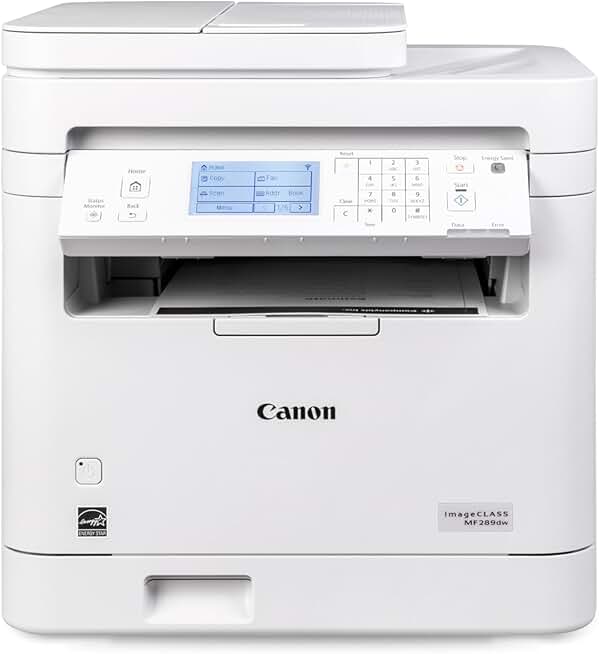
The Canon imageCLASS MF289dw emerges as a compelling option for those seeking a robust, all-in-one monochrome laser printer. In today’s fast-paced environment, having a reliable printer that can handle various tasks – from printing and scanning to copying and faxing – is essential for both home offices and small businesses.
This review delves into the capabilities of the Canon imageCLASS MF289dw, providing an in-depth analysis of its features, performance, and overall value. We will explore how this machine stands up to the demands of daily use, examining its speed, print quality, and connectivity options.
Quick Summary: Canon imageCLASS MF289dw
Rating: 3.6 out of 5 stars (based on 51 reviews)
Price: $224.94 USD
Key Pros:
- Fast 35 PPM monochrome printing ensures high productivity.
- All-in-one functionality (Print, Copy, Scan, Fax) for comprehensive office tasks.
- Wireless connectivity and duplex printing enhance convenience and efficiency.
Key Cons:
- Monochrome only, limiting use for color-intensive documents.
- Lower than average customer rating suggests potential reliability or setup challenges.
Table of Contents
Canon imageCLASS MF289dw Overview
The Canon imageCLASS MF289dw is an all-in-one monochrome laser printer designed to meet the demands of modern home offices and small to medium-sized businesses. This versatile device combines printing, copying, scanning, and faxing capabilities into a single, compact unit, streamlining workflow and saving valuable office space.
As part of Canon’s renowned imageCLASS series, the MF289dw is engineered for efficiency and reliability. Its monochrome laser technology ensures crisp, professional-quality text documents at impressive speeds, making it ideal for high-volume text-based printing.
One of the standout features of this model is its duplex printing capability, allowing for automatic two-sided printing. This not only conserves paper but also contributes to a more professional presentation of documents, aligning with eco-friendly practices and cost-saving measures.
Connectivity is another strong suit of the Canon imageCLASS MF289dw, offering both wired and wireless options. Users can easily connect via USB, Ethernet, or Wi-Fi, providing flexibility in placement and access from multiple devices, including smartphones and tablets.
The printer’s auto document feeder (ADF) enhances its scanning and copying functions, enabling quick processing of multi-page documents. This feature is particularly beneficial for tasks such as digitizing archives or creating multiple copies of reports without manual page feeding.
Operating the MF289dw is made intuitive through its user-friendly control panel, typically featuring an LCD screen for easy navigation of settings and functions. Canon’s commitment to user experience is evident in the straightforward setup and maintenance procedures.
Despite being a renewed product, the Canon imageCLASS MF289dw comes with a 1-year limited warranty, offering peace of mind to buyers. This warranty underscores the confidence in the quality and performance of these refurbished units, ensuring they meet rigorous standards.
The printer’s ENERGY STAR certification highlights its energy efficiency, helping to reduce electricity consumption and operating costs over time. This makes it an environmentally conscious choice for businesses and individuals looking to minimize their carbon footprint.
While primarily focused on monochrome output, its robust feature set and reliable performance make the Canon imageCLASS MF289dw a strong contender in its category. It’s built for productivity and designed to be a workhorse in environments where speed and efficiency are paramount.
Understanding the full scope of its capabilities requires a closer look at its technical specifications and how they translate into real-world benefits for users. From its print resolution to its paper handling, every aspect is geared towards delivering consistent, high-quality results for text-heavy documents.
The Canon imageCLASS MF289dw represents a blend of advanced features and practical functionality, packaged in a durable design. It’s a testament to Canon’s legacy in imaging technology, offering a reliable solution for everyday office tasks without the need for color printing capabilities.
For more general information about laser printers and their advantages, you can visit Wikipedia’s Laser Printer page.
Canon imageCLASS MF289dw Key Features & Specs
The Canon imageCLASS MF289dw boasts a comprehensive suite of features and robust specifications that underpin its performance as an all-in-one monochrome laser printer. Understanding these details is crucial for assessing its suitability for various professional and personal applications.
Printing Performance
At the heart of the MF289dw is its impressive printing speed, rated at up to 35 pages per minute (PPM) for monochrome documents. This speed ensures that even large print jobs are completed quickly, significantly boosting productivity in busy work environments.
The printer offers a maximum print resolution of 600 x 600 dpi, which, while standard for laser printers, delivers sharp, clear text and graphics. This resolution is more than adequate for professional documents, reports, and forms where legibility is paramount.
Automatic duplex printing is a standard feature, allowing for seamless two-sided printing without manual intervention. This not only saves paper but also streamlines the printing process, making it more efficient and environmentally friendly.
Copying Capabilities
The copying function of the Canon imageCLASS MF289dw mirrors its printing prowess, with speeds up to 35 CPM. It supports both single-sided and two-sided copying, leveraging the automatic document feeder for multi-page originals.
Users can adjust copy settings such as reduction/enlargement (typically 25% to 400%), density, and document type to optimize output quality. The ability to copy ID cards or small documents onto a single page is also a practical inclusion.
Scanning Functionality
Equipped with a flatbed scanner and a 50-sheet automatic document feeder (ADF), the MF289dw offers versatile scanning options. The ADF is particularly useful for scanning multi-page documents rapidly, ideal for digitizing paper records.
Scan resolution typically ranges up to 600 x 600 dpi optically, with enhanced resolutions possible through software interpolation. The printer supports scanning to various destinations, including PC, USB memory, and network folders, facilitating easy document management.
Fax Features
Despite the declining reliance on fax, the Canon imageCLASS MF289dw includes a full-featured fax modem. It supports Super G3 faxing, offering fast transmission speeds and includes memory for storing incoming faxes if the paper tray is empty.
Features like delayed transmission, group dialing, and automatic redial contribute to its comprehensive fax capabilities. This ensures that traditional communication needs are fully met within the all-in-one device.
Connectivity Options
Connectivity is a key strength, with the MF289dw supporting USB 2.0 High-Speed, Ethernet (10/100 Base-T), and Wi-Fi (802.11b/g/n). The wireless connectivity allows for printing from virtually anywhere within a network, enhancing flexibility.
Mobile printing solutions such as Apple AirPrint, Mopria Print Service, and Canon PRINT Business app are supported, enabling convenient printing from smartphones and tablets. This caters to the modern mobile workforce, allowing for printing on the go.
Paper Handling
The printer typically features a 250-sheet paper cassette and a 1-sheet multipurpose tray, accommodating various media types and sizes. The multipurpose tray is excellent for envelopes, labels, or specialty paper.
Output capacity is generally around 100 sheets, ensuring that print jobs don’t overflow the output tray. This robust paper handling system supports continuous printing and reduces the need for frequent paper refills.
Additional Specifications
The Canon imageCLASS MF289dw is ENERGY STAR certified, indicating its energy-efficient operation. It also includes security features such as Department ID Management to control printer access and usage, which is beneficial for small office environments.
The inclusion of a 1-year limited warranty, even for renewed units, provides significant assurance regarding product quality and longevity. This commitment to customer satisfaction is a notable benefit for buyers considering a refurbished model.
For detailed technical specifications and support, you might find useful information on Canon’s official support page for imageCLASS MF289dw.
Pros & Cons of the Canon imageCLASS MF289dw
Evaluating any product thoroughly requires a balanced look at its strengths and weaknesses. The Canon imageCLASS MF289dw, while offering many compelling features, also has aspects that prospective buyers should consider. Here’s an honest breakdown of its pros and cons.
Pros of the Canon imageCLASS MF289dw
1. Exceptional Print Speed and Quality: The 35 PPM print speed is a significant advantage, especially for businesses or individuals with high-volume printing needs. Text documents are consistently sharp and professional, thanks to its laser technology.
2. All-in-One Functionality: Integrating printing, copying, scanning, and faxing into one device saves space and simplifies office operations. This multifunctionality makes it a highly versatile tool for various tasks, eliminating the need for separate machines.
3. Automatic Duplexing and ADF: The ability to automatically print on both sides of a page (duplexing) and the 50-sheet auto document feeder greatly enhance efficiency. These features are invaluable for saving paper and processing multi-page documents quickly for scanning or copying.
4. Robust Connectivity Options: With USB, Ethernet, and Wi-Fi, the MF289dw offers flexible connection choices. The wireless capabilities, including support for mobile printing apps, allow for convenient printing from a wide range of devices without being tethered to a computer.
5. User-Friendly Interface: Canon printers are generally known for their intuitive control panels. The MF289dw typically features an easy-to-read LCD screen and straightforward navigation, making it accessible even for users who are not tech-savvy.
6. Energy Efficiency: Its ENERGY STAR certification means the printer is designed to consume less power, which translates to lower electricity bills and a reduced environmental impact. This is a benefit for cost-conscious and eco-friendly users.
7. 1-Year Limited Warranty: Even as a renewed product, the inclusion of a 1-year limited warranty provides significant reassurance. This warranty demonstrates confidence in the product’s refurbished quality and protects the buyer against potential defects.
8. Cost-Effective Toner: Laser printers generally offer a lower cost per page compared to inkjet printers, particularly for monochrome documents. The toner cartridges for the imageCLASS MF289dw tend to yield a high number of prints, reducing long-term operating expenses.
Cons of the Canon imageCLASS MF289dw
1. Monochrome Only: The most significant limitation is its inability to print in color. For users who frequently require color documents, presentations, or photos, this printer will not suffice, necessitating a separate color printer or alternative solution.
2. Subpar Customer Rating (3.6 stars): A 3.6-star rating from 51 reviews is below average for a highly-regarded product category. This might indicate potential issues with reliability, setup complexity, or specific user experiences that are less than ideal. Prospective buyers should research common complaints.
3. Initial Setup Can Be Tricky: While operation is user-friendly, some users report that the initial setup, particularly for wireless connectivity, can be somewhat challenging. This might require patience or reliance on customer support for less experienced users.
4. Bulk and Weight: As an all-in-one laser printer with an ADF, the MF289dw is a relatively substantial piece of equipment. Its size and weight might be a concern for those with limited desk space or who need a highly portable solution.
5. Limited Paper Capacity for Large Offices: While a 250-sheet paper tray is adequate for home offices and small businesses, larger organizations with extremely high print volumes might find themselves refilling paper more frequently than desired. A larger capacity option would be beneficial for such scenarios.
6. No Touchscreen Display: While it has an LCD screen, it typically lacks a modern touchscreen interface. This can make navigation slightly less intuitive compared to printers with full-color touchscreens, though still functional.
In conclusion, the Canon imageCLASS MF289dw excels in productivity and monochrome efficiency but falls short if color printing is a requirement. The reported customer rating suggests a need for careful consideration of potential user experience issues, despite its robust feature set.
Who Should Buy the Canon imageCLASS MF289dw?
Deciding if the Canon imageCLASS MF289dw is the right printer for you involves matching its capabilities and limitations with your specific needs. This monochrome all-in-one laser printer is not for everyone, but it shines in particular scenarios.
Home Office Professionals: If you work from home and primarily deal with text-based documents, contracts, invoices, or reports, the MF289dw is an excellent choice. Its fast print speed, duplexing, and all-in-one features can significantly boost your home office productivity.
The ability to print, scan, copy, and fax from a single device simplifies your workspace and reduces clutter. Wireless connectivity allows for flexible placement and easy printing from various devices within your home network.
Small Business Owners: For small businesses with moderate to high monochrome printing demands, this printer is a strong contender. Law offices, accounting firms, and small administrative offices often require quick, reliable black-and-white prints and efficient document management.
The 50-sheet ADF and automatic duplexing are critical features for handling client files, proposals, and daily administrative tasks. The cost-effectiveness of laser toner also contributes to lower operating costs for budget-conscious businesses.
Students and Academics: While perhaps overkill for basic student needs, those in fields requiring extensive research papers, essays, or academic publishing might find the MF289dw beneficial. Its speed and consistent print quality are ideal for producing lengthy academic documents.
The scanning capabilities are also useful for digitizing research materials or converting handwritten notes into digital formats. However, students who frequently need to print color presentations or graphics might need to consider a supplementary color printer.
Users Prioritizing Speed and Efficiency: Anyone who values quick turnaround times for printed materials will appreciate the 35 PPM output. If you frequently print large batches of documents and cannot afford to wait, this printer delivers on speed.
The integrated functions mean less time switching between devices and more time focusing on core tasks. This efficiency translates directly into increased productivity, a valuable asset in any busy environment.
Individuals Seeking a Renewed Product Value: As an Amazon Renewed product, the MF289dw offers an opportunity to acquire a high-quality printer at a potentially lower price point. The 1-year warranty provides assurance, making it a smart choice for those looking for value without sacrificing reliability.
Renewed products undergo inspection and testing to ensure they function like new, offering a sustainable and economical option. This makes the Canon imageCLASS MF289dw an attractive proposition for budget-conscious buyers who still demand performance.
Environmetally Conscious Buyers: The ENERGY STAR certification and duplex printing capabilities appeal to users who prioritize environmental sustainability. Reducing power consumption and paper waste contributes to a greener office or home.
Choosing a renewed product also supports the circular economy by extending the life of electronics, further reducing environmental impact. This aligns with a commitment to sustainable purchasing practices.
Who Might Want to Look Elsewhere:
- Users needing color printing: If color documents, photos, or vibrant graphics are a frequent requirement, the MF289dw’s monochrome-only output will be a significant limitation.
- Users with very limited space: While compact for an AIO laser, it’s still larger and heavier than a basic inkjet or a print-only laser printer.
- Users seeking the latest touchscreen tech: Those accustomed to modern, large touchscreen interfaces might find the traditional LCD panel less intuitive.
- Users with extremely low print volumes: For very occasional printing, a simpler, smaller, and potentially less expensive inkjet printer might be more suitable, especially if color is needed.
In summary, the Canon imageCLASS MF289dw is best suited for environments where high-volume, high-quality monochrome printing, scanning, copying, and faxing are regular tasks. Its efficiency, robust features, and value proposition make it an excellent workhorse for the right user.
However, if color output is a non-negotiable requirement, or if space is extremely limited, alternative options should be explored. The renewed status offers a compelling price point, making it an accessible option for many.
FAQ about the Canon imageCLASS MF289dw
Here are some frequently asked questions about the Canon imageCLASS MF289dw, providing further clarity on its operation, maintenance, and suitability.
Q1: Is the Canon imageCLASS MF289dw difficult to set up, especially for wireless printing?
A1: While the initial setup for the Canon imageCLASS MF289dw is generally straightforward, some users report that configuring wireless connectivity can be a bit challenging. It typically involves connecting the printer to your Wi-Fi network and then installing the necessary drivers and software on your computer or mobile devices.
Canon provides detailed setup guides and online resources, and their customer support can assist with troubleshooting. Following the step-by-step instructions carefully, or utilizing the Canon PRINT Business app for mobile setup, can simplify the process significantly.
Q2: What is the average cost per page for toner cartridges with the Canon imageCLASS MF289dw?
A2: Laser printers like the Canon imageCLASS MF289dw are known for their economical cost per page, especially for monochrome printing. The exact cost per page depends on the toner cartridge yield and its purchase price.
Typically, standard toner cartridges for this series can yield around 1,700 to 2,000 pages, while high-yield cartridges can produce 4,000 pages or more. Dividing the cartridge cost by its page yield will give you the cost per page, which is usually very competitive compared to inkjet alternatives for black-and-white prints.
Q3: Can I print directly from my smartphone or tablet with the Canon imageCLASS MF289dw?
A3: Yes, the Canon imageCLASS MF289dw fully supports mobile printing. It is compatible with popular mobile printing solutions such as Apple AirPrint for iOS devices and Mopria Print Service for Android devices. Additionally, Canon offers its own Canon PRINT Business app, which provides enhanced printing and scanning capabilities from your mobile device.
These features allow you to print documents, photos, and web pages directly from your smartphone or tablet without needing a computer, offering great convenience for on-the-go productivity.
Q4: Does the renewed Canon imageCLASS MF289dw come with toner cartridges?
A4: Renewed products, including the Canon imageCLASS MF289dw, often come with starter toner cartridges. However, the exact inclusion can vary depending on the refurbisher or seller.
It’s always recommended to check the specific product description for the renewed item on Amazon to confirm what accessories, including toner, are included. Starter cartridges typically have a lower yield than full retail cartridges, so you may need to purchase a replacement sooner.
Q5: Is the automatic document feeder (ADF) reliable for scanning multiple pages?
A5: The 50-sheet automatic document feeder (ADF) on the Canon imageCLASS MF289dw is generally reliable for scanning, copying, and faxing multi-page documents efficiently. It is designed to handle standard paper sizes and weights smoothly.
However, like all ADFs, its performance can be affected by the condition of the paper (e.g., wrinkled, torn, or very thin/thick paper). For optimal results, ensure documents are free from staples, clips, and tears before using the ADF.
Q6: What operating systems are compatible with the Canon imageCLASS MF289dw?
A6: The Canon imageCLASS MF289dw is designed for broad compatibility across various operating systems. It typically supports Windows (including Windows 10 and 11), macOS (various recent versions), and Linux environments. Drivers and software are usually available for download from Canon’s official support website.
Always verify the specific OS compatibility listed by Canon or the seller to ensure your system is supported, especially if you are using an older or less common operating system version.
Q7: Can this printer handle different paper types and sizes?
A7: Yes, the Canon imageCLASS MF289dw is versatile in its paper handling. It typically supports a range of paper sizes, including Letter, Legal, A4, A5, B5, and envelopes. The 250-sheet paper cassette is suitable for standard paper, while the 1-sheet multipurpose tray is ideal for specialty media like envelopes, labels, or thicker paper stock.
This flexibility makes it adaptable for various printing needs, from standard office documents to custom print jobs requiring different paper types. Always check the printer’s manual for specific media weight and type limitations.
Q8: What kind of warranty does a renewed Canon imageCLASS MF289dw typically have?
A8: As stated in the product description, this renewed Canon imageCLASS MF289dw comes with a 1-year limited warranty. This is a significant benefit for a refurbished product, providing buyers with assurance similar to that of a new product.
The warranty covers defects in materials and workmanship, ensuring that the device functions as expected. Always review the specific terms and conditions of the warranty provided by the seller or Amazon Renewed program for full details on coverage and claims processes.
Final Verdict
The Canon imageCLASS MF289dw presents itself as a highly capable and efficient monochrome all-in-one laser printer, especially for those operating within a home office or small business environment. Its combination of high-speed printing, versatile functionality, and robust connectivity options makes it a strong contender in its class.
The ability to print at 35 PPM, coupled with automatic duplexing and a 50-sheet ADF, significantly streamlines document handling. These features are invaluable for maintaining productivity and managing workflows effectively, whether you’re printing reports, scanning invoices, or sending faxes.
Wireless connectivity through Wi-Fi, along with support for mobile printing solutions like Apple AirPrint and the Canon PRINT Business app, adds a layer of convenience that is essential in today’s mobile-first world. This flexibility allows users to print from virtually any device, enhancing accessibility and ease of use.
However, it’s crucial to acknowledge its limitations. The MF289dw is a monochrome-only printer, meaning it cannot produce color documents or images. This is a significant consideration for users who frequently require color output for presentations, marketing materials, or photographs.
The 3.6-star customer rating, while not disastrous, suggests that some users may have encountered challenges, possibly related to setup, specific functionalities, or long-term reliability. Prospective buyers should always review recent user feedback to understand potential pain points.
Despite this, the inclusion of a 1-year limited warranty for a renewed product is a substantial advantage. It offers peace of mind, assuring buyers that the refurbished unit has been inspected and is expected to perform reliably, providing excellent value for the price.
For those whose primary needs revolve around high-volume, high-quality black-and-white printing, copying, scanning, and faxing, the Canon imageCLASS MF289dw is indeed an excellent printer. It delivers on its promise of efficiency and professional output, making it a worthy investment for its target audience.
If you are looking for a workhorse printer that excels in monochrome productivity and offers comprehensive all-in-one features at a competitive price point, especially through the Amazon Renewed program, then the Canon imageCLASS MF289dw is certainly worth it. It stands as a reliable tool that can handle the daily demands of a busy office or home environment.