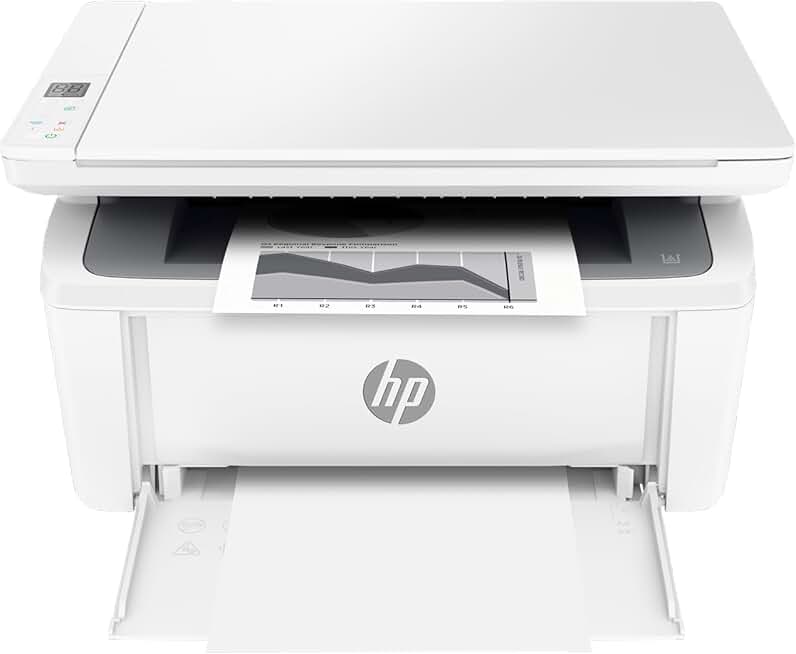
The HP LaserJet M140w Printer stands out as a compelling choice for individuals and small teams seeking a reliable, compact, and wireless multifunction printer. In this comprehensive review, we delve into every aspect of this monochrome laser MFP, exploring its capabilities for printing, scanning, and copying. We aim to provide an honest assessment of its performance, features, and overall value, helping you determine if it’s the ideal solution for your home or small office environment.
HP LaserJet M140w Printer: Quick Summary
Rating: 4.1/5 (Based on 1557 reviews)
Price: $169.00 (at time of review)
Key Pros:
- Compact, Space-Saving Design: Ideal for small desks and home offices.
- Wireless Connectivity & Mobile Printing: Seamless printing from smartphones, tablets, and laptops.
- Fast Black & White Laser Printing: Delivers crisp text documents quickly and efficiently.
Key Cons:
- Monochrome Only: Does not support color printing.
- No Automatic Document Feeder (ADF): Requires manual feeding for multi-page scanning/copying.
Table of Contents
HP LaserJet M140w Printer Overview
The HP LaserJet M140w Printer is designed as a versatile, compact, and efficient monochrome laser multifunction printer (MFP). It combines printing, scanning, and copying capabilities into a single, space-saving device, making it an attractive option for environments where desk space is a premium. This model targets home offices, small businesses, and individuals who primarily need to print black and white documents with speed and clarity.
Its design philosophy centers on delivering essential functions without unnecessary bulk. Unlike larger, more feature-rich office printers, the M140w focuses on a streamlined user experience and reliable performance for everyday tasks. This makes it particularly suitable for users who appreciate simplicity and efficiency in their office equipment.
Connectivity is a key strength of the HP LaserJet M140w Printer, offering both Wi-Fi and USB options. The wireless capabilities enable flexible placement within an office and support modern mobile printing workflows. Users can easily print from their smartphones, tablets, and laptops, adding a layer of convenience often missing in more traditional setups.
The printer’s energy efficiency is another notable aspect, boasting ENERGY STAR and Blue Angel certifications. These certifications indicate that the device consumes less power during operation and standby, contributing to lower electricity bills and a reduced environmental footprint. This is a significant consideration for cost-conscious users and eco-friendly households.
From a usage perspective, the M140w excels at producing crisp, professional-quality text documents. Laser technology ensures sharp lines and dark blacks, which are crucial for reports, invoices, legal documents, and academic papers. While it lacks color printing, its proficiency in monochrome output is a major draw for specific user groups.
The overall user experience is enhanced by HP’s intuitive setup process, often guided by the HP Smart app. This application simplifies installation, helps manage printer settings, and facilitates mobile printing, making the device accessible even for those who are not tech-savvy. This ease of use reduces potential frustration and ensures users can get started quickly.
Considering its price point, the HP LaserJet M140w Printer represents an excellent entry into the world of laser printing for those transitioning from inkjet or looking to upgrade an older monochrome device. It offers a balance of affordability, performance, and essential multifunctionality that is hard to beat in its category. Its robust build quality suggests durability, ensuring it can withstand the demands of regular use in a busy home or small office setting.
The maintenance aspect is also straightforward, primarily involving the replacement of a single toner cartridge. This simplifies supply management compared to inkjet printers that require multiple color cartridges. The design ensures that toner replacement is a quick and clean process, minimizing downtime and maximizing productivity for users.
Ultimately, the HP LaserJet M140w Printer carves out a niche for itself by providing dependable monochrome laser performance in a compact, user-friendly package. It’s a pragmatic choice for anyone whose primary printing needs revolve around high-quality black and white documents and who values wireless convenience and energy efficiency.
HP LaserJet M140w Printer Key Features & Specifications
The HP LaserJet M140w Printer is packed with features designed to optimize productivity and convenience for its target users. Understanding these key specifications is crucial for evaluating its suitability for your specific needs. Here, we break down the core functionalities and technical details that define this compact MFP.
Print Capabilities
At its core, the M140w is a monochrome laser printer, meaning it specializes in black and white output. It boasts a print speed of up to 21 pages per minute (ppm) for black documents, which is quite respectable for an entry-level laser printer. This speed ensures that even larger documents are printed quickly, reducing waiting times in a busy environment.
The print resolution is up to 600 x 600 dpi (dots per inch), delivering sharp, crisp text and clear graphics. This resolution is more than adequate for professional-looking reports, contracts, and everyday documents. The laser technology inherently provides superior text clarity compared to many inkjet counterparts, especially for fine print.
Scan and Copy Functions
As a multifunction device, the HP LaserJet M140w Printer includes flatbed scanning and copying capabilities. The flatbed scanner allows for scanning various document types, including books and irregular-sized items, with an optical scan resolution of up to 600 x 600 dpi. This resolution ensures good detail capture for digitizing documents and photos.
The copy function mirrors the print speed for monochrome documents, making quick reproductions efficient. However, it’s important to note the absence of an Automatic Document Feeder (ADF). This means multi-page documents must be placed on the scanner glass one sheet at a time, which can be a manual and time-consuming process for large jobs.
Connectivity Options
Connectivity is a major highlight of the HP LaserJet M140w Printer. It supports Wi-Fi 802.11b/g/n, enabling seamless wireless printing from virtually anywhere within your network. This eliminates the need for cumbersome cables and allows multiple users to share the printer effortlessly. For those preferring a direct connection, a Hi-Speed USB 2.0 port is also included.
Mobile printing is fully supported through the HP Smart app, Apple AirPrint, and Mopria. The HP Smart app, in particular, offers a comprehensive mobile experience, allowing users to print, scan, and order supplies directly from their smartphones or tablets. This flexibility is invaluable for modern work habits and remote setups.
Paper Handling
The input tray has a capacity of up to 150 sheets, which is standard for a personal or small office laser printer. This capacity is sufficient for daily printing tasks without constant refilling. The output bin can hold up to 100 sheets. It supports a variety of paper sizes, including Letter, Legal, A4, A5, A6, and various envelopes, and handles plain paper, labels, and envelopes.
Compact Design and Energy Efficiency
One of the most appealing aspects of the HP LaserJet M140w Printer is its incredibly compact footprint. With dimensions roughly around 14.2 x 10.4 x 7.8 inches (360 x 264 x 197 mm) and weighing approximately 11.3 lbs (5.1 kg), it can easily fit on a small desk, shelf, or even within a cabinet. This makes it an ideal choice for cramped home offices or small business spaces.
Furthermore, its ENERGY STAR certification and Blue Angel compliance underscore its commitment to sustainability. These ratings signify that the printer meets strict energy efficiency guidelines, reducing power consumption during active use and in sleep mode. This not only helps the environment but also translates into lower operating costs over the printer’s lifespan. You can find more details about energy-efficient printers on the ENERGY STAR official website.
Processor and Memory
While specific processor details are often less emphasized in this class of printer, the M140w typically comes with sufficient processor speed and memory (e.g., 64 MB) to handle print jobs efficiently. This ensures smooth operation, even when processing complex documents or managing multiple print requests from different devices. The internal architecture is optimized for quick processing and immediate response.
Toner System
The printer uses HP 141A/X LaserJet Toner Cartridges. The ‘A’ version is a standard yield cartridge, while the ‘X’ version is a high-yield cartridge, offering more pages per cartridge and potentially a lower cost per page. This two-option system allows users to choose based on their printing volume and budget preferences. Laser toner cartridges are known for their longevity and resistance to drying out, offering consistent performance over time.
Pros & Cons of the HP LaserJet M140w Printer
Every product has its strengths and weaknesses, and the HP LaserJet M140w Printer is no exception. A balanced understanding of its pros and cons is essential for making an informed purchasing decision. Here, we outline the primary advantages and disadvantages of this monochrome MFP.
Pros:
- Compact Footprint: This printer’s most significant advantage is its incredibly small size. It can easily fit on a crowded desk, a small shelf, or even tucked away in a corner, making it perfect for minimalist setups or limited spaces. This design consideration is a major selling point for home office users.
- Wireless Convenience: The integrated Wi-Fi connectivity allows for flexible placement and easy sharing among multiple devices. Printing from laptops, smartphones, and tablets via the HP Smart app, AirPrint, or Mopria is seamless, enhancing productivity and user experience.
- Fast Monochrome Printing: With speeds up to 21 ppm, the M140w delivers documents quickly and efficiently. This speed is a substantial upgrade from many inkjet printers and is ideal for users who need rapid output of text-heavy materials, saving valuable time during busy workdays.
- Reliable Laser Output: Laser technology ensures consistently sharp, crisp text and professional-quality black and white documents. Unlike inkjet prints, laser prints are smudge-free and resistant to fading, making them suitable for important documents and archival purposes.
- Affordable Initial Cost: The HP LaserJet M140w Printer is positioned as an accessible entry-level laser MFP. Its competitive price point makes laser printing technology available to a broader audience, providing excellent value for the features offered.
- Energy Efficient: Bearing ENERGY STAR and Blue Angel certifications, this printer is designed to consume less power. This not only contributes to a greener footprint but also helps reduce electricity bills over the long term, adding to its cost-effectiveness.
- Ease of Use: Setting up the printer is straightforward, often guided by the intuitive HP Smart app. The control panel is simple and easy to navigate, ensuring that even less tech-savvy users can operate the device without frustration.
- Multifunctionality: Combining printing, scanning, and copying in one unit saves space and reduces the need for multiple devices. This all-in-one capability is highly practical for small offices and home users who require diverse document handling.
Cons:
- No Color Printing: This is arguably the biggest limitation. If your printing needs occasionally or frequently involve color documents, photos, or graphics, the M140w will not meet those requirements. This is a dedicated monochrome device.
- No Automatic Document Feeder (ADF): The absence of an ADF means that scanning or copying multi-page documents requires manual placement of each sheet on the flatbed scanner. This can be time-consuming and cumbersome for large scanning or copying tasks, significantly impacting efficiency.
- Toner Cost: While laser printers generally offer a lower cost per page than inkjets, replacement toner cartridges (especially the standard yield HP 141A) can sometimes seem expensive relative to the printer’s initial purchase price. High-yield cartridges (141X) offer better value but still represent an ongoing expense.
- Limited Paper Capacity: The 150-sheet input tray is adequate for personal or light office use but can be insufficient for higher-volume printing. Users who print hundreds of pages daily might find themselves refilling the tray frequently, which can interrupt workflow.
- No Ethernet Port: The printer relies solely on Wi-Fi or USB for network connectivity. While Wi-Fi is convenient, some small office setups might prefer the stability and security of a wired Ethernet connection, which is not an option here.
- Basic Feature Set: The M140w is designed for essential functions. It lacks advanced features such as duplex printing (automatic double-sided printing), touchscreens, or advanced security options found in higher-end or business-oriented MFPs.
- Flatbed Scanner Size: The flatbed scanner is typically limited to letter/A4 size documents. Scanning larger items or odd-sized media might require external solutions or be impossible.
Who Should Buy the HP LaserJet M140w Printer?
Understanding the target audience for the HP LaserJet M140w Printer is key to determining if it’s the right investment for your specific needs. This printer is not a one-size-fits-all solution, but it excels in particular scenarios. Here’s a breakdown of who would benefit most from this compact monochrome MFP.
Ideal Users for the HP LaserJet M140w Printer:
- Home Office Users with Limited Space: If your workspace is constrained, the M140w’s incredibly small footprint makes it an ideal choice. It provides full multifunctionality (print, scan, copy) without dominating your desk. Its compact design is a major advantage for home-based professionals.
- Small Business Owners Needing Basic Document Management: For very small businesses or startups that primarily deal with invoices, receipts, contracts, and other text-heavy documents in black and white, this printer offers a cost-effective and reliable solution. It handles essential tasks without overcomplicating things.
- Students and Educators: For printing essays, research papers, study guides, and administrative documents, the M140w delivers fast, crisp text. Its wireless capabilities allow for easy printing from various devices, which is highly convenient in an academic setting.
- Users Prioritizing Speed and Text Quality for Monochrome: If your main requirement is to print sharp, professional black and white documents quickly, the laser technology of the M140w is superior to most inkjets in its price range. The output is consistently clear and smudge-free, perfect for formal documents.
- Budget-Conscious Buyers Seeking Laser Technology: For those who want the benefits of laser printing (speed, quality, lower cost per page over time compared to inkjets) but have a limited budget, the M140w offers an accessible entry point. It’s an affordable way to get into the laser MFP market.
- Individuals Needing Reliable Wireless Connectivity: If you frequently print from multiple devices like a laptop, smartphone, or tablet, the M140w’s robust Wi-Fi and mobile printing support (HP Smart app, AirPrint, Mopria) provide seamless integration into your digital workflow.
- Environmental Advocates: With its ENERGY STAR and Blue Angel certifications, the M140w is an environmentally conscious choice. It consumes less power, which translates to lower energy bills and a reduced carbon footprint, aligning with sustainable practices.
Who Might Want to Consider Alternatives:
- Users Requiring Color Printing: This is a monochrome-only printer. If you need to print photos, color graphics, marketing materials, or any document with color elements, this printer will not suffice. You would need to look at color laser or inkjet MFPs.
- High-Volume Offices or Users Needing an ADF: If you regularly scan or copy multi-page documents (e.g., contracts, reports, stacks of invoices), the lack of an Automatic Document Feeder (ADF) will be a significant bottleneck. Manually placing each page on the flatbed scanner is inefficient for large jobs.
- Graphic Designers or Photographers: Due to its monochrome nature and focus on text, this printer is not suitable for creative professionals who need high-resolution color output or specialized media handling for visual work.
- Users Needing Advanced Features: If you require features like automatic duplex printing (two-sided printing), a larger touchscreen interface, built-in fax capabilities, or advanced security protocols, the M140w’s basic feature set will likely disappoint.
- Offices Requiring Wired Network Stability: While it has Wi-Fi, the absence of an Ethernet port might be a drawback for offices that prefer the robust and consistent connection of a wired network for shared printing.
In summary, the HP LaserJet M140w Printer is a stellar choice for individuals and small operations where monochrome printing, scanning, and copying are the primary needs, space is limited, and wireless convenience is highly valued. It offers remarkable value for its intended purpose, making it a worthy contender in the entry-level laser MFP market. However, if color output or extensive multi-page document handling is crucial, exploring other options would be advisable.
Frequently Asked Questions About the HP LaserJet M140w Printer
To further assist you in understanding the HP LaserJet M140w Printer, we’ve compiled a list of frequently asked questions. These answers address common concerns and provide additional insights into the printer’s functionality and use, ensuring you have all the information needed.
Q1: Is the HP LaserJet M140w Printer difficult to set up?
A: No, the setup process for the HP LaserJet M140w Printer is generally straightforward and user-friendly. HP provides detailed instructions, and the HP Smart app significantly simplifies the wireless setup from your smartphone or tablet. Many users report being able to get the printer up and running within minutes, even without extensive technical knowledge. The app guides you through connecting to Wi-Fi and installing necessary drivers.
Q2: Can I print from my phone or tablet with the HP LaserJet M140w Printer?
A: Absolutely. The HP LaserJet M140w Printer is designed with robust mobile printing capabilities. You can print directly from your smartphone or tablet using the HP Smart app, which offers a comprehensive suite of features for printing, scanning, and managing your printer. Additionally, it supports Apple AirPrint for iOS devices and Mopria for Android devices, providing seamless integration with most mobile operating systems.
Q3: What kind of toner does the HP LaserJet M140w Printer use?
A: The HP LaserJet M140w Printer uses HP 141A/X LaserJet Toner Cartridges. The HP 141A is a standard yield cartridge, suitable for moderate printing volumes. For users with higher printing needs, the HP 141X is a high-yield cartridge, offering more pages and often a better cost per page over time. Always ensure you purchase genuine HP toner for optimal performance and print quality.
Q4: Does the HP LaserJet M140w Printer have an automatic document feeder (ADF)?
A: No, the HP LaserJet M140w Printer does not feature an Automatic Document Feeder (ADF). It comes equipped with a flatbed scanner only. This means that for scanning or copying multi-page documents, each sheet must be manually placed on the scanner glass one at a time. While this is fine for occasional use, it can be a significant drawback for high-volume scanning or copying tasks.
Q5: Is the HP LaserJet M140w Printer suitable for a small business?
A: The HP LaserJet M140w Printer can be suitable for a very small business or a home-based business with light-to-moderate monochrome printing, scanning, and copying needs. Its compact size, wireless capabilities, and fast black and white output are beneficial. However, its lack of color printing, absence of an ADF, and limited paper capacity might make it less ideal for businesses with higher volume requirements or diverse document types. Consider your specific workflow before committing.
Q6: What is the print speed of the HP LaserJet M140w Printer?
A: The HP LaserJet M140w Printer offers a respectable print speed of up to 21 pages per minute (ppm) for black documents. This speed ensures that your text-heavy documents are produced quickly and efficiently, minimizing waiting times. For an entry-level monochrome laser MFP, this speed is quite competitive and meets the demands of most personal and small office environments.
Q7: Can I connect the HP LaserJet M140w Printer directly to my computer with a cable?
A: Yes, in addition to wireless connectivity, the HP LaserJet M140w Printer includes a Hi-Speed USB 2.0 port. This allows you to connect the printer directly to your computer using a USB cable (often sold separately). This option is useful if you prefer a wired connection, if your Wi-Fi network is unreliable, or if you need to set up the printer without a network connection initially.
Q8: What does "MFP" mean in the context of the HP LaserJet M140w Printer?
A: "MFP" stands for Multifunction Printer. In the case of the HP LaserJet M140w Printer, it means the device is capable of performing multiple office functions beyond just printing. Specifically, it can print, scan, and copy documents. This all-in-one functionality makes it a versatile tool for managing various document-related tasks within a single, compact unit. For a deeper dive into multifunction printers, you can consult resources like Wikipedia’s article on Multi-function printers.
Final Verdict on the HP LaserJet M140w Printer
After a thorough examination, the HP LaserJet M140w Printer emerges as an outstanding choice for its specific niche. It brilliantly combines the essential functions of printing, scanning, and copying into an incredibly compact and user-friendly monochrome laser device. Its strengths lie in its space-saving design, robust wireless connectivity, and the consistent delivery of crisp, fast black and white documents.
This printer truly shines in home office environments, small businesses with light-to-moderate printing needs, and for students who require reliable, high-quality text output. The ease of setup, intuitive mobile printing options via the HP Smart app, and its energy efficiency further enhance its appeal, making it a practical and responsible choice for everyday document management.
While it’s important to acknowledge its limitations—primarily the absence of color printing and an Automatic Document Feeder—these are deliberate design choices that contribute to its affordability and compact size. For users whose workflow does not heavily rely on color graphics or extensive multi-page scanning, these limitations are minor trade-offs for the value offered.
In conclusion, if you are in the market for a dependable, compact, and affordable monochrome laser MFP that excels at producing professional-quality black and white documents and offers seamless wireless convenience, the HP LaserJet M140w Printer is an ultimate value and absolutely worth the investment. It delivers on its promises, providing a reliable workhorse for essential office tasks without cluttering your space or breaking the bank.