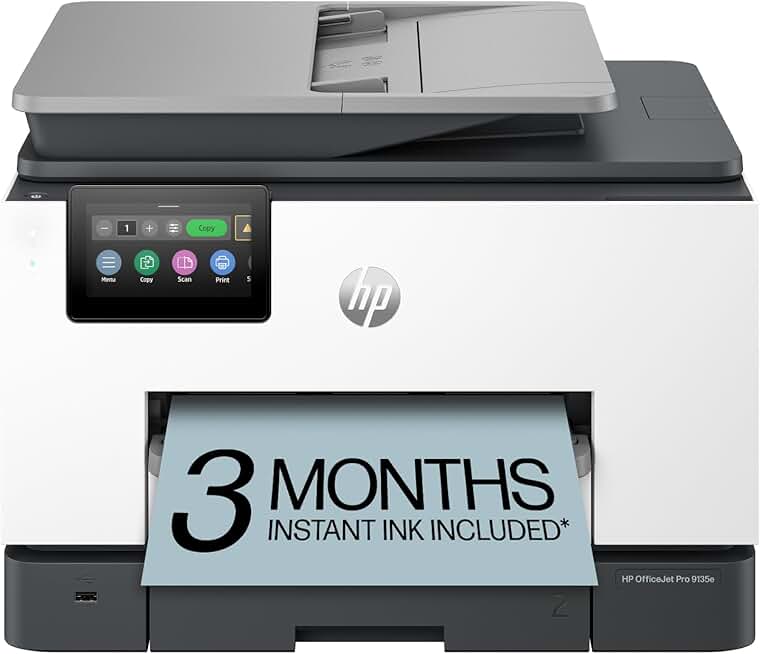
The HP OfficeJet Pro 9135e is presented as a robust all-in-one solution for modern home offices and small businesses. This wireless inkjet printer combines printing, scanning, copying, and faxing capabilities into a single, sleek unit.
It promises efficiency with features like automatic document feeding (ADF) and duplex printing, making it a compelling option for those seeking a comprehensive document management system. Our in-depth review will explore whether this model truly lives up to its versatile claims.
Quick Summary: HP OfficeJet Pro 9135e
- Rating: 3.8/5.0 (Based on 1107 reviews)
- Price: $299.89
Key Pros:
- Comprehensive all-in-one functionality (print, scan, copy, fax, ADF, duplex).
- Includes a 3-month Instant Ink trial, reducing initial running costs significantly.
- AI-enabled features and robust wireless connectivity enhance usability and smart office integration.
Key Cons:
- Lower user rating compared to some competitors, indicating potential concerns.
- Can be complex for users unfamiliar with advanced printer settings and AI features.
Table of Contents
HP OfficeJet Pro 9135e Overview
The HP OfficeJet Pro 9135e positions itself as a central hub for document management in a busy small office or home environment. It’s designed to handle a wide range of tasks, from printing vivid color reports to sending faxes, all from a single device.
This model is part of HP’s esteemed OfficeJet Pro series, known for delivering business-grade performance in a compact footprint. The ‘e’ designation often signifies enhanced connectivity and subscription-based services, such as HP Instant Ink, which is a key component of this printer’s value proposition.
HP has engineered the 9135e to be highly efficient, boasting fast print speeds and automatic double-sided printing. This capability is crucial for reducing paper consumption and speeding up workflow in professional settings where efficiency is paramount.
Beyond traditional functions, the HP OfficeJet Pro 9135e incorporates smart features, including AI-enabled functionalities. These aim to streamline common tasks, offer predictive maintenance, and provide a more intuitive user experience, aligning with the demands of modern smart offices.
Connectivity is a strong suit, with robust wireless capabilities allowing users to print from various devices without being tethered to a physical connection. This flexibility supports a dynamic work environment, enabling printing from laptops, smartphones, and tablets.
The inclusion of a 3-month Instant Ink trial is a significant benefit, designed to provide a hassle-free ink replenishment experience and potentially lower ongoing costs. This subscription service monitors ink levels and automatically orders new cartridges before you run out.
For businesses that still rely on faxing, the integrated fax functionality ensures that all communication needs are met without requiring a separate machine. This consolidates office equipment, saving space and reducing overall operational complexity.
The build quality of the HP OfficeJet Pro 9135e is typical of HP’s OfficeJet Pro line, focusing on durability and a professional aesthetic. It’s designed to withstand the demands of frequent use in a small office setting, ensuring long-term reliability.
Setting up the printer is generally straightforward, thanks to HP’s guided setup processes and intuitive software. Wireless connectivity, in particular, is often simplified to get users up and running quickly, minimizing downtime.
While the initial purchase price might seem like an investment, the comprehensive features and potential long-term savings through Instant Ink can offer significant value. This makes it an attractive option for businesses looking for a complete printing solution.
The target audience for the HP OfficeJet Pro 9135e includes small to medium-sized businesses, home office users, and remote workers who require a reliable, feature-rich, and connected all-in-one device. Its comprehensive feature set caters to diverse professional needs.
Understanding the full scope of its capabilities and how they translate into real-world benefits is essential for any potential buyer. This overview highlights its core strengths and positioning in the competitive all-in-one printer market.
HP OfficeJet Pro 9135e Key Features & Specs
The HP OfficeJet Pro 9135e is packed with features designed to enhance productivity and streamline office tasks. Understanding these specifications is crucial for evaluating its suitability for your specific needs.
At its core, this is an all-in-one color inkjet printer. This means it can perform four primary functions: printing, scanning, copying, and faxing. The inkjet technology is ideal for producing vibrant color documents and photos, making it versatile for various output requirements.
One of its standout features is its wireless connectivity. The 9135e supports Wi-Fi, allowing for seamless printing from computers, laptops, smartphones, and tablets without the need for physical cables. This flexibility is essential in modern, dynamic work environments.
The printer boasts an Automatic Document Feeder (ADF), which is indispensable for scanning or copying multi-page documents quickly. It eliminates the need to manually feed each page, significantly saving time and effort for large tasks.
Duplex printing, or automatic two-sided printing, is another key feature. This not only conserves paper but also helps in creating professional-looking documents efficiently. It’s a standard expectation for business-oriented printers like the HP OfficeJet Pro 9135e.
Print speeds are competitive for its class, ensuring that documents are produced promptly. While specific speeds can vary based on document type and quality settings, HP OfficeJet Pro models are generally known for their respectable output rates.
The inclusion of a 3-month Instant Ink trial is a notable advantage. This service intelligently manages your ink supply, ordering new cartridges when levels are low and delivering them directly to your door. This helps avoid unexpected ink shortages.
AI-enabled features are integrated to enhance user experience and efficiency. These intelligent capabilities can optimize printer settings, provide smart shortcuts for common tasks, and even offer predictive maintenance alerts, reducing potential downtime.
Security features are also built into the HP OfficeJet Pro 9135e. Given the sensitive nature of office documents, HP ensures robust security to protect your network and data from unauthorized access, a critical consideration for any business.
The printer typically supports various paper sizes and types, from standard letter and legal documents to envelopes and photo paper. This versatility allows users to handle diverse printing tasks with a single device.
Scan resolution is high, ensuring crisp and clear digital reproductions of documents and images. This is vital for archiving important records or sharing high-quality digital files, preserving the integrity of the original material.
The control panel usually features an intuitive touchscreen display, making navigation through menus and settings straightforward. This user-friendly interface contributes to a smoother overall operation and easier access to advanced functions.
Energy efficiency is often a design priority for HP, and the 9135e is likely to adhere to environmental standards. This means it consumes less power, which can lead to lower electricity bills and a reduced environmental footprint over its lifespan.
HP Smart App compatibility allows for remote printing, scanning to cloud services, and managing your printer directly from your mobile device. This level of control offers immense convenience and flexibility for users on the go or working remotely.
The HP OfficeJet Pro 9135e is designed to be a comprehensive and intelligent solution for document handling. Its blend of traditional office functions with modern connectivity and AI features makes it a strong contender in the all-in-one printer market.
Considering its robust feature set, the 9135e aims to meet the demanding requirements of a productive office environment. From its hardware capabilities to its smart software integrations, every aspect is geared towards efficiency and reliability.
Pros & Cons
Evaluating the HP OfficeJet Pro 9135e requires a balanced look at its strengths and weaknesses. This section will detail the key advantages and potential drawbacks you might encounter with this all-in-one printer.
Pros:
- Comprehensive All-in-One Functionality: The 9135e truly excels in its versatility, offering print, scan, copy, and fax capabilities within a single device. This consolidation saves space and simplifies office operations, eliminating the need for multiple machines. The integrated Automatic Document Feeder (ADF) and duplex printing further enhance its utility for handling multi-page documents efficiently.
- Excellent Wireless Connectivity and Smart Features: With robust Wi-Fi capabilities, the printer allows for flexible printing from virtually any device, including smartphones and tablets, through the HP Smart App. The AI-enabled features provide intelligent shortcuts, optimize settings, and offer predictive maintenance, making the user experience more intuitive and proactive. This smart integration is a significant advantage for modern, connected offices.
- Cost-Effective Ink Management with Instant Ink: The included 3-month Instant Ink trial is a major benefit, providing a smart solution for ink replenishment. This subscription service ensures you never run out of ink by automatically ordering and delivering cartridges when needed, potentially leading to substantial savings on ink costs over time compared to traditional cartridge purchases.
- Professional Print Quality: As an inkjet printer from the OfficeJet Pro series, the 9135e delivers high-quality color and black-and-white prints. Text is sharp and crisp, while color graphics are vibrant and accurate, making it suitable for professional documents, presentations, and marketing materials where visual impact is important.
- Efficient Document Handling: Features like the ADF and automatic duplex printing are critical for improving office efficiency. They enable quick processing of multi-page documents for scanning, copying, or printing on both sides, significantly reducing manual effort and speeding up workflow for repetitive tasks.
Cons:
- Inconsistent User Ratings: The 3.8-star rating from over a thousand reviews suggests that while many users are satisfied, a notable portion has experienced issues. These can range from connectivity glitches to software complications or dissatisfaction with print quality for specific use cases. Potential buyers should investigate common complaints.
- Complexity for Less Tech-Savvy Users: While AI-enabled features aim to simplify, the sheer number of options and advanced settings can be overwhelming for users who prefer a more straightforward, plug-and-play experience. Troubleshooting connectivity or advanced features might require some technical acumen, which could be a barrier for some individuals.
- Reliance on Instant Ink Subscription: While the Instant Ink trial is a pro, the long-term commitment to a subscription model can be a con for users who prefer to purchase cartridges as needed. If the subscription is not managed correctly or if usage patterns change, it might not always be the most cost-effective solution for everyone.
- Potential for Connectivity Issues: Despite robust wireless capabilities, some users occasionally report challenges with maintaining a stable wireless connection or initial setup. Network environments can be complex, and ensuring seamless integration might require basic networking knowledge or troubleshooting.
- Bulk and Footprint for Home Use: While compact for an all-in-one business printer, the HP OfficeJet Pro 9135e may still be larger than basic home printers. For very small home offices or those with limited desk space, its physical footprint could be a consideration, requiring dedicated space.
In summary, the HP OfficeJet Pro 9135e offers a compelling package of features for the right user. Its comprehensive functionality and smart ink management are strong draws, but potential buyers should be mindful of the user feedback regarding reliability and the learning curve for advanced features.
Who Should Buy the HP OfficeJet Pro 9135e?
Deciding if the HP OfficeJet Pro 9135e is the right printer for you involves understanding your specific needs and usage patterns. This section will help identify the ideal user for this versatile all-in-one device.
Small Business Owners and Entrepreneurs: If you run a small business or are an entrepreneur, the 9135e offers a comprehensive suite of tools in one machine. Its ability to print, scan, copy, and fax, combined with high-quality output, makes it a valuable asset for managing diverse business documents.
Home Office Professionals: For individuals who primarily work from a home office, this printer can significantly boost productivity. The wireless connectivity allows for flexible placement, and features like the ADF and duplex printing are excellent for handling daily administrative tasks efficiently.
Users with Moderate to High Print Volumes: The 3-month Instant Ink trial and the Instant Ink subscription model itself are particularly beneficial for those who print regularly. If your monthly print volume is consistent and falls within the Instant Ink plans, you could realize significant savings and convenience.
Individuals Needing Fax Capabilities: While faxing is less common now, some industries and personal situations still require it. The integrated fax function of the HP OfficeJet Pro 9135e makes it an ideal choice for users who need a reliable fax solution without buying a separate machine.
Tech-Savvy Users Who Appreciate Smart Features: If you’re comfortable with technology and enjoy leveraging smart features, the AI-enabled functionalities and HP Smart App integration will appeal to you. These features can truly streamline your workflow and offer advanced control over your printing experience.
Those Prioritizing Wireless Freedom: The robust wireless connectivity is a major draw. If you need to print from multiple devices (laptop, tablet, phone) or want the flexibility to place your printer anywhere in your office without network cables, the 9135e is well-suited.
Organizations Seeking Document Security: For businesses handling sensitive information, the built-in security features of the HP OfficeJet Pro 9135e provide peace of mind. Protecting network access and data integrity is paramount, and this printer offers robust solutions in that regard.
Anyone Looking for Professional-Quality Color Prints: If your work requires clear text and vibrant, accurate color graphics for reports, presentations, or marketing materials, the inkjet technology of the OfficeJet Pro series delivers consistently high-quality output that meets professional standards.
On the other hand, if you only print occasionally, primarily in black and white, or prefer to buy ink cartridges on an ad-hoc basis, some of the 9135e’s advanced features and the Instant Ink subscription might not be the most cost-effective or suitable choice for you.
Similarly, if you are extremely budget-conscious and require only basic print functionality, there might be simpler, less expensive models available. The value of the HP OfficeJet Pro 9135e truly shines for users who will utilize its full range of features and connectivity options.
Consider your daily tasks, your print volume, your budget for ongoing supplies, and your comfort level with advanced tech. These factors will help you determine if this printer is the optimal investment for your home or small office environment.
Ultimately, the HP OfficeJet Pro 9135e is designed for productivity-focused users who need a reliable, feature-rich, and connected all-in-one printer to support a busy workload. Its blend of traditional functions with modern smart capabilities makes it a strong contender for those specific needs.
FAQ about HP OfficeJet Pro 9135e
Here are some frequently asked questions about the HP OfficeJet Pro 9135e to help clarify common concerns and provide further insights into its functionality.
Q1: What does ‘All-in-One’ mean for the HP OfficeJet Pro 9135e?
A1: ‘All-in-One’ signifies that the HP OfficeJet Pro 9135e combines multiple office functions into a single device. Specifically, it can print, scan, copy, and fax. This comprehensive functionality makes it a versatile tool for various document management tasks in a home or small office setting.
It eliminates the need for separate machines for each function, saving space and simplifying your office setup. The integration ensures a smoother workflow for tasks that involve multiple steps, such as scanning a document and then emailing it.
Q2: How does the 3-month Instant Ink trial work with the HP OfficeJet Pro 9135e?
A2: The 3-month Instant Ink trial included with the HP OfficeJet Pro 9135e allows you to experience HP’s ink subscription service without immediate cost. After activating the printer, you enroll in Instant Ink, choosing a plan based on your estimated monthly page usage.
HP monitors your ink levels, and when they run low, new cartridges are automatically shipped to you before you run out. After the trial period, your chosen plan’s monthly fee will apply, offering a convenient and potentially cost-saving way to manage ink supplies.
Q3: Is the HP OfficeJet Pro 9135e easy to set up for wireless printing?
A3: Yes, HP designs its OfficeJet Pro printers, including the HP OfficeJet Pro 9135e, for relatively easy wireless setup. The printer typically comes with clear instructions and guided software that walks you through connecting to your Wi-Fi network.
The HP Smart App further simplifies the process, allowing you to configure the printer and manage its settings directly from your smartphone or tablet. Most users find the initial setup straightforward, enabling quick access to wireless printing capabilities.
Q4: What are the benefits of the AI-enabled features in the HP OfficeJet Pro 9135e?
A4: The AI-enabled features in the HP OfficeJet Pro 9135e are designed to enhance user experience and efficiency. These features can include smart shortcuts for repetitive tasks, automatic optimization of print settings based on document type, and predictive maintenance alerts.
This intelligence helps streamline workflows, reduces the need for manual adjustments, and can even anticipate potential issues, contributing to a more seamless and reliable printing experience. It’s about making the printer work smarter for you.
Q5: Can I print from my smartphone or tablet with this printer?
A5: Absolutely. The HP OfficeJet Pro 9135e is fully compatible with mobile printing through its robust wireless connectivity. By downloading the HP Smart App to your smartphone or tablet, you can easily print documents, photos, and web pages directly from your mobile device.
The app also allows for mobile scanning, ordering supplies, and managing printer settings remotely, providing ultimate convenience for users who rely on their mobile devices for work and personal tasks.
Q6: Is the HP OfficeJet Pro 9135e suitable for printing high-quality photos?
A6: While the HP OfficeJet Pro 9135e is an inkjet printer and capable of producing good quality color prints, it’s primarily designed for office documents and business graphics rather than professional photo printing. It can print photos with decent clarity and color.
For truly professional-grade photo output, a dedicated photo printer with more ink cartridges (e.g., 6 or more) and specialized photo paper handling might offer superior results. However, for everyday business photos and casual prints, its quality is generally satisfactory.
Q7: Does the 9135e support automatic two-sided scanning?
A7: The product description specifies ‘Duplex printing’ and ‘ADF’ (Automatic Document Feeder). While it performs duplex printing, the ability for the ADF to do single-pass duplex scanning (scanning both sides of a page in one pass) is a premium feature not always implied by ‘ADF’ alone.
Many ADFs offer automatic duplex scanning by flipping the page. For the most accurate information, it’s always best to consult the official HP product page or user manual for the HP OfficeJet Pro 9135e to confirm specific ADF scanning capabilities. HP’s official product page often lists these details.
Q8: What are the main differences between an inkjet and a laser printer?
A8: The HP OfficeJet Pro 9135e is an inkjet printer, which uses liquid ink sprayed through nozzles to create images and text. Inkjets are typically better for vibrant color graphics and photos, and have lower upfront costs.
Laser printers, conversely, use toner powder and a laser to fuse the image onto paper. They are generally faster, more efficient for high-volume black-and-white text printing, and have lower per-page costs for text. Understanding this difference is key to choosing the right printer type for your primary use. For more details on printer types, you can refer to Wikipedia’s Inkjet printer entry.
Final Verdict
The HP OfficeJet Pro 9135e emerges as a compelling all-in-one printer for specific user demographics, particularly those operating small businesses or busy home offices. Its comprehensive feature set, including print, scan, copy, and fax capabilities, positions it as a robust central hub for document management.
The printer’s strong wireless connectivity and integration with the HP Smart App offer unparalleled flexibility, allowing users to print and manage tasks from virtually any device. This adaptability is crucial in today’s mobile and distributed work environments, enhancing productivity and convenience.
One of the most attractive aspects is the inclusion of a 3-month Instant Ink trial. This service can significantly reduce the stress and cost associated with ink replenishment, ensuring that your office never runs out of essential supplies, provided your print volume aligns with the subscription plans.
The AI-enabled features, while potentially requiring a slight learning curve for some, contribute to a smarter and more efficient workflow. They aim to simplify complex tasks and offer predictive insights, making the printing experience more proactive and less prone to interruptions.
However, it is important to acknowledge the mixed user ratings, which suggest that some individuals may encounter challenges, possibly related to connectivity or the complexity of its advanced features. Potential buyers should weigh these concerns against the printer’s extensive benefits.
For users who regularly utilize all four functions (print, scan, copy, fax), appreciate modern wireless capabilities, and can benefit from an ink subscription service, the HP OfficeJet Pro 9135e represents a worthwhile investment. Its professional print quality and efficient document handling are significant advantages.
If you’re seeking a simple, bare-bones printer for occasional use, this model might be overkill. But for those who demand a versatile, connected, and intelligent office assistant, the 9135e stands out as a strong contender in the all-in-one inkjet market.
Its blend of traditional office utility with contemporary smart features makes it an excellent choice for modern professionals seeking efficiency and reliability. The HP OfficeJet Pro 9135e is a powerful tool designed to keep your office running smoothly.