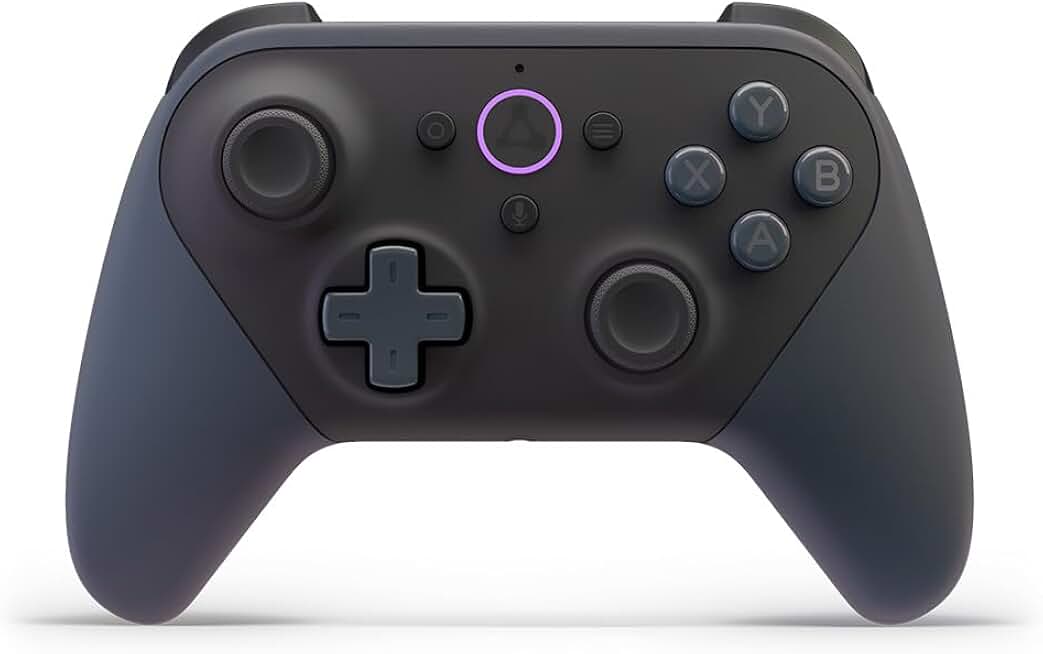
The Luna Wireless Controller is specifically designed to elevate your cloud gaming experience, offering seamless connectivity and responsive controls. This dedicated controller aims to minimize latency and provide a premium feel, making it an indispensable accessory for Amazon Luna subscribers and cloud gaming enthusiasts.
Quick Summary
Rating: 4.2 out of 5 stars (13,307 reviews)
Price: $69.99 USD
Key Pros:
- Direct cloud connection for reduced latency
- Comfortable ergonomic design for extended play
- Seamless switching between compatible devices
Key Cons:
- Limited utility outside of Amazon Luna
- Requires AA batteries, no built-in rechargeable option
Table of Contents
Luna Wireless Controller Overview
The Luna Wireless Controller stands out in the crowded gaming peripheral market due to its unique design philosophy. Unlike traditional controllers that connect to a console or PC, the Luna controller connects directly to Amazon’s cloud servers. This innovative approach aims to bypass typical input lag associated with local device processing, theoretically providing a smoother and more responsive gaming experience.
This direct connection is facilitated through Wi-Fi, allowing the controller to communicate commands to the cloud server where the game is actually running. This means your button presses are sent directly to the game instance, reducing the round trip time compared to a controller that first connects to your local device (like a Fire TV or PC) and then transmits those commands to the cloud.
The ergonomic design of the Luna Wireless Controller is another significant aspect. It’s crafted to fit comfortably in a wide range of hand sizes, ensuring that prolonged gaming sessions remain enjoyable without causing undue fatigue. The button layout is familiar to most gamers, drawing inspiration from popular console controllers, which helps in a quick adaptation period for new users.
Beyond its primary function with Amazon Luna, the controller also offers Bluetooth connectivity. This expands its compatibility, allowing it to be used with a variety of other devices such as PCs, Macs, Android phones, and iPhones. While Bluetooth introduces a slight increase in latency compared to the direct Wi-Fi connection, it still provides a versatile option for playing non-Luna games or using the controller for other media consumption.
Battery life is a practical consideration for any wireless device, and the Luna Wireless Controller uses two AA batteries. While some users might prefer a built-in rechargeable battery, the use of standard AAs offers the convenience of quick swaps, ensuring minimal downtime. The controller is also designed with a low-power mode to conserve battery when not actively in use.
The build quality feels robust and durable, capable of withstanding the rigors of enthusiastic gaming. Buttons and joysticks provide satisfying tactile feedback, contributing to the overall premium feel. This attention to detail in construction reflects Amazon’s commitment to delivering a high-quality accessory for its cloud gaming platform.
Furthermore, the controller integrates seamlessly into the Amazon ecosystem. Setting it up with a Fire TV device or the Luna app on other platforms is straightforward, often requiring just a few simple steps. This ease of integration is a key selling point for users already invested in Amazon’s services.
Understanding the Luna Wireless Controller involves appreciating its core purpose: to optimize the cloud gaming experience. Its direct Wi-Fi connection to the cloud is a differentiating factor, aiming to deliver responsiveness that rivals local gaming. This makes it a specialized tool for a growing segment of the gaming market.
For those new to cloud gaming, the concept of a controller connecting directly to the internet might seem unconventional. However, it’s a clever engineering solution to mitigate one of cloud gaming’s biggest challenges: input latency. The Luna Wireless Controller addresses this head-on, striving to make cloud gaming feel as immediate as possible.
The controller’s design also emphasizes portability and multi-device compatibility. Whether you’re playing on a large screen TV, a laptop, or a mobile phone, the Luna Wireless Controller can adapt, providing a consistent control scheme across various setups. This flexibility is crucial for a service like Luna, which is accessible across multiple device types.
Luna Wireless Controller Key Features & Specs
The Luna Wireless Controller boasts several key features and specifications that distinguish it from standard gaming controllers. Its most prominent attribute is the unique Wi-Fi technology designed for cloud gaming. This technology allows the controller to connect directly to Amazon’s custom game servers, bypassing your local device for input processing.
This direct connection aims to reduce latency by between 17 to 30 milliseconds compared to a Bluetooth connection. For competitive gamers or those sensitive to input lag, this difference can be significant, leading to a noticeably more fluid and responsive gameplay experience on the Luna platform. It’s a core engineering marvel that underpins the controller’s performance.
In terms of connectivity, the Luna Wireless Controller offers dual modes: Wi-Fi for Luna gameplay and Bluetooth for broader compatibility. The Bluetooth mode ensures that the controller isn’t solely tied to the Luna service, allowing it to function as a general-purpose gamepad for PCs, Macs, Android devices, and iOS devices. This versatility extends its value beyond the Amazon ecosystem.
The physical design is another crucial specification. It features a familiar layout with two analog sticks, a D-pad, four action buttons (A, B, X, Y), two shoulder buttons, and two triggers. This standard configuration makes it easy for gamers to pick up and play without a steep learning curve, as the muscle memory from other controllers often translates directly.
Ergonomics play a vital role in comfort during extended gaming sessions. The controller is designed with textured grips and a balanced weight distribution, ensuring a secure and comfortable hold. Its dimensions and contouring are carefully engineered to accommodate various hand sizes, minimizing strain and maximizing enjoyment.
Powering the device are two AA batteries. While some modern controllers feature rechargeable internal batteries, the choice of AA batteries offers a practical advantage: instant power replacement. When batteries run low, a quick swap ensures uninterrupted gaming, avoiding the need to wait for a recharge. Amazon claims up to 20 hours of gameplay on a single set of batteries, depending on usage.
Integrated into the controller are advanced haptic feedback motors, providing immersive rumble effects that respond to in-game actions. These vibrations enhance the sensory experience, making impacts, explosions, and environmental cues feel more visceral and engaging. The quality of these motors is comparable to leading console controllers.
The controller also includes a 3.5mm headphone jack, a feature often appreciated by gamers for private audio or in-game voice chat. This allows users to connect their preferred wired headset directly to the controller, simplifying their setup and ensuring clear communication without needing additional adapters or wireless headsets.
Seamless device switching is a standout feature. With the Luna controller, you can easily transition your game from one screen to another—say, from a Fire TV to a PC or a mobile device—without re-pairing or reconfiguring the controller. This is achieved through its cloud-connected nature, where the controller’s state is maintained across your Luna sessions.
Software updates are delivered automatically to the Luna Wireless Controller via its Wi-Fi connection, ensuring that the device always benefits from the latest performance improvements and bug fixes. This proactive updating keeps the controller optimized and future-proof, adapting to new features of the Luna service and enhancing overall reliability.
The inclusion of a dedicated microphone button further enhances its utility, particularly for voice commands and in-game communication. This small but significant detail underscores its design for a comprehensive cloud gaming experience, where interaction and accessibility are paramount. The Luna Wireless Controller is truly built from the ground up for the cloud.
Pros & Cons
Evaluating the Luna Wireless Controller involves weighing its specialized advantages against its potential limitations. Understanding these aspects helps prospective buyers make an informed decision about whether this controller aligns with their gaming habits and ecosystem.
Pros:
- Reduced Latency for Cloud Gaming: The primary and most significant advantage is its direct Wi-Fi connection to Amazon’s Luna servers. This bypasses your local device’s processing, sending commands straight to the cloud. This results in noticeably lower input lag, providing a smoother and more responsive experience crucial for fast-paced games.
- Seamless Device Switching: The controller’s cloud-aware nature allows for effortless transitions between different devices. You can start a game on your Fire TV, pick it up on your phone, and then switch to a PC without needing to re-pair or reconfigure the controller. This fluidity enhances the multi-screen cloud gaming experience.
- Ergonomic and Comfortable Design: The Luna Wireless Controller is designed for comfort during extended play. Its familiar button layout, comfortable grips, and balanced weight ensure that it feels good in hand, reducing fatigue. This thoughtful design makes long gaming sessions more enjoyable.
- Broad Bluetooth Compatibility: While optimized for Luna via Wi-Fi, the controller also features Bluetooth connectivity. This expands its utility, allowing it to be used as a standard gamepad for a wide array of devices including PCs, Macs, Android, and iOS. It’s not just a single-purpose device.
- Integrated Headphone Jack: The inclusion of a 3.5mm audio jack is a welcome addition for many gamers. It allows for private listening and in-game voice chat with any standard wired headset, simplifying the audio setup and enhancing immersion without needing additional accessories.
- Robust Build Quality: Users generally report a solid and durable construction. The buttons and joysticks feel responsive and well-made, suggesting the controller is built to withstand regular use. This contributes to a premium feel and long-term reliability.
- Automatic Software Updates: The controller updates its firmware automatically over Wi-Fi. This ensures it always has the latest features, performance enhancements, and bug fixes without manual intervention. This helps maintain optimal performance and compatibility over time.
Cons:
- Reliance on AA Batteries: A notable drawback for some users is the lack of a built-in rechargeable battery. The controller requires two AA batteries, which, while convenient for quick swaps, can lead to ongoing costs and environmental concerns compared to rechargeable alternatives.
- Limited Latency Benefit Outside Luna: The core advantage of reduced latency is primarily realized when playing games on Amazon Luna via Wi-Fi. When used with other platforms via Bluetooth, the latency performance becomes comparable to other standard Bluetooth controllers, losing its unique edge.
- Price Point: At its standard price, the Luna Wireless Controller is positioned similarly to, or slightly above, some first-party console controllers that offer broader native compatibility and often rechargeable batteries. Its value proposition is strongest for dedicated Luna users.
- Specific Ecosystem Integration: While it offers Bluetooth, the controller’s design and features are heavily optimized for the Amazon Luna ecosystem. Users primarily playing on other cloud services or local platforms might find its specialized features less relevant or its cost harder to justify.
- No USB-C for Wired Play/Charging: The controller primarily operates wirelessly. While it has a USB-C port, it is generally used for initial setup and firmware updates, not for regular wired gameplay or charging an internal battery. This limits its flexibility for those who prefer a wired connection for absolute minimal latency or charging while playing.
In summary, the Luna Wireless Controller excels as a dedicated tool for Amazon Luna cloud gaming, offering a distinct advantage in responsiveness. Its versatility via Bluetooth is appreciated, but its core strengths are most apparent within the Amazon ecosystem. The decision to purchase largely depends on your primary gaming platform and priorities.
Who Should Buy the Luna Wireless Controller?
The Luna Wireless Controller is not a one-size-fits-all gaming peripheral; its unique features cater to specific types of gamers and use cases. Understanding its target audience is key to determining if it’s the right investment for your setup. This controller shines brightest within the Amazon ecosystem and for those prioritizing a specific cloud gaming experience.
Firstly, the most obvious demographic for this controller is **dedicated Amazon Luna subscribers**. If you frequently use Amazon’s cloud gaming service across multiple devices like a Fire TV, PC, Mac, or mobile, this controller is almost essential. Its direct Wi-Fi connection to Luna servers provides the lowest possible latency for the platform, offering a superior experience compared to generic Bluetooth controllers.
Secondly, **cloud gaming enthusiasts who are sensitive to input lag** will greatly appreciate the Luna Wireless Controller. While cloud gaming inherently introduces some latency due to data transmission, the controller’s design specifically aims to mitigate controller input lag. This makes a noticeable difference in fast-paced action games, fighting games, or competitive multiplayer titles where every millisecond counts.
Thirdly, **gamers who value seamless multi-device play** will find the Luna Wireless Controller incredibly convenient. The ability to switch from playing on a living room TV to a bedroom laptop or a smartphone on the go, without re-pairing or reconfiguring the controller, is a significant quality-of-life improvement. This feature enhances the flexibility of cloud gaming across various screens.
Fourthly, **individuals already deeply integrated into the Amazon ecosystem** might find the Luna Wireless Controller a natural fit. If you own multiple Fire TV devices, use Alexa regularly, or are an Amazon Prime subscriber, the controller’s ease of setup and integration with other Amazon services will be a major plus. It feels like a native extension of their existing tech environment.
Consider this controller if you are looking for a reliable and comfortable gamepad that offers a solid, familiar feel. Its ergonomic design and standard button layout make it accessible to most gamers, providing comfort for extended play sessions. The build quality also suggests durability, which is important for frequent users.
However, if your primary gaming platform is a dedicated console (PlayStation, Xbox, Nintendo Switch) or a high-end gaming PC for local games, the Luna Wireless Controller might be less critical. While it offers Bluetooth compatibility, its standout latency reduction benefit is specific to Luna’s Wi-Fi connection. For non-Luna gaming, other controllers might offer better value or more advanced features like adaptive triggers or rechargeable batteries.
Similarly, if you rarely play cloud games or are only an occasional Luna user, a more general-purpose Bluetooth controller might suffice. The premium price of the Luna Wireless Controller is justified by its specialized cloud gaming optimization, which might be overkill for casual use or non-Luna-focused gaming.
Ultimately, the Luna Wireless Controller is an excellent choice for anyone committed to the Amazon Luna platform and seeking the best possible experience it can offer. Its design decisions directly address the unique challenges of cloud gaming, making it an indispensable accessory for its intended purpose. For others, a more versatile or platform-specific controller might be a better fit.
Moreover, if you appreciate the convenience of standard AA batteries for quick swaps over waiting for a recharge, this controller’s power solution will appeal to you. It eliminates downtime, allowing you to get back into the game immediately once batteries run out. This can be a significant factor for uninterrupted gaming sessions.
The controller also appeals to those who frequently travel or move between different locations, bringing their gaming with them. The effortless device switching and broad compatibility mean you can maintain a consistent gaming experience whether you’re at home, a friend’s house, or on vacation, provided you have an internet connection and a compatible screen.
For more information on Amazon Luna, you can visit their official page: Amazon Luna. To learn more about the broader concept of cloud gaming, Wikipedia offers a comprehensive overview: Cloud Gaming on Wikipedia.
FAQ about Luna Wireless Controller
Here are some frequently asked questions about the Luna Wireless Controller, addressing common concerns and providing detailed insights into its functionality and usage.
Q1: How does the Luna Wireless Controller reduce latency compared to other controllers?
The Luna Wireless Controller reduces latency by connecting directly to Amazon’s Luna cloud servers via Wi-Fi. This bypasses the need for the controller to first connect to your local device (like a Fire TV or PC) and then for that device to send the input to the cloud. Instead, your commands go straight to the game instance running in the cloud, significantly cutting down the round-trip time for input signals. This direct connection can reduce latency by 17 to 30 milliseconds compared to a standard Bluetooth connection.
Q2: Can I use the Luna Wireless Controller with devices other than Amazon Luna?
Yes, absolutely. While optimized for Amazon Luna via Wi-Fi, the Luna Wireless Controller also features standard Bluetooth connectivity. This allows it to be paired and used with a wide range of devices, including Windows PCs, macOS computers, Android smartphones and tablets, and Apple iPhones and iPads. When used via Bluetooth, it functions like any other generic Bluetooth gamepad, offering broad compatibility for non-Luna games and applications.
Q3: Does the Luna Wireless Controller have a rechargeable battery?
No, the Luna Wireless Controller does not feature a built-in rechargeable battery. It operates on two standard AA batteries. While this means you’ll need to replace batteries periodically, it also offers the convenience of quick swaps, allowing you to get back to gaming instantly without waiting for a recharge. Amazon estimates up to 20 hours of gameplay on a fresh set of AA batteries, depending on usage and haptic feedback intensity.
Q4: Is the Luna Wireless Controller comfortable for long gaming sessions?
Yes, the Luna Wireless Controller is generally praised for its ergonomic design, making it comfortable for extended periods of gameplay. It features a familiar layout that feels natural in hand, with textured grips for a secure hold. The weight distribution is balanced, and its contours are designed to minimize hand fatigue, catering to a wide range of hand sizes and preferences. This focus on comfort is crucial for a cloud gaming service where sessions can be lengthy.
Q5: How do I switch between playing on different devices with the Luna Wireless Controller?
One of the standout features of the Luna Wireless Controller is its seamless device switching. Because the controller is connected to the cloud, its state is maintained across your Luna sessions. To switch devices, simply launch the Luna app or website on your desired new device (e.g., move from a Fire TV to a PC). The controller will automatically recognize the active game session and connect, allowing you to continue playing without needing to manually re-pair or reconfigure anything. This seamless transition is a core benefit of its cloud-first design.
Q6: Does the controller have haptic feedback or rumble features?
Yes, the Luna Wireless Controller includes advanced haptic feedback motors that provide immersive rumble effects. These vibrations respond to in-game actions such as impacts, explosions, engine revs, or environmental cues, enhancing the overall sensory experience. The quality of the haptic feedback is comparable to that found in leading console controllers, adding another layer of immersion to your gaming.
Q7: Can I use a wired headset with the Luna Wireless Controller?
Yes, the Luna Wireless Controller is equipped with a standard 3.5mm headphone jack. This allows you to connect your preferred wired gaming headset directly to the controller for private audio listening or in-game voice chat. This feature simplifies your setup, eliminating the need for wireless headsets or additional adapters, and ensures clear communication with teammates or friends.
Q8: Are there any specific setup requirements for the Luna Wireless Controller?
Initial setup for the Luna Wireless Controller is straightforward. You’ll typically need to insert two AA batteries and then follow the on-screen prompts within the Luna app on your chosen device (Fire TV, PC, mobile). The controller connects to your Wi-Fi network, and once configured, it’s ready for cloud gaming. For Bluetooth pairing with non-Luna devices, the process is similar to pairing any other Bluetooth accessory through your device’s settings. The controller also receives automatic firmware updates over Wi-Fi to ensure optimal performance.
Final Verdict
The Luna Wireless Controller carves out a distinct niche in the gaming peripheral market, primarily as an indispensable companion for Amazon Luna cloud gaming. Its most compelling feature, the direct Wi-Fi connection to Amazon’s game servers, is a genuine innovation aimed at tackling the perennial challenge of input latency in cloud gaming. This specialized design provides a tangible improvement in responsiveness, making fast-paced games feel more immediate and enjoyable.
Beyond its technical prowess in latency reduction, the controller offers a comfortable and familiar gaming experience. The ergonomic design, standard button layout, and robust build quality ensure that it can withstand rigorous use while remaining comfortable during extended play sessions. This attention to user comfort is crucial for a device intended for long-duration engagement with a gaming service.
The versatility offered by its Bluetooth connectivity should not be overlooked. While its core strength lies with Luna, the ability to effortlessly switch to a standard Bluetooth gamepad for other platforms like PC, Mac, or mobile devices adds significant value. This makes it more than a single-purpose device, extending its utility beyond the Amazon ecosystem.
However, potential buyers must weigh these benefits against certain considerations. The reliance on AA batteries, rather than a built-in rechargeable solution, may be a minor inconvenience for some, though the quick-swap capability offers its own advantages. Additionally, its premium price point means that its value proposition is strongest for those who are deeply invested in or frequently use the Amazon Luna service.
For the casual gamer who only occasionally dips into cloud gaming, or for those whose primary gaming is on traditional consoles or local PCs, a generic Bluetooth controller might offer sufficient functionality at a lower cost. The unique selling points of the Luna Wireless Controller are most pronounced when utilized within its intended cloud gaming environment.
In conclusion, if you are an active Amazon Luna subscriber, a cloud gaming enthusiast who prioritizes minimal input lag, or someone who frequently switches between devices for your gaming sessions, the Luna Wireless Controller is an outstanding choice. It is expertly engineered to enhance your cloud gaming experience, delivering on its promise of responsiveness and seamless play. For its target audience, it represents an excellent investment that truly elevates the cloud gaming landscape.