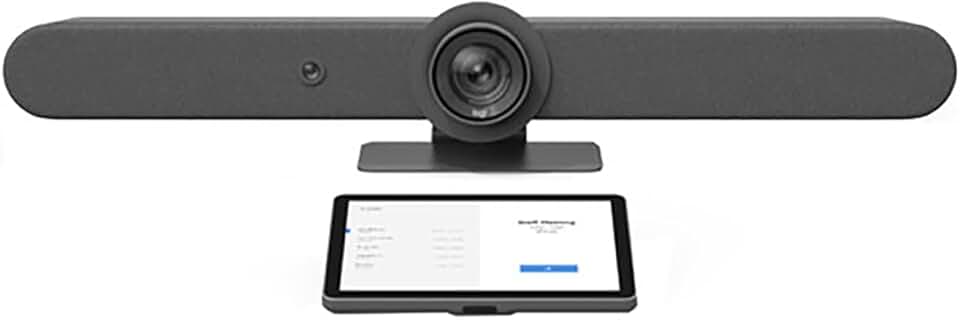
The Logitech Rally Bar + Tap IP Graphite Bundle for Video Meeting Rooms represents a significant leap forward in integrated video conferencing technology. This comprehensive system aims to transform average meeting spaces into highly efficient, professional collaboration hubs, making virtual communication seamless and intuitive.
Quick Summary: Logitech Rally Bar
Rating: 3.8/5.0
Price: $4467.99 USD
Key Pros:
- Exceptional video and audio quality for professional meetings.
- Integrated design reduces clutter and simplifies setup.
- Flexible deployment options (Appliance Mode or USB Mode).
Key Cons:
- High initial investment cost for smaller budgets.
- Limited expandability for very large, complex room configurations without additional accessories.
Table of Contents
Logitech Rally Bar Overview
The Logitech Rally Bar is an all-in-one video conferencing solution designed to equip medium-sized meeting rooms with professional-grade audio and video capabilities. It integrates a 4K camera, multiple speakers, and an array of beamforming microphones into a sleek, unified device. This design philosophy minimizes cable clutter and simplifies deployment, making it an attractive option for modern workplaces.
This particular bundle includes the Rally Bar itself and the Logitech Tap IP, a network-connected touch controller that streamlines meeting management. The Tap IP provides a dedicated interface for joining meetings, controlling cameras, and managing audio, eliminating the need for a separate computer or complex setup in the room.
The Rally Bar supports a wide range of video conferencing platforms, including Zoom, Microsoft Teams, and Google Meet, offering incredible flexibility. It can operate in two primary modes: Appliance Mode, where it runs the meeting application natively, and USB Mode, where it functions as a webcam and speakerphone connected to a dedicated room PC.
Logitech’s proprietary RightSense technologies are at the heart of the Rally Bar’s performance. These include RightSight for automatic camera framing, RightLight for intelligent lighting optimization, and RightSound for superior audio clarity and noise suppression. These features work in concert to ensure every participant looks and sounds their best, regardless of their location.
The device’s robust build quality and thoughtful engineering reflect Logitech’s commitment to durable and reliable professional equipment. Its graphite finish adds a touch of sophistication that blends seamlessly into contemporary office aesthetics. The integrated cable management further enhances its clean, professional appearance.
For businesses seeking to standardize their meeting room technology, the Logitech Rally Bar offers a consistent and high-quality experience across multiple spaces. Its ability to scale from small huddle rooms to larger conference areas, often with minimal additional equipment, makes it a versatile investment. The ecosystem of Logitech peripherals, including additional mics and display hubs, allows for further customization.
Understanding the nuances of the Logitech Rally Bar means appreciating its role as a central hub for collaboration. It’s not just a camera or a speaker; it’s an intelligent system designed to facilitate natural and productive interactions. This holistic approach sets it apart from many fragmented conferencing solutions.
The integration with Tap IP is particularly noteworthy. This dedicated controller removes the friction often associated with starting and managing video calls. Users can initiate meetings with a single touch, minimizing technical delays and maximizing productive meeting time. This user-friendly interface is critical for widespread adoption within an organization.
The underlying software and firmware are regularly updated by Logitech, ensuring that the Rally Bar remains compatible with evolving video conferencing platforms and gains new features over time. This forward-thinking approach protects the initial investment and keeps the system relevant for years to come. Such continuous improvement is a hallmark of premium professional equipment.
In essence, the Logitech Rally Bar aims to provide a premium, hassle-free video conferencing experience. It combines advanced optics, sophisticated audio processing, and intelligent software into a single, elegant package. This makes it an ideal choice for organizations prioritizing seamless communication and a professional image in their virtual interactions.
Logitech Rally Bar Key Features & Specs
The Logitech Rally Bar boasts a suite of impressive features and specifications that position it as a leader in video conferencing technology. Its integrated design means that many components are housed within a single device, simplifying installation and management. Let’s delve into the specifics that make this system stand out.
Advanced Camera System
- 4K UHD Resolution: The camera captures stunningly sharp video, supporting resolutions up to 4K at 30fps. This ensures crystal-clear visuals for all participants, enhancing engagement and clarity in virtual meetings.
- PTZ Capabilities: A motorized pan and tilt lens offers a wide field of view (90° horizontal, 15° vertical) with 15x HD zoom. This allows for precise framing of meeting participants, ensuring everyone is visible and in focus.
- RightSight Technology: This intelligent feature automatically frames meeting participants, adjusting the camera as people enter or leave the room. It ensures optimal framing without manual intervention, creating a more natural viewing experience.
- High-Quality Optics: Logitech’s custom-designed lens minimizes distortion and chromatic aberration, delivering true-to-life colors and sharp detail. This attention to optical quality is crucial for professional presentations and detailed discussions.
Superior Audio Engineering
- Beamforming Microphones: Six adaptive beamforming microphones are integrated into the Rally Bar, capable of picking up voices up to 15 feet away. These microphones focus on active speakers while suppressing background noise, ensuring clear communication.
- RightSound Technology: This suite of audio enhancements includes automatic voice leveling and active noise suppression. It ensures that everyone’s voice is heard consistently and clearly, even in challenging acoustic environments.
- High-Performance Speakers: Two 70mm speakers deliver rich, full-range audio that fills the meeting room, ensuring that remote participants are heard clearly. The speakers are tuned for voice clarity, making conversations feel more natural.
- Acoustic Echo Cancellation: Essential for preventing distracting echoes, this feature ensures that audio from the speakers doesn’t get picked up by the microphones, maintaining a clean audio stream.
Flexible Deployment and Connectivity
- Appliance Mode: The Rally Bar can run video conferencing applications like Zoom Rooms or Microsoft Teams Rooms natively. This eliminates the need for a separate computer in the room, simplifying the setup and reducing potential points of failure.
- USB Mode: Alternatively, it can connect via USB to a dedicated room PC or laptop, functioning as an advanced webcam, microphone, and speaker. This offers versatility for environments that prefer a traditional BYOD (Bring Your Own Device) approach.
- Multiple Connectivity Options: It includes HDMI in/out for dual displays, USB 3.0 ports, and an Ethernet port for network connectivity. Wi-Fi support provides additional flexibility for network integration.
- Logitech Tap IP Integration: The included Tap IP controller connects to the network via Ethernet, providing a dedicated touch interface for meeting control. This allows for one-touch join, camera control, and other meeting functions without touching a keyboard or mouse.
Intelligent Features and Management
- AI Viewfinder: A second, wide-angle camera provides a persistent room view. This AI viewfinder enhances RightSight’s auto-framing capabilities, allowing for smoother transitions and more accurate participant detection.
- Logitech Sync Management: IT administrators can remotely monitor, manage, and update the Rally Bar and Tap IP through the Logitech Sync platform. This centralized management simplifies device maintenance and ensures optimal performance across multiple deployments.
- Environmental Sensors: Integrated sensors monitor air quality, temperature, and humidity, providing insights into the meeting room environment. This data can help optimize comfort and well-being for meeting participants.
The comprehensive nature of the Logitech Rally Bar‘s features underscores its value as an all-in-one solution. From its 4K camera with intelligent framing to its advanced audio processing and flexible deployment options, every aspect is designed to deliver a superior video conferencing experience. The inclusion of the Tap IP further enhances usability, providing intuitive control right at your fingertips.
The combination of hardware and software intelligence, particularly the RightSense technologies, ensures that the Rally Bar adapts to various meeting scenarios. This adaptability is key in dynamic work environments where meeting sizes and participant locations can vary greatly. Such robust features justify its position as a premium offering in the smart home and office sector.
Pros & Cons
Evaluating any high-value technology like the Logitech Rally Bar requires a balanced look at its strengths and weaknesses. This section breaks down the significant advantages and potential drawbacks to help you make an informed decision about this video conferencing bundle.
Pros:
- Exceptional Audio and Video Quality: The Rally Bar delivers a truly premium meeting experience. Its 4K camera with 15x zoom and RightSight auto-framing ensures everyone is seen clearly, while the beamforming microphones and RightSound technology provide crystal-clear audio, free from distractions.
- All-in-One Integrated Design: Housing the camera, speakers, and microphones in a single, sleek unit significantly reduces clutter and simplifies installation. This integrated approach also means fewer cables and devices to manage, contributing to a cleaner meeting room aesthetic.
- Flexible Deployment Options: The ability to operate in Appliance Mode (running native meeting software) or USB Mode (connecting to a dedicated PC) offers incredible versatility. This adaptability allows organizations to choose the setup that best suits their IT infrastructure and preferred conferencing platform.
- Intuitive Control with Tap IP: The included Logitech Tap IP provides a dedicated, user-friendly touch interface for managing meetings. One-touch join, easy camera control, and quick mute functions streamline the meeting experience, reducing technical friction and boosting productivity.
- Advanced AI-Powered Features: RightSight, RightLight, and RightSound technologies leverage AI to optimize video framing, lighting, and audio in real-time. These intelligent features automatically adjust to room conditions and participant movements, creating a more natural and engaging virtual interaction.
- Robust Platform Compatibility: The Rally Bar is certified for and compatible with major platforms such as Zoom Rooms, Microsoft Teams Rooms, and Google Meet. This broad compatibility ensures that businesses can integrate it seamlessly into their existing collaboration ecosystem.
- Centralized Management with Logitech Sync: For IT administrators, the Logitech Sync platform offers powerful remote management capabilities. This includes monitoring device health, pushing firmware updates, and configuring settings across multiple Rally Bars, simplifying maintenance and support.
- Scalability for Various Room Sizes: While ideal for medium rooms, the Rally Bar can be augmented with additional Rally Mic Pods and Display Hubs to extend its reach to larger spaces. This modularity allows for growth and adaptation as business needs evolve.
Cons:
- High Initial Investment: With a price point over $4,000, the Rally Bar bundle represents a significant investment. This cost might be prohibitive for small businesses or those with very limited budgets for meeting room technology, despite its long-term value.
- Limited Expandability for Very Large Rooms (Base Unit): While expandable, the base Rally Bar unit might not be sufficient for exceptionally large or acoustically challenging rooms without additional, separately purchased accessories like extra mic pods. This adds to the overall cost and complexity for the largest spaces.
- Learning Curve for Advanced IT Features: While user-friendly for meeting participants, IT staff might require some time to fully grasp the nuances of Appliance Mode setup, network configurations, and Logitech Sync management. This isn’t a plug-and-play solution for complex enterprise environments.
- Reliance on Platform Licenses: To utilize the full capabilities of Appliance Mode with platforms like Zoom Rooms or Teams Rooms, businesses will need to maintain appropriate software licenses. This is an ongoing operational cost beyond the hardware purchase.
- Requires Stable Network Connectivity: Given its reliance on network for Tap IP control and Appliance Mode functionality, a robust and stable network infrastructure is essential for optimal performance. Any network instability could impact the meeting experience.
In summary, the Logitech Rally Bar offers a compelling package for businesses prioritizing high-quality, integrated, and intelligent video conferencing. Its benefits in terms of performance, ease of use, and management are substantial. However, the investment cost and the need for a capable IT team to maximize its potential are factors that prospective buyers should carefully consider.
Who Should Buy the Logitech Rally Bar?
Deciding if the Logitech Rally Bar is the right investment for your organization depends heavily on your specific needs, budget, and existing infrastructure. This premium video conferencing solution caters to a distinct market segment, offering unparalleled quality and convenience for certain types of users and environments.
Medium to Large Businesses and Enterprises
The Rally Bar is an ideal fit for organizations with multiple meeting rooms that need to provide a consistent, high-quality video conferencing experience. Enterprises often have a mix of room sizes, and the Rally Bar’s scalability, particularly when combined with additional mic pods, makes it a versatile choice. Its centralized management capabilities via Logitech Sync are invaluable for IT departments overseeing numerous devices across various locations.
These organizations typically have the budget to invest in premium hardware that ensures reliability and performance, minimizing downtime and support calls. The professional image projected by seamless, high-definition video and clear audio is critical for client meetings, internal collaborations, and executive presentations. The investment in the Rally Bar pays dividends in enhanced productivity and a strong corporate image.
Companies Prioritizing Hybrid Work Environments
With the rise of hybrid work models, ensuring equitable and effective communication between in-office and remote participants is paramount. The Rally Bar excels here by providing an immersive experience for both sides. Features like RightSight auto-framing make remote participants feel more included, as the camera intelligently focuses on who is speaking or present.
The advanced audio processing ensures that in-room conversations are picked up clearly, even from various points around a table, while suppressing distracting background noise. This creates a level playing field for participation, regardless of physical location. For companies committed to making hybrid work successful, the Rally Bar is a powerful enabling tool.
Organizations Seeking Simplicity and Reliability
One of the Rally Bar’s significant advantages is its all-in-one design and the inclusion of the Tap IP controller. This combination simplifies the user experience dramatically. Meeting participants no longer need to fumble with laptops, cables, or complex software interfaces to start a meeting.
The one-touch join functionality of the Tap IP means meetings start on time, reducing frustration and maximizing productive time. For organizations where ease of use and consistent performance are top priorities, especially for non-technical users, the Rally Bar delivers. Its robust build quality also contributes to long-term reliability, minimizing technical glitches.
Businesses Using Major UC Platforms
If your company is standardized on platforms like Zoom Rooms, Microsoft Teams Rooms, or Google Meet, the Rally Bar offers seamless integration. Its Appliance Mode allows it to run these applications natively, providing a dedicated room system experience. This eliminates compatibility issues and ensures a consistent user interface across all your meeting spaces.
The certifications from these leading platforms guarantee optimal performance and features. This deep integration is a key differentiator from generic webcam and speakerphone setups, providing a more robust and feature-rich experience tailored to the specific platform. For IT teams, this means less troubleshooting and more predictable performance.
Those Seeking a Premium, Future-Proof Solution
While the initial cost is high, the Rally Bar is built for longevity and adaptability. Its modular design allows for future expansion, and Logitech’s commitment to regular firmware updates ensures ongoing compatibility and feature enhancements. This makes it a relatively future-proof investment in a rapidly evolving technology landscape.
The high-quality components and advanced AI features mean that the Rally Bar will continue to meet demanding communication needs for years to come. It’s an investment in a robust ecosystem rather than a disposable gadget. For companies looking to equip their offices with best-in-class technology, the Rally Bar stands as a strong contender.
Conversely, small businesses with very tight budgets or those primarily using basic personal webcams for ad-hoc meetings might find the Rally Bar to be overkill. Its features and price point are geared towards dedicated meeting spaces where high-stakes collaboration occurs regularly. However, for any organization that values high-quality virtual communication and streamlined operations, the Logitech Rally Bar is an exceptional choice.
It’s also worth noting that the bundle with the Tap IP is particularly beneficial for organizations looking for a completely dedicated room solution. The Tap IP acts as the brain of the meeting room experience, allowing users to control everything without needing to connect a personal device. This level of dedication enhances security and simplifies the overall workflow.
Consider the total cost of ownership, including the reduction in IT support calls due to reliable hardware and intuitive controls. The efficiency gained from starting meetings on time and having clear communication can quickly offset the initial hardware cost, making it a smart long-term investment for the right organization.
For more technical insights, you can visit the official Logitech Rally Bar product page.
FAQ about Logitech Rally Bar
Here are some frequently asked questions about the Logitech Rally Bar to provide further clarity on its functionality, compatibility, and best use cases.
Q1: What video conferencing platforms does the Logitech Rally Bar support?
The Logitech Rally Bar is highly versatile and supports a wide range of popular video conferencing platforms. It is certified for and compatible with Zoom Rooms, Microsoft Teams Rooms, and Google Meet. This means it can run these applications natively in Appliance Mode, providing a dedicated room system experience.
Additionally, in USB Mode, it can function as a high-quality webcam, microphone, and speaker for virtually any conferencing application that runs on a connected computer. This flexibility ensures it integrates seamlessly into almost any existing collaboration ecosystem, offering broad compatibility for diverse business needs.
Q2: Is the Logitech Rally Bar easy to install and set up?
One of the key design philosophies behind the Rally Bar is simplicity of installation. Its all-in-one form factor significantly reduces the complexity of wiring and component integration. For basic setup, it can be mounted above or below a display, with minimal cable connections.
The Tap IP controller further streamlines the user interface, making it easy for anyone to start and manage meetings. While initial IT configuration for network settings and platform integration (especially in Appliance Mode) might require some technical knowledge, the physical installation is straightforward compared to multi-component systems.
Q3: What is the difference between Appliance Mode and USB Mode?
Appliance Mode allows the Rally Bar to run video conferencing software directly on its built-in computing hardware, without the need for an external computer. This creates a dedicated room system, offering a simplified and consistent user experience.
USB Mode, on the other hand, connects the Rally Bar to an external computer (e.g., a dedicated room PC or a user’s laptop) via a USB cable. In this mode, the Rally Bar acts as a high-end peripheral, providing superior camera, microphone, and speaker capabilities to the connected computer’s conferencing application. The choice depends on your IT strategy and desired user workflow.
Q4: Can I expand the audio coverage of the Rally Bar for larger rooms?
Yes, the audio coverage of the Logitech Rally Bar can be expanded for larger meeting spaces. Logitech offers Rally Mic Pods, which are external microphones that connect to the Rally Bar to extend its voice pickup range. These additional mic pods ensure that participants even in the farthest corners of a large room are heard clearly.
The system automatically detects and integrates these additional microphones, leveraging RightSound technology across all connected units. This modularity allows the Rally Bar to adapt from medium-sized rooms to larger conference halls, ensuring consistent audio quality throughout. You can also connect a Rally Display Hub for cleaner cable management with multiple displays.
Q5: What are Logitech’s RightSense technologies?
RightSense technologies are a suite of intelligent features developed by Logitech to enhance the meeting experience. They include: RightSight, which uses AI to automatically frame meeting participants, adjusting the camera as people move; RightLight, which optimizes video lighting and color to ensure participants look natural, even in low-light conditions; and RightSound, which enhances audio clarity through voice leveling, noise suppression, and echo cancellation.
These technologies work together seamlessly to create a more natural, engaging, and professional video conferencing experience. They reduce the need for manual adjustments, allowing participants to focus solely on the meeting content rather than technical settings. This automation is a key factor in the Rally Bar’s premium performance.
Q6: How does the Tap IP controller enhance the meeting experience?
The Tap IP controller significantly enhances the user experience by providing a dedicated, intuitive touch interface for managing meetings. Instead of fumbling with a keyboard, mouse, or personal device, users can initiate meetings with a single touch, control camera pan/tilt/zoom, adjust volume, and mute microphones directly from the table.
This streamlined control reduces technical friction and ensures meetings start promptly and efficiently. Its network connectivity simplifies installation, as it only requires an Ethernet cable, and it can be managed remotely by IT. The Tap IP transforms complex meeting room technology into an accessible and user-friendly system.
Q7: Is the Logitech Rally Bar suitable for a small huddle room?
While the Rally Bar is primarily designed for medium to large meeting rooms, it can certainly be used in a larger huddle room if budget allows and premium features are desired. For very small huddle rooms, Logitech offers other solutions like the Rally Bar Mini or MeetUp, which are more appropriately sized and priced.
However, if your huddle room often hosts important client calls or executive meetings where superior audio-visual quality is non-negotiable, the Rally Bar’s advanced capabilities would be beneficial. Its intelligent framing and audio pickup would still provide an excellent experience, though it might be considered overkill for basic huddle room needs.
For further technical specifications and setup guides, you can refer to the Logitech Support documentation.
Final Verdict
The Logitech Rally Bar + Tap IP Graphite Bundle for Video Meeting Rooms stands out as an exceptional, all-in-one solution for modern video conferencing needs. Its combination of a 4K camera, advanced audio engineering, and intelligent AI-driven features creates a truly immersive and professional meeting experience. This system is designed to remove the technical hurdles often associated with virtual collaboration, allowing teams to focus on productive discussions.
The flexibility of Appliance Mode and USB Mode ensures broad compatibility with existing IT infrastructures and preferred conferencing platforms. The inclusion of the Tap IP controller is a significant advantage, providing an intuitive, dedicated interface that simplifies meeting initiation and control. This ease of use is critical for widespread adoption and minimizing support calls.
While the initial investment is substantial, the Rally Bar’s robust build quality, continuous firmware updates, and remote management capabilities via Logitech Sync ensure a long lifespan and reduced total cost of ownership. For businesses serious about improving their communication, fostering hybrid work, and projecting a professional image, this bundle represents a valuable and strategic investment.
Its ability to scale with additional accessories like mic pods makes it adaptable for various room sizes, from medium conference rooms to larger boardrooms. The intelligent RightSense technologies (RightSight, RightLight, RightSound) are not just marketing buzzwords; they genuinely enhance the quality and naturalness of virtual interactions, making remote participants feel more connected and engaged.
In conclusion, if your organization is seeking a premium, reliable, and user-friendly video conferencing system that integrates seamlessly with leading platforms, the Logitech Rally Bar is an outstanding choice. It delivers a superior experience that justifies its price point for businesses prioritizing high-quality, efficient, and hassle-free virtual meetings. It’s an investment in better communication, better collaboration, and ultimately, better business outcomes.