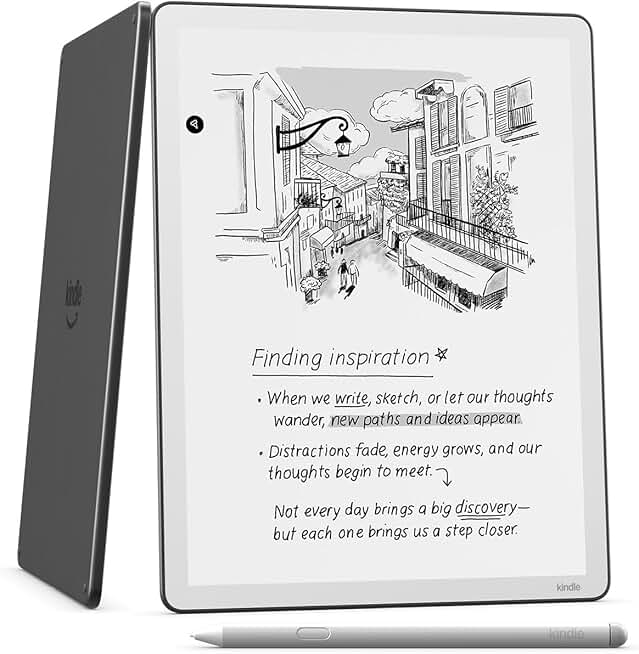
The Kindle Scribe 32GB marks a significant evolution in Amazon’s e-reader lineup, blending the beloved features of a Kindle with the functionality of a digital notebook. This innovative device offers an expansive 11-inch paper-like display, meticulously designed for both immersive reading and natural, fluid writing.
Quick Summary: Kindle Scribe 32GB
Rating: 4.4/5 stars
Price: $499.99 USD
Key Pros:
- Exceptional paper-like writing experience with Premium Pen.
- Large 11-inch display ideal for reading, note-taking, and PDFs.
- Outstanding battery life, lasting weeks on a single charge.
- Seamless integration with Amazon’s vast content ecosystem.
Key Cons:
- Higher price point compared to traditional Kindles.
- Limited color display and app functionality compared to tablets.
Table of Contents
Kindle Scribe 32GB Overview
The Kindle Scribe 32GB is Amazon’s ambitious foray into the digital note-taking market, seamlessly merging the best aspects of an e-reader with the utility of a digital notebook. It stands out in the Kindle family as the first model to incorporate writing functionality, offering a truly unique user experience.
Unlike traditional tablets, which often lead to eye strain and distractions, the Kindle Scribe prioritizes a focused, paper-like interaction. Its E Ink display is designed to mimic the look and feel of real paper, reducing glare and making it comfortable to read and write for extended periods.
This device is not merely an oversized Kindle; it’s a productivity tool crafted for those who prefer the tactile sensation of pen on paper but desire the convenience and organizational benefits of digital. From annotating documents to journaling and sketching, the Kindle Scribe offers a versatile platform.
The 32GB storage capacity provides ample space for thousands of books, documents, and notebooks, ensuring that users rarely have to worry about running out of room. This generous storage is particularly beneficial for professionals and students who deal with large volumes of content.
Amazon has positioned the Kindle Scribe as a premium device, targeting users who value both reading and writing capabilities. It’s a direct competitor to other digital notepads but leverages the vast Amazon ecosystem for content delivery and management.
The integration with the Kindle store means users have immediate access to millions of titles, from bestsellers to academic texts. This makes it an incredibly powerful tool for both leisure reading and serious study or work.
Furthermore, its ability to send documents directly to the device via email or the Send-to-Kindle app enhances its utility for business and educational contexts. You can easily review and mark up PDFs or Microsoft Word documents without printing them.
The design of the Kindle Scribe is sleek and minimalist, reflecting its focus on functionality. It’s thin, lightweight, and engineered for portability, making it an ideal companion for travel, commutes, or simply moving around the house.
Overall, the Kindle Scribe 32GB redefines what an e-reader can be, transforming it into a versatile digital canvas for thought, learning, and creativity. It’s a compelling option for anyone looking to streamline their digital life while maintaining the benefits of a paper-based workflow.
Kindle Scribe 32GB Key Features & Specs
The Kindle Scribe 32GB boasts a suite of features designed to deliver an unparalleled reading and writing experience. Its specifications are carefully chosen to optimize performance, battery life, and user comfort, setting it apart in the e-reader market.
At its core is the generous 11-inch paper-like display, which utilizes advanced E Ink technology. This screen offers a resolution of 300 ppi (pixels per inch), ensuring text is crisp and clear, indistinguishable from printed words. The matte finish minimizes glare, making it ideal for use in various lighting conditions, including direct sunlight.
A significant highlight is the integrated front light with auto-adjusting capabilities and a warm light option. This adaptive lighting system ensures comfortable reading in any environment, from bright daylight to a dimly lit room, reducing eye strain during long sessions.
The included Premium Pen is a game-changer for digital note-taking. It requires no charging, pairing, or setup, making it always ready for use. The pen features a dedicated eraser on the top and a customizable shortcut button on the side, allowing for quick switching between pen types or highlighting functions.
The writing experience itself is remarkably natural, thanks to the display’s texture and the pen’s responsiveness. There’s a subtle friction that mimics writing on paper, providing tactile feedback that enhances precision and comfort. This is a crucial element for those who value the analog feel of writing.
With 32GB of internal storage, the Kindle Scribe offers substantial capacity for your digital library and personal notes. This is more than enough for thousands of books, audiobooks, and countless notebooks, making it a reliable companion for extensive reading and writing projects.
Connectivity is handled via Wi-Fi, enabling fast downloads of books and seamless syncing of notes to the Amazon cloud. This ensures your content is always accessible and backed up across your devices.
Battery life is another standout feature, often lasting for weeks on a single charge, depending on usage. This endurance is a hallmark of E Ink devices and a major advantage over power-hungry tablets, providing uninterrupted productivity and entertainment.
The device supports a wide range of content formats, including Kindle books (AZW3, AZW), unprotected MOBI, PDF, TXT, EPUB, PRC natively. It also handles HTML, DOC, DOCX, JPEG, GIF, PNG, and PMP through conversion, making it highly versatile for various document types. Learn more about E Ink technology’s benefits for reading here.
Software features include dedicated notebooks with various templates (lined, gridded, blank, to-do lists), the ability to add sticky notes to books, and the convenience of sending documents to your Kindle for annotation. The interface is intuitive, focusing on ease of use and minimizing distractions.
The physical design is thin and light, measuring approximately 0.22 inches (5.8 mm) thick and weighing around 15.3 ounces (433 g). Its symmetrical design with a wider bezel on one side allows for comfortable one-handed holding, whether you are left- or right-handed, enhancing ergonomic comfort during long reading or writing sessions.
In essence, the Kindle Scribe 32GB combines a high-resolution, glare-free display with a responsive, battery-free stylus and robust storage, making it a powerful tool for anyone serious about digital reading and writing. Its thoughtful design and comprehensive features cater to both productivity and leisure.
Pros & Cons
Evaluating any device requires a balanced look at its strengths and weaknesses. The Kindle Scribe 32GB, while innovative, is no exception. Understanding these aspects will help potential buyers make an informed decision.
Pros of the Kindle Scribe 32GB:
Exceptional Paper-Like Writing Experience: This is arguably the Scribe’s most compelling feature. The combination of the textured screen and the Premium Pen creates a remarkably authentic writing sensation. The subtle resistance against the pen tip truly mimics writing on physical paper, making note-taking and sketching a joy.
The Premium Pen’s battery-free design is a huge convenience, eliminating the need for constant charging or worrying about it dying mid-thought. Its built-in eraser and customizable shortcut button further enhance the natural workflow, allowing for quick corrections and tool switching without breaking concentration.
Versatile Functionality for Reading, Writing, and Annotation: The Kindle Scribe isn’t just a reader or just a notebook; it’s a powerful hybrid. Users can read their favorite books with all the benefits of a Kindle (adjustable font sizes, dictionary lookups) and then seamlessly switch to taking notes in a dedicated notebook.
Its ability to handle PDFs and other documents, allowing for direct annotation with the pen, is invaluable for students and professionals. This feature transforms the Scribe into a digital binder, consolidating all reading and writing tasks into one device, reducing paper clutter significantly.
Long-Lasting Battery Life: True to its Kindle heritage, the Scribe offers outstanding battery endurance. Depending on usage (reading vs. writing, light settings), it can last for weeks on a single charge. This extended battery life is a massive advantage for users who are constantly on the go or prefer not to be tethered to a charger.
It means fewer interruptions during long reading sessions or critical note-taking, making it a reliable tool for travel, commutes, or extended periods away from power outlets. This peace of mind allows users to focus on their tasks without battery anxiety.
Large, Comfortable 11-inch Display: The expansive screen provides ample space for both text and handwritten notes. For readers, it means less page-turning and a more immersive experience. For writers, it offers a generous canvas for detailed notes, diagrams, or sketches without feeling cramped.
The high-resolution, glare-free E Ink display is incredibly easy on the eyes, even after hours of use. This comfort factor is a key differentiator from traditional backlit tablets, promoting healthier screen time habits and reducing digital eye strain.
Seamless Integration with Amazon’s Ecosystem: For existing Kindle users, the Scribe offers a familiar and integrated experience. Access to millions of books, magazines, and audiobooks from the Kindle store is immediate. Your purchases and notes are synced across devices via the Amazon cloud.
The ‘Send-to-Kindle’ functionality allows easy transfer of personal documents, web articles, and PDFs to the Scribe for reading and annotation. This ecosystem integration simplifies content management and ensures a consistent user experience across Amazon’s platforms.
Cons of the Kindle Scribe 32GB:
Higher Price Point: Compared to standard Kindles, the Scribe is a premium device with a significantly higher price tag. This can be a barrier for budget-conscious consumers who primarily need a device for reading and don’t require the advanced writing features.
While its features justify some of the cost, it places the Scribe in a different category than entry-level e-readers, making it a more substantial investment. Potential buyers need to weigh the value of its writing capabilities against the cost.
Limited App Ecosystem and Monochromatic Display: Unlike full-fledged tablets, the Kindle Scribe operates on a simplified OS and does not support a wide range of third-party apps. Its E Ink display is also monochromatic, meaning it only shows shades of gray, which is not suitable for color-rich content like magazines, comics, or videos.
This limitation means it cannot replace a tablet for entertainment or complex productivity tasks requiring specific applications. Users needing a device for browsing the web extensively, watching media, or running diverse apps will find the Scribe’s capabilities restricted in these areas.
Software Still Evolving: While Amazon has released updates, some users feel the software for note organization and handwriting recognition could be more advanced. For instance, direct handwriting-to-text conversion on the device itself for entire notebooks is still a requested feature, though it can be done when sharing notes externally.
The initial software also lacked certain organizational features that some power users might expect from a dedicated digital notebook. Amazon is continuously improving the software, but early adopters might experience a slightly less mature feature set compared to established digital note-takers.
Who Should Buy the Kindle Scribe 32GB?
The Kindle Scribe 32GB is a specialized device that caters to a particular demographic. It’s not for everyone, but for the right user, it can be an indispensable tool that significantly enhances productivity and reading pleasure.
Students and Academics: This device is a dream come true for students who need to read textbooks, annotate research papers, and take extensive notes. The large screen allows for comfortable viewing of academic PDFs, and the Premium Pen makes highlighting and scribbling in margins incredibly intuitive.
It can replace multiple notebooks and binders, consolidating all study materials into one lightweight, portable device. The ability to easily share annotated documents with classmates or professors further enhances its academic utility.
Professionals and Business Users: For individuals who frequently review documents, attend meetings, or brainstorm ideas, the Kindle Scribe offers a distraction-free environment. Lawyers, consultants, engineers, and creatives can use it to mark up contracts, sketch out concepts, or jot down meeting minutes.
The ‘Send-to-Kindle’ feature allows for quick transfer of business documents for review, eliminating the need to print physical copies. Its long battery life ensures it’s ready for a full day of work without needing a charger.
Avid Readers and Book Lovers: While traditional Kindles suffice for reading, the Scribe’s 11-inch display offers a more expansive and immersive reading experience. It’s particularly beneficial for those who read graphically rich books, large-print editions, or simply prefer a bigger page.
The ability to add sticky notes to books without defacing them is a bonus for those who like to engage deeply with their reading, whether for personal reflection or book club discussions.
Minimalists Seeking Digital Paper: For individuals looking to reduce paper consumption and digital clutter, the Scribe presents an elegant solution. It offers the tactile satisfaction of writing on paper while providing the organizational benefits of a digital system.
It allows users to keep all their notes, journals, and sketches in one place, easily searchable and backed up in the cloud, without the distractions of a typical tablet or smartphone.
Artists and Creatives (for basic sketching): While not a full-fledged graphic tablet, the Scribe can serve as an excellent digital sketchbook for quick ideas, brainstorming, or simple illustrations. The natural feel of the Premium Pen makes it suitable for capturing creative thoughts on the go.
Its monochromatic display is perfect for line art, character design, or architectural sketches where color isn’t a primary requirement. It’s a great tool for initial concept development before moving to more complex digital art software.
Anyone Looking to Reduce Screen Time from Traditional Tablets: If you find yourself constantly distracted by notifications and apps on your iPad or Android tablet, the Kindle Scribe offers a refreshing alternative. Its singular focus on reading and writing promotes deeper concentration.
The E Ink screen is also far gentler on the eyes than LCD/OLED displays, making it a healthier choice for extended periods of use. It helps foster a more mindful and productive digital interaction.
Ultimately, the Kindle Scribe 32GB is best suited for individuals who place a high value on a paper-like reading and writing experience, require robust note-taking capabilities, and appreciate the long battery life and distraction-free environment of an E Ink device. It’s an investment in focused productivity and comfortable digital interaction.
FAQ about Kindle Scribe 32GB
Q: What is the main difference between the Kindle Scribe and other Kindles?
A: The primary distinction of the Kindle Scribe 32GB is its integrated writing functionality, enabled by its larger 11-inch E Ink display and the included Premium Pen. Traditional Kindles are designed solely for reading, while the Scribe allows users to read, take notes, annotate documents, and sketch.
It combines the best aspects of a dedicated e-reader with the utility of a digital notebook, offering a versatile tool for both consumption and creation of content. The larger screen size also sets it apart from smaller, reading-focused Kindles.
Q: Can I convert my handwritten notes to text on the Kindle Scribe 32GB?
A: Currently, the Kindle Scribe 32GB does not offer on-device, real-time handwriting-to-text conversion for entire notebooks. However, you can export your handwritten notes as PDFs or other formats, and then use external software or services to convert them to text.
Amazon has been continuously updating the software, and features like this might be introduced in future updates. For now, the focus is on capturing notes digitally with the natural feel of handwriting.
Q: How long does the battery last on the Kindle Scribe 32GB?
A: The battery life of the Kindle Scribe 32GB is exceptional, typically lasting for weeks on a single charge. For reading, it can last up to 12 weeks with half an hour of reading per day and the light setting at 13.
For writing, it can last up to 3 weeks with half an hour of writing per day. Actual battery life will vary based on light settings, Wi-Fi usage, and the intensity of reading and writing activities. This extended battery life is a significant advantage over other digital devices.
Q: Can I use the Kindle Scribe 32GB to browse the internet or watch videos?
A: No, the Kindle Scribe 32GB is not designed for general web browsing or video playback. Its E Ink display is optimized for text and static images, offering a high refresh rate suitable for reading and writing, but not for dynamic content like videos.
While it has Wi-Fi for downloading content and syncing notes, its built-in browser is very basic and primarily intended for accessing Kindle store content or simple web pages. It’s a device focused on distraction-free productivity rather than multimedia consumption.
Q: Is the Premium Pen included with the Kindle Scribe 32GB? Does it need charging?
A: Yes, the Kindle Scribe 32GB model includes the Premium Pen. The Premium Pen is a remarkable accessory because it requires no charging whatsoever. It operates without batteries, drawing power through electromagnetic resonance (EMR) technology from the display itself.
This means the pen is always ready to use, without the hassle of pairing or worrying about its battery level. It also features a dedicated eraser on top and a customizable shortcut button for enhanced usability.
Q: How does the writing experience compare to real paper?
A: The writing experience on the Kindle Scribe 32GB is remarkably close to writing on real paper. The display has a subtle texture that provides a pleasant amount of friction, mimicking the feel of a pen gliding across a page.
The responsiveness of the Premium Pen and the minimal latency contribute to a natural and fluid writing sensation. While it’s not an exact 1:1 replication, it’s one of the best digital writing experiences available, designed to reduce the