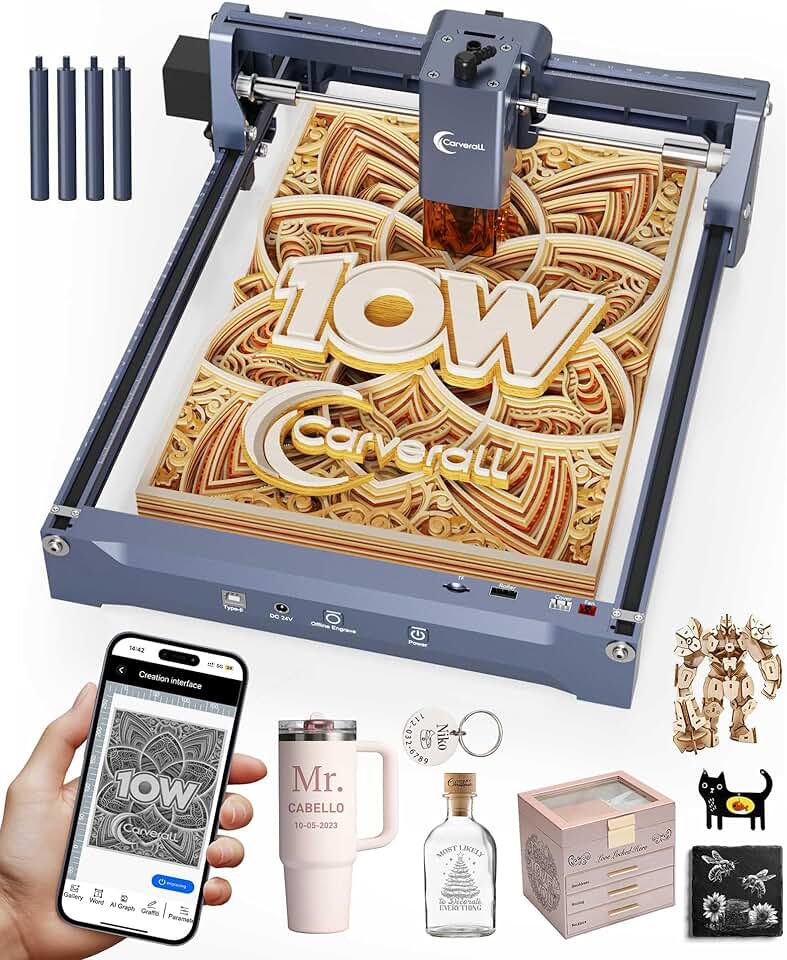
The K15 Pro Laser Engraver emerges as a compelling option for hobbyists and small business owners looking to delve into the world of laser engraving and cutting. This 10W laser machine promises versatility and precision across a range of materials, making it a valuable tool for various creative and practical applications. Our in-depth review will explore its capabilities, performance, and overall value for money.
Quick Summary: K15 Pro Laser Engraver
Rating: 4.2/5 stars (from 41 reviews)
Price: $199.20 USD (at time of review)
Key Pros:
- Powerful 10W Laser Output: Delivers robust performance for engraving and light cutting on diverse materials, including wood, acrylic, and some coated metals. This power level is excellent for detailed work and faster processing.
- Offline Engraving Capability: Offers immense flexibility by allowing users to operate the machine without a constant computer connection, enhancing workflow efficiency and portability. This feature is particularly useful for repetitive tasks or at locations without immediate PC access.
- Wide Material Compatibility: Excels at working with a broad spectrum of materials such as wood, acrylic, paper, leather, fabric, and even coated metals and stone, making it highly versatile for various projects. This broad compatibility opens up many creative avenues for users.
Key Cons:
- Limited Work Area (7.9″x11.8″): While suitable for many projects, the “near A4” work area might be restrictive for larger designs or batch processing, requiring careful planning or multiple passes. Users planning extensive projects should consider this limitation.
- Steeper Learning Curve for Beginners: As with many CNC tools, mastering the software and fine-tuning settings for different materials can take time and practice, potentially posing a challenge for absolute novices. Patience and a willingness to experiment are key for new users.
Table of Contents
K15 Pro Laser Engraver Overview
The K15 Pro Laser Engraver represents a significant entry into the accessible laser engraving market, offering a blend of power, precision, and user-friendly features. Designed for both enthusiasts and small-scale professionals, this 10W machine aims to bridge the gap between entry-level devices and more industrial-grade solutions. Its robust capabilities allow for intricate designs and clean cuts on a variety of materials.
At its core, the K15 Pro features a powerful 10W laser module, which is a sweet spot for many users. This power level is sufficient for deep engraving on wood, leather, and even some metals, while also providing adequate cutting capabilities for thinner materials like acrylic and plywood. The machine’s design prioritizes stability and accuracy, ensuring that each pass of the laser is consistent and precise.
One of the standout aspects of the K15 Pro Laser Engraver is its focus on versatility. Users can experiment with a wide array of materials, from natural substances like wood and stone to synthetic ones like acrylic and various coated metals. This broad compatibility makes it an ideal tool for diverse projects, whether it’s personalizing gifts, creating custom signage, or developing unique craft items.
The work area of approximately 7.9″x11.8″ (near A4 size) is well-suited for a multitude of small to medium-sized projects. While not the largest on the market, it provides ample space for most hobbyist and small business needs, allowing for detailed work without consuming excessive desk space. This compact footprint is a major advantage for home users with limited workshop areas.
Beyond its physical attributes, the K15 Pro integrates modern conveniences such as offline engraving. This feature significantly enhances workflow, allowing users to upload designs and then operate the engraver independently of a computer connection. Such functionality is particularly beneficial for repetitive batch jobs or when working in an environment where a dedicated computer isn’t always available.
The machine also boasts a user-friendly interface, often compatible with popular engraving software like LightBurn or LaserGRBL. This compatibility ensures that users have access to powerful and intuitive design and control tools, making the learning curve manageable despite the advanced nature of laser engraving. Support for these widely used programs is a strong selling point.
Safety is another crucial consideration in laser engraving, and the K15 Pro incorporates features to address this. While specific safety mechanisms can vary, most modern engravers like this one include protective shields or glasses and emergency stop functions. Users are always advised to follow best practices for laser safety, including proper ventilation and eye protection.
Overall, the K15 Pro Laser Engraver aims to deliver a high-performance engraving and cutting experience at an accessible price point. It targets creative individuals, DIY enthusiasts, and small entrepreneurs who require a reliable and versatile tool for their projects. Its combination of power, precision, and convenience positions it as a strong contender in its category.
The robust construction of the K15 Pro contributes to its long-term durability and consistent performance. A solid frame minimizes vibrations, which is essential for achieving crisp, clear engravings and precise cuts. This attention to mechanical detail ensures that the laser head moves smoothly and accurately across the work surface, reducing errors and improving output quality.
For those new to laser technology, the K15 Pro offers a relatively gentle introduction, despite the inherent complexity of the field. Many online communities and resources exist to support users of similar machines, helping to demystify the process and accelerate learning. The prevalence of compatible software also means a wealth of tutorials and guides are readily available.
Considering its price, the K15 Pro Laser Engraver presents an excellent value proposition. It provides professional-level results without the hefty investment typically associated with industrial laser systems. This affordability makes advanced crafting and prototyping more accessible to a wider audience, democratizing creative production.
The machine’s ability to handle various project complexities, from simple text engravings to intricate geometric patterns, underscores its versatility. This adaptability allows users to continuously push their creative boundaries and explore new artistic and functional applications. The K15 Pro is truly a tool that can grow with the user’s skill set.
K15 Pro Laser Engraver Key Features & Specifications
The K15 Pro Laser Engraver is packed with features that make it a formidable tool for various engraving and cutting tasks. Understanding these specifications is crucial for appreciating its capabilities and how it stands out in the competitive market. Let’s delve into the core attributes that define this machine.
10W High-Power Diode Laser Module
At the heart of the K15 Pro is its powerful 10W diode laser module. This output power is critical for achieving deep, clean engravings and efficient cutting on a variety of materials. A 10W laser is significantly more capable than lower-wattage lasers, allowing for faster processing times and greater material penetration.
This power enables the K15 Pro to engrave on hard surfaces like coated metals and stone, which would be challenging for weaker lasers. For softer materials such as wood, leather, and acrylic, the 10W laser ensures crisp lines and smooth edges, even with intricate designs. It provides a good balance between power and precision for common crafting needs.
Generous "Near A4" Work Area (7.9"x11.8")
The K15 Pro offers a working area of approximately 7.9 inches by 11.8 inches, which is roughly equivalent to an A4 paper size. This dimension provides ample space for most hobbyist projects, including custom signage, photo engraving, and small parts fabrication. While not industrial-scale, it’s highly practical for home workshops and small studios.
This work area size allows users to tackle a variety of projects without constantly resetting or repositioning materials. It strikes a balance between offering sufficient creative space and maintaining a compact footprint, which is ideal for those with limited space. The precise dimensions ensure that designs can be translated accurately from software to material.
Offline Engraving Capability
One of the most convenient features of the K15 Pro is its offline engraving function. This allows users to load their design files onto a memory card or via a direct connection, and then operate the engraver without requiring a continuous connection to a computer. This significantly enhances the machine’s flexibility and ease of use.
For repetitive tasks or batch production, offline engraving streamlines the workflow by freeing up the computer for other tasks. It also makes the engraver more portable, as it doesn’t need to be tethered to a desktop PC. This feature is a game-changer for efficiency and convenience, particularly for small businesses or those who attend craft fairs.
Wide Material Compatibility
The K15 Pro excels in its ability to work with a broad spectrum of materials. It can engrave on wood, bamboo, paper, plastic, leather, PCB board, aluminum oxide, non-reflective plating and lacquered metal, ceramics, and stone. For cutting, it handles materials like cardboard, non-woven fabric, light wood, acrylic material, and thin plastic board.
This extensive material compatibility makes the K15 Pro an incredibly versatile tool for diverse creative and functional projects. From personalizing wooden gifts to cutting intricate acrylic shapes for models, the possibilities are vast. Users can explore various textures and finishes, expanding their artistic horizons with a single machine.
CNC DIY Lazer Cutter Design
As a CNC (Computer Numerical Control) DIY lazer cutter, the K15 Pro offers a high degree of precision and repeatability. The CNC aspect means that movements are controlled digitally, ensuring accuracy in every pass. This precision is vital for creating detailed engravings and cleanly cut pieces.
The DIY nature implies a certain level of assembly and hands-on involvement, which can be a rewarding experience for users. It also means the machine is designed with accessibility and customization in mind, often allowing for upgrades or modifications by advanced users. This blend of CNC accuracy and DIY spirit makes it a powerful educational and crafting tool.
Software Compatibility
The K15 Pro Laser Engraver is typically compatible with popular and robust laser control software such as LightBurn and LaserGRBL. LightBurn is a highly regarded paid software known for its advanced features, intuitive interface, and excellent support for various laser machines. LaserGRBL is a free, open-source alternative that is very capable for many tasks.
Compatibility with these established software platforms ensures that users have access to powerful design, control, and optimization tools. This allows for fine-tuning laser parameters, importing various file formats, and executing complex engraving and cutting paths with ease. The software ecosystem greatly enhances the user experience and the machine’s overall utility.
Enhanced Safety Features
While specific safety features can vary slightly, the K15 Pro Laser Engraver typically includes essential safety considerations. These often involve protective covers or shields around the laser module to minimize accidental exposure to the laser beam. Emergency stop buttons are also common, allowing for immediate shutdown in case of unexpected events.
Users are always advised to wear appropriate laser safety glasses specifically rated for the laser’s wavelength. Proper ventilation is also crucial to dissipate fumes generated during the engraving and cutting process. Adhering to these safety protocols ensures a safe and enjoyable operating experience with the K15 Pro.
Technical Specifications Summary:
- Laser Power: 10W (Optical Output)
- Work Area: Approx. 7.9″ x 11.8″ (200mm x 300mm)
- Engraving Speed: Varies by material and settings, generally high for its class.
- Connectivity: USB, Offline (TF Card/SD Card support)
- Supported Software: LightBurn, LaserGRBL (and similar G-code senders)
- Supported Materials (Engrave): Wood, Bamboo, Paper, Plastic, Leather, PCB Board, Aluminum Oxide, Non-reflective Plating & Lacquered Metal, Ceramics, Stone.
- Supported Materials (Cut): Cardboard, Non-woven Fabric, Light Wood, Acrylic Material, Thin Plastic Board.
- Input Voltage: 100-240V AC, 50/60Hz
- Output Voltage: 12V DC
- Precision: High, typical for CNC-controlled diode lasers.
- Module Type: Fixed focus diode laser.
These features and specifications collectively demonstrate that the K15 Pro Laser Engraver is a well-rounded and capable machine for a wide array of creative and DIY projects. Its robust laser, flexible operation, and extensive material compatibility make it a compelling choice for its target audience. The precise control offered by its CNC design ensures quality results.
Pros & Cons
Every tool, no matter how advanced, comes with its own set of advantages and disadvantages. The K15 Pro Laser Engraver is no exception, and a thorough understanding of its pros and cons is essential for prospective buyers. This balanced perspective helps in making an informed decision about whether this machine aligns with individual needs and expectations.
Pros of the K15 Pro Laser Engraver
-
Powerful 10W Laser Output: The 10W optical power of the laser module is a significant advantage. This allows for faster engraving speeds and deeper cuts compared to lower-wattage lasers, greatly enhancing productivity. It also broadens the range of materials the machine can effectively process, including some harder and thicker substrates.
This power translates into more professional-looking results with sharper details and cleaner edges. For users who need to engrave intricate designs or cut through materials like 3mm plywood, the 10W output provides the necessary muscle. It reduces the number of passes required, saving time and extending the life of the laser module.
-
Excellent Material Versatility: The ability to engrave and cut a wide array of materials is a major selling point. From common crafting materials like wood, paper, and leather to more challenging ones like coated metals, ceramics, and stone, the K15 Pro handles them with competence. This versatility makes it suitable for a vast range of projects.
This broad compatibility means users aren’t limited to specific project types but can experiment with different textures and applications. Whether creating custom jewelry, personalized home decor, or functional prototypes, the K15 Pro can adapt. It significantly expands creative possibilities for both hobbyists and small businesses.
-
Offline Engraving for Enhanced Convenience: The offline engraving feature is a game-changer for workflow efficiency. Being able to upload a design and then disconnect the computer allows for greater flexibility in operation. This is particularly useful for batch processing or when working in a space where a dedicated computer connection is inconvenient.
It frees up your computer for other tasks while the engraver works autonomously, boosting overall productivity. This feature also contributes to the machine’s portability, as it can operate in various locations without needing a tethered PC. It simplifies the user experience by reducing the reliance on constant digital oversight.
-
Robust and Stable Construction: The K15 Pro features a sturdy frame and quality components, which contribute to its overall stability and durability. A stable platform is crucial for precise laser engraving, as it minimizes vibrations that could otherwise lead to blurred or inaccurate results. This robust build quality ensures consistent performance over time.
This structural integrity also means the machine can withstand regular use in a workshop environment. It helps maintain the alignment of the laser module and the work surface, which is essential for repetitive tasks and achieving high-quality output. The solid construction implies a longer lifespan for the engraver.
-
User-Friendly Software Compatibility: Compatibility with established software like LightBurn and LaserGRBL is a significant advantage. These programs are widely used, well-supported, and offer extensive features for design, layout, and laser control. This means users don’t have to learn proprietary, often less capable, software.
Access to these powerful software suites lowers the barrier to entry for beginners while providing advanced features for experienced users. The wealth of online tutorials and community support for LightBurn and LaserGRBL also aids in a smoother learning process. This software ecosystem greatly enhances the machine’s usability and creative potential.
Cons of the K15 Pro Laser Engraver
-
Relatively Small Work Area: The 7.9″x11.8″ (near A4) work area, while adequate for many projects, can be a limiting factor for larger designs or batch production of multiple items. Users looking to engrave or cut sizable pieces might find themselves needing to segment their projects or invest in a larger machine.
This limitation means careful planning is required for projects exceeding the work area dimensions. While it’s suitable for hobbyists and small crafts, it might not be ideal for those with ambitions for larger-scale production. It’s a trade-off for the machine’s compact footprint and affordability.
-
Learning Curve for Beginners: While compatible with user-friendly software, laser engraving itself involves a learning curve, especially for those new to CNC technology. Understanding material settings, laser power, speed, and focus can take time and experimentation. Achieving optimal results requires patience and a willingness to troubleshoot.
New users may initially struggle with calibrating the machine, understanding G-code commands, or optimizing settings for different materials. Although there are many resources available, the initial setup and mastery of the software and hardware can be daunting. This is common with most laser engravers, but worth noting for absolute novices.
-
Fume and Ventilation Requirements: Like all laser engravers, the K15 Pro produces fumes and particulate matter during operation, particularly when cutting or engraving organic materials. Proper ventilation is absolutely essential to ensure user safety and prevent respiratory issues. This often requires an external exhaust system or operating in a well-ventilated area.
Ignoring ventilation can lead to health hazards and an unpleasant working environment. This adds an additional setup consideration and potential cost for users who don’t already have an adequate ventilation solution. It’s a critical safety aspect that cannot be overlooked.
-
No Enclosure Included: The K15 Pro typically comes as an open-frame design, meaning there’s no integrated enclosure to contain fumes or provide additional laser light protection. While safety glasses are mandatory, an enclosure offers an extra layer of safety and helps manage smoke and odors more effectively.
Users might need to construct or purchase a separate enclosure, adding to the overall cost and setup complexity. This is a common characteristic of entry-level and mid-range diode laser engravers, but it’s an important consideration for safety and cleanliness in a home environment. Learn more about laser safety.
By carefully weighing these pros and cons, potential buyers can determine if the K15 Pro Laser Engraver is the right fit for their specific projects and working environment. Its strengths lie in its power, versatility, and convenience, while its limitations are primarily related to work area size and the inherent learning curve of laser technology.
Who Should Buy the K15 Pro Laser Engraver?
The K15 Pro Laser Engraver is a versatile tool, but it’s not for everyone. Understanding its ideal user base can help potential buyers determine if this machine is the right investment for their creative or professional endeavors. This section explores the various profiles of individuals and businesses that would most benefit from the K15 Pro.
Hobbyists and DIY Enthusiasts
This machine is perfectly suited for hobbyists who enjoy crafting, model making, or personalizing items. The 10W laser provides enough power to experiment with a wide range of materials, enabling users to create unique gifts, custom decor, or intricate components for their projects. Its relatively compact size makes it ideal for home workshops.
DIY enthusiasts will appreciate the K15 Pro’s ability to tackle various materials like wood, acrylic, and leather for their home improvement or personal projects. Whether it’s custom stencils, engraved tools, or personalized gadgets, the engraver offers a new dimension to their creative toolkit. The accessible price point also makes it an attractive entry into laser technology.
Small Business Owners and Entrepreneurs
For small businesses focused on custom products, the K15 Pro Laser Engraver offers a cost-effective solution for production. Businesses specializing in personalized jewelry, custom keychains, engraved tumblers, or bespoke signage can significantly benefit from its capabilities. The ability to engrave on diverse materials means a broader product offering.
The offline engraving feature is particularly valuable for small businesses, allowing for efficient batch processing without tying up a computer. This can streamline production and improve turnaround times, crucial for meeting customer demands. The K15 Pro can help elevate product quality and uniqueness, setting small businesses apart in a competitive market.
Educators and STEM Programs
Schools, universities, and STEM (Science, Technology, Engineering, and Mathematics) programs can find the K15 Pro an excellent educational tool. It provides hands-on experience with CNC technology, laser physics, and digital design. Students can learn about material science, precision manufacturing, and creative problem-solving.
Its relatively safe operation (with proper precautions) and accessible software make it suitable for supervised student use. Projects ranging from creating educational models to designing functional prototypes can be realized with the K15 Pro. It fosters innovation and technical skills among learners, preparing them for future technological challenges.
Artists and Designers
Creative professionals looking to add a new medium to their artistic expression will find the K15 Pro highly capable. It allows artists to engrave intricate patterns, textures, and images onto various surfaces, transforming their digital designs into tangible art pieces. The precision of the laser opens up possibilities for detailed linework and shading.
Designers can use it for rapid prototyping, creating mock-ups of products, or producing unique art installations. The ability to work with materials like wood, leather, and even stone offers a rich palette for artistic exploration. The K15 Pro enables artists to push the boundaries of their craft and explore innovative techniques.
Users Seeking an Affordable Entry into Laser Technology
For individuals intrigued by laser engraving but hesitant about the high cost of industrial machines, the K15 Pro offers an excellent entry point. Its competitive price combined with robust features makes it an attractive option for those wanting to explore the technology without a significant financial commitment. It provides professional-grade results at a hobbyist-friendly budget.
This affordability opens up the world of laser crafting to a broader audience, allowing more people to experience the joy of creating with precision and power. It’s an ideal stepping stone for those who might eventually upgrade to larger or more specialized machines, providing foundational experience and skills.
Individuals with a Moderate Technical Aptitude
While the K15 Pro is user-friendly, mastering laser engraving still requires a certain level of technical aptitude and patience. Users who are comfortable with computer software, willing to learn new skills, and troubleshoot minor issues will get the most out of this machine. It’s an excellent tool for those who enjoy the process of learning and fine-tuning.
Those who are comfortable with DIY assembly and understanding technical manuals will find the setup straightforward. The rewards of mastering the K15 Pro are significant, allowing for endless creative possibilities once the initial learning curve is overcome. It’s a tool for creators who enjoy engaging with their equipment on a deeper level.
Ultimately, the K15 Pro Laser Engraver is best suited for individuals and small enterprises who value versatility, power, and affordability in a laser engraving and cutting solution. It caters to those who are ready to invest time in learning the craft and are looking for a reliable machine to bring their creative visions to life. It’s a fantastic choice for expanding a workshop’s capabilities.
Considering its robust feature set and accessible price, the K15 Pro stands out as a smart choice for anyone serious about exploring or expanding into laser-based fabrication. It offers a powerful platform for innovation and production across numerous applications. The machine’s capabilities truly empower users to transform raw materials into personalized masterpieces.
FAQ about the K15 Pro Laser Engraver
Here are some frequently asked questions about the K15 Pro Laser Engraver to help you better understand its operation, capabilities, and maintenance. These answers aim to address common concerns and provide clarity for potential and current users.
Q1: What materials can the K15 Pro Laser Engraver engrave and cut?
A: The K15 Pro is highly versatile regarding material compatibility. It can engrave a wide range of materials including wood, bamboo, paper, plastic, leather, PCB board, aluminum oxide, non-reflective plating and lacquered metal, ceramics, and stone. For cutting, it effectively handles cardboard, non-woven fabric, light wood (typically up to 3-5mm depending on density), acrylic material, and thin plastic board. The 10W laser allows for deeper engraving and more efficient cutting on these materials.
It’s important to note that while it can engrave on certain metals (coated, lacquered, or aluminum oxide), it cannot engrave on bare, reflective metals like stainless steel or raw aluminum without a special coating. Always test a small, inconspicuous area of your material first to determine optimal power and speed settings for the best results and to prevent damage.
Q2: What software is compatible with the K15 Pro Laser Engraver?
A: The K15 Pro Laser Engraver typically supports popular and powerful laser control software such as LightBurn and LaserGRBL. LightBurn is a highly recommended paid software known for its extensive features, intuitive user interface, and broad compatibility with various laser engravers. It offers advanced design, layout, and control functionalities.
LaserGRBL is a free, open-source alternative that is also very capable for many engraving and cutting tasks, especially for beginners. Both software options allow users to import design files, set engraving parameters, and control the machine with precision. Compatibility with these industry-standard programs ensures a smooth and efficient workflow for users.
Q3: Is the K15 Pro difficult to set up for a beginner?
A: While the K15 Pro is designed with user-friendliness in mind, laser engravers, by nature, do have a moderate learning curve. Initial assembly might require some basic DIY skills, but clear instructions are usually provided. The main learning aspect comes from understanding the software (LightBurn/LaserGRBL) and optimizing laser settings (power, speed, passes) for different materials.
New users should expect to spend some time experimenting and watching tutorials to get comfortable with the process. However, the online community for these types of engravers is very supportive, and there are many resources available to help overcome initial challenges. Patience and a willingness to learn are key to mastering the K15 Pro.
Q4: What safety precautions should be taken when operating the K15 Pro?
A: Laser safety is paramount. Always wear appropriate laser safety glasses specifically rated for the wavelength of the K15 Pro’s diode laser (typically 450nm-455nm) whenever the laser is active. Never look directly at the laser beam or its reflection. Ensure proper ventilation to extract fumes and smoke generated during engraving and cutting, as these can be harmful. An air assist system can also help reduce smoke and improve cut quality.
Keep a fire extinguisher nearby and never leave the machine unattended while operating, especially when cutting flammable materials. Ensure the work area is clean and free of combustible materials. The K15 Pro may include some basic safety features, but user vigilance and adherence to safety protocols are crucial. Refer to laser safety standards for comprehensive guidelines.
Q5: Can the K15 Pro engrave images and photos?
A: Yes, the K15 Pro Laser Engraver is fully capable of engraving images and photos with impressive detail. Its 10W laser and precise control allow for excellent grayscale reproduction and intricate dot patterns (dithering) to create photo-realistic engravings on suitable materials like wood, slate, or anodized aluminum. The quality of the engraving largely depends on the resolution of the original image and the chosen material.
Software like LightBurn provides advanced tools for image preparation, including resizing, contrast adjustment, and dithering algorithms, to optimize photos for laser engraving. Experimentation with settings like lines per inch (LPI) and power levels will help achieve the best photographic results on different surfaces. The K15 Pro offers a fantastic platform for personalized photo gifts and artistic reproductions.
Q6: Does it have offline engraving capabilities? How does it work?
A: Yes, the K15 Pro features offline engraving, which is a significant convenience. This means you can prepare your design file on your computer using compatible software, save it (often as a G-code file), and then transfer it to the engraver via a memory card (like a TF card or SD card). Once the file is loaded onto the machine, you can disconnect your computer and operate the engraver using its onboard controls.
This functionality is incredibly useful for repetitive tasks, allowing you to run multiple engraving jobs without needing your computer connected or even turned on. It enhances portability and efficiency, especially in a workshop setting where a computer might not always be readily available or needed for other tasks. It truly streamlines the production process.
Q7: What is the maximum thickness the K15 Pro can cut?
A: The cutting thickness of the K15 Pro Laser Engraver depends heavily on the material’s density and type. With its 10W laser, it can typically cut through light wood (like basswood or thin plywood) up to 3-5mm thick in multiple passes. For acrylic, it can usually cut 2-3mm in one or more passes, provided the acrylic is opaque (clear acrylic is difficult for diode lasers).
Softer materials like paper, cardboard, and thin fabrics can be cut in a single pass. For optimal cutting results, using an air assist system is highly recommended, as it helps clear debris and prevents charring, leading to cleaner edges and faster cuts. Always perform test cuts on scrap material to find the ideal settings for your specific project.
Q8: Is assembly required for the K15 Pro?
A: Yes, like many desktop CNC laser engravers in this price range, the K15 Pro typically requires some assembly upon arrival. It usually comes as a kit with the main components pre-fabricated, but users will need to connect the frame elements, attach the laser module, and route cables. The assembly process is generally straightforward and can be completed by most users with basic tool knowledge.
Detailed instructions, often including step-by-step manuals or video guides, are usually provided by the manufacturer. While it adds a bit of time before you can start engraving, the assembly process can help users understand the machine’s mechanics better. It’s not overly complex and typically takes an hour or two for most individuals.
Final Verdict
The K15 Pro Laser Engraver stands out as an incredibly capable and versatile machine, offering an excellent balance of power, precision, and affordability. Its 10W laser module provides sufficient strength for detailed engraving and efficient cutting across a broad spectrum of materials, from soft woods and leather to challenging coated metals and stone. This makes it a highly valuable asset for a diverse user base.
For hobbyists, DIY enthusiasts, and small business owners, the K15 Pro offers a compelling entry point into the world of laser fabrication. The convenience of offline engraving, coupled with compatibility with robust software like LightBurn, significantly enhances its usability and workflow efficiency. Despite a moderate learning curve, the rewards of mastering this tool are substantial, opening up endless creative and production possibilities.
While the work area might be a limiting factor for very large projects, and proper ventilation is a non-negotiable requirement, these are common considerations for most desktop laser engravers. The K15 Pro’s overall performance, material versatility, and accessible price point firmly position it as an excellent value proposition in its category. It’s a robust and reliable choice for transforming digital designs into tangible creations.
In conclusion, if you are seeking a powerful, versatile, and budget-friendly laser engraver that can handle a wide array of materials and projects, the K15 Pro Laser Engraver is an outstanding choice. It empowers users to bring their creative visions to life with precision and efficiency, making it a highly recommended tool for anyone serious about crafting, prototyping, or small-scale production. It truly delivers an impressive experience for its price.