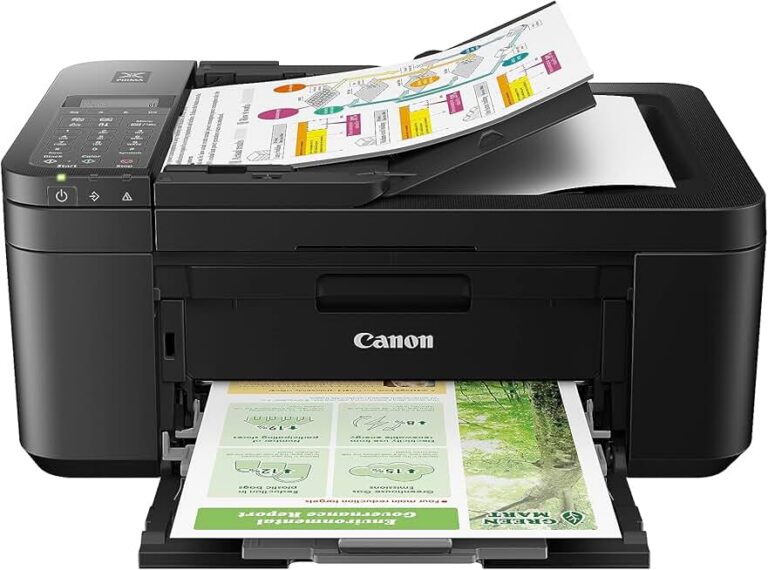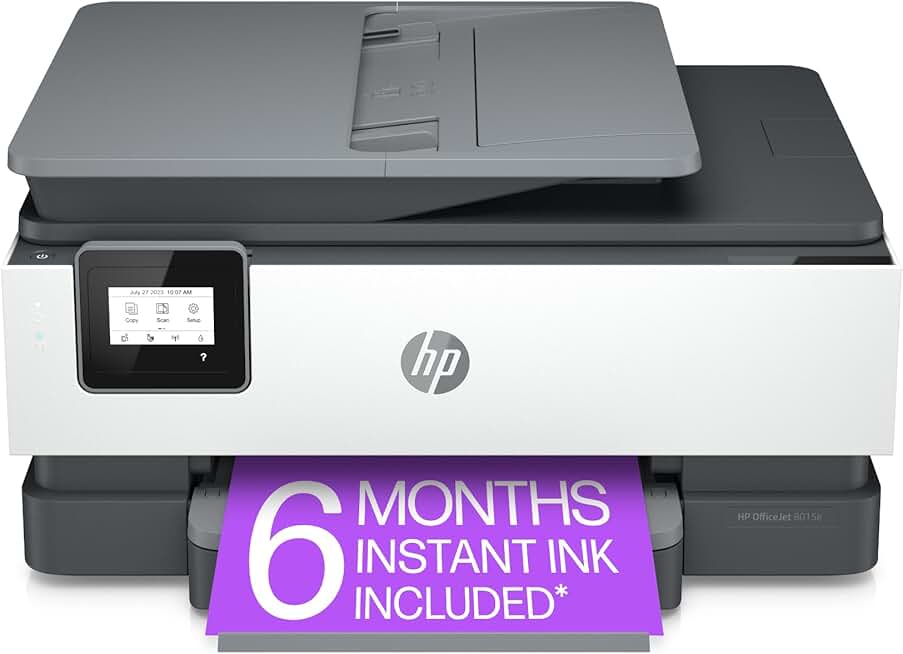
The HP OfficeJet 8015e stands out as a versatile and economical all-in-one wireless color printer designed for the demands of modern home offices and small businesses. This comprehensive review will delve into its capabilities, performance, and overall value, helping you decide if it’s the right printing solution for your needs.
Quick Summary: HP OfficeJet 8015e
Rating: 4.0/5 Stars (Based on 12,100+ reviews)
Price: $265.00
Key Pros:
- Compact, space-saving design perfect for home offices.
- Reliable wireless connectivity for seamless printing from various devices.
- Includes a 6-month Instant Ink trial, offering potential cost savings.
- Automatic Document Feeder (ADF) enhances scanning and copying efficiency.
- Supports automatic duplex printing, saving paper and resources.
Key Cons:
- Ink subscription dependency can be a drawback for some users.
- Initial setup, particularly wireless configuration, may require patience.
Table of Contents
HP OfficeJet 8015e Overview
The HP OfficeJet 8015e is positioned as a reliable and feature-rich all-in-one printer, specifically tailored for the home user and small office environment. It aims to deliver a balance of functionality, convenience, and cost-effectiveness, making it a compelling option in a crowded market segment.
This model integrates print, scan, and copy capabilities into a single, compact device, streamlining workflows and saving valuable desk space. Its wireless connectivity is a key highlight, allowing users to print from virtually anywhere within their network using various devices, from laptops to smartphones.
A significant aspect of the 8015e model is its inclusion of a 6-month trial to HP’s Instant Ink service. This subscription-based ink delivery system can offer substantial savings on ink costs for users with consistent printing habits, ensuring you never run out of ink unexpectedly.
The design philosophy behind the HP OfficeJet 8015e emphasizes user-friendliness and efficiency. Its intuitive controls and robust software support aim to simplify common printing tasks, reducing the learning curve for new users and enhancing productivity.
Beyond basic functionality, this printer incorporates features typically found in higher-end models, such as an Automatic Document Feeder (ADF) and automatic duplex printing. These additions significantly improve efficiency for tasks involving multiple pages, such as scanning documents or printing double-sided reports.
Considering its price point, the build quality of the HP OfficeJet 8015e is practical and durable for its intended use. While it primarily uses plastic construction, it feels sturdy enough for regular home or light office use, promising longevity without a premium price tag.
For those interested in the broader context of printer technology and its evolution, a visit to the Wikipedia page on Inkjet Printers provides excellent background information. Understanding the underlying technology can help appreciate the advancements found in modern devices like the 8015e.
The printer’s compatibility with the HP Smart app further enhances its appeal, allowing for remote printing, mobile scanning, and easy setup. This level of integration with mobile ecosystems is crucial in today’s connected world, offering flexibility that traditional printers often lack.
Overall, the HP OfficeJet 8015e is designed for users who require a dependable, versatile, and budget-conscious printing solution. It balances essential features with modern conveniences, making it a strong contender for a wide range of personal and professional tasks.
Its ability to handle diverse media types, from plain paper to photo paper, also broadens its utility for creative projects and high-quality output. This versatility ensures that the printer can adapt to various document and image reproduction needs without requiring multiple specialized devices.
The focus on energy efficiency, with its Energy Star certification, is another thoughtful addition. This means the printer is designed to consume less power, contributing to lower electricity bills and a reduced environmental footprint, which is increasingly important for conscious consumers.
In summary, the HP OfficeJet 8015e offers a comprehensive package for users seeking an all-in-one device that is easy to use, efficient, and economical. Its combination of features makes it a strong choice for daily printing, scanning, and copying tasks.
HP OfficeJet 8015e Key Features & Specs
Understanding the core features and specifications of the HP OfficeJet 8015e is crucial for evaluating its suitability for your specific printing requirements. This section breaks down the technical aspects and explains their practical implications.
- Print Technology: Thermal Inkjet
The 8015e utilizes HP’s reliable thermal inkjet technology, known for producing sharp text and vibrant color graphics. This technology is widely used in consumer and small office printers, offering a good balance of speed and print quality for everyday tasks. - Functions: Print, Copy, Scan
As an all-in-one device, the printer provides comprehensive functionality. This means you can handle a wide range of document tasks without needing separate machines, saving both space and cost in your home or small office environment. - Print Speed: Up to 18 ppm black, 10 ppm color (ISO)
These speeds are measured using ISO (International Organization for Standardization) standards, providing a realistic indication of performance. For a home or small office, 18 pages per minute for black and white documents is quite respectable, ensuring that typical print jobs are completed promptly. - Print Resolution: Up to 1200 x 1200 rendered dpi for black, Up to 4800 x 1200 optimized dpi color
High DPI (dots per inch) translates directly to sharper text and more detailed images. The optimized color resolution ensures that photos and color graphics appear smooth and professional, making it suitable for presentations and personal photo printing. - Connectivity: Wi-Fi 802.11b/g/n, USB 2.0
The robust wireless connectivity allows for flexible placement and access from multiple devices without physical cables. The inclusion of USB 2.0 provides a direct connection option for situations where a wired link is preferred or necessary for setup. - Mobile Printing: Apple AirPrint, Mopria, HP Smart app
These mobile printing solutions offer unparalleled convenience. Apple AirPrint and Mopria enable printing directly from iOS and Android devices, respectively, while the HP Smart app provides advanced features like remote printing, mobile scanning, and easy troubleshooting. - Duplex Printing: Automatic (Two-sided printing)
Automatic duplexing is a significant feature for saving paper and reducing environmental impact. It allows the printer to print on both sides of a page without manual intervention, which is ideal for reports, brochures, and general document printing. - Paper Handling: 225-sheet input tray, 60-sheet output tray
The input tray capacity is generous enough for most home and small office users, reducing the frequency of paper refills. The output tray capacity is also adequate, preventing large print jobs from overflowing onto your desk. - Scanner: Flatbed, ADF (35-sheet)
The flatbed scanner is perfect for delicate items like books or photos, while the 35-sheet Automatic Document Feeder (ADF) dramatically speeds up scanning or copying multi-page documents. This combination offers great versatility for various scanning needs. - Display: 2.2-inch Mono Touchscreen
The monochrome touchscreen provides an intuitive interface for navigating menus, checking ink levels, and initiating print or scan jobs directly from the printer. While not color, it is functional and clear for essential operations. - Instant Ink Eligibility: Yes, with 6-month trial included
This feature is a major selling point, offering a subscription service where HP ships ink cartridges to your door before you run out. The trial period allows users to experience the convenience and potential cost savings firsthand, making printing more predictable and budget-friendly. - Security Features: Basic network security
The HP OfficeJet 8015e includes essential security measures to protect your network and data during printing. These features help safeguard against unauthorized access and ensure your documents remain private within your home or small office network. - Dimensions/Weight: Compact footprint, approx. 18.11 x 15.35 x 9.06 inches (W x D x H), 17.2 lbs
Its relatively compact size and moderate weight make it easy to fit into various workspaces without dominating the area. This is particularly beneficial for small desks or home office setups where space is at a premium. - Energy Efficiency: Energy Star certified
Being Energy Star certified means the printer meets strict energy efficiency guidelines set by the EPA. This translates to lower power consumption during operation and in standby mode, contributing to reduced energy bills and a more sustainable operation. - Processor Speed and Memory: While specific details might vary, the printer is equipped with sufficient processing power and memory to handle typical print queues without significant lag. This ensures smooth operation even when managing multiple print requests.
- Supported Operating Systems: The HP OfficeJet 8015e is compatible with a broad range of operating systems, including various versions of Windows, macOS, and even some Linux distributions, ensuring wide usability across different computing environments.
These features collectively make the HP OfficeJet 8015e a highly functional and efficient printer for its target audience. Its design focuses on delivering a seamless user experience coupled with reliable performance for daily tasks.
The thoughtful inclusion of both wired and wireless connectivity options ensures that the printer can be integrated into almost any home or small office network setup. This flexibility is key for users with diverse technological needs and preferences.
Furthermore, the printer’s capacity for handling different paper types and sizes, from letter to legal and various photo paper formats, adds to its versatility. This allows users to tackle a wide array of printing projects, from standard documents to creative photo prints.
The combination of speed, resolution, and advanced features like ADF and auto-duplexing positions the HP OfficeJet 8015e as a strong contender for those seeking an all-in-one solution that doesn’t compromise on essential capabilities.
Pros & Cons
Evaluating the strengths and weaknesses of the HP OfficeJet 8015e is crucial for a balanced review. Here’s a detailed look at its advantages and potential drawbacks.
Pros:
- Cost-Effective Printing with Instant Ink: The included 6-month Instant Ink trial is a significant advantage. This subscription service can lead to substantial savings on ink costs, especially for users with consistent printing volumes, making ink management hassle-free and predictable.
- Reliable Wireless Connectivity & Mobile Printing: The printer’s robust Wi-Fi capabilities and support for Apple AirPrint, Mopria, and the HP Smart app provide exceptional flexibility. Users can print from virtually any device, anywhere in the home or small office, without being tethered by cables.
- Automatic Document Feeder (ADF): The 35-sheet ADF significantly boosts productivity for scanning and copying multi-page documents. This feature is invaluable for handling administrative tasks efficiently, saving time and effort compared to manual flatbed scanning.
- Compact and Space-Saving Design: With its streamlined footprint, the HP OfficeJet 8015e fits comfortably into smaller workspaces, making it ideal for home offices, dorm rooms, or any area where desk space is at a premium. Its aesthetic is also modern and unobtrusive.
- Automatic Duplex Printing: The ability to automatically print on both sides of a page is an excellent feature for saving paper and reducing environmental impact. It’s perfect for reports, presentations, and general document printing, contributing to both cost savings and sustainability.
- Good Print Quality for Text and Graphics: The thermal inkjet technology delivers crisp, sharp text for documents and vibrant, clear colors for graphics and photos. For everyday business documents, school projects, and casual photo prints, the quality is more than adequate.
- Intuitive User Interface: The 2.2-inch mono touchscreen, while small, is responsive and easy to navigate. It simplifies tasks like initiating scans, checking ink levels, and configuring basic settings directly from the printer, enhancing the overall user experience.
- Energy Efficient: Being Energy Star certified means the printer is designed to operate with lower power consumption. This not only helps reduce electricity bills but also aligns with eco-friendly practices, making it a responsible choice for conscious consumers.
- Versatile Media Handling: The printer supports a variety of paper types and sizes, from standard letter and legal documents to envelopes and different photo paper finishes. This versatility ensures it can meet diverse printing needs, from professional reports to creative projects.
Cons:
- Instant Ink Dependency: While a pro for some, the reliance on the Instant Ink subscription can be a con for others. If you stop the subscription, the special Instant Ink cartridges cease to function, potentially forcing users to purchase standard cartridges at a higher immediate cost.
- Initial Setup Can Be Tricky: Setting up the printer, especially connecting to a wireless network, can sometimes be challenging for less tech-savvy users. While the HP Smart app assists, some users have reported needing multiple attempts or referring to online guides.
- Print Speed for High Volume: While adequate for home and small office use, the print speeds of 18 ppm black and 10 ppm color are not designed for heavy, continuous printing. Businesses with very high print volumes might find it too slow for their needs.
- Small Touchscreen: The 2.2-inch monochrome touchscreen, while functional, might feel a bit small and less premium compared to color touchscreens on higher-end models. This can affect ease of use for those accustomed to larger, more vibrant displays.
- Plastic Build Quality: As expected for its price point, the printer features a predominantly plastic construction. While sturdy enough for its intended use, it doesn’t exude the premium feel of more expensive models, and some components might feel less robust over time.
- Ink Cartridge Yield (Standard): If not using Instant Ink, the standard ink cartridges can have a relatively lower page yield compared to some competitors, potentially leading to more frequent cartridge replacements and higher per-page costs in the long run.
- Limited Advanced Features: While it covers the essentials, the HP OfficeJet 8015e lacks some advanced features found in professional-grade office printers, such as fax capabilities (though less common now), a larger ADF capacity, or multiple paper trays.
- No Ethernet Port: For some small office setups, a direct Ethernet connection offers more stability and security than Wi-Fi. The absence of an Ethernet port means users are solely reliant on wireless or USB connectivity, which might be a drawback for certain network environments.
By weighing these pros and cons, potential buyers can make an informed decision regarding whether the HP OfficeJet 8015e aligns with their specific expectations and usage patterns. Its strengths lie in its convenience and cost-effectiveness for moderate use, while its limitations primarily concern high-volume or specialized office environments.
Who Should Buy the HP OfficeJet 8015e?
The HP OfficeJet 8015e is designed to cater to a specific demographic of users who prioritize a balance of functionality, convenience, and cost-efficiency. Understanding who this printer is best suited for can help you determine if it’s the right investment for your needs.
Home Users and Families:
This printer is an excellent choice for general home use, including printing school assignments, personal documents, recipes, and occasional photos. Its all-in-one capabilities mean it can handle diverse family needs, from scanning old photos to copying important papers.
The wireless connectivity is particularly beneficial for households with multiple devices, allowing everyone to print from their laptops, tablets, or smartphones effortlessly. The compact design also ensures it won’t take up too much space in a busy home environment.
Small Home Office Owners and Freelancers:
For individuals running a small business or freelancing from home, the HP OfficeJet 8015e offers essential features without the hefty price tag of larger office machines. Its print, scan, and copy functions are perfectly adequate for daily administrative tasks, client communications, and light document management.
The Automatic Document Feeder (ADF) is a significant advantage for small business owners who need to quickly scan multi-page contracts, invoices, or receipts. This feature alone can save considerable time and effort in a busy home office setting.
Students:
Students often require a reliable and affordable printer for essays, research papers, presentations, and study materials. The 8015e’s automatic duplex printing helps save on paper costs, a valuable consideration for those on a budget.
Mobile printing support makes it easy to print documents directly from a smartphone or tablet, which is convenient for last-minute assignments. The Instant Ink trial also provides peace of mind, ensuring ink is always available when deadlines loom.
Users Seeking Instant Ink Benefits:
If you appreciate the convenience and potential cost savings of a subscription-based ink delivery service, the HP OfficeJet 8015e is an ideal candidate. The included 6-month Instant Ink trial provides a great opportunity to experience predictable ink costs and automatic cartridge replenishment.
This model is specifically designed to integrate seamlessly with Instant Ink, optimizing ink usage and ensuring you never run out unexpectedly. It’s perfect for users who prefer a hands-off approach to ink management.
Space-Conscious Individuals:
Apartment dwellers, students in dorms, or anyone with limited desk space will appreciate the compact footprint of the HP OfficeJet 8015e. Its all-in-one functionality means you get three devices in one, saving space that would otherwise be occupied by separate printers, scanners, and copiers.
The sleek design also helps it blend into various interior aesthetics without being an eyesore. This thoughtful design consideration makes it suitable for modern, minimalist setups.
Budget-Conscious Buyers:
For those looking for a feature-rich printer without breaking the bank, the HP OfficeJet 8015e offers excellent value. Its initial purchase price is competitive, and the Instant Ink program can further reduce long-term operating costs, making it an economical choice.
It delivers a robust set of features that are often found in more expensive models, providing a strong return on investment for users who need dependable daily performance.
Users Needing Wireless Freedom:
In today’s interconnected world, the ability to print wirelessly from multiple devices is almost a necessity. The 8015e excels in this area, offering seamless integration with various operating systems and mobile platforms.
This wireless freedom is perfect for dynamic environments where users move between devices or prefer the convenience of printing from a different room. It eliminates the clutter of cables and enhances overall accessibility.
Individuals Requiring Basic Security:
While not a high-security enterprise printer, the HP OfficeJet 8015e includes basic network security features that are sufficient for home and small office environments. These features help protect your documents and network from casual unauthorized access, providing a reasonable level of privacy.
For more detailed information on HP’s printer offerings and support, you might find the official HP Printers website a useful resource. This site can provide additional context on the OfficeJet series and other HP products.
In conclusion, the HP OfficeJet 8015e is a versatile and economical solution for a broad spectrum of users. Its blend of all-in-one functionality, wireless convenience, and cost-saving features makes it a highly attractive option for anyone seeking a reliable printer for moderate daily use.
FAQ about HP OfficeJet 8015e
Here are some frequently asked questions about the HP OfficeJet 8015e, providing detailed answers to common inquiries from potential users.
Q1: What is Instant Ink and how does it work with the HP OfficeJet 8015e?
Instant Ink is a subscription service offered by HP where you pay a monthly fee based on the number of pages you print, not the amount of ink you use. The HP OfficeJet 8015e is designed to be compatible with this service, and it typically includes a 6-month trial.
When your printer is enrolled in Instant Ink, it automatically orders new cartridges from HP when your ink levels are low, and these are shipped directly to your door. This ensures you never run out of ink unexpectedly and can potentially save money compared to buying traditional cartridges, especially if you print a mix of color and black and white pages.
Q2: Is the HP OfficeJet 8015e difficult to set up wirelessly?
Initial setup, particularly wireless configuration, can sometimes be a point of frustration for some users. While HP provides the HP Smart app to guide you through the process, which is generally straightforward, occasional network complexities can lead to challenges.
Many users find that following the app’s instructions carefully and ensuring a stable Wi-Fi connection makes the process smooth. If issues arise, checking your router settings or consulting HP’s online support resources can usually resolve them. A direct USB connection is always an option if wireless setup proves too difficult initially.
Q3: Can I print from my smartphone or tablet with this printer?
Absolutely. The HP OfficeJet 8015e offers robust mobile printing capabilities. It supports Apple AirPrint for iOS devices and Mopria Print Service for Android devices, allowing direct printing from your mobile device without needing to install specific drivers.
Additionally, the HP Smart app (available for both iOS and Android) enhances mobile printing by providing extra features. These include remote printing, mobile scanning, and access to printer settings, making it incredibly convenient for printing on the go or from anywhere in your home.
Q4: Does this printer support automatic double-sided printing?
Yes, the HP OfficeJet 8015e features automatic duplex printing. This means it can automatically print on both sides of a page without you having to manually flip the paper.
This feature is excellent for saving paper, reducing costs, and creating professional-looking documents like reports and brochures. It significantly enhances efficiency for multi-page print jobs.
Q5: What are the main differences between the 8015e and other HP OfficeJet models?
The ‘e’ in 8015e typically signifies that the printer is part of HP’s ‘e-series,’ which often includes the 6-month Instant Ink trial and enhanced connectivity features, such as HP Smart app integration and cloud printing capabilities. Compared to older or basic OfficeJet models, the 8015e usually offers faster print speeds, an Automatic Document Feeder (ADF), and automatic duplexing.
Higher-end OfficeJet Pro models might offer faster speeds, larger paper capacities, more robust build quality, or additional features like fax functionality and larger color touchscreens. The 8015e strikes a balance, providing strong features for home and small office use without the premium price of professional-grade machines.
Q6: How is the print quality for photos and documents?
For documents, the HP OfficeJet 8015e delivers crisp, clear text with good legibility, making it suitable for professional reports, essays, and everyday correspondence. The black ink performance is generally excellent for text-heavy pages.
For photos and color graphics, the printer produces vibrant colors and decent detail, especially when using appropriate photo paper. While it won’t match dedicated photo printers, the quality is more than adequate for casual photo prints, school projects, and colorful presentations, offering a good balance for an all-in-one device.
Q7: What kind of paper can the HP OfficeJet 8015e handle?
The HP OfficeJet 8015e is quite versatile in terms of media handling. It can accommodate standard paper sizes such as Letter, Legal, and A4, as well as various photo paper sizes (e.g., 4×6, 5×7 inches) and envelopes.
It supports different paper weights and finishes, including plain paper, HP photo papers, matte brochure paper, glossy brochure paper, and other specialty inkjet papers. This flexibility allows users to tackle a wide range of printing tasks, from basic documents to more creative projects.
Q8: Is the HP OfficeJet 8015e suitable for heavy printing needs?
While the HP OfficeJet 8015e is robust for home and small office use, it is not designed for extremely heavy, continuous printing volumes found in large corporate environments. Its print speeds of up to 18 ppm black and 10 ppm color are adequate for moderate daily printing tasks.
For users who print hundreds or thousands of pages per week, a more industrial-grade printer with higher duty cycles, faster speeds, and larger paper capacities might be more appropriate. However, for typical home or small business use, its performance and durability are generally well-suited.
Final Verdict
The HP OfficeJet 8015e stands out as an excellent all-in-one wireless color printer, perfectly balancing functionality, convenience, and value for money. It’s a highly recommended choice for home users, students, and small home offices that require a versatile and efficient printing solution.
Its key strengths lie in its reliable wireless connectivity, comprehensive mobile printing support, and productivity-enhancing features like the Automatic Document Feeder and automatic duplex printing. The included 6-month Instant Ink trial further sweetens the deal, offering a compelling proposition for managing ink costs.
While it may not be the fastest printer on the market or possess the heavy-duty build of enterprise-grade machines, the 8015e delivers solid performance for its intended audience. Its compact design and intuitive operation make it a practical addition to any space-constrained environment.
For those seeking a dependable printer that handles everyday tasks with ease, provides modern connectivity options, and offers a smart way to manage ink expenses, the HP OfficeJet 8015e represents an ultimate choice and excellent value.
It’s a smart investment for anyone looking to streamline their printing, scanning, and copying needs without compromising on essential features or breaking their budget. The overall user experience, backed by HP’s ecosystem, makes it a strong contender in its class.