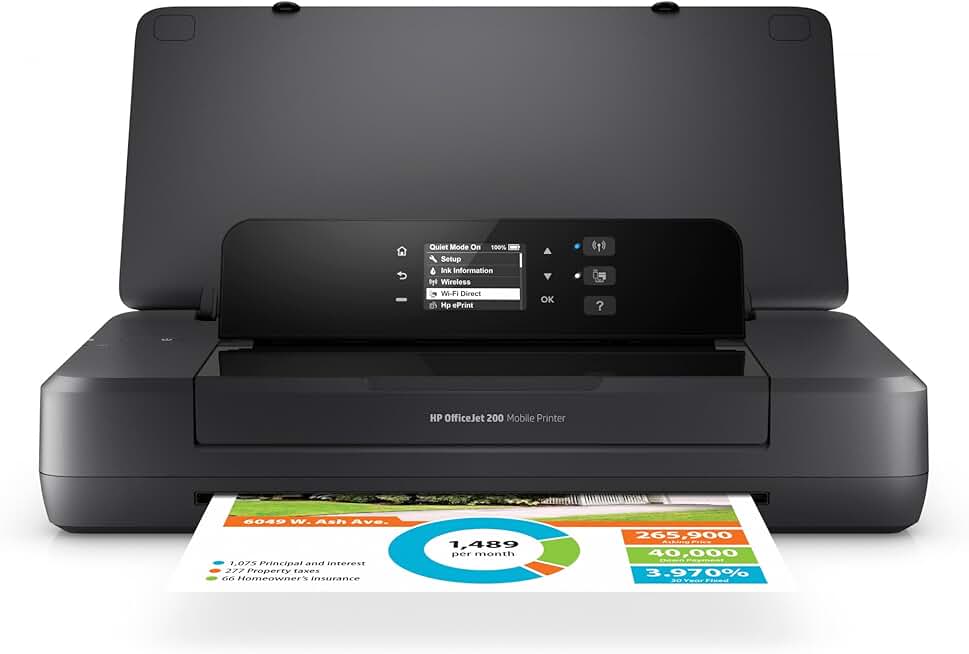
The HP OfficeJet 200 Mobile Printer represents a significant leap in portable printing technology, offering unparalleled convenience for professionals and individuals who require high-quality printing on the move. This compact and robust device is designed to meet the demands of a dynamic work environment, ensuring that productivity is never hindered by location.
Quick Summary: HP OfficeJet 200 Mobile Printer
Rating: 4.4/5.0 (Based on 2338 reviews)
Price: $329.89
Key Pros:
- Exceptional portability with integrated battery.
- Versatile wireless connectivity options (Wi-Fi Direct, USB).
- High-quality print output for documents and photos.
Key Cons:
- Ink cartridge yield can be a concern for high-volume users.
- Initial cost is higher than some entry-level desktop printers.
Table of Contents
HP OfficeJet 200 Mobile Printer Overview
The HP OfficeJet 200 Mobile Printer is engineered for individuals and small businesses that demand flexibility and efficiency, regardless of their location. This device is not just a compact printer; it’s a complete portable office solution, allowing users to print professional-quality documents and photos from virtually anywhere.
Its design prioritizes portability without compromising on performance. Weighing just over 4 pounds with the battery, it’s light enough to carry in a backpack or brief case, making it an ideal companion for business trips, client meetings, or field work. The integrated battery ensures you’re not tethered to a power outlet, providing true wireless freedom.
The HP OfficeJet 200 boasts robust wireless connectivity options, including Wi-Fi Direct, which allows for direct printing from smartphones, tablets, and laptops without needing a local network. This feature is particularly useful when working in areas with limited or no Wi-Fi access, providing a seamless printing experience.
Beyond its mobility, the printer delivers impressive print quality, capable of producing crisp text and vibrant color graphics. It utilizes HP Thermal Inkjet technology, renowned for its reliability and consistent output. This ensures that your presentations, reports, and invoices always look professional.
The user interface is intuitive, featuring a small but clear display that simplifies navigation through menus and settings. Setup is straightforward, allowing users to quickly connect and begin printing, even for those who are not particularly tech-savvy. This ease of use contributes significantly to its overall appeal.
Considering its compact size, the print speeds are respectable, making it suitable for on-demand printing of important documents. While not designed for high-volume batch printing like a traditional office printer, it excels in its niche as a rapid, portable solution for immediate printing needs.
The printer’s energy efficiency is another noteworthy aspect. Its EPEAT Silver rating signifies a commitment to environmental sustainability, using less power and incorporating recycled materials in its construction. This aligns with modern demands for eco-friendly technology.
The HP OfficeJet 200 Mobile Printer also offers a decent paper capacity for a portable unit, minimizing the need for frequent refills during typical mobile use. It supports various paper types and sizes, adding to its versatility for different printing tasks, from standard documents to custom forms.
Regular firmware updates ensure the printer remains secure and compatible with the latest operating systems and devices, prolonging its lifespan and enhancing user experience. HP’s commitment to ongoing support is a reassuring factor for long-term ownership.
This printer is a testament to HP’s engineering prowess, merging high functionality with extreme portability. It redefines what users can expect from a mobile printing device, setting a high standard for its class and proving that powerful performance can come in a small package.
The robust build quality of the HP OfficeJet 200 Mobile Printer ensures it can withstand the rigors of travel and frequent movement. Its sturdy construction protects internal components from bumps and jostles, a critical factor for any device designed for on-the-go use.
Furthermore, the printer’s quiet operation is a significant advantage in professional settings such as client offices or shared workspaces. It allows for discreet printing without causing disruption, maintaining a professional atmosphere.
For those who frequently work remotely or travel for business, the ability to print contracts, invoices, or presentations immediately can be a game-changer. This eliminates the need to search for print shops or rely on hotel business centers, saving valuable time and ensuring data security.
The integrated battery is a core component of its mobility, offering a substantial number of prints on a single charge. This capacity allows users to complete multiple printing tasks throughout the day without needing to recharge, making it genuinely independent.
Overall, the HP OfficeJet 200 Mobile Printer is more than just a convenience; it’s a productivity enhancer for anyone whose work takes them beyond the traditional office setup. Its blend of portability, performance, and features makes it a standout choice in the mobile printer market.
HP OfficeJet 200 Mobile Printer Key Features & Specs
The HP OfficeJet 200 Mobile Printer is packed with features designed to maximize productivity and convenience for users on the go. Understanding these specifications is crucial for appreciating its capabilities and how it stands out in a competitive market.
Integrated Rechargeable Battery
One of the most defining features of the OfficeJet 200 is its built-in, long-lasting rechargeable battery. This lithium-ion battery provides the power needed for extensive printing sessions, offering hundreds of pages on a single charge. It transforms the printer from a mere accessory into a truly independent mobile workstation.
The battery can be conveniently charged via an AC adapter, a car charger (sold separately), or even a USB port, providing multiple options to keep you powered up. This flexibility ensures that you can recharge your device wherever you are, adapting to various travel scenarios.
Compact and Lightweight Design
Measuring approximately 14.3 x 7 x 2.7 inches and weighing around 4.6 pounds (with battery), the HP OfficeJet 200 is incredibly compact. Its small footprint makes it easy to stow in a laptop bag, backpack, or even a larger briefcase, without adding significant bulk or weight.
This thoughtful design makes it an ideal choice for sales professionals, field technicians, students, and anyone who needs to print documents away from a traditional office setup. The robust casing also protects the internal components during transit.
Wireless Connectivity (Wi-Fi Direct)
The printer offers a suite of connectivity options, with Wi-Fi Direct being a standout. This feature allows users to connect their mobile devices and laptops directly to the printer without the need for a router or an existing Wi-Fi network. It’s perfect for printing in remote locations or when secure network access is unavailable.
In addition to Wi-Fi Direct, the printer supports standard Wi-Fi connectivity, enabling it to join existing networks for shared use. A USB 2.0 port is also included for traditional wired connections, providing maximum compatibility across different devices and scenarios.
High-Quality Printing
Despite its portable nature, the OfficeJet 200 does not compromise on print quality. It can produce crisp, sharp text documents at resolutions up to 1200 x 1200 rendered dpi for black and 4800 x 1200 optimized dpi color when printing from a computer on selected HP photo papers.
This ensures that all your printed materials, from important contracts to colorful presentations, maintain a professional appearance. The printer uses individual ink cartridges, allowing you to replace only the colors that run out, which can be more cost-effective in the long run.
Print Speed and Paper Handling
The HP OfficeJet 200 Mobile Printer offers competitive print speeds for its class. It can print black and white documents at up to 10 pages per minute (ppm) in ISO (laser-comparable) speed, and color documents at up to 7 ppm ISO. Draft speeds can be even faster, reaching up to 20 ppm for black and 18 ppm for color.
The input tray has a capacity of up to 50 sheets, which is generous for a mobile printer and reduces the frequency of paper refills during typical usage. It supports various media types, including plain paper, photo paper, brochures, envelopes, and labels, up to legal size (8.5 x 14 inches).
Intuitive Control Panel
A 2.0-inch Hi-Res Monochrome Graphic Display provides an easy-to-use interface for navigating printer settings, checking ink levels, and managing print jobs. The clear display and simple buttons make operation straightforward, even for users unfamiliar with mobile printers.
This intuitive control panel simplifies tasks like connecting to Wi-Fi, performing maintenance, and reviewing printer status, enhancing the overall user experience. It eliminates the need to constantly connect to a computer or mobile app for basic functions.
HP ePrint and Mobile Printing Apps
The OfficeJet 200 supports HP ePrint, allowing users to print from virtually anywhere by simply emailing documents to the printer’s unique email address. This feature is incredibly convenient for remote printing or when you need to send a document to your printer from a device not directly connected.
Compatibility with the HP Smart app further enhances mobile printing capabilities, offering advanced features like scanning (using your phone’s camera), ordering ink, and printing from cloud services. This suite of mobile solutions makes the HP OfficeJet 200 Mobile Printer incredibly versatile.
Energy Efficiency and EPEAT Rating
HP has designed this printer with environmental considerations in mind. It is EPEAT Silver registered, indicating a commitment to energy efficiency and reduced environmental impact throughout its lifecycle. This makes it a responsible choice for eco-conscious consumers and businesses.
Its low power consumption, especially when operating on battery power, contributes to its overall efficiency. This not only saves energy but also extends the battery life, providing more prints per charge and reducing the need for frequent recharging.
The combination of these features makes the HP OfficeJet 200 Mobile Printer a formidable tool for anyone requiring flexible and reliable printing solutions outside of a traditional office setting. Its robust feature set directly addresses the common pain points associated with mobile work, providing practical solutions for everyday tasks.
The ability to print borderless photos up to 5×7 inches is another impressive capability for a mobile printer. This allows for quick, high-quality photo prints on the go, perfect for capturing and sharing memories or for professional presentations that require visual elements.
Furthermore, the printer’s compatibility with various operating systems, including Windows, macOS, Android, and iOS, ensures broad accessibility. This cross-platform support means that virtually any device can connect and print, making it a universal tool for mobile professionals.
The inclusion of a quiet mode setting is a thoughtful addition, allowing users to reduce printing noise when working in quiet environments like libraries, coffee shops, or shared office spaces. This enhances the user’s experience and minimizes disruption to others.
Overall, the HP OfficeJet 200 Mobile Printer’s specifications and features are meticulously crafted to provide a premium mobile printing experience. It balances power, portability, and performance, making it an excellent investment for its target audience.
Pros & Cons
Every product has its strengths and weaknesses, and the HP OfficeJet 200 Mobile Printer is no exception. A balanced look at its pros and cons can help potential buyers make an informed decision about whether this portable printer is the right fit for their specific needs.
Pros of the HP OfficeJet 200 Mobile Printer
- Exceptional Portability: The integrated rechargeable battery and compact, lightweight design make this printer incredibly easy to transport. It’s designed for true mobility, allowing users to print from virtually anywhere without being tied to a power outlet.
- Versatile Wireless Connectivity: With Wi-Fi Direct, standard Wi-Fi, and USB connectivity, the printer offers multiple ways to connect and print from various devices. This flexibility is crucial for diverse working environments and ensures seamless integration with smartphones, tablets, and laptops.
- High-Quality Print Output: The OfficeJet 200 delivers sharp text and vibrant color graphics, producing professional-grade documents and photos. This quality ensures that printed materials always leave a positive impression, whether for business or personal use.
- Intuitive User Interface: The 2.0-inch monochrome graphic display and straightforward controls make the printer easy to set up and operate. Users can manage settings, check ink levels, and initiate print jobs without difficulty, enhancing overall user satisfaction.
- Decent Print Speed for a Mobile Unit: While not a speed demon, the printer offers respectable print speeds of up to 10 ppm for black and 7 ppm for color documents (ISO). This is sufficient for on-demand printing tasks typical of mobile use, ensuring efficiency.
- HP ePrint and Mobile App Support: Features like HP ePrint and compatibility with the HP Smart app expand printing possibilities, allowing remote printing via email and offering advanced management tools. These features add significant value and convenience for modern mobile users.
- Robust Build Quality: Constructed to withstand the rigors of travel, the printer’s durable casing protects its internal components. This ensures longevity and reliability, even with frequent transportation and use in various conditions.
- Energy Efficient: The EPEAT Silver rating highlights its commitment to environmental sustainability, with low power consumption. This not only reduces the carbon footprint but also maximizes battery life, providing more prints per charge.
- Quiet Operation: The printer operates quietly, a significant advantage when working in shared or sensitive environments. This allows for discreet printing without causing disruption, maintaining a professional and respectful atmosphere.
Cons of the HP OfficeJet 200 Mobile Printer
- Ink Cartridge Yield: For users with high-volume printing needs, the smaller ink cartridges typical of mobile printers can lead to more frequent replacements. This might result in a higher running cost per page compared to larger, desktop-oriented printers.
- Initial Cost: The price point of the HP OfficeJet 200 Mobile Printer is higher than many entry-level desktop inkjet printers. While justified by its advanced mobile features and integrated battery, it represents a significant upfront investment for some users.
- No Automatic Document Feeder (ADF): Unlike some larger mobile all-in-one printers, the OfficeJet 200 lacks an ADF, meaning multi-page documents must be fed manually for scanning (if using a separate mobile scanning app). This is a minor inconvenience but worth noting for those who frequently scan multiple pages.
- No Built-in Scanner/Copier Functionality: The OfficeJet 200 is purely a printer. Users needing scanning or copying capabilities will need to rely on their smartphone’s camera with an app like HP Smart or carry a separate portable scanner, which adds to the mobile kit.
- Limited Paper Capacity: While 50 sheets is good for a mobile printer, it still requires more frequent refills than a standard office printer. For very large print jobs, this could interrupt workflow and require more attention.
In summary, the HP OfficeJet 200 Mobile Printer excels in its core purpose of providing high-quality, truly mobile printing. Its advantages in portability, connectivity, and print quality make it a top contender for specific user groups. However, potential buyers should weigh these benefits against the considerations of ink yield, initial cost, and the absence of integrated scanning capabilities.
The trade-offs are generally inherent to the mobile printer category, where compactness and battery life often come at the expense of higher capacity or multifunctionality. For its intended use, the OfficeJet 200 strikes an excellent balance.
Understanding these pros and cons will help you determine if the features and limitations align with your personal or professional printing demands. It’s about finding the right tool for the job, and for mobile printing, this device offers a compelling package.
Who Should Buy the HP OfficeJet 200 Mobile Printer?
The HP OfficeJet 200 Mobile Printer is not for everyone, but for specific individuals and professionals, it is an indispensable tool. Its unique combination of features makes it perfectly suited for those whose work or lifestyle demands printing capabilities beyond the confines of a traditional office.
Sales Professionals and Field Agents
Salespeople who are constantly on the road, meeting clients, and closing deals will find this printer invaluable. The ability to print contracts, invoices, quotes, or presentation materials on the spot can significantly accelerate sales cycles and enhance professionalism. Imagine printing a revised proposal right in front of a client, securing a deal without delay.
Field agents, such as insurance adjusters, real estate agents, or property managers, often need to provide immediate documentation. Printing inspection reports, lease agreements, or policy summaries directly from a job site saves time and improves customer service. The printer’s portability ensures they can carry it easily from one location to another.
Small Business Owners and Entrepreneurs
Entrepreneurs who operate out of home offices, co-working spaces, or frequently travel for business events will benefit immensely. The OfficeJet 200 allows them to maintain a professional appearance by providing printed materials for meetings, trade shows, or pop-up shops. It eliminates reliance on external printing services, offering greater control and cost savings.
For small businesses, especially those without a fixed office, this mobile printer serves as a primary printing solution. It supports the dynamic nature of startup life, where flexibility and efficiency are paramount. The ability to print essential documents anywhere is a major advantage.
Students and Researchers
College students, especially those in specialized fields or who frequently work on group projects, can use this printer for on-the-go assignments. Printing research papers, handouts, or notes in a dorm room, library, or study group setting offers convenience. It’s also great for printing last-minute revisions before class.
Researchers conducting fieldwork or presenting at conferences can print data, posters, or supplementary materials without needing access to campus facilities. The reliable performance of the HP OfficeJet 200 Mobile Printer ensures that their critical documents are always ready when needed.
Travelers and Remote Workers
Anyone who frequently travels for work or leisure and needs to print occasional documents will appreciate the OfficeJet 200. Whether it’s boarding passes, travel itineraries, booking confirmations, or work-related documents, having a personal printer eliminates the hassle of hotel business centers or public printing services.
Remote workers who enjoy working from various locations, like coffee shops, vacation rentals, or even outdoors, can maintain productivity. This printer provides the freedom to print important documents securely and privately, regardless of their workstation for the day.
The seamless integration with mobile devices via Wi-Fi Direct makes it particularly appealing for digital nomads. They can print directly from their smartphone or tablet, streamlining their workflow and reducing dependence on physical connections or shared networks.
For individuals who value security, printing sensitive documents on their own device rather than a public printer offers peace of mind. This is a crucial consideration for legal professionals, financial advisors, or healthcare workers who handle confidential information.
Consider the scenarios where you might need to print something urgently but are far from a conventional printer. The HP OfficeJet 200 Mobile Printer fills this gap perfectly, acting as a portable safety net for all your printing needs.
It’s also an excellent choice for those who attend workshops, seminars, or training sessions and need to print materials on demand. Instructors can print extra copies of handouts, while attendees can print notes or supplementary information without interruption.
Outdoor Enthusiasts and Event Organizers
Even for less conventional uses, the OfficeJet 200 shines. Outdoor event organizers, wedding planners, or festival coordinators might need to print last-minute schedules, attendee lists, or signage on site. Its battery operation and robust design make it suitable for environments without immediate power access.
Craft show vendors or artists who sell their work at various venues can print receipts, product labels, or promotional materials on demand. This flexibility helps them adapt quickly to customer needs and maintain a professional presence wherever they set up shop.
Anyone Needing a Backup Printer
Finally, even if you have a primary desktop printer, the OfficeJet 200 can serve as an excellent backup. In case your main printer fails, or you simply need to print something privately or away from your desk, this mobile unit provides a reliable alternative. Its small size means it can be easily stored until needed.
In essence, the HP OfficeJet 200 Mobile Printer is designed for anyone who values productivity, flexibility, and convenience, and who frequently finds themselves needing to print away from a fixed office environment. Its capabilities empower users to maintain efficiency and professionalism wherever their work or life takes them.
The investment in such a device is justified by the time saved, the improved efficiency, and the enhanced professional image it provides. It transforms any location into a potential workspace, breaking down geographical barriers to productivity. Learn more about mobile printing technology on Wikipedia.
Consider your daily routine and whether the ability to print on demand would simplify your tasks or open new opportunities. For many, the answer is a resounding yes, making the HP OfficeJet 200 a smart and practical purchase.
FAQ about HP OfficeJet 200 Mobile Printer
Here are some frequently asked questions about the HP OfficeJet 200 Mobile Printer, designed to provide comprehensive answers and help clarify common concerns for prospective buyers and current users.
Q1: How long does the battery last on a single charge?
A: The integrated lithium-ion battery in the HP OfficeJet 200 Mobile Printer is designed for extended use. On a full charge, it can typically print up to 500 pages in draft mode, though actual battery life varies significantly based on usage patterns, print content (e.g., text vs. color graphics), wireless usage, and environmental conditions. For typical mixed usage, you can expect a full day’s worth of printing for most mobile professionals.
It’s important to note that printing complex color documents or using Wi-Fi extensively will consume more power than printing simple black and white text documents. The printer also has power-saving modes to help conserve battery when not actively in use.
Q2: Can I print directly from my smartphone or tablet?
A: Yes, absolutely. The HP OfficeJet 200 Mobile Printer offers robust mobile printing capabilities. It supports Wi-Fi Direct, allowing you to connect your smartphone or tablet directly to the printer without needing a Wi-Fi router. Additionally, it is compatible with the HP Smart app, available for iOS and Android, which enables easy printing from your mobile devices, managing printer settings, and even ordering ink.
The printer also supports HP ePrint, which lets you email documents directly to the printer’s unique email address from any internet-connected device. This broad range of mobile connectivity ensures maximum flexibility for printing from your preferred mobile device.
Q3: What type of ink cartridges does the OfficeJet 200 use?
A: The HP OfficeJet 200 Mobile Printer uses two individual ink cartridges: one black cartridge (HP 62 or 62XL) and one tri-color cartridge (HP 62 or 62XL). The ‘XL’ versions offer a higher page yield, which can be more cost-effective for users who print more frequently, reducing the cost per page and the need for frequent replacements.
Using genuine HP ink cartridges is recommended to ensure optimal print quality and printer longevity. These cartridges are specifically designed to work with the printer’s thermal inkjet technology, providing consistent and reliable results.
Q4: Is the printer compatible with macOS and Windows?
A: Yes, the HP OfficeJet 200 Mobile Printer is fully compatible with both macOS and Windows operating systems. HP provides drivers and software for various versions of both operating systems, ensuring seamless integration. You can connect via USB or wirelessly through Wi-Fi.
For macOS users, the printer often works with built-in AirPrint functionality, simplifying setup. Windows users can download the necessary drivers from the HP support website. This broad compatibility makes it a versatile choice for users across different computing platforms.
Q5: Can this printer handle different paper sizes and types?
A: Yes, the OfficeJet 200 is quite versatile in its paper handling. It supports a range of paper sizes, including standard letter (8.5 x 11 inches), legal (8.5 x 14 inches), A4, A5, B5, and various photo paper sizes (e.g., 4×6, 5×7 inches). It can also print on envelopes and labels.
In terms of paper types, it handles plain paper, HP photo papers, HP matte brochure or professional paper, HP glossy brochure or professional paper, and other specialty inkjet papers. The input tray has a capacity of up to 50 sheets of plain paper, which is suitable for most mobile printing tasks.
Q6: Does the HP OfficeJet 200 have scanning or copying capabilities?
A: No, the HP OfficeJet 200 Mobile Printer is a dedicated printer only. It does not have built-in scanning or copying functionality. If you require these features while on the go, you would need to use your smartphone’s camera in conjunction with the HP Smart app for scanning, or carry a separate portable scanner.
This design choice helps keep the printer compact and lightweight, prioritizing its core function of mobile printing. For users who primarily need to print documents and occasionally scan using their phone, this limitation is often manageable.
Q7: How durable is the printer for travel?
A: The HP OfficeJet 200 is designed with travel and durability in mind. Its robust construction and compact form factor make it well-suited to withstand the bumps and jostles of being carried in a bag or brief case. The components are built to be resilient, and the printer’s overall design minimizes fragile external parts.
While it’s not designed for extreme rugged use, it holds up very well to typical business travel and daily commuting. Proper care, such as using a protective carrying case, can further extend its lifespan and ensure its continued performance on the road. You can find more details on product specifications at the HP Official Product Page.
Q8: What is the typical operating noise level of the printer?
A: The HP OfficeJet 200 Mobile Printer operates at a relatively low noise level, which is a significant advantage for a mobile device. While printing, it produces around 45-50 dB(A), which is comparable to a quiet conversation. It also features a ‘Quiet Mode’ setting that can further reduce the noise, albeit sometimes at a slightly slower print speed.
This quiet operation makes it suitable for use in professional environments like client offices, libraries, or shared workspaces where minimizing disruption is important. It allows for discreet printing without drawing undue attention.
Final Verdict
The HP OfficeJet 200 Mobile Printer stands out as an ultimate portable powerhouse, proving to be an exceptional choice for anyone in need of reliable, high-quality printing capabilities on the go. Its blend of compact design, integrated battery, and versatile connectivity truly redefines mobile productivity. For professionals whose office is wherever they are, this printer is not just a convenience but a necessity.
While the initial investment is higher than some desktop counterparts and ink cartridge yields might require more frequent attention for heavy users, these are minor trade-offs for the unparalleled freedom and efficiency it offers. The print quality is consistently impressive, delivering crisp text and vibrant colors that maintain a professional standard for all your documents.
The ease of use, thanks to its intuitive control panel and extensive mobile app support, makes it accessible even for those who are not tech-savvy. Its robust build ensures it can handle the demands of frequent travel, making it a durable companion for any mobile professional or student.
In conclusion, if your work or lifestyle requires a dependable, high-performance printer that can truly go anywhere with you, the HP OfficeJet 200 Mobile Printer is undoubtedly worth the investment. It’s a brilliant piece of engineering that seamlessly integrates into a mobile workflow, empowering users to stay productive and professional, no matter the location.
This printer is more than just a gadget; it’s a strategic tool that can significantly enhance efficiency and responsiveness in a fast-paced, mobile world. Its ability to turn any location into a functional workspace makes it a top recommendation for its target audience.