The Cricut Explore 4 smart cutting machine, especially in its appealing Seashell hue and comprehensive Engagement Bundle, stands out as a remarkable tool for crafters and DIY enthusiasts alike. This innovative device promises to transform your creative projects, offering precision, versatility, and ease of use for a wide array of materials and designs. Our in-depth review will explore every facet of this machine, from its core capabilities to the incredible value packed into its accompanying bundle, ensuring you understand exactly what makes it a stellar addition to any creative workspace.
Quick Summary: Cricut Explore 4
- Rating: 4.6/5 stars (361 reviews)
- Price: $299.00 USD
- Key Pros:
- Exceptional value with comprehensive Engagement Bundle
- Versatile cutting for over 100 materials, including Smart Materials
- User-friendly Design Space software for easy project creation
- Key Cons:
- Requires internet connection for Design Space functionality
- Some materials may require specific mats or accessories
Table of Contents
Cricut Explore 4 Overview
The Cricut Explore 4 represents the latest iteration in Cricut’s highly popular Explore series, designed to bring professional-level crafting capabilities into the homes of hobbyists and small business owners. This smart cutting machine is engineered to cut over 100 different materials with precision, from delicate paper and cardstock to iron-on vinyl, adhesive vinyl, and even some thicker materials like bonded fabric and glitter cardstock. Its core function is to allow users to design virtually anything on their computer or mobile device and then have the machine cut it out flawlessly.
What truly sets the Cricut Explore 4 apart, especially in this specific offering, is the comprehensive Engagement Bundle. This bundle is meticulously curated to provide new users with a complete starter kit, eliminating the need to purchase essential supplies separately. It includes a variety of Smart Materials, which are a game-changer for crafters, allowing for mat-free cutting up to 12 feet long. This feature significantly speeds up workflows and enables larger, more ambitious projects that were previously cumbersome.
The machine itself boasts a sleek and compact design, making it an attractive addition to any craft room or home office. The Seashell color variant adds a touch of elegance and uniqueness, distinguishing it from the more standard white or mint green models. Beyond aesthetics, its robust build quality ensures durability and consistent performance over countless projects, making it a reliable workhorse for both casual and intensive crafting sessions.
The operational backbone of the Cricut Explore 4 is the intuitive Design Space software. This free, cloud-based platform is where all the magic happens, allowing users to browse thousands of ready-to-make projects, create their own designs from scratch, or upload their own images. Design Space offers a user-friendly interface that caters to both beginners and experienced designers, providing tools for text editing, image manipulation, and project layout. Its seamless integration with the machine ensures a smooth transition from design to cut.
For those new to the world of digital cutting, the Cricut Explore 4 serves as an excellent entry point. Its balance of power, versatility, and user-friendliness makes it less intimidating than some of its more industrial counterparts, while still delivering professional-grade results. Whether you’re looking to personalize gifts, create custom home decor, design intricate cards, or launch a small business selling custom apparel, this machine provides the foundation for endless creative possibilities. It truly empowers users to bring their imaginative ideas to life with precision and efficiency, redefining what’s possible in personal crafting.
The machine’s ability to handle various materials opens up a vast realm of crafting opportunities. From creating custom decals for water bottles and laptops using adhesive vinyl to designing personalized t-shirts and fabric items with iron-on HTV, the applications are extensive. Imagine crafting unique party decorations, intricate stencil designs for painting, or even custom labels for your pantry. The Cricut Explore 4 simplifies complex cutting tasks, making them accessible and enjoyable for everyone. For more information on Cricut machines and their capabilities, you can visit the official Cricut website.
Cricut Explore 4 Key Features & Specs
The Cricut Explore 4 is packed with features designed to enhance the crafting experience, making it both powerful and user-friendly. One of its most significant advancements is its compatibility with Smart Materials. These innovative materials, including Smart Vinyl and Smart Iron-On, allow for cutting without a mat, enabling projects up to 12 feet long. This not only saves time but also expands the scale of projects you can undertake, from large wall decals to continuous banners.
Under the hood, the machine boasts impressive cutting force and speed. While specific force details are typically reserved for the Maker series, the Explore 4 is perfectly capable of cutting over 100 different types of materials with precision and efficiency. Its adaptive tool system supports a fine-point blade for intricate cuts, a bonded-fabric blade for textiles, and a deep-point blade for thicker materials, offering considerable versatility for various project types.
The dual tool carriage is another standout feature, allowing the machine to hold two different tools simultaneously. This means you can cut and score, or cut and write, in one go without having to manually switch tools during a project. This streamlines the creative process, saving valuable time and reducing the chances of errors. Imagine cutting out intricate shapes while simultaneously adding perfect handwritten text details.
Wireless connectivity via Bluetooth is standard, providing freedom from tangled wires and allowing you to design and cut from your computer, tablet, or smartphone. This flexibility means you can work from anywhere in your home or studio, sending projects to your Cricut Explore 4 with ease. The machine also includes a USB port for wired connection options, ensuring reliability regardless of your setup.
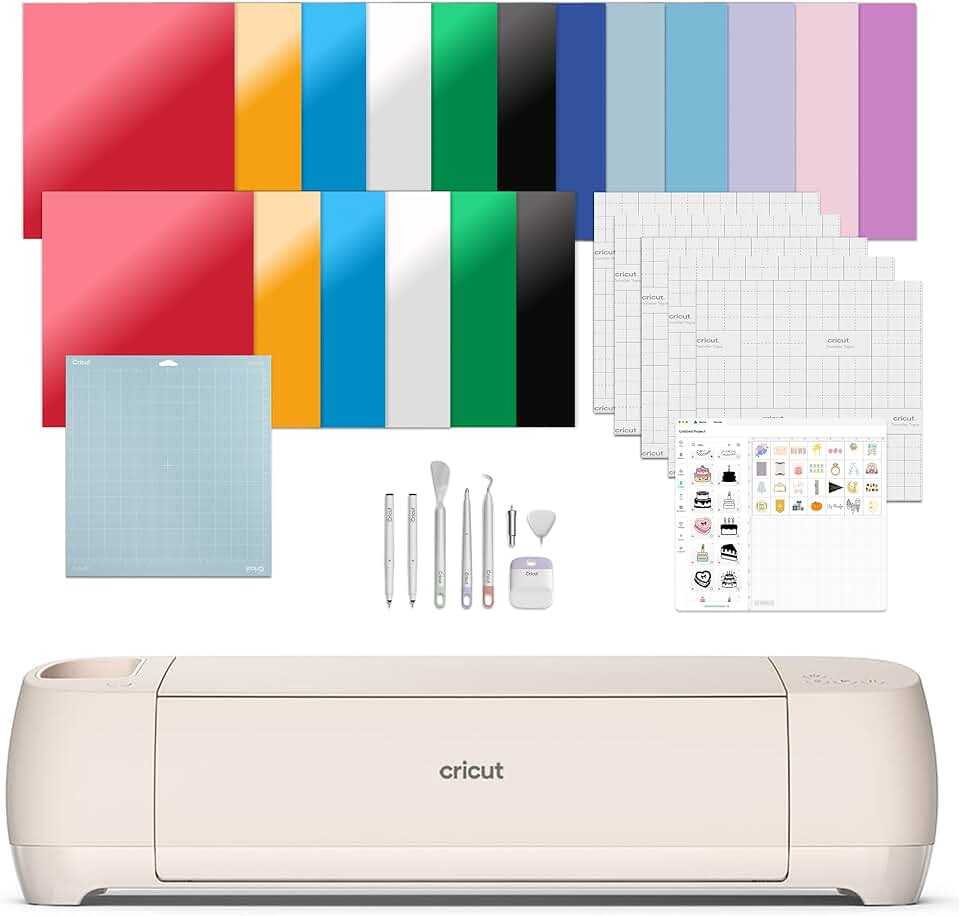
The Engagement Bundle specifically enhances the value proposition of the Cricut Explore 4. It includes a generous assortment of essential materials and tools: multiple rolls of Smart Vinyl for various adhesive projects, a pack of vibrant cardstock for paper crafts, transfer tape for applying vinyl decals, and iron-on HTV (Heat Transfer Vinyl) for customizing apparel. These materials alone represent a significant investment if purchased separately, making the bundle an economical choice for new crafters.
Furthermore, the bundle comes with a standard grip cutting mat, which is essential for non-Smart Materials, a basic tool kit for weeding and applying, and a set of Cricut pens for drawing and writing. To kickstart your creativity, it also includes access to 30 free images in the Design Space App. This comprehensive starter pack ensures that you can unbox your machine and begin creating immediately, without any additional purchases needed to get going.
The Seashell color of this particular Cricut Explore 4 model is not just a cosmetic detail; it offers a fresh and modern aesthetic that can inspire creativity. This machine maintains the robust build quality and reliability that Cricut is known for, ensuring that it can withstand frequent use. Its integrated storage compartments keep tools organized and within reach, contributing to a tidy and efficient workspace. The combination of hardware and the rich bundle contents truly makes this machine a powerful creative hub.
Pros & Cons of the Cricut Explore 4
Pros:
- Exceptional Bundle Value: The Engagement Bundle included with the Cricut Explore 4 is a significant advantage. It provides a wide range of essential materials and tools, from Smart Vinyl and cardstock to a cutting mat and tool kit, making it an excellent all-in-one starter package for new crafters. This saves money and eliminates the guesswork of what to buy first.
- Versatile Material Compatibility: This machine can precisely cut over 100 different materials, including popular choices like paper, cardstock, iron-on, adhesive vinyl, and even bonded fabric. This versatility allows for a vast array of projects, from custom apparel to intricate cards and home decor. The ability to switch between materials seamlessly is a huge benefit.
- Smart Materials for Mat-Free Cutting: The Cricut Explore 4 supports Smart Materials, which can be cut directly without a mat. This feature is revolutionary for larger projects, enabling cuts up to 12 feet long. It significantly speeds up the workflow and reduces the hassle of preparing mats, making big projects much more manageable and efficient.
- User-Friendly Design Space Software: Cricut’s Design Space software is intuitive and accessible for all skill levels. It offers a vast library of pre-designed projects, fonts, and images, alongside robust tools for creating custom designs. Its cloud-based nature means you can access your projects from any device, and its consistent updates introduce new features and improvements regularly.
- Precision and Accuracy: The Cricut Explore 4 delivers consistently precise cuts, ensuring clean lines and intricate details in every project. This accuracy is crucial for professional-looking results, whether you’re cutting tiny lettering for a decal or complex patterns for a layered card. The machine’s engineering ensures consistent performance project after project.
- Dual Tool Carriage for Efficiency: The ability to hold two tools at once means you can perform multiple functions in a single pass. For example, you can cut and score, or cut and write, without stopping to change tools. This feature significantly streamlines the crafting process, saving time and improving overall project efficiency, especially for multi-step designs.
- Wireless Bluetooth Connectivity: Bluetooth connectivity allows for seamless operation from your computer, tablet, or smartphone without the need for a physical connection. This provides flexibility in your workspace setup and makes it incredibly convenient to send designs to your machine from various devices. It keeps your crafting area tidy and free of cables.
Cons:
- Internet Dependency for Design Space: While Design Space offers an offline mode for saved projects, a consistent internet connection is generally required for full functionality, including browsing new images, fonts, and projects, or syncing your designs. This can be a drawback for users in areas with unreliable internet access or those who prefer to work completely offline.
- Proprietary Materials and Accessories: While the Cricut Explore 4 can use some third-party materials, Cricut often encourages the use of its own branded materials and accessories for optimal results and warranty compliance. These proprietary items can sometimes be more expensive than generic alternatives, potentially increasing long-term costs for frequent crafters.
- Learning Curve for Software: Although Design Space is user-friendly, there is still a learning curve for new users, especially those unfamiliar with graphic design software. Mastering all its features and understanding how to best prepare designs for cutting can take time and practice. Tutorials and online communities are helpful, but initial frustration is possible.
- Initial Cost: Despite the excellent value of the bundle, the upfront investment for the Cricut Explore 4 can be significant for some budgets. While it’s a worthwhile investment for serious crafters, it might be a barrier for those just looking to dabble in crafting without a major commitment. However, the bundle mitigates some of this by including so many essentials.
- Potential for Material Waste: Like any cutting machine, there’s a learning curve involved in optimizing material usage. Mistakes in design, mat placement, or settings can lead to wasted materials, which can add up over time, especially with more expensive specialty materials. Careful planning and practice are key to minimizing waste.
Who Should Buy the Cricut Explore 4?
The Cricut Explore 4 with its Engagement Bundle is an ideal choice for a diverse range of individuals, from complete crafting novices to seasoned DIY enthusiasts and even small business owners. Its blend of power, ease of use, and comprehensive starter kit makes it particularly appealing to those looking for an all-in-one solution to kickstart or expand their creative endeavors. This machine is designed to cater to a broad audience, offering something for almost everyone interested in digital cutting.
Beginner Crafters: If you’re new to the world of vinyl cutting, paper crafting, or personalized DIY projects, the Cricut Explore 4 is an excellent starting point. The included bundle provides all the necessary materials and tools, removing the intimidation factor of having to figure out what to buy separately. The Design Space software is also incredibly user-friendly, with plenty of tutorials and a supportive online community to guide you through your first projects. You can literally unbox it and start creating almost immediately.
Small Business Owners: Entrepreneurs looking to create custom products like t-shirts, mugs, decals, personalized gifts, or greeting cards will find the Cricut Explore 4 to be a valuable asset. Its precision and ability to cut various materials efficiently can help produce high-quality, professional-looking items in small batches. The Smart Materials feature is especially beneficial for streamlining production and handling larger designs without interruption, boosting productivity for your business.
Home Decor Enthusiasts: For those who love to personalize their living space, this machine opens up a world of possibilities. Create custom wall decals, stencil designs for painting furniture, personalized labels for pantry organization, or unique decorations for holidays and special occasions. The Seashell color of the machine can also blend beautifully into a stylish home office or craft room, adding to its appeal as a home decor tool.
Teachers and Educators: The Cricut Explore 4 can be an invaluable tool in educational settings. Teachers can use it to create engaging classroom decorations, educational aids, flashcards, and personalized learning materials. Students can also use it for art projects, science fair displays, or even creating custom school spirit items. Its robust nature means it can withstand the demands of a classroom environment.
Gift Givers and Personalizers: If you enjoy giving thoughtful, handmade gifts, the Cricut Explore 4 will quickly become your best friend. From custom-designed cards and intricate gift tags to personalized apparel and etched glassware (with the right accessories), the machine allows you to add a unique, personal touch to every present. The ability to create bespoke items makes your gifts truly stand out.
Hobbyists and Upgraders: Current crafters who are looking to upgrade from older, less capable machines, or those who want to expand their material capabilities, will appreciate the advancements of the Cricut Explore 4. Its Smart Material compatibility and enhanced speed offer a significant improvement over basic models, providing more options and greater efficiency for existing projects. It strikes a great balance between the entry-level Joy and the professional-grade Maker.
Essentially, anyone with a desire to create custom, professional-quality items with ease and precision will benefit from the Cricut Explore 4. Its comprehensive bundle ensures that you have everything you need to start your creative journey immediately, making it a fantastic investment for personal enjoyment, educational purposes, or even entrepreneurial ventures. For creative inspiration and project ideas, many online communities and blogs, like The Craft Patch Blog, offer fantastic resources.
FAQ about Cricut Explore 4
Q1: What materials can the Cricut Explore 4 cut?
The Cricut Explore 4 is incredibly versatile, capable of cutting over 100 different materials. This includes a wide range of popular crafting essentials such as paper, cardstock, iron-on (HTV), adhesive vinyl, poster board, and even some specialty materials like bonded fabric, glitter cardstock, and faux leather. Its precision cutting allows for intricate designs on both thin and moderately thick materials, making it suitable for a vast array of projects. The machine’s adaptive tool system ensures optimal cutting performance across these diverse material types.
Q2: Is the Cricut Explore 4 easy for beginners?
Yes, the Cricut Explore 4 is widely considered one of the most beginner-friendly smart cutting machines available. Its intuitive Design Space software provides a guided experience, with numerous tutorials and pre-designed projects to help new users get started. The included Engagement Bundle further simplifies the process by providing all essential materials and tools, removing the need for separate purchases. While there’s a slight learning curve, most beginners can create impressive projects after just a few hours of practice.
Q3: What is “Smart Material” and why is it important?
Smart Material refers to Cricut’s proprietary line of materials (like Smart Vinyl and Smart Iron-On) specifically designed to be fed directly into the Cricut Explore 4 without the need for a cutting mat. This is important because it allows for longer, continuous cuts up to 12 feet, which is perfect for large-scale projects like wall decals or banners. Mat-free cutting also streamlines the crafting process, saving time and reducing material preparation, making it a significant convenience feature for many crafters.
Q4: Do I need a subscription for Cricut Design Space?
No, you do not need a paid subscription to use Cricut Design Space with your Cricut Explore 4. The software itself is free to download and use, allowing you to upload your own images, use your own fonts, and access a selection of free projects and images. Cricut Access is an optional paid subscription that offers unlimited use of a vast library of fonts, images, and projects, along with other benefits like discounts. Many crafters find the free version sufficient for their needs, especially with the 30 free images included in this bundle.
Q5: How does the Explore 4 compare to the Cricut Maker?
The Cricut Explore 4 is an excellent all-around machine, ideal for a wide range of popular materials like vinyl, iron-on, cardstock, and bonded fabric. The Cricut Maker series, however, is Cricut’s professional-grade machine, offering more cutting force and compatibility with a wider array of specialized tools (like the Knife Blade for balsa wood and the Rotary Blade for unbonded fabric) and over 300 materials.
If you plan to cut thicker, denser materials regularly, or work with unbacked fabrics, the Maker might be a better fit. For most common crafting projects, the Explore 4 is more than sufficient and often more budget-friendly.
Q6: What’s included in the Engagement Bundle?
The Engagement Bundle for the Cricut Explore 4 is quite comprehensive. It typically includes the Cricut Explore 4 machine itself (in Seashell color), a variety of Smart Vinyl, Smart Iron-On (HTV), cardstock, and transfer tape. Additionally, it comes with a standard grip cutting mat, a basic tool kit (often including a weeder, scraper, and spatula), a set of Cricut pens for drawing, and access to 30 free images within the Design Space App. This bundle is designed to provide everything a new crafter needs to start creating immediately.
Q7: Can I use third-party materials with the Cricut Explore 4?
While Cricut encourages the use of its own branded materials for optimal results and to ensure warranty compliance, the Cricut Explore 4 can indeed cut many third-party materials. Crafters often use generic brands of vinyl, cardstock, and iron-on with success, though some experimentation with cut settings might be required. It’s generally recommended to test a small piece of any new, non-Cricut material before committing to a large project to ensure desired results and prevent potential damage to your machine or mat.
Q8: What kind of projects can I make with this machine?
With the Cricut Explore 4, the project possibilities are nearly endless. You can create custom t-shirts, tote bags, and other apparel using iron-on vinyl. Design personalized decals for mugs, water bottles, cars, or laptops with adhesive vinyl. Craft intricate greeting cards, party invitations, and scrapbooking elements from cardstock and paper. Make custom stencils for painting, design unique home decor items, or organize your pantry with custom labels. The versatility of the materials it cuts allows for a vast array of DIY, home renovation, and gift-making projects.
Final Verdict
The Cricut Explore 4 in its Seashell variant, especially when paired with the generous Engagement Bundle, truly stands out as an exceptional smart cutting machine that delivers incredible value. It strikes a near-perfect balance between advanced features and user-friendliness, making it an ideal choice for both crafting newcomers and experienced DIY enthusiasts. The machine’s ability to precisely cut over 100 different materials, combined with the groundbreaking convenience of Smart Materials for mat-free cutting, sets it apart in its category.
The comprehensive Engagement Bundle is a significant highlight, offering a thoughtful collection of essential materials and tools that allow users to dive into crafting immediately upon unboxing. This eliminates the often-overwhelming task of purchasing supplies separately and ensures that you have everything needed to bring your initial creative visions to life. From Smart Vinyl to iron-on HTV, cardstock, and a basic tool kit, the bundle provides a robust foundation for countless projects.
While the reliance on Design Space and a consistent internet connection might be a minor drawback for some, the software’s intuitive interface, vast project library, and continuous updates more than compensate. The precision of the cuts, the efficiency of the dual tool carriage, and the freedom of wireless Bluetooth connectivity all contribute to a smooth and enjoyable crafting experience, consistently yielding professional-looking results that will impress. The elegant Seashell color adds a stylish touch to any workspace.
For anyone looking to personalize their home, create unique gifts, start a small crafting business, or simply explore their creative potential, the Cricut Explore 4 with this Engagement Bundle is a highly recommended investment. It’s a powerful, versatile, and accessible tool that empowers users to transform ideas into tangible creations with remarkable ease and precision. This machine is truly an amazing value, promising years of creative enjoyment and high-quality output.