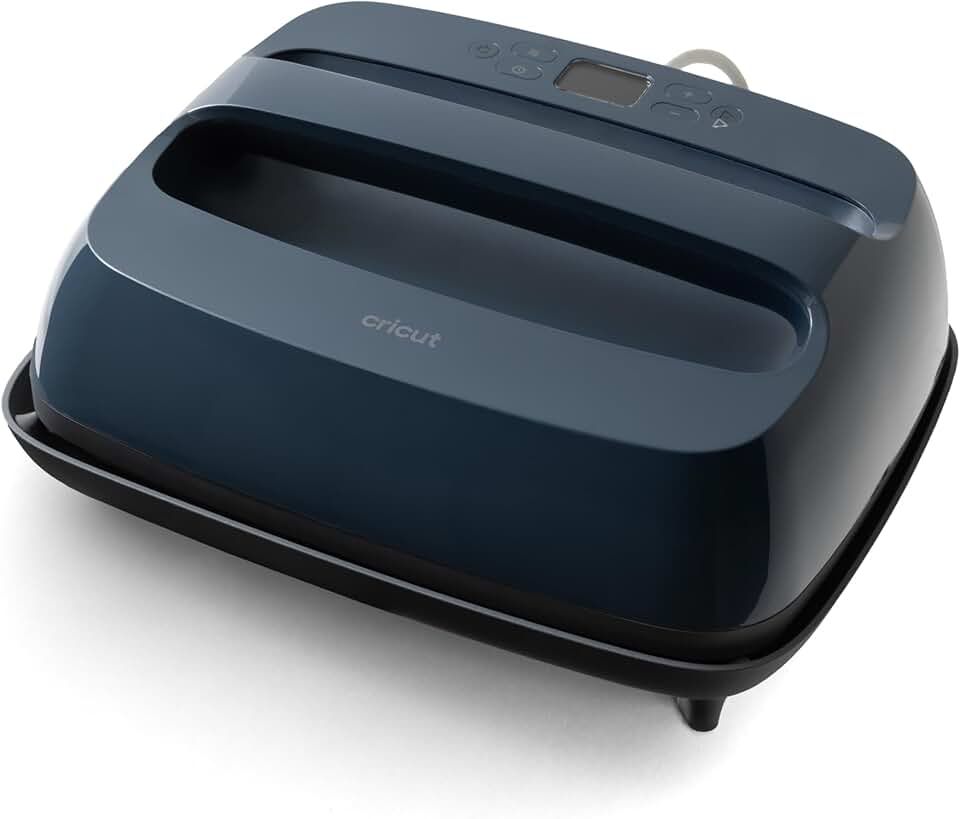
The Cricut EasyPress 2 has revolutionized the way crafters and DIY enthusiasts approach heat transfer projects. This innovative heat press offers a professional, iron-on result without the bulk and complexity of traditional heat press machines.
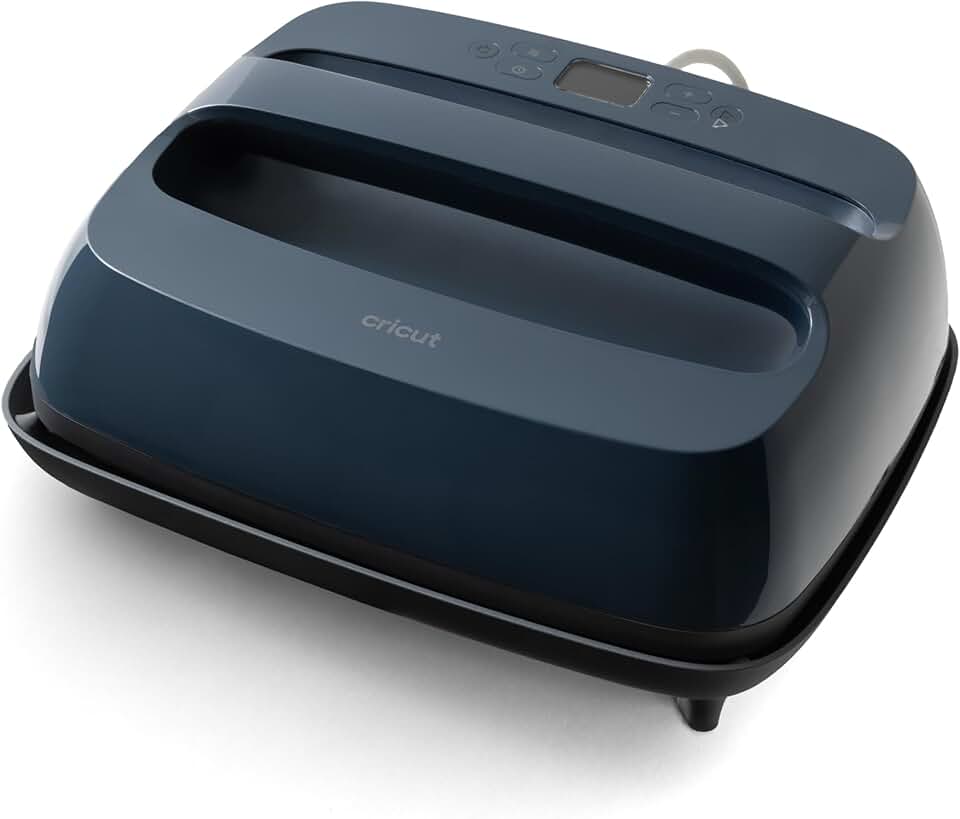
It bridges the gap between a standard household iron and a full-sized commercial heat press, providing consistent heat and pressure for flawless transfers every time. For anyone serious about creating custom apparel, home decor, or personalized gifts, the Cricut EasyPress 2 is an essential tool.
Quick Summary: Cricut EasyPress 2 (12×10)
Rating: 4.8/5.0 (Based on 8782 reviews)
Price: ~$119.00 USD
Key Pros:
- Professional Results: Delivers consistent, even heat for durable transfers that outlast many washes.
- User-Friendly: Simple interface with precise temperature and time controls, making it accessible for beginners and experienced crafters alike.
- Portable & Compact: Lighter and less bulky than traditional heat presses, ideal for small spaces and easy storage.
Key Cons:
- Manual Pressure: Requires user-applied pressure, which can lead to inconsistencies if not careful.
- Limited Size: The 12×10 inch size, while versatile, might be too small for very large projects, necessitating multiple presses.
Table of Contents
Cricut EasyPress 2 Overview
The Cricut EasyPress 2 is a versatile heat press machine designed for crafters who demand professional-quality iron-on results with minimal fuss. It combines the speed of a heat press with the convenience of an iron, making it an ideal tool for a wide range of projects.
This model, specifically the 12×10 inch version, offers a generous heating plate size that is perfect for T-shirts, tote bags, pillows, and even larger items like blankets when used with multiple presses. Its intelligent design focuses on delivering consistent, edge-to-edge heat.
Unlike a traditional iron, which often has cold spots and uneven heating, the EasyPress 2 maintains a precise temperature across its entire ceramic-coated plate. This consistency is crucial for ensuring that your heat transfer vinyl (HTV) or Infusible Ink designs adhere properly and last through numerous washes.
The user interface is remarkably straightforward, featuring a clear digital display for temperature and time settings. With just a few button presses, you can set your desired heat and duration, taking the guesswork out of heat transfer projects.
Safety is also a key consideration in its design. The EasyPress 2 includes an insulated safety base that protects your work surface from heat, and an auto-shutoff feature provides peace of mind, activating after a period of inactivity.
Its relatively compact size and lighter weight compared to industrial heat presses make it highly portable and easy to store in a crafting space. This makes the Cricut EasyPress 2 a fantastic option for those with limited space or who need to transport their crafting tools.
The device heats up quickly, allowing you to get started on your projects without long waiting times. This efficiency is a significant advantage, especially for those producing multiple items or working on time-sensitive crafts.
The Cricut EasyPress 2 is not just a tool; it’s an enabler for creativity, allowing users to confidently tackle projects that require durable, professional-looking heat transfers. Its robust build quality suggests it’s built to last, providing reliable performance for countless crafting sessions.
Whether you’re decorating apparel for personal use, creating custom gifts, or even starting a small business, the consistent performance of this heat press ensures your creations stand out. The 12×10 inch size strikes a perfect balance between accommodating larger designs and maintaining a manageable footprint.
It’s important to remember that while the EasyPress 2 provides excellent heat, the user is responsible for applying consistent pressure. This manual element gives you control but also requires a bit of practice to perfect, ensuring even adhesion across your entire design.
Cricut EasyPress 2 Key Features & Specs
The Cricut EasyPress 2 is packed with features designed to simplify the heat transfer process and deliver superior results. Understanding these key specifications helps users leverage its full potential for various crafting projects.
At its core, the most defining feature is its 12 in x 10 in ceramic-coated heat plate. This generous size allows for the creation of substantial designs on items like adult T-shirts, large tote bags, and even small blankets without needing to reposition the material too frequently. The ceramic coating ensures even heat distribution and prevents scorching.
The device boasts precise temperature control up to 400°F (205°C). This wide temperature range accommodates a vast array of heat transfer materials, including different types of HTV, Infusible Ink, and even some sublimation projects. The digital display makes setting the exact temperature straightforward and highly accurate.
Complementing the temperature control is the accurate timer function, adjustable up to 60 seconds. This allows users to follow material-specific instructions precisely, which is critical for optimal adhesion and longevity of designs. The countdown timer, coupled with an audible beep, ensures you press for the perfect duration.
A significant advantage of the EasyPress 2 is its rapid heat-up time. It reaches desired temperatures significantly faster than its predecessor, allowing crafters to spend less time waiting and more time creating. This efficiency is a huge plus for high-volume projects or when you’re short on time.
Safety features are thoughtfully integrated. The insulated safety base provides a secure resting spot for the hot plate, protecting your workspace from heat damage. Furthermore, the auto-shutoff feature automatically turns off the machine after a period of inactivity, preventing accidents and conserving energy.
Despite its powerful heating capabilities, the Cricut EasyPress 2 maintains a relatively lightweight and portable design. Weighing in at approximately 8.2 lbs, it’s easy to move between workspaces or take to crafting events. Its compact form factor makes storage hassle-free, a common concern for many crafters.
The machine is also equipped with a USB port for firmware updates, ensuring that your EasyPress 2 can stay current with the latest features and improvements from Cricut. This forward-thinking design adds to the longevity and value of the device.
Another subtle yet crucial feature is the intuitive user interface. The minimal button layout and clear digital readout simplify operation, making it accessible even for those new to heat pressing. There’s no complex programming or steep learning curve.
Finally, the build quality of the Cricut EasyPress 2 is robust, suggesting it’s designed for frequent use. The sturdy handle provides a comfortable grip for applying pressure, and the overall construction feels durable and reliable, a testament to Cricut’s engineering.
These features collectively make the EasyPress 2 a powerhouse for creative projects, offering a blend of precision, safety, and user-friendliness. From small intricate designs to larger apparel customizations, its capabilities are extensive.
Pros & Cons
Every tool has its strengths and weaknesses, and the Cricut EasyPress 2 is no exception. A balanced understanding of its pros and cons is essential for any potential buyer to make an informed decision.
Pros of the Cricut EasyPress 2:
-
Exceptional Heat Consistency: One of the most significant advantages is its ability to deliver precise, even heat across the entire plate. Unlike household irons, which often have hot and cold spots, the EasyPress 2 ensures your designs adhere uniformly, preventing peeling and lifting.
This consistent heat is crucial for the longevity of your projects, especially when working with materials like HTV and Infusible Ink that require specific temperature profiles for proper adhesion. It significantly reduces project failure rates due to uneven heating.
-
User-Friendly Operation: The EasyPress 2 is remarkably simple to use, even for crafting novices. Its intuitive digital display allows for quick and accurate setting of temperature and time, eliminating guesswork. There are no complex settings or steep learning curves.
This ease of use makes it accessible to a broader audience, encouraging more people to dive into heat transfer crafting. The clear instructions and minimal buttons contribute to a smooth crafting experience.
-
Portability and Compact Design: Compared to bulky, traditional clamshell heat presses, the EasyPress 2 is much lighter and more compact. This makes it easy to store in smaller crafting spaces, transport to workshops, or simply move around your home.
Its portability is a huge benefit for crafters who don’t have a dedicated, large craft room or who frequently craft on the go. It balances professional results with practical space considerations.
-
Versatility Across Materials: The wide temperature range (up to 400°F) allows the EasyPress 2 to work with a diverse range of heat transfer materials. This includes various types of heat transfer vinyl, Cricut’s Infusible Ink, iron-on patches, and even some sublimation applications.
This versatility means you’re not limited in your creative choices, enabling you to experiment with different effects and finishes on a variety of fabric types and blanks.
-
Integrated Safety Features: Safety is paramount, and Cricut has included thoughtful features like an insulated safety base and an auto-shutoff function. The safety base protects your work surface from the hot plate, while the auto-shutoff prevents overheating and accidents if the machine is left unattended.
These features provide peace of mind, especially for users who might be new to using high-temperature crafting tools. They contribute to a safer crafting environment.
Cons of the Cricut EasyPress 2:
-
Manual Pressure Application: Unlike hydraulic or pneumatic heat presses that apply consistent, even pressure automatically, the EasyPress 2 requires the user to apply downward pressure manually. While the machine itself ensures even heat, inconsistent pressure can lead to uneven adhesion or durability issues.
This means there’s a slight learning curve to mastering the right amount and distribution of pressure, especially on larger designs or when working with delicate materials. It requires user technique to achieve truly perfect results.
-
Size Limitations for Very Large Projects: While the 12×10 inch plate is versatile, it might be too small for very large items that exceed its dimensions significantly, such as oversized apparel or large fabric banners. For such projects, multiple presses are required, which can introduce seams or slight variations.
Crafters frequently working on very large-scale items might find a full-sized clamshell press more efficient. However, for most common crafting projects, the 12×10 size is quite adequate.
-
No Automatic Timer Reset: After a press cycle, the timer needs to be manually reset for the next press. While a minor inconvenience, it can add a small delay and require an extra step during repetitive tasks, especially in a production setting.
This is a small design choice that could be improved for even greater efficiency, though it doesn’t detract significantly from the overall functionality.
Who Should Buy the Cricut EasyPress 2?
The Cricut EasyPress 2 is an excellent investment for a specific demographic of crafters and small business owners. Understanding who benefits most from its features can help you decide if it’s the right tool for your needs.
Hobby Crafters and DIY Enthusiasts: If you enjoy personalizing T-shirts, creating custom tote bags, or adding iron-on designs to home decor items, the EasyPress 2 is perfect. Its ease of use and professional results elevate your projects beyond what a household iron can achieve.
It’s ideal for those who want consistent, long-lasting results without the learning curve or bulk of a traditional heat press. The intuitive controls make it approachable for beginners, while the quality output satisfies experienced crafters.
Small Business Owners: For individuals running a small online shop or selling custom merchandise, the EasyPress 2 offers a cost-effective solution for producing high-quality items. Its reliability ensures consistent product quality, which is crucial for customer satisfaction.
While not designed for industrial-scale production, it can handle a steady flow of orders for personalized apparel, mugs (with appropriate attachments), and other custom goods. The 12×10 inch size is versatile enough for most common business applications.
Users with Limited Space: Crafting can often lead to cluttered workspaces. The compact and lightweight design of the EasyPress 2 makes it an excellent choice for those with limited dedicated crafting areas. It’s easy to pull out for use and store away neatly when not needed.
Its portability also means you can easily move your crafting station to different rooms or even take it to craft fairs and markets for on-site customization.
Crafters Using Cricut Cutting Machines: If you already own a Cricut Explore or Maker cutting machine, the EasyPress 2 is a natural companion. It seamlessly integrates into the Cricut ecosystem, making it simple to create and transfer designs using Cricut’s extensive range of materials, including Infusible Ink and various HTVs.
The coordinated product line ensures compatibility and optimized settings, taking the guesswork out of combining your cutting and heat transfer processes. You can learn more about Cricut products on their official website: Cricut Official Website.
Those Seeking Professional-Grade Iron-Ons: If you’re tired of iron-on designs peeling after a few washes, the EasyPress 2 is your solution. Its consistent heat and ability to reach precise temperatures ensure superior adhesion and durability, making your creations look and last like professionally made items.
Educators and Workshop Leaders: For teachers, instructors, or anyone leading crafting workshops, the EasyPress 2 is a safe and effective tool to introduce heat transfer techniques. Its user-friendliness allows participants to quickly grasp the process and achieve successful results.
The safety features like the insulated base and auto-shutoff are particularly beneficial in group settings, minimizing risks. Its portability also allows for easy setup in various classroom or workshop environments.
Anyone Upgrading from a Household Iron: If you’ve been using a standard iron for your HTV projects and are frustrated with inconsistent results, scorching, or poor adhesion, the EasyPress 2 is a significant upgrade. It provides the control and consistency needed for reliable, high-quality transfers.
The investment is worthwhile for the saved time, reduced material waste, and vastly improved finish on your projects. It transforms the often-frustrating experience of ironing-on into a smooth, professional process.
In summary, the Cricut EasyPress 2 is best suited for individuals and small businesses who prioritize professional results, ease of use, and portability in their heat transfer projects. It’s a powerful tool that empowers creative expression without the complexities of industrial equipment.
FAQ about Cricut EasyPress 2
Here are some frequently asked questions about the Cricut EasyPress 2, providing further insights into its functionality and best practices.
Q1: What materials can I use with the Cricut EasyPress 2?
The Cricut EasyPress 2 is incredibly versatile and can be used with a wide range of heat transfer materials. Primarily, it’s designed for various types of Heat Transfer Vinyl (HTV), including iron-on, glitter iron-on, holographic iron-on, and more. It is also perfectly optimized for Cricut’s proprietary Infusible Ink system, which creates seamless, vibrant, and permanent transfers that become one with the base material.
Beyond Cricut-specific materials, it can also work with many other brands of HTV and even some sublimation transfer papers, provided you adhere to the manufacturer’s recommended time and temperature settings. Always perform a small test first if you’re using a new material. For a deeper dive into HTV, you can refer to resources like Heat Press Nation’s HTV Guide.
Q2: How does the EasyPress 2 differ from a traditional iron?
The main difference lies in heat consistency and control. A traditional household iron has an uneven heating surface with hot and cold spots, making it difficult to achieve uniform adhesion. Its temperature gauge is often imprecise, and it lacks a built-in timer, leading to guesswork.
The EasyPress 2, on the other hand, features a ceramic-coated heat plate that ensures precise, edge-to-edge heat distribution. It has a digital display for exact temperature settings (up to 400°F) and an integrated timer (up to 60 seconds), guaranteeing optimal transfer conditions. This results in professional-looking, durable transfers that withstand repeated washing much better than those applied with an iron.
Q3: What size EasyPress 2 should I get?
Cricut offers the EasyPress 2 in several sizes: 6×7 inches, 9×9 inches, and 12×10 inches. The 12×10 inch size, which we are reviewing, is generally considered the most versatile for most crafters.
It’s large enough to cover most adult T-shirt designs, tote bags, and pillows in a single press or two. The 6×7 inch is great for small items like baby onesies, hats, or small patches, while the 9×9 inch is a good mid-range option. If you primarily work on larger projects or want the most flexibility, the 12×10 inch model is the recommended choice.
Q4: Do I need a mat to use the Cricut EasyPress 2?
Yes, using an appropriate mat is highly recommended for optimal results and to protect your work surface. Cricut offers its own EasyPress Mat, which is specifically designed to work with the EasyPress machines.
This mat provides a firm, even surface for pressing, absorbs moisture, and helps to direct heat back into your project, ensuring better adhesion. It also protects your table or countertop from the heat. While you can improvise with a thick towel, the EasyPress Mat offers superior performance and protection.
Q5: Is the Cricut EasyPress 2 suitable for starting a small business?
Absolutely. The EasyPress 2 is an excellent tool for small businesses that involve custom apparel, accessories, or home decor. Its ability to produce consistent, high-quality, and durable transfers means your products will look professional and satisfy customers.
While it’s not a high-volume industrial machine, it’s perfect for bespoke orders, small batches, or personalized items. Its relatively low cost compared to commercial heat presses also makes it an accessible entry point for entrepreneurs.
Q6: How do I know what temperature and time to use for my projects?
Cricut provides an invaluable resource called the Cricut Heat Guide, available on their official website. This online tool allows you to select your specific EasyPress model, the material you’re pressing onto, and the heat transfer material you’re using (e.g., Everyday Iron-On onto a cotton T-shirt).
It then provides the exact temperature, time, and pressure settings, along with pre-press and post-press instructions. Always refer to this guide or the instructions provided by your material manufacturer for the best results.
Q7: Can I use the EasyPress 2 for sublimation?
While the EasyPress 2 can reach the temperatures required for some sublimation projects (up to 400°F), it’s important to note a few things. Sublimation requires very precise and even pressure, which the manual nature of the EasyPress 2 might make challenging to achieve perfectly.
It can work for flat sublimation blanks like polyester shirts, mousepads, or certain ceramic tiles. However, for items requiring a curved or very specific pressure, a dedicated sublimation heat press or mug press might yield better, more consistent results. Always use proper sublimation paper and blanks.
Final Verdict
The Cricut EasyPress 2 (12×10 inch) stands out as an exceptional heat press for crafters and small business owners alike. It masterfully bridges the gap between a domestic iron and a commercial heat press, offering the best of both worlds: professional-grade results with remarkable ease of use and portability.
Its ability to deliver precise, consistent, and even heat across its ceramic-coated plate is a game-changer for anyone seeking durable, long-lasting heat transfers. This eliminates the frustration of peeling designs and inconsistent adhesion often associated with less specialized tools.
The intuitive digital interface, rapid heat-up time, and robust safety features further enhance the user experience, making it accessible for beginners while still meeting the demands of more experienced creators. The 12×10 inch size is particularly versatile, accommodating a wide array of projects from apparel to home decor.
While it does require manual pressure application, which can have a slight learning curve, the benefits far outweigh this minor drawback. For its price point, the value offered by the Cricut EasyPress 2 in terms of performance, reliability, and ease of use is truly amazing.
If you’re looking to elevate your crafting projects, create professional-quality custom items, or efficiently produce merchandise for a small business, this heat press is an ultimate tool that will not disappoint. It’s a worthwhile investment that will transform your heat transfer experience and the quality of your finished products.