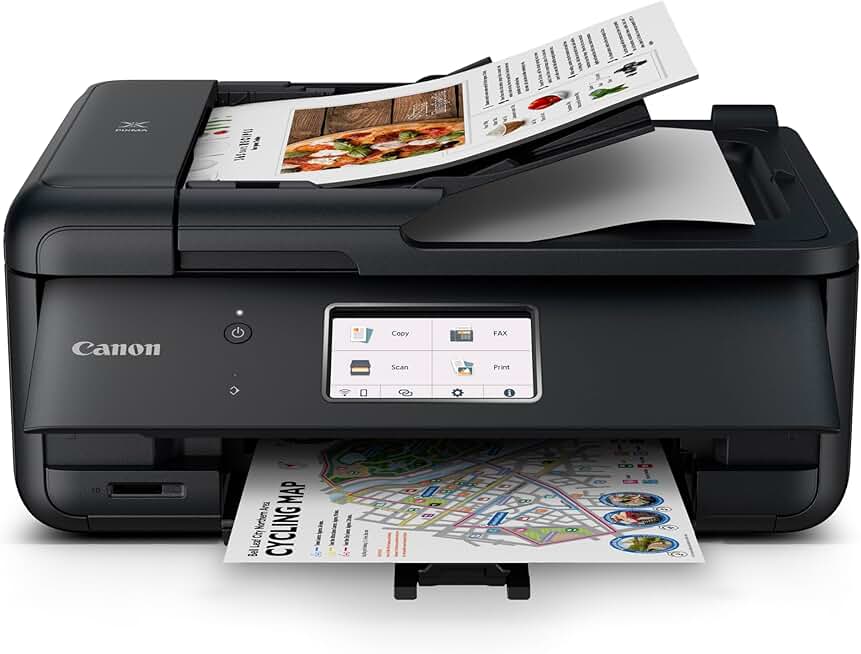
The Canon PIXMA TR8620a is a versatile all-in-one printer designed specifically for the demands of a modern home office. It integrates printing, scanning, copying, and faxing into one compact device, making it an attractive option for professionals, students, and families alike. This review will delve into its performance, features, and overall value, helping you decide if it’s the right fit for your needs.
Quick Summary: Canon PIXMA TR8620a
- Rating: 4.0 out of 5 stars
- Price: $149.00 (as of review date)
- Key Pros:
- Compact design fits easily into home office setups.
- Versatile all-in-one functionality (print, scan, copy, fax).
- Excellent print quality for both documents and photos.
- Key Cons:
- Ink replacement costs can accumulate over time.
- Photo printing can be slower compared to dedicated photo printers.
Table of Contents
Canon PIXMA TR8620a Overview
The Canon PIXMA TR8620a stands out as a robust all-in-one inkjet printer meticulously crafted for the dynamic requirements of a modern home office environment. This particular model, often denoted with an ‘a’ in its name, generally signifies a minor revision or a specific retail channel variant, but its core functionalities and performance align closely with the highly regarded TR8620. It’s engineered to provide comprehensive document management, encompassing printing, scanning, copying, and even faxing capabilities within a single, space-saving unit.
Designed with productivity in mind, the TR8620a aims to streamline various office tasks for remote workers, small business owners, and busy families. Its intuitive interface and reliable performance make it a central hub for document creation and handling. From printing important reports to scanning old photos or sending a quick fax, this device handles a broad spectrum of daily demands with efficiency.
The printer’s aesthetic is sleek and professional, ensuring it blends seamlessly into any home office decor without occupying excessive space. Its compact footprint is a significant advantage for users with limited desk space, allowing for a more organized and clutter-free workspace. Despite its smaller size, it doesn’t compromise on the robust features expected from a Canon PIXMA device.
Connectivity is a core strength of the Canon PIXMA TR8620a, offering multiple options to ensure effortless integration with various devices. This includes standard USB, Wi-Fi, and Ethernet, alongside mobile printing solutions like AirPrint and Mopria Print Service. This extensive connectivity ensures that users can print from virtually any device, whether it’s a laptop, smartphone, or tablet, without being tethered to a physical connection.
The inclusion of an Automatic Document Feeder (ADF) further enhances its utility, particularly for scanning and copying multi-page documents. This feature saves considerable time and effort, making it ideal for digitizing stacks of invoices, contracts, or school assignments. The ADF’s capacity and reliability contribute significantly to the printer’s overall efficiency in a busy setting.
For more detailed technical specifications and official support, you can visit the Canon USA official product page. Understanding the full scope of its design helps appreciate its targeted application in a demanding home office environment.
The Canon PIXMA TR8620a is more than just a printer; it’s a complete document solution. It’s built to handle a diverse workload, from vibrant photo prints to sharp, professional documents. This versatility ensures that it remains a valuable asset for any home office, adapting to changing needs and demands over time.
Its user-friendly operation, largely driven by a clear touchscreen display, minimizes the learning curve and allows users to quickly access desired functions. This ease of use, combined with its comprehensive feature set, positions the TR8620a as a highly competitive option in the all-in-one printer market. It strikes a balance between advanced capabilities and practical usability, making sophisticated tasks accessible to everyday users.
Canon PIXMA TR8620a Key Features & Specs
The Canon PIXMA TR8620a is packed with features designed to maximize productivity and convenience in a home office setting. Understanding these core specifications helps in appreciating its capabilities and how it can integrate into your workflow. Its advanced inkjet technology ensures high-quality output for various media types.
At its heart, the TR8620a boasts an impressive 5-individual ink system. This setup includes pigment black for sharp text documents and four dye-based inks (black, cyan, magenta, yellow) for vibrant, lifelike photos. The individual ink tanks mean you only replace the color that runs out, potentially saving on long-term ink costs compared to combined color cartridges.
For printing, the device offers respectable speeds of approximately 15 images per minute (ipm) for black documents and 10 ipm for color. It supports a maximum print resolution of 4800 x 1200 dpi, which is crucial for producing crisp text and detailed images. Automatic duplex printing is a standard feature, allowing for convenient two-sided document printing and saving paper.
The scanning function is highly capable, featuring both a flatbed scanner and a 20-sheet Automatic Document Feeder (ADF). The flatbed is perfect for delicate items or books, while the ADF streamlines scanning multi-page documents up to legal size. The optical scan resolution reaches 1200 x 2400 dpi, ensuring excellent clarity for scanned images and documents.
Copying functions are robust, with features like 4-on-1/2-on-1 copy, auto exposure copy, frame erase copy, and even ID card copy. The ADF also supports copying multi-page documents efficiently. Copy speed is approximately 6.5 ipm for color documents, making it suitable for moderate copying tasks.
Fax capabilities, while less common in modern home offices, are still present for those who need them. The TR8620a includes a Super G3 color fax modem, allowing for reliable document transmission. Its memory can store up to 250 pages, ensuring important faxes are not missed.
Connectivity options are comprehensive, catering to a wide range of devices and networks. It supports Wi-Fi (2.4/5GHz dual-band), Ethernet, and a standard USB connection. Mobile printing is seamless with Apple AirPrint, Mopria Print Service, and the Canon PRINT Inkjet/SELPHY app. This ensures flexibility whether you’re printing from a desktop, laptop, smartphone, or tablet.
A prominent 4.3-inch LCD touchscreen provides an intuitive interface for navigating menus, previewing documents, and managing print jobs directly from the printer. This touch panel significantly enhances usability, making settings adjustments and task initiation straightforward even without a computer.
Paper handling is another strong suit, thanks to its dual paper feed system. It features a front paper cassette and a rear paper tray, allowing you to load different paper types or sizes simultaneously. The front cassette holds up to 100 sheets of plain paper, while the rear tray accommodates 100 sheets of plain paper or up to 20 sheets of photo paper. This dual input is incredibly convenient for users who frequently switch between document and photo printing.
The Canon PIXMA TR8620a also integrates with smart home ecosystems, being compatible with Amazon Alexa. This allows for voice-activated printing of templates, checklists, and even checking ink levels, adding a layer of hands-free convenience to your daily tasks. This smart integration makes the printer more accessible and user-friendly in a connected home.
Measuring approximately 17.7 (L) x 14.4 (W) x 7.5 (H) inches and weighing around 17.5 lbs, the TR8620a is designed to be compact without sacrificing functionality. Its footprint is modest enough for most desks, and its weight makes it manageable to move if necessary. The robust build quality also contributes to its durability and longevity in a busy home office setting.
Power consumption is also optimized, with the printer being ENERGY STAR certified, indicating its efficiency and reduced environmental impact. This is an important consideration for long-term operational costs and ecological footprint for any device used regularly in a home or office environment.
Pros & Cons
Evaluating any product requires a balanced look at its strengths and weaknesses. The Canon PIXMA TR8620a, while an excellent all-around performer, has specific areas where it shines and others where it might not meet every user’s expectations. Understanding these nuances is key to making an informed purchasing decision.
Pros of the Canon PIXMA TR8620a:
- Exceptional Print Quality: This printer truly excels in producing sharp, clear text documents and vibrant, color-accurate photos. Canon’s FINE (Full-photolithography Inkjet Nozzle Engineering) technology, combined with the 5-individual ink system, delivers professional-grade results that are impressive for a home office printer.
- Compact and Space-Saving Design: Its relatively small footprint allows it to fit comfortably on most desks or shelves without dominating the workspace. This is a significant advantage for home offices where space is often at a premium, contributing to a more organized and efficient environment.
- Versatile All-in-One Functionality: The ability to print, scan, copy, and fax from a single device is incredibly convenient. This eliminates the need for multiple machines, reducing clutter and simplifying document management processes for various tasks.
- Intuitive Touchscreen Interface: The 4.3-inch LCD touchscreen makes navigating menus, selecting functions, and previewing documents remarkably easy. Its user-friendly design reduces frustration and speeds up common tasks, even for less tech-savvy users.
- Dual Paper Input Trays: Featuring both a front cassette and a rear paper tray, the TR8620a allows users to load plain paper and specialty media (like photo paper or envelopes) simultaneously. This eliminates the constant need to swap paper, saving time and improving workflow efficiency.
- Reliable Automatic Document Feeder (ADF): The 20-sheet ADF is a major time-saver for scanning or copying multi-page documents. It feeds pages automatically, making quick work of digitizing contracts, reports, or school assignments without manual intervention.
- Extensive Wireless Connectivity: With dual-band Wi-Fi, Ethernet, AirPrint, Mopria, and the Canon PRINT app, printing from various devices (laptops, smartphones, tablets) is seamless. This flexibility is essential for modern, mobile-first workflows and shared home environments.
- Smart Home Integration: Compatibility with Amazon Alexa for voice commands adds a layer of convenience. Users can initiate printing of templates or check ink levels with simple voice prompts, integrating the printer into a smart home ecosystem.
Cons of the Canon PIXMA TR8620a:
- Ink Consumption and Cost: While the individual ink tanks are a pro, the overall cost of replacement ink cartridges can add up, especially for users with high print volumes. This is a common concern with many inkjet printers, and the TR8620a is no exception.
- Slower Photo Printing Speeds: While photo quality is excellent, the speed at which it prints photos can be noticeably slower compared to dedicated photo printers. For occasional photo prints, it’s acceptable, but for large batches, it might feel sluggish.
- No Automatic Duplex Scanning via ADF: The ADF supports single-pass scanning, meaning it can only scan one side of a document at a time. For two-sided documents, users must manually flip the stack, which can be less efficient than printers with true auto-duplex ADFs.
- Initial Setup Can Be Tricky for Some: While generally straightforward, some users might find the initial Wi-Fi setup or driver installation slightly complex, especially if they are not accustomed to printer installations. Clear instructions are provided, but patience may be required.
- Limited Paper Capacity for High Volume: With a combined capacity of 200 sheets (100 front, 100 rear), it’s sufficient for home office use but might require frequent reloading for very high-volume printing tasks. This is a trade-off for its compact size.
Overall, the Canon PIXMA TR8620a offers a compelling package for its target audience. Its strengths in print quality, versatility, and user-friendliness generally outweigh its minor drawbacks, making it a strong contender for home office needs.
Who Should Buy the Canon PIXMA TR8620a?
Identifying the ideal user for the Canon PIXMA TR8620a is crucial for determining if this printer aligns with your specific needs and workflow. This all-in-one device is not a one-size-fits-all solution, but it particularly shines for certain demographics and use cases.
Home Office Professionals and Remote Workers: This is arguably the primary target audience for the TR8620a. If you regularly work from home and require a reliable device for printing documents, scanning contracts, copying reports, and occasionally sending faxes, this printer is an excellent choice. Its all-in-one functionality streamlines daily tasks, making your home office more efficient.
The compact design means it won’t overwhelm your workspace, and the dual paper trays are perfect for switching between plain paper for reports and letterheads for official correspondence without constant reloading. The ADF is a lifesaver for digitizing multi-page documents quickly, saving valuable time during busy workdays.
Small Business Owners: For small businesses operating out of a home or a compact office, the Canon PIXMA TR8620a offers a cost-effective and feature-rich solution. It can handle invoices, receipts, marketing materials, and client documents with professional quality. The ability to fax is also a bonus for businesses that still rely on this method of communication for certain transactions.
Its robust connectivity options ensure that multiple users or devices within a small office can easily access the printer. This flexibility supports a dynamic work environment where various tasks are performed throughout the day. The individual ink system helps manage consumable costs effectively.
Students and Academics: If you’re a student who frequently prints research papers, assignments, or presentation slides, the TR8620a delivers crisp text and clear graphics. The scanner is useful for digitizing handwritten notes or textbook pages, while the copier can quickly duplicate study materials. Its wireless capabilities are perfect for printing from dorm rooms or shared living spaces.
The dual paper feed is convenient for printing on different paper types, such as standard paper for essays and glossy paper for project covers. The compact size also means it won’t take up too much precious desk space in a student’s room.
Families with Diverse Printing Needs: For households that need a versatile printer for school projects, occasional photo prints, tickets, recipes, and general document printing, the TR8620a is a strong contender. Its ease of use, even for children or less tech-savvy family members, is a significant advantage.
The excellent photo print quality means you can print cherished family memories right at home, while the document quality handles school reports and household bills with ease. The smart home integration can also be a fun and practical feature for families.
Users Seeking High-Quality Photo and Document Printing: If print quality is a top priority for both text and images, the Canon PIXMA TR8620a will not disappoint. Its 5-ink system and high resolution produce results that often surpass expectations for an all-in-one device. This makes it suitable for amateur photographers or those who appreciate fine detail in their prints.
However, it’s important to consider who might *not* be the best fit for this printer:
- Heavy-Duty Commercial Users: For very high-volume printing (e.g., hundreds of pages daily), the TR8620a’s ink costs and paper capacity might not be economical or efficient enough. Dedicated laser printers or ink tank systems would be more suitable.
- Professional Photographers Needing Large Prints: While photo quality is great, it’s not designed for gallery-level, large-format photo printing with archival inks. Specialized photo printers would offer more advanced features and larger print sizes.
- Users Requiring Automatic Duplex Scanning: If you frequently scan two-sided documents and need the convenience of a single-pass, automatic duplex ADF, this printer will require manual flipping of pages, which might be a deal-breaker for some.
In summary, the Canon PIXMA TR8620a is an excellent choice for anyone needing a reliable, versatile, and compact all-in-one printer for a home office or small business environment. Its balance of features, quality, and ease of use makes it a valuable asset for a wide range of users who prioritize functionality and output quality.
FAQ about Canon PIXMA TR8620a
Here are some frequently asked questions about the Canon PIXMA TR8620a to help address common concerns and provide further clarity on its functionality and features.
Q1: What is the main difference between the Canon PIXMA TR8620 and the TR8620a?
A1: The ‘a’ designation in the Canon PIXMA TR8620a typically indicates a minor refresh or a specific retail channel variant of the TR8620. Functionally, these two models are nearly identical in terms of features, performance, and specifications. Any differences are usually superficial, such as packaging or bundled software, rather than core hardware or capabilities. Users can expect the same high-quality performance from both models.
Q2: How is the print quality for both photos and documents on the Canon PIXMA TR8620a?
A2: The print quality of the Canon PIXMA TR8620a is generally excellent for both documents and photos. For documents, the pigment black ink produces sharp, crisp text that is highly legible, even at small font sizes. For photos, the four dye-based inks deliver vibrant colors, smooth gradations, and impressive detail, making it suitable for printing family photos or creative projects. Its maximum print resolution of 4800 x 1200 dpi contributes significantly to this high output quality.
Q3: What are the typical ink costs for the Canon PIXMA TR8620a?
A3: The Canon PIXMA TR8620a uses a 5-individual ink system, which can be both a pro and a con regarding cost. While you only replace the specific color that runs out, the individual cartridges can still add up, especially with frequent printing.
Original Canon ink cartridges (PGI-280 Pigment Black, CLI-281 Black, Cyan, Magenta, Yellow) typically range from $15-25 each, with multi-packs offering slight savings. For moderate users, ink costs are manageable, but heavy users might find them a recurring expense. High-yield XL cartridges are available to reduce the frequency of replacements.
Q4: Does the Canon PIXMA TR8620a support automatic duplex scanning?
A4: No, the Canon PIXMA TR8620a does not feature automatic duplex scanning through its Automatic Document Feeder (ADF). The ADF can scan multi-page documents, but it can only scan one side of each page at a time. To scan two-sided documents, you would need to manually flip the stack of pages after the first side has been scanned. For users who frequently deal with double-sided documents, this manual step might be a consideration.
Q5: Is the Canon PIXMA TR8620a easy to set up with Wi-Fi and mobile devices?
A5: Yes, setting up the Canon PIXMA TR8620a with Wi-Fi and mobile devices is generally straightforward. The printer’s 4.3-inch touchscreen guides you through the wireless setup process. For mobile printing, it supports popular services like Apple AirPrint for iOS devices and Mopria Print Service for Android. Additionally, Canon’s dedicated PRINT Inkjet/SELPHY app provides a comprehensive interface for printing, scanning, and managing the printer from your smartphone or tablet, making mobile integration very user-friendly.
Q6: Can the Canon PIXMA TR8620a really work with Amazon Alexa?
A6: Yes, the Canon PIXMA TR8620a is compatible with Amazon Alexa. This integration allows users to perform certain tasks using voice commands through an Alexa-enabled device. For example, you can ask Alexa to print various templates (like checklists or calendars), check the printer’s ink levels, or even print coloring pages. This feature adds a layer of convenience and hands-free operation, integrating the printer into your smart home ecosystem for selected functions.
Q7: What kind of paper does the Canon PIXMA TR8620a support?
A7: The Canon PIXMA TR8620a supports a wide variety of paper types and sizes, thanks to its dual paper input system. It can handle standard plain paper (Letter, Legal, A4), photo paper (Glossy, Semi-Gloss, Matte in various sizes like 4×6, 5×7, 8×10), envelopes (DL, Com 10), and even some specialty papers like card stock. The rear paper tray is particularly versatile for heavier or specialty media, while the front cassette is ideal for plain paper. This flexibility ensures it can meet diverse printing needs.
Q8: What are the main advantages of its dual paper feed system?
A8: The dual paper feed system of the Canon PIXMA TR8620a offers significant advantages in terms of convenience and efficiency. With a front paper cassette and a rear paper tray, you can load different types of media simultaneously.
For instance, you can keep plain paper in the front cassette for everyday documents and photo paper or envelopes in the rear tray. This eliminates the need to constantly swap paper types, saving time and reducing interruptions in your workflow. It’s particularly useful for users who frequently switch between printing documents and photos or other specialty items.
Final Verdict
The Canon PIXMA TR8620a emerges as an outstanding all-in-one printer, exceptionally well-suited for the dynamic environment of a home office or small business. Its blend of high-quality output, versatile functionality, and user-friendly features makes it a compelling choice for anyone seeking a reliable document management solution. The printer consistently delivers crisp text and vibrant photos, meeting the demands of both professional documents and personal creative projects.
Its compact design ensures it integrates seamlessly into various workspaces without consuming excessive desk space, a critical consideration for many home users. The intuitive 4.3-inch touchscreen and extensive wireless connectivity options, including AirPrint and Mopria, further enhance its appeal by simplifying operation and enabling flexible printing from a multitude of devices. The dual paper input trays are a particular highlight, significantly improving workflow efficiency by allowing different media types to be loaded simultaneously.
While the cost of replacement ink cartridges and the absence of automatic duplex scanning via the ADF are minor drawbacks, they are generally outweighed by the printer’s numerous advantages. For users who prioritize print quality, comprehensive features, and ease of use in a home office context, the Canon PIXMA TR8620a represents an excellent investment. It is a workhorse that can handle a diverse range of tasks, from scanning multi-page documents with its reliable ADF to printing stunning photographs.
Ultimately, if you are in the market for an all-in-one printer that offers a robust feature set, produces impressive results, and is designed with the modern home office in mind, the Canon PIXMA TR8620a stands out as a highly recommended option. It provides substantial value for its price, proving itself to be a versatile and indispensable tool for productivity and creativity.