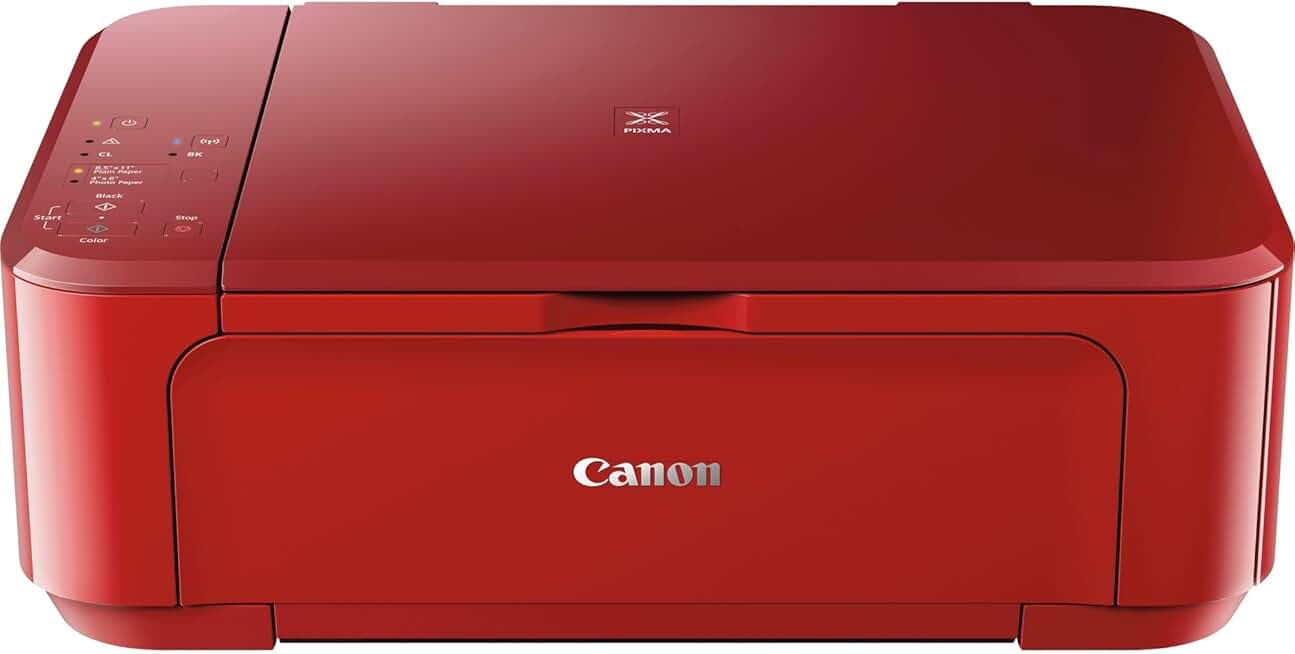
The Canon PIXMA MG3620 stands out as a highly functional and budget-friendly wireless all-in-one color inkjet printer, designed to meet the diverse needs of home users and small offices. This review delves into its capabilities, performance, and overall value, helping you decide if it’s the right choice for your printing, scanning, and copying requirements.
Quick Summary: Canon PIXMA MG3620
Rating: 4.0 out of 5 stars
Price: $109.00 USD
Key Pros:
- Wireless connectivity for mobile and cloud printing.
- Excellent print quality for both text and photos.
- Automatic duplex printing saves paper.
Key Cons:
- Ink cartridges can be expensive over time.
- No LCD screen for easier navigation.
Table of Contents
Canon PIXMA MG3620 Overview
The Canon PIXMA MG3620 is an all-in-one inkjet printer that combines printing, scanning, and copying functionalities into one compact device. It’s specifically designed for users who need reliable performance without a hefty price tag, making it a popular choice for home environments and students.
This model emphasizes wireless connectivity, allowing users to print from various devices including smartphones, tablets, and computers, without the need for a direct cable connection. Its setup process is generally straightforward, enabling quick integration into existing home networks.
Beyond basic functionality, the MG3620 offers features like automatic duplex printing, which helps conserve paper by printing on both sides of a sheet. This is a significant advantage for those who print frequently or wish to minimize their environmental impact.
Canon has a long-standing reputation for producing printers that deliver high-quality output, and the PIXMA MG3620 is no exception. It excels at producing crisp text documents and vibrant, detailed color photos, often exceeding expectations for its price point.
Its compact footprint is another notable aspect, allowing it to fit comfortably in smaller spaces, such as a home office desk or a corner shelf. This thoughtful design makes it a practical solution for cluttered environments where space is at a premium.
Despite its capabilities, it’s important to consider the ongoing cost of ink, as with many inkjet printers. While the initial purchase price is attractive, ink cartridge replacements can add up over time, especially for heavy users.
The printer supports various paper types and sizes, from standard letter and legal documents to photo paper and envelopes. This versatility ensures it can handle a wide range of personal and academic printing tasks, making it a truly multi-purpose device.
Connectivity options extend to cloud services, allowing for printing directly from platforms like Google Drive, Dropbox, and Microsoft OneDrive. This feature enhances its utility for users who rely on cloud storage for their documents and photos.
For more technical details on Canon’s printer lineup and technologies, you can visit the official Canon USA website.
The Canon PIXMA MG3620 is often praised for its ease of use, making it accessible even for those who are not particularly tech-savvy. The intuitive interface and clear instructions contribute to a hassle-free user experience from setup to daily operation.
Its robust build quality ensures durability, promising a long service life with proper care and maintenance. This reliability is a key factor for users seeking a printer that can withstand regular use without frequent issues.
In summary, the MG3620 positions itself as a reliable, versatile, and affordable all-in-one printer. It balances core functionality with modern conveniences like wireless and cloud printing, making it a strong contender for anyone needing a capable home printer.
Canon PIXMA MG3620 Key Features & Specs
The Canon PIXMA MG3620 is packed with features designed to enhance user convenience and printing efficiency. Understanding these specifications is crucial for evaluating its suitability for your specific needs.
One of its most significant features is Wireless Connectivity. This allows for seamless printing from virtually anywhere in your home or office using Wi-Fi. It supports various mobile printing solutions, including Canon PRINT Inkjet/SELPHY app, AirPrint, Google Cloud Print, and Mopria for Android devices.
The printer’s All-in-One Functionality means it can print, scan, and copy. The flatbed scanner is capable of scanning documents and photos up to 8.5 x 11.7 inches, providing good resolution for digital archiving or copying tasks.
Automatic Duplex Printing is a standout feature for a printer in this price range. It automatically prints on both sides of the paper, significantly reducing paper consumption and saving money, which is both economical and environmentally friendly.
In terms of print quality, the MG3620 utilizes Canon’s FINE (Full-photolithography Inkjet Nozzle Engineering) technology. This system uses microscopic ink droplets and high nozzle counts to produce sharp text and vivid, detailed color images at a maximum color resolution of 4800 x 1200 dpi.
The printer uses a Hybrid Ink System, combining pigment black ink for crisp text with dye-based color inks for rich, vibrant photos. This ensures that both document and photo printing achieve optimal results.
Print speeds are respectable for a home printer, with approximately 9.9 images per minute (ipm) for black and white documents and 5.7 ipm for color. While not the fastest, these speeds are more than adequate for typical home or student use.
The paper tray has a capacity of 100 sheets of plain paper or 20 sheets of 4×6 photo paper, suitable for moderate printing volumes. It supports a variety of media types, including plain paper, photo paper (glossy, semi-gloss, matte), envelopes, and even t-shirt transfers.
For cloud integration, the printer offers PIXMA Cloud Link. This feature allows users to print directly from popular online services like Facebook, Twitter, Flickr, Instagram, Dropbox, Google Drive, and more, without needing a computer.
Its physical dimensions are approximately 17.7 (W) x 12.0 (D) x 6.0 (H) inches, and it weighs around 12.1 pounds, making it a relatively compact and lightweight device that can fit into various home setups without dominating the space.
The printer connects to a computer via USB 2.0 or Wi-Fi. The absence of an Ethernet port means it’s primarily designed for wireless network integration or direct USB connection, catering to individual users rather than large networked offices.
Energy efficiency is also a consideration, with the printer typically consuming around 1.4W in standby mode and 16W during operation. This low power consumption helps keep electricity bills down, which is a welcome bonus for any home appliance.
Overall, the Canon PIXMA MG3620 offers a strong feature set for its category, combining essential printing capabilities with modern wireless and cloud conveniences. These specifications highlight its value as an all-around home printer.
Pros & Cons
Evaluating the Canon PIXMA MG3620 requires a balanced look at its strengths and weaknesses. This section provides a detailed breakdown of its advantages and disadvantages, helping potential buyers make an informed decision.
Pros of the Canon PIXMA MG3620:
- Excellent Print Quality: The MG3620 truly shines in its output. Text documents are consistently sharp and clear, rivaling laser printers for readability. Color graphics and photos are vibrant, with good detail and accurate color reproduction, making it suitable for printing school projects, family photos, or marketing materials.
- Wireless Connectivity: The seamless Wi-Fi connectivity is a major plus. It allows users to print from various devices—laptops, smartphones, and tablets—without needing to be physically connected. This flexibility is invaluable in a modern home environment, supporting printing from almost any room.
- Automatic Duplex Printing: This feature is a significant advantage for both cost-saving and environmental reasons. The ability to automatically print on both sides of a page drastically cuts down on paper usage, which translates to lower expenses over time and less waste.
- Compact Design: With its relatively small footprint, the MG3620 is ideal for spaces where desk real estate is limited. It can easily fit on a shelf, a small desk, or in a cabinet, making it a practical choice for apartments, dorm rooms, or home offices with minimal space.
- Affordable Price Point: The initial purchase price of the Canon PIXMA MG3620 is highly competitive, making it an accessible option for budget-conscious consumers. This low entry cost allows many users to acquire a capable all-in-one printer without a significant upfront investment.
- Cloud Printing Support: The integration with services like Google Cloud Print and PIXMA Cloud Link enhances its versatility. Users can print documents and photos stored in cloud storage directly, adding another layer of convenience for modern digital workflows.
- Easy Setup: Many users report that setting up the MG3620 is straightforward, even for those who are not tech-savvy. The clear instructions and intuitive process mean you can get the printer up and running quickly, minimizing frustration.
- Reliable Performance: For its price, the printer offers consistent and reliable performance for everyday tasks. It handles typical home printing volumes well, producing consistent results without frequent jams or errors, which contributes to a positive user experience.
Cons of the Canon PIXMA MG3620:
- High Ink Costs: This is perhaps the most common complaint for many inkjet printers, and the MG3620 is no exception. While the printer itself is inexpensive, the replacement ink cartridges (especially if you use genuine Canon cartridges) can be costly, potentially negating some of the initial savings over the printer’s lifespan, particularly for heavy users.
- No LCD Screen: The absence of an LCD screen for navigation can make certain operations, like checking ink levels, troubleshooting, or initiating copies, less intuitive. Users typically rely on indicator lights and the Canon PRINT app for status updates and controls, which might not appeal to everyone.
- Modest Print Speed: While acceptable for home use, the print speeds (around 9.9 ipm for black and white and 5.7 ipm for color) are not particularly fast compared to some competitors or higher-end models. This might be a minor inconvenience for users with large print jobs or tight deadlines.
- Small Paper Capacity: A 100-sheet paper tray is sufficient for occasional printing but can be limiting for users who print frequently or in large batches. It requires more frequent refilling, which can interrupt workflows.
- No Automatic Document Feeder (ADF): For scanning or copying multi-page documents, the lack of an ADF means you have to manually place each page on the flatbed scanner. This can be time-consuming and cumbersome, particularly for larger documents.
- Basic Build Materials: To keep costs down, the MG3620 uses primarily plastic components. While generally robust, it might not feel as premium or durable as more expensive models. Care must be taken to avoid accidental damage.
Understanding these pros and cons provides a clearer picture of what to expect from the Canon PIXMA MG3620. It excels in delivering quality output and wireless convenience at an affordable price, but users should be mindful of the ongoing ink costs and certain feature limitations.
Who Should Buy the Canon PIXMA MG3620?
The Canon PIXMA MG3620 is an excellent choice for a specific segment of users, thanks to its blend of features, performance, and affordability. Understanding its target audience can help you determine if it’s the right printer for your needs.
Home Users and Families: This printer is ideally suited for general home use. Families needing to print school assignments, occasional documents, recipes, or photos will find its all-in-one capabilities and ease of use highly beneficial. Its wireless features make it accessible to multiple family members from their respective devices.
Students: For college or high school students living in dorms or small apartments, the MG3620’s compact size and wireless printing are significant advantages. It can easily fit into tight spaces and handle essays, reports, and research materials without a fuss. The automatic duplex printing also helps save on paper costs.
Small/Home Office Users with Light Printing Needs: If your home office primarily requires occasional document printing, scanning, and copying, the MG3620 can serve effectively. It’s not designed for high-volume commercial printing but is perfect for invoices, reports, and administrative tasks that don’t involve hundreds of pages daily.
Budget-Conscious Buyers: One of the primary draws of the Canon PIXMA MG3620 is its attractive price point. Users looking for a capable printer without breaking the bank will find this model offers significant value. It delivers essential functions and quality output at an affordable initial cost.
Users Prioritizing Photo Printing Quality: Despite its budget-friendly nature, the MG3620 produces surprisingly good photo prints. If you enjoy printing your own photos at home for albums, scrapbooks, or personal display, its color accuracy and detail will not disappoint.
Those Who Value Wireless and Cloud Printing: For individuals who frequently print from smartphones, tablets, or cloud storage services like Google Drive or Dropbox, the MG3620’s robust wireless and cloud connectivity features are a major convenience. It integrates seamlessly with modern digital ecosystems.
Users with Limited Space: The compact dimensions of the MG3620 make it a perfect fit for small desks, shelves, or shared living spaces. If you’re struggling with space constraints but still need a versatile printer, this model is an excellent candidate.
However, this printer might not be the best fit for everyone. Heavy users who print hundreds of pages weekly might find the ink costs too high and the paper capacity too small. Similarly, businesses requiring an Automatic Document Feeder (ADF) for scanning multi-page documents will need to look at other options.
The Canon PIXMA MG3620 is a solid choice for those seeking a reliable, high-quality, and affordable all-in-one printer for moderate home or small office use. It balances functionality with cost-effectiveness, making it a smart investment for many.
FAQ about Canon PIXMA MG3620
Here are some frequently asked questions about the Canon PIXMA MG3620, addressing common concerns and providing detailed answers to help users get the most out of their printer.
Q1: What type of ink cartridges does the Canon PIXMA MG3620 use?
A1: The Canon PIXMA MG3620 uses two FINE (Full-photolithography Inkjet Nozzle Engineering) cartridges: one black (PG-240 or PG-240XL for high yield) and one color (CL-241 or CL-241XL for high yield). These cartridges contain Canon’s ChromaLife100+ ink system, designed for longevity and vibrant prints. The XL versions offer a higher page yield, which can be more cost-effective for frequent printing.
Q2: Can I print from my smartphone or tablet with the MG3620?
A2: Yes, absolutely. The Canon PIXMA MG3620 features robust wireless connectivity that supports mobile printing. You can use the free Canon PRINT Inkjet/SELPHY app for iOS and Android devices, which allows you to print photos, documents, and scan directly to your mobile device. It also supports Apple AirPrint for iOS devices, Google Cloud Print, and Mopria Print Service for Android, providing multiple convenient options for wireless printing.
Q3: Does the Canon PIXMA MG3620 support automatic double-sided printing?
A3: Yes, one of the key features of the MG3620 is its automatic duplex printing capability. This means the printer can automatically print on both sides of a sheet of paper without manual intervention. This feature is excellent for saving paper, reducing costs, and making your documents more professional and compact. It’s a significant advantage for students and home users alike.
Q4: Is the Canon PIXMA MG3620 compatible with macOS and Windows operating systems?
A4: Yes, the Canon PIXMA MG3620 is compatible with a wide range of operating systems, including most versions of Windows (e.g., Windows 10, 8.1, 8, 7, Vista, XP) and macOS (e.g., macOS Sierra v10.12, OS X El Capitan v10.11, OS X Yosemite v10.10). Drivers and software are readily available on Canon’s support website, ensuring broad compatibility for most home computer setups.
Q5: Can I scan multiple pages at once with this printer?
A5: The Canon PIXMA MG3620 does not have an Automatic Document Feeder (ADF). This means you cannot automatically scan multiple pages in a stack. To scan multi-page documents, you will need to manually place each page on the flatbed scanner one by one. While this is a limitation for large scanning jobs, it’s typical for printers in this price range and adequate for occasional scanning needs.
Q6: What are the dimensions and weight of the MG3620?
A6: The Canon PIXMA MG3620 is designed to be compact. Its approximate dimensions are 17.7 inches (W) x 12.0 inches (D) x 6.0 inches (H). It weighs around 12.1 pounds. These measurements make it easy to place on a desk or shelf without taking up too much space, which is ideal for small home offices or dorm rooms. Its relatively light weight also makes it easy to move if needed.
Q7: How do I connect the Canon PIXMA MG3620 to my Wi-Fi network?
A7: Connecting the MG3620 to your Wi-Fi network typically involves a few steps. You can use the standard setup method by pressing the Wi-Fi button on the printer and then initiating the connection on your router (WPS method), or by using the Canon PRINT Inkjet/SELPHY app for a guided setup. Alternatively, you can connect it via a USB cable to your computer initially to set up the wireless connection through the driver software. The Canon website provides detailed setup guides and videos for various connection methods, which can be found at Canon Support.
Q8: Does the Canon PIXMA MG3620 come with ink cartridges?
A8: Yes, typically, new Canon PIXMA MG3620 printers come with a set of starter ink cartridges (one black and one color) to get you started. These starter cartridges usually have a lower ink volume than standard replacement cartridges, so you will likely need to purchase full-sized replacements sooner rather than later, especially if you plan on doing a lot of printing.
Final Verdict
The Canon PIXMA MG3620 is a compelling option for anyone seeking a versatile, reliable, and budget-friendly all-in-one printer for home or light office use. Its strengths lie in its excellent print quality for both documents and photos, robust wireless connectivity, and the convenience of automatic duplex printing.
The ability to print wirelessly from multiple devices and integrate with cloud services makes it incredibly adaptable to modern digital lifestyles. Its compact design further enhances its appeal, allowing it to fit into virtually any workspace without imposing on valuable real estate.
While the ongoing cost of ink and the lack of an LCD screen or an Automatic Document Feeder are considerations, these are common trade-offs for printers in this price segment. For users with moderate printing needs, these limitations are often outweighed by the printer’s overall performance and value.
The MG3620 consistently delivers crisp text and vibrant color output, performing above expectations for its price point. This makes it an ideal choice for students, families, or individuals who need a dependable printer for everyday tasks, school projects, and occasional photo printing.
Ultimately, if you prioritize print quality, wireless convenience, and automatic duplexing, and are mindful of potential ink costs over time, the Canon PIXMA MG3620 represents an excellent investment. It’s a workhorse that consistently delivers, proving its worth as an essential tool in any home setup.
It stands as a testament to Canon’s ability to produce high-performing devices that cater to the needs of the average consumer, balancing advanced features with an accessible price. For those in the market for a new all-in-one printer, the MG3620 should definitely be on your shortlist.
Based on its performance, features, and user satisfaction, the Canon PIXMA MG3620 is highly recommended for its target audience. It provides a strong combination of functionality and affordability, making it an outstanding value in the competitive home printer market.