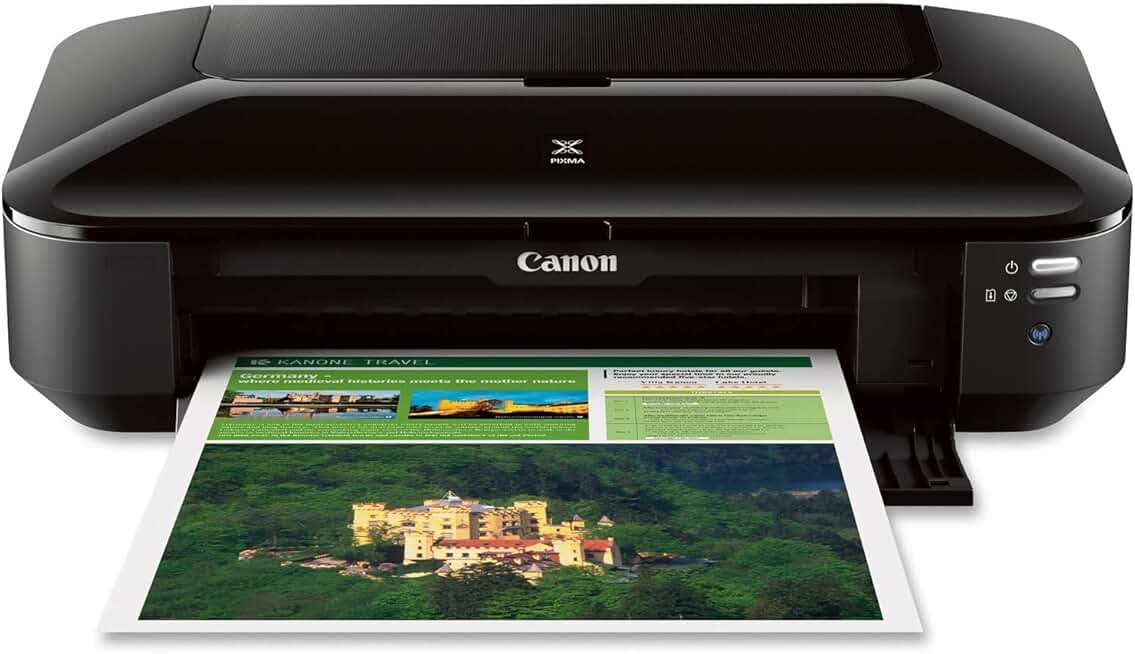
The Canon Pixma iX6820 Printer stands out as a formidable contender in the wireless business inkjet category, particularly for those needing wide-format capabilities. This in-depth review delves into why this specific model, often available through Amazon Renewed, offers such impressive value for small businesses and home offices.
Quick Summary: Canon Pixma iX6820 Printer
Rating: 4.1/5 Stars (from 4264 reviews)
Price: $209.00 USD (Amazon Renewed)
Key Pros:
- Exceptional wide-format printing up to 13″x19″ (A3+).
- High-quality output with 5-individual ink tank system for sharp text and vibrant graphics.
- Robust wireless connectivity, including AirPrint and Cloud printing, for flexible workflows.
Key Cons:
- Lacks automatic duplex printing, requiring manual intervention for two-sided documents.
- Dedicated printer only; no scanning, copying, or faxing functionalities.
Table of Contents
Canon Pixma iX6820 Printer Overview
The Canon Pixma iX6820 Printer is a specialized wireless inkjet printer designed with the demands of small businesses and home offices in mind. Its most compelling feature is its ability to print wide-format documents, a capability often found only in much more expensive professional printers. This makes it an exceptional choice for users who frequently need to produce larger-than-standard prints, such as marketing materials, spreadsheets, or architectural drawings.
This model is not an all-in-one device; it focuses solely on printing, ensuring dedicated performance in its core function. This specialization allows it to excel in print quality and speed for its class. Its compact footprint, considering its wide-format capabilities, makes it suitable for environments where space might be a premium.
The iX6820’s wireless connectivity is another cornerstone of its design, enabling seamless printing from multiple devices without the clutter of cables. This feature is crucial for modern, dynamic work environments where users might switch between laptops, tablets, and smartphones. The inclusion of AirPrint and Google Cloud Print further enhances its accessibility and ease of use.
For those considering a renewed product, the Canon Pixma iX6820 Printer offers an even more compelling value proposition. Amazon Renewed products are professionally inspected, tested, and cleaned by Amazon-qualified suppliers, ensuring they work and look like new. This provides an opportunity to acquire a high-performance printer at a significantly reduced cost, contributing to both budget savings and environmental sustainability.
This printer is engineered to deliver crisp text and vibrant colors, essential for any business document or presentation. Its five-individual ink tank system means you only replace the color that runs out, optimizing ink usage and reducing waste. This intelligent ink system is a thoughtful design choice for cost-conscious users who still demand professional-grade output.
In a typical home office setting, the iX6820 can effortlessly handle everything from daily correspondence to large-scale project prints. Imagine needing to print a detailed spreadsheet for a client meeting or a large-format infographic for a presentation; this printer handles it with ease. It bridges the gap between standard desktop printers and expensive commercial-grade plotters, making professional wide-format printing accessible.
The ENERGY STAR certification highlights Canon’s commitment to energy efficiency, which translates into lower operating costs and a reduced environmental footprint. Features like Quiet Mode further enhance its suitability for home office environments, minimizing distractions during operation. This thoughtful design consideration underscores its practicality for everyday business use.
Its robust build quality suggests durability, a key factor for any business equipment expected to perform consistently. While it may not have all the bells and whistles of an all-in-one, its singular focus on high-quality, wide-format printing makes it exceptionally good at what it does. This specialization is often preferred by users who already have separate scanning or copying solutions or simply don’t need those functions.
The Canon Pixma iX6820 Printer is more than just a printer; it’s a tool that empowers small businesses and creative professionals to produce high-impact documents in-house. Its blend of performance, versatility, and value, especially as a renewed product, positions it as a smart investment for specific printing needs. It supports a wide range of paper types and sizes, from standard letter to glossy photo paper up to 13×19 inches, offering true creative freedom.
Understanding the context of its use is vital. This printer shines where professional presentation and the ability to print larger documents are paramount. It avoids the common pitfall of trying to do everything and instead focuses on perfecting its primary function. This approach often leads to a more reliable and higher-quality user experience for its intended audience.
Canon Pixma iX6820 Printer Key Features & Specs
The Canon Pixma iX6820 Printer is packed with features designed to deliver high-quality, efficient wide-format printing. Understanding these specifications is key to appreciating its value proposition for business and creative users. Each component plays a vital role in its overall performance and utility.
- Maximum Print Resolution: Up to 9600 x 2400 dpi (Dots Per Inch) in color. This incredibly high resolution ensures that both text and images are rendered with exceptional clarity and detail. For business documents, this means crisp, professional-looking reports and presentations. For graphic designers, it translates to smooth gradients and sharp lines in their proofs.
- Print Speed: Approximately 14.5 images per minute (ipm) for black and 10.4 ipm for color, based on ESAT (Estimated Saturated Throughput) standards. While not the fastest laser printer, these speeds are respectable for an inkjet in its class, especially when considering the large format sizes it can handle. It efficiently processes multi-page documents and images.
- Ink System: The printer utilizes a 5-individual ink tank system. This includes a PGI-250 Pigment Black for sharp, dense text and CLI-251 Cyan, Magenta, Yellow, and Dye-based Black for vibrant photos and graphics. The individual tanks are a significant advantage, allowing users to replace only the specific color that runs out, thus reducing overall ink waste and cost.
- Paper Handling: Equipped with a rear paper tray that can hold up to 150 sheets of plain paper. Its true standout feature is its ability to handle a wide array of paper sizes, from standard Letter (8.5″ x 11″) and Legal (8.5″ x 14″) to Ledger (11″ x 17″) and a maximum of 13″ x 19″ (A3+) in size. It supports various paper types including plain, photo paper, glossy, semi-gloss, and matte finishes, offering versatility for different printing needs.
- Connectivity: The iX6820 offers multiple connection options. It features built-in Wi-Fi (802.11 b/g/n) for wireless printing from computers and mobile devices, an Ethernet port for wired network integration, and a standard USB 2.0 port for direct connection to a single computer. This comprehensive suite ensures it can fit into almost any office network setup.
- Mobile and Cloud Printing: Seamlessly integrates with mobile devices through AirPrint for Apple devices and Google Cloud Print for Android and Chrome OS users. Canon’s own PIXMA Printing Solutions (PPS) app further enhances mobile printing capabilities, allowing users to print directly from cloud services and social media.
- Quiet Mode: An excellent feature for home offices or shared workspaces, Quiet Mode significantly reduces operating noise. This ensures that printing tasks do not disrupt concentration or conversations, contributing to a more peaceful work environment.
- Auto Power On/Off: This intelligent power management feature automatically turns the printer on when a print job is sent and off after a period of inactivity. It helps conserve energy and reduces the need for manual intervention, making the printer more efficient and user-friendly.
- Physical Dimensions: Measuring approximately 23.0” (W) x 12.3” (D) x 6.3” (H) and weighing around 17.9 lbs, the printer is remarkably compact for a wide-format device. Its relatively small footprint allows it to fit comfortably on most desks or shelves without consuming excessive space.
- ENERGY STAR Certified: This certification signifies that the Canon Pixma iX6820 Printer meets strict energy efficiency guidelines set by the U.S. Environmental Protection Agency. This translates into lower electricity consumption, benefiting both the user’s utility bill and the environment.
- Bundled Software: Comes with useful software like My Image Garden, which helps organize photos and offers creative printing options, and Full HD Movie Print, allowing users to print still frames from full HD movies captured with compatible Canon DSLRs.
These features collectively make the iX6820 a powerful and versatile tool. The combination of high resolution, flexible paper handling, and diverse connectivity options ensures that it can meet a wide range of printing demands from various sources. The individual ink system and energy-saving functions also underscore its cost-effectiveness and environmental consciousness. For more detailed technical information, you can often find specifications on the Canon USA official website.
Pros & Cons
Evaluating the strengths and weaknesses of the Canon Pixma iX6820 Printer is crucial for any potential buyer. Its specific design choices lead to distinct advantages for certain users, while also presenting limitations for others. Here’s a detailed breakdown.
Pros:
- Exceptional Wide-Format Printing (up to 13″x19″ / A3+): This is arguably the printer’s most significant advantage. The ability to print large documents, posters, spreadsheets, or architectural drawings in-house saves time and money that would otherwise be spent at a print shop. It provides creative professionals and small businesses with unparalleled flexibility.
- Superior Print Quality: With a maximum resolution of 9600 x 2400 dpi and a 5-individual ink tank system, the iX6820 consistently produces crisp, sharp text and vibrant, true-to-life color graphics. This high fidelity is essential for professional presentations, marketing materials, and photographic proofs, ensuring your output always looks polished and impressive.
- Robust Wireless and Cloud Connectivity: The printer supports Wi-Fi, Ethernet, and USB, making it adaptable to various network setups. Its compatibility with AirPrint, Google Cloud Print, and Canon’s PPS app allows for effortless printing from virtually any device, from any location. This streamlines workflows and enhances productivity in a mobile-centric world.
- Cost-Effective Individual Ink Tanks: The 5-ink system, featuring separate tanks for each color, is a smart economic choice. Instead of replacing an entire multi-color cartridge when only one color runs out, you only replace the specific depleted tank. This minimizes waste and helps manage running costs more efficiently over time, which is a significant benefit for businesses.
- Relatively Compact Design for its Class: Despite its wide-format capabilities, the iX6820 maintains a surprisingly modest footprint. Measuring 23.0” (W) x 12.3” (D) x 6.3” (H), it can fit on most standard desks without dominating the workspace. This is a considerable advantage for home offices or small business settings where space is often at a premium, making it a practical choice.
- Energy Efficient and Quiet Operation: The printer is ENERGY STAR certified, indicating its commitment to lower power consumption. Additionally, its Quiet Mode feature reduces operational noise, making it less disruptive in shared or quiet environments. These features contribute to a more pleasant and environmentally conscious printing experience, reflecting modern office demands.
- Excellent Value (Especially as Renewed): Acquiring the Canon Pixma iX6820 Printer through Amazon Renewed offers an incredible cost-saving opportunity. You get a high-performance printer with professional wide-format capabilities at a fraction of the price of a new unit. This makes premium features accessible to budget-conscious individuals and small businesses, providing outstanding bang for your buck.
Cons:
- No Automatic Duplex Printing: One notable omission is the lack of automatic duplex printing. To print on both sides of a page, users must manually flip the paper and re-feed it. This can be a minor inconvenience for high-volume document printing and can slightly slow down workflows when two-sided documents are frequently required, impacting paper saving efforts.
- Dedicated Printer Only (No Scanner/Copier/Fax): The iX6820 is a single-function printer. It does not include scanning, copying, or faxing capabilities. While this specialization contributes to its excellent print quality, it means users needing an all-in-one device will need to purchase separate units or opt for a different model. This can be a drawback for small offices that rely on a single device for multiple tasks.
- Slower Photo Print Speeds: While the photo print quality is exceptional, the speed for producing borderless photos, especially at larger sizes, can be relatively slow compared to dedicated photo printers. For users needing rapid photo output, this might be a point of consideration, though for occasional high-quality photo prints, it performs admirably.
- Ongoing Ink Costs: While the individual ink tanks are more economical than combined cartridges, ink remains a recurring expense. High-volume users might find the long-term cost of ink cartridges to be a significant factor. It’s always wise to research the cost per page for your anticipated usage before committing to any inkjet printer.
Overall, the pros of the Canon Pixma iX6820 Printer heavily outweigh its cons for its target audience. Its specialized wide-format printing, coupled with superb quality and connectivity, makes it a powerful tool, provided its single-function nature and manual duplexing are acceptable for your workflow. The renewed option further enhances its appeal by making these advanced features more affordable.
Who Should Buy the Canon Pixma iX6820 Printer?
The Canon Pixma iX6820 Printer isn’t designed for everyone, but for a specific niche of users, it offers unparalleled value and performance. Understanding its ideal audience helps potential buyers determine if this printer is the right fit for their unique needs and workflow. Its specialized features cater to particular demands that standard printers often cannot meet.
Small Business Owners and Entrepreneurs: If your business frequently requires printing marketing materials, large spreadsheets, financial reports, or detailed presentations in-house, this printer is an excellent investment. It allows you to produce professional-grade wide-format documents without relying on external print services, saving both time and money. Think of real estate agents printing property brochures or small consulting firms creating large-scale project timelines.
Home Office Users with Specific Needs: For individuals running a business from home who occasionally need to print documents larger than letter or legal size, the iX6820 is perfect. This could include crafting custom greeting cards, printing large family photo collages, or academic posters. Its compact size for a wide-format printer also makes it suitable for smaller home office spaces.
Students, Architects, and Designers: This group will find immense value in the iX6820’s wide-format capabilities. Architects can print blueprints, floor plans, or CAD drawings up to 13×19 inches for review and presentation. Design students can produce portfolio pieces, mock-ups, and project layouts with exceptional color accuracy and detail. It’s an affordable alternative to professional-grade plotters for personal use.
Budget-Conscious Buyers Seeking Wide-Format: The Canon Pixma iX6820 Printer, especially when purchased as an Amazon Renewed product, offers an incredible entry point into wide-format printing. If you need the capability but have a limited budget, this printer provides a cost-effective solution without compromising significantly on quality or features. It’s a smart way to get more printer for your money.
Users Prioritizing Print Quality: If sharp text and vibrant, accurate colors are paramount for your output, this printer delivers. Its high resolution and 5-individual ink system ensure that every print, from a simple text document to a complex graphic, meets high professional standards. This is critical for anyone whose work depends on visual impact and clarity.
Individuals Who Already Own a Scanner/Copier: Since the iX6820 is a dedicated printer, it’s an ideal choice for those who already have a separate multi-function device for scanning, copying, and faxing. It allows them to add wide-format printing capabilities to their setup without duplicating other functions. This can be a more efficient and flexible approach than buying an all-in-one that may underperform in its printing aspect.
Those Who Appreciate Wireless Flexibility: If you value the freedom to print from various devices—laptops, tablets, smartphones—and from different locations within your office or home, the iX6820’s robust wireless and cloud printing features will be highly beneficial. It supports modern, agile workflows that don’t rely on wired connections, enhancing productivity and convenience.
In essence, the iX6820 is for the discerning user who understands their specific printing requirements and values specialized performance over an all-in-one compromise. It’s a tool that empowers creativity and professionalism through its focus on high-quality, wide-format output. Its excellent print quality and connectivity make it a powerful asset for the right user, proving its impressive value.
Ultimately, if your workflow demands the ability to print larger documents with exceptional clarity and color, and you’re comfortable with a dedicated printer that doesn’t offer scanning or auto-duplexing, then the Canon Pixma iX6820 Printer is an outstanding candidate. It fills a crucial gap in the market by providing professional-grade output at a consumer-friendly price point, especially through renewed channels. Its performance as a wide-format printer is truly impressive for its category.
FAQ about Canon Pixma iX6820 Printer
This section addresses common questions about the Canon Pixma iX6820 Printer to help clarify its capabilities and suitability for various users. Understanding these details can aid in making an informed purchase decision.
Q1: What is the maximum paper size the Canon Pixma iX6820 Printer can handle?
A1: The Canon Pixma iX6820 Printer can print on paper sizes up to 13 x 19 inches (A3+). This wide-format capability is one of its primary selling points, allowing users to produce large posters, spreadsheets, architectural drawings, and photographic prints that exceed standard letter or legal sizes. This versatility is highly beneficial for creative professionals and small businesses.
Q2: Does this printer have scanning or copying capabilities?
A2: No, the Canon Pixma iX6820 is a dedicated single-function printer. It does not include a scanner, copier, or fax machine. This specialization allows it to focus entirely on delivering high-quality print output. Users requiring multi-functionality would need to purchase separate devices or consider an all-in-one printer, but they might compromise on wide-format printing.
Q3: How many ink cartridges does the Canon Pixma iX6820 Printer use?
A3: This printer uses a 5-individual ink tank system. This includes one pigment-based black cartridge (PGI-250) for sharp text and four dye-based color cartridges (CLI-251: Cyan, Magenta, Yellow, and a smaller Black) for vibrant photos and graphics. The individual tanks are cost-effective, as you only replace the specific color that runs out, minimizing waste and saving money.
Q4: Is the Canon Pixma iX6820 Printer compatible with Mac and Windows operating systems?
A4: Yes, the Canon Pixma iX6820 Printer is fully compatible with both Windows and Mac operating systems. It also supports mobile printing solutions like Apple AirPrint, Google Cloud Print, and Canon’s PIXMA Printing Solutions (PPS) app, allowing for seamless printing from a wide range of devices including smartphones and tablets.
Q5: What does “Wireless Business Printer” imply for its connectivity?
A5: The term “Wireless Business Printer” signifies that the iX6820 offers robust network connectivity options essential for a modern office. It features built-in Wi-Fi for cable-free operation, an Ethernet port for stable wired network connections, and a standard USB 2.0 port. This ensures flexible placement and easy access from multiple computers and mobile devices on a network.
Q6: Can I print photos with the Canon Pixma iX6820 Printer, and how is the quality?
A6: Absolutely, the Canon Pixma iX6820 Printer excels at photo printing, especially with its high resolution and 5-ink system. It can produce borderless photos up to 13×19 inches with impressive detail and color accuracy. While not a dedicated photo lab printer, its output quality is more than sufficient for professional proofs, presentations, and personal photographic projects.
Q7: Is this printer easy to set up for a home office environment?
A7: Yes, setting up the iX6820 is generally straightforward. Canon provides clear instructions, and the wireless setup process is typically intuitive. For network connectivity, both Wi-Fi and Ethernet options are available, catering to different preferences. Most users find they can get the printer up and running efficiently without extensive technical support.
Q8: What does “Amazon Renewed” mean for this specific product?
A8: When you purchase the Canon Pixma iX6820 Printer as an “Amazon Renewed” product, it means it has been professionally inspected, tested, and cleaned by Amazon-qualified suppliers. These products are guaranteed to work and look like new, often coming with a 90-day Amazon Renewed Guarantee. This offers a more sustainable and cost-effective way to acquire high-quality electronics.
Final Verdict
The Canon Pixma iX6820 Printer is a truly impressive machine, carving out a distinct niche for itself in the competitive printer market. It is not an all-rounder, nor does it try to be. Instead, it focuses on excelling in one key area: delivering high-quality, wide-format prints up to 13×19 inches. This specialization makes it an invaluable asset for a targeted group of users who consistently require larger documents with professional-grade clarity and vibrant colors.
Its 5-individual ink tank system, high print resolution, and robust wireless connectivity are not just features; they are foundational elements that contribute to its efficiency and the quality of its output. For small business owners, graphic designers, architects, or even ambitious home users, the ability to print their own large-format materials in-house represents a significant advantage. This capability can lead to substantial savings in time and outsourcing costs.
The absence of automatic duplexing and multi-functionality (scanning, copying, faxing) are its main drawbacks. However, for many users, these are acceptable trade-offs for the exceptional wide-format printing capabilities it provides. If you already have separate solutions for these tasks, or if your primary need is simply printing, then these omissions become less significant.
Considering its availability as an Amazon Renewed product, the Canon Pixma iX6820 Printer offers an even more compelling proposition. It allows budget-conscious buyers to access professional-level wide-format printing at a fraction of the cost of a new device, all while backed by Amazon’s guarantee. This makes it an incredibly smart and sustainable choice for those seeking maximum value.
In conclusion, the Canon Pixma iX6820 Printer lives up to its reputation as an impressive workhorse for specific demands. It is absolutely worth it for anyone whose workflow benefits from high-quality, wide-format printing and who appreciates the cost savings and environmental benefits of a renewed product. If your business or creative projects call for professional-looking large prints, this printer is a brilliant investment that will consistently deliver.