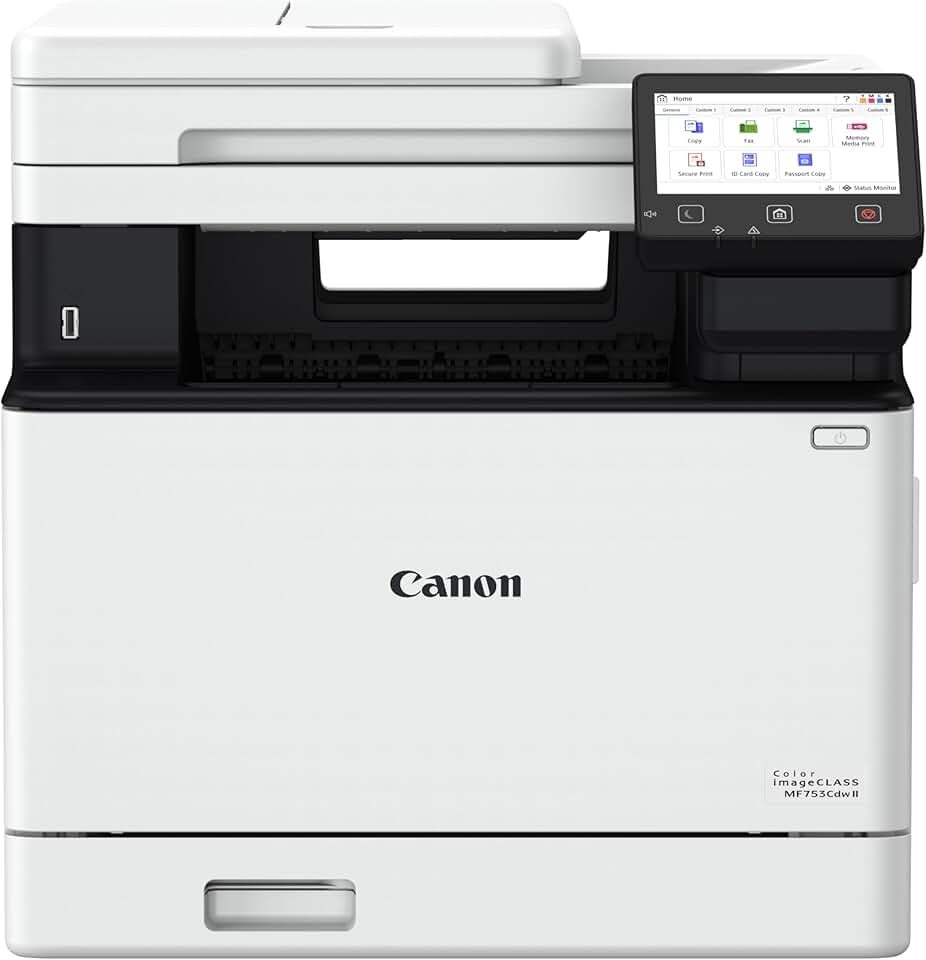
The Canon MF753Cdw II stands out as a formidable contender in the competitive market of all-in-one laser printers. Designed to meet the demands of both small businesses and busy home offices, this multifunction device promises efficiency, reliability, and a comprehensive suite of features.
Quick Summary: Canon MF753Cdw II
Rating: 4.0/5.0 Stars (Based on 126 reviews)
Price: $512.49 USD
This all-in-one color laser printer offers robust functionality for busy environments.
Key Pros:
- Fast color and monochrome printing at 35 PPM.
- Comprehensive all-in-one functions: print, scan, copy, fax.
- Wireless connectivity and duplex printing for convenience.
- Comes with a 3-year limited warranty for peace of mind.
Key Cons:
- Initial cost might be higher for some budgets.
- Toner cartridge replacements can be expensive over time.
Table of Contents
Canon MF753Cdw II Overview
The Canon MF753Cdw II is more than just a printer; it’s a comprehensive document management solution designed for efficiency and productivity. This all-in-one color laser printer combines robust printing capabilities with scanning, copying, and faxing functions, making it a versatile asset for any demanding environment.
Canon has engineered this model to deliver consistent, high-quality output, whether you’re printing vibrant color reports or crisp monochrome documents. Its laser technology ensures sharp text and accurate graphics, crucial for professional presentations and client-facing materials.
The printer boasts impressive speeds, capable of producing up to 35 pages per minute (PPM) for both color and black-and-white documents. This rapid output is a significant advantage for users who frequently handle large print jobs and need quick turnaround times.
Beyond speed, the MF753Cdw II emphasizes convenience with its wireless connectivity options. Users can easily print from various devices, including computers, laptops, smartphones, and tablets, without the need for tangled cables.
Duplex printing and scanning are standard features, allowing for automatic two-sided document handling. This not only saves paper but also streamlines workflows, particularly when dealing with multi-page contracts, reports, or brochures.
The inclusion of an Auto Document Feeder (ADF) further enhances its scanning and copying capabilities. The ADF can process multiple pages automatically, freeing up users from manual page feeding and accelerating bulk tasks significantly.
Durability and longevity are also key aspects of the Canon MF753Cdw II. Canon provides a 3-year limited warranty, underscoring their confidence in the product’s build quality and performance. This extended warranty offers peace of mind for businesses relying on their printer for daily operations.
From a user experience perspective, the printer features an intuitive touchscreen interface. This display simplifies navigation through menus, settings, and functions, making it accessible even for those who are not tech-savvy.
Considering its ENERGY STAR certification, the Canon MF753Cdw II is also designed with energy efficiency in mind. This helps reduce operational costs and environmental impact, aligning with modern sustainability goals for both businesses and home users.
Overall, this printer is positioned as a powerhouse for those who demand high performance, versatility, and reliability from their office equipment. It aims to streamline document management and enhance productivity across various professional settings.
Its robust feature set and solid construction make it a worthy investment for anyone looking to upgrade their printing infrastructure. The combination of speed, quality, and comprehensive functionality sets it apart in its class.
Canon MF753Cdw II Key Features & Specs
The Canon MF753Cdw II is packed with features designed to maximize productivity and offer a seamless user experience. Understanding these core specifications helps in appreciating its value proposition for various professional settings.
Printing Performance and Quality
At its core, the MF753Cdw II is a high-performance laser printer. It delivers impressive print speeds of up to 35 pages per minute (PPM) for both monochrome and color documents, ensuring that large print jobs are completed quickly and efficiently.
The laser technology provides crisp, sharp text and vibrant, accurate colors. This is crucial for professional documents, marketing materials, and presentations where visual fidelity is paramount. The print resolution ensures fine details are captured accurately.
Automatic duplex printing is a standard feature, allowing for two-sided printing without manual intervention. This not only conserves paper but also contributes to a more professional appearance for reports and brochures.
All-in-One Functionality
This device truly shines as an all-in-one solution, integrating print, scan, copy, and fax capabilities into a single machine. This consolidation saves space and reduces the need for multiple peripheral devices in an office environment.
The scanner function offers high-resolution optical scanning, capable of digitizing documents with clarity. It supports various file formats and destinations, including email, network folders, and USB drives, facilitating easy document sharing and archiving.
Copying is also robust, with features like ID card copy, collation, and reduction/enlargement options. The integrated Auto Document Feeder (ADF) handles up to 50 sheets, making multi-page scanning and copying tasks effortless and fast.
For those still relying on traditional communication, the fax functionality is fully equipped with advanced features. These include PC Fax, secure fax reception, and various dialing options, ensuring reliable document transmission.
Connectivity and User Interface
The MF753Cdw II offers versatile connectivity options, including standard USB 2.0, Gigabit Ethernet, and Wi-Fi. The wireless capabilities are particularly beneficial, enabling users to print from anywhere within their network without physical connections.
Mobile printing support is extensive, with compatibility for Canon PRINT Business, Apple AirPrint, and Mopria Print Service. This allows for convenient printing directly from smartphones and tablets, catering to a modern, mobile workforce.
The printer features a large, intuitive 5-inch color touchscreen display. This interface provides easy access to all functions, settings, and status updates, making operation straightforward even for complex tasks.
Paper Handling and Capacity
The standard paper capacity includes a 250-sheet front-loading paper cassette and a 50-sheet multipurpose tray. This combined capacity is suitable for most small to medium-sized office needs, reducing the frequency of paper refills.
An optional 550-sheet paper cassette is available for users with higher volume printing requirements, expanding the total capacity to 850 sheets. This flexibility allows the printer to grow with the demands of your business.
The multipurpose tray is excellent for handling various media types and sizes, including envelopes, labels, and thicker stock. This versatility ensures that the Canon MF753Cdw II can handle diverse printing needs.
Security and Management
Security features are integrated to protect sensitive documents and network integrity. These include Department ID Management, Secure Print, and various network security protocols, helping to prevent unauthorized access.
For IT administrators, the printer supports remote management tools, allowing for easy monitoring, configuration, and troubleshooting from a central location. This streamlines maintenance and ensures optimal performance.
Energy Efficiency and Warranty
As an ENERGY STAR certified device, the MF753Cdw II meets strict energy efficiency guidelines. It consumes less power in active and standby modes, leading to lower electricity bills and a reduced carbon footprint.
Canon backs this printer with a robust 3-year limited warranty, which includes Canon’s U.S.-based customer service and technical support. This commitment to post-purchase support adds significant value and peace of mind for users.
Pros & Cons
Evaluating the strengths and weaknesses of the Canon MF753Cdw II is crucial for making an informed purchasing decision. This section breaks down the significant advantages and potential drawbacks based on its features and market position.
Pros:
- Exceptional Print Speed: With 35 PPM for both color and monochrome, this printer handles high-volume tasks with ease. This speed significantly boosts productivity in busy office environments, minimizing wait times for large documents.
- Vibrant Color Output: The laser technology produces consistently sharp text and rich, accurate colors. This is vital for professional marketing materials, detailed reports, and presentations where visual quality is paramount.
- Comprehensive All-in-One Functionality: Integrating print, scan, copy, and fax capabilities into one machine offers unparalleled versatility. This reduces clutter and streamlines document management for a more efficient workspace.
- Automatic Duplexing: The ability to automatically print and scan two-sided documents saves paper and time. This feature is environmentally friendly and adds a professional touch to all your double-sided outputs.
- Robust Connectivity Options: Featuring Wi-Fi, Ethernet, and USB, the printer ensures flexible connection methods for various setups. Mobile printing support via AirPrint and Mopria further enhances convenience for modern workflows.
- Intuitive Touchscreen Interface: The large 5-inch color touchscreen simplifies operation and navigation. Users can easily access functions, monitor status, and configure settings without extensive training, improving user experience.
- High Paper Capacity (Expandable): A standard capacity of 300 sheets (250-sheet tray + 50-sheet multipurpose) is generous for many users. The option to add a 550-sheet cassette makes it scalable for growing demands.
- Advanced Document Feeder: The 50-sheet Auto Document Feeder (ADF) makes scanning and copying multi-page documents incredibly efficient. It automates a tedious process, saving valuable time.
- Strong Security Features: Department ID Management and Secure Print protect sensitive information, crucial for businesses handling confidential data. These features help maintain data integrity and compliance.
- 3-Year Limited Warranty: Canon’s extended warranty provides significant peace of mind and reflects confidence in the product’s durability. This level of support minimizes potential long-term maintenance concerns.
- Energy Star Certified: Its energy-efficient design helps reduce electricity consumption and operational costs. This aligns with environmental initiatives and contributes to a lower total cost of ownership.
Cons:
- Higher Initial Investment: The upfront cost of the Canon MF753Cdw II is higher than many inkjet or entry-level laser printers. This might be a barrier for individuals or very small businesses with tight budgets, despite its long-term value.
- Toner Cartridge Costs: While laser printers are known for lower cost per page, the replacement toner cartridges for color laser printers can be expensive. Users should factor in the cost of four individual color cartridges over the printer’s lifespan.
- Physical Size and Weight: As a robust all-in-one laser printer, it has a larger footprint and is heavier than compact models. This requires dedicated space and might be less suitable for extremely cramped home offices.
- Warm-up Time: Like most laser printers, it may have a slight warm-up delay before the first page prints, especially when coming out of a deep sleep mode. While quick, it’s not instantaneous like some inkjets.
- Complexity for Basic Users: While the touchscreen is intuitive, the sheer number of features and settings might be overwhelming for users who only need basic printing functionality. Some advanced features may go unused.
In summary, the MF753Cdw II offers a compelling package of speed, quality, and versatility, making it an excellent choice for demanding environments. However, potential buyers should weigh the initial and ongoing costs against their specific needs and budget. The long-term benefits often outweigh the higher upfront investment for those who truly utilize its full capabilities.
Who Should Buy the Canon MF753Cdw II?
Deciding if the Canon MF753Cdw II is the right printer for you involves considering your specific needs, workload, and budget. This powerful all-in-one device is not for everyone, but it excels in certain environments and for particular user profiles.
Small to Medium-Sized Businesses (SMBs)
This printer is an ideal fit for SMBs that require a reliable, high-volume, and versatile document solution. Its fast print speeds (35 PPM) for both color and monochrome ensure that daily office tasks, from invoices to marketing flyers, are processed quickly.
The all-in-one functionality (print, scan, copy, fax) means an SMB doesn’t need to purchase separate machines, saving space and reducing IT management complexity. The automatic duplexing and 50-sheet ADF are invaluable for handling multi-page documents efficiently, which is common in business operations.
For businesses that need to produce professional-quality color documents in-house, the MF753Cdw II delivers. Presentations, reports, and client-facing materials will benefit from the crisp text and vibrant colors, maintaining a polished corporate image.
Busy Home Offices and Remote Workers
Individuals working from home who have a high printing demand will find the MF753Cdw II to be a significant upgrade. If your work involves frequent printing, scanning contracts, or sending faxes, this printer handles it all with ease and speed.
The wireless connectivity and mobile printing capabilities are particularly useful in a home office setting, allowing flexibility in where you print from. The robust paper capacity also reduces the need for constant refilling, letting you focus on your work.
While the initial cost is higher, the durability, speed, and comprehensive feature set can justify the investment for serious home office users who rely heavily on their printer for their livelihood.
Educational Institutions and Departments
School administrative offices, university departments, or even dedicated teaching staff could benefit from this printer’s capabilities. Producing handouts, forms, reports, and internal communications often requires high volume and reliable color output.
The security features, such as Department ID Management, can help control usage and track costs across different groups within an institution. The ability to handle various paper types also makes it suitable for diverse educational materials.
Users Prioritizing Speed and Efficiency
If your primary concern is getting documents printed, scanned, or copied as quickly as possible, the MF753Cdw II is an excellent choice. Its 35 PPM speed and efficient ADF are designed for maximum throughput, minimizing bottlenecks in your workflow.
For those who frequently print large reports, multi-page contracts, or need to digitize stacks of documents, the time savings offered by this machine are substantial. It’s built for environments where time is money.
The intuitive touchscreen interface also contributes to efficiency by making functions easy to locate and execute, reducing the learning curve and improving overall user productivity.
In essence, if you find yourself constantly waiting for your current printer, or if you’re struggling with multiple single-function devices, the Canon MF753Cdw II offers a streamlined, high-performance alternative. It’s an investment in productivity.
Users Seeking Durability and Support
The 3-year limited warranty from Canon is a significant draw for users who value long-term reliability and support. This commitment indicates a durable product and provides assurance against potential issues, reducing long-term ownership risks.
For businesses that cannot afford downtime due to printer malfunctions, the robust build quality and extensive warranty offer critical peace of mind. It’s an investment in a machine designed to last and perform consistently.
Conversely, if you only print occasionally, don’t need color, or have a very limited budget, a simpler, less expensive model might be more appropriate. However, for those with demanding document needs, the Canon MF753Cdw II delivers exceptional value.
Consider your average monthly print volume, the importance of color, and the need for scanning and faxing capabilities. If these factors align with the MF753Cdw II’s strengths, it will be a highly beneficial addition to your workspace.
For more detailed specifications and support, you can visit the Canon Official Product Page.
FAQ about Canon MF753Cdw II
This section addresses common questions about the Canon MF753Cdw II to provide further clarity and help potential buyers understand its capabilities and operational aspects.
Q1: What are the main functions of the Canon MF753Cdw II?
A1: The Canon MF753Cdw II is a true all-in-one multifunction printer. It is capable of printing, scanning, copying, and faxing documents. This comprehensive suite of functions makes it a central hub for all your document management needs in an office or home office environment, consolidating multiple devices into one efficient unit.
Q2: Does the Canon MF753Cdw II support wireless printing?
A2: Yes, absolutely. The MF753Cdw II offers robust wireless connectivity, allowing you to print from various devices over your Wi-Fi network. It supports popular mobile printing solutions such as Apple AirPrint, Mopria Print Service, and Canon’s own PRINT Business app, providing flexibility and convenience for users on the go.
Q3: What is the print speed for both color and black-and-white documents?
A3: This printer boasts an impressive print speed of up to 35 pages per minute (PPM) for both color and monochrome documents. This high speed ensures that even large print jobs are completed quickly, significantly boosting productivity and reducing wait times in busy settings.
Q4: Does this printer have an automatic document feeder (ADF) and duplex capabilities?
A4: Yes, the Canon MF753Cdw II is equipped with a 50-sheet automatic document feeder (ADF). This allows for efficient, unattended scanning and copying of multi-page documents. Furthermore, it supports automatic duplex printing and scanning, meaning it can handle two-sided documents without manual flipping, saving paper and streamlining workflows.
Q5: What kind of warranty comes with the Canon MF753Cdw II?
A5: Canon provides a 3-year limited warranty for the MF753Cdw II. This warranty typically covers defects in materials and workmanship, offering peace of mind for your investment. It also includes access to Canon’s U.S.-based customer service and technical support for assistance with any issues.
Q6: Is the Canon MF753Cdw II energy efficient?
A6: Yes, the MF753Cdw II is ENERGY STAR certified, indicating its compliance with strict energy efficiency guidelines. This means it’s designed to consume less power during operation and in standby modes, which can help reduce electricity costs and contribute to a more environmentally friendly workspace.
Q7: Can I print from a USB drive directly?
A7: Yes, the printer features a convenient USB host port. You can directly print documents (like JPEG, TIFF, PDF) from a USB flash drive without needing a computer. This feature is particularly useful for quick prints or for sharing documents directly from portable storage.
Q8: What is the recommended monthly print volume for this printer?
A8: While specific recommended monthly print volumes can vary and are often found in the detailed product specifications on Canon’s website, printers in this class (35 PPM, laser) are generally designed for moderate to high volume usage. They typically handle several thousand pages per month reliably, making them suitable for busy small offices or departments. For precise figures, always consult the manufacturer’s official documentation.
These FAQs cover some of the most common inquiries about the Canon MF753Cdw II, providing quick and detailed answers to help users understand its core functionalities and benefits. For any further technical details, consulting the user manual or Canon’s support resources is recommended.
Final Verdict
After an in-depth analysis of its features, performance, and user feedback, the Canon MF753Cdw II emerges as an outstanding choice for demanding office environments. It represents a significant investment in productivity and efficiency for small to medium-sized businesses and busy home offices.
Its blend of rapid color and monochrome printing, comprehensive all-in-one functionality, and robust connectivity options makes it a highly versatile and valuable asset. The automatic duplexing and efficient Auto Document Feeder further streamline document workflows, saving precious time and resources.
While the initial purchase price and ongoing toner costs are points to consider, the long-term benefits often outweigh these factors. The MF753Cdw II delivers professional-grade output, durable construction, and is backed by a solid 3-year warranty, ensuring reliability and peace of mind.
For users who prioritize speed, high-quality color output, and a full suite of document management tools, this printer is truly worth it. It simplifies complex tasks, enhances security, and offers an intuitive user experience through its touchscreen interface.
In conclusion, if your office or home office requires a dependable, high-performance, and feature-rich multifunction laser printer, the Canon MF753Cdw II is a top-tier contender that will meet and likely exceed your expectations. It’s an investment that pays dividends in efficiency and professional output.