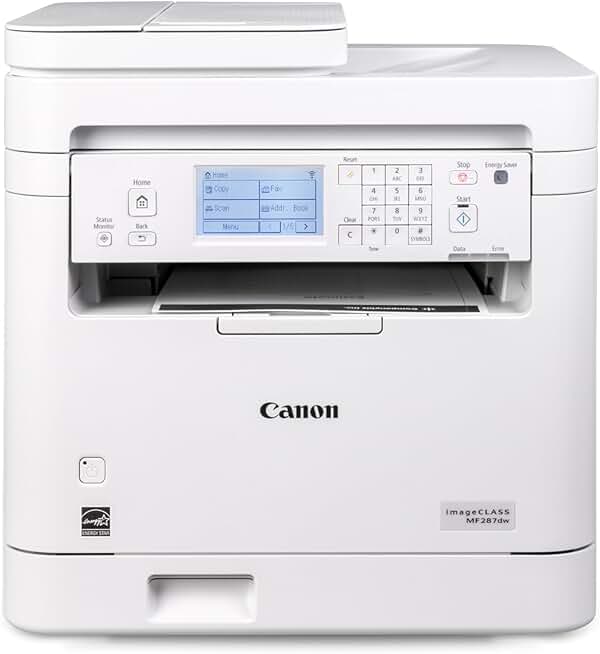
The Canon MF287dw Printer stands out as a robust and reliable monochrome laser all-in-one device, engineered to meet the demanding needs of small offices and home-based professionals. This comprehensive review will delve deep into its capabilities, performance, and overall value, helping you determine if it’s the right fit for your printing, copying, scanning, and faxing requirements.
Quick Summary: Canon MF287dw Printer
- Rating: 4.1/5 Stars (based on 114 reviews)
- Price: $229.00 USD (at time of review)
- Key Pros:
- Fast monochrome printing at 35 PPM.
- Automatic duplex printing saves paper.
- Versatile all-in-one functionality (Print, Copy, Scan, Fax).
- Key Cons:
- No color printing capability.
- Initial setup for wireless can be complex for some users.
Table of Contents
Canon MF287dw Printer Overview
The Canon MF287dw Printer is a versatile all-in-one monochrome laser printer designed for efficiency and productivity in busy environments. It combines high-speed printing with robust copying, scanning, and faxing capabilities into a single, compact unit. This model is particularly appealing to users who require consistent, high-volume black-and-white output without the need for color.
Canon has positioned the MF287dw as a workhorse for small to medium-sized businesses and home offices where reliability and cost-effectiveness are paramount. Its laser technology ensures crisp text and graphics, making it ideal for professional documents, invoices, and reports. The printer’s focus on monochrome output often translates to lower per-page printing costs compared to color inkjet or laser alternatives, especially for text-heavy documents.
One of the key selling points of the Canon MF287dw Printer is its comprehensive feature set, which includes automatic duplex printing. This capability significantly reduces paper consumption and contributes to a more eco-friendly workspace. Furthermore, its wireless connectivity options provide flexibility in placement and allow multiple users to share the device seamlessly across a network.
The printer’s design is utilitarian yet modern, featuring a relatively small footprint for an all-in-one laser device. This makes it suitable for placement on a desk or a dedicated printer stand without dominating the office space. The intuitive control panel with a clear display facilitates easy navigation through its various functions, enhancing user experience.
Performance-wise, the MF287dw boasts a print speed of up to 35 pages per minute (PPM), which is impressive for its category. This speed ensures that even large print jobs are completed quickly, minimizing wait times and boosting overall office productivity. The first page out time is also quite rapid, further contributing to its efficiency.
The inclusion of an Automatic Document Feeder (ADF) for scanning and copying multi-page documents is another significant advantage. This feature streamlines workflows, allowing users to process stacks of papers without manual intervention. For offices dealing with a regular flow of paperwork, the ADF is an invaluable time-saver.
Canon’s commitment to energy efficiency is evident in the MF287dw’s ENERGY STAR certification. This means the printer is designed to consume less power, reducing electricity bills and environmental impact. Such considerations are increasingly important for both budget-conscious consumers and environmentally aware businesses.
While the Canon MF287dw Printer excels in monochrome tasks, it’s important for potential buyers to understand its limitations. It does not offer color printing, which might be a deal-breaker for those who require vibrant graphics or photographic output. However, for its intended purpose of high-quality, high-volume black-and-white document processing, it is an exceptional performer.
The printer also comes with a 1-year limited warranty, providing peace of mind to new owners. This warranty demonstrates Canon’s confidence in the product’s durability and reliability, offering support should any issues arise during the initial period of ownership. Customers can usually find detailed warranty information on Canon’s official support pages, ensuring they understand the terms of coverage.
Considering its robust feature set, impressive speed, and reliable performance, the Canon MF287dw Printer presents a compelling option for anyone seeking a dedicated monochrome all-in-one solution. Its ability to handle diverse office tasks efficiently makes it a strong contender in its market segment, offering substantial value for its price point.
Canon MF287dw Printer Key Features & Specs
The Canon MF287dw Printer is packed with features designed to enhance productivity and streamline office workflows. Understanding its core specifications helps in appreciating its capabilities and suitability for various tasks. Here, we’ll break down the most important aspects of this monochrome laser all-in-one device.
Monochrome Laser Printing
At its heart, the MF287dw is a monochrome laser printer, meaning it specializes in producing high-quality black-and-white documents. Laser technology ensures sharp text and consistent output, which is crucial for professional documents, contracts, and reports. This focus allows for faster speeds and often lower cost per page for text printing.
The print resolution typically associated with Canon laser printers ensures that even fine print and intricate details are rendered clearly. This makes it an excellent choice for businesses that prioritize textual clarity and professional appearance over color graphics. The toner-based system also prevents smudging, a common issue with some inkjet technologies.
Duplex Printing Capability
One of the most significant features is its automatic duplex printing. This allows the printer to automatically print on both sides of a page, saving paper and reducing environmental impact. For businesses and individuals looking to cut down on paper costs and storage space, this feature is invaluable.
Automated duplexing also means less manual intervention, as you don’t need to manually flip pages for double-sided prints. This streamlines the printing process for multi-page documents, enhancing overall efficiency. It’s a standard feature that significantly improves the user experience for frequent printing tasks.
Wireless Connectivity
The Canon MF287dw Printer offers robust wireless connectivity, enabling flexible placement within an office or home environment without the need for direct cable connections. Users can print from various devices, including computers, laptops, smartphones, and tablets, through Wi-Fi or mobile printing apps.
This wireless capability supports various standards, often including Wi-Fi Direct for peer-to-peer connections and compatibility with services like Apple AirPrint and Mopria Print Service. Such versatility makes it easy for multiple users to access and utilize the printer, whether they are in the same room or across a small office network.
All-in-One Functionality (Print, Copy, Scan, Fax)
As an all-in-one device, the MF287dw integrates four essential office functions: printing, copying, scanning, and faxing. This consolidation saves space and reduces the need for multiple single-function devices. Each function is designed to perform reliably and efficiently.
The copying function allows for quick duplication of documents, while the scanning capability enables digitalization of paper documents into various formats like PDF or JPEG. The built-in fax modem provides a traditional communication method still required by many businesses, ensuring a complete office solution.
Automatic Document Feeder (ADF)
The inclusion of an Automatic Document Feeder (ADF) is a critical feature for handling multi-page documents when copying, scanning, or faxing. Instead of placing each page individually on the flatbed scanner, you can load a stack of documents into the ADF, and the printer will process them automatically.
This significantly speeds up tasks involving numerous pages, such as digitizing archives or sending multi-page faxes. The capacity of the ADF is typically sufficient for most small office needs, further enhancing the printer’s productivity credentials. It’s a real time-saver for repetitive document processing.
Print Speed (35 PPM)
With a print speed of 35 pages per minute (PPM), the Canon MF287dw Printer is a fast performer in its class. This speed ensures that even large print jobs are completed quickly, reducing bottlenecks in busy office environments. High print speeds are essential for maintaining workflow efficiency and meeting tight deadlines.
The rapid output minimizes waiting times, allowing users to get their documents and move on to other tasks promptly. For a monochrome laser printer, 35 PPM is a very respectable speed, making it suitable for environments with moderate to high print volumes. This speed applies to single-sided letter-sized documents, with duplex speeds often being slightly lower but still efficient.
ENERGY STAR Certified
The ENERGY STAR certification signifies that the MF287dw meets strict energy efficiency guidelines set by the U.S. Environmental Protection Agency. This means the printer is designed to consume less power during operation and in standby modes, leading to reduced electricity costs and a smaller carbon footprint.
For environmentally conscious users and businesses looking to lower their utility expenses, an ENERGY STAR-rated device is a significant advantage. It reflects a commitment to sustainable practices without compromising performance, offering a balance between power and productivity.
1 Year Limited Warranty
Canon provides a 1-year limited warranty with the MF287dw, offering protection against manufacturing defects and malfunctions under normal use. This warranty period provides peace of mind, ensuring that support is available should any issues arise during the initial year of ownership.
It is always advisable to register the product upon purchase and to review the full terms and conditions of the warranty on the Canon website. This ensures that you are fully aware of what is covered and the procedure for making a warranty claim, should it become necessary. A solid warranty is an indicator of manufacturer confidence in product quality.
Pros & Cons of the Canon MF287dw Printer
Every product has its strengths and weaknesses, and the Canon MF287dw Printer is no exception. A balanced perspective helps potential buyers make an informed decision. Here’s a detailed look at the advantages and disadvantages of this monochrome laser all-in-one device.
Pros of the Canon MF287dw Printer
Exceptional Print Speed and Quality
The MF287dw boasts a rapid print speed of 35 pages per minute (PPM), making it highly efficient for environments with high document volume. This speed ensures that large print jobs are completed quickly, significantly reducing wait times and improving overall workflow. The laser technology delivers consistently sharp, crisp text and professional-looking documents, which is essential for business correspondence and reports.
The clarity and precision of the text output are a standout feature, ensuring that even small fonts are perfectly legible. This high print quality, combined with its speed, positions the MF287dw as a reliable workhorse for any office requiring consistent black-and-white output. Users often praise its ability to maintain quality even during continuous, heavy use.
Automatic Duplexing for Cost and Environmental Savings
The automatic duplex printing feature is a major advantage, allowing the printer to print on both sides of a page without manual intervention. This not only saves a significant amount of paper but also contributes to reduced environmental impact. For businesses, lower paper consumption translates directly into cost savings over time.
Beyond cost and environmental benefits, duplexing simplifies the printing of multi-page documents, making the process more efficient and less prone to errors. It’s a standard feature that adds considerable value, particularly for those who frequently print lengthy reports or manuals. This convenience is often underestimated until experienced firsthand.
Comprehensive All-in-One Functionality
The MF287dw offers print, copy, scan, and fax capabilities, providing a complete office solution in a single device. This versatility eliminates the need for separate machines, saving valuable office space and simplifying equipment management. All functions are seamlessly integrated and accessible through an intuitive control panel.
The integrated functionality ensures that all your document handling needs are met by one reliable machine. From digitizing paper files with the scanner to sending urgent faxes, the MF287dw handles a wide range of tasks efficiently. This consolidated approach is ideal for small offices or home setups where space and budget are considerations.
Efficient Automatic Document Feeder (ADF)
Equipped with an Automatic Document Feeder, the printer can handle multi-page scanning, copying, and faxing with ease. This feature allows users to load a stack of documents and let the machine process them automatically, saving considerable time and effort compared to manual flatbed scanning. The ADF is particularly beneficial for batch processing documents.
For tasks like archiving old records or distributing information, the ADF transforms a tedious manual job into a quick, automated process. Its reliable feeding mechanism minimizes jams, further enhancing productivity. This feature alone can justify the investment for users with regular document processing needs.
Robust Wireless and Mobile Connectivity
The printer’s wireless capabilities offer immense flexibility, allowing it to be placed anywhere within network range without being tethered by cables. It supports various mobile printing solutions like Apple AirPrint and Mopria Print Service, enabling users to print directly from their smartphones and tablets. This ease of access is crucial in modern, dynamic work environments.
Setting up the wireless connection allows multiple users to share the printer effortlessly, promoting collaboration and efficiency. The ability to print from mobile devices adds another layer of convenience, perfect for urgent print jobs or when working away from a computer. This connectivity makes the MF287dw a truly modern office device.
Cons of the Canon MF287dw Printer
No Color Printing
The most significant limitation of the Canon MF287dw Printer is its inability to print in color. This is a monochrome-only device, meaning it can only produce black-and-white output. For users who frequently need to print color graphics, photos, marketing materials, or presentations, this printer will not suffice.
This restriction means that additional printing solutions would be required for any color-specific tasks, potentially increasing overall equipment costs and complexity. While excellent for text, its lack of color output is a clear drawback for diverse printing needs. Buyers must confirm their primary printing requirements are indeed monochrome.
Potentially Complex Wireless Setup
While offering excellent wireless connectivity, some users have reported that the initial setup process for connecting the printer to a wireless network can be somewhat complex or unintuitive. This might require a bit of technical know-how or patience to get it fully configured, especially for those less familiar with network settings.
Although Canon provides detailed instructions and support, the learning curve for wireless setup can be a source of frustration for some. Once configured, it generally performs reliably, but the initial hurdle could deter less tech-savvy individuals. It is advisable to consult the manual or online tutorials for a smoother setup experience.
Higher Initial Toner Cartridge Cost
Like many laser printers, the initial cost of replacement toner cartridges for the Canon MF287dw Printer can be higher than inkjet cartridges. While laser toner typically yields more pages and offers a lower cost per page in the long run, the upfront expense for a new cartridge can be a noticeable investment. This might surprise users accustomed to cheaper inkjet refills.
However, it’s important to factor in the significantly higher page yield of toner cartridges compared to ink. For high-volume printing, the total cost of ownership often favors laser printers, but the sticker shock of a new toner cartridge is a legitimate concern for some budgets. Investing in high-yield cartridges can further optimize long-term costs.
Who Should Buy the Canon MF287dw Printer?
The Canon MF287dw Printer is not a one-size-fits-all solution, but it excels in specific environments and for particular user profiles. Understanding who this printer is best suited for can help you determine if it aligns with your home or office needs. Its features cater to efficiency, speed, and cost-effectiveness in monochrome document handling.
Small to Medium-Sized Businesses
For small to medium-sized businesses (SMBs) that frequently print invoices, contracts, reports, and other text-heavy documents, the MF287dw is an excellent choice. Its high print speed of 35 PPM ensures that daily printing demands are met without slowdowns, keeping operations running smoothly. The robust build quality is designed to withstand continuous use in a busy office setting.
The all-in-one functionality (print, copy, scan, fax) means that a single device can handle multiple office tasks, reducing capital expenditure and freeing up valuable office space. This consolidation is particularly beneficial for growing businesses that need versatile equipment without a large footprint. The ability to network the printer wirelessly also supports multiple users.
Home Office Professionals
Individuals working from a home office who require a reliable and efficient printer for professional documents will find the MF287dw highly beneficial. If your work primarily involves legal documents, academic papers, administrative tasks, or any other black-and-white intensive printing, this printer offers superior performance and lower running costs compared to many inkjet alternatives.
The automatic duplexing feature is a significant advantage for home users looking to save on paper and manage costs. Furthermore, the wireless connectivity allows for flexible placement within the home, and mobile printing capabilities make it convenient to print from personal devices. Its energy efficiency also helps keep utility bills in check, which is a common concern for home-based entrepreneurs.
Users with High-Volume Monochrome Printing Needs
Any user or organization with a consistent and high volume of black-and-white printing will benefit immensely from the Canon MF287dw Printer. Laser printers are inherently more cost-effective per page for monochrome prints than inkjet printers, especially over the long term. The high yield of toner cartridges means fewer replacements and less downtime.
Educational institutions, accounting firms, and legal offices often fall into this category, where thousands of pages of text documents are printed monthly. The MF287dw’s durability and efficiency are perfectly aligned with such demanding environments, ensuring consistent output without frequent maintenance issues. Its speed helps process large batches quickly.
Those Prioritizing Sharp Text and Professional Documents
If the clarity and sharpness of text are paramount for your printed materials, the MF287dw’s laser technology delivers exceptional results. This printer produces crisp, smudge-free documents that convey professionalism, making it ideal for client-facing materials, official correspondence, and academic submissions. The quality is consistently high from the first page to the last.
For industries where document legibility and presentation are critical, such as finance, healthcare, or government, this printer provides the necessary output quality. It ensures that every character is precisely rendered, preventing misinterpretations and upholding the integrity of important information. This focus on text quality is a core strength.
Budget-Conscious Buyers Seeking Long-Term Value
While the initial purchase price might be higher than some basic inkjet printers, the Canon MF287dw Printer offers significant long-term value due to its low cost per page and robust construction. The efficiency of laser toner, combined with features like automatic duplexing, leads to substantial savings on consumables and paper over the printer’s lifespan.
Its durability also means less frequent need for replacement, further contributing to its overall economic advantage. For those who calculate total cost of ownership rather than just the upfront price, the MF287dw is a smart investment. The ENERGY STAR certification also adds to savings through reduced power consumption, making it an economically sound choice.
In summary, the Canon MF287dw Printer is an excellent fit for anyone needing a fast, reliable, and cost-effective monochrome all-in-one printer for high-volume text document production. It’s ideal for professional settings where efficiency and crisp black-and-white output are key, and where color printing is not a primary requirement.
FAQ about Canon MF287dw Printer
Here are some frequently asked questions about the Canon MF287dw Printer, providing further insights into its functionality, maintenance, and compatibility. These answers aim to address common concerns and help users get the most out of their device.
Q1: Is the Canon MF287dw Printer compatible with Mac and Windows operating systems?
A1: Yes, the Canon MF287dw Printer is designed to be fully compatible with both Windows and macOS operating systems. Canon provides the necessary drivers and software for seamless integration with a wide range of computer systems. You can typically download the latest drivers from the official Canon support website to ensure optimal performance.
For Windows users, installation is usually straightforward, often involving an auto-run installer. Mac users will find support through AirPrint for basic printing, and dedicated drivers for advanced features like scanning and faxing. It’s always recommended to check the Canon support page for your specific OS version.
Q2: Can I print from my smartphone or tablet with the MF287dw?
A2: Absolutely. The Canon MF287dw Printer supports various mobile printing solutions, including Apple AirPrint for iOS devices and Mopria Print Service for Android devices. Canon also offers its own proprietary mobile printing app, Canon PRINT Business, which provides enhanced control and features for printing and scanning directly from your mobile device.
These mobile options allow for convenient printing without needing to transfer files to a computer, enhancing flexibility and productivity. Ensure your mobile device and the printer are connected to the same Wi-Fi network for these features to function correctly. The setup process for mobile printing is generally user-friendly.
Q3: What type of toner cartridge does the Canon MF287dw Printer use, and how many pages does it yield?
A3: The Canon MF287dw Printer typically uses Canon 137 series toner cartridges, specifically the Canon Cartridge 137 (standard yield) or Cartridge 137 Black High Capacity (high yield). The standard yield cartridge usually produces around 2,400 pages, while the high-capacity version can yield approximately 5,000 pages, based on ISO/IEC standards.
These page yields are estimates and can vary depending on the content being printed, such as the density of text or graphics. Opting for the high-capacity cartridge is often more economical in the long run for users with heavy printing demands, as it reduces the cost per page and the frequency of cartridge replacement. Always purchase genuine Canon toner for best results.
Q4: Does the MF287dw have a feeder for scanning multiple documents?
A4: Yes, the Canon MF287dw Printer is equipped with an Automatic Document Feeder (ADF). This feature allows you to load a stack of multiple pages (typically up to 50 sheets) for scanning, copying, or faxing in a continuous batch. This saves considerable time and effort compared to manually placing each page on the flatbed scanner.
The ADF is particularly useful for digitizing large archives, processing multi-page contracts, or sending lengthy faxes efficiently. It significantly streamlines workflows in busy office environments. Make sure documents are free of staples or clips before loading them into the ADF to prevent jams.
Q5: Is the Canon MF287dw Printer difficult to set up for wireless use?
A5: While the Canon MF287dw Printer offers robust wireless capabilities, some users may find the initial wireless setup process a bit challenging compared to a direct USB connection. Canon provides detailed setup guides and online resources, but it may require some familiarity with network settings to connect successfully. Ensure you have your Wi-Fi network name (SSID) and password ready.
Many users find success by following the step-by-step instructions in the included manual or by utilizing the Canon online setup guides. Once configured, the wireless connection typically remains stable and reliable, allowing for seamless printing from various devices across your network. Patience and adherence to the instructions are key for a smooth setup.
Q6: What is the maximum paper size the MF287dw can handle?
A6: The Canon MF287dw Printer can typically handle a variety of paper sizes up to legal size (8.5 x 14 inches) in its main paper tray. It also supports standard letter (8.5 x 11 inches) and A4 sizes, as well as smaller media types like envelopes and custom sizes through its multi-purpose tray. Always check the printer’s specifications for a complete list of supported media types and sizes.
Using the correct paper size and type for your print job is crucial for optimal performance and to prevent paper jams. The multi-purpose tray is particularly useful for printing on specialty media that might not fit in the main tray, such as thicker paper stock or labels. Always consult the user manual for detailed guidance on paper loading and specifications.
Q7: Does the MF287dw have a touch screen display?
A7: The Canon MF287dw Printer typically features a 5-inch color touchscreen LCD panel. This touchscreen interface provides an intuitive way to navigate through the printer’s menus, adjust settings, and access various functions like copying, scanning, and faxing. The visual feedback and ease of selection greatly enhance the user experience.
A touchscreen makes operating the printer significantly more user-friendly than traditional button-based interfaces, allowing for quicker command execution and easier troubleshooting. Users can often customize the home screen to display frequently used functions, further streamlining daily tasks. This modern interface is a notable convenience feature.
Final Verdict on the Canon MF287dw Printer
After a thorough examination of its features, performance, and user feedback, the Canon MF287dw Printer emerges as an outstanding choice for specific user groups. It is a highly capable and efficient monochrome laser all-in-one device that prioritizes speed, reliability, and cost-effectiveness for black-and-white document management. Its blend of high-speed printing, automatic duplexing, and comprehensive functionality makes it a strong contender in the small office and home office market.
For businesses and professionals whose primary need is crisp, fast, and high-volume black-and-white printing, scanning, copying, and faxing, the MF287dw delivers exceptional value. The 35 PPM print speed ensures productivity, while the automatic document feeder and duplex printing significantly streamline workflows and reduce operational costs. The wireless connectivity adds a layer of convenience and flexibility that is essential in modern work environments, allowing for easy sharing and mobile printing.
However, it is crucial to reiterate that this printer is strictly a monochrome device. If your workflow requires any form of color printing, whether for marketing materials, photographs, or color-coded documents, the MF287dw will not meet those needs. This is its most significant limitation, and potential buyers must consider their color printing requirements before committing to this model.
Despite the lack of color, the Canon MF287dw Printer stands out for its robust build, energy efficiency, and the long-term cost savings associated with laser toner. The 1-year limited warranty provides a reasonable assurance of quality and support. For users seeking a dependable workhorse for their monochrome document tasks, this printer represents a smart and worthwhile investment. It truly is an ultimate solution for dedicated black-and-white print needs.
For more detailed specifications and support information, you can visit the official Canon USA website. To learn more about laser printer technology and its benefits, a visit to Wikipedia’s Laser Printer page can provide valuable context.