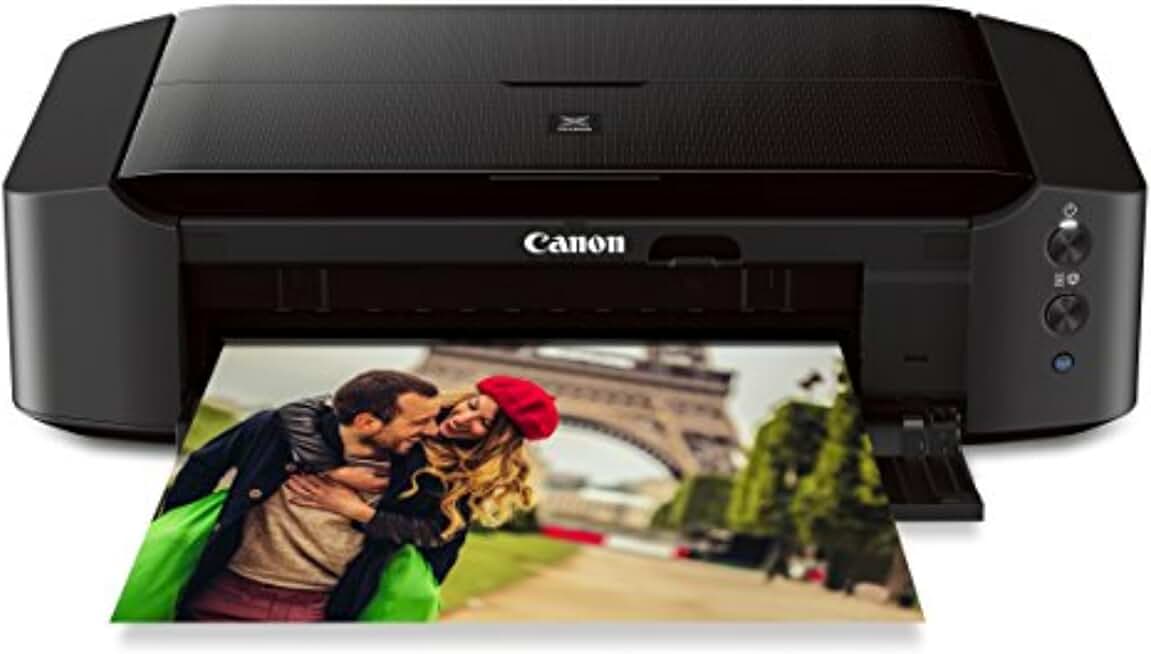
When it comes to bringing your digital memories to life, the Canon IP8720 Printer stands out as a formidable contender for serious photo enthusiasts and creative professionals alike. This wireless inkjet photo printer is engineered to deliver stunning, high-quality prints, making it an excellent addition to any home or small office environment. Its advanced features and connectivity options ensure a seamless printing experience for a wide range of tasks.
Quick Summary: Canon IP8720 Printer
- Rating: 4.1/5.0 (Based on 2582 reviews)
- Price: $259.65 USD
- Key Pros:
- Exceptional photo print quality with 6-ink system.
- Wireless connectivity and mobile printing support.
- Supports wide format printing up to 13″x19″.
- Key Cons:
- Ink consumption can be high for frequent use.
- No automatic duplex printing feature.
Table of Contents
Canon IP8720 Printer Overview
The Canon IP8720 Printer is a specialized photo inkjet printer designed for users who demand superior print quality, especially for photographs and creative projects. Unlike standard all-in-one printers, this model focuses purely on printing, excelling in vibrant color reproduction and sharp detail. Its sleek, black design and compact footprint allow it to blend seamlessly into various home or office setups.
At its core, the IP8720 utilizes a six-ink color system, which includes a gray ink cartridge in addition to the standard CMYK and pigment black. This extra gray ink significantly enhances grayscale gradients and improves color accuracy, particularly in subtle tones and shadows, resulting in more professional-looking monochrome and color prints.
Canon has positioned the IP8720 as an accessible wide-format printer, capable of handling media up to 13 by 19 inches. This capability opens up a world of possibilities for printing large photographs, art reproductions, or even small posters, making it a versatile tool for hobbyists and semi-professional photographers. The printer’s robust paper handling system ensures smooth feeding of various media types, from glossy photo paper to fine art stock.
Connectivity is another strong suit of the Canon IP8720 Printer. It offers both Wi-Fi and USB connectivity, providing flexibility for different user preferences. The wireless functionality is particularly convenient, allowing users to print from multiple devices without needing to be physically tethered to the printer. This feature is crucial in modern smart home environments where devices are increasingly interconnected.
Mobile printing is fully supported through Canon’s PIXMA Printing Solutions app, Apple AirPrint, and Google Cloud Print. These integrations make it incredibly easy to print directly from smartphones, tablets, and cloud services, streamlining the workflow for busy individuals. Whether you’re at home or on the go, sending a print job to the IP8720 is straightforward and efficient.
While the Canon IP8720 Printer is primarily a photo printer, it also performs admirably with text documents, producing crisp and legible results. However, its optimized ink system for photos means that its running costs might be slightly higher than a dedicated document printer if used for extensive text printing. Users should consider their primary printing needs before committing to this model.
The printer’s setup process is generally straightforward, guided by clear instructions and user-friendly software. Maintenance, such as ink cartridge replacement and print head cleaning, is also designed to be as simple as possible, minimizing downtime and ensuring consistent print quality over time. This user-centric design makes the IP8720 a practical choice for those who value ease of use alongside high performance.
In summary, the Canon IP8720 Printer is a specialized device that excels in delivering outstanding photo prints with broad format capabilities and modern connectivity. It’s a testament to Canon’s commitment to imaging excellence, offering a compelling package for anyone serious about their printed output. Understanding its strengths as a photo-centric device is key to appreciating its value.
Canon IP8720 Printer Key Features & Specs
The Canon IP8720 Printer is packed with features that elevate it beyond a standard home printer, particularly for those focused on visual output. Its specifications are tailored to provide a premium printing experience, focusing on color accuracy, resolution, and media versatility. Understanding these details is crucial for appreciating its capabilities.
One of the most significant features is its 6-Color Ink System. This includes Cyan, Magenta, Yellow, Black (dye-based for photos), Pigment Black (for text), and Gray ink. The inclusion of gray ink is particularly noteworthy, as it dramatically improves tonal gradation in both color and monochrome images, reducing graininess and producing smoother transitions. This advanced ink system is the bedrock of its impressive photo quality.
The printer boasts an impressive maximum color DPI of 9600 x 2400, which is critical for producing incredibly detailed and sharp photographs. This high resolution ensures that even the smallest details in an image are rendered with clarity, making prints look professional and true to the original digital file. The FINE (Full-photolithography Inkjet Nozzle Engineering) print head technology contributes to this precision, enabling microscopic ink droplets to be ejected with accuracy.
Another standout capability is its Wide Format Printing. The Canon IP8720 Printer can handle paper sizes up to 13″ x 19″ (A3+), which is a significant advantage for photographers and artists. This allows for the creation of large prints suitable for framing, portfolios, or display, extending creative possibilities beyond standard 8″x10″ or 8.5″x11″ prints. It supports various media types, including glossy, semi-gloss, matte, and fine art papers.
Wireless Connectivity is a standard modern convenience, and the IP8720 delivers with built-in Wi-Fi. This enables seamless printing from computers, laptops, and mobile devices without the need for physical cables. Setting up the wireless connection is typically straightforward, allowing users to quickly integrate the printer into their home network.
For mobile users, the printer offers robust support for Mobile Printing Apps and Services. This includes Apple AirPrint, which allows direct printing from iOS devices, and Google Cloud Print, for printing from Chromebooks and other web-connected devices. Canon’s own PIXMA Printing Solutions (PPS) app provides additional control and functionality for printing from smartphones and tablets, including photo editing and cloud integration.
The print speed for photos is respectable for its class, with an approximate speed of 36 seconds for a borderless 4″ x 6″ photo. For documents, it offers approximately 14.5 images per minute (ipm) for black and 10.4 ipm for color. While not the fastest for documents, these speeds are more than adequate for typical home use and occasional document printing.
Energy efficiency is also a consideration, as indicated by its ENERGY STAR certification. This means the Canon IP8720 Printer is designed to consume less power, helping to reduce electricity bills and environmental impact. The printer also features a quiet mode, which can be useful in home environments where noise levels are a concern, allowing for printing without significant disruption.
In summary, the Canon IP8720 Printer combines a sophisticated 6-ink system, high-resolution output, and wide-format capabilities with modern wireless and mobile printing options. These features make it a powerful tool for anyone serious about producing high-quality photo prints at home, offering both performance and convenience in a single package. Its ability to handle diverse media types further enhances its appeal to creative individuals.
Pros & Cons
Understanding the strengths and weaknesses of any product is vital for making an informed purchasing decision. The Canon IP8720 Printer, while excellent in many respects, also has its areas where it could be improved. Let’s delve into a detailed breakdown of its advantages and disadvantages.
Pros of the Canon IP8720 Printer
- Outstanding Photo Print Quality: This is arguably the IP8720’s strongest suit. The 6-ink system, particularly the inclusion of gray ink, produces incredibly vibrant colors, smooth tonal gradations, and sharp details. Prints exhibit excellent color accuracy and depth, making them ideal for professional portfolios, art reproductions, and cherished family photos. The high resolution of 9600 x 2400 dpi ensures that every nuance is captured on paper.
- Wide Format Printing Capability: The ability to print up to 13″ x 19″ (A3+) is a significant advantage for photographers and graphic designers. This allows for large, impactful prints that standard printers cannot achieve, expanding creative possibilities and making the printer suitable for producing exhibition-quality pieces. It supports various paper types, from glossy to fine art.
- Excellent Wireless and Mobile Connectivity: With built-in Wi-Fi, AirPrint, Google Cloud Print, and Canon’s own mobile app, the IP8720 offers superb flexibility. Users can print effortlessly from their smartphones, tablets, laptops, or cloud services, making it convenient for modern, multi-device households. This eliminates the need for cumbersome cables and allows for printing from virtually anywhere within network range.
- Dedicated Photo Printer Focus: Unlike multi-function devices, the IP8720 is optimized solely for printing. This specialization means that all its engineering and features are geared towards maximizing print quality, particularly for images. This focus translates into superior results compared to all-in-one machines that often compromise photo quality for scanner or copier functionality.
- Relatively Compact Design for Wide Format: Despite its wide-format capabilities, the IP8720 maintains a reasonably compact footprint for its class. It won’t dominate your desk space as much as some other large-format printers, making it a more practical option for home users with limited room. Its sleek black finish also helps it blend into various decors.
Cons of the Canon IP8720 Printer
- High Ink Consumption and Running Costs: The 6-ink system, while delivering superb quality, tends to consume ink relatively quickly, especially when printing many large, high-coverage photos. Individual ink cartridges mean you only replace the color that runs out, which is good, but the overall cost of ink over time can add up, making it less economical for very high-volume printing. Users should factor in ink costs when considering this printer.
- No Automatic Duplex Printing: A notable omission for a modern printer is the lack of automatic duplex (two-sided) printing. Users wishing to print on both sides of a document must manually flip the paper, which can be inconvenient and time-consuming for multi-page documents. This feature is more common in document-centric printers but would have been a welcome addition for general use.
- No Scanner or Copier Functionality: As a dedicated printer, the IP8720 lacks scanning and copying capabilities. This means users will need a separate device for these functions, which might be a drawback for those looking for an all-in-one solution. Its specialization comes at the cost of versatility in other office tasks, requiring additional hardware for a complete setup.
- Slower Document Print Speeds: While excellent for photos, the document print speeds (14.5 ipm black, 10.4 ipm color) are not as fast as some dedicated office inkjet or laser printers. If your primary need is rapid printing of text documents, you might find the IP8720 a bit sluggish. Its strength truly lies in image output, not high-speed document throughput.
- No Ethernet Port: While it offers robust Wi-Fi, the absence of an Ethernet port might be a minor inconvenience for users who prefer a wired network connection for maximum stability and security, especially in shared office environments. For most home users, Wi-Fi is sufficient, but a wired option offers an alternative for specific network setups.
Overall, the Canon IP8720 Printer makes a strong case for itself through its exceptional photo quality and wide-format capabilities. However, potential buyers should be mindful of its operational costs and its specialized nature, which foregoes some common features found in multi-function devices. It’s a trade-off between specialized excellence and general-purpose utility.
Who Should Buy the Canon IP8720 Printer?
The Canon IP8720 Printer is not a one-size-fits-all solution; its specialized features and capabilities make it ideal for specific user demographics. Understanding who stands to benefit most from this printer can help potential buyers determine if it’s the right investment for their needs. This section will outline the primary target audience for this impressive photo printer.
Photography Enthusiasts and Hobbyists: This group is arguably the core audience for the IP8720. If you enjoy taking photos with a DSLR, mirrorless camera, or even a high-end smartphone and want to see your work in tangible, high-quality prints, this printer is an excellent choice. Its 6-ink system and high resolution truly bring images to life, making it perfect for creating prints for personal albums, gifts, or small home displays.
The ability to print up to 13″ x 19″ is a major draw for photographers who want to create larger format prints for their portfolios or to hang on walls. The rich colors and smooth gradients produced by the gray ink cartridge ensure that your photographic vision is accurately translated from screen to paper. It’s a fantastic tool for those who want to move beyond basic photo lab prints and have more control over their output.
Art Students and Graphic Designers: Students in art, photography, or graphic design programs often need to print high-quality images and designs for assignments, critiques, and portfolios. The IP8720 offers a cost-effective way to produce professional-looking prints without relying solely on external print shops. Its wide format support is also beneficial for printing design mock-ups or small posters.
For these users, color accuracy and detail are paramount, and the IP8720 delivers on both fronts. It allows for experimentation with different paper types and finishes, which is crucial for learning and developing a personal style. The wireless connectivity also means easy integration into a busy student or designer’s workflow, allowing printing from various devices.
Small Business Owners and Entrepreneurs (Creative Fields): If you run a small business that relies on visual content, such as an Etsy shop selling handmade prints, a boutique photography studio, or a craft business, the Canon IP8720 Printer can be a valuable asset. It enables you to produce high-quality prints in-house, offering greater control over quality and faster turnaround times.
Printing marketing materials, product photos, or unique art pieces on demand can save money compared to outsourcing. The wide format capability is particularly useful for creating small posters, custom greeting cards, or even limited edition art prints. Its reliable performance ensures consistent results for your professional output.
Home Users Who Prioritize Photo Quality: While many home users opt for all-in-one printers, those who specifically value exceptional photo quality above all else will find the IP8720 to be a superior choice. If your primary printing needs revolve around photos for family albums, scrapbooking, or decorating your home, this printer offers a significant upgrade over standard consumer models.
It’s for the user who wants their vacation photos to look as vibrant on paper as they do on screen, or who wants to print professional-looking invitations or greeting cards. The ease of wireless printing from various devices also makes it convenient for a family setting where multiple members might want to print their photos.
Users with Limited Space But High Standards: Given its relatively compact size for a wide-format printer, the IP8720 is suitable for users who have limited desk space but are unwilling to compromise on print quality. It provides a powerful printing solution without requiring an extensive setup, making it accessible for home offices or small creative workstations.
In conclusion, the Canon IP8720 Printer is best suited for individuals and small businesses where high-quality photo and art printing is a priority. Its specialized nature means it might not be the best fit for those who primarily print documents or require scanning/copying functions. However, for its intended purpose, it delivers exceptional results that justify its focus and design. For more technical details on inkjet printing, you can refer to Wikipedia’s Inkjet Printer page.
FAQ about Canon IP8720 Printer
This section addresses common questions about the Canon IP8720 Printer to help clarify its functionalities, performance, and maintenance for potential buyers and current users. These answers aim to provide practical insights into its operation.
Q1: What type of ink cartridges does the Canon IP8720 Printer use, and how many?
A1: The Canon IP8720 Printer uses a 6-color individual ink tank system. This includes five dye-based inks (Cyan, Magenta, Yellow, Black) which are primarily for photo printing, and one pigment-based black ink for crisp text documents. The inclusion of a gray ink cartridge (CLI-251 Gray) is crucial for enhancing tonal gradations and producing more neutral monochrome prints, as well as improving overall color accuracy in photos.
Each color has its own separate cartridge, meaning you only need to replace the specific color that runs out, which can be more economical than printers with combined color cartridges. The specific cartridge series it uses is the CLI-251 for dye-based colors (C, M, Y, G, BK) and PGI-250 for the pigment black.
Q2: Can the Canon IP8720 Printer print on different types of paper?
A2: Yes, the Canon IP8720 Printer is highly versatile in terms of media compatibility. It can print on a wide array of paper types and sizes. This includes plain paper, various glossy photo papers (e.g., Photo Paper Plus Glossy II, Photo Paper Glossy), semi-gloss photo paper (e.g., Photo Paper Plus Semi-Gloss), matte photo paper, and even fine art papers. Its wide format capability extends up to 13″ x 19″ (A3+), allowing for larger photographic prints and creative projects.
It also supports custom sizes within its range, as well as envelopes and printable CDs/DVDs with the included tray. This broad support makes it suitable for diverse creative and professional applications, from printing family photos to producing art reproductions.
Q3: Is the Canon IP8720 Printer easy to set up for wireless printing?
A3: Setting up the Canon IP8720 Printer for wireless printing is generally straightforward. Canon provides clear instructions and software utilities to guide users through the process. Most users can connect the printer to their home Wi-Fi network using either the WPS (Wi-Fi Protected Setup) button on their router or by manually entering network details through the printer’s setup utility on a computer. Once connected, it becomes accessible from any device on the same network.
The printer supports various mobile printing options like Apple AirPrint and Google Cloud Print, which often require minimal setup beyond ensuring the printer is on the network. Canon’s PIXMA Printing Solutions app also simplifies printing from mobile devices, offering an intuitive interface for managing print jobs and settings. For troubleshooting, Canon’s official support website provides extensive guides and drivers.
Q4: Does this printer support automatic duplex (two-sided) printing?
A4: No, the Canon IP8720 Printer does not feature automatic duplex printing. If you need to print on both sides of a page, you will have to manually flip the paper over and re-feed it into the printer. This is a common feature in many document-focused printers but is often omitted in specialized photo printers like the IP8720 to streamline the paper path for various media types and reduce mechanical complexity. While it can print two-sided documents, it requires user intervention for the second side.
Q5: What is the typical maintenance required for the Canon IP8720 Printer?
A5: Like most inkjet printers, the Canon IP8720 Printer requires routine maintenance to ensure optimal performance and print quality. This primarily involves replacing ink cartridges as they run out, which is made easy by the individual ink tank system. Additionally, regular print head cleaning and print head alignment are recommended, especially if you notice banding, streaking, or misaligned prints. These functions can typically be initiated directly from the printer’s control panel or through the printer utility software on your computer.
It’s also advisable to keep the printer dust-free by occasionally wiping its exterior and ensuring the paper tray area is clear of debris. Running a test print or nozzle check pattern periodically helps to identify and resolve potential issues before they become severe. Consistent use, even if infrequent, can help prevent ink clogs.
Q6: How does the IP8720 handle printing from cloud services?
A6: The Canon IP8720 Printer integrates well with cloud services through Google Cloud Print and Canon’s PIXMA Printing Solutions (PPS) app. Google Cloud Print allows you to print from web-connected devices and applications, including Google Docs, Gmail, and Chrome, by sending print jobs to your printer via the internet. The PPS app, available for iOS and Android, provides a more direct way to access and print photos and documents stored in popular cloud services like Dropbox, Google Drive, and OneDrive directly from your mobile device.
This functionality enhances the printer’s versatility, allowing you to print important files and photos regardless of where they are stored, as long as you have an internet connection and the printer is registered with the service.
Final Verdict
The Canon IP8720 Printer carves out a distinct niche in the crowded printer market by focusing intensely on high-quality photo output. For anyone who prioritizes stunning, vibrant, and detailed photographic prints, this printer is an exceptional choice that delivers on its promises. Its 6-ink system, including a crucial gray ink, sets it apart, ensuring superior color accuracy and smooth tonal transitions that truly elevate printed images to an art form.
The ability to print wide-format photos up to 13″ x 19″ is a significant advantage, opening up creative avenues for photographers, artists, and designers. This feature alone makes it a compelling option for those who wish to create larger prints for display, portfolios, or professional presentations without investing in much more expensive professional-grade printers. The versatility in media handling further enhances its appeal to creative users.
Modern connectivity options, including robust Wi-Fi, AirPrint, Google Cloud Print, and Canon’s dedicated mobile app, ensure that the IP8720 fits seamlessly into contemporary digital workflows. Printing from various devices—be it a smartphone, tablet, or laptop—is straightforward and convenient, making it highly accessible for all members of a household or small team. This ease of use complements its powerful printing capabilities.
However, it is crucial to reiterate that the Canon IP8720 Printer is a specialized device. Its strengths lie almost exclusively in photo printing, and it does come with certain trade-offs. The absence of a scanner or copier means it’s not an all-in-one solution. Furthermore, the lack of automatic duplex printing and somewhat slower document print speeds indicate it’s not designed for high-volume text document production.
Another consideration is the ongoing cost of ink. While individual ink cartridges are beneficial, the 6-ink system can lead to higher operational expenses, especially for users who print frequently or produce many large, ink-intensive images. Prospective buyers should factor these running costs into their budget. Despite this, for the quality it delivers, many users find the ink costs justifiable.
In conclusion, if you are a photography enthusiast, a budding artist, a graphic design student, or a small business owner in a creative field who demands exceptional photo print quality and the flexibility of wide-format output, the Canon IP8720 Printer represents an outstanding investment. It’s built for those who understand and appreciate the difference that a dedicated photo printer can make.
While it may not be the most versatile printer for general office tasks, its performance in its specialized domain is truly impressive, making it a worthy addition to any creative workspace. For more information on Canon’s printer technology, you can visit the official Canon USA website.