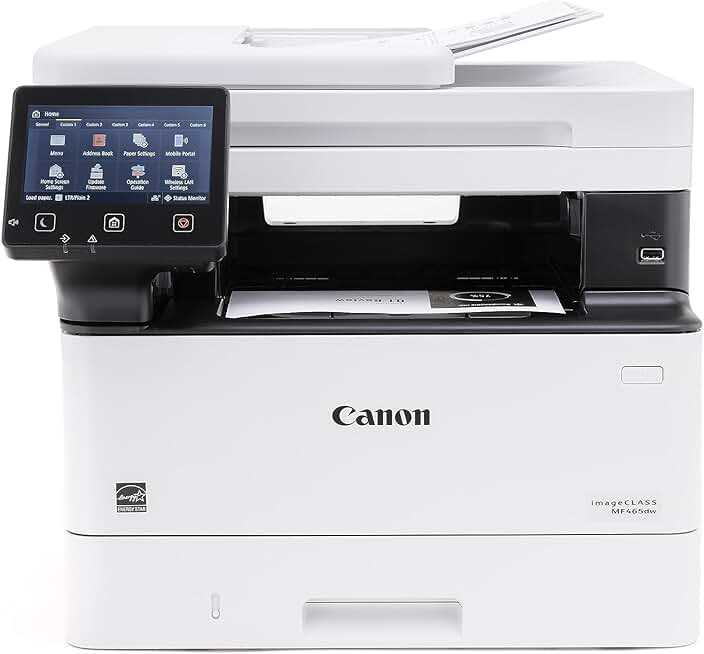
The Canon imageCLASS MF465dw stands out as a powerful and versatile monochrome laser printer, designed to meet the demanding needs of both home offices and small businesses. This all-in-one device combines printing, scanning, copying, and faxing capabilities into a single, efficient unit. For those seeking premium performance at a more accessible price point, the Amazon Renewed program offers an incredible opportunity to acquire this impressive machine.
Quick Summary: Canon imageCLASS MF465dw
Rating: 4.4/5 stars (442 reviews)
Price: $449.99 USD
Key Pros:
- Blazing fast 42 PPM monochrome printing for high-volume tasks.
- Comprehensive all-in-one functionality (print, scan, copy, fax) with duplex ADF.
- Robust wireless and mobile connectivity options for flexible use.
- Excellent value proposition, especially through Amazon Renewed with a 3-year warranty.
Key Cons:
- Monochrome only, not suitable for color printing needs.
- Relatively large footprint for very small desks or limited spaces.
Table of Contents
Canon imageCLASS MF465dw Overview
The Canon imageCLASS MF465dw is a robust multifunction laser printer engineered for efficiency and reliability in busy environments. It consolidates the essential office functions of printing, scanning, copying, and faxing into one streamlined device, saving space and simplifying workflow. This monochrome workhorse is particularly well-suited for users who primarily deal with text documents and require high-speed output.
With an impressive print speed of up to 42 pages per minute (PPM), the MF465dw ensures that large print jobs are completed quickly, significantly boosting productivity. Its automatic duplex printing and scanning capabilities further enhance efficiency by allowing two-sided documents to be processed without manual intervention. This feature is not only a time-saver but also contributes to paper conservation, making it an environmentally conscious choice.
The printer’s design prioritizes user convenience, featuring a clear, intuitive touchscreen display that makes navigation and operation straightforward. Setting up tasks like scanning to email or cloud services is simplified, reducing the learning curve for new users. Canon’s reputation for building durable and dependable office equipment is evident in the MF465dw, promising longevity and consistent performance.
Connectivity is a strong suit for the Canon imageCLASS MF465dw, offering a variety of options including wireless, Ethernet, and USB. This flexibility ensures seamless integration into diverse network setups, whether in a bustling office or a home environment. Mobile printing support through applications like Apple AirPrint, Mopria Print Service, and the Canon PRINT Business app allows users to print directly from their smartphones and tablets, adding another layer of convenience.
Choosing an Amazon Renewed unit of the Canon imageCLASS MF465dw offers an exceptional value proposition. These products are professionally inspected, tested, and cleaned to work like new, but come with a significantly reduced price tag. The inclusion of a 3-year limited warranty, even on a renewed product, underscores Canon’s confidence in its durability and provides peace of mind for buyers.
This printer is designed for environments where consistent, high-quality monochrome output is paramount, and multifunctionality is a necessity. From generating reports and invoices to scanning important documents for digital archiving, the MF465dw handles a wide array of tasks with ease. Its energy-efficient design, evidenced by its ENERGY STAR certification, also helps to keep running costs down over time.
The robust build quality and thoughtful feature set make the Canon imageCLASS MF465dw a compelling choice for anyone needing a reliable office workhorse. It strikes an excellent balance between speed, functionality, and cost-effectiveness, especially when considering the renewed option. For professionals and small businesses, this printer represents a smart investment in productivity.
Canon imageCLASS MF465dw Key Features & Specs
The Canon imageCLASS MF465dw is packed with features designed to maximize productivity and streamline office tasks. Understanding these key specifications helps highlight why this printer is a top contender in the monochrome laser multifunction printer category. Its robust design and comprehensive capabilities make it a valuable asset.
One of its most impressive specifications is the print speed, rated at up to 42 pages per minute (PPM) for monochrome documents. This rapid output ensures that even large print jobs are processed quickly, minimizing wait times and keeping workflows moving efficiently. For a small office or home office, this speed can significantly impact daily operations.
The MF465dw is an all-in-one device, meaning it handles printing, scanning, copying, and faxing. This multifunctionality eliminates the need for separate machines, saving valuable desk space and reducing overall equipment costs. Each function is integrated seamlessly, controlled through an intuitive interface.
Automatic Duplex Printing and Scanning is a standout feature, allowing the printer to automatically print on both sides of a page and scan two-sided documents in a single pass. This not only saves paper but also speeds up the processing of multi-page documents. The 50-sheet Automatic Document Feeder (ADF) further enhances scanning and copying efficiency for stacks of documents.
Connectivity options are extensive, including Wireless (Wi-Fi), Ethernet, and USB 2.0. The wireless capability allows for flexible placement and easy sharing among multiple users without the clutter of cables. For more stable connections in networked environments, the Ethernet port is a reliable choice.
Mobile Ready capabilities ensure that users can print from virtually anywhere using their mobile devices. The printer supports popular platforms like Apple AirPrint, Mopria Print Service, and the Canon PRINT Business app. This flexibility is crucial for today’s mobile workforce, enabling quick prints from smartphones and tablets.
The printer is equipped with a 5-inch intuitive color touchscreen LCD, which simplifies navigation through menus and settings. This user-friendly interface makes complex tasks like setting up scan-to-cloud destinations or adjusting print settings straightforward for all users, regardless of technical proficiency.
Security features are also integrated, providing peace of mind for sensitive documents. These include secure print functionality, which requires a PIN code to release print jobs, preventing unauthorized access to confidential information. This is particularly important in shared office environments where privacy is a concern.
The 3-year limited warranty is a significant advantage, especially for an Amazon Renewed product. This extended warranty period reflects Canon’s confidence in the product’s quality and durability, even after refurbishment. It provides robust protection and support, ensuring long-term reliability for your investment.
Energy efficiency is another key aspect, with the MF465dw being ENERGY STAR certified. This means it meets strict energy efficiency guidelines, helping to reduce electricity consumption and operating costs over its lifespan. For businesses conscious of their environmental footprint and utility bills, this is a noteworthy benefit.
Overall, the Canon imageCLASS MF465dw offers a comprehensive suite of features that cater to the needs of modern offices requiring fast, reliable, and secure monochrome printing and document handling. Its combination of speed, versatility, and user-friendly design makes it a highly capable device.
Pros & Cons of the Canon imageCLASS MF465dw
Evaluating any product involves weighing its advantages against its potential drawbacks. The Canon imageCLASS MF465dw, particularly as an Amazon Renewed offering, presents a compelling set of benefits alongside a few considerations. Understanding these can help determine if it’s the right fit for your specific needs.
Pros of the Canon imageCLASS MF465dw:
- Exceptional Speed and Efficiency: With a print speed of 42 PPM, this printer excels in environments requiring rapid document output. The automatic duplex printing and scanning capabilities further enhance efficiency, saving both time and paper. This is ideal for high-volume tasks.
- Comprehensive All-in-One Functionality: Integrating printing, scanning, copying, and faxing into one device offers unparalleled convenience. The 50-sheet Automatic Document Feeder (ADF) makes handling multi-page documents for scanning or copying incredibly easy, boosting productivity significantly.
- Versatile Connectivity Options: The MF465dw supports wireless, Ethernet, and USB connections, providing flexibility for various office setups. Its mobile printing capabilities (AirPrint, Mopria, Canon PRINT Business app) allow for seamless printing from smartphones and tablets, adapting to modern workstyles.
- Impressive Value (Especially Renewed): Acquiring the Canon imageCLASS MF465dw through Amazon Renewed offers a substantial cost saving compared to a new unit. This makes high-end features more accessible, providing excellent performance for the investment. The professional refurbishment ensures near-new quality.
- Robust Build Quality and Reliability: Canon is known for its durable office equipment, and the MF465dw lives up to this reputation. Its sturdy construction promises long-term reliability and consistent performance, even under heavy use. This ensures fewer interruptions and maintenance issues.
- User-Friendly Operation: The 5-inch color touchscreen simplifies navigation and task management, making the printer accessible even for less tech-savvy users. Its intuitive interface reduces the learning curve and streamlines daily operations, enhancing user experience.
- Strong Warranty Support: A 3-year limited warranty, even for a renewed product, is a significant advantage. This extended coverage provides peace of mind, demonstrating Canon’s confidence in the product’s refurbished quality and protecting your investment against potential issues.
- Energy Efficient: Being ENERGY STAR certified, the printer is designed to consume less power, which translates to lower electricity bills and a reduced environmental footprint. This is a benefit for both your wallet and the planet, aligning with sustainable practices.
Cons of the Canon imageCLASS MF465dw:
- Monochrome Only: The primary limitation of the MF465dw is its monochrome output. It cannot print in color, which makes it unsuitable for users who frequently need to produce color documents, graphics, or photos. This is a critical consideration for creative or marketing roles.
- Physical Size: As a robust multifunction laser printer with an ADF, the MF465dw has a relatively large footprint. This might be a concern for users with very limited desk space in a small home office or crowded work area. Measuring available space is essential before purchase.
- Toner Cartridge Costs: While laser printers generally offer a lower cost per page than inkjet printers, the initial purchase price of replacement toner cartridges can be higher. Users should factor in ongoing toner expenses when calculating the total cost of ownership. However, high-yield cartridges can help mitigate this.
- Initial Setup Complexity for Some: While generally user-friendly, setting up network connectivity, especially in more complex office environments, can sometimes require a basic understanding of network configurations. Wireless setup is usually straightforward, but advanced features might need more attention.
- Noise Levels: Like many laser printers, the MF465dw can produce some noise during operation, particularly during active printing or scanning. While not excessively loud, it might be noticeable in very quiet environments. This is a common characteristic of high-speed laser devices.
Overall, the Canon imageCLASS MF465dw offers a compelling package for monochrome document handling. Its strengths in speed, functionality, and value often outweigh its limitations for the intended user base. The Amazon Renewed option further amplifies its appeal by making advanced features more affordable.
Who Should Buy the Canon imageCLASS MF465dw?
The Canon imageCLASS MF465dw is an ideal choice for a specific demographic of users who prioritize speed, efficiency, and multifunctionality in a monochrome laser printer. Its features cater to environments with high document volumes and a need for reliable performance. The availability through Amazon Renewed further broadens its appeal to budget-conscious buyers seeking premium quality.
Home Office Professionals: Individuals working from home who require a robust printer for business documents will find the MF465dw exceptionally useful. Its 42 PPM speed ensures reports, invoices, and contracts are printed quickly, while the all-in-one capabilities simplify scanning and copying tasks. The wireless connectivity allows for flexible placement within the home office.
Small to Medium-Sized Businesses (SMBs): For SMBs where monochrome printing dominates the workflow, the MF465dw serves as an excellent central office machine. Its high print speed, automatic duplexing, and ADF are crucial for managing daily office tasks efficiently. The secure print feature adds an important layer of data protection for business-critical documents.
Students and Educators with High Print Volumes: College students or educators who frequently print lengthy research papers, course materials, or assignments will benefit from the printer’s speed and cost-effectiveness per page. The ability to print double-sided helps conserve paper, which is often a budget consideration for students.
Budget-Conscious Buyers Seeking Value: The Amazon Renewed option makes the Canon imageCLASS MF465dw an attractive proposition for those who want high-end features without the new product price tag. Renewed products are thoroughly inspected and restored to like-new condition, offering significant savings. The included 3-year warranty provides assurance, mitigating typical concerns about refurbished electronics.
Users Needing Reliable Document Management: Anyone who regularly needs to scan documents for digital archiving, copy multi-page reports, or send faxes will appreciate the integrated functions of this device. The ADF is a game-changer for batch processing, saving considerable time and effort compared to flatbed scanning.
Organizations Prioritizing Security: For offices handling sensitive information, the secure print function of the MF465dw is a valuable asset. It ensures that confidential documents are only released to the authorized user with a PIN, preventing accidental or unauthorized viewing of printouts left unattended at the printer.
Environments Requiring Energy Efficiency: Being ENERGY STAR certified, the MF465dw is a smart choice for those looking to reduce their energy consumption and operational costs. This makes it appealing to businesses and individuals committed to sustainable practices and lower utility bills.
The Canon imageCLASS MF465dw is not for users who primarily need color printing or those with extremely limited space who cannot accommodate its footprint. However, for anyone requiring a fast, reliable, and feature-rich monochrome multifunction laser printer, especially at a compelling price point through Amazon Renewed, this model is an outstanding investment. Its blend of performance, versatility, and cost-effectiveness makes it a strong contender for many office and home office setups.
FAQ about the Canon imageCLASS MF465dw
Here are some frequently asked questions about the Canon imageCLASS MF465dw, providing further insights into its functionality and usability, particularly in the context of an Amazon Renewed purchase.
Q1: What does “Monochrome Duplex Wireless Laser Printer, All-in-One” mean for the Canon imageCLASS MF465dw?
A1: This description highlights several key capabilities. “Monochrome” means it prints only in black and white, making it ideal for text-heavy documents. “Duplex” refers to its ability to automatically print and scan on both sides of a page, saving time and paper. “Wireless” indicates it can connect to a network without cables, offering flexible placement. “Laser Printer” signifies it uses toner cartridges and laser technology for fast, high-quality prints. “All-in-One” means it combines printing, scanning, copying, and faxing functions in one device.
Q2: Is the 3-year limited warranty valid for an Amazon Renewed Canon imageCLASS MF465dw?
A2: Yes, according to the product listing, the 3-year limited warranty applies to this Canon imageCLASS MF465dw, even as an Amazon Renewed unit. This is a significant benefit, as renewed products often come with shorter warranties. This extended coverage provides excellent peace of mind, ensuring support and protection for your investment.
Q3: What kind of mobile printing options does the MF465dw support?
A3: The Canon imageCLASS MF465dw offers extensive mobile printing support. It is compatible with Apple AirPrint for iOS devices, Mopria Print Service for Android devices, and the dedicated Canon PRINT Business app. These options allow users to print documents and images directly from their smartphones and tablets, enhancing convenience and flexibility.
Q4: How does the Automatic Document Feeder (ADF) work, and what is its capacity?
A4: The MF465dw features a 50-sheet Automatic Document Feeder. This mechanism allows you to place a stack of documents (up to 50 pages) into the feeder, and the printer will automatically scan or copy each page sequentially. This is incredibly efficient for processing multi-page documents without manually placing each sheet on the flatbed scanner.
Q5: What are the benefits of choosing an Amazon Renewed printer like the Canon imageCLASS MF465dw?
A5: Choosing an Amazon Renewed product offers several advantages. You get a high-quality, professionally inspected, tested, and cleaned device that functions like new, but at a significantly lower price. It’s an environmentally friendly choice as it extends the life of electronic products. The inclusion of a robust warranty, as seen with this printer, further enhances the value and reduces risk.
Q6: Is the Canon imageCLASS MF465dw difficult to set up, especially the wireless features?
A6: Setting up the Canon imageCLASS MF465dw is generally straightforward. The intuitive touchscreen display guides you through the initial setup process. For wireless connectivity, the printer can connect to your Wi-Fi network with relative ease, often requiring just a few steps. Canon also provides comprehensive manuals and online support to assist with any specific configurations.
Q7: What type of toner does the Canon imageCLASS MF465dw use, and how often will I need to replace it?
A7: The Canon imageCLASS MF465dw uses Canon’s standard toner cartridges, specifically designed for this series of monochrome laser printers. The frequency of replacement depends entirely on your print volume. High-yield toner cartridges are available, which offer a significantly higher page yield and lower cost per page, making them ideal for heavy users and reducing the need for frequent replacements. Always use genuine Canon toner for optimal performance and print quality.
Q8: Can the MF465dw handle different paper sizes and types?
A8: Yes, the Canon imageCLASS MF465dw is designed to handle a variety of paper sizes and types. It typically supports standard sizes like Letter, Legal, A4, B5, and Executive, among others. It can also accommodate various media types such as plain paper, heavy paper, recycled paper, labels, and envelopes. Always refer to the printer’s specifications for a complete list of supported media to ensure compatibility and prevent jams.
Final Verdict on the Canon imageCLASS MF465dw
The Canon imageCLASS MF465dw emerges as an incredibly capable and highly impressive monochrome laser printer, particularly for those in search of a reliable office workhorse. Its blend of high-speed performance, comprehensive all-in-one functionality, and versatile connectivity options makes it a standout choice for various environments. The value proposition is significantly enhanced when considering the Amazon Renewed option, which offers premium features at a more accessible price point.
With its blazing fast 42 PPM print speed and efficient automatic duplexing for both printing and scanning, the MF465dw is built for productivity. The 50-sheet ADF simplifies batch document processing, saving invaluable time for busy professionals and small businesses. Mobile printing support ensures seamless integration with modern workflows, allowing flexibility from any device.
While it is a monochrome-only device, which is a key consideration for those needing color prints, its strengths in black and white document handling are undeniable. The robust build quality, user-friendly touchscreen interface, and integrated security features collectively contribute to a smooth and secure user experience. The included 3-year limited warranty, even on a renewed product, is a testament to its expected longevity and Canon’s commitment to quality.
For home office users, small businesses, or anyone with high-volume monochrome printing, scanning, copying, and faxing needs, the Canon imageCLASS MF465dw presents an exceptional investment. The opportunity to acquire such a high-performance machine through Amazon Renewed further solidifies its position as a smart and economical choice. It delivers impressive results without compromise.
We confidently recommend the Canon imageCLASS MF465dw for its outstanding performance, feature set, and the remarkable value it offers. It’s a printer that truly lives up to its promise of enhancing productivity and streamlining document management. Learn more about Canon’s imageCLASS series on their official website for additional technical details and support. For a broader understanding of multifunction printers, you can also refer to Wikipedia’s article on Multifunction Printers.