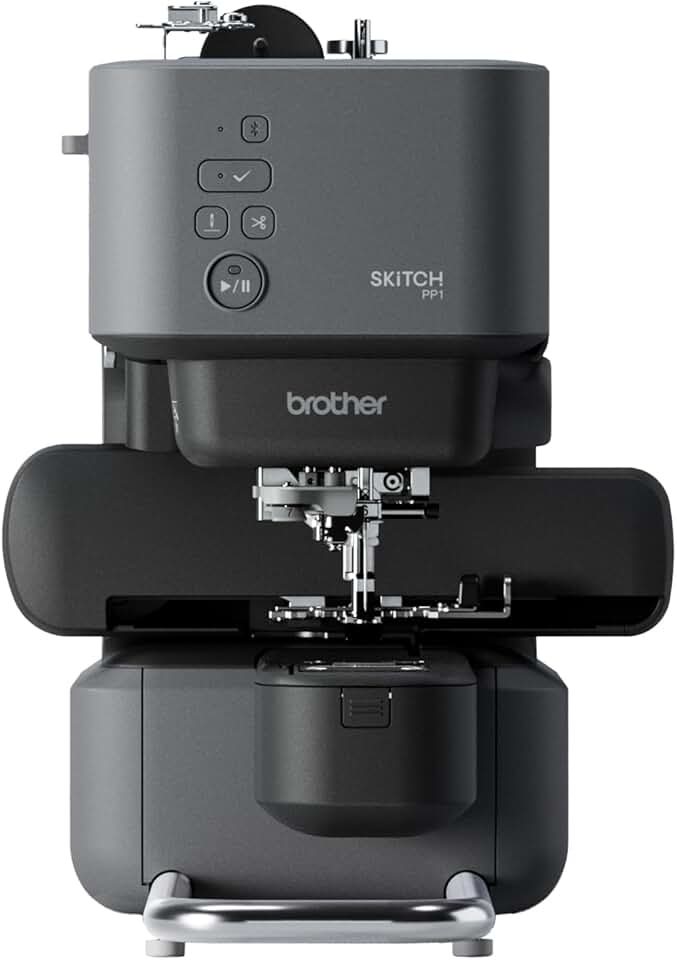
The Brother Skitch Machine, marketed as an entry-level embroidery solution, promises creative freedom through its innovative Artspira mobile app integration. This single-needle embroidery machine aims to simplify the craft, making it accessible to hobbyists and beginners. However, our comprehensive review dives deep into its capabilities and limitations to provide an honest assessment.
Quick Summary
- Rating: 3.2/5.0
- Price: $379.99
- Key Pros:
- Compact and portable design.
- Intuitive app-driven workflow for simple tasks.
- Good for very small, basic projects.
- Key Cons:
- Limited 4″x4″ embroidery area.
- Strict dependence on the Artspira mobile app.
- Frequent connectivity issues reported by users.
Table of Contents
Brother Skitch Machine Overview
The Brother Skitch Machine enters the market as a distinct offering, targeting a specific niche within the expansive world of embroidery. It is designed primarily for creative hobbyists and absolute beginners who are looking to dip their toes into machine embroidery without the complexity of traditional, multi-needle setups. The machine’s core appeal lies in its compact footprint and simplified operation.
Unlike conventional embroidery machines that often feature intricate onboard controls and dedicated screens, the Skitch machine offloads much of its functionality to a mobile application. This approach, while modern, fundamentally alters the user interaction paradigm. Users must rely entirely on their smartphone or tablet to design, import, and manage their embroidery projects.
The single-needle design of the Brother Skitch Machine means that color changes during a project require manual intervention. This is a standard characteristic for entry-level machines but can be a point of frustration for those accustomed to multi-needle systems that automate this process. Understanding this limitation upfront is crucial for managing expectations.
Its compact 4×4 inch embroidery area is another defining characteristic, dictating the scale and complexity of projects that can be undertaken. While perfect for small motifs, patches, or embellishments on garments, it immediately restricts ambitious designs. This size constraint positions the Skitch machine firmly in the personal crafting space, rather than for larger-scale production.
The promise of a seamless, app-controlled experience is a significant draw, especially for a generation comfortable with mobile interfaces. However, the reliance on an external device introduces potential points of failure, such as connectivity issues or app-specific bugs, which can disrupt the creative flow. This digital dependency is a double-edged sword for many users.
The portability of the Brother Skitch Machine is a genuine advantage for crafters who have limited workspace or wish to take their projects on the go. Its lightweight construction allows for easy storage and transport, making it suitable for small apartments or crafting groups. This flexibility distinguishes it from bulkier, more stationary embroidery equipment.
Considering its price point, the Skitch machine attempts to carve out a space where affordability meets modern convenience. However, the value proposition must be carefully assessed against its inherent limitations, particularly for users who might quickly outgrow its capabilities. It’s a stepping stone, not a comprehensive solution for all embroidery needs.
The overall perception of the Brother Skitch Machine often depends on the user’s prior experience with embroidery and their specific project aspirations. For some, it represents a fantastic gateway into a new hobby, while for others, its restrictions might quickly lead to frustration. Setting realistic expectations is key to a positive experience with this particular model.
The target demographic for the Brother Skitch Machine appears to be individuals who are new to embroidery and are perhaps intimidated by the complexity of traditional machines. It aims to lower the barrier to entry, offering a more approachable and aesthetically pleasing device. This design philosophy emphasizes simplicity and ease of use over advanced features.
The ‘required Artspira mobile app’ is not merely an accessory but the central nervous system of the machine. Without a compatible device and an active connection to the app, the Skitch machine is essentially non-functional. This design choice streamlines the hardware but places all intelligence and control within the software environment.
This dependency means that the user’s experience is intrinsically linked to the performance, stability, and feature set of the Artspira app itself. Any updates, bugs, or changes to the app directly impact the usability of the embroidery machine. It necessitates a certain level of comfort with mobile technology and app-driven workflows.
The aesthetic design of the Brother Skitch Machine also sets it apart, featuring a clean, minimalist look that blends well into modern home environments. This deliberate design choice contrasts with the often industrial appearance of other crafting machines. It speaks to a user base that values both function and form in their creative tools.
While the machine handles basic text, monograms, and simple designs competently, its performance on more intricate or dense patterns can be mixed. Users should anticipate needing to simplify complex designs to achieve optimal results within the machine’s capabilities. This often means adjusting expectations for high-detail embroidery work. For those interested in learning more about the broader history and technology of embroidery machines, a visit to the Wikipedia page on embroidery machines can provide valuable context.
The learning curve, while advertised as minimal, still exists, particularly for those entirely new to embroidery concepts like hooping, thread tension, and stabilization. The app guides the process, but foundational knowledge remains important for successful project outcomes. Patience and practice are still essential components of mastering the Skitch machine.
Brother Skitch Machine Key Features & Specs
The Brother Skitch Machine boasts a set of features and specifications that define its capabilities and limitations in the embroidery landscape. Understanding these details is crucial for prospective buyers to determine if the machine aligns with their crafting needs. The central pillar of its operation is its deep integration with the Artspira mobile application.
At the heart of the Skitch machine’s design is its 4-inch by 4-inch embroidery area. This square hoop size is standard for many entry-level machines and is ideal for smaller projects such as monograms, small appliques, patches, and embellishing pockets or collars. It is important to note that this size is a hard limit, meaning larger designs must be broken down or are simply not feasible.
The machine operates as a single-needle embroidery machine, which means it uses one needle and one thread color at a time. For designs with multiple colors, the user must manually stop the machine, change the thread spool, and re-thread the needle for each color segment. This process can be time-consuming for intricate, multi-color patterns.
Bluetooth connectivity is the primary method of communication between the Brother Skitch Machine and the Artspira app. This wireless connection streamlines the transfer of designs from your mobile device to the machine, eliminating the need for USB cables or memory cards. Reliable Bluetooth pairing is essential for a smooth workflow.
The Artspira mobile app is arguably the most critical feature, as it serves as the design studio, machine controller, and project manager. The app offers a library of built-in designs, fonts, and patterns, alongside tools for drawing your own creations directly on the screen. It also facilitates the import of certain file types, expanding design possibilities.
The app allows for real-time monitoring of the embroidery process, including stitch progress and estimated completion times. It also provides tutorials and guides, which are particularly helpful for new users learning the ropes of machine embroidery. The functionality of the machine is entirely dependent on the app’s capabilities and stability.
The physical footprint of the Brother Skitch Machine is remarkably compact, measuring approximately 16.2 inches in width, 10.3 inches in depth, and 12.6 inches in height. This small size, combined with a relatively light weight (around 10 pounds), makes it an excellent choice for crafters with limited space or those who need portability.
Powering the machine is a standard AC adapter, providing a straightforward power solution suitable for home use. The motor is designed for consistent, albeit not high-speed, embroidery, balancing precision with the single-needle operation. Users should not expect industrial-level speed or continuous heavy-duty performance.
The machine includes basic accessories to get started, such as an embroidery hoop, a needle set, bobbin thread, and a seam ripper. While sufficient for initial projects, users will quickly find themselves needing to invest in additional supplies like various thread colors, stabilizers, and extra bobbins. These are essential for expanding creative endeavors.
One notable specification is the machine’s ability to handle various fabric types, provided the appropriate stabilizer is used. From cotton to denim to lighter knits, the Skitch machine can embroider on a decent range of materials. However, delicate fabrics or very thick materials may require more advanced techniques and careful preparation.
The internal memory of the machine is limited, relying mostly on the app for design storage and transfer. This means designs are primarily managed within the Artspira ecosystem rather than being stored directly on the machine itself. This reinforces the app-centric nature of the Skitch machine’s operation.
Maintenance requirements for the Brother Skitch Machine are relatively simple, involving regular cleaning of the bobbin area and occasional oiling, as outlined in the user manual. This ease of maintenance contributes to its beginner-friendly appeal. Proper care ensures longevity and consistent stitch quality.
Pros & Cons
Evaluating the Brother Skitch Machine involves a careful balance of its innovative approach against its practical limitations. While it offers a compelling entry point for some, its drawbacks are significant enough to warrant serious consideration before purchase. Our detailed analysis reveals both its strengths and weaknesses.
Pros of the Brother Skitch Machine
One of the most significant advantages of the Brother Skitch Machine is its compact and portable design. Its small footprint means it can easily fit into cramped crafting spaces or be tucked away when not in use. This portability also makes it ideal for taking to workshops or craft gatherings, offering flexibility that larger machines cannot.
The intuitive app-driven workflow via the Artspira app is another major pro, especially for tech-savvy beginners. The app simplifies design creation, editing, and machine operation, making the learning curve for software navigation much smoother than traditional interfaces. It provides a modern, familiar interaction for smartphone users.
For individuals looking to create small, simple projects, the Skitch machine excels. Monograms, small patches, custom labels, and minimalist designs are well within its capabilities. It produces clean stitches on these smaller scales, allowing for personalized touches on garments and accessories without overwhelming complexity.
The machine’s setup process is relatively straightforward, guided by the Artspira app. This ease of initial use helps new embroiderers get started quickly, reducing the intimidation factor often associated with more complex machinery. The quick start allows users to jump into their first projects with minimal delay.
The aesthetic appeal of the Brother Skitch Machine is also a positive. Its sleek, modern design is less industrial than many other embroidery machines, making it a more attractive addition to a home office or craft room. This design consideration contributes to a pleasant overall user experience.
Cons of the Brother Skitch Machine
The most prominent drawback is the limited 4″x4″ embroidery area. This size severely restricts the scope of projects, making it unsuitable for larger designs, complex patterns, or decorating full-sized garments. Users quickly encounter this boundary, which can stifle creativity and project ambition.
A critical negative is the strict dependence on the Artspira app. The machine cannot function independently; an active Bluetooth connection to a compatible mobile device running the Artspira app is mandatory. This creates a single point of failure and means the machine’s capabilities are entirely dictated by the app’s features and stability. Many users find this restrictive and unreliable.
Numerous users have reported connectivity issues, where the Bluetooth connection between the machine and the app frequently drops or fails to establish. These interruptions can lead to frustrating project delays or even ruined embroidery, significantly impacting the user experience. Reliable connectivity is paramount for an app-driven device.
For its feature set and performance, some users find the price point to be somewhat high. While it’s an entry-level machine, its limitations, particularly the small hoop size and app dependency, lead many to question its overall value compared to other machines in a similar price bracket that offer more traditional control or larger work areas.
The learning curve, while initially appearing low, can become steeper when dealing with troubleshooting app issues or understanding the nuances of embroidery techniques not fully covered by the app. Beginners might find themselves relying heavily on external resources to master the craft with this specific machine.
The single-needle operation, while common for entry-level models, can be a major time sink for multi-color designs. The constant need for manual thread changes disrupts the workflow and can make larger, more colorful projects feel tedious. This significantly slows down project completion times.
Design flexibility is also somewhat constrained. While the Artspira app offers built-in designs and drawing tools, importing external designs can be cumbersome or limited to specific file formats. This can be frustrating for users who want to utilize a wider range of purchased or self-created embroidery patterns.
Finally, the long-term reliability and support for the Artspira app are concerns for some users. Future updates or changes to the app could potentially alter the machine’s functionality or compatibility, creating uncertainty. Dependence on a third-party app platform always carries this inherent risk.
Who Should Buy the Brother Skitch Machine?
Determining if the Brother Skitch Machine is the right investment requires an honest assessment of your embroidery aspirations and technical comfort level. This machine caters to a very specific segment of the crafting community, and it’s essential to understand if you fall within its intended audience.
Ideal Users for the Brother Skitch Machine
The primary demographic for the Brother Skitch Machine is the absolute beginner in machine embroidery. If you’ve never used an embroidery machine before and are looking for a simple, non-intimidating entry point, the Skitch machine might appeal to you. Its app-centric approach aims to demystify the process.
It is also suitable for casual crafters with limited space. Its compact size and portability make it an excellent option for those living in apartments or homes without dedicated crafting rooms. It can be easily set up on a kitchen table and stored away afterward, making it a space-efficient tool.
Individuals primarily interested in small, personalized projects will find the Skitch machine capable. Think monograms on towels, small logos on t-shirts, custom patches, or embellishing baby items. If your creative vision aligns with designs that fit within a 4×4 inch area, this machine can be a good fit.
Tech-savvy individuals who are comfortable with mobile applications and Bluetooth connectivity will likely adapt to the Skitch machine’s workflow more easily. If you prefer to control devices from your smartphone and appreciate a modern, minimalist interface, the Artspira app integration might feel natural to you.
Crafters looking for a secondary, portable machine for specific small tasks or for taking to craft events could also consider the Skitch. It’s not designed to be a primary workhorse but can complement a larger, more feature-rich machine for quick, on-the-go projects.
Who Should Avoid the Brother Skitch Machine?
If you envision creating large, intricate embroidery designs, the Brother Skitch Machine is definitively not for you. Its 4×4 inch hoop size will be a constant source of frustration, forcing you to break down designs or abandon ambitious projects altogether. For larger hoops, look at other models.
Individuals who require a machine for commercial use or high-volume production should also look elsewhere. The single-needle operation and the need for manual thread changes make it inefficient for producing multiple items or complex, multi-color designs rapidly. It’s a hobby machine, not a business tool.
Those who prefer traditional machine controls and onboard screens will likely find the Artspira app dependency irritating. If you dislike relying on a smartphone or frequently experience connectivity issues with other Bluetooth devices, the Skitch machine’s workflow will be a constant challenge.
Experienced embroiderers seeking advanced features like automatic thread cutting, multiple needles, or a wider array of built-in editing capabilities will find the Skitch machine too basic. It lacks the sophistication and robust functionality that seasoned crafters often demand from their equipment.
If you are on a very strict budget but still want a full-featured embroidery machine, it’s worth exploring older, refurbished, or different entry-level models that might offer a larger embroidery area or more traditional controls for a similar price. The premium for its app integration might not translate to value for everyone. For detailed specifications and official support information regarding the Brother Skitch Machine, you can visit the official Brother product page.
Ultimately, the decision rests on your priorities. If portability, a modern app interface, and small, simple projects are paramount, and you are prepared for potential connectivity quirks, the Brother Skitch Machine could be a fit. However, for anything beyond these specific needs, you will quickly outgrow its capabilities.
FAQ about Brother Skitch Machine
To further assist in understanding the Brother Skitch Machine, we’ve compiled a list of frequently asked questions. These answers delve deeper into common concerns and operational aspects, providing clarity for potential users.
Q1: What is the Artspira app and why is it required?
The Artspira app is Brother’s proprietary mobile application that serves as the command center for the Brother Skitch Machine. It’s an all-in-one platform for design, editing, and machine control. It’s required because the Skitch machine itself has no onboard screen or physical controls for design selection or initiation. All instructions, from choosing a design to starting the embroidery process, are sent wirelessly via Bluetooth from the Artspira app. Without it, the machine cannot function, making it an indispensable part of the user experience.
Q2: What are the limitations of the 4″x4″ embroidery area?
The 4″x4″ embroidery area is a significant limitation, restricting the size of designs you can create in a single hooping. This means you cannot embroider large logos, full back designs on jackets, or extensive patterns without either breaking them into smaller segments (which requires precise re-hooping and alignment, a challenging task) or simply choosing smaller motifs. It is perfectly adequate for monograms, small patches, and embellishments, but it prevents more ambitious or larger-scale projects. Users must manage their creative expectations accordingly.
Q3: Is the Brother Skitch Machine suitable for commercial use?
No, the Brother Skitch Machine is generally not suitable for commercial use or high-volume production. Its single-needle design necessitates manual thread changes for each color, which is time-consuming and inefficient for multiple items. The small embroidery area also limits the types of commercial projects it can undertake. Furthermore, its reliance on a mobile app and reported connectivity issues can hinder consistent, reliable production. Commercial operations typically require industrial-grade machines with larger hoops and multi-needle capabilities.
Q4: How easy is it for a complete beginner to use?
For a complete beginner, the Brother Skitch Machine offers a relatively straightforward entry into machine embroidery, primarily due to its app-driven interface. The Artspira app guides users through design selection, editing, and the embroidery process with on-screen prompts. However, while the app simplifies control, beginners still need to learn fundamental embroidery techniques such as proper hooping, selecting the correct stabilizer for different fabrics, and managing thread tension. The initial learning curve for the app is low, but mastering embroidery itself still requires practice.
Q5: What kind of designs can I create/import?
Within the Artspira app, you can create simple line art designs using its drawing tools, access a library of built-in embroidery designs, and utilize various fonts for lettering. The app also supports the import of certain image files (like JPG, PNG) which it can convert into embroidery patterns, though the quality of conversion can vary. For more complex or professional designs, you might need to purchase pre-digitized files. The machine primarily uses Brother’s proprietary file format (.pes) or general embroidery formats that the Artspira app can interpret.
Q6: Are there ongoing costs associated with the Artspira app?
When the Brother Skitch Machine was launched, the basic functionality of the Artspira app was available for free. However, Brother often offers premium features, additional design packs, or advanced editing tools within its apps through subscription models or one-time purchases. It is advisable to check the current terms and conditions of the Artspira app on its respective app store page (Apple App Store or Google Play Store) to understand any potential ongoing costs for enhanced features. Basic machine operation typically remains free.
Q7: What are common connectivity issues with the Brother Skitch Machine?
Common connectivity issues reported by users include difficulty pairing the machine with the Artspira app via Bluetooth, frequent disconnection during embroidery projects, and delays in transmitting commands. These issues can be caused by various factors, including interference from other wireless devices, outdated app versions, operating system incompatibilities, or the distance between the mobile device and the machine. Troubleshooting often involves restarting the app, turning Bluetooth on/off, or ensuring the app and device OS are up to date.
Q8: How does it compare to other entry-level embroidery machines?
The Brother Skitch Machine distinguishes itself from other entry-level machines primarily through its exclusive reliance on a mobile app for control. Many other entry-level machines, such as the Brother PE535 or Singer Legacy SE300, feature onboard LCD screens and physical buttons, offering a more traditional, self-contained operation. While the Skitch’s 4×4 hoop size is common, some competitors offer slightly larger areas or more robust built-in design editing without needing a separate device. Its portability and modern aesthetic are key differentiators, but its app dependency and connectivity concerns set it apart in a potentially negative way for some users.
Final Verdict
The Brother Skitch Machine presents an interesting proposition in the world of home embroidery, aiming to democratize the craft through modern technology. Our extensive review indicates that while it succeeds in offering a unique, app-driven experience for a specific niche, it falls short of being a universally recommended entry-level machine due to several significant limitations.
Its compact design, portability, and the streamlined interface of the Artspira app are undeniable strengths. For the absolute beginner who is comfortable with mobile technology and only intends to tackle very small, simple projects like monograms or small patches, the Skitch machine offers an accessible starting point. Its modern aesthetic also makes it an attractive addition to a craft space.
However, the machine’s strict dependence on the Artspira app and the prevalent reports of Bluetooth connectivity issues are major concerns. These can lead to frustrating interruptions and a less-than-seamless creative process. The 4×4 inch embroidery area, while standard for some entry-level models, quickly becomes restrictive for anyone with slightly more ambitious project ideas.
Considering its price point, the value proposition of the Brother Skitch Machine becomes questionable when weighed against its limitations. Many users might find that for a similar investment, other entry-level machines, while perhaps less ‘smart,’ offer larger embroidery areas, more reliable onboard controls, and greater overall flexibility without mandatory app reliance.
Ultimately, the Brother Skitch Machine is a product with a clear vision, but its execution introduces compromises that impact its overall rating and user satisfaction. It’s a machine designed for a very specific kind of beginner – one who prioritizes modern app control and portability over traditional machine functionality, larger project capabilities, or unwavering connectivity.
For those who fit this narrow profile, and who are prepared to navigate potential technical quirks, the Skitch could still serve as a functional gateway into embroidery. However, for a broader audience seeking a more robust, versatile, or reliable entry into machine embroidery, or for anyone desiring to grow beyond basic projects, there are more compelling and less restrictive options available on the market. Our final verdict leans towards it being a potentially disappointing choice for many due to its restrictive nature and reported performance inconsistencies.