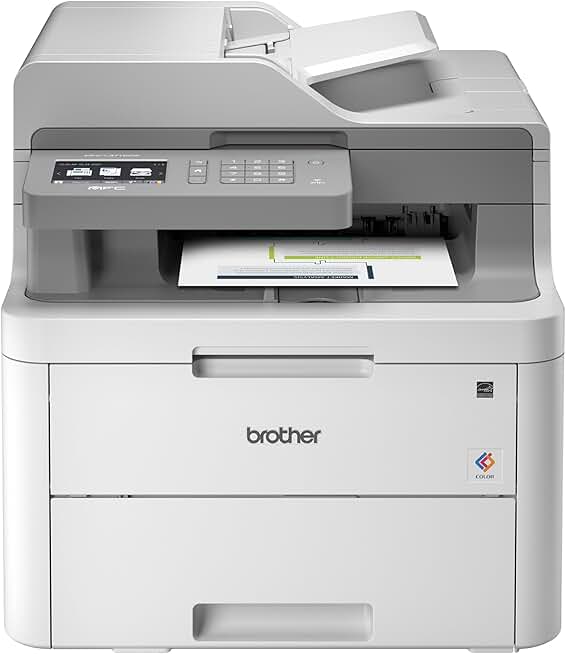
The Brother MFC-L3710CW Printer stands out as a compact digital color all-in-one device designed to meet the demands of home offices and small businesses. This comprehensive review dives deep into its functionalities, performance, and overall value, particularly considering its availability as an Amazon Renewed product.

Quick Summary: Brother MFC-L3710CW Printer
- Rating: 4.3 out of 5 stars (2006 reviews)
- Price: $960.00 USD (Amazon Renewed)
Key Pros:
- Compact Design: Fits easily into smaller workspaces without sacrificing features.
- Vibrant Color Output: Produces professional-quality prints with sharp text and rich colors.
- Wireless Connectivity: Offers seamless printing from multiple devices and mobile options.
- Automatic Duplex Printing: Saves paper by printing on both sides automatically.
Key Cons:
- High Price for Renewed: The listed price of $960.00 for a renewed unit is exceptionally high compared to typical market values.
- No Auto-Duplex Scanning: The Automatic Document Feeder (ADF) does not support two-sided scanning in a single pass.
Table of Contents
Brother MFC-L3710CW Printer Overview
The Brother MFC-L3710CW Printer is a versatile all-in-one solution designed for efficiency and quality. It combines printing, copying, scanning, and faxing capabilities into a single, compact unit, making it an attractive option for environments where space is at a premium but robust functionality is essential. This model from Brother is part of their popular line of digital color printers, known for providing laser-quality results without the bulk often associated with traditional laser devices.
As a digital color LED printer, the MFC-L3710CW utilizes Light Emitting Diode technology to produce crisp text and vibrant graphics. This technology offers similar benefits to laser printing, such as speed and durability, while often allowing for a more compact design. It’s an ideal choice for users who frequently print color documents, presentations, or marketing materials and require a professional finish.
The target audience for the Brother MFC-L3710CW Printer primarily includes individuals working from home, small business owners, and small workgroups. These users typically need a reliable machine that can handle a moderate volume of prints, scans, and copies without frequent maintenance or high operational costs. The all-in-one nature means fewer devices cluttering the workspace and a streamlined workflow for various office tasks.
One of the significant aspects of this review is its status as an Amazon Renewed product. Amazon Renewed offers pre-owned, refurbished products that have been inspected and tested to work and look like new. These products are backed by the Amazon Renewed Guarantee, which typically includes a 90-day replacement or refund policy, providing some peace of mind for buyers seeking cost-effective solutions.
However, the listed price of $960.00 for this renewed unit is a critical point of consideration. Typically, a new Brother MFC-L3710CW Printer retails for significantly less, often in the $300-$400 range. This discrepancy means that prospective buyers must carefully evaluate the value proposition, comparing it not only to other renewed units but also to brand-new alternatives.
Brother has a strong reputation for producing reliable and user-friendly printers. The MFC-L3710CW continues this legacy, offering intuitive controls and straightforward operation. Its compact footprint, measuring approximately 16.1 x 18.7 x 16.3 inches, ensures it can fit comfortably on most desks or shelves, a crucial factor for many home and small office setups.
The printer’s robust feature set includes automatic duplex printing, a 50-sheet automatic document feeder (ADF), and versatile connectivity options like built-in wireless, USB, and Ethernet. These features collectively enhance productivity and flexibility, allowing users to print from various devices and streamline document handling tasks. Understanding these capabilities is key to appreciating the potential of the Brother MFC-L3710CW Printer.
The model’s position in the market is competitive, often vying with similar offerings from brands like HP, Canon, and Samsung. Its strength lies in Brother’s consistent focus on reliability, toner efficiency, and comprehensive all-in-one functionality. For those seeking a dependable color printer with multifunctionality, the MFC-L3710CW generally presents a strong case, though the renewed pricing here demands careful scrutiny.
Historically, the MFC-L3710CW has been a popular choice for its balance of features and performance. It delivers professional-grade output for everyday business documents, reports, and marketing materials. The inclusion of Amazon Dash Replenishment readiness also simplifies toner ordering, ensuring you rarely run out of supplies when you need them most, adding a layer of convenience to its operation.
In summary, while the Brother MFC-L3710CW Printer offers an impressive array of features and solid performance, the specific pricing for this Amazon Renewed unit is a primary factor to consider. Its compact design, quality output, and comprehensive capabilities make it a strong contender for those needing a versatile office machine, but only if the renewed price aligns with market expectations or offers significant additional value not immediately apparent.
Brother MFC-L3710CW Printer Key Features & Specs
The Brother MFC-L3710CW Printer is packed with features designed to enhance productivity and deliver high-quality results. Understanding these specifications is crucial for anyone considering this model for their home or small office environment. Its core technology, connectivity options, and paper handling capabilities are particularly noteworthy.
Digital Color LED Print Technology
At the heart of the MFC-L3710CW is its digital color LED print engine. This technology provides an alternative to traditional laser printing, offering similar benefits such as fast print speeds, sharp text, and durable output. The LED array uses static light to create images on the drum, which then attracts toner, resulting in precise and vibrant prints.
This method allows for a more compact printer design compared to some laser counterparts, making it suitable for smaller spaces. The print resolution goes up to 2400 x 600 dpi, ensuring that both black and white text documents and color graphics are rendered with excellent clarity and detail, making your reports and presentations look professional.
Impressive Print Speeds
The printer boasts speeds of up to 19 pages per minute (ppm) for both color and monochrome prints. This consistent speed across different document types is a significant advantage for users who frequently switch between color and black-and-white tasks. Such speeds help maintain workflow efficiency, reducing waiting times for larger print jobs.
For small businesses or busy home offices, these speeds translate directly into increased productivity. You can quickly print multi-page reports, invoices, or marketing flyers without significant delays. The first page out time is also competitive, ensuring that even single-page documents are delivered promptly.
Versatile Connectivity Options
Connectivity is a strong suit of the Brother MFC-L3710CW Printer. It offers multiple ways to connect and print, catering to various user preferences and network setups. Built-in Wi-Fi allows for seamless wireless printing from laptops, desktops, and mobile devices without the need for direct cable connections.
For more stable and secure network connections, an Ethernet port is also included, making it easy to integrate into an existing wired office network. A USB 2.0 interface provides direct connection to a single computer, which is useful for situations where network printing isn’t feasible or preferred. These options ensure flexibility for different office environments.
Comprehensive Mobile Printing Support
In today’s mobile-centric world, the ability to print from smartphones and tablets is essential. The MFC-L3710CW supports a wide range of mobile printing applications, including Brother iPrint&Scan, Apple AirPrint, Google Cloud Print (though Google is deprecating this service, Brother’s own app remains robust), and Mopria. This extensive support means users can easily print documents, photos, and web pages directly from their handheld devices.
The Brother iPrint&Scan app, in particular, offers advanced functionality, allowing users to print and scan directly to and from their mobile devices. This enhances convenience and flexibility, enabling quick document sharing and archiving without needing a computer as an intermediary. It’s a valuable feature for dynamic work settings.
Robust Paper Handling
Paper handling capabilities are crucial for an all-in-one printer, and the MFC-L3710CW delivers. It features a generous 250-sheet adjustable paper tray, capable of handling letter and legal-sized paper. This capacity reduces the frequency of paper refills, which is a boon for busy offices.
Additionally, a manual feed slot is included for printing on various specialty papers, such as envelopes, card stock, and custom-sized media. This flexibility allows users to produce a wider range of professional documents in-house. The 50-sheet Automatic Document Feeder (ADF) is perfect for quickly scanning, copying, or faxing multi-page documents, saving significant time compared to manual placement.
Automatic Duplex Printing
One of the most eco-friendly and cost-saving features is automatic duplex printing. The Brother MFC-L3710CW Printer can automatically print on both sides of a page, reducing paper consumption and overall costs. This feature is invaluable for producing professional-looking double-sided documents and presentations.
While the ADF handles multi-page documents, it’s important to note that the duplex capability applies to printing, not scanning. For two-sided scanning, users would need to manually flip the documents in the ADF, which is a minor inconvenience but worth noting for workflows requiring frequent double-sided digital archiving.
Intuitive Touchscreen Interface
The printer is equipped with a 2.7-inch color touchscreen display, making navigation and operation remarkably straightforward. Users can easily access various functions like copying, scanning, and faxing, adjust settings, and monitor toner levels directly from the panel. The intuitive interface reduces the learning curve and simplifies daily tasks.
This user-friendly design contributes significantly to the overall positive experience of using the MFC-L3710CW. Quick access to common functions and clear visual feedback make managing print jobs and device settings efficient, even for those who are not particularly tech-savvy.
Compact Dimensions and Weight
Measuring approximately 16.1 (W) x 18.7 (D) x 16.3 (H) inches and weighing around 49.6 pounds, the MFC-L3710CW is relatively compact for a color all-in-one printer with its feature set. Its size allows it to fit comfortably in most home office setups or on a shared desk in a small business environment.
The compact footprint is a key selling point, especially for users with limited space who still require robust multifunctionality. Despite its capabilities, it doesn’t dominate the workspace, maintaining a clean and organized office aesthetic. More detailed specifications can often be found on the official Brother product page.
Toner Cartridge System and Dash Replenishment
The MFC-L3710CW uses four separate toner cartridges (black, cyan, magenta, yellow), which is generally more cost-effective than combined cartridges as you only replace the color that runs out. High-yield replacement cartridges are available, offering a lower cost per page for more frequent printing needs. This helps manage ongoing operational expenses.
The printer is also Amazon Dash Replenishment Ready. This feature automatically detects when toner levels are low and can trigger an order for new cartridges directly from Amazon, ensuring you never run out of supplies unexpectedly. This automation adds a layer of convenience, allowing users to focus on their work rather than supply management.
In conclusion, the Brother MFC-L3710CW Printer offers a compelling package of features and specifications for its class. From its digital color LED technology and fast speeds to its versatile connectivity and robust paper handling, it’s designed for efficiency and quality. While the renewed price needs careful consideration, the underlying product capabilities are undeniably strong.
Pros & Cons
Evaluating any product thoroughly requires a balanced look at its strengths and weaknesses. The Brother MFC-L3710CW Printer, despite its impressive feature set, is no exception. Here’s a detailed breakdown of what makes it shine and where it might fall short, particularly in the context of it being an Amazon Renewed unit.
Pros of the Brother MFC-L3710CW Printer
The advantages of this multifunction device are numerous, making it a strong contender for many users. Its design and performance attributes contribute significantly to its overall appeal and functionality in various work settings. Understanding these benefits helps in appreciating its value.
Excellent Print Quality for Both Color and Mono
One of the standout features of the MFC-L3710CW is its print quality. Utilizing digital color LED technology, it produces exceptionally sharp black text that rivals traditional laser printers. This ensures that all your documents, from reports to legal papers, look professional and are easy to read. The clarity is consistent even on smaller fonts.
For color prints, the MFC-L3710CW delivers vibrant and accurate hues. Graphics, presentations, and marketing materials benefit immensely from its high resolution and precise color reproduction. This makes it an ideal choice for businesses that need to print impactful color documents in-house without compromising on quality.
Compact Footprint for Space-Constrained Environments
Despite being a full-featured all-in-one printer with print, scan, copy, and fax capabilities, the MFC-L3710CW maintains a remarkably compact design. This is a crucial advantage for home offices, small businesses, or any workspace where desk space is limited. Its dimensions allow it to fit neatly into corners or on smaller tables.
This compact nature does not compromise on functionality, providing a powerful printing solution that doesn’t dominate your workspace. The thoughtful design ensures that users can enjoy robust features without the bulk typically associated with multifunction color printers, contributing to a more organized and efficient office setup.
Versatile Connectivity Options and Mobile Printing
The MFC-L3710CW offers a comprehensive suite of connectivity options, including built-in Wi-Fi, Ethernet, and USB. This versatility ensures that the printer can be easily integrated into almost any network environment, whether it’s a bustling small office or a remote home setup. Wireless connectivity is particularly convenient, allowing multiple users to print from different devices.
Furthermore, its support for various mobile printing solutions like Brother iPrint&Scan, AirPrint, and Mopria makes printing from smartphones and tablets effortless. This flexibility caters to modern work habits, enabling users to print documents on the go or directly from their mobile devices without needing a computer, enhancing overall productivity and convenience.
Robust Paper Handling with Automatic Duplex Printing
The printer’s paper handling capabilities are designed for efficiency and convenience. The 250-sheet capacity paper tray means fewer interruptions for refills, which is beneficial for moderate print volumes. The manual feed slot is a practical addition, allowing for printing on diverse media types such as envelopes, labels, and thicker cardstock.
Automatic duplex printing is another significant advantage, enabling the printer to automatically print on both sides of a page. This feature not only saves paper and reduces costs but also helps create professional-looking double-sided documents. It’s an environmentally friendly option that streamlines the production of reports and other multi-page materials.
Cons of the Brother MFC-L3710CW Printer
While the MFC-L3710CW has many strengths, there are a few areas where it might not meet every expectation, especially concerning its renewed status and specific functionalities. Addressing these points provides a more complete picture for potential buyers.
Significantly High Price for a Renewed Unit
The most glaring drawback for this specific listing is the price of $960.00 for an Amazon Renewed unit. This price point is unusually high, especially when compared to the typical retail price of a brand-new MFC-L3710CW, which often falls in the $300-$400 range. For a renewed product, one would generally expect a substantial discount.
Prospective buyers need to carefully consider whether the renewed status, even with Amazon’s guarantee, justifies such a premium price. At this cost, it may be more economical to purchase a new unit or even a more advanced model. This pricing anomaly significantly impacts the value proposition of this particular listing, making it a critical factor in the purchasing decision.
No Automatic Duplex Scanning (Single-Pass ADF)
While the MFC-L3710CW offers automatic duplex printing, its Automatic Document Feeder (ADF) does not support automatic two-sided scanning in a single pass. This means that if you need to scan both sides of a multi-page document, you will have to manually flip the stack of papers to scan the reverse side. This can be a minor inconvenience for workflows that frequently involve double-sided document digitization.
For users who regularly scan contracts, invoices, or other two-sided documents, this limitation could add extra steps and time to their process. While not a deal-breaker for everyone, it’s an important distinction to note, especially if high-volume, automated duplex scanning is a priority for your office needs.
Ongoing Toner Costs
Like most color LED/laser printers, the MFC-L3710CW involves ongoing costs for toner cartridges. While Brother offers high-yield options to reduce the cost per page, the initial investment in a full set of replacement color toners can be substantial. Users with very high color print volumes should factor these recurring expenses into their budget.
While cost-per-page is generally lower than inkjet for text, color pages still consume significant toner. It’s advisable to research current toner prices and estimated page yields to get a clear picture of the long-term operational costs. The Amazon Dash Replenishment feature, while convenient, does not inherently reduce the cost of the toner itself.
In summary, the Brother MFC-L3710CW Printer offers a compelling set of features and performance for a compact all-in-one. Its strengths in print quality, connectivity, and paper handling are significant. However, the high renewed price and the lack of automatic duplex scanning are notable considerations that potential buyers must weigh against their specific needs and budget.
Who Should Buy the Brother MFC-L3710CW Printer?
Deciding if the Brother MFC-L3710CW Printer is the right fit for your needs involves understanding its ideal user profile. This printer excels in specific scenarios, making it a perfect choice for some, while others might find better alternatives. The unique combination of features, performance, and its status as an Amazon Renewed product at a particular price point dictates its suitability.
Home Office Users Needing Color and Multifunctionality
For individuals running a home office, the MFC-L3710CW offers a complete solution. It consolidates printing, scanning, copying, and faxing into a single device, saving valuable desk space. If your work involves printing professional color documents, reports, or client presentations, the high-quality output of this printer will be a significant advantage.
The wireless connectivity is also a huge plus for home environments, allowing seamless printing from various devices across your network. This versatility ensures that whether you’re working on a laptop, tablet, or smartphone, you can easily send print jobs without hassle. It’s a robust tool for maintaining productivity in a home-based professional setting.
Small Businesses with Moderate Print Volumes
Small businesses often require a reliable and efficient printer that can handle a moderate workload without breaking the bank on consumables or initial purchase. The MFC-L3710CW fits this description well, providing fast print speeds and a decent paper capacity for daily operations. It can competently manage invoices, marketing flyers, internal reports, and other essential business documents.
Its automatic duplex printing feature helps businesses save on paper costs, which can add up over time. The 50-sheet ADF streamlines the process of copying and scanning multi-page documents, enhancing overall office efficiency. For small teams that need consistent performance and quality, this Brother MFC-L3710CW Printer is a strong candidate.
Users Prioritizing Print Quality and Speed
If your primary requirements for a printer are high-quality output and quick turnaround times, the MFC-L3710CW is designed to deliver. Its digital color LED technology ensures crisp text and vibrant colors, making it suitable for documents where presentation matters. The 19 ppm speed for both color and monochrome prints keeps your workflow moving efficiently.
This makes it ideal for professionals such as real estate agents, consultants, or educators who frequently need to produce visually appealing and information-rich documents. The consistent quality across various media types also adds to its appeal for those who demand excellence in their printed materials.
Individuals Needing Robust Scanning and Copying Features
Beyond printing, the MFC-L3710CW offers comprehensive scanning and copying functionalities. The flatbed scanner is perfect for delicate items or books, while the 50-sheet ADF makes quick work of multi-page documents. Features like scan-to-email, scan-to-network, and scan-to-cloud enhance document management and sharing capabilities.
These robust scanning features are invaluable for digitizing paperwork, archiving important records, or sharing documents with colleagues and clients. While it lacks automatic duplex scanning, the overall suite of scanning and copying options provides significant utility for administrative tasks and document workflow management.
Those Comfortable with the Amazon Renewed Program
Given that this is an Amazon Renewed product, it’s best suited for buyers who are comfortable with purchasing refurbished electronics. This means understanding that the product is pre-owned but has been professionally inspected and tested to work like new. The Amazon Renewed Guarantee provides a safety net, but some users prefer brand-new items.
However, the specific price of $960.00 for this renewed unit is a major caveat. At this price, it’s significantly more expensive than a new unit, which negates the typical cost-saving benefit of buying renewed. Therefore, potential buyers must weigh whether this specific renewed offering truly provides value or if it’s an anomaly that should be avoided in favor of a new purchase or a more reasonably priced renewed option.
Users Who Value Wireless Flexibility and Mobile Access
In modern work environments, the ability to print from anywhere within the office or home network is highly valued. The MFC-L3710CW’s robust wireless connectivity, coupled with support for various mobile printing apps, makes it an excellent choice for users who need this flexibility. It allows for quick and convenient printing without being tethered to a single workstation.
This is particularly useful in dynamic settings where multiple users need to access the printer from different devices. The ease of setting up and using mobile printing features streamlines workflows and enhances overall productivity, catering to the needs of a digitally connected workforce.
Those Who Appreciate a Compact Design without Feature Compromise
For many, space is a luxury, and a printer that offers extensive features in a small footprint is highly desirable. The MFC-L3710CW manages to pack print, scan, copy, and fax capabilities into a relatively compact chassis, making it suitable for small desks, shelves, or shared office spaces. It avoids the bulky appearance of some industrial-grade multifunction devices.
This compact design means you don’t have to sacrifice functionality for space. It provides a full suite of office tools in a form factor that integrates seamlessly into smaller environments, helping maintain a tidy and efficient workspace. This balance of size and capability is a key selling point for a wide range of users.
In conclusion, the Brother MFC-L3710CW Printer is a strong contender for home office users and small businesses that prioritize high-quality color printing, comprehensive multifunctionality, and versatile connectivity in a compact design. However, the decision to purchase this specific Amazon Renewed unit must be heavily influenced by a careful evaluation of its listed price against its typical market value, as the current pricing makes it a less straightforward recommendation.
FAQ about Brother MFC-L3710CW Printer
Here are some frequently asked questions about the Brother MFC-L3710CW Printer, providing further clarification on its features, performance, and what to expect, especially when considering an Amazon Renewed unit.
Q1: What does “Amazon Renewed” mean for the Brother MFC-L3710CW Printer?
A1: When a product like the Brother MFC-L3710CW Printer is listed as “Amazon Renewed,” it means it is a pre-owned, refurbished product that has been professionally inspected and tested to work and look like new. This process typically involves a thorough diagnostic test, replacement of any defective parts, and a comprehensive cleaning.
Amazon Renewed products are backed by the Amazon Renewed Guarantee, which usually provides a 90-day replacement or refund if the product does not work as expected. While this offers some assurance, it’s important to remember it’s not a brand-new device. The condition is expected to be excellent, with minimal to no signs of wear, but individual experiences may vary.
Q2: Is the MFC-L3710CW a true laser printer, or is it different?
A2: The Brother MFC-L3710CW is a digital color LED printer, not a traditional laser printer. While both LED and laser printers use toner and produce similar high-quality, durable prints, the underlying technology differs. Laser printers use a laser beam and mirrors to draw images on the drum, whereas LED printers use a stationary array of Light Emitting Diodes.
Practically, for the end-user, the differences are often negligible in terms of output quality and speed. LED technology can sometimes allow for more compact printer designs due to fewer moving parts. So, while not technically a “laser” printer, it delivers “laser quality results” that are comparable to its laser counterparts.
Q3: What are the typical toner costs for the Brother MFC-L3710CW Printer?
A3: Toner costs for the Brother MFC-L3710CW Printer depend on whether you use standard-yield or high-yield cartridges, and if you purchase genuine Brother toners or third-party alternatives. The printer uses four separate toner cartridges (black, cyan, magenta, yellow).
High-yield cartridges (TN227 series) offer a lower cost per page and are generally recommended for users with moderate to high print volumes. While the initial cost for a full set of replacement toners can be substantial, the cost per page for monochrome prints is typically very competitive, and color prints, while more expensive, are still cost-effective compared to many inkjet alternatives. Always check current prices for TN223 (standard) and TN227 (high-yield) cartridges.
Q4: Can the MFC-L3710CW scan both sides of a document automatically?
A4: No, the Brother MFC-L3710CW Printer’s Automatic Document Feeder (ADF) does not support automatic two-sided (duplex) scanning in a single pass. While it has automatic duplex printing, for scanning two-sided documents, you would need to manually flip the stack of pages in the ADF to scan the second side.
This means that while the ADF is efficient for single-sided multi-page documents, it requires a manual intervention for double-sided originals. Users who frequently need to scan two-sided documents automatically might find this a minor limitation and may need to consider models with a single-pass duplex ADF.
Q5: Is the Brother MFC-L3710CW Printer easy to set up for wireless printing?
A5: Generally, setting up the Brother MFC-L3710CW Printer for wireless printing is straightforward, especially with modern routers that support Wi-Fi Protected Setup (WPS). You can typically connect it to your network using the printer’s control panel, following on-screen instructions.
Brother also provides detailed setup guides and driver software that simplify the process. For mobile devices, apps like Brother iPrint&Scan automatically detect the printer on your network. While initial network configuration can sometimes be tricky depending on your home network’s complexity, Brother’s documentation and support resources are usually helpful in resolving common issues.
Q6: What mobile printing options are available with this printer?
A6: The MFC-L3710CW offers extensive mobile printing capabilities, making it highly convenient for users who print from smartphones and tablets. It supports Brother’s proprietary iPrint&Scan app, which allows for direct printing and scanning from iOS and Android devices.
Additionally, it is compatible with Apple AirPrint for iOS devices and Mopria Print Service for Android devices, providing native printing support without needing additional apps. These options ensure that you can easily print documents, photos, and web pages directly from your mobile devices, enhancing flexibility and productivity.
Q7: How does its print quality compare to inkjet printers?
A7: The print quality of the Brother MFC-L3710CW Printer, being a digital color LED device, generally offers distinct advantages over most inkjet printers, particularly for text and business graphics. It produces sharper, smudge-free text that is resistant to fading and water, making it ideal for professional documents.
While modern inkjets can produce excellent photo quality, the MFC-L3710CW excels in vibrant, consistent color graphics for business presentations and reports. Its output is typically faster and more durable than inkjet prints, especially for high-volume tasks. For general office use, the LED technology offers superior consistency and robustness compared to most consumer-grade inkjets.
Q8: What kind of documents is the Brother MFC-L3710CW Printer best suited for?
A8: The Brother MFC-L3710CW Printer is best suited for a wide range of office documents that require both professional text and vibrant color. This includes multi-page reports, presentations, marketing flyers, brochures, invoices, forms, and general correspondence.
Its ability to print high-quality text and graphics quickly makes it ideal for producing materials where clarity and visual impact are important. It’s also well-suited for scanning and copying various office documents, whether single or multi-page, streamlining administrative tasks in a home or small business environment. It’s a versatile workhorse for everyday office needs.
Final Verdict
The Brother MFC-L3710CW Printer is an impressively capable compact digital color all-in-one, delivering a robust suite of features that cater exceptionally well to home offices and small businesses. Its strengths lie in its excellent print quality for both monochrome and vibrant color documents, fast print speeds, versatile connectivity options including comprehensive mobile support, and efficient paper handling with automatic duplex printing.
The compact design is a significant advantage, allowing it to fit into tighter spaces without compromising on functionality. It’s a reliable workhorse that can handle a variety of tasks from printing professional reports to scanning important documents, all while maintaining a user-friendly experience through its intuitive touchscreen.
However, the specific listing for this Amazon Renewed unit presents a notable challenge due to its exceptionally high price of $960.00. This price point is considerably higher than what a new unit typically costs, which severely impacts its value proposition as a renewed product. While the Amazon Renewed Guarantee provides some peace of mind, it does not justify such a premium.
Therefore, while the product itself, the Brother MFC-L3710CW Printer, is an excellent choice for its intended audience, this particular renewed listing requires extreme caution. If you can find this model, new or renewed, at a more reasonable market-appropriate price (typically in the $300-$400 range for a new unit, and less for renewed), it comes highly recommended for its performance and feature set.
At the listed price of $960.00 for a renewed unit, it is difficult to recommend, as it contradicts the very purpose of buying a renewed item for cost savings. Buyers should meticulously compare this price to brand-new options and other renewed listings before making a decision. The printer’s performance is impressive, but the value at this specific renewed price is questionable.