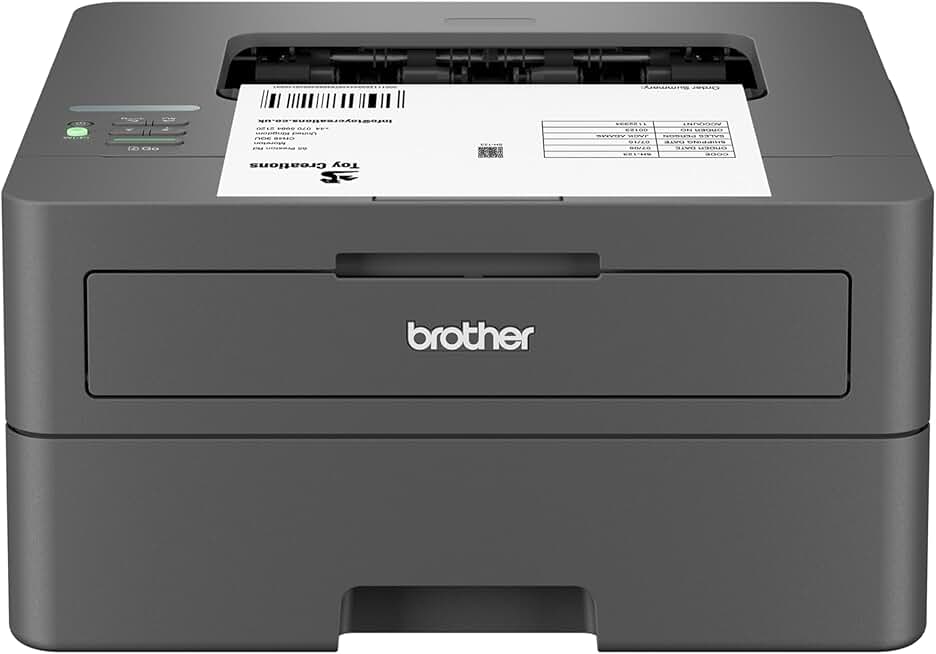
The Brother HL-L2405W Printer is a compact and efficient solution designed for individuals and small offices seeking reliable monochrome laser printing capabilities. This wireless printer offers a compelling blend of speed, convenience, and cost-effectiveness, making it a strong contender in its class.
It integrates seamlessly into modern home and small office environments with its mobile printing support and Alexa compatibility. Our in-depth review will explore every aspect of this device, from its setup to its long-term performance and overall value proposition.
Quick Summary: Brother HL-L2405W Printer
Rating: 4.1 out of 5 stars (Based on 2111 reviews)
Price: $139.99 USD
Key Pros:
- Wireless Connectivity: Effortless setup and printing from various devices.
- Compact Design: Fits easily into tight spaces, ideal for home offices.
- Cost-Effective: Laser technology offers lower per-page costs compared to inkjet.
Key Cons:
- Monochrome Only: Lacks color printing capability, limiting versatility.
- Initial Setup Nuances: Some users report slight challenges with Wi-Fi configuration.
Table of Contents
Brother HL-L2405W Printer Overview
The Brother HL-L2405W Printer stands out as a highly practical and budget-conscious choice for anyone needing a dedicated black and white printing solution. It’s designed specifically for environments where color output isn’t a priority, but speed, reliability, and low operating costs are paramount. This model builds on Brother’s reputation for producing dependable laser printers that deliver consistent results.
Its compact footprint is a significant advantage, allowing it to fit comfortably on a small desk or shelf without dominating the workspace. This makes it particularly appealing for home offices, dorm rooms, or small business settings where space is often at a premium. Despite its size, it doesn’t compromise on performance, offering brisk print speeds suitable for everyday document needs.
The printer’s wireless capabilities are central to its appeal, enabling users to print from various devices without the clutter of cables. This flexibility is crucial in today’s connected world, where printing from smartphones, tablets, and laptops is commonplace. The inclusion of mobile printing apps further enhances this convenience, streamlining workflows for busy professionals and students alike.
One of the core benefits of a monochrome laser printer like the HL-L2405W is its economical operation. Toner cartridges typically last much longer than inkjet cartridges, leading to a lower cost per page over time. This makes it an ideal investment for those with moderate to high black and white printing volumes, offering significant savings in the long run.
The Refresh Subscription Trial is an interesting addition, offering a convenient way to manage toner supplies. This service, often linked to smart printers, anticipates when new toner is needed and automatically ships it, ensuring you never run out unexpectedly. While optional, it adds another layer of user convenience and helps optimize printer uptime, which is especially valuable in a business context.
Furthermore, its compatibility with Alexa allows for voice-activated printing commands, adding a touch of smart home integration. This feature, while perhaps not essential for all users, highlights Brother’s commitment to incorporating modern conveniences into their product line. It simplifies basic printing tasks, allowing for hands-free operation in a busy home or office.
Overall, the Brother HL-L2405W Printer is positioned as a no-frills, high-efficiency workhorse for black and white documents. It prioritizes core printing functionality, ease of use, and economic operation, making it a reliable tool for productivity without unnecessary complexity or excessive cost. Its design ethos focuses on delivering consistent, crisp text output with minimal fuss.
Brother HL-L2405W Printer Key Features & Specs
The Brother HL-L2405W Printer is packed with features designed to enhance productivity and convenience for its target audience. Understanding these key specifications is crucial for appreciating its capabilities and determining if it aligns with your specific printing needs. Each component plays a vital role in its overall performance and user experience.
Print Speed and Quality: This printer boasts a brisk print speed, typically around 30 pages per minute (ppm) for black and white documents. This speed is more than adequate for most home and small office environments, ensuring that large documents are processed quickly. The print quality is consistently sharp, producing crisp text and clear graphics at a resolution of up to 2400 x 600 dpi, which is excellent for professional-looking documents.
Wireless Connectivity and Mobile Printing: One of the standout features is its robust wireless connectivity (802.11b/g/n). This allows for seamless printing from virtually anywhere within your network, eliminating the need for direct cable connections. It supports various mobile printing options, including Brother Mobile Connect, Apple AirPrint, and Mopria Print Service, making it incredibly easy to print directly from smartphones and tablets without installing additional drivers.
Paper Handling: The HL-L2405W comes equipped with a generous 250-sheet adjustable paper tray, capable of handling letter and legal-sized paper. This capacity reduces the frequency of paper refills, which is a significant time-saver in busy settings. Additionally, it features a manual feed slot for printing on thicker media like envelopes or cardstock, adding to its versatility for various document types.
Automatic Duplex Printing: An essential feature for saving paper and reducing environmental impact, automatic duplex printing allows the printer to print on both sides of the page without manual intervention. This not only cuts down on paper costs but also makes creating professional, double-sided documents effortless. It’s a key efficiency booster for reports and presentations.
Refresh Subscription Trial: The inclusion of a Refresh Subscription Trial (1) offers a glimpse into Brother’s intelligent toner delivery service. This system monitors your toner levels and automatically orders and ships replacement cartridges before you run out. It’s designed to provide uninterrupted printing and peace of mind, though users should understand the terms of the trial before committing to the subscription.
Amazon Alexa Compatibility: For users with smart home devices, the printer’s compatibility with Amazon Alexa provides an innovative way to initiate printing tasks. Simple voice commands can trigger print jobs, check toner levels, or even reorder supplies, offering a hands-free and convenient printing experience. This integration highlights the printer’s modern design philosophy.
Compact Design: With dimensions designed for small spaces, this printer measures approximately 14.2 inches wide, 14 inches deep, and 7.2 inches high. Its small footprint ensures it won’t overwhelm a desk, making it perfect for home offices, dorm rooms, or shared workspaces where space optimization is critical. The sleek, black finish also ensures it blends well with most office decor.
Toner Yield and Cost Efficiency: The Brother HL-L2405W Printer uses high-yield toner cartridges, which contribute to its low cost per page. This is a major selling point for laser printers over inkjets, especially for users who print frequently. The initial toner cartridge included is typically a starter cartridge, so budgeting for a standard or high-yield replacement is advisable for long-term savings.
For more detailed technical specifications, you can visit the official Brother product page.
Pros & Cons
Every product has its strengths and weaknesses, and the Brother HL-L2405W Printer is no exception. A balanced perspective helps potential buyers make an informed decision by weighing what the printer excels at against its limitations. Understanding these points can clarify if it’s the right fit for your specific environment and usage patterns.
Pros:
- Exceptional Print Speed for its Class: The HL-L2405W delivers documents at a rapid pace, often exceeding 30 pages per minute. This speed is particularly beneficial for users who frequently print multi-page reports or large batches of documents, drastically cutting down on waiting times compared to slower inkjet alternatives. It ensures your workflow remains efficient and uninterrupted.
- Outstanding Print Quality for Text: As a monochrome laser printer, its primary strength lies in producing sharp, clear, and professional-grade text. Documents, contracts, invoices, and reports come out with crisp black characters that are easy to read and present a polished appearance. This reliability in text quality is a hallmark of Brother laser printers.
- Economical Running Costs: Laser printers are renowned for their lower cost per page compared to inkjet models, and the HL-L2405W upholds this advantage. Its high-yield toner cartridges mean fewer replacements and a significantly reduced expenditure on consumables over the printer’s lifespan. This long-term saving makes it a very attractive option for budget-conscious users.
- Reliable Wireless Connectivity: The printer’s integrated Wi-Fi offers robust and stable connections, facilitating printing from a wide array of devices without the need for physical cables. This wireless freedom is crucial for modern, flexible workspaces and allows for convenient placement of the printer anywhere within your network’s range. It supports various mobile printing protocols for maximum compatibility.
- Compact and Space-Saving Design: Its small footprint is a major benefit for home offices, small businesses, or any environment where space is at a premium. The sleek, understated design allows it to blend seamlessly into various decors without being an obtrusive piece of equipment. This thoughtful design ensures functionality without sacrificing valuable desk space.
- Automatic Duplex Printing: The ability to automatically print on both sides of a sheet of paper is a significant convenience and cost-saving feature. It reduces paper consumption, which is good for the environment and your wallet, while also making it easy to produce professional-looking double-sided documents and brochures without manual flipping.
- Intuitive Setup and User Experience: While some users might find initial Wi-Fi setup a minor hurdle, the overall user experience is generally straightforward. Brother’s drivers and software are user-friendly, and the control panel, though minimal, provides easy access to essential functions. The mobile apps further simplify printing tasks for on-the-go professionals.
Cons:
- Monochrome Only: The most significant limitation of the HL-L2405W is its inability to print in color. For users who occasionally need to print color graphics, photos, or vibrant presentations, this printer will not suffice. It is strictly a black and white document printer, and this specialization means it’s not a versatile all-in-one solution for every household or office.
- No Scanner or Copier Functionality: Unlike many multifunction printers (MFPs) available today, the HL-L2405W is a dedicated printer only. It does not include scanning or copying capabilities, which might be a drawback for users who need an integrated solution for document management. This means requiring separate devices for scanning or copying documents.
- Initial Wi-Fi Setup Can Be Tricky for Some: While wireless connectivity is a major pro, a minority of users report that the initial setup, particularly connecting to a Wi-Fi network, can be less intuitive than desired. This might require consulting the manual or online resources for troubleshooting, potentially causing minor frustration for less tech-savvy individuals.
- Limited Paper Input for Specialized Media: Although it has a manual feed slot, the main paper tray is primarily designed for standard paper sizes. Printing on a wide variety of specialized media types or very thick cardstock might be cumbersome or not fully supported, limiting its use for creative projects or very heavy-duty printing tasks beyond standard documents.
- No USB Host Port for Direct Printing: The printer lacks a USB host port, meaning you cannot directly print from a USB flash drive without a computer or network connection. All print jobs must be initiated through a connected device (computer, smartphone) or via the network. This minor inconvenience might affect users who prefer direct-from-drive printing.
Who Should Buy the Brother HL-L2405W Printer?
The Brother HL-L2405W Printer is not a one-size-fits-all solution, but it perfectly caters to specific user profiles and environments. Identifying whether your needs align with its strengths is key to maximizing your satisfaction and getting the best value for your investment. This printer excels in scenarios where black and white document printing is the primary requirement.
Home Office Professionals: If you work from home and frequently print documents, reports, invoices, or research papers that don’t require color, this printer is an excellent choice. Its fast print speeds and automatic duplexing can significantly boost your productivity, allowing you to quickly process workloads. The low cost per page is also a major benefit for managing home office expenses.
Students and Educators: For students constantly printing essays, lecture notes, handouts, or research materials, the HL-L2405W offers an economical and reliable solution. Its compact size makes it suitable for dorm rooms or small study areas. Educators can also benefit from its efficiency for printing syllabi, assignments, and administrative documents.
Small Business Owners: Businesses that primarily deal with black and white documents, such as legal firms, accounting offices, or small retail operations, will find this printer highly valuable. The robust paper tray capacity reduces constant refilling, and the durable laser technology ensures consistent performance even with higher print volumes. Its wireless capabilities allow for flexible placement within a small office layout.
Anyone Seeking Cost-Effective Printing: If your main goal is to minimize printing costs over time, especially if you print a substantial amount of black and white text, the HL-L2405W is a strong contender. The initial investment in a laser printer often pays off quickly due to the significantly lower cost of toner cartridges compared to inkjet ink. This makes it an intelligent financial decision for frequent printers.
Users with Limited Space: Its compact design is a major selling point for those with restricted desk space. Whether it’s a small apartment, a cluttered home office, or a shared workspace, this printer can fit in without being an eyesore or taking up too much valuable real estate. It delivers powerful printing capabilities within a minimal footprint.
Individuals Who Prioritize Speed and Reliability: If you’re tired of slow inkjet printers or constantly dealing with clogged print heads, a monochrome laser printer like this one offers a refreshing change. Laser technology is known for its speed, consistency, and reliability, providing crisp prints every time without the maintenance hassles often associated with inkjet models. It’s a true workhorse.
Tech-Savvy Users Desiring Smart Integration: With its mobile printing support and Alexa compatibility, the HL-L2405W appeals to users who appreciate modern conveniences and smart home integration. Printing from your phone or using voice commands adds a layer of ease and sophistication to your printing tasks, fitting well into a connected lifestyle.
Conversely, if you frequently need to print in color, require scanning or copying functionality, or primarily print high-resolution photos, then this specific model would not be the ideal choice. It is a specialized tool, and its value is highest when its specific strengths align with your core printing requirements. For those particular needs, an all-in-one color inkjet or laser printer would be more appropriate.
Consider your daily printing habits and long-term needs carefully. If crisp black and white documents, speed, and low running costs are at the top of your list, the Brother HL-L2405W Printer is an outstanding investment that will serve you well for years to come. Its focus on core laser printing excellence makes it a reliable addition to any productive environment.
FAQ about Brother HL-L2405W Printer
Here are some frequently asked questions about the Brother HL-L2405W Printer, providing further clarity on its operation, maintenance, and capabilities. These answers aim to address common concerns and help users get the most out of their printer. Understanding these details can enhance your overall experience.
Q1: Is the Brother HL-L2405W Printer difficult to set up wirelessly?
A1: While most users find the wireless setup straightforward, a small percentage report minor challenges. Brother provides detailed instructions in the manual and on their support website. Using the Brother Mobile Connect app can often simplify the process by guiding you through network connection steps. Ensure your Wi-Fi network is stable and you have the correct password for a smooth setup experience.
Q2: Can this printer print in color?
A2: No, the Brother HL-L2405W Printer is a monochrome laser printer, meaning it only prints in black and white. It is specifically designed for crisp text and basic graphics in grayscale. If you require color printing, you would need to consider a different model, such as a color laser printer or an inkjet printer, which offers full-color output capabilities.
Q3: What type of toner cartridge does the Brother HL-L2405W Printer use, and how long does it last?
A3: This printer uses Brother TN830 (standard yield) or TN830XL (high yield) toner cartridges. The lifespan of a cartridge depends on your print volume. A standard yield cartridge typically prints around 1,200 pages, while a high-yield cartridge can produce approximately 3,000 pages. These figures are based on ISO/IEC 19752 standards, and actual yield may vary based on content printed.
Q4: Does the Refresh Subscription Trial automatically charge me after the trial period?
A4: Yes, typically, subscription trials for services like Refresh are designed to convert to a paid subscription automatically unless you cancel before the trial period ends. It is crucial to read the terms and conditions of the Refresh Subscription Trial carefully upon activation to understand the duration of the trial and the cancellation process. This ensures you avoid unexpected charges.
Q5: Is the Brother HL-L2405W Printer compatible with Mac computers?
A5: Yes, the Brother HL-L2405W Printer is fully compatible with Mac operating systems. You can download the necessary drivers from Brother’s official support website, or often, your Mac will automatically detect and install the appropriate drivers when connected to the same network. It also supports Apple AirPrint for direct printing from iOS devices and Mac computers without additional software.
Q6: Can I connect this printer via a USB cable instead of Wi-Fi?
A6: Yes, in addition to wireless connectivity, the Brother HL-L2405W Printer includes a USB 2.0 port for a wired connection to your computer. This provides a reliable alternative if you prefer a direct connection or if your Wi-Fi network is unreliable. A standard USB A-to-B printer cable (not usually included) is required for this connection type.
Q7: What kind of paper can the manual feed slot handle?
A7: The manual feed slot is designed for printing on single sheets of various media types that might not feed well from the main tray. This includes thicker paper, envelopes, labels, and cardstock. It’s ideal for specialized print jobs where you need to use non-standard paper types, offering greater flexibility than the main paper tray. Always check the printer’s specifications for maximum paper weight supported.
Q8: Does this printer have a display screen?
A8: The Brother HL-L2405W Printer features a simple, compact control panel, typically with a few buttons and LED indicators, but it does not have a full graphical display screen. Status updates, such as toner low warnings or network connection status, are usually communicated via these LED lights and through your computer’s printer utility software or the mobile app. This minimalist design contributes to its compact size and ease of use for essential functions.
Q9: How does the Alexa compatibility work?
A9: The Alexa compatibility allows you to use voice commands through an Alexa-enabled device (like an Echo speaker) to perform basic printing tasks. You can ask Alexa to print a shopping list, a to-do list, or even check the printer’s toner level. To enable this, you typically need to link your Brother printer to your Amazon account through the Alexa app and enable the Brother skill. This feature is designed for convenience in smart home ecosystems.
Q10: Is this printer suitable for high-volume printing?
A10: While the Brother HL-L2405W Printer offers efficient speeds and low cost per page, it’s generally considered suitable for moderate to high-volume printing in a home or small office context. For very high-volume, enterprise-level printing (thousands of pages daily), a more robust, larger-capacity business-grade laser printer might be more appropriate. However, for typical daily needs of hundreds of pages, it performs admirably.
Final Verdict
The Brother HL-L2405W Printer emerges as an outstanding choice for anyone in search of a dedicated monochrome laser printer that balances performance, economy, and modern convenience. Its robust feature set, including fast print speeds, excellent text quality, and versatile wireless connectivity, makes it a highly effective tool for productivity in various settings. It delivers on Brother’s promise of reliable and efficient printing.
While it is important to acknowledge its limitations, specifically the absence of color printing and scanning/copying functions, these are not drawbacks for its intended audience. For home office users, students, and small businesses whose primary need is high-quality, high-volume black and white document printing, this printer offers exceptional value. The low cost per page and automatic duplexing contribute to significant long-term savings.
The inclusion of mobile printing support and Alexa compatibility further solidifies its position as a modern, user-friendly device. These features enhance its accessibility and integrate seamlessly into contemporary digital workflows. Its compact design ensures it can fit comfortably into almost any workspace without compromising on professional output.
Considering its competitive price point, impressive speed, and economical operation, the Brother HL-L2405W Printer is undeniably a superior investment. It’s a workhorse that consistently delivers crisp, clear documents, making it one of the best values in the compact monochrome laser printer category. We highly recommend it for anyone prioritizing efficient black and white printing.
For additional insights into laser printer technology and general maintenance tips, you might find resources from reputable tech review sites like PCMag’s guide to the best laser printers helpful.