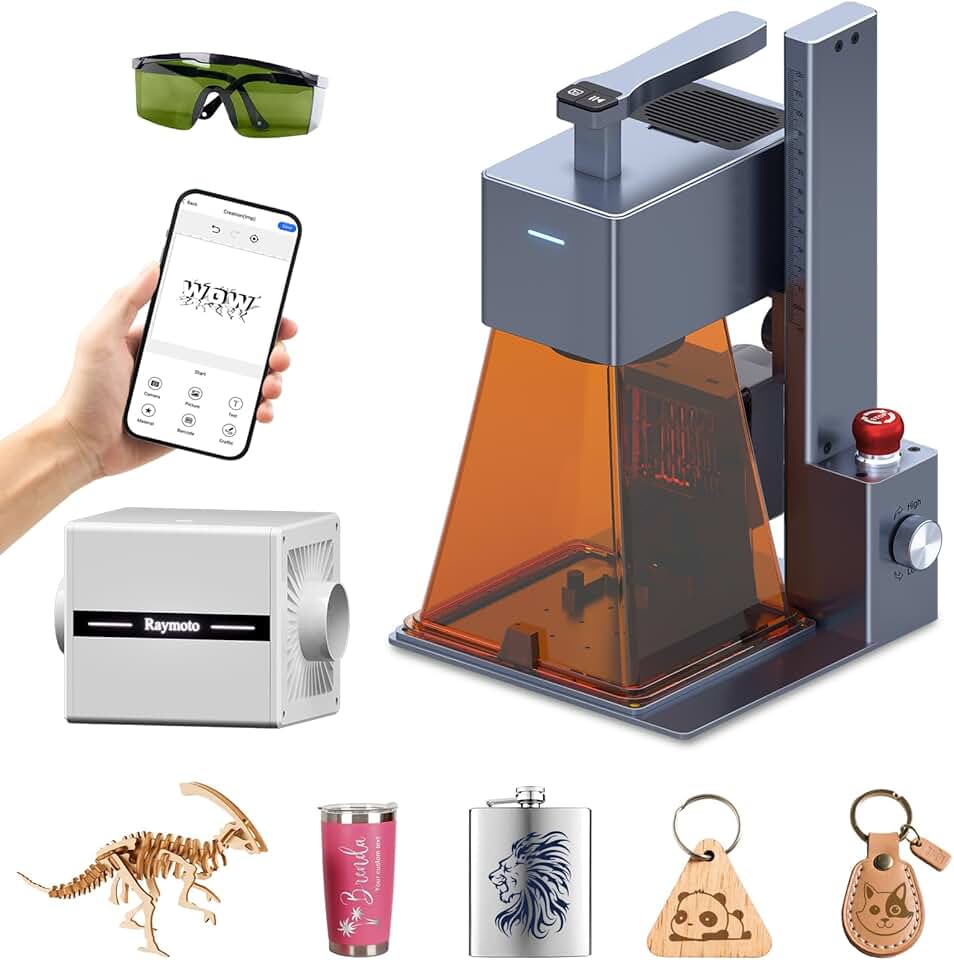
The Raymoto R1 Pro Laser Engraver emerges as a compelling solution for creators, hobbyists, and small business owners seeking a powerful yet portable engraving and cutting machine. This 20W diode laser system promises high-speed precision and multi-material versatility, encapsulated within a design that prioritizes both performance and user safety. Its robust capabilities make it suitable for a wide range of applications, from personalized gifts to intricate artistic projects.
Quick Summary: Raymoto R1 Pro Laser Engraver
- Rating: 5.0/5.0 (Based on 1 review)
- Price: $899.99
- Key Pros:
- Powerful 20W optical output for efficient engraving and cutting.
- Integrated safety cover enhances user protection and smoke management.
- Excellent portability and easy setup for versatile use.
- Wide compatibility with various materials for diverse projects.
- Key Cons:
- Limited working area compared to larger, more expensive industrial machines.
- Initial learning curve for optimizing advanced software settings.
Table of Contents
Raymoto R1 Pro Laser Engraver Overview
The Raymoto R1 Pro Laser Engraver represents a significant advancement in consumer-grade and small business laser technology. This 20W portable machine is engineered to bridge the gap between entry-level hobbyist tools and more industrial-grade equipment, offering a powerful optical output that can handle both intricate engraving and precise cutting tasks. Its design focuses on user accessibility without compromising on the quality and speed of its operations.
At its core, the R1 Pro utilizes a high-power diode laser, a technology known for its efficiency and longevity. The 20,000mW output power means it can engrave at impressive speeds and cut through various materials with relative ease, making it a versatile asset for any creative endeavor. This level of power opens up possibilities that lower wattage lasers simply cannot achieve, expanding the scope of projects users can undertake.
One of the most notable aspects of the Raymoto R1 Pro Laser Engraver is its portability. Unlike bulky industrial machines that require dedicated space, the R1 Pro is designed to be moved and set up with minimal effort. This feature is particularly beneficial for users who have limited workshop space, attend craft fairs, or need to transport their equipment between different locations. Its compact footprint ensures it doesn’t dominate your workspace.
Safety is another paramount consideration in the R1 Pro’s design. The inclusion of a dedicated safety cover is a critical feature, especially for home users or those working in shared environments. This cover helps to contain laser light, protecting eyes from harmful exposure, and also assists in managing smoke and fumes generated during the engraving or cutting process. This thoughtful addition significantly improves the overall user experience and peace of mind.
The machine boasts multi-material compatibility, allowing users to work with an extensive array of substrates. From common materials like wood and leather to more challenging ones such as certain acrylics and thin metals, the Raymoto R1 Pro Laser Engraver offers the flexibility needed for diverse artistic and commercial projects. This broad material range makes it an invaluable tool for product customization and prototyping.
Setup and operation are designed to be straightforward, catering to both experienced laser users and those new to the technology. While professional-grade results often involve a learning curve with design software, the physical setup of the R1 Pro is streamlined. This ease of use encourages experimentation and rapid project iteration, which is ideal for small businesses needing quick turnaround times or hobbyists eager to dive into their creative pursuits.
The emphasis on high-speed operation means less waiting and more creating. For small businesses, this directly translates to increased productivity and the ability to fulfill orders more efficiently. For DIY enthusiasts, it means projects are completed faster, allowing more time for new ideas and designs. The precision of the laser ensures that even the most intricate details are rendered accurately, producing professional-quality finishes.
Overall, the Raymoto R1 Pro Laser Engraver positions itself as a robust, user-friendly, and safe option for anyone looking to enter or expand their capabilities in the world of laser engraving and cutting. Its blend of power, portability, and protective features makes it a standout choice in its category. It’s a tool that empowers creativity and fosters entrepreneurial spirit, offering a path to producing high-quality, customized products with relative ease.
Raymoto R1 Pro Laser Engraver Key Features & Specifications
Understanding the specific features and technical specifications of the Raymoto R1 Pro Laser Engraver is crucial for appreciating its capabilities and determining its suitability for various projects. This machine is packed with components and design choices that contribute to its performance, safety, and versatility. Each element plays a vital role in the overall user experience and the quality of the output.
20W Optical Output Power
The most defining feature of the R1 Pro is its 20W optical output power. This is a significant amount of power for a diode laser in this class, allowing for faster engraving speeds and more robust cutting capabilities compared to 5W or 10W models. This power enables deeper, cleaner cuts in wood and acrylic, and faster, more pronounced engravings on various materials including some thin metals. It translates directly to increased efficiency and expanded material processing options.
Portable and Compact Design
The Raymoto R1 Pro Laser Engraver is engineered for portability. Its relatively compact footprint and thoughtful design make it easy to move, store, and set up in different locations. This is ideal for users with limited permanent workshop space or those who need to transport the engraver for demonstrations, craft shows, or collaborative projects. The emphasis on portability ensures that powerful laser engraving isn’t confined to a single, dedicated area.
Integrated Safety Cover
A standout safety feature is the integrated protective cover. This enclosure serves multiple critical functions: it provides a physical barrier against direct laser exposure, significantly reducing the risk of eye injury, and it also helps to contain smoke and fumes generated during operation. The cover often includes a viewing window with a filter to safely observe the engraving process, enhancing both safety and user convenience. This is especially important for home environments or schools.
Multi-Material Compatibility
The versatility of the Raymoto R1 Pro Laser Engraver extends to its ability to work with a wide range of materials. Users can engrave and cut materials such as various types of wood (plywood, bamboo, MDF), leather, acrylic, paper, cardboard, fabric, slate, ceramics, and even some coated metals. This broad compatibility makes it an invaluable tool for diverse applications, from custom signage and jewelry to personalized gifts and intricate models. Understanding material properties and laser settings is key to optimal results.
High-Speed Engraving Capabilities
The combination of 20W power and advanced galvanometer technology (if applicable, or simply efficient stepper motors) allows the R1 Pro to achieve remarkable engraving speeds. This high speed is crucial for productivity, enabling users to complete projects faster, whether they are producing multiple items for a small business or working on time-sensitive personal projects. Faster engraving doesn’t mean sacrificing detail; the machine maintains precision even at higher speeds.
Easy Setup and User-Friendly Operation
Despite its advanced capabilities, the Raymoto R1 Pro Laser Engraver is designed for relatively easy setup. Most users can assemble and get the machine operational within a short period, often with clear instructions. It typically supports popular laser control software like LightBurn and LaserGRBL, which provide intuitive interfaces for design import, parameter adjustments, and job execution. This accessibility lowers the barrier to entry for new users while offering advanced control for experienced ones. For more details on laser engraving software, you can visit LightBurn’s official website.
Precision and Accuracy
The R1 Pro is built for high precision, capable of rendering fine details and intricate patterns with excellent accuracy. This is vital for producing professional-quality results, especially for projects requiring small text, complex graphics, or tight tolerances. The stable mechanical structure and precise laser module contribute to consistent and repeatable engraving and cutting performance, ensuring that each project meets high standards.
Robust Build Quality
Constructed with durable materials, the R1 Pro is designed for longevity and consistent performance. A sturdy frame and high-quality components ensure stability during operation, which is critical for maintaining precision. The robust build also contributes to the machine’s overall reliability, making it a dependable tool for continuous use in a creative or commercial setting. Investing in a well-built machine minimizes downtime and maintenance issues.
Pros & Cons of the Raymoto R1 Pro Laser Engraver
Every product has its strengths and weaknesses, and the Raymoto R1 Pro Laser Engraver is no exception. A balanced review requires a thorough examination of both its advantages and potential drawbacks. Understanding these points will help prospective buyers make an informed decision based on their specific needs and expectations.
Pros of the Raymoto R1 Pro Laser Engraver
- Powerful 20W Optical Output: This is arguably its biggest advantage. The 20W power allows for significantly faster engraving and more capable cutting of thicker materials like wood and acrylic. It reduces project times and expands the range of materials and thicknesses that can be processed, making it highly efficient for both hobbyists and small businesses.
- Exceptional Portability: The R1 Pro’s design emphasizes ease of movement. Its compact and relatively lightweight structure means it can be easily transported between different workspaces, shared environments, or even to events like craft fairs. This flexibility is a major benefit for users who don’t have a dedicated, permanent setup.
- Integrated Safety Cover: The built-in safety cover is a critical feature, especially for home or classroom use. It provides essential eye protection by blocking harmful laser emissions and also helps to contain smoke, fumes, and debris, leading to a cleaner and safer working environment. This thoughtful design element greatly enhances user confidence and overall safety.
- Wide Material Compatibility: Thanks to its powerful laser, the R1 Pro can work with an impressive array of materials. This includes various woods, leather, acrylic, paper, cardboard, fabric, slate, glass, and even certain coated metals. This versatility empowers users to undertake a diverse range of projects, from custom artwork to functional prototypes and personalized products.
- User-Friendly Setup and Operation: Despite its advanced capabilities, the R1 Pro is designed with user accessibility in mind. The initial setup is typically straightforward, and compatibility with popular software like LightBurn and LaserGRBL means that even beginners can get started relatively quickly. This ease of use lowers the barrier to entry for new laser engraver users.
- High Precision and Speed: The machine is capable of delivering highly detailed engravings with remarkable accuracy, ensuring professional-grade results for intricate designs and small text. Coupled with its high operating speed, this means efficient production without compromising on the quality or resolution of the output.
- Potential for Small Business Growth: For entrepreneurs, the R1 Pro offers a robust platform for creating custom products, prototypes, and personalized items. Its speed and material versatility can contribute significantly to a small business’s production capacity and product offerings, providing a competitive edge in the custom goods market.
Cons of the Raymoto R1 Pro Laser Engraver
- Relatively Small Working Area: While portable, the R1 Pro’s working area may be a limitation for very large projects. Users looking to engrave or cut items significantly bigger than typical craft or gift sizes might find themselves needing to tile designs, which can add complexity. This is a common trade-off for portability in this class of engravers.
- Learning Curve for Advanced Software: Although basic operation is simple, mastering software like LightBurn to achieve optimal results across different materials and complex designs can take time and practice. New users may need to invest effort into understanding various settings, power, speed, and focus adjustments to unlock the machine’s full potential.
- Initial Investment Cost: At its price point, the Raymoto R1 Pro Laser Engraver represents a notable investment for a hobbyist, especially compared to entry-level 5W or 10W lasers. While its capabilities justify the cost for serious users or small businesses, casual users might find the initial outlay a significant consideration.
- Limited Long-Term Review Data: As a relatively newer product, the R1 Pro may have fewer long-term user reviews compared to more established brands or models. This can make it slightly harder to assess its long-term reliability, durability, and customer support consistency over extended periods of use. Prospective buyers might want to keep an eye on emerging user feedback.
Who Should Buy the Raymoto R1 Pro Laser Engraver?
The Raymoto R1 Pro Laser Engraver is a versatile tool, but it’s not for everyone. Identifying the ideal user helps potential buyers determine if this powerful machine aligns with their creative or commercial aspirations. Its specific features and capabilities cater to a particular segment of the market, offering significant value to those whose needs match its strengths.
DIY Enthusiasts and Crafters
For passionate DIY enthusiasts and crafters, the R1 Pro is an excellent upgrade or starting point. It allows for personalized gifts, custom home decor, intricate jewelry, and unique art pieces. The ability to work with various materials means endless creative possibilities, transforming ordinary items into bespoke creations. If you enjoy making things truly your own, this engraver provides the precision and power to bring complex designs to life.
Small Business Owners and Entrepreneurs
Entrepreneurs looking to launch or expand a small business focused on custom products will find the Raymoto R1 Pro Laser Engraver incredibly valuable. Its 20W power and high-speed capabilities translate to efficient production of personalized items like custom keychains, engraved tumblers, wooden signs, leather goods, or unique promotional materials. The portability also makes it suitable for pop-up shops or craft markets, allowing on-site customization.
Hobbyists Seeking an Upgrade
Many hobbyists start with entry-level laser engravers, often with lower wattage. If you’ve outgrown your current 5W or 10W machine and need more power for faster operations, deeper cuts, or a wider range of materials, the R1 Pro is an ideal next step. It offers a significant leap in capability without jumping to industrial-grade prices or complexities, providing a robust platform for more ambitious projects.
Educators and STEM Programs
Schools, colleges, and STEM programs can benefit from the R1 Pro’s balance of power, safety, and user-friendliness. It’s a fantastic tool for teaching design, manufacturing principles, and digital fabrication. The integrated safety cover makes it a safer option for supervised student use, allowing for hands-on learning in a controlled environment. Students can learn to design, prototype, and create with real-world applications.
Users Prioritizing Safety in a Home Environment
For those who plan to use a laser engraver at home or in a shared space, the R1 Pro’s integrated safety cover is a non-negotiable feature. This cover significantly enhances user protection by containing laser light and managing fumes. This peace of mind is invaluable, ensuring that creative pursuits don’t come at the expense of safety for the user or others in the vicinity. It makes laser engraving more accessible to a broader audience concerned with safety protocols.
Individuals Needing Portability and Flexibility
If your workspace is dynamic, or if you frequently move your equipment, the R1 Pro’s portable design is a key selling point. It can be easily stored away when not in use or transported to different locations without significant hassle. This flexibility supports various work styles, from a dedicated home workshop to a shared studio space, ensuring that your laser engraver can adapt to your needs rather than the other way around. It offers true creative freedom on the go.
Those Seeking a Balance of Power and Affordability
While not the cheapest option on the market, the Raymoto R1 Pro Laser Engraver offers a compelling balance of high power (20W optical) and a relatively accessible price point compared to industrial CO2 lasers. It provides professional-level engraving and cutting capabilities without the prohibitive cost or complex infrastructure requirements of larger machines. This makes it an attractive investment for serious users who want performance without breaking the bank.
In summary, the R1 Pro is best suited for individuals and small businesses that require a powerful, versatile, and safe laser engraver that can be easily integrated into various environments. It’s an excellent choice for those ready to elevate their crafting, prototyping, or product customization efforts with a reliable and efficient machine.
FAQ about the Raymoto R1 Pro Laser Engraver
Prospective buyers often have specific questions about laser engravers, especially when investing in a powerful and versatile machine like the Raymoto R1 Pro Laser Engraver. This FAQ section aims to address common inquiries, providing detailed answers to help you better understand its functionality, safety, and operational aspects.
Q1: What materials can the Raymoto R1 Pro Laser Engraver work with?
A1: The Raymoto R1 Pro Laser Engraver is highly versatile and can engrave and cut a wide array of materials. These include various types of wood (plywood, balsa, bamboo, MDF), leather, acrylic (especially opaque colors), paper, cardboard, fabric, felt, slate, ceramics, stone, and even some coated metals. For optimal results, it’s always recommended to test settings on a scrap piece of your specific material.
Q2: Is the Raymoto R1 Pro Laser Engraver safe for home use?
A2: Yes, the R1 Pro is designed with safety in mind, making it suitable for home use. Its most significant safety feature is the integrated safety cover, which helps to contain laser light and protect users’ eyes from direct exposure. Additionally, this cover assists in managing smoke and fumes, though proper ventilation (e.g., near an open window or with an exhaust system) is always recommended when operating any laser engraver to ensure air quality.
Q3: What software is compatible with this laser engraver?
A3: The Raymoto R1 Pro Laser Engraver is typically compatible with popular and robust laser control software such as LightBurn and LaserGRBL. LightBurn is a highly recommended professional software known for its extensive features, intuitive interface, and broad support for various laser machines. LaserGRBL is a free, open-source alternative that is simpler to use for basic engraving tasks. Both allow for importing various design files and controlling the engraving process.
Q4: How easy is it for a beginner to set up and use the Raymoto R1 Pro Laser Engraver?
A4: The R1 Pro is designed for relatively easy setup, even for beginners. The physical assembly usually involves a few straightforward steps with clear instructions. While basic operation is quite accessible, mastering the software (like LightBurn) and understanding optimal power/speed settings for different materials will require some learning and experimentation. Many online resources and communities are available to assist new users in getting started and advancing their skills.
Q5: What is the working area or engraving size of this machine?
A5: While the exact working area can vary slightly between specific models or revisions, portable laser engravers like the Raymoto R1 Pro Laser Engraver typically offer a moderate working area. This size is generally sufficient for most DIY projects, personalized gifts, and small business products. For very large items, users might need to employ tiling techniques, where a large design is broken into smaller sections and engraved sequentially.
Q6: Can the Raymoto R1 Pro Laser Engraver cut through thick materials?
A6: With its 20W optical power, the R1 Pro is capable of cutting through a respectable range of materials. It can cut through various thicknesses of wood (e.g., 5-8mm plywood or balsa) and acrylic (e.g., 3-5mm) in multiple passes, depending on the material density and color. While it’s powerful for a diode laser, it won’t cut as thick or as fast as a high-power CO2 laser, but it excels within its class for both engraving and cutting capabilities.
Q7: What kind of maintenance does the Raymoto R1 Pro Laser Engraver require?
A7: Maintenance for the R1 Pro is generally straightforward. Regular cleaning of the laser lens is crucial to ensure optimal performance and longevity. Dust and debris can accumulate on the lens, affecting laser focus and power. Periodically checking and tightening belts or screws, and ensuring the work area is clean, will also help maintain precision and smooth operation. Always consult the manufacturer’s manual for specific maintenance guidelines.
Q8: Is the Raymoto R1 Pro Laser Engraver suitable for commercial production?
A8: Yes, the Raymoto R1 Pro Laser Engraver is well-suited for small-scale commercial production. Its 20W power and high-speed capabilities allow for efficient creation of custom products, making it a valuable asset for small businesses, Etsy sellers, or crafters who sell their creations. While it may not match the throughput of industrial machines, its affordability, versatility, and quality output make it an excellent choice for many entrepreneurial ventures. For more general information on laser engraving technology, consider visiting Wikipedia’s article on Laser Engraving.
Final Verdict on the Raymoto R1 Pro Laser Engraver
After a comprehensive review of its features, capabilities, and target audience, the Raymoto R1 Pro Laser Engraver stands out as an exceptional machine in its category. It successfully combines powerful performance with user-centric design, making it a highly attractive option for a diverse range of creators. Its 20W optical output positions it firmly above many entry-level diode lasers, offering a significant boost in both engraving speed and cutting capacity.
The integrated safety cover is a critical differentiator, providing peace of mind for users operating the machine in home or shared environments. This commitment to safety, coupled with its robust multi-material compatibility, ensures that users can explore a vast spectrum of creative and commercial projects without undue concern. The ability to work with various woods, acrylics, leathers, and even some metals unlocks immense potential for customization and product development.
While the initial learning curve for advanced software settings might require some dedication, the overall ease of setup and compatibility with widely used programs like LightBurn make the R1 Pro accessible. This balance of power and user-friendliness is precisely what many hobbyists, DIY enthusiasts, and small business owners are looking for in a laser engraver. It empowers them to achieve professional-grade results without the complexities and costs associated with industrial equipment.
For those seeking to upgrade from less powerful machines, the R1 Pro offers a clear path to enhanced capabilities. For new entrepreneurs, it provides a reliable and efficient tool to create unique, personalized products that can stand out in a competitive market. Its portability further adds to its appeal, allowing for flexible use across different locations, which is invaluable for dynamic creative workflows or market opportunities.
In conclusion, the Raymoto R1 Pro Laser Engraver is an outstanding investment for anyone serious about laser engraving and cutting. It delivers on its promise of high-speed performance, precision, and safety, all within a portable and user-friendly package. If you’re looking for an excellent machine that can elevate your crafting, prototyping, or small business ventures, the R1 Pro is undoubtedly worth considering. It’s a tool that not only meets expectations but often exceeds them, providing a solid foundation for endless creative possibilities.