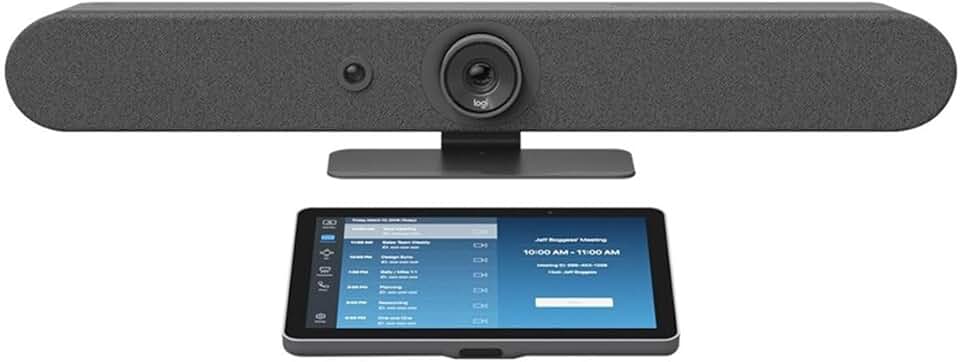
The Logitech Rally Bar Mini is an essential tool for modern hybrid workplaces, offering an integrated video conferencing solution designed to simplify meeting room setups. In today’s dynamic business environment, seamless communication is paramount, and this powerful bundle aims to deliver exceptional audio and video quality without the complexity often associated with traditional AV systems. This review delves deep into its capabilities, performance, and overall value for businesses seeking to enhance their collaborative spaces.
Quick Summary: Logitech Rally Bar Mini Bundle
Rating: 3.5/5
Price: $3539.99 USD
Key Pros:
- Integrated, all-in-one design significantly simplifies setup and management.
- Delivers exceptional audio and video quality for a superior meeting experience.
- Intuitive control with the included Tap IP touch controller enhances user interaction.
- Offers flexible platform support, working seamlessly with Zoom Rooms and Microsoft Teams Rooms.
- Features AI-driven technologies like RightSight camera framing for dynamic participant views.
Key Cons:
- The premium price point may be a significant investment for smaller organizations.
- While versatile, it might have limited scalability for very large, complex conference room environments.
Table of Contents
Logitech Rally Bar Mini Overview
The Logitech Rally Bar Mini represents a significant leap forward in integrated video conferencing solutions, specifically tailored for small to medium-sized meeting rooms. It combines a high-definition camera, studio-quality speakers, and an advanced microphone array into a sleek, single device. This all-in-one approach dramatically simplifies deployment and management, making it an attractive option for businesses looking to upgrade their collaborative spaces without extensive IT intervention.
Designed to support the burgeoning hybrid work model, the Rally Bar Mini ensures that remote participants feel just as present and engaged as those in the room. Its robust set of features is engineered to deliver a consistent, high-quality meeting experience across various platforms. The bundle often includes the Logitech Tap IP, a dedicated touch controller that provides an intuitive interface for starting meetings, managing participants, and controlling room functions.
The core philosophy behind the Logitech Rally Bar Mini is to provide enterprise-grade video conferencing capabilities in a compact and user-friendly package. It eliminates the need for separate components, extensive cabling, and complex configuration processes. This integrated design not only streamlines the physical setup but also centralizes control and troubleshooting, reducing potential points of failure and simplifying ongoing maintenance for IT departments.
Its versatility is further enhanced by its ability to run supported video conferencing applications natively on the device, such as Zoom Rooms and Microsoft Teams Rooms. This appliance mode functionality means that a dedicated PC is not always required, further simplifying the meeting room architecture. Alternatively, it can operate in USB mode, connecting to a computer for broader compatibility with virtually any video conferencing software.
The Rally Bar Mini is built with a focus on both performance and aesthetics. Its sleek graphite finish and thoughtful design ensure it blends seamlessly into modern office environments, rather than being an obtrusive piece of technology. The robust construction speaks to Logitech’s commitment to durability and reliability, crucial factors for business-critical equipment that sees daily use in demanding corporate settings.
Understanding the nuances of the Logitech Rally Bar Mini involves appreciating its role as a comprehensive ecosystem rather than just a collection of devices. It’s about how the camera, audio, and control interface work in harmony to create an effortless and highly effective meeting environment. This holistic design ethos is what sets it apart from more traditional, piecemeal video conferencing setups.
For organizations navigating the complexities of hybrid work, where some employees are in the office and others are remote, having reliable and high-quality video conferencing tools is non-negotiable. The Rally Bar Mini addresses this need directly by providing a consistent and equitable experience for all participants, regardless of their location. It helps bridge the geographical gap, fostering better collaboration and productivity.
The initial investment in a solution like the Logitech Rally Bar Mini is often justified by the long-term benefits of reduced IT support, improved meeting efficiency, and enhanced user satisfaction. Its future-proof design, with regular software updates and compatibility with evolving collaboration platforms, ensures that it remains a valuable asset for years to come. This makes it a strategic choice for businesses planning for sustained growth and technological advancement in their communication infrastructure.
Logitech Rally Bar Mini Key Features & Specs
The Logitech Rally Bar Mini is packed with advanced features designed to deliver a premium video conferencing experience. At its heart is an impressive camera system, featuring a 4K sensor, 15x HD zoom, and a wide 120-degree field of view. This allows it to capture everyone in the room with exceptional clarity, even in smaller spaces, ensuring no participant is left out of frame.
One of its standout technologies is Logitech RightSight, an AI-powered camera control system that automatically frames meeting participants. This intelligent feature can detect people in the room, zoom in, and pan to keep everyone visible and optimally framed. It eliminates the need for manual camera adjustments, allowing users to focus entirely on the discussion rather than technical controls, creating a more natural and engaging interaction for remote attendees.
Audio quality is equally paramount, and the Rally Bar Mini excels here with its advanced RightSound technology. This suite of audio innovations includes beamforming microphones that pick up voices clearly while suppressing background noise and echoes. The six-microphone array ensures every voice in the room is captured, and the powerful, distortion-free speakers deliver crystal-clear audio to participants, whether they are in the room or joining remotely.
The bundle’s inclusion of the Logitech Tap IP is a game-changer for usability. This dedicated network-connected touch controller provides a sleek and responsive interface for managing meetings. Users can effortlessly join calls, share content, and control camera functions with a simple tap, eliminating the typical fumbling with remotes or laptop interfaces. Its clean design and single-cable PoE connectivity make installation straightforward and tidy.
Connectivity options are robust, ensuring flexibility for various deployment scenarios. The Rally Bar Mini supports both appliance mode, running native Zoom Rooms or Microsoft Teams Rooms software, and USB mode, for use with any PC-based video conferencing application. It features multiple USB ports for accessories, HDMI output for dual displays, and an Ethernet port for reliable network connectivity, including Power over Ethernet (PoE) for simplified wiring.
The device is built with enterprise-grade security and manageability in mind. It supports a robust device management platform, Logitech Sync, which allows IT administrators to monitor, manage, and update devices remotely. This centralized control simplifies large-scale deployments and ensures all units are running the latest firmware, enhancing security and performance across the organization.
Physical specifications highlight its compact footprint, making it ideal for huddle rooms and small conference spaces. Despite its small size, it integrates a powerful computing engine that processes video and audio streams efficiently, ensuring smooth, lag-free communication. The high-quality optics and precision-engineered audio components are housed within a durable enclosure, built to withstand the rigors of daily professional use.
Furthermore, the Rally Bar Mini offers flexible mounting options, including wall mounts, table stands, and TV mounts, allowing it to be integrated seamlessly into diverse room layouts. This adaptability ensures that organizations can optimize their meeting spaces without compromising on aesthetics or functionality. The attention to detail in both hardware and software design underscores Logitech’s commitment to delivering a comprehensive and user-centric video conferencing solution for the modern workplace.
The integrated speaker system is designed for clarity and intelligibility, ensuring that every word spoken by remote participants is heard clearly by those in the meeting room. This bidirectional audio excellence is critical for fostering truly collaborative and inclusive meeting experiences. The acoustic design of the Rally Bar Mini minimizes reverberation and echo, which can often plague conference rooms, providing a professional sound profile.
Pros & Cons
Delving into the advantages of the Logitech Rally Bar Mini, its all-in-one design stands out as a paramount benefit. This integrated approach significantly reduces the complexity of setting up and managing video conferencing rooms. Instead of juggling multiple devices, cables, and configurations, IT teams can deploy a single, streamlined unit, saving valuable time and resources during installation and ongoing maintenance. This simplicity translates to a more reliable system with fewer potential points of failure.
The exceptional audio and video quality delivered by the Rally Bar Mini creates a superior meeting experience for all participants. The 4K camera with intelligent framing ensures everyone is seen clearly, while the RightSound technology provides crystal-clear audio, free from distractions like background noise and echoes. This high fidelity communication helps foster better engagement and understanding, making remote collaboration feel more natural and effective.
The intuitive control offered by the included Logitech Tap IP touch controller is another major plus. Its dedicated interface simplifies the process of starting and managing meetings, allowing users to effortlessly join calls, share content, and control room functions. This ease of use reduces the learning curve for meeting attendees and minimizes the need for IT support during actual meetings, empowering users to run their own sessions smoothly.
Furthermore, the Rally Bar Mini boasts impressive flexibility in terms of platform support. It can run popular video conferencing applications like Zoom Rooms and Microsoft Teams Rooms natively in appliance mode, eliminating the need for a separate computer. This direct integration streamlines the user experience and optimizes performance for these specific platforms. Alternatively, it can function as a USB device, connecting to a PC for compatibility with virtually any other conferencing software, offering unparalleled versatility.
The AI-driven features, particularly RightSight automatic framing, significantly enhance the meeting experience. This technology intelligently adjusts the camera to keep participants in view, providing dynamic and professional-looking shots without manual intervention. This automation ensures that remote attendees always have the best possible view of the room’s participants, contributing to a more immersive and inclusive meeting environment.
However, the Logitech Rally Bar Mini does come with certain considerations. The most significant is its premium price point. While the integrated features and high performance justify the cost for many businesses, it represents a substantial investment. Smaller organizations or those with very tight budgets might find this initial outlay prohibitive, requiring careful consideration of their return on investment and long-term needs before committing to the system.
Another potential drawback is its scalability for very large or highly complex conference room environments. While excellent for small to medium rooms, the Rally Bar Mini might not provide sufficient coverage or customization for expansive spaces that require multiple cameras, advanced audio mixing, or highly specialized AV integrations. For such scenarios, a more modular and customizable solution from Logitech’s broader Rally product line, or a different vendor, might be more appropriate, necessitating a careful assessment of room size and specific requirements.
While the integrated nature is a strong pro, it also means less modularity. If a specific component, like the camera or speaker, needs an upgrade or replacement, it often means replacing the entire bar. This contrasts with systems where individual components can be swapped out, potentially leading to higher long-term costs in certain niche scenarios. However, for most users, the benefits of integration far outweigh this minor concern, given the robust build quality.
Who Should Buy the Logitech Rally Bar Mini?
The Logitech Rally Bar Mini is an ideal solution for a specific demographic of businesses and organizations seeking to modernize their meeting spaces. Firstly, it is perfectly suited for small to medium-sized businesses (SMBs) that require enterprise-grade video conferencing without the complexity and cost associated with custom-built AV systems. Its all-in-one design simplifies procurement, installation, and ongoing management, making it an accessible premium option for companies without dedicated extensive IT departments.
Organizations that have fully embraced or are transitioning to a hybrid work model will find the Rally Bar Mini invaluable. With a significant portion of their workforce operating remotely, ensuring seamless and equitable communication between in-office and remote team members is critical. The high-quality audio, video, and intelligent framing capabilities of the Rally Bar Mini help bridge the physical gap, fostering better collaboration and engagement for all participants, regardless of their location.
IT managers and facilities professionals who prioritize ease of deployment and centralized management will also greatly benefit from this system. The Rally Bar Mini’s integrated nature means fewer components to install and troubleshoot. Coupled with Logitech Sync, its device management platform, IT teams can remotely monitor, update, and configure units across multiple locations, significantly reducing administrative overhead and ensuring consistent performance throughout the organization.
Companies that heavily rely on specific video conferencing platforms such as Zoom Rooms or Microsoft Teams Rooms will find the Rally Bar Mini to be an excellent fit. Its ability to run these applications natively in appliance mode provides an optimized and streamlined user experience. This direct integration ensures maximum compatibility and performance, allowing users to start meetings quickly and efficiently without external computing devices.
Furthermore, businesses that demand high-quality audio and video for their meetings will appreciate the Rally Bar Mini’s advanced optics and RightSound technology. For sales presentations, client meetings, or executive briefings where clear communication and professional presentation are paramount, the superior performance of this system ensures that every interaction is impactful and effective. It helps project a professional image and facilitates clearer discussions.
Finally, organizations looking for a future-proof investment in their collaboration technology should consider the Rally Bar Mini. Logitech consistently provides software updates that enhance features and maintain compatibility with evolving platforms. This commitment to continuous improvement ensures that the system remains relevant and performs optimally for years, protecting the initial investment and adapting to future communication needs without frequent hardware overhauls.
It is particularly well-suited for huddle rooms, small conference rooms, and executive offices where space might be limited but the demand for high-quality communication is high. Its compact form factor combined with powerful features makes it an ideal choice for these intimate settings, providing a premium experience without overwhelming the room visually or technically. This balance of size and capability is a key selling point for many businesses.
Consider the Logitech Rally Bar Mini if your goal is to provide a consistent, high-quality, and easy-to-use video conferencing experience across multiple smaller meeting spaces. It’s a strategic investment for enhancing workplace productivity and ensuring that your team can collaborate effectively, whether they are in the same building or across continents. Its design ethos focuses on empowering users and simplifying IT management, making it a compelling choice for modern enterprises.
FAQ about Logitech Rally Bar Mini
Q1: What video conferencing platforms does the Logitech Rally Bar Mini support?
The Logitech Rally Bar Mini is highly versatile in its platform support. It can run popular video conferencing applications such as Zoom Rooms and Microsoft Teams Rooms natively in appliance mode. This means the device itself acts as the computer, simplifying the setup and optimizing performance for these specific platforms. Additionally, it can operate in USB mode, connecting to a laptop or desktop computer, which allows it to be used with virtually any other video conferencing software, including Google Meet, RingCentral, and more. This dual functionality ensures maximum compatibility for diverse organizational needs.
Q2: Is the Logitech Rally Bar Mini easy to install and set up?
Yes, one of the primary design goals of the Logitech Rally Bar Mini is ease of installation and setup. Its all-in-one form factor significantly reduces the number of components and cables required compared to traditional modular systems. The included Logitech Tap IP controller also simplifies the user interface, making it intuitive to get started. For IT administrators, Logitech Sync provides a centralized management platform for remote configuration and updates, further streamlining the deployment process across multiple rooms. Most installations can be completed quickly with minimal technical expertise.
Q3: What room sizes is the Rally Bar Mini most suitable for?
The Logitech Rally Bar Mini is specifically designed and optimized for small to medium-sized meeting rooms, huddle spaces, and executive offices. Its wide 120-degree field of view camera and advanced microphone array are engineered to effectively capture participants and audio in spaces typically accommodating up to 6-10 people comfortably. For larger conference rooms or auditoriums, Logitech offers the standard Rally Bar or modular Rally Plus system, which provides greater scalability and coverage. It’s crucial to match the device to the room’s specific dimensions and capacity for optimal performance.
Q4: What is the main difference between the Rally Bar Mini and the standard Rally Bar?
The primary difference between the Rally Bar Mini and the standard Rally Bar lies in their size, audio/video coverage, and suitability for different room sizes. The Rally Bar Mini is a more compact unit, designed for small to medium rooms. The standard Rally Bar is larger, offering greater audio pickup range and speaker output, making it ideal for medium to large conference rooms (up to 16-20 people). Both share similar core technologies like RightSense AI and native app support, but the standard Rally Bar often includes an additional speaker and microphone capacity for its intended larger scale.
Q5: Does the Logitech Rally Bar Mini require a dedicated computer?
Not necessarily. The Logitech Rally Bar Mini can operate in an appliance mode, meaning it has an integrated computer capable of running native video conferencing applications like Zoom Rooms or Microsoft Teams Rooms directly on the device. This eliminates the need for a separate dedicated PC in the meeting room, simplifying the setup and reducing hardware costs. However, it also offers a USB mode, allowing it to connect to a laptop or desktop computer, functioning as an external camera, microphone, and speaker for use with any PC-based conferencing software. This flexibility provides options for different deployment strategies.
Q6: How does the AI camera framing feature work on the Rally Bar Mini?
The AI camera framing feature, known as Logitech RightSight, uses artificial intelligence to automatically detect and frame meeting participants. It intelligently adjusts the camera’s pan, tilt, and zoom to keep everyone in the room visible and optimally positioned within the video frame. This technology can track active speakers, reframe the view as people enter or leave the room, and ensure a dynamic and professional visual experience for remote attendees. It eliminates the need for manual camera control, allowing users to concentrate fully on the meeting content.
Q7: What is the Logitech Tap IP and why is it included in the bundle?
The Logitech Tap IP is a dedicated, network-connected touch controller that provides an intuitive and user-friendly interface for managing video conferences. It’s included in the bundle to simplify the meeting experience. With Tap IP, users can easily start and join meetings, share content, adjust camera views, and control other room functions with a simple touch. Its single-cable Power over Ethernet (PoE) connectivity ensures a clean and straightforward installation. It acts as the central command center for the meeting room, enhancing usability and reducing reliance on personal devices.
Q8: Can the Rally Bar Mini integrate with existing AV systems?
While the Logitech Rally Bar Mini is designed as an all-in-one solution for simplicity, it does offer some integration capabilities with existing AV systems, primarily through its USB and HDMI outputs. For basic setups, it can serve as the primary camera, microphone, and speaker for a room’s PC. For more complex integrations, especially involving external audio processors or additional microphones beyond its built-in array, it may require careful planning and potentially additional Logitech accessories like Rally Mic Pods.
Its appliance mode is generally self-contained, but USB mode offers more flexibility for integrating with a room’s existing computer-based setup. For detailed integration scenarios, consulting Logitech’s technical documentation or a certified AV integrator is recommended. You can find more information on their official product page: Logitech Rally Bar Mini Official Page.
Final Verdict
The Logitech Rally Bar Mini + Tap IP Graphite Bundle stands as a powerful, integrated solution for modern video conferencing needs, particularly for small to medium-sized meeting rooms. Its all-in-one design, combining a high-quality camera, advanced audio, and intuitive control, significantly streamlines the setup and management processes. This makes it an incredibly attractive option for businesses aiming to enhance their collaborative spaces without the complexities often associated with traditional, component-based AV systems. The commitment to user-friendliness extends from installation to daily operation, empowering employees to confidently manage their meetings.
The device excels in delivering a premium user experience, largely due to its intelligent AI-driven features like RightSight automatic framing and RightSound audio processing. These technologies ensure that every meeting is professional, engaging, and inclusive, bridging the gap between in-office and remote participants. The flexibility to run native applications like Zoom Rooms and Microsoft Teams Rooms, or to connect via USB for broader compatibility, further solidifies its position as a versatile tool in any hybrid work environment.
While the premium price point requires a significant investment, the long-term benefits in terms of reduced IT overhead, improved meeting efficiency, and enhanced communication quality often justify the cost. For organizations prioritizing reliability, ease of use, and top-tier performance in their video conferencing infrastructure, the Rally Bar Mini offers substantial value. It’s a strategic purchase for businesses that understand the importance of seamless virtual collaboration in today’s global landscape.
In conclusion, if your organization is seeking a robust, high-performance, and incredibly user-friendly video conferencing solution for small to medium rooms, the Logitech Rally Bar Mini + Tap IP bundle is an outstanding choice. It delivers on its promise of simplifying complex technology, allowing teams to focus on productive collaboration rather than technical hurdles. This bundle is an investment in future-proof communication, ensuring your meeting spaces are equipped for the demands of the evolving workplace. It truly is an ultimate bundle worth the investment for a superior meeting experience.