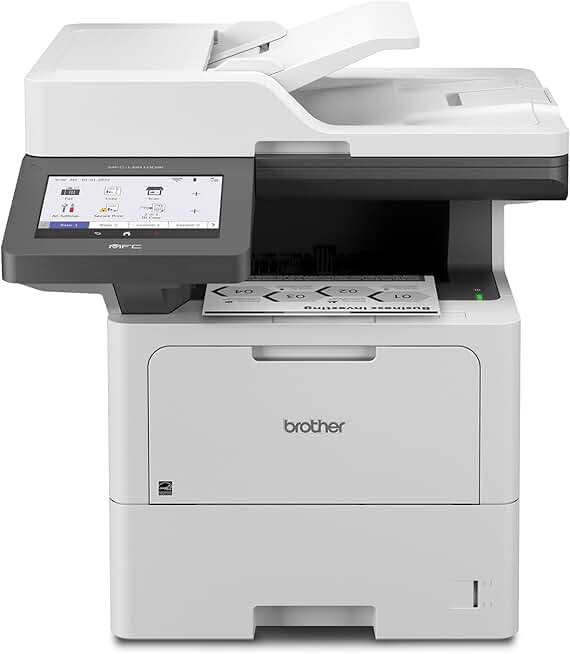
The Brother MFC-L6810DW Printer stands out as a robust enterprise-grade monochrome laser all-in-one solution designed for businesses with high-volume printing, scanning, copying, and faxing needs. This review delves into its capabilities, performance, and overall value proposition, helping you determine if it’s the right fit for your demanding office environment.
Quick Summary: Brother MFC-L6810DW Printer
Rating: 4.0/5.0
Price: $869.99 USD
Key Pros:
- Exceptional print speeds and high-volume capability, ideal for busy offices.
- Advanced security features protect sensitive documents and network integrity.
- Large paper capacity with expandable trays minimizes frequent reloading.
Key Cons:
- Monochrome only, limiting its versatility for color-dependent tasks.
- Higher initial cost compared to entry-level or inkjet alternatives.
Table of Contents
Brother MFC-L6810DW Printer Overview
The Brother MFC-L6810DW Printer is engineered to meet the rigorous demands of enterprise-level office environments, providing a comprehensive solution for document management. As a monochrome laser all-in-one device, it specializes in high-speed, high-quality black and white printing, scanning, copying, and faxing.
This model is particularly well-suited for businesses that prioritize efficiency, security, and robust performance. Its design focuses on minimizing user intervention through large paper capacities and durable components, ensuring consistent operation even under heavy workloads.
Brother has integrated advanced networking capabilities, including wireless connectivity, making it easy to integrate into diverse office setups. The printer’s emphasis on security features is paramount for protecting sensitive business information from unauthorized access and cyber threats.
For offices looking to streamline their document workflows and reduce operational costs associated with printing, the MFC-L6810DW offers a compelling value proposition. Its high-yield toner cartridges contribute to a lower cost per page, which is a significant factor for businesses managing substantial print volumes.
The machine’s robust build quality suggests longevity and reliability, reducing the need for frequent maintenance or replacements. This makes it a sound investment for companies seeking a long-term printing solution that can keep pace with their growth and evolving needs.
Its multifunctionality means that a single device can handle tasks that would otherwise require multiple machines, saving valuable office space and simplifying IT management. This consolidation is a key benefit for small to medium-sized businesses as well as larger enterprises.
Furthermore, the MFC-L6810DW supports various mobile printing options, allowing employees to print directly from their smartphones, tablets, and other devices. This flexibility enhances productivity and caters to the modern, mobile workforce.
The printer’s compatibility with Alexa also highlights its modern integration capabilities, offering voice-activated control for certain functions. This feature adds a layer of convenience, particularly in busy office settings where hands-free operation can be beneficial.
Overall, the Brother MFC-L6810DW represents a strategic choice for organizations that need a powerful, secure, and efficient monochrome printing and document management hub. Its enterprise-focused features ensure it can handle the complexities of a professional environment.
Brother MFC-L6810DW Printer Key Features & Specs
The Brother MFC-L6810DW Printer boasts a comprehensive set of features and specifications that underscore its suitability for demanding business environments. Understanding these details is crucial for assessing its performance and value.
Print Performance and Speed
One of the standout features is its impressive print speed, typically reaching up to 52 pages per minute (ppm) for black and white documents. This rapid output ensures that large print jobs are completed quickly, significantly boosting office productivity.
The printer also supports automatic duplex printing, allowing for two-sided document creation. This not only saves paper but also contributes to a more professional presentation of reports and internal communications.
Its maximum print resolution usually stands at 1200 x 1200 dpi, delivering crisp, clear text and sharp graphics. This high resolution is essential for professional documents, ensuring readability and quality.
Paper Handling and Capacity
The MFC-L6810DW comes equipped with a substantial paper capacity, typically including a 520-sheet capacity paper tray and a 50-sheet multi-purpose tray. This combined capacity reduces the frequency of paper reloads, which is a major advantage in busy offices.
For even higher demands, the printer is expandable with optional paper trays, potentially increasing its total capacity to over 1,600 sheets. This scalability ensures the printer can grow with your business needs.
The automatic document feeder (ADF) handles up to 70 pages, facilitating quick and efficient scanning and copying of multi-page documents. It also supports single-pass duplex scanning, further enhancing efficiency.
Advanced Security Features
Security is a critical aspect for enterprise printers, and the MFC-L6810DW excels in this area. It includes features like Secure Function Lock, Active Directory support, and NFC card reader compatibility for secure access control.
Network security protocols such as IPsec, SSL/TLS, and 802.1x are supported, protecting data transmitted over the network. This comprehensive security suite helps prevent unauthorized access to the printer and sensitive documents.
Secure Print functionality allows users to release print jobs only when they are physically at the printer, using a PIN or NFC card. This ensures confidentiality for sensitive documents, preventing them from being left unattended on the output tray.
Connectivity and Integration
Connectivity options are extensive, including Gigabit Ethernet, Wi-Fi (802.11b/g/n), and USB interfaces. This versatility allows for flexible placement and integration into various network infrastructures.
The printer supports a wide array of mobile printing solutions, such as Apple AirPrint, Google Cloud Print 2.0, Brother iPrint&Scan, Mopria, and Wi-Fi Direct. These options enable seamless printing from a variety of mobile devices.
Integration with cloud services like Dropbox, Google Drive, OneDrive, and Evernote is also available, allowing for direct scanning to and printing from these platforms. This streamlines document workflows and enhances collaboration.
Efficiency and Eco-Friendliness
The MFC-L6810DW is designed with efficiency in mind, utilizing high-yield replacement toner cartridges that can print up to 12,000 pages. This results in a low cost per page and reduced environmental impact from cartridge waste.
It is EPEAT certified, indicating its commitment to environmental performance. Features like toner save mode and deep sleep mode further contribute to energy efficiency, reducing operational costs over time.
The robust duty cycle, often rated for up to 150,000 pages monthly (with a recommended monthly volume of up to 10,000 pages), highlights its durability and capability to handle consistent, heavy use without premature wear.
For more detailed technical specifications, users can refer to the official Brother support page, which provides comprehensive documentation and drivers for this model. Brother MFC-L6810DW Official Product Page
Pros & Cons
Evaluating the advantages and disadvantages of the Brother MFC-L6810DW Printer is essential for making an informed purchasing decision. This section breaks down the key benefits and potential drawbacks of this enterprise-grade all-in-one device.
Pros of the Brother MFC-L6810DW Printer
Exceptional Print Speed and High Volume Capability
The MFC-L6810DW delivers impressive print speeds of up to 52 pages per minute, making it a powerhouse for offices with significant printing demands. This speed minimizes wait times for large documents and ensures workflows remain fluid.
Its robust monthly duty cycle, with a recommended volume of up to 10,000 pages, confirms its ability to handle consistent, heavy usage without faltering. This reliability is crucial for maintaining productivity in busy business environments.
Advanced Security Features
Security is paramount for enterprise users, and this printer offers a comprehensive suite of features to protect sensitive information. Secure Print, NFC card reader compatibility, and various network security protocols are all integrated.
These features help prevent unauthorized access to documents and network resources, complying with corporate security policies and data protection regulations. The layered security provides peace of mind for IT administrators and users alike.
Large and Expandable Paper Capacity
With a standard 520-sheet paper tray and a 50-sheet multi-purpose tray, the printer reduces the need for frequent paper reloading. This saves time and minimizes interruptions during large print jobs.
The option to add multiple additional paper trays allows for significant expansion of total paper capacity, making it highly adaptable to growing business needs. This scalability is a key advantage for long-term investment planning.
Duplex Printing, Scanning, and Copying
The automatic duplex functionality for printing, scanning, and copying is a major efficiency booster. It allows for two-sided document creation and processing, saving paper and reducing manual effort.
Single-pass duplex scanning is particularly noteworthy, as it scans both sides of a document simultaneously. This significantly speeds up the digitization of multi-page documents, enhancing overall workflow efficiency.
Versatile Connectivity Options
Offering Gigabit Ethernet, Wi-Fi, and USB connectivity, the MFC-L6810DW provides flexible integration into any office network. Wireless capabilities enable convenient placement without being tethered by cables.
Support for various mobile printing apps and cloud services further enhances its versatility. Employees can print and scan from virtually anywhere, improving collaboration and remote work capabilities.
Cons of the Brother MFC-L6810DW Printer
Monochrome Only Output
A primary limitation of the MFC-L6810DW is its monochrome-only output. While excellent for text-heavy documents, it cannot produce color prints, which might be a drawback for businesses requiring marketing materials, presentations, or graphics with color.
Offices that frequently need color printing will either need a separate color printer or should consider a different all-in-one solution. This specialization makes it less versatile for diverse printing needs.
Higher Initial Cost
As an enterprise-grade laser all-in-one, the MFC-L6810DW has a higher upfront purchase price compared to many inkjet printers or entry-level laser models. This initial investment might be a barrier for very small businesses or those with tight budgets.
However, this cost is often offset by lower long-term operating expenses due to high-yield toner cartridges and robust durability. Buyers should consider the total cost of ownership rather than just the initial price.
Physical Size and Weight
Given its robust features and large paper capacity, the MFC-L6810DW is a substantial machine in terms of physical size and weight. This might be a concern for offices with limited space or specific placement requirements.
Careful planning is needed to ensure adequate space and a sturdy surface for installation. Its dimensions are typical for an enterprise-level device but could be cumbersome for smaller work areas.
Understanding these pros and cons will help potential buyers weigh the benefits against the limitations and determine if the Brother MFC-L6810DW Printer aligns with their specific business requirements and budget constraints.
Who Should Buy the Brother MFC-L6810DW Printer?
The Brother MFC-L6810DW Printer is not a one-size-fits-all solution; its features and capabilities make it particularly well-suited for specific types of users and environments. Understanding the target audience can help potential buyers determine if this powerful machine aligns with their operational needs.
Medium to Large Businesses and Enterprises
This printer is an excellent choice for medium to large businesses that generate a high volume of monochrome documents daily. Its fast print speeds and extensive paper capacity are designed to keep up with demanding workflows, minimizing bottlenecks.
Enterprise-level organizations with multiple departments or a large number of employees will benefit from its robust performance and scalability. The ability to add optional paper trays means it can adapt to increasing print demands over time.
Offices Requiring Strong Security Features
Businesses handling sensitive client data, financial records, or confidential internal communications will find the MFC-L6810DW’s advanced security features invaluable. Secure Print, user authentication, and robust network security protocols provide essential protection.
Legal firms, healthcare providers, financial institutions, and government offices are prime candidates for this printer, where data security and compliance are non-negotiable. The peace of mind offered by these features is a significant advantage.
Workgroups with High Print Volume Needs
Within larger organizations, specific workgroups or departments that have consistently high print, scan, or copy volumes will greatly benefit. For instance, an accounting department processing numerous invoices or a human resources department managing employee records.
The combination of high-speed output and efficient paper handling ensures that these critical functions are supported without interruption. Its durability also means it can withstand the constant activity of busy teams.
Businesses Focused on Cost-Efficiency for Monochrome Printing
While the initial investment is higher, the MFC-L6810DW offers a low cost per page due to its high-yield toner cartridges. For businesses that primarily print in black and white, this translates to significant long-term savings on consumables.
Organizations looking to optimize their operational expenses will appreciate the efficiency gains and reduced toner replacement frequency. The total cost of ownership is very competitive for its class, making it an economically sound decision.
Offices Needing Robust Multifunctionality
For offices that need more than just printing, the all-in-one capabilities of the MFC-L6810DW are a major draw. Its high-speed scanning, copying, and faxing functions mean fewer devices are needed to manage document workflows.
This consolidation saves space, reduces IT management overhead, and simplifies user training. It’s an ideal choice for streamlining operations in environments where multiple document tasks are common.
Environments Prioritizing Connectivity and Modern Integration
With comprehensive connectivity options including wireless, Ethernet, and mobile printing support, this printer fits seamlessly into modern, networked offices. Its compatibility with cloud services and Alexa integration caters to contemporary business practices.
Businesses that embrace mobile workforces and cloud-based document management will find the MFC-L6810DW’s integration capabilities highly beneficial. It supports a flexible and accessible printing ecosystem.
Conversely, small home offices with minimal print needs or users requiring frequent color output might find this printer to be overkill or unsuitable. Its specialization lies in high-volume, secure monochrome document management for professional settings.
For more general information on choosing the right printer for your business, you might consult resources like PCMag’s guide to business printers, which offers a broader perspective on various printer types and their applications.
FAQ about Brother MFC-L6810DW Printer
Here are some frequently asked questions about the Brother MFC-L6810DW Printer, providing further clarity on its functionality, maintenance, and suitability for various business needs.
Q1: What is the maximum print speed of the Brother MFC-L6810DW Printer?
A1: The Brother MFC-L6810DW Printer offers an impressive maximum print speed of up to 52 pages per minute (ppm) for black and white documents. This speed ensures efficient handling of high-volume print jobs in busy office environments.
This rapid output is a key feature for enterprise users who cannot afford delays in document production. It helps maintain a smooth workflow and prevents bottlenecks during peak hours.
Q2: Does the MFC-L6810DW support color printing?
A2: No, the Brother MFC-L6810DW Printer is a monochrome (black and white) laser all-in-one printer. It is specifically designed for high-quality, high-volume black and white printing, scanning, copying, and faxing.
If your business requires color printing, you would need to consider a separate color printer or a different multifunction device that supports color output. This model excels in its specialized monochrome role.
Q3: What kind of security features are included with this printer?
A3: The MFC-L6810DW comes with a robust suite of advanced security features. These include Secure Function Lock, Active Directory support, NFC card reader compatibility for secure access, and Secure Print.
It also supports various network security protocols like IPsec, SSL/TLS, and 802.1x to protect data transmission. These features are crucial for safeguarding sensitive business information and ensuring compliance.
Q4: Can I print from my mobile devices with the Brother MFC-L6810DW Printer?
A4: Yes, the Brother MFC-L6810DW Printer offers extensive mobile printing support. It is compatible with popular services such as Apple AirPrint, Google Cloud Print 2.0, Brother iPrint&Scan, Mopria, and Wi-Fi Direct.
This allows users to easily print documents and images directly from their smartphones, tablets, and other mobile devices, enhancing flexibility and productivity for a mobile workforce.
Q5: What is the paper capacity of the MFC-L6810DW, and is it expandable?
A5: The standard paper capacity of the MFC-L6810DW includes a 520-sheet capacity paper tray and a 50-sheet multi-purpose tray. This provides a substantial initial capacity for most office needs.
Furthermore, the printer is designed for scalability, allowing you to add optional paper trays to significantly increase the total paper capacity, potentially up to over 1,600 sheets. This makes it suitable for growing businesses.
Q6: What is the typical monthly duty cycle for this printer?
A6: The Brother MFC-L6810DW Printer has a robust maximum monthly duty cycle of up to 150,000 pages. However, the recommended monthly print volume for optimal performance and longevity is typically up to 10,000 pages.
Adhering to the recommended monthly volume helps ensure the printer operates reliably and extends its lifespan. This duty cycle indicates its capability to handle consistent, heavy usage in an enterprise setting.
Q7: Does the printer support automatic two-sided scanning and copying?
A7: Yes, the MFC-L6810DW features an automatic document feeder (ADF) that supports single-pass duplex scanning and copying. This means it can scan or copy both sides of a document in a single pass, greatly speeding up the process.
This functionality is a significant time-saver for digitizing multi-page, double-sided documents, making it highly efficient for administrative tasks and archiving.
Q8: Is the Brother MFC-L6810DW Printer energy efficient?
A8: Yes, the MFC-L6810DW is designed with energy efficiency in mind. It is EPEAT certified, indicating its environmental performance. Features like toner save mode and deep sleep mode contribute to reduced power consumption.
Its high-yield toner cartridges also mean fewer replacements and less waste, further reducing its environmental footprint and operational costs over time. This makes it a greener choice for businesses.
Final Verdict
The Brother MFC-L6810DW Printer is an outstanding choice for any medium to large business or enterprise workgroup that demands high-volume, secure, and efficient monochrome document management. Its powerful performance metrics, coupled with robust security features and versatile connectivity, make it a truly valuable asset.
While its monochrome-only output and higher initial cost might deter some, these are easily outweighed by its long-term cost efficiency, exceptional speed, and comprehensive feature set for its intended market. The printer’s durability and expandability ensure it’s a future-proof investment.
For organizations prioritizing productivity, data security, and streamlined workflows in a black and white printing environment, the MFC-L6810DW stands out as a top-tier solution. It consistently delivers reliable performance, making it a truly worthwhile addition to any professional office setup.