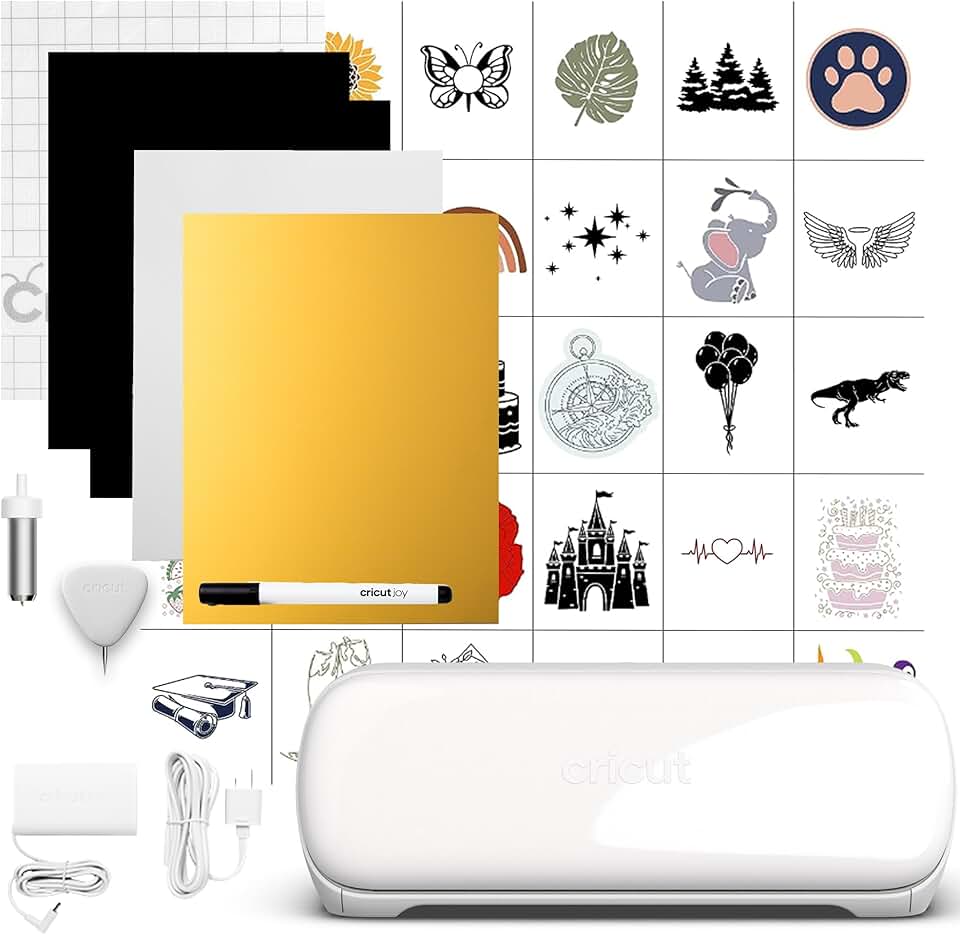
The Cricut Joy Xtra stands out as a remarkable addition to the world of personal cutting machines, bridging the gap between the ultra-compact original Joy and the more robust Explore or Maker series. This innovative device offers an impressive blend of portability, versatility, and user-friendliness, making it an amazing choice for crafters of all skill levels.

Quick Summary: Cricut Joy Xtra
Rating: 4.5/5 stars (532 reviews)
Price: $179.00 USD
Key Pros:
- Wider cutting area than original Joy
- Print Then Cut feature for stickers
- Compact and easy to store
- Ideal for beginners and small projects
- Versatile for popular crafting materials
Key Cons:
- Limited tool compatibility
- Not for heavy-duty materials
- Requires Cricut Design Space
Table of Contents
Cricut Joy Xtra Overview
The Cricut Joy Xtra represents a thoughtful evolution in Cricut’s lineup of smart cutting machines, designed to cater to a broad spectrum of crafters. It perfectly slots into the ecosystem, offering more capabilities than the original Cricut Joy but maintaining a more compact and accessible profile than its larger siblings, the Cricut Explore and Cricut Maker.
This machine is engineered for simplicity and efficiency, making it an excellent entry point for beginners while still providing enough power and features to satisfy experienced hobbyists. Its primary appeal lies in its ability to handle a wider range of projects compared to the original Joy, particularly with its expanded cutting width and the highly anticipated Print Then Cut functionality.
At its core, the Cricut Joy Xtra is a digital die-cutting machine that connects wirelessly via Bluetooth to your computer or mobile device. It operates seamlessly with the intuitive Cricut Design Space software, which serves as your creative hub for designing, uploading, and preparing projects. This software provides access to a vast library of images, fonts, and ready-to-make projects, allowing users to dive into crafting almost immediately.
One of the most significant upgrades in the Cricut Joy Xtra is its enhanced capacity for materials. While it excels at cutting popular crafting staples like vinyl, iron-on, and cardstock, it also introduces the ability to work with printable materials. This opens up a new world of possibilities for creating custom stickers, labels, and other intricate designs that combine printing with precision cutting.
The machine’s compact footprint makes it an ideal choice for those with limited crafting space or crafters who prefer to move their projects around. Despite its smaller size, it doesn’t compromise on precision or reliability, delivering consistent, high-quality cuts every time. This balance of size and performance is a key differentiator for the Joy Xtra.
For individuals looking to personalize everyday items, organize their homes, or create unique gifts, the Cricut Joy Xtra provides an accessible and powerful solution. Its digital version often includes a starter pack of materials or a trial subscription to Cricut Access, further enhancing its value proposition for new users eager to explore their creative potential.
The versatility of this machine extends to various applications, from designing custom apparel with iron-on vinyl to crafting personalized greeting cards and intricate paper projects. Its ease of setup and operation ensures that users can spend less time troubleshooting and more time bringing their creative visions to life. It truly embodies modern crafting convenience.
Understanding the placement of the Cricut Joy Xtra within the broader Cricut family is crucial. It’s not intended to replace the heavy-duty capabilities of the Maker series, which can cut thicker materials like wood or fabric with specialized tools. Instead, it perfects the art of smaller, everyday projects with popular materials, offering a streamlined and efficient crafting experience.
The machine supports Cricut’s innovative Smart Materials, which allow for longer, matless cuts, enhancing efficiency and reducing preparation time for certain projects. This feature is particularly beneficial for creating long banners, continuous labels, or larger iron-on designs without the need to piece together multiple cuts on a mat.
In essence, the Cricut Joy Xtra is designed for the modern crafter who values convenience, precision, and a wide range of creative possibilities within a manageable size. It empowers users to tackle a variety of DIY tasks, transforming simple materials into personalized masterpieces with surprising ease and impressive results.
Cricut Joy Xtra Key Features & Specs
The Cricut Joy Xtra boasts a suite of features and specifications that make it a powerful and versatile tool for hobbyists and professionals alike. Understanding these details is key to appreciating its capabilities and how it can elevate your crafting projects.
A standout feature is its expanded cutting width. Unlike the original Cricut Joy, which was limited to 4.5 inches, the Joy Xtra can cut materials up to 8.5 inches wide when using a mat, and up to 9.5 inches wide with compatible Smart Materials. This increased width significantly broadens the scope of projects you can undertake, from larger stickers to more substantial iron-on designs.
The machine also offers impressive cutting length capabilities. With Smart Materials, the Cricut Joy Xtra can cut continuous designs up to 4 feet long, making it perfect for banners, wall decals, or repetitive patterns. For mat-based projects, it handles standard letter-sized materials (8.5 x 11 inches) with ease, allowing for precise cuts on various paper and vinyl types.
Perhaps the most anticipated new feature is the Print Then Cut functionality. This allows users to design custom graphics in Cricut Design Space, print them on a home inkjet printer, and then feed the printed sheet into the Joy Xtra for precise cutting around the printed image. This is revolutionary for creating professional-looking stickers, labels, and intricate paper crafts.
The Cricut Joy Xtra is compatible with a wide array of popular crafting materials. It effortlessly cuts various types of vinyl (permanent, removable, glitter), iron-on (HTV), cardstock, sticker paper, infusible ink sheets, and adhesive-backed deluxe paper. This material versatility ensures that most common crafting needs are well covered by the machine.
In terms of tools, the Joy Xtra utilizes a fine-point blade, which is ideal for cutting intricate details on a broad range of materials. It is also compatible with Cricut Joy pens and markers, allowing for drawing and writing functions to add personalized touches to cards, labels, and other projects. While specialized tools are limited compared to larger machines, the core functionality is robust.
Cricut Design Space remains the central control hub for the Cricut Joy Xtra. This intuitive, cloud-based software is available on desktop and mobile devices, providing access to thousands of pre-made projects, fonts, and images. Users can also upload their own SVG, JPG, PNG, and other file types, offering immense creative freedom for custom designs.
Connectivity is streamlined through Bluetooth wireless technology, ensuring a clean and clutter-free workspace. This wireless connection provides reliable communication between your device and the machine, making it easy to send designs and monitor the cutting process from anywhere in your crafting area.
The machine’s physical dimensions are designed for portability and minimal space consumption. It is lightweight and significantly smaller than the Explore or Maker machines, making it easy to store in a drawer, on a shelf, or transport to crafting events. This compact design does not compromise its sturdy build quality, ensuring durability and consistent performance.
Another practical feature is its ability to work with Smart Materials. These specialized materials are designed to be fed directly into the machine without a cutting mat, simplifying the process for longer cuts and reducing material waste. This innovation saves time and makes large-scale projects more manageable for crafters.
For those interested in personalized apparel and accessories, the Cricut Joy Xtra works seamlessly with Infusible Ink products. This allows for vibrant, permanent, and peel-proof heat transfers onto compatible blanks, creating professional-quality custom t-shirts, tote bags, and coasters. The integration with the broader Cricut ecosystem is a definite advantage.
The digital version of the Cricut Joy Xtra often includes a starter bundle of materials or a trial subscription to Cricut Access, providing immediate value upon purchase. This allows new users to experiment with different materials and projects right out of the box, fostering a smooth and enjoyable introduction to the world of smart cutting.
Pros & Cons
Evaluating any crafting tool requires a balanced look at its strengths and weaknesses. The Cricut Joy Xtra, while an impressive machine, has specific advantages and limitations that prospective buyers should consider.
Pros of the Cricut Joy Xtra:
- Wider Cutting Area: A significant upgrade from the original Joy, the Xtra’s ability to cut up to 8.5 inches (or 9.5 inches with Smart Materials) allows for larger and more impactful projects. This expanded width provides greater flexibility for designing stickers, labels, and iron-ons.
- Print Then Cut Capability: This feature is a game-changer for personalized stickers, labels, and intricate printed designs. It allows users to print full-color graphics on their home printer and then have the Joy Xtra precisely cut around them, offering professional-looking results for a variety of paper-based crafts.
- Compact and Portable Design: The Joy Xtra maintains a relatively small footprint, making it ideal for crafters with limited space or those who need a machine they can easily transport. Its lightweight nature ensures it can be stored away conveniently when not in use.
- User-Friendly for Beginners: Designed with ease of use in mind, the Cricut Joy Xtra is intuitive to set up and operate. The accompanying Cricut Design Space software offers a guided experience, making it an excellent entry point for new crafters to digital die-cutting.
- Versatility for Common Materials: It excels at cutting popular crafting materials such as vinyl, iron-on, cardstock, and sticker paper. This versatility means it can handle the vast majority of everyday DIY projects, from custom apparel to home decor and personalized gifts.
- Smart Materials Compatibility: The ability to use Smart Materials without a mat simplifies workflows and enables longer, continuous cuts up to 4 feet. This is particularly useful for creating large banners, repetitive patterns, or streamlined production of multiple items.
- Excellent Value Proposition: Positioned as a mid-range machine, the Joy Xtra offers a robust set of features for its price point. It provides advanced capabilities like Print Then Cut, which were previously exclusive to larger, more expensive machines, making it an attractive investment for many crafters.
Cons of the Cricut Joy Xtra:
- Limited Tool Compatibility: The Joy Xtra primarily uses a fine-point blade and is compatible with Cricut Joy pens. It does not support the wider range of tools available for the Cricut Explore or Maker series, meaning it cannot cut thicker materials like wood, fabric, or chipboard.
- Not for Heavy-Duty Materials: While versatile for common crafting materials, the machine is not designed for cutting dense or very thick substrates. Crafters needing to work with balsa wood, leather, or specific fabrics without bonding will find its capabilities insufficient.
- Requires Cricut Design Space: While Design Space is user-friendly, it is a cloud-based software that requires an internet connection for full functionality. Some users may prefer offline software or have concerns about subscription models for premium content (Cricut Access).
- Smaller Project Size Compared to Larger Machines: Although wider than the original Joy, the Joy Xtra still has limitations compared to the 12-inch cutting width of the Explore and Maker machines. This means very large projects might require tiling or are simply not feasible on the Xtra.
- Initial Accessory Costs: Like all cutting machines, getting started often requires purchasing additional mats, blades, and a variety of materials beyond any included starter pack. These ongoing costs can add up, especially for diverse crafting projects.
Who Should Buy the Cricut Joy Xtra?
The Cricut Joy Xtra is positioned to be an ideal crafting companion for several distinct user profiles, thanks to its unique blend of features and compact design. Understanding who this machine is best suited for can help potential buyers make an informed decision.
Beginner Crafters: If you’re new to the world of digital die-cutting and smart machines, the Joy Xtra is an excellent starting point. Its intuitive interface, user-friendly Design Space software, and straightforward operation make it less intimidating than larger, more complex machines. It allows newcomers to learn the ropes without feeling overwhelmed by an excess of features or tools.
Crafters with Limited Space: For those living in smaller apartments, dorm rooms, or who simply have a dedicated crafting corner rather than a full studio, the compact footprint of the Cricut Joy Xtra is a major advantage. It’s easy to set up, use, and then tuck away, ensuring your workspace remains uncluttered.
Individuals Focused on Specific, Everyday Projects: If your primary crafting interests revolve around creating custom cards, personalized labels, vinyl decals, iron-on transfers for t-shirts, or a variety of stickers using the Print Then Cut feature, the Joy Xtra is perfectly equipped for these tasks. It excels at medium-sized projects that use common crafting materials.
Users Upgrading from the Original Cricut Joy: Owners of the original Cricut Joy who find themselves limited by its 4.5-inch cutting width will find the Xtra to be a logical and significant upgrade. The expanded 8.5-inch cutting area, combined with Print Then Cut, provides a substantial boost in capability without requiring a jump to a full-sized machine.
Small Business Owners for Quick Batch Products: Entrepreneurs who create small batches of custom products like stickers for packaging, personalized tags, or unique iron-on designs for merchandise can benefit from the Joy Xtra’s efficiency. Its speed and precision for common materials make it a reliable tool for quick turnaround times on these items.
Educators and Students: For classroom projects, personalizing school supplies, or creating engaging learning materials, the Joy Xtra offers an accessible and versatile solution. Its ease of use means students can quickly learn to operate it, fostering creativity in an educational setting.
Home Organizers and DIY Enthusiasts: Anyone looking to bring order and personalization to their home will appreciate the Joy Xtra. From creating custom pantry labels and storage bin identifiers to designing unique wall decals and decorative elements, the machine makes home organization both functional and stylish. Its Print Then Cut feature is particularly useful for creating aesthetically pleasing and durable labels.
The Cricut Joy Xtra is not for those who need to cut extremely thick materials like basswood, garment leather, or intricate fabric patterns without backing. For such heavy-duty tasks, the Cricut Maker series would be a more appropriate investment. However, for the vast majority of popular crafting projects that involve vinyl, paper, cardstock, and iron-on, the Joy Xtra delivers exceptional performance and value.
Consider your primary crafting goals and available space. If you seek a compact, user-friendly machine that excels at personalized items, stickers, labels, and small to medium-sized projects with popular materials, the Cricut Joy Xtra is an outstanding choice that will undoubtedly spark your creativity and enhance your DIY endeavors.
FAQ about Cricut Joy Xtra
Here are some frequently asked questions about the Cricut Joy Xtra to help you better understand its capabilities and how to get the most out of this versatile crafting machine.
Q1: What materials can the Cricut Joy Xtra cut?
A1: The Cricut Joy Xtra is designed to cut a wide variety of popular crafting materials. This includes various types of vinyl (permanent, removable, glitter, shimmer), iron-on (heat transfer vinyl), cardstock (up to 250gsm), sticker paper, writable label paper, Infusible Ink transfer sheets, and adhesive-backed deluxe paper. It excels at cutting these materials with precision for your projects.
Q2: What is the maximum cutting size of the Cricut Joy Xtra?
A2: When using a cutting mat, the Cricut Joy Xtra can cut materials up to 8.5 inches wide and 11.75 inches long. For matless cutting with Smart Materials, it can cut designs up to 9.5 inches wide and an impressive 4 feet long, making it suitable for longer banners, decals, and repetitive patterns without interruption.
Q3: Is the Cricut Joy Xtra suitable for beginners?
A3: Absolutely. The Cricut Joy Xtra is specifically designed with user-friendliness in mind, making it an excellent choice for beginners. Its simple setup, intuitive Design Space software, and streamlined operation help new crafters quickly get started and achieve professional-looking results without a steep learning curve. Learn more about Cricut products on their official website.
Q4: Can I use my own designs with the Cricut Joy Xtra?
A4: Yes, you can definitely use your own designs. Cricut Design Space allows you to upload various file formats, including SVG, JPG, PNG, GIF, BMP, and DXF. You can then prepare these designs within the software for cutting or Print Then Cut functionality, giving you full creative control over your projects.
Q5: Does the Cricut Joy Xtra require a subscription?
A5: No, a subscription is not strictly required to use the Cricut Joy Xtra. The Cricut Design Space software is free to download and use, allowing you to upload your own images and fonts, and access free projects. However, Cricut Access, a paid subscription, offers an extensive library of premium images, fonts, and ready-to-make projects, along with discounts on digital purchases. Many users find the subscription valuable for expanded creative options.
Q6: How does the Cricut Joy Xtra compare to the original Cricut Joy?
A6: The Cricut Joy Xtra is a significant upgrade from the original Cricut Joy. The key differences include a wider cutting area (8.5/9.5 inches vs. 4.5 inches), and the addition of Print Then Cut capability, which the original Joy lacks. The Xtra also supports standard letter-sized materials, offering greater versatility for a broader range of projects while maintaining a compact size.
Q7: What is “Print Then Cut” and how does it work on the Joy Xtra?
A7: Print Then Cut is a feature that allows you to print designs from your home printer and then have your Cricut machine precisely cut around the contours of those printed images. On the Joy Xtra, you design your graphic in Design Space, print it on your home inkjet printer, and then load the printed sheet into the Joy Xtra. The machine uses a sensor to read registration marks and cuts your design perfectly, making it ideal for custom stickers, labels, and decals.
Q8: What accessories do I need to get started with the Cricut Joy Xtra?
A8: To get started, you’ll typically need a cutting mat (LightGrip or StandardGrip), a fine-point blade (usually included), and your choice of materials like Smart Vinyl, Smart Iron-On, or cardstock. Pens and markers are optional for drawing features. A weeding tool and scraper can also be very helpful for working with vinyl and iron-on projects. Many digital versions of the Joy Xtra come with a small starter pack.
Final Verdict
The Cricut Joy Xtra stands as a truly remarkable and highly recommended smart cutting machine, delivering an amazing balance of size, functionality, and value. It successfully carves out its niche between the entry-level Cricut Joy and the professional-grade Explore and Maker series, offering a compelling option for a wide array of crafters.
Its expanded cutting width, capable of handling materials up to 9.5 inches with Smart Materials, is a significant enhancement that opens up a world of new project possibilities. This addresses a common limitation of the original Joy, allowing for larger decals, more substantial iron-ons, and bigger card designs.
The inclusion of the Print Then Cut feature is a game-changer for many, enabling the creation of intricate, full-color stickers, labels, and customized paper crafts with professional precision. This functionality alone elevates the Joy Xtra beyond a simple personal cutter, positioning it as a versatile tool for both hobbyists and small business owners.
Ease of use remains a cornerstone of the Cricut Joy Xtra experience. Its straightforward setup, intuitive Design Space software, and reliable Bluetooth connectivity ensure that even beginners can achieve impressive results quickly. This low barrier to entry makes it an excellent gateway into the rewarding world of digital crafting.
While it may not cut the thickest materials like its larger counterparts, the Joy Xtra excels at working with the most popular crafting materials, including various vinyls, iron-ons, and cardstocks. Its compatibility with Smart Materials further enhances efficiency, allowing for longer, matless cuts that streamline project creation.
For crafters seeking a compact, portable, and powerful machine that can handle a broad range of everyday projects, especially those involving personalized stickers, labels, and apparel, the Cricut Joy Xtra is an outstanding investment. It provides exceptional value for its price, making advanced features accessible to a wider audience.
In conclusion, if you’re looking for an ultimate craft machine that combines portability with impressive versatility and user-friendliness, the Cricut Joy Xtra is an amazing choice. It’s perfect for upgrading from a basic machine, or as a primary cutter for anyone focused on personalizing, organizing, and creating with precision and ease. It truly lives up to its promise of delivering extra joy to your crafting endeavors.