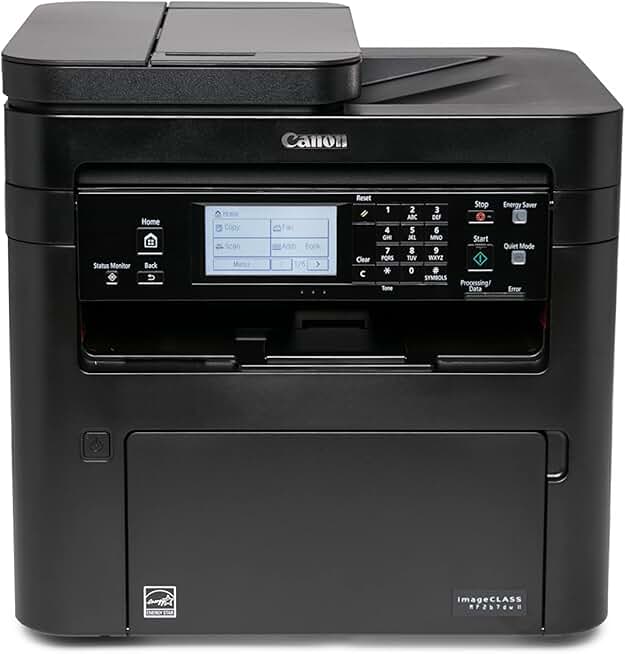
The Canon MF267dw II stands out as a robust and versatile monochrome laser printer, designed to meet the demanding needs of small offices and home-based professionals. This all-in-one device combines printing, scanning, copying, and faxing capabilities into a single, efficient unit, making it a compelling choice for those seeking productivity and convenience.
Quick Summary: Canon MF267dw II
- Rating: 4.2 out of 5 stars
- Price: $292.18 USD
- Key Pros:
- Fast 30 PPM print speed for monochrome documents.
- All-in-One functionality (Print, Scan, Copy, Fax) with ADF.
- Excellent wireless and mobile connectivity options.
- Key Cons:
- Monochrome only, no color printing.
- Can be bulky for very small desk spaces.
Table of Contents
Canon MF267dw II Overview
The Canon MF267dw II is a sophisticated all-in-one monochrome laser printer designed for efficiency and high performance in busy environments. It offers a comprehensive suite of features including printing, scanning, copying, and faxing, all from a single, compact device. This model is particularly appealing for small businesses, home offices, and individual professionals who require reliable document handling without the need for color output.
Canon has engineered the MF267dw II to deliver crisp, professional-quality text and graphics at impressive speeds. Its monochrome laser technology ensures sharp lines and dark blacks, which are essential for business documents, reports, and invoices. The printer’s robust build quality suggests durability, a common expectation from Canon’s imageCLASS series.
One of the printer’s most significant advantages is its versatile connectivity. With built-in Wi-Fi, Ethernet, and USB options, it seamlessly integrates into various network configurations. Mobile printing capabilities further enhance its utility, allowing users to print directly from smartphones and tablets using popular apps and services.
The inclusion of an Automatic Document Feeder (ADF) for both scanning and copying tasks is a major productivity booster. It allows for processing multi-page documents quickly and efficiently, reducing manual effort and saving valuable time. This feature is particularly beneficial for digitizing paper records or sending multi-page faxes.
Operating the Canon MF267dw II is straightforward thanks to its intuitive LCD touch panel. This interface provides easy access to all functions and settings, allowing users to navigate menus and initiate tasks with minimal fuss. The printer also supports secure printing, which is crucial for handling sensitive information in shared office environments.
Energy efficiency is another hallmark of this device. Canon has implemented various power-saving modes and technologies to reduce electricity consumption, aligning with modern environmental standards and helping to lower operating costs over time. This makes it an eco-friendlier choice for conscious consumers and businesses.
For those considering an Amazon Renewed product, the Canon MF267dw II offers an excellent opportunity to acquire a high-quality device at a more accessible price point. Renewed products are professionally inspected, tested, and cleaned to work like new, often backed by a guarantee. This can provide significant savings without compromising on performance or reliability, making it a smart investment for budget-conscious buyers.
The printer’s maximum monthly duty cycle indicates its capacity to handle substantial print volumes, making it a reliable workhorse for consistent daily use. While primarily designed for monochrome output, its comprehensive feature set ensures that it can serve as the central hub for all document management needs in a professional setting. Its compact footprint also means it doesn’t demand excessive desk space, fitting well into various office layouts.
Canon MF267dw II Key Features & Specifications
The Canon MF267dw II is packed with features that enhance productivity and streamline document workflows for both individuals and small teams. Understanding these specifications is crucial for appreciating its value and determining if it aligns with your specific operational requirements. Each component is designed for optimal performance and user convenience.
Print Speed and Quality
This monochrome laser printer boasts an impressive print speed of up to 30 pages per minute (PPM) for letter-sized documents. This rapid output ensures that large print jobs are completed quickly, minimizing wait times and improving overall efficiency in a busy office environment. The first print out time is also fast, typically under 6 seconds, meaning you don’t have to wait long for your documents to start printing.
The print resolution of 600 x 600 dpi (dots per inch) might seem standard, but Canon’s laser technology ensures that text is exceptionally sharp and clear. This resolution is more than adequate for professional documents, legal papers, and reports where legibility is paramount. Graphics, while monochrome, also appear crisp with good detail.
All-in-One Functionality
Beyond printing, the Canon MF267dw II serves as a comprehensive multi-function device. It includes a high-quality scanner, a fast copier, and a reliable fax machine. This consolidation of functions saves valuable desk space and reduces the need for multiple single-purpose machines, making it a cost-effective solution for many users.
The flatbed scanner offers versatile scanning options for various media types, including books and fragile documents. The Automatic Document Feeder (ADF) is a standout feature, capable of handling up to 50 sheets for continuous scanning, copying, or faxing. This dual-sided (duplex) ADF further boosts efficiency by processing both sides of a document in a single pass.
Connectivity Options
Connectivity is a strong suit for the Canon MF267dw II. It supports Wi-Fi, Ethernet, and USB 2.0 connections, offering flexibility for different office setups. The wireless capability allows for placement anywhere within your network’s range, eliminating cable clutter and facilitating shared use among multiple users.
Mobile printing is seamlessly integrated through services like Apple AirPrint, Mopria Print Service for Android, and the Canon PRINT Business app. These options allow users to print documents and photos directly from their smartphones and tablets, providing convenience for those who work on the go or prefer mobile devices. The printer also supports Google Cloud Print, further expanding its cloud-based printing capabilities.
Paper Handling and Capacity
The standard paper tray has a capacity of 250 sheets, which is ample for most small office and home office needs, reducing the frequency of paper refills. Additionally, a 1-sheet multipurpose tray is available for handling specialty media such as envelopes, labels, or thicker paper stocks. The output tray can hold up to 100 sheets, preventing large print jobs from spilling over.
Automatic duplex printing (two-sided printing) is a standard feature, helping to conserve paper and reduce environmental impact. This is particularly useful for reports and presentations, making the Canon MF267dw II an economical choice in terms of paper consumption. The robust paper handling supports various paper sizes, from letter and legal to custom sizes, ensuring versatility for different document types.
Security and Management Features
Security is paramount for business documents, and the MF267dw II addresses this with features like Secure Print. This function allows users to hold print jobs at the printer until a PIN is entered, preventing unauthorized viewing of sensitive information. This is especially useful in shared office environments where confidentiality is important.
The printer also includes a Department ID Management feature, which allows administrators to control access to specific functions and track usage by user or department. This helps in managing printing costs and ensuring responsible resource utilization. The device is compatible with various operating systems, including Windows, macOS, and Linux, ensuring broad compatibility across different computing environments.
The Canon MF267dw II is designed for a monthly duty cycle of up to 15,000 pages, with a recommended monthly print volume of 750 to 3,000 pages. This robust specification indicates its capability to handle consistent, high-volume printing without compromising on performance or reliability, making it a true workhorse for its intended users. The intuitive 6-line LCD touch panel simplifies device navigation and status monitoring.
Pros & Cons of the Canon MF267dw II
Evaluating the strengths and weaknesses of any product is essential for making an informed purchasing decision. The Canon MF267dw II, while an excellent all-around monochrome laser printer, has specific advantages and minor drawbacks that potential buyers should consider. Understanding these aspects will help you determine if it’s the right fit for your document management needs.
Pros of the Canon MF267dw II
- Exceptional Print Speed: With 30 pages per minute, the MF267dw II ensures that documents are printed quickly, reducing wait times and boosting productivity. This speed is particularly beneficial for large print jobs and busy office environments where efficiency is key. It helps maintain workflow without unnecessary delays.
- All-in-One Functionality: The combination of printing, scanning, copying, and faxing in one device offers significant convenience and saves space. This multifunctionality means you don’t need separate machines for different tasks, consolidating your office equipment and simplifying operations. The integrated design is a major advantage for smaller setups.
- Automatic Document Feeder (ADF) with Duplex: The 50-sheet ADF simplifies scanning and copying multi-page documents by processing them automatically. Its duplex capability further enhances efficiency by scanning both sides of a document in a single pass, saving time and effort. This is a crucial feature for digitizing archives or batch processing documents.
- Versatile Connectivity: Offering Wi-Fi, Ethernet, and USB 2.0, the printer provides flexible connection options for various setups. The wireless capabilities are particularly useful for modern offices, allowing for easy sharing and printing from multiple devices without physical cables. Mobile printing support adds another layer of convenience.
- Professional Print Quality: Despite being monochrome, the laser output delivers consistently sharp, clear text and graphics. This quality is vital for business documents, ensuring that all communications look professional and are easy to read. The crispness of the text is a hallmark of Canon’s laser technology.
- User-Friendly Interface: The 6-line LCD touch panel makes navigating settings and functions intuitive and straightforward. This ease of use reduces the learning curve and allows users to quickly get started with printing, scanning, or copying tasks. The clear display provides immediate feedback and status updates.
- Robust Build and Reliability: Canon’s imageCLASS series is known for its durability, and the MF267dw II is no exception. It’s built to withstand consistent daily use, offering a reliable printing solution for demanding environments. The recommended monthly duty cycle reflects its capacity for sustained performance.
- Paper-Saving Duplex Printing: Automatic two-sided printing helps reduce paper consumption and environmental impact. This feature is not only eco-friendly but also contributes to lower operating costs over the long term, making it a smart choice for budget-conscious users. It’s a standard feature that adds significant value.
Cons of the Canon MF267dw II
- Monochrome Only: The primary limitation is its inability to print in color. For users who occasionally need color documents, photos, or marketing materials, this printer will not suffice. They would need a separate color printer, which might negate some of the space-saving benefits of an all-in-one.
- Physical Size: While compact for an all-in-one, the Canon MF267dw II can still be somewhat bulky for very small desks or extremely cramped home office spaces. Users with limited room might need to carefully consider its dimensions before purchase. Its footprint is substantial compared to a basic inkjet printer.
- Toner Cartridge Costs: Like all laser printers, toner cartridges can be more expensive upfront than inkjet cartridges. While they typically yield more pages, the initial replacement cost can be a consideration. However, for high-volume printing, the cost per page is generally lower with laser printers, making it a long-term economical choice.
- No Touchscreen Display: While it has an LCD panel, it’s not a full-color touchscreen. Some users might prefer the more modern and intuitive interface of a touchscreen, especially for complex operations or cloud services. The 6-line LCD is functional but lacks the advanced interactivity of a touchscreen.
Who Should Buy the Canon MF267dw II?
The Canon MF267dw II is designed for a specific demographic of users and environments that can truly leverage its robust feature set. Understanding its ideal user base is crucial for prospective buyers to ensure it aligns with their specific needs and workflow requirements. This section will explore various scenarios where this monochrome laser printer truly shines.
Small Business Owners and Entrepreneurs
For small business owners, the Canon MF267dw II is an invaluable asset. Its all-in-one functionality means that printing invoices, scanning contracts, copying documents, and sending faxes can all be handled by a single device. The fast print speed of 30 PPM ensures that high-volume administrative tasks are completed efficiently, keeping the business running smoothly. The professional output quality also ensures that all client-facing documents maintain a high standard, reflecting positively on the business.
Home Office Professionals
Individuals working from a home office often require a reliable and versatile machine that can handle diverse tasks. The MF267dw II fits this bill perfectly, offering a comprehensive solution for document management. Its wireless connectivity allows for flexible placement, and mobile printing capabilities support a modern, flexible work style. For many home office users, color printing is rarely a necessity, making this monochrome powerhouse an ideal choice for productivity.
Students and Academics
While students might initially gravitate towards cheaper inkjet printers, those pursuing higher education or academic research often have significant monochrome printing needs. Research papers, theses, articles, and reading materials are frequently text-heavy. The Canon MF267dw II provides fast, cost-effective printing with sharp text, making it excellent for academic work. The scanning feature is also useful for digitizing notes or journal articles.
Users Prioritizing Efficiency and Speed
Anyone who values speed and efficiency in their document handling will appreciate the Canon MF267dw II. Its quick warm-up time and rapid print speeds mean less waiting and more doing. The duplex ADF is a game-changer for anyone dealing with multi-page documents regularly, significantly cutting down on manual labor and saving precious time. This printer is built for environments where time is money.
Budget-Conscious Buyers Seeking Quality
Opting for an Amazon Renewed Canon MF267dw II presents an excellent opportunity for budget-conscious individuals or businesses to acquire a high-quality, professional-grade printer at a reduced cost. Renewed products are rigorously tested and certified to work like new, often coming with a warranty. This allows users to access premium features and reliability without paying the full new price, making it a smart financial decision.
Environments with High Monochrome Print Volume
Offices or individuals who primarily print black and white documents will find the MF267dw II to be a highly economical choice. Laser printers generally have a lower cost per page for monochrome prints compared to inkjets, especially for high volumes. The large paper capacity and robust duty cycle support continuous, heavy-duty printing without frequent interruptions for paper refills or maintenance.
Users Needing Secure Document Handling
For those handling sensitive information, the Secure Print function of the Canon MF267dw II is a significant advantage. This feature ensures that confidential print jobs are only released when a PIN is entered at the printer, preventing unauthorized access to important documents. This is a critical security measure for legal offices, HR departments, or any professional dealing with private data. For more information on Canon’s security features, you can visit the official Canon website.
Frequently Asked Questions About the Canon MF267dw II
Prospective buyers often have specific questions about printers, especially when considering a robust all-in-one like the Canon MF267dw II. This section aims to address some of the most common queries, providing detailed answers to help you make an informed decision.
Q1: Is the Canon MF267dw II difficult to set up?
A1: Setting up the Canon MF267dw II is generally straightforward. The printer comes with clear instructions, and Canon provides online resources and drivers for easy installation. Wireless setup can be done through a wizard on the printer’s LCD panel or via WPS if your router supports it. For most users, it’s a plug-and-play experience, especially for USB connections, and network setup is intuitive. The initial toner cartridge is usually included, allowing for immediate use.
Q2: What kind of toner cartridges does the Canon MF267dw II use, and how long do they last?
A2: The Canon MF267dw II uses Canon’s Cartridge 137 series toner. There are standard yield and high-yield (137 Black, 137 Black High-Yield) options available. The standard yield cartridge typically produces around 2,400 pages, while the high-yield version can print approximately 3,500 pages, based on ISO/IEC standards. Actual page yield can vary depending on content and printing habits. Using genuine Canon toner ensures optimal performance and print quality.
Q3: Can I print from my smartphone or tablet with this printer?
A3: Yes, absolutely. The Canon MF267dw II is highly mobile-ready. It supports Apple AirPrint for iOS devices, Mopria Print Service for Android, and the Canon PRINT Business app for both platforms. These options allow you to easily print documents, photos, and web pages directly from your mobile devices without needing to transfer files to a computer first. This flexibility is a major convenience for modern workflows.
Q4: Does the Automatic Document Feeder (ADF) support duplex scanning and copying?
A4: Yes, the 50-sheet Automatic Document Feeder (ADF) on the Canon MF267dw II is capable of single-pass duplex scanning and copying. This means it can scan or copy both sides of a document in one go, significantly speeding up the process of digitizing or duplicating multi-page two-sided documents. This feature is a major time-saver for administrative tasks and document archiving.
Q5: Is the Canon MF267dw II suitable for a small workgroup or just individual use?
A5: The Canon MF267dw II is well-suited for both individual use in a home office and for small workgroups. Its robust build, fast print speed, and comprehensive connectivity options (including Ethernet and Wi-Fi) allow multiple users to share the printer seamlessly. Features like Department ID Management help in controlling access and tracking usage within a workgroup. Its recommended monthly print volume also supports shared use effectively.
Q6: What is the benefit of buying an Amazon Renewed Canon MF267dw II?
A6: Buying an Amazon Renewed Canon MF267dw II offers several benefits. You get a fully functional, professionally inspected and tested product that works and looks like new, but at a significantly lower price. Renewed products typically come with a satisfaction guarantee, such as the Amazon Renewed Guarantee, ensuring peace of mind. This is an excellent way to acquire a high-quality, feature-rich device without the premium price tag, making advanced technology more accessible. For more details on the Amazon Renewed program, you can refer to the Amazon Renewed information page.
Q7: Can I connect the printer to my computer with a USB cable?
A7: Yes, the Canon MF267dw II includes a USB 2.0 port for direct connection to a computer. While wireless and Ethernet connections offer more flexibility for shared use, a direct USB connection provides a reliable and simple setup for individual users. The necessary USB cable is typically sold separately, so ensure you have one if you plan to use this connection method.
Q8: Does the printer support secure printing for confidential documents?
A8: Yes, the Canon MF267dw II features a Secure Print function. This allows you to send print jobs to the printer which will only be released after a user inputs a pre-set PIN directly on the printer’s control panel. This is an essential security feature for handling sensitive or confidential documents in shared office environments, ensuring that private information remains protected from unauthorized viewing.
Final Verdict on the Canon MF267dw II
The Canon MF267dw II stands out as an exceptionally capable and reliable monochrome laser all-in-one printer, perfectly suited for the demands of modern home offices and small businesses. Its blend of speed, versatility, and professional output quality makes it a highly valuable asset for anyone needing efficient document management. The printer’s rapid 30 PPM speed ensures that even large print jobs are handled swiftly, maintaining productivity in fast-paced environments.
Beyond its impressive print capabilities, the integrated scanner, copier, and fax machine, complemented by a duplex ADF, provide a comprehensive solution for all document-related tasks. The array of connectivity options, including Wi-Fi and mobile printing, ensures seamless integration into any contemporary workspace. While it lacks color printing, its strengths in monochrome performance are undeniable, delivering crisp, clear text consistently.
Choosing an Amazon Renewed Canon MF267dw II further enhances its appeal, offering a significant cost saving without compromising on the robust performance and reliability Canon is known for. This makes high-quality office technology accessible to a wider audience, providing excellent value for money. For those prioritizing efficiency, professional output, and comprehensive functionality in a monochrome device, the MF267dw II is an outstanding choice.
It’s a workhorse that will serve you well, streamlining your document processes and contributing to a more organized and productive workspace. Its thoughtful design and feature set make it an investment that pays dividends in efficiency and peace of mind.