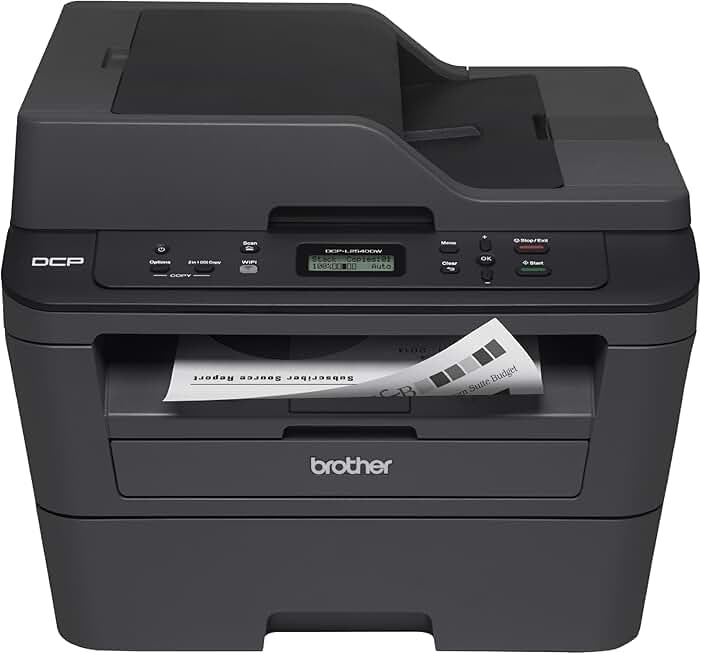
The Brother DCPL2540DW Printer stands out as a highly capable and cost-effective solution for both home offices and small businesses. This compact monochrome laser printer, often available through Amazon Renewed, offers impressive functionality, including printing, copying, and scanning capabilities, making it a versatile addition to any workspace. Our comprehensive review delves into its performance, features, and overall value, especially considering the benefits of purchasing a renewed model.
Quick Summary: Brother DCPL2540DW Printer
Rating: 4.3/5.0 stars (Based on 6003 reviews)
Price: $438.15 USD (Note: Prices for renewed products can fluctuate)
Key Pros:
- High-Speed Monochrome Printing: Delivers fast, crisp black-and-white documents, ideal for high-volume text.
- Wireless & Network Connectivity: Easy integration into home or small office networks via Wi-Fi and Ethernet.
- Automatic Duplex Printing: Saves paper and time with automatic two-sided printing, a crucial feature for efficiency.
- Multifunctionality: Combines printing, copying, and scanning in one compact device, maximizing utility in limited spaces.
Key Cons:
- No Color Printing: Strictly a monochrome device, unsuitable for photo or color document needs.
- Small Output Tray: The paper output tray might be somewhat limited for very large print jobs, requiring occasional emptying.
Table of Contents
Brother DCPL2540DW Printer Overview
The Brother DCPL2540DW Printer is a workhorse designed for efficiency and economy in environments that primarily require black-and-white document handling. As a multifunction device, it seamlessly integrates printing, copying, and scanning capabilities, making it a comprehensive tool for daily tasks. Its compact footprint ensures it doesn’t monopolize valuable desk space, a significant advantage for home offices or smaller commercial settings.
This model is particularly appealing for those looking to manage printing costs effectively. Laser technology inherently offers a lower cost per page compared to inkjet alternatives, and the Brother DCPL2540DW capitalizes on this. It utilizes high-yield toner cartridges, further reducing the frequency and expense of consumables, which is a major consideration for budget-conscious users.
Connectivity is another strong suit, with built-in Wi-Fi and Ethernet options. This allows for flexible placement within a network and enables printing from various devices, including smartphones and tablets, without the need for a direct cable connection. The inclusion of automatic duplex printing is a standout feature, promoting paper conservation and streamlining the production of two-sided documents.
The availability of the Brother DCPL2540DW Printer through programs like Amazon Renewed adds an extra layer of value. Renewed products undergo rigorous inspection, testing, and refurbishment to ensure they meet original performance standards. This means consumers can acquire a high-quality, reliable printer at a significantly reduced price, contributing to both personal savings and environmental sustainability by extending the life cycle of electronics.
While it strictly handles monochrome output, its speed and reliability for text-based documents are undeniable. It’s not designed for vivid color graphics or photo printing, but for invoices, reports, emails, and general office documents, it excels. Its robust build quality and straightforward operation contribute to a positive user experience, minimizing downtime and technical frustrations.
The DCPL2540DW is positioned as a reliable, no-frills workhorse that gets the job done consistently. It avoids unnecessary complexities, focusing instead on core functionality and user convenience. For anyone needing a dependable printer that also copies and scans, without the need for color, this model presents a compelling argument, especially when considering the enhanced value of a renewed unit.
Understanding the nuances of laser printing versus inkjet is crucial, and the Brother DCPL2540DW clearly falls into the former category, prioritizing speed and crisp text over photographic quality. This makes it an ideal choice for professional documents and high-volume text output. Its compact design also means it can fit into tighter spaces, a practical consideration for many modern workspaces.
The printer’s compatibility with various operating systems and its mobile printing capabilities ensure broad usability across different devices and platforms. Whether you’re printing from a desktop PC, a laptop, or a mobile device, the setup process is generally straightforward. This versatility is a key reason for its enduring popularity among small office and home users.
Ultimately, the Brother DCPL2540DW Printer offers a balanced combination of performance, features, and cost-effectiveness. Its ability to handle multiple office tasks, coupled with the potential savings from purchasing a renewed version, makes it an attractive proposition. It embodies the essence of a practical office solution, delivering consistent results for everyday document management.
Brother DCPL2540DW Printer Key Features & Specs
The Brother DCPL2540DW Printer is packed with features designed to enhance productivity and streamline document management for small offices and home users. Understanding these specifications is key to appreciating its value and determining if it aligns with your specific needs. Let’s break down the core functionalities that make this multifunction device stand out.
Print Speed and Quality
One of the most significant advantages of the Brother DCPL2540DW is its impressive print speed, capable of delivering up to 30 pages per minute (ppm). This rapid output ensures that even large documents are printed quickly, minimizing waiting times and boosting overall efficiency. The print resolution of up to 2400 x 600 dpi ensures crisp, professional-quality text, which is essential for business documents, reports, and academic papers.
Automatic Duplex Printing
A standout feature is the automatic duplex printing capability. This allows the printer to automatically print on both sides of the paper, saving time, reducing paper consumption, and contributing to a more sustainable workflow. It’s an invaluable asset for creating professional-looking two-sided documents without manual intervention.
Connectivity Options
The DCPL2540DW offers a comprehensive suite of connectivity options. It includes built-in wireless (802.11b/g/n) and Ethernet interfaces for flexible network integration, alongside a standard USB 2.0 port for direct connection to a computer. This versatility ensures that the printer can be easily integrated into almost any existing network setup, whether wired or wireless.
Mobile Device Printing
For modern users, mobile printing is a necessity, and this Brother printer delivers. It supports a range of mobile printing solutions, including Brother iPrint&Scan, Google Cloud Print, Apple AirPrint, and Cortado Workplace. This allows users to print directly from their smartphones, tablets, and other mobile devices, adding significant convenience and flexibility to their workflow.
Copy and Scan Functionality
Beyond printing, the Brother DCPL2540DW is a capable copier and scanner. The flatbed scanner allows for high-resolution scanning of documents and images, with optical scan resolution up to 600 x 2400 dpi. The copier function offers features like N-in-1 copying and ID copy, making it easy to duplicate various types of documents efficiently.
Paper Handling
The printer comes with a generous 250-sheet capacity adjustable paper tray, which is suitable for letter and legal-size paper. There’s also a manual feed slot for printing on thicker media, envelopes, or custom paper sizes, adding to its versatility. This robust paper handling capability reduces the need for frequent paper refills, especially during larger print jobs.
Toner Management and Amazon Dash Replenishment
To further enhance convenience and cost-efficiency, the Brother DCPL2540DW is Amazon Dash Replenishment Ready. This feature automatically orders toner when levels are low, ensuring you never run out of supplies unexpectedly. This proactive approach to supplies management saves time and prevents interruptions to your printing tasks, making it incredibly convenient for busy users. You can also opt for high-yield replacement toner cartridges, which offer an even lower cost per page and extend the time between replacements.
Compact Design and Intuitive Controls
Despite its multifunctionality, the DCPL2540DW boasts a compact design, making it suitable for tight spaces. Its dimensions (approximately 16.1" x 15.7" x 12.5") allow it to fit comfortably on most desks. The control panel features a simple LCD display and intuitive buttons, making navigation and operation straightforward, even for those who are not tech-savvy.
These core features collectively make the Brother DCPL2540DW Printer a highly functional and practical choice for anyone needing a reliable monochrome laser multifunction device. Its blend of speed, versatility, and cost-effectiveness, particularly when purchased as a renewed unit, provides significant value.
Pros & Cons of the Brother DCPL2540DW
Evaluating any product thoroughly requires a balanced look at its strengths and weaknesses. The Brother DCPL2540DW Printer, while an excellent choice for many, also has specific limitations that potential buyers should consider. Here, we delve into the key advantages and disadvantages of this monochrome laser multifunction device.
Pros of the Brother DCPL2540DW
Exceptional Cost-Per-Page
One of the most compelling reasons to choose the Brother DCPL2540DW is its incredibly low cost per page. Laser technology, combined with the availability of high-yield toner cartridges, makes printing significantly more economical than with inkjet printers, especially for high volumes. This translates to substantial savings over the printer’s lifespan, a critical factor for businesses and budget-conscious individuals.
High-Speed and Reliable Performance
With print speeds of up to 30 ppm, this printer is a true workhorse. It handles large print jobs with ease, making it ideal for busy offices or students with frequent document printing needs. The laser engine is known for its consistent and reliable performance, producing sharp, clear text output every time, reducing the frustration of misprints or smudges.
Automatic Duplex Printing
The built-in automatic duplex printing feature is a major advantage. It allows for effortless two-sided printing, saving paper and reducing environmental impact. This function is not only eco-friendly but also helps in creating professional, polished documents without any manual intervention, enhancing productivity and convenience.
Versatile Connectivity Options
The DCPL2540DW offers a wide array of connection methods, including Wi-Fi, Ethernet, and USB 2.0. This flexibility ensures seamless integration into various network environments and allows for easy printing from multiple devices. Mobile printing support via AirPrint, Google Cloud Print, and Brother iPrint&Scan further enhances its accessibility and user convenience.
Multifunctionality in a Compact Design
Despite offering print, copy, and scan functionalities, the Brother DCPL2540DW maintains a relatively compact footprint. This makes it an excellent choice for offices or homes where space is at a premium. Having three essential office functions in one device reduces clutter and simplifies equipment management, providing a comprehensive solution without a large physical presence.
Value from Amazon Renewed
Purchasing the Brother DCPL2540DW through Amazon Renewed offers exceptional value. These units are professionally inspected, tested, and refurbished to work like new, but come at a significantly lower price. This makes a reliable, feature-rich printer accessible to a wider audience, extending product life and reducing electronic waste.
Cons of the Brother DCPL2540DW
Monochrome Only Output
The most significant limitation of the Brother DCPL2540DW Printer is its inability to print in color. For users who frequently need to print color documents, photos, or graphics, this printer will not meet their requirements. It is strictly a monochrome device, optimized for black-and-white text and basic images.
No Automatic Document Feeder (ADF) for Scanning/Copying
While it does offer scanning and copying, the DCPL2540DW lacks an Automatic Document Feeder (ADF). This means that multi-page documents must be placed on the flatbed scanner one page at a time for copying or scanning. This can be time-consuming and inconvenient for users who frequently process large documents, limiting its efficiency for bulk scanning tasks.
Limited Input/Output Tray Capacity for Heavy Use
While the 250-sheet input tray is adequate for most home and small office users, those with extremely high-volume printing needs might find it slightly restrictive, requiring more frequent refills. Similarly, the output tray can sometimes feel a bit small for very large print jobs, leading to potential paper jams if not emptied regularly.
Initial Setup Can Be Tricky for Network Newbies
While wireless setup is generally straightforward, some users, particularly those less familiar with network configurations, might find the initial wireless setup process a bit challenging. Troubleshooting network connectivity issues can require some technical understanding, although Brother provides good support resources. Ensuring a stable Wi-Fi signal is also crucial for consistent wireless performance.
Basic LCD Display
The control panel features a simple two-line LCD display, which is functional but not as intuitive or feature-rich as a touchscreen interface found on some higher-end models. Navigating menus and adjusting settings can feel a bit clunky compared to more modern interfaces, though it serves its purpose for basic operations.
Considering these pros and cons, the Brother DCPL2540DW Printer presents a clear picture. Its strengths lie in economical, high-speed monochrome printing and versatile functionality, while its limitations are primarily in the absence of color and certain advanced features found in more expensive, full-featured multifunction devices. For the right user, these trade-offs are well worth the value.
Who Should Buy the Brother DCPL2540DW Printer?
The Brother DCPL2540DW Printer is not a one-size-fits-all solution, but it excels in specific use cases and for particular types of users. Understanding its strengths and limitations helps in identifying its ideal audience. This section outlines who would benefit most from investing in this reliable monochrome laser multifunction printer, especially considering its availability as a renewed product.
Home Office Users
Individuals running a home-based business or working remotely will find the DCPL2540DW an indispensable tool. Its multifunction capabilities (print, copy, scan) consolidate essential office equipment into one compact device, saving space and simplifying operations. The low cost per page is a significant advantage for managing business expenses efficiently, making it a smart financial choice.
The wireless connectivity allows for flexible placement within the home and easy printing from various devices, including laptops and mobile phones. For professionals who primarily deal with text-heavy documents like invoices, reports, and contracts, the crisp black-and-white output is perfectly adequate. Its robust build ensures it can handle daily demands without issue.
Small Business Owners
Small businesses, from startups to established local operations, often have tight budgets and require reliable, efficient equipment. The Brother DCPL2540DW Printer fits this description perfectly. Its fast print speeds keep pace with busy work environments, and the automatic duplex printing helps conserve resources, which is crucial for controlling overheads.
The ability to connect via Ethernet is particularly useful for small office networks, providing a stable and shared printing solution for multiple users. While it lacks color, most internal business documents and external communications are often monochrome, making this printer a cost-effective workhorse. The Amazon Renewed option further enhances its appeal by offering enterprise-level functionality at a small business price point.
Students and Educators
For students, especially those in higher education, and educators who frequently print assignments, research papers, or course materials, the DCPL2540DW offers tremendous value. The low cost per page makes high-volume printing affordable, and the fast speeds mean less time spent waiting for documents. Its reliability ensures that deadlines are met without printer-related stress.
The compact size is ideal for dorm rooms or small study areas, and wireless printing from laptops or tablets adds convenience. The scanning function is also useful for digitizing notes or submitting handwritten assignments. It’s a durable printer that can withstand the demands of academic life.
Budget-Conscious Buyers Seeking Value
Anyone looking for maximum functionality without breaking the bank will appreciate the Brother DCPL2540DW. Its competitive pricing, especially when purchased through Amazon Renewed, combined with low running costs, makes it an exceptionally economical choice. This printer delivers professional performance and features typically found in more expensive models, but at a fraction of the price.
The renewed aspect means you get a thoroughly inspected and tested product that performs like new, often backed by a warranty, offering peace of mind. This is a smart way to acquire quality electronics while adhering to a strict budget, proving that high performance doesn’t always have to come with a premium price tag.
Environmental Advocates and Sustainable Shoppers
Choosing a renewed product like the Brother DCPL2540DW Printer is an excellent decision for environmentally conscious consumers. By opting for a refurbished printer, you contribute to reducing electronic waste and extending the lifespan of existing products. This aligns with sustainable consumption practices and helps minimize the environmental footprint associated with manufacturing new electronics.
The printer’s automatic duplex printing feature further supports environmental efforts by significantly cutting down on paper usage. This combination of sustainable purchasing and eco-friendly operation makes it a responsible choice for those prioritizing environmental impact alongside functionality and cost. It’s a tangible way to make a difference.
Users with High-Volume Text Printing Needs
If your primary printing requirement is high volumes of black-and-white text, this printer is perfectly suited. Its laser technology ensures sharp, consistent text quality even at high speeds, and the toner cartridges last significantly longer than inkjet counterparts. This makes it ideal for generating large reports, legal documents, or daily administrative paperwork efficiently and economically.
The 250-sheet paper tray reduces the need for constant refilling, allowing for uninterrupted long print runs. Coupled with the low cost per page, it’s an unbeatable solution for anyone whose workflow heavily relies on monochrome document production. The robust design can withstand continuous use, a testament to its durability.
In summary, the Brother DCPL2540DW Printer is an exceptional choice for anyone needing a reliable, cost-effective, and versatile monochrome laser multifunction device. Its target audience ranges from individuals in home offices to small businesses, students, and environmentally conscious consumers who value performance and economy. It consistently delivers on its promise of efficient document management.
FAQ about the Brother DCPL2540DW Printer
To help potential buyers make an informed decision, we’ve compiled a list of frequently asked questions regarding the Brother DCPL2540DW Printer. These answers aim to clarify common concerns and provide practical insights into its operation and maintenance. Understanding these details can significantly enhance your experience with this multifunction laser device.
Q1: Is the Brother DCPL2540DW Printer difficult to set up, especially wirelessly?
A1: Setting up the Brother DCPL2540DW is generally straightforward, particularly with a wired USB connection. For wireless setup, Brother provides detailed instructions and software that guide you through the process. While most users find it simple, some less tech-savvy individuals might experience minor challenges connecting to complex home networks. Brother’s official support website offers comprehensive guides and troubleshooting tips.
Ensuring your Wi-Fi network is stable and you have your network password handy will make the process much smoother. The printer’s control panel also assists with network configuration. For more advanced network setups, consulting the user manual or Brother’s online resources can be very helpful.
Q2: What is the average cost of toner for the Brother DCPL2540DW and how many pages does it yield?
A2: The Brother DCPL2540DW uses TN630 (standard yield) and TN660 (high yield) toner cartridges. The TN630 typically yields around 1,200 pages, while the TN660 can produce approximately 2,600 pages. The cost per page is significantly lower with the high-yield TN660 cartridge, making it the more economical choice for regular use.
Prices for toner cartridges vary depending on the retailer and whether you choose genuine Brother cartridges or third-party compatible options. While compatible toners can be cheaper, genuine Brother toners are often recommended for optimal print quality and printer longevity. Amazon Dash Replenishment can help manage toner ordering efficiently.
Q3: Can I print from my smartphone or tablet with this printer?
A3: Yes, absolutely. The Brother DCPL2540DW supports various mobile printing solutions. These include Brother iPrint&Scan, Apple AirPrint for iOS devices, and Google Cloud Print for Android and other platforms. These applications allow you to print documents, photos, and web pages directly from your mobile devices, offering great convenience.
Setting up mobile printing usually involves downloading the relevant app and ensuring your mobile device and printer are on the same Wi-Fi network. The process is designed to be user-friendly, expanding your printing flexibility beyond traditional computers. It’s a key feature for modern, connected workflows.
Q4: Does the Amazon Renewed version of the Brother DCPL2540DW come with a warranty?
A4: Yes, Amazon Renewed products typically come with the Amazon Renewed Guarantee. This guarantee ensures that the product works and looks like new, and is backed by a 90-day replacement or refund policy. This provides peace of mind for buyers, knowing that their renewed printer is covered in case of any issues. This policy applies to most renewed products.
It’s always a good idea to check the specific warranty details on the product page at the time of purchase, as terms can sometimes vary. The Amazon Renewed program aims to deliver products that meet high standards, ensuring customer satisfaction. You can learn more about Amazon Renewed policies on their official site: Amazon Renewed Program.
Q5: Is the Brother DCPL2540DW suitable for heavy-duty scanning of multi-page documents?
A5: While the Brother DCPL2540DW includes a flatbed scanner, it does not feature an Automatic Document Feeder (ADF). This means that for multi-page documents, you will need to place each page individually on the scanner glass. For occasional scanning of a few pages, this is perfectly fine. However, for heavy-duty scanning of large, multi-page documents, it can become quite time-consuming and inefficient.
If frequent, high-volume multi-page scanning is a primary requirement, you might consider a Brother model with an integrated ADF, such as the Brother MFC-L2710DW. For moderate scanning needs, the DCPL2540DW’s flatbed scanner offers good quality and functionality. The optical scan resolution is sufficient for most document archiving tasks.
Q6: Can I use third-party or compatible toner cartridges with the Brother DCPL2540DW?
A6: Yes, you can generally use third-party or compatible toner cartridges with the Brother DCPL2540DW Printer. Many users opt for these alternatives as they are often more affordable than genuine Brother brand cartridges. However, it’s important to be aware of potential risks. Using non-Brother toner may void your printer’s warranty in some cases, and print quality or page yield might vary.
Some compatible cartridges may also lead to printer errors or reduced performance. Always choose reputable third-party brands with good reviews if you decide to go this route. For guaranteed performance and to avoid any potential issues, genuine Brother toner is always the safest choice, despite the higher cost. More information on laser printers and their consumables can be found on Wikipedia: Laser Printer.
Q7: How compact is the DCPL2540DW and can it fit on a small desk?
A7: The Brother DCPL2540DW is designed with a compact footprint, making it suitable for smaller workspaces. Its approximate dimensions are 16.1 inches (W) x 15.7 inches (D) x 12.5 inches (H). This size allows it to fit comfortably on most standard desks or shelves without taking up excessive space. It’s an ideal choice for home offices, dorm rooms, or small business environments where space is a premium.
Despite its multifunctionality, Brother has managed to keep the design relatively sleek. Always measure your available space before purchasing to ensure a perfect fit. The top-loading paper tray design also helps maintain its compact profile when not in use.
Final Verdict on the Brother DCPL2540DW Printer
After a thorough review, the Brother DCPL2540DW Printer emerges as an outstanding value proposition, especially when considering its availability through Amazon Renewed. This multifunction monochrome laser printer is a powerful tool for anyone needing reliable, high-speed, and economical black-and-white document management. It successfully balances performance with affordability, making it a top contender in its class.
Its core strengths lie in its rapid 30 ppm print speed, ensuring that large print jobs are handled quickly and efficiently. The automatic duplex printing feature is a significant advantage, promoting paper savings and streamlining document creation. Furthermore, the versatile connectivity options, including Wi-Fi, Ethernet, and USB, offer unparalleled flexibility in how and where you use the printer.
The inclusion of copying and scanning functionalities within a compact design adds immense value, consolidating essential office tasks into one device. For home office users, small businesses, students, and anyone with high-volume text printing needs, the low cost per page offered by laser toner technology translates into substantial long-term savings. The Amazon Dash Replenishment readiness further enhances its convenience by automating toner reorders.
While the absence of color printing and an Automatic Document Feeder for scanning multi-page documents are notable limitations, these are expected trade-offs for a monochrome device in this price range. For users whose primary needs revolve around crisp, fast black-and-white documents and occasional flatbed scanning/copying, these cons are easily outweighed by the numerous pros.
The opportunity to purchase the Brother DCPL2540DW Printer as an Amazon Renewed product significantly boosts its appeal. It offers a chance to acquire a high-performing, professionally refurbished device at a reduced cost, backed by a guarantee. This not only saves money but also contributes to environmental sustainability by giving electronics a second life.
In conclusion, if you are in the market for a robust, reliable, and cost-effective monochrome laser multifunction printer that handles printing, copying, and scanning with ease, the Brother DCPL2540DW Printer is an exceptional choice. It delivers consistent quality and efficiency, proving to be an ultimate pick that is truly worth the investment for its intended audience. It stands as a testament to Brother’s commitment to producing dependable office equipment.