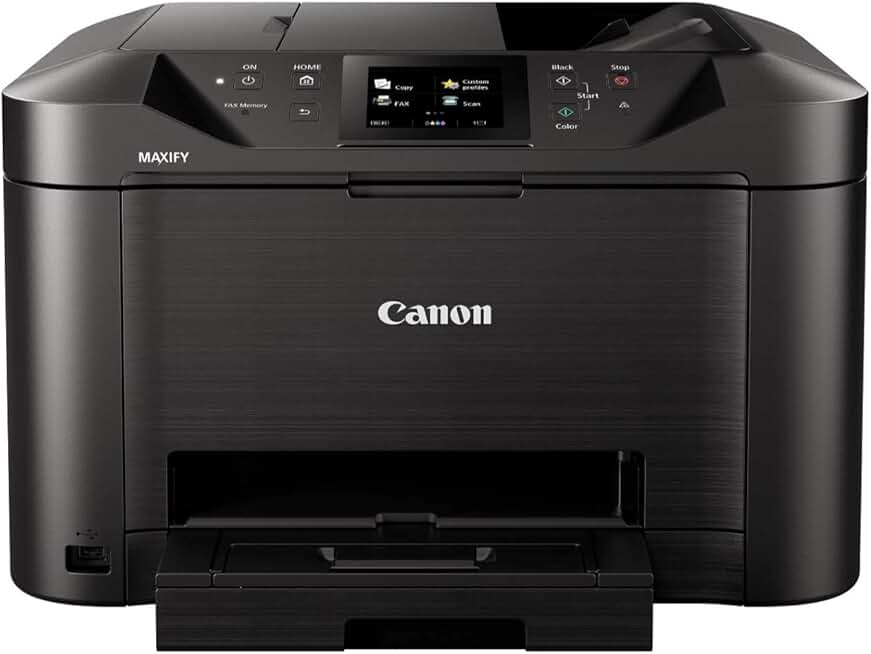
The Canon MB5120 Printer stands out as a robust all-in-one solution designed specifically for the demands of a modern office or busy home environment. This versatile device combines printing, scanning, copying, and faxing capabilities into a single, efficient unit. Its feature set is tailored to boost productivity and streamline document management for small to medium-sized businesses.
In this comprehensive review, we will delve into every aspect of the Canon MB5120 Printer, evaluating its performance, key features, and overall value. Our goal is to provide an honest and in-depth analysis to help you determine if this Canon MAXIFY series printer is the right investment for your specific needs.
Quick Summary: Canon MB5120 Printer
Overall Rating: 3.9/5 stars
Price: $299.95 (at time of review)
Key Pros:
- Fast Print Speeds: Delivers quick output for busy office environments.
- Excellent Duplex Functionality: Automatic two-sided printing, scanning, and copying saves time and paper.
- Robust Mobile Connectivity: Seamless printing from various devices and cloud services.
- Low Running Costs: Efficient pigment ink system offers economical printing over time.
- High Paper Capacity: Dual 250-sheet trays reduce frequent reloading.
Key Cons:
- Initial Setup Complexity: Some users report a challenging setup process.
- Small Touchscreen: The 3.5-inch display can feel cramped for navigation.
- Noise During Operation: Can be somewhat loud, especially during high-speed printing.
Table of Contents
Canon MB5120 Printer Overview
The Canon MB5120 Printer is part of Canon’s MAXIFY series, specifically engineered for small offices and home office (SOHO) environments. It aims to provide a reliable, high-performance solution for users who require more than just basic printing capabilities. This all-in-one device handles a variety of tasks, from producing professional-quality documents to managing digital workflows.
Canon designed the MB5120 with efficiency in mind, focusing on features that directly benefit business productivity. This includes rapid print speeds, robust paper handling, and comprehensive connectivity options. It’s built to be a workhorse, capable of handling significant print volumes without compromising on quality or speed.
One of the core philosophies behind the Canon MB5120 Printer is its emphasis on cost-effectiveness. By utilizing high-yield pigment inks, the printer aims to deliver a low cost per print, making it an economical choice for businesses that print frequently. This financial consideration is often a critical factor for small businesses managing tight budgets.
Beyond its printing prowess, the MB5120 integrates advanced scanning, copying, and faxing functions. The automatic document feeder (ADF) supports duplex operations, allowing for efficient processing of multi-page documents on both sides. This capability is invaluable for digitizing records or creating two-sided copies effortlessly.
Connectivity is another strong suit, offering a range of options including Wi-Fi, Ethernet, and USB. This ensures seamless integration into various network environments and allows for flexible placement within an office. Mobile printing support further enhances its utility, enabling users to print directly from smartphones and tablets.
The printer’s overall construction feels sturdy and durable, indicative of its business-oriented design. It’s not the most compact device, but its footprint is justified by its extensive features and paper capacity. The control panel, featuring a 3.5-inch touchscreen, provides access to its various functions, though its size can sometimes be a minor limitation.
Being an ENERGY STAR certified product, the Canon MB5120 Printer is also designed to be energy efficient. This helps in reducing operational costs and environmental impact, aligning with modern business practices that prioritize sustainability. For more information on ENERGY STAR certifications, you can visit the official ENERGY STAR website.
In essence, the Canon MB5120 Printer is positioned as a comprehensive and reliable office companion. It aims to meet the diverse needs of a busy work environment by offering a blend of speed, quality, and cost-efficiency. Its all-in-one functionality makes it a central hub for document management, reducing the need for multiple single-function devices.
Canon MB5120 Printer Key Features & Specs
The Canon MB5120 Printer is packed with features designed to maximize productivity and deliver high-quality output for business users. Understanding these specifications is crucial for appreciating its capabilities and determining its suitability for your workflow. Here, we break down the most important aspects of this all-in-one device.
Print Speed and Quality
One of the standout features is its impressive print speed. The MB5120 boasts ISO print speeds of up to 24 images per minute (ipm) for black and white documents and 15.5 ipm for color documents. This speed ensures that large print jobs are completed quickly, minimizing wait times in a busy office.
Print quality is equally important, and the MB5120 excels here with its Dual Resistant High Density (DRHD) pigment ink system. This specialized ink produces sharp, laser-quality text that is water and smudge-resistant, crucial for professional documents. Colors are also vibrant and rich, suitable for business graphics and presentations.
Ink System and Efficiency
The printer uses individual ink tanks, meaning you only need to replace the color that runs out, which can lead to cost savings. The DRHD pigment inks are designed for high durability and longevity, ensuring that printed documents maintain their quality over time. This system contributes significantly to the printer’s low cost per print.
High-yield XL ink cartridges are available for the Canon MB5120 Printer, further extending the time between replacements. This is a practical advantage for offices with high print volumes, as it reduces interruptions and lowers the overall running costs. The pigment-based ink also provides excellent resistance against markers and smudges.
Paper Handling and Capacity
The MB5120 offers robust paper handling capabilities, essential for a business-focused printer. It features two front-loading paper cassettes, each holding up to 250 sheets, for a total capacity of 500 sheets. This generous capacity means less frequent paper reloading, boosting continuous workflow.
It also includes a 50-sheet automatic document feeder (ADF) that supports automatic duplex scanning, copying, and faxing. This feature is a major time-saver when dealing with multi-page documents, allowing users to process both sides of a stack of papers without manual intervention. The printer can handle various paper types and sizes, from plain paper to envelopes and photo paper.
Connectivity Options
Connectivity is comprehensive, making the Canon MB5120 Printer highly adaptable to different office setups. It supports Wi-Fi for wireless printing from computers and mobile devices, Ethernet for wired network integration, and a high-speed USB 2.0 port for direct connection to a single computer. These options ensure flexibility in how the printer is used and shared.
Mobile printing is a core strength, with support for Canon PRINT Inkjet/SELPHY app, Apple AirPrint, and Mopria Print Service. Users can easily print documents and photos directly from their smartphones and tablets. Cloud printing services are also integrated, allowing for printing from popular platforms like Google Drive, Dropbox, and OneDrive directly from the printer’s interface.
Other Notable Features
- 3.5-inch Touchscreen LCD: Provides intuitive navigation through menus and functions, although some users might find it a bit small.
- Duplex Printing/Scanning/Copying/Faxing: Full duplex functionality across all modes significantly enhances efficiency.
- Scheduled On/Off: Allows users to set specific times for the printer to power on and off, saving energy.
- Security Features: Includes IP address filtering and secure print functions to protect sensitive documents.
- High Page Yield: Designed for an optimum duty cycle, ensuring it can withstand the rigors of a busy office environment.
These features collectively make the Canon MB5120 Printer a powerful tool for any small to medium business. Its blend of speed, quality, and versatile functionality positions it as a strong contender in the business inkjet market. For detailed product specifications, you can refer to Canon’s official product page for the MAXIFY MB5120.
Pros & Cons
Evaluating any product requires a balanced look at its strengths and weaknesses. The Canon MB5120 Printer, while offering many compelling advantages for business users, also has a few areas where it might not meet every expectation. Here’s a detailed breakdown of its pros and cons.
Pros of the Canon MB5120 Printer
- Exceptional Print Speed: The MB5120 delivers black and white documents at 24 ipm and color at 15.5 ipm, which is very fast for an inkjet in its class. This speed dramatically improves workflow efficiency, particularly for bulk printing tasks. It minimizes the time spent waiting for documents, allowing for more productive work hours.
- Professional Document Quality: Thanks to its Dual Resistant High Density (DRHD) pigment inks, text output is consistently sharp, crisp, and comparable to laser printers. These inks also provide excellent resistance to smudges and water, ensuring documents remain legible and professional-looking even when handled frequently or exposed to minor spills. Color graphics are vibrant and accurate, suitable for business presentations and reports.
- Advanced Duplex Functionality: One of its most significant advantages is the automatic two-sided printing, scanning, copying, and faxing. The 50-sheet duplex ADF handles multi-page double-sided originals effortlessly, saving a tremendous amount of time and paper. This feature is a staple for modern, efficient office environments aiming to reduce paper consumption and manual effort.
- Versatile Paper Handling: With dual 250-sheet paper trays, the MB5120 boasts a total capacity of 500 sheets. This high capacity means less frequent reloading, which is a major convenience for busy offices. It also allows users to load different paper types or sizes simultaneously, such as plain paper in one tray and letterhead or envelopes in the other.
- Comprehensive Connectivity Options: The printer offers a wide array of connectivity choices including Wi-Fi, Ethernet, and USB 2.0. This ensures easy integration into any office network, whether wired or wireless. Mobile printing is robust, supporting popular services like AirPrint, Mopria, and Canon’s own PRINT app, alongside cloud printing capabilities.
- Economical Running Costs: The use of individual, high-yield pigment ink tanks contributes to a low cost per print. Since only the depleted color cartridge needs replacement, waste is minimized. The efficiency of the DRHD inks ensures that you get more pages out of each cartridge, making it a cost-effective solution over the long term for businesses with consistent printing needs.
- Durable Build Quality: The Canon MB5120 Printer is built to withstand the demands of a busy office. Its robust construction suggests reliability and longevity, making it a sound investment for continuous daily use. This durability is a hallmark of Canon’s MAXIFY series, designed for business applications.
Cons of the Canon MB5120 Printer
- Complex Initial Setup: Some users have reported that the initial setup process for the Canon MB5120 Printer can be somewhat time-consuming and less intuitive than expected. Connecting to Wi-Fi, installing drivers, and configuring cloud services might require a bit more technical patience. While not insurmountable, it could be a minor frustration for less tech-savvy individuals.
- Small Touchscreen Display: The 3.5-inch touchscreen, while functional, can feel a bit cramped for navigating through menus and inputting information. In an era of larger, more responsive displays, this smaller screen might not offer the most fluid user experience. This could lead to minor delays or errors during complex operations.
- Noticeable Operational Noise: While printing at its fast speeds, the MB5120 can generate a moderate amount of noise. This might be a concern for very quiet office environments or home offices where noise levels are critical. While not excessively loud, it is certainly audible during active use, especially when printing large documents.
- Not Optimized for Photo Printing: While the color output is good for business graphics, the Canon MB5120 Printer is not specifically designed for high-end photo printing. Users looking for professional-grade photo output with fine detail and color accuracy on glossy paper might find it falls short compared to dedicated photo printers. Its strength lies firmly in document production.
Overall, the pros of the Canon MB5120 Printer significantly outweigh its cons for its intended audience. Its speed, duplex capabilities, and low running costs make it a highly attractive option for productivity-focused environments. The minor drawbacks are generally manageable and do not detract significantly from its core value proposition.
Who Should Buy the Canon MB5120 Printer?
Identifying the ideal user for the Canon MB5120 Printer is crucial for ensuring satisfaction and maximizing its value. This all-in-one device is not a one-size-fits-all solution, but it excels for specific user profiles and work environments. Understanding its target audience will help potential buyers make an informed decision.
Small to Medium Business Owners
The Canon MB5120 Printer is an excellent fit for small to medium-sized businesses (SMBs) that require a reliable and efficient document management hub. Its high print speeds, robust paper handling, and comprehensive all-in-one functionality are perfectly aligned with the fast-paced demands of a growing business. It can handle invoices, reports, presentations, and general office correspondence with ease.
For businesses looking to minimize operational costs, the low cost per print offered by the MB5120’s pigment ink system is a significant advantage. This can lead to substantial savings over time compared to printers with higher ink consumption or more expensive consumables. The ability to print, scan, copy, and fax from one machine also saves space and simplifies IT management.
Home Office Professionals with High Volume Needs
Individuals running a busy home office that frequently prints, scans, or copies will find the Canon MB5120 Printer to be a powerful asset. Its professional-grade features, such as duplex ADF and dual paper trays, are not typically found in entry-level home printers. This allows home-based professionals to maintain a high level of productivity and professionalism.
The extensive connectivity options, including Wi-Fi and mobile printing, are also highly beneficial for home office setups. This flexibility allows users to print from various devices without being tethered to a single computer. The robust duty cycle means it can handle consistent use without premature wear, a common issue with consumer-grade models.
Users Prioritizing Speed and Document Quality
If your primary concern is getting documents printed quickly without sacrificing quality, the MB5120 is an outstanding choice. Its rapid ISO print speeds ensure that even large documents are processed efficiently. The laser-sharp text and vibrant business graphics produced by the DRHD pigment inks meet high professional standards.
This printer is particularly well-suited for environments where clear, legible documents are paramount, such as legal offices, accounting firms, or educational institutions. The water and smudge-resistant properties of the ink add an extra layer of durability to important paperwork.
Businesses Needing Robust Duplex Capabilities
For any organization that regularly handles multi-page, double-sided documents, the MB5120’s full duplex functionality across printing, scanning, copying, and faxing is invaluable. Automating these tasks saves considerable time and effort compared to manually flipping pages. This feature also contributes to significant paper savings.
Whether you’re digitizing archives, distributing two-sided handouts, or processing contracts, the automatic duplexing streamlines these operations. It transforms what could be a tedious, time-consuming process into a quick and efficient one, enhancing overall office productivity.
Users Who Value Mobile and Cloud Printing
In today’s connected world, the ability to print from anywhere is a significant advantage. The Canon MB5120 Printer offers robust support for mobile devices and cloud services, making it ideal for users who work remotely or frequently print from smartphones and tablets. Its compatibility with AirPrint, Mopria, and Canon’s own app provides seamless wireless printing.
Furthermore, direct cloud printing from services like Google Drive and Dropbox allows for greater flexibility and accessibility. This feature is perfect for modern workflows where documents are often stored and accessed digitally across various platforms. It reduces reliance on traditional desktop computers for printing tasks.
In summary, the Canon MB5120 Printer is best suited for users who demand high performance, reliability, and cost-efficiency from their all-in-one office device. It’s a strategic investment for those who prioritize productivity, quality, and versatile document handling in a professional setting. Its comprehensive feature set caters directly to the needs of small businesses and busy home offices seeking a robust printing solution.
FAQ about Canon MB5120 Printer
Here are some frequently asked questions about the Canon MB5120 Printer, providing detailed answers to common inquiries that potential buyers and current users might have. This section aims to address practical concerns and offer clarity on its functionalities.
Q1: What type of ink does the Canon MB5120 Printer use?
The Canon MB5120 Printer utilizes Dual Resistant High Density (DRHD) pigment inks for all four colors (black, cyan, magenta, and yellow). Pigment inks are known for producing sharp, durable text and vibrant colors that are resistant to water, smudges, and highlighter pens. This makes them ideal for professional business documents that need to withstand handling and last longer.
The individual ink tank system means you only replace the specific color that runs out, which helps reduce waste and operating costs. High-yield XL cartridges are also available, offering even more pages per cartridge and further enhancing its cost-efficiency for high-volume printing tasks.
Q2: Can the Canon MB5120 Printer print wirelessly from mobile devices?
Yes, the Canon MB5120 Printer offers robust wireless printing capabilities from mobile devices. It supports several popular mobile printing platforms, including Apple AirPrint for iOS devices and Mopria Print Service for Android devices. Additionally, Canon provides its own dedicated app, the Canon PRINT Inkjet/SELPHY app, which offers enhanced control and functionality for both iOS and Android users.
This extensive mobile support allows users to easily print documents, photos, and web pages directly from their smartphones or tablets without needing to transfer files to a computer. It significantly enhances convenience and flexibility in a modern office or home environment, allowing for seamless integration with mobile workflows.
Q3: Is the Canon MB5120 Printer suitable for heavy printing volumes?
Absolutely. The Canon MB5120 Printer is specifically engineered for business use and is well-suited for heavy printing volumes. It features a robust design and a high recommended monthly duty cycle, indicating its capacity to handle consistent and demanding print loads. Its fast print speeds and dual 250-sheet paper trays also contribute to its efficiency in high-volume scenarios.
The pigment ink system, with available high-yield cartridges, further supports heavy use by reducing the frequency of ink replacements and maintaining a low cost per page. This combination of speed, capacity, and economical operation makes it a reliable workhorse for small to medium businesses and busy home offices.
Q4: Does the Canon MB5120 support automatic two-sided printing, scanning, and copying?
Yes, the Canon MB5120 Printer offers full duplex functionality across all its main features: printing, scanning, and copying. It can automatically print on both sides of a page, which saves paper and time. For scanning and copying, its 50-sheet automatic document feeder (ADF) can process two-sided originals without manual intervention.
This comprehensive duplex capability is a significant advantage for businesses that frequently handle multi-page documents. It streamlines workflows, reduces manual effort, and contributes to greater efficiency in document management. This feature is a hallmark of its design as a business-oriented all-in-one printer.
Q5: How is the scan quality of the Canon MB5120 Printer?
The scan quality of the Canon MB5120 Printer is generally very good, especially for documents. It produces sharp, clear scans suitable for archiving, digital workflows, and OCR (Optical Character Recognition) applications. The scanner can achieve resolutions up to 1200 x 1200 dpi (optical), capturing fine details in text and graphics.
The automatic document feeder (ADF) ensures consistent quality for multi-page scanning, and the duplex scanning feature efficiently handles two-sided originals. While it’s excellent for business documents, it might not offer the same level of detail or color accuracy for high-resolution photo scanning as dedicated photo scanners, but it performs admirably for its intended business applications.
Q6: What is the total paper capacity of the Canon MB5120 Printer?
The Canon MB5120 Printer features a substantial paper capacity, designed to minimize interruptions during large print jobs. It comes equipped with two front-loading paper cassettes, each capable of holding 250 sheets of plain paper. This provides a generous total paper capacity of 500 sheets.
This dual-tray setup is highly convenient, allowing users to load different types of paper (e.g., letterhead in one tray, plain paper in another) or simply extend printing time without needing to constantly refill. The high capacity is a key benefit for busy office environments and users with significant printing needs.
Q7: Is it easy to replace ink cartridges in the Canon MB5120 Printer?
Yes, replacing ink cartridges in the Canon MB5120 Printer is designed to be a straightforward process. The printer features front-loading ink access, meaning you can easily open a panel on the front of the device to access the individual ink tanks. Each cartridge is clearly labeled and color-coded, making it simple to identify which one needs replacing.
The cartridges click securely into place, and the printer’s display usually guides you through the replacement steps. This user-friendly design minimizes downtime and ensures that even those less familiar with printer maintenance can manage ink changes efficiently.
Q8: Does the Canon MB5120 Printer come with a warranty?
When purchased new, the Canon MB5120 Printer typically comes with a 1-year limited warranty from Canon, covering parts and labor. However, if you are purchasing an Amazon Renewed product, the warranty terms will be different. Amazon Renewed products are generally backed by the Amazon Renewed Guarantee, which usually provides a replacement or refund within 90 days of receipt if the product does not work as expected. It’s always advisable to check the specific warranty details provided by the seller for any renewed product.
Final Verdict
The Canon MB5120 Printer establishes itself as a highly capable and reliable all-in-one solution for the modern small office or busy home office. Its comprehensive feature set, combining high-speed printing, advanced duplexing, and versatile connectivity, makes it a compelling choice for productivity-focused users. This printer is truly built to handle the diverse demands of a professional environment.
What truly sets the Canon MB5120 Printer apart is its commitment to efficiency and cost-effectiveness. The DRHD pigment inks deliver consistently sharp, smudge-resistant documents at a low cost per page, which translates into significant savings over time for businesses with regular printing needs. The substantial 500-sheet paper capacity and 50-sheet duplex ADF further enhance its ability to manage large workloads with minimal intervention.
While the initial setup might require a bit of patience and the touchscreen could be larger, these minor drawbacks are easily overshadowed by its overall performance and value. The extensive mobile and cloud printing options cater to contemporary workflows, providing unparalleled flexibility in how and where you manage your documents. Its robust build quality also assures longevity and consistent performance, an essential factor for business equipment.
For small to medium businesses, home office professionals, and anyone who prioritizes speed, high-quality document output, and efficient paper handling, the Canon MB5120 Printer is an excellent investment. It is a workhorse that can streamline your document processes, reduce operational costs, and contribute significantly to a more productive work environment. Its blend of features and performance makes it a truly essential all-in-one device that is well worth its price.