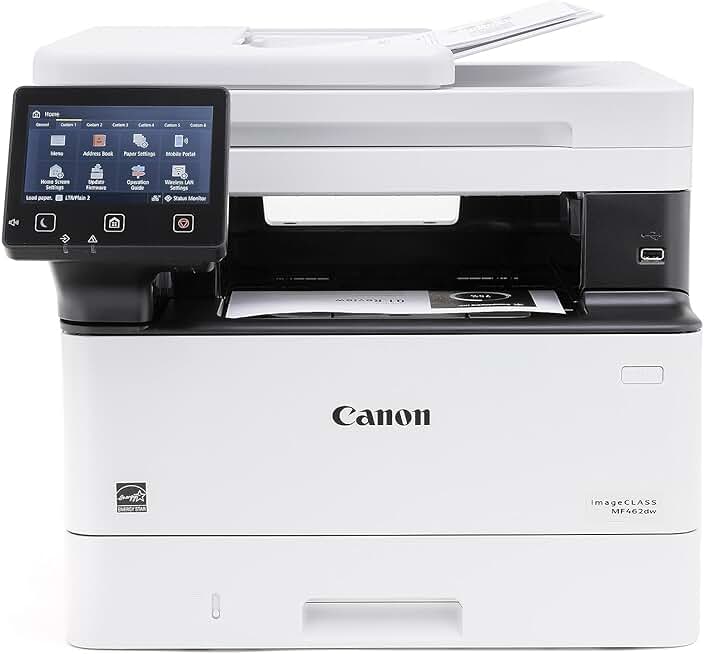
The Canon MF462dw Printer stands out as a robust and reliable monochrome all-in-one laser printer designed for both home and small office environments. This versatile device combines printing, scanning, copying, and faxing capabilities into a single, compact unit, promising efficiency and productivity for various tasks. Our comprehensive review will delve into its performance, features, and overall value, helping you decide if this printer is the right fit for your needs.
Quick Summary: Canon imageCLASS MF462dw
- Rating: 4.2 out of 5 stars (from 366 reviews)
- Price: $399.00 USD
Key Pros:
- High-speed monochrome printing at 37 PPM, perfect for busy environments.
- Comprehensive all-in-one functionality with print, scan, copy, and fax capabilities.
- Automatic duplex printing and a 50-sheet automatic document feeder enhance efficiency.
- Robust wireless connectivity and mobile printing options offer great flexibility.
- Backed by a 3-year limited warranty, providing long-term peace of mind.
Key Cons:
- Monochrome only, limiting its use for color printing needs.
- Initial toner cartridge yield may be lower than standard replacements.
Table of Contents
Canon MF462dw Printer Overview
The Canon MF462dw Printer is a versatile and efficient monochrome laser multifunction printer designed to meet the demanding needs of small offices and home users. This all-in-one device consolidates printing, scanning, copying, and faxing functionalities, streamlining workflows and reducing the need for multiple machines. Its robust design and feature set make it a compelling choice for environments where speed, reliability, and cost-effectiveness are paramount.
Canon has engineered the imageCLASS MF462dw to deliver impressive performance, starting with its rapid print speed of up to 37 pages per minute (PPM). This speed ensures that even large print jobs are completed quickly, minimizing wait times and boosting overall productivity. The printer’s monochrome output is sharp and consistent, producing professional-quality documents with crisp text and clear graphics.
Beyond its printing prowess, the MF462dw integrates a high-quality scanner, copier, and fax machine. The 50-sheet automatic document feeder (ADF) is a significant convenience, allowing users to scan or copy multi-page documents without manual intervention. This feature is particularly beneficial for digitizing archives or distributing reports efficiently.
Connectivity options are comprehensive, including built-in Wi-Fi, Ethernet, and USB. The wireless capability allows for flexible placement within an office or home network, enabling multiple users to access the printer from various devices. Mobile printing solutions, such as Canon PRINT Business app, Apple AirPrint, and Mopria Print Service, further enhance its accessibility, allowing users to print directly from smartphones and tablets.
The user interface is intuitive, featuring a clear LCD touch panel that simplifies navigation through menus and settings. This ease of use reduces the learning curve, making the printer accessible even for those who are not tech-savvy. The compact footprint of the Canon MF462dw Printer also makes it suitable for spaces where desk space is at a premium, without compromising on functionality.
Canon’s commitment to durability and support is evident in the included 3-year limited warranty, offering users peace of mind and protection for their investment. This extended warranty underscores the manufacturer’s confidence in the printer’s build quality and long-term reliability. Energy Star certification further highlights its energy efficiency, contributing to lower operating costs and a reduced environmental footprint.
In summary, the Canon MF462dw Printer is positioned as a high-performance, all-in-one solution for those requiring dependable monochrome printing and multifunction capabilities. Its combination of speed, comprehensive features, flexible connectivity, and strong warranty makes it a strong contender in its class. It is an ideal choice for small businesses, home offices, and even personal use where a robust and efficient document solution is needed.
Canon MF462dw Printer Key Features & Specs
The Canon MF462dw Printer is packed with features designed to maximize productivity and efficiency in a busy work environment. Understanding these specifications is crucial for appreciating the printer’s capabilities and determining if it aligns with your specific needs. This section breaks down the core components and functionalities that make this all-in-one laser printer a formidable tool.
High-Speed Monochrome Printing
At the heart of the MF462dw is its impressive print engine, capable of delivering up to 37 pages per minute (PPM) for letter-sized documents. For legal-sized paper, it maintains a strong pace of 30 PPM. This speed ensures that large reports, invoices, or contracts are printed quickly, reducing bottlenecks and keeping your workflow smooth.
The printer boasts a print resolution of up to 600 x 600 dpi (dots per inch), which, combined with Canon’s UHQ (Ultra High Quality) technology, provides sharp, clear text and detailed graphics. This resolution is more than sufficient for professional-looking business documents, ensuring legibility and a polished appearance.
All-in-One Functionality
The Canon MF462dw Printer is a true multifunction device, integrating four essential office functions: printing, scanning, copying, and faxing. This consolidation saves valuable office space and simplifies equipment management, as you only need to maintain one device for all your document needs.
The flatbed scanner and 50-sheet automatic document feeder (ADF) are central to its versatility. The ADF allows for efficient scanning and copying of multi-page documents, both single-sided and double-sided (duplex scanning for copying), significantly speeding up these processes. Scan resolution can reach up to 600 x 600 dpi (optical) and 9600 x 9600 dpi (interpolated), ensuring high-quality digital reproductions.
Automatic Duplex Printing
One of the most significant efficiency features of the MF462dw is its automatic duplex printing capability. This allows the printer to automatically print on both sides of a page, saving paper and reducing environmental impact. Duplex printing is a standard feature that helps reduce paper consumption and document bulk, which is ideal for creating professional reports and presentations.
Robust Connectivity Options
Connectivity is a strong suit for the Canon MF462dw Printer, offering multiple ways to connect and print. It includes built-in Wi-Fi connectivity (802.11b/g/n), enabling wireless printing from various devices on your network without the need for cables. An Ethernet port provides a stable wired connection for network environments, and a USB 2.0 High-Speed port allows for direct connection to a single computer.
For mobile users, the printer supports popular mobile printing solutions such as Apple AirPrint, Mopria Print Service, and the Canon PRINT Business app. These options allow for convenient printing directly from smartphones and tablets, catering to the needs of a modern, on-the-go workforce. This flexibility ensures that users can print from virtually anywhere within the network.
Paper Handling and Capacity
The MF462dw comes equipped with a 250-sheet front-loading paper cassette and a 1-sheet multipurpose tray. This standard capacity is suitable for most small office or home office needs, reducing the frequency of paper refills. The multipurpose tray is useful for specialty media such as envelopes, labels, or thicker paper stocks, adding to the printer’s versatility.
An optional 250-sheet paper cassette is available for users who require higher paper capacity, allowing for expansion to a total of 501 sheets. This scalability ensures the printer can grow with your business needs, accommodating increased print volumes without constant paper reloads. The output tray can hold up to 100 sheets of printed documents.
Intuitive User Interface and Security
Operating the Canon MF462dw Printer is straightforward, thanks to its 5-inch color touchscreen LCD panel. This intuitive interface provides easy access to all functions, settings, and status updates. Users can customize the home screen to display frequently used functions, further enhancing ease of use. The touch panel is responsive and clear, making navigation simple.
Security features are also integrated to protect sensitive documents and network integrity. These include Department ID Management, Secure Print, and IP/MAC Address Filtering. These measures help control access to the printer and protect confidential information, which is essential in any professional setting.
Energy Efficiency and Warranty
The Canon MF462dw Printer is ENERGY STAR certified, indicating its compliance with strict energy efficiency guidelines. This translates to lower power consumption and reduced electricity bills, making it an environmentally friendly and cost-effective choice. The printer also features an auto power-off mode to conserve energy when not in use.
Canon backs this printer with a substantial 3-year limited warranty, providing excellent coverage and support. This extended warranty period is a testament to the product’s reliability and Canon’s confidence in its durability. Users can register their product on the Canon USA website for support and warranty information.
Pros & Cons
Evaluating the strengths and weaknesses of any product is crucial for making an informed purchasing decision. The Canon MF462dw Printer, while offering significant advantages, also comes with certain limitations that potential buyers should consider. Here, we delve into a detailed breakdown of its key pros and cons.
Pros of the Canon MF462dw Printer
- Exceptional Print Speed: The Canon MF462dw Printer boasts a rapid print speed of up to 37 pages per minute. This high output rate is perfect for high-volume printing tasks, ensuring that documents are produced quickly and efficiently, saving valuable time in busy office environments.
- All-in-One Functionality: This device truly excels as an all-in-one solution, integrating printing, scanning, copying, and faxing capabilities. This comprehensive functionality means you only need one machine to handle all your document management needs, saving space and simplifying maintenance.
- Automatic Duplex Printing and ADF: The inclusion of automatic duplex printing allows for effortless double-sided printing, conserving paper and reducing costs. Coupled with the 50-sheet automatic document feeder (ADF), it makes scanning and copying multi-page documents incredibly efficient, eliminating the need for manual page turning.
- Flexible Wireless Connectivity: With built-in Wi-Fi and mobile printing support (AirPrint, Mopria, Canon PRINT Business app), the MF462dw offers superb flexibility. Users can print from virtually any device—desktops, laptops, smartphones, or tablets—without being tethered to a physical connection, enhancing convenience and accessibility.
- Sharp Monochrome Output: The printer consistently delivers crisp, clear black and white text and graphics at 600 x 600 dpi resolution. This ensures that all your documents, from reports to invoices, look professional and are easy to read, maintaining a high standard for your business communications.
- Intuitive Touchscreen Interface: The 5-inch color touchscreen provides an easy-to-navigate interface, making it simple to access functions, adjust settings, and monitor printer status. Its user-friendly design reduces the learning curve and streamlines daily operations.
- Robust Build Quality and Warranty: Canon is known for its durable products, and the MF462dw is no exception. It comes with a generous 3-year limited warranty, providing significant peace of mind and demonstrating the manufacturer’s confidence in the printer’s reliability and longevity.
- Energy Efficiency: Being ENERGY STAR certified, the Canon MF462dw Printer is designed to be energy-efficient. This means lower electricity consumption during operation and in standby mode, leading to reduced utility bills and a smaller environmental footprint.
Cons of the Canon MF462dw Printer
- Monochrome Only: The most significant limitation is that this is a monochrome printer, meaning it can only print in black and white. For users who frequently need to print color documents, presentations, or photos, this printer will not suffice, requiring a separate color printer or alternative solution.
- Starter Toner Cartridge Yield: Like many new printers, the Canon MF462dw Printer often comes with a starter toner cartridge that has a lower yield compared to standard replacement cartridges. This means you might need to purchase a full-capacity toner cartridge sooner than expected, adding to the initial setup cost.
- No USB Port for Direct Printing: While it offers excellent network and mobile connectivity, the absence of a front-facing USB port for direct printing from a flash drive might be a minor inconvenience for some users. This means documents must be routed through a computer or mobile device.
- Cost of Replacement Toner: While laser printers generally offer a lower cost per page than inkjets, the initial purchase price of genuine Canon toner cartridges can be relatively high. While third-party options exist, using them might void the warranty or affect print quality, making the cost of consumables a recurring consideration.
- Physical Size: While compact for an all-in-one laser printer, it is still larger and heavier than many inkjet counterparts. For users with extremely limited desk space, its footprint might be a consideration, although its capabilities often justify the size.
Who Should Buy the Canon MF462dw Printer?
The Canon MF462dw Printer is a specialized tool, and like any specialized equipment, it’s best suited for particular users and environments. Understanding its target audience can help potential buyers determine if its features and performance align with their specific needs. This section explores the ideal users who would benefit most from this robust monochrome laser all-in-one.
Small and Home Offices
This printer is an excellent choice for small businesses and home offices that require a reliable and efficient document solution. Its all-in-one capabilities mean it can handle all the essential tasks—printing invoices, scanning contracts, copying reports, and sending faxes—without needing multiple devices. The high print speed and automatic duplexing are particularly beneficial for managing daily administrative tasks effectively.
The compact footprint of the MF462dw allows it to fit comfortably into smaller office spaces where desk real estate is at a premium. Its wireless connectivity further reduces cable clutter, contributing to a tidier and more organized workspace. This makes it a practical solution for entrepreneurs, freelancers, and small teams.
Users with High-Volume Monochrome Printing Needs
If your printing requirements primarily involve black and white documents and you frequently print in large quantities, the Canon MF462dw Printer is a strong contender. Its 37 PPM speed ensures that bulk printing jobs are completed quickly, making it ideal for generating reports, proposals, legal documents, or educational materials. Laser technology also means consistent quality over long print runs.
Businesses such as accounting firms, law offices, or educational institutions that produce a high volume of text-heavy documents will find this printer invaluable. The lower cost per page associated with laser toner, compared to inkjet cartridges, also makes it a more economical choice for substantial print volumes over time.
Individuals Requiring Multifunctionality
For those who need more than just a printer, the MF462dw’s comprehensive all-in-one features are a major draw. The integrated scanner, copier, and fax machine, combined with a 50-sheet automatic document feeder, provide a complete document management solution. This is perfect for users who need to digitize paper documents, make quick copies, or send traditional faxes.
Freelancers or consultants who manage their own paperwork, including client contracts, expense reports, and administrative forms, will appreciate the convenience of having all these functions in one reliable device. It streamlines various administrative tasks, allowing for greater focus on core work.
Workgroups Needing Reliable Network Printing
The robust network connectivity, including Wi-Fi and Ethernet, makes the Canon MF462dw Printer suitable for small workgroups. Multiple users can easily connect to the printer from their computers or mobile devices, facilitating shared access and collaborative workflows. The printer’s security features, such as Department ID Management, also help control usage in a shared environment.
Its reliability and durable construction ensure that it can withstand the demands of multiple users, providing consistent performance throughout the workday. The ability to print from mobile devices also adds flexibility for employees who are often on the go or prefer using their smartphones for quick print jobs.
Budget-Conscious Buyers Prioritizing Value
While the initial investment for a laser printer might be higher than some inkjets, the Canon MF462dw Printer offers excellent long-term value. Its energy efficiency, durable construction, and the lower cost per page of laser toner contribute to reduced operating expenses over the printer’s lifespan. The 3-year warranty also minimizes potential repair costs.
For buyers looking for a dependable workhorse that will last for years and provide cost-effective printing for monochrome documents, the MF462dw represents a smart investment. It’s an economical choice for those who want to avoid the frequent ink cartridge replacements and associated costs of inkjet printers.
Users Seeking Ease of Use and Setup
The intuitive 5-inch color touchscreen and straightforward setup process make the Canon MF462dw Printer appealing to users who prefer ease of use. Whether setting up wireless connectivity or navigating printing options, the user interface is designed to be accessible. This minimizes frustration and allows users to get up and running quickly.
The clear instructions and user-friendly controls make it suitable for individuals who may not be highly technically inclined but still require a powerful and versatile printer for their daily tasks. The overall user experience is geared towards simplicity and efficiency.
FAQ about Canon MF462dw Printer
When considering a significant purchase like the Canon MF462dw Printer, potential buyers often have a range of questions regarding its functionality, maintenance, and compatibility. This FAQ section aims to address some of the most common inquiries, providing detailed answers to help clarify any doubts and inform your decision.
Q1: Is the Canon MF462dw Printer a color printer?
No, the Canon MF462dw Printer is a monochrome laser printer. This means it only prints in black and white. It is designed for users who primarily need to print text documents, reports, and other black-and-white materials. If you require color printing capabilities for graphics, photos, or presentations, you would need to consider a different model or a separate color printer.
Its specialization in monochrome printing allows it to excel in speed, efficiency, and cost-effectiveness for black-and-white output. This focus helps maintain a lower cost per page for high-volume text printing compared to color laser or inkjet printers.
Q2: What is the maximum print speed of the MF462dw?
The Canon MF462dw Printer boasts an impressive maximum print speed of up to 37 pages per minute (PPM) for letter-sized documents. For legal-sized documents, it can print up to 30 PPM. This high speed makes it an excellent choice for environments that require quick turnaround times for large print jobs, such as busy offices or academic settings.
The fast print engine is a key advantage, ensuring that productivity remains high even when faced with substantial printing demands. This speed is consistent whether you are printing single-sided or utilizing the automatic duplex feature.
Q3: Does the Canon MF462dw support automatic double-sided printing and scanning?
Yes, the Canon MF462dw Printer fully supports automatic duplex printing, meaning it can automatically print on both sides of a page without manual intervention. This feature helps save paper and creates more professional-looking documents. For scanning and copying, it includes a 50-sheet automatic document feeder (ADF) that supports duplex scanning for copying, allowing you to process double-sided originals efficiently.
While the ADF can scan both sides of a document for copying, it typically does so by scanning one side, flipping the page, and then scanning the other, rather than a single-pass duplex scan. This still significantly reduces manual effort for multi-page double-sided documents.
Q4: What connectivity options are available with the Canon MF462dw Printer?
The Canon MF462dw Printer offers a comprehensive range of connectivity options to suit various setups. It includes built-in Wi-Fi (802.11b/g/n) for wireless networking, an Ethernet port for wired network connections, and a USB 2.0 High-Speed port for direct connection to a computer. This versatility ensures easy integration into almost any home or office network environment.
Additionally, it supports popular mobile printing solutions such as Apple AirPrint, Mopria Print Service, and the Canon PRINT Business app. These mobile options allow users to print directly from their smartphones and tablets, providing ultimate convenience and flexibility for modern workflows.
Q5: What type of toner cartridge does the Canon MF462dw use?
The Canon MF462dw Printer uses Canon Toner Cartridge 070 (standard yield) and Canon Toner Cartridge 070 H (high yield). The standard yield cartridge typically produces around 1,500 pages, while the high-yield version can print approximately 3,000 pages. Using genuine Canon toner ensures optimal print quality and printer longevity.
While third-party compatible cartridges may be available, it’s generally recommended to use genuine Canon consumables to prevent potential damage to the printer and to maintain the quality of your printed output. The initial printer purchase usually includes a starter cartridge with a lower yield.
Q6: Is the Canon MF462dw Printer compatible with Mac and Windows operating systems?
Yes, the Canon MF462dw Printer is designed to be compatible with both Windows and macOS operating systems. Canon provides drivers and software for various versions of Windows (including Windows 10 and 11) and macOS. You can typically download the latest drivers and utilities from the official Canon support website to ensure full functionality.
For mobile printing, its support for Apple AirPrint ensures seamless printing from iOS devices, while Mopria Print Service covers a wide range of Android devices. This broad compatibility makes it a flexible choice for diverse user environments.
Q7: What is the warranty period for the Canon MF462dw Printer?
The Canon MF462dw Printer comes with a substantial 3-year limited warranty. This warranty covers defects in materials and workmanship, offering significant peace of mind for your investment. The extended warranty period is a strong indicator of Canon’s confidence in the product’s durability and reliability.
It is always advisable to register your product with Canon after purchase to ensure you receive all warranty benefits and support. Details regarding the specific terms and conditions of the warranty can be found in the product documentation or on the Canon website.
Q8: How energy-efficient is the Canon MF462dw Printer?
The Canon MF462dw Printer is ENERGY STAR certified, meaning it meets strict energy efficiency guidelines set by the U.S. Environmental Protection Agency. This certification indicates that the printer consumes less energy during operation and in standby modes, contributing to lower electricity bills and a reduced environmental impact.
Features like an auto power-off mode and efficient fusing technology help minimize power consumption. This makes it an environmentally conscious choice for users looking to reduce their energy footprint while still benefiting from a powerful office machine.
Final Verdict
The Canon MF462dw Printer emerges as an outstanding choice for small offices, home offices, and individuals with demanding monochrome printing needs. Its blend of high-speed performance, comprehensive multifunctionality, and robust connectivity makes it a highly valuable asset for efficient document management. This all-in-one laser printer delivers on its promise of reliability and productivity.
The impressive 37 PPM print speed, combined with automatic duplex printing and a 50-sheet ADF, significantly boosts workflow efficiency. Whether you’re printing large reports, scanning multi-page contracts, or making quick copies, the MF462dw handles tasks with remarkable speed and precision. The crisp, professional-quality text output is consistently excellent, ensuring all your documents present well.
While it is a monochrome-only printer, this specialization allows it to excel in its niche, offering a lower cost per page for black and white printing compared to many color alternatives. The array of connectivity options, including Wi-Fi, Ethernet, and mobile printing support, provides unparalleled flexibility, allowing users to print from virtually any device in their network.
The intuitive 5-inch color touchscreen simplifies operation, making the printer accessible to users of all technical skill levels. Furthermore, the 3-year limited warranty provides exceptional peace of mind, underscoring Canon’s commitment to quality and customer satisfaction. It’s an energy-efficient device that helps keep operating costs low.
Considering its robust feature set, high performance, and long-term value, the Canon MF462dw Printer is an excellent investment for anyone requiring a dependable and efficient monochrome all-in-one laser solution. It truly offers an ultimate combination of features for its price point, making it a highly recommended product.