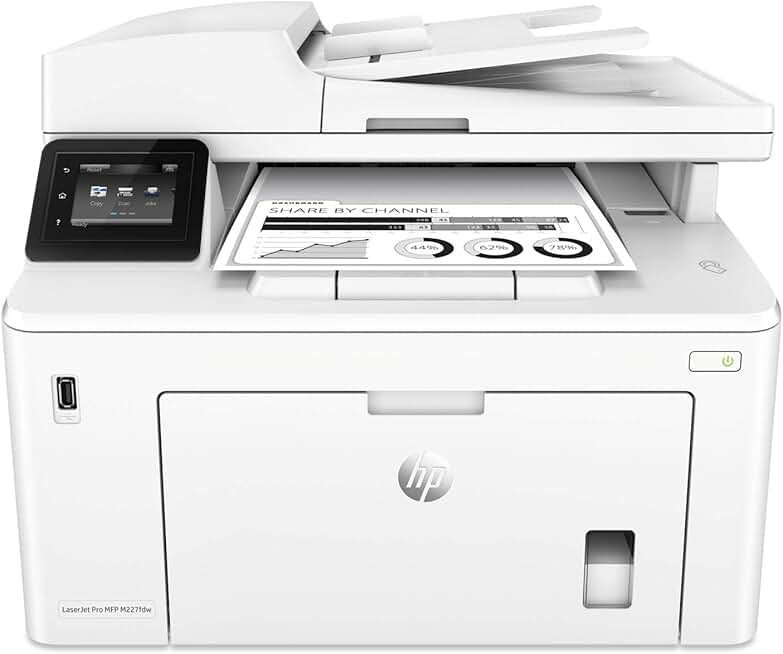
The HP M227fdw Printer stands out as a highly capable wireless monochrome all-in-one printer, particularly when considering its availability as an Amazon Renewed product. This device is engineered to meet the demands of small offices and busy home environments, offering a comprehensive suite of print, scan, copy, and fax functionalities within a single, efficient unit.
Choosing a renewed product like this HP M227fdw Printer offers a smart way to acquire premium office equipment at a more accessible price point. It combines robust performance with the economic benefits of refurbished electronics, making it an attractive option for budget-conscious consumers who do not want to compromise on quality or features.
Quick Summary: HP M227fdw Printer
Rating: 4.4 out of 5 stars (Based on 1342 reviews)
Price: $499.99
Key Pros:
- Fast monochrome printing at up to 30 ppm.
- Versatile all-in-one functionality (print, scan, copy, fax).
- Excellent connectivity options: Wireless, Ethernet, USB, mobile printing.
- Automatic duplex printing for efficiency and paper saving.
Key Cons:
- Limited to monochrome printing only, no color output.
- Toner cartridge replacement costs can add up over time.
- Initial network setup might require some technical familiarity.
Table of Contents
HP M227fdw Printer Overview
The HP M227fdw Printer is a multifunction peripheral (MFP) designed to handle a variety of office tasks with efficiency and reliability. As a monochrome laser printer, it excels at producing crisp, clear black-and-white documents quickly, making it ideal for text-heavy environments.
Its all-in-one capabilities mean it can print, scan, copy, and fax, consolidating several devices into one compact machine. This integration saves valuable desk space and streamlines document management workflows for users. The model G3Q75A specifically refers to this robust and feature-rich device.
Considering the HP M227fdw Printer as an Amazon Renewed product adds an interesting dimension to its value proposition. Amazon Renewed products are pre-owned, professionally inspected, tested, and cleaned to work like new. They are backed by the Amazon Renewed Guarantee, which provides peace of mind regarding their quality and functionality.
This renewed status typically translates to significant cost savings compared to purchasing a brand-new unit, without sacrificing performance. For businesses or individuals on a budget, this presents an excellent opportunity to access high-quality office technology. The refurbishment process ensures that all critical components are in optimal working order, often replacing parts as needed.
The design of the HP M227fdw Printer is professional and functional, featuring a compact footprint that belies its extensive capabilities. Its sturdy build quality suggests durability, a common characteristic of HP’s business-grade laser printers. The user interface, centered around a color touchscreen, aims for intuitive operation.
In terms of performance, the M227fdw is known for its fast print speeds and consistent output quality. It’s built to handle moderate print volumes, making it a workhorse for daily office tasks. The monochrome laser technology ensures sharp text and graphics, suitable for professional documents, reports, and invoices.
Connectivity is a strong suit of this MFP, offering both wireless and wired options. This flexibility allows it to integrate seamlessly into various network environments, whether a bustling office or a home setup. The inclusion of features like automatic duplex printing further enhances its efficiency and reduces paper consumption.
The HP M227fdw Printer, even in its renewed form, provides a compelling package for anyone needing a reliable, feature-rich monochrome MFP. Its combination of speed, versatility, and cost-effectiveness makes it a strong contender in its category. This printer is particularly appealing to those who prioritize functional excellence and value, seeking a long-term solution for their document needs.
Analyzing the HP M227fdw Printer Key Features & Specifications
The HP M227fdw Printer is packed with features designed to maximize productivity and efficiency in a professional setting. Understanding its core specifications helps in appreciating its capabilities and suitability for various tasks.
Printing Speed and Quality
One of the standout features of the HP M227fdw Printer is its impressive print speed. It can churn out documents at up to 30 pages per minute (ppm), which is excellent for a printer in its class. This speed ensures that even large print jobs are completed quickly, reducing waiting times in a busy office environment.
The first page out time is also remarkably fast, often under 7 seconds, meaning you don’t have to wait long for your initial document. Print quality is consistently high, delivering crisp, sharp text at a resolution of up to 1200 x 1200 dpi. This resolution ensures that all documents, from simple letters to detailed reports, appear professional and highly legible.
All-in-One Functionality: Print, Scan, Copy, Fax
As a true multifunction device, the HP M227fdw Printer integrates four essential office functions. This consolidation saves space and simplifies equipment management, making it a versatile tool for any workspace.
Scanner Capabilities
The scanner features both a flatbed and a 35-sheet automatic document feeder (ADF), allowing for versatile document handling. The flatbed is perfect for scanning delicate items, books, or odd-sized documents, while the ADF efficiently handles multi-page documents. It offers a scan resolution of up to 1200 dpi (flatbed) and 300 dpi (ADF), producing clear digital copies.
The scanner supports various scan-to destinations, including email, network folders, and USB drives, facilitating easy document sharing and archiving. This functionality is crucial for digitizing paper-based information and integrating it into digital workflows.
Copier Features
The copier function on the HP M227fdw Printer is equally robust, capable of producing up to 30 copies per minute. Users can easily adjust settings such as reduction/enlargement (25 to 400%), number of copies, and even copy ID cards. The ADF greatly enhances copying efficiency for multi-page originals.
Fax Functionality
For offices that still rely on traditional communication methods, the M227fdw includes a full-featured fax machine. It boasts a fax transmission speed of 33.6 kbps and can store up to 1,000 pages in memory. Features like auto-redial, delayed sending, and junk fax barrier provide comprehensive control over fax communications.
Connectivity Options
Connectivity is a major strength of the HP M227fdw Printer, offering multiple ways to connect and print. It includes built-in Wi-Fi 802.11b/g/n, allowing for seamless wireless printing from various devices without the need for cables. Wi-Fi Direct further simplifies this, enabling direct connection from mobile devices to the printer without a network.
For more stable and secure connections, the printer also features a built-in Ethernet port, ideal for networked office environments. A high-speed USB 2.0 port is available for direct connection to a single computer. Mobile printing solutions like HP Smart App, Apple AirPrint, and Mopria make it easy to print from smartphones and tablets, offering unparalleled convenience. The integration with Alexa also allows for voice-activated printing, adding a modern touch to its functionality.
Automatic Duplex Printing
The inclusion of automatic duplex printing is a significant advantage for the HP M227fdw Printer. This feature allows the printer to automatically print on both sides of a page, saving paper and reducing environmental impact. It also contributes to more professional-looking documents, such as reports and brochures, without manual intervention.
Paper Handling
The printer comes with a 250-sheet input tray, sufficient for most small to medium-sized print jobs. It also has a 10-sheet priority tray for special media. The output bin holds up to 150 sheets. It supports a wide range of media types, including plain paper, envelopes, labels, cardstock, and transparencies, and various sizes from A4 to B5.
Display and User Interface
A 2.7-inch color touchscreen display provides an intuitive interface for navigating the printer’s functions. Users can easily access print, scan, copy, and fax settings, check toner levels, and manage network connections directly from the panel. The responsiveness and clarity of the touchscreen enhance the overall user experience.
Processor and Memory
Under the hood, the HP M227fdw Printer is powered by an 800 MHz processor and equipped with 256 MB of RAM. This robust hardware configuration ensures smooth operation, even when handling complex print jobs or multiple tasks simultaneously. It contributes to the printer’s fast processing and quick recovery from sleep mode, maintaining high productivity.
Energy Efficiency and Security
The M227fdw is designed with energy efficiency in mind, boasting EPEAT Silver and Energy Star certifications. These certifications indicate that the printer meets strict guidelines for energy consumption, helping to reduce electricity costs and environmental footprint. Security features, including an embedded web server, SNMPv3, and SSL/TLS, help protect sensitive data and prevent unauthorized access to the device.
For more detailed technical specifications and support, users can visit the HP Official Support Page for the M227fdw series.
Pros & Cons of the HP M227fdw Printer
Evaluating the HP M227fdw Printer involves weighing its many advantages against its few limitations. This balanced perspective helps potential buyers make an informed decision about whether this renewed MFP is the right fit for their specific needs.
Key Pros of the HP M227fdw Printer
- Exceptional Speed and Efficiency for Monochrome Tasks: The printer’s ability to print at 30 ppm and its fast first-page-out time significantly boosts productivity. For environments that primarily handle black-and-white documents, this speed is a major asset, ensuring quick turnaround for reports, invoices, and general correspondence.
- Comprehensive Multifunctionality: Integrating print, scan, copy, and fax capabilities into one device is incredibly convenient. This eliminates the need for separate machines, saving space, reducing clutter, and simplifying maintenance. The 35-sheet ADF further enhances scanning and copying efficiency for multi-page documents.
- Robust Connectivity Options: With built-in Wi-Fi, Wi-Fi Direct, Ethernet, and USB 2.0, the HP M227fdw Printer offers unparalleled flexibility in how it connects to your network and devices. Support for mobile printing apps like HP Smart App, Apple AirPrint, and Mopria ensures seamless printing from smartphones and tablets, catering to modern work habits.
- Automatic Duplex Printing: This feature is a significant benefit for both cost savings and environmental responsibility. Automatically printing on both sides of a page reduces paper consumption by up to 50%, which translates to lower operational costs over time. It also produces professional-looking double-sided documents effortlessly.
- Reliability of Renewed Products: Purchasing an Amazon Renewed HP M227fdw Printer means getting a product that has been professionally inspected, tested, and cleaned. This process ensures it functions like new, often with a warranty, providing a cost-effective way to acquire high-quality office equipment without the risks typically associated with used items.
- Compact and Professional Design: Despite its extensive features, the M227fdw maintains a relatively compact footprint for an MFP. Its sleek, professional aesthetic allows it to blend well into any office or home office environment without dominating the space. The sturdy construction also points to its durability.
- High-Quality Output: The monochrome laser technology consistently delivers sharp, clear, and professional-grade text. This ensures that all printed materials, from internal memos to client-facing documents, project a polished image. Graphics are also rendered with good detail and clarity in grayscale.
Key Cons of the HP M227fdw Printer
- Monochrome Only Printing: The most significant limitation of the HP M227fdw Printer is its inability to print in color. For users or businesses that require color documents, presentations, or marketing materials, this printer will necessitate a separate color printing solution. This can be a deal-breaker for creative industries or roles requiring vibrant visuals.
- Toner Replacement Costs: While laser printers generally offer a lower cost per page than inkjets, the initial purchase price of toner cartridges can be substantial. For very high-volume users, these ongoing costs need to be factored into the total cost of ownership. Using genuine HP toner is recommended for optimal performance, but third-party options might be less reliable.
- Initial Setup Complexity: Setting up the wireless and network features of the HP M227fdw Printer, particularly for users unfamiliar with network configurations, can be somewhat challenging. While HP provides guides and support, some users might find the process less intuitive than a simple plug-and-play setup. This can lead to initial frustration for less tech-savvy individuals.
- Limited Paper Capacity for Very High-Volume Offices: The standard 250-sheet input tray, while sufficient for many small offices and home users, might be inadequate for very high-volume printing environments. Such settings might require more frequent paper refills, potentially disrupting workflow. There is no option to expand paper capacity with additional trays.
- Lack of Advanced Finishing Options: The HP M227fdw Printer does not offer advanced finishing capabilities like stapling, hole-punching, or binding. For professional documents that require these features, manual intervention or a separate finishing device would be necessary. This is typical for printers in this price and size category but worth noting for specific business needs.
Who Should Buy the HP M227fdw Printer?
The HP M227fdw Printer is a versatile machine, but it’s not a one-size-fits-all solution. Its specific features and renewed status make it particularly well-suited for certain types of users and environments. Understanding its ideal audience can help you determine if it’s the right investment for your needs.
Small Businesses with High Monochrome Printing Needs
This printer is an excellent choice for small businesses that frequently print large volumes of black-and-white documents. Think legal offices, accounting firms, or administrative departments that rely heavily on contracts, invoices, reports, and forms. The fast print speed and high-quality text output ensure professional results and efficient workflow.
The all-in-one functionality means these businesses can also scan client documents, copy internal memos, and send faxes from a single device. This consolidation streamlines office operations and reduces equipment overhead, making it a cost-effective solution for core document management tasks.
Home Office Users Requiring Versatile MFP Functions
For individuals running a home office, the HP M227fdw Printer offers a comprehensive solution. It provides all the essential functions needed for a productive home workspace: printing work documents, scanning personal records, copying important papers, and even faxing when necessary. Its wireless capabilities allow for flexible placement and easy connection to various devices around the home.
The automatic duplex printing feature is particularly beneficial for home users looking to save on paper costs and organize their documents efficiently. The robust build quality and reliability, even as a renewed product, mean less worry about frequent breakdowns and more focus on work.
Students Needing Reliable Document Printing and Scanning
Students, especially those in higher education, often require a dependable printer for essays, research papers, and course materials. The M227fdw’s fast monochrome printing is perfect for academic submissions, ensuring clear and readable text. The scanning function is invaluable for digitizing notes, textbook pages, or handwritten assignments, allowing for easy digital organization and submission.
The wireless connectivity also enables printing from laptops, tablets, or smartphones, which is a huge convenience in a student’s busy schedule. While it lacks color, the focus on efficient black-and-white output aligns well with the majority of academic printing requirements.
Users Looking for Cost-Effective Laser Printing
Opting for an Amazon Renewed HP M227fdw Printer is a smart financial decision for those seeking the benefits of laser printing without the brand-new price tag. Laser printers are known for their lower cost per page compared to inkjets, especially for monochrome prints. This renewed model makes high-quality, efficient printing more accessible to budget-conscious buyers.
The Amazon Renewed Guarantee provides assurance that the product will work as expected, offering a reliable alternative to buying new. This makes it an attractive option for startups, small non-profits, or individuals who want to maximize their budget without compromising on essential office equipment features.
Those Prioritizing Speed and Efficiency Over Color
If your printing needs are predominantly black and white, and you value speed and efficiency above all else, then the HP M227fdw Printer is an excellent match. Its fast output and quick processing times are designed to keep workflows moving smoothly. The absence of color printing means no wasted time or resources on unnecessary color cartridges if your tasks don’t demand them.
This focus on monochrome excellence makes it a specialized tool for specific productivity goals. It’s about getting the job done quickly, reliably, and with professional quality in black and white.
Individuals Comfortable with Network Setup
While the HP M227fdw Printer offers extensive connectivity, setting up its wireless and network features requires a basic level of technical comfort. Users who are confident in configuring network devices or willing to follow detailed instructions will find its integration seamless. Those who prefer a purely plug-and-play, single-computer connection might find the network setup slightly more involved.
Overall, the HP M227fdw Printer is best suited for environments where monochrome printing is primary, multifunctionality is desired, and budget-consciousness is a factor. Its renewed status further enhances its appeal by offering premium features at a more accessible price.
FAQ about the HP M227fdw Printer
Q1: What does “Amazon Renewed” mean for this HP M227fdw Printer?
Amazon Renewed indicates that the HP M227fdw Printer is a pre-owned product that has been professionally inspected, tested, and cleaned by Amazon-qualified suppliers. It is guaranteed to work and look like new, often with minimal to no signs of wear. The product comes with the Amazon Renewed Guarantee, which provides a replacement or refund within 90 days of receipt if it doesn’t meet expectations.
Q2: Can the HP M227fdw Printer print in color?
No, the HP M227fdw Printer is a monochrome laser printer, meaning it only prints in black and white. It is specifically designed for efficient, high-volume black-and-white document production. If you require color printing, you would need to consider a different printer model or supplement this one with a separate color printer.
Q3: What kind of toner does the HP M227fdw Printer use and what’s the yield?
The HP M227fdw Printer uses HP 30A (CF230A) Black Original LaserJet Toner Cartridges for standard yield and HP 30X (CF230X) High-Yield Black Original LaserJet Toner Cartridges for extended use. The standard 30A cartridge typically yields around 1,600 pages, while the high-yield 30X cartridge can produce approximately 3,500 pages, based on ISO/IEC 19752 standards. This high yield helps reduce the cost per page.
Q4: Is the HP M227fdw Printer compatible with Mac and Windows?
Yes, the HP M227fdw Printer is fully compatible with both Windows and macOS operating systems. HP provides drivers and software for both platforms, ensuring seamless integration and functionality. You can download the latest drivers and utilities from the official HP support website for optimal performance.
Q5: How difficult is it to set up wireless printing on the HP M227fdw Printer?
Setting up wireless printing on the HP M227fdw Printer is generally straightforward for most users. The printer features a 2.7-inch color touchscreen that guides you through the setup process. You can connect it to your Wi-Fi network using the setup wizard or via Wi-Fi Direct for a direct connection from your mobile device. While some basic network knowledge can be helpful, HP’s instructions are typically clear.
Q6: Does this printer support automatic double-sided scanning?
The HP M227fdw Printer supports automatic duplex *printing*, meaning it can automatically print on both sides of a page. However, its automatic document feeder (ADF) does not support single-pass automatic double-sided scanning. To scan a double-sided document, you would need to manually flip the pages after the first side is scanned through the ADF, or use the flatbed for individual pages.
Q7: What are the main differences between this and a consumer inkjet MFP?
The main differences lie in technology and purpose. The HP M227fdw Printer is a monochrome laser MFP, offering faster speeds, sharper text, and lower cost per page for black-and-white documents, ideal for business use. Consumer inkjet MFPs, in contrast, typically offer color printing, are often slower, and have higher running costs for text but excel at printing photos and vibrant graphics. Laser printers are generally more durable for high-volume text printing.
Q8: Can I print from my smartphone or tablet with the HP M227fdw Printer?
Absolutely. The HP M227fdw Printer supports several mobile printing solutions, making it very convenient to print from your smartphone or tablet. These include the HP Smart App, Apple AirPrint for iOS devices, and Mopria Print Service for Android devices. You can also utilize Wi-Fi Direct to print directly to the printer without needing a router or existing network connection.
Final Verdict on the HP M227fdw Printer
The HP M227fdw Printer, particularly as an Amazon Renewed offering, presents a compelling package for specific user needs. It stands as a testament to HP’s commitment to producing reliable and efficient office equipment, now made more accessible through the renewed marketplace. This monochrome all-in-one laser printer delivers on its promise of speed, functionality, and professional output.
For small businesses, home offices, and students who predominantly deal with black-and-white documents, its fast print speeds, automatic duplex printing, and comprehensive print, scan, copy, and fax capabilities are invaluable. The robust connectivity options, including wireless, Ethernet, and mobile printing, ensure it integrates seamlessly into almost any modern workflow. The EPEAT Silver and Energy Star certifications also highlight its energy efficiency, contributing to lower operating costs and a reduced environmental footprint.
While the HP M227fdw Printer’s lack of color printing and the ongoing cost of toner cartridges are considerations, these are often outweighed by its significant benefits for its target audience. The value proposition is further enhanced by its renewed status, offering a high-performance device at a more budget-friendly price point, backed by Amazon’s guarantee.
Ultimately, if your primary requirement is a dependable, fast, and feature-rich monochrome MFP that can handle a steady volume of work, the HP M227fdw Printer is an outstanding choice. It’s a smart investment for those seeking efficiency and quality in black-and-white document management. This device proves that a renewed product can deliver exceptional performance and be a truly worthwhile addition to your workspace.
For more general information on how laser printers work, you can explore resources like Wikipedia’s article on Laser Printers.