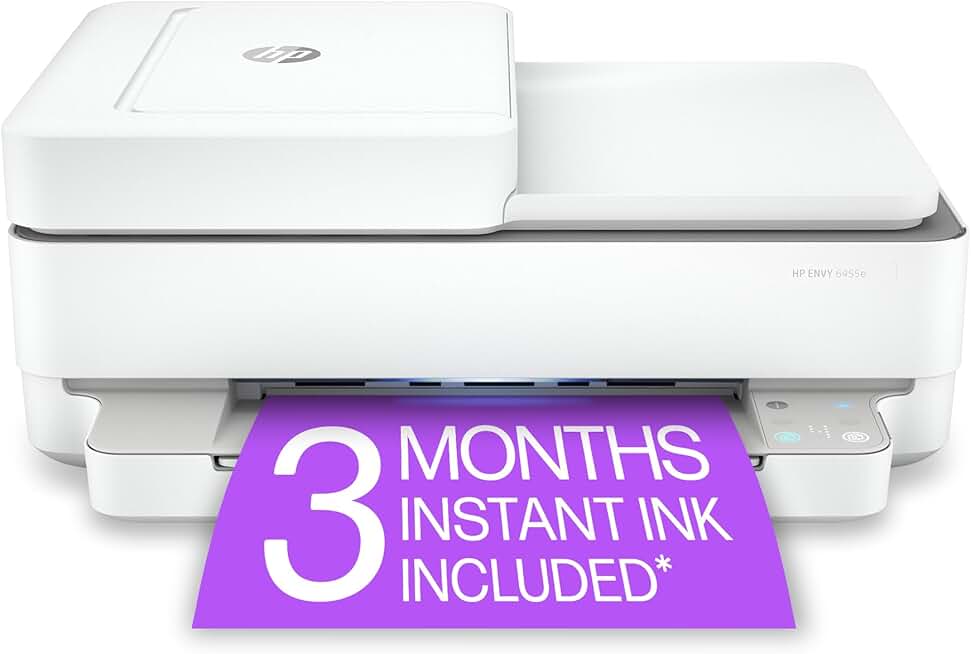
The HP Envy 6455e wireless color inkjet printer stands out as a compelling option for home users seeking an all-in-one solution. This review delves deep into its capabilities, performance, and overall value, particularly focusing on the Amazon Renewed offering. We will explore whether this versatile device truly delivers on its promise of easy setup and mobile printing for everyday tasks.
Quick Summary: HP Envy 6455e
Rating: 3.9/5 stars (Based on 6970 reviews)
Price: $199.00 USD
Key Pros:
- Excellent wireless connectivity and mobile printing via HP Smart app.
- Includes 3 months of Instant Ink trial, offering significant ink savings.
- Automatic duplex printing saves paper and time.
- Compact and aesthetically pleasing design fits well in home environments.
Key Cons:
- Lacks an Automatic Document Feeder (ADF) for multi-page scanning/copying.
- Print speeds are average, which might not suit high-volume users.
- Reliance on HP+ and Instant Ink can limit third-party cartridge use.
Table of Contents
HP Envy 6455e Overview
The HP Envy 6455e is an all-in-one wireless color inkjet printer designed specifically for home and small home office environments. It combines printing, scanning, and copying capabilities into a single, compact unit. This model is part of HP’s ‘e’ series, which signifies its integration with HP+ and eligibility for the Instant Ink subscription service.
As an Amazon Renewed product, the HP Envy 6455e offers a cost-effective way to acquire a high-quality printer. Amazon Renewed items are pre-owned products that have been professionally inspected, tested, and cleaned by qualified suppliers. They are guaranteed to work and look like new, backed by the 90-day Amazon Renewed Guarantee. This makes it an appealing option for budget-conscious consumers.
The primary target audience for the HP Envy 6455e includes families, students, and individuals with moderate printing needs. Its emphasis on wireless connectivity and mobile printing solutions caters to modern households where devices like smartphones and tablets are primary sources for documents and photos. The printer’s sleek, white design also ensures it blends seamlessly into various home decors.
A key aspect of the HP Envy 6455e is its deep integration with HP’s ecosystem, particularly HP+ and Instant Ink. HP+ is a smart printing system that keeps your printer up-to-date and ready to print from virtually anywhere. It requires an internet connection, genuine HP ink cartridges, and offers benefits like advanced features in the HP Smart app and the included Instant Ink trial.
The Instant Ink program is a subscription service that delivers ink to your door before you run out, based on pages printed, not cartridges used. The 6455e typically comes with a 3-month trial, which can be a significant cost-saver for users who print regularly. This service aims to simplify ink management and potentially reduce overall printing costs, although it does require an ongoing commitment.
Performance-wise, the HP Envy 6455e is built for reliability and convenience rather than raw speed or heavy-duty commercial use. It handles everyday documents, reports, and occasional photo prints with adequate quality. The automatic duplex printing feature is a standout, allowing for efficient two-sided printing without manual intervention, which is a common desire for home users.
The printer’s setup process is streamlined through the HP Smart app, guiding users step-by-step from unboxing to connecting to a Wi-Fi network. This user-friendly approach is crucial for home users who may not have extensive technical knowledge. Overall, the HP Envy 6455e positions itself as a practical and accessible printing solution for the modern home, balancing features with affordability, especially in its renewed form.
Understanding the nuances of its features, particularly the HP+ and Instant Ink requirements, is vital for potential buyers. While these programs offer convenience and potential savings, they also introduce specific dependencies. This review aims to provide a comprehensive look at these aspects, helping you decide if the renewed HP Envy 6455e is the right fit for your printing needs.
HP Envy 6455e Key Features & Specs
The HP Envy 6455e is packed with features designed to enhance the home printing experience. Understanding these specifications is crucial to determining if this printer aligns with your specific requirements. We will break down its core functionalities and discuss their practical implications for daily use.
Print, Scan, Copy Functionality
As an all-in-one device, the HP Envy 6455e handles the three essential office functions: printing, scanning, and copying. The print resolution is sufficient for crisp text documents and vibrant color graphics, typically up to 4800 x 1200 optimized dpi for color printing from a computer on selected HP photo papers. This ensures that school reports, family photos, and everyday documents look sharp and professional.
Scanning capabilities are robust, allowing users to digitize documents and photos with ease. The flatbed scanner is ideal for delicate items, books, or single sheets. While it lacks an Automatic Document Feeder (ADF), which is common in this price segment, manual scanning for occasional multi-page documents is straightforward through the HP Smart app. Copying functions mirror the scanning and printing, offering basic color and black-and-white duplication directly from the printer or via the app.
Wireless Connectivity and Mobile Printing
One of the most significant advantages of the HP Envy 6455e is its advanced wireless connectivity. It supports dual-band Wi-Fi, which provides a more stable and faster connection compared to single-band options. This robust connection minimizes drops and ensures seamless printing from various devices across your home network.
Mobile printing is exceptionally easy thanks to compatibility with Apple AirPrint and Mopria, allowing direct printing from compatible smartphones and tablets without installing additional drivers. The HP Smart app further enhances this experience, providing remote printing capabilities, printer status monitoring, and access to scanning tools directly from your mobile device. You can print documents from cloud storage, scan directly to your phone, and even set up the printer initially using the app.
HP+ Smart Printing System & Instant Ink
The ‘e’ in 6455e signifies its integration with HP+, a smart printing system that offers several benefits. When activated, HP+ ensures your printer is always connected, secure, and ready to print from anywhere. It requires an internet connection and the exclusive use of genuine HP ink cartridges for the life of the printer. In return, users receive a 3-month trial of HP Instant Ink, which is a subscription service that delivers ink to your door based on the number of pages you print each month.
Instant Ink is designed to save users money and hassle by eliminating the need to constantly monitor ink levels or rush to the store. The printer automatically orders ink when it detects low levels, and cartridges are shipped directly to you. This model is particularly beneficial for those who print a consistent volume of pages, regardless of whether they are black and white or color, as pricing is based on pages, not ink consumption. The initial 3-month trial allows users to experience this convenience firsthand.
Automatic Duplex Printing
The inclusion of automatic duplex printing is a highly practical feature for home users. This allows the printer to automatically print on both sides of the paper, reducing paper consumption and saving time. For printing multi-page documents or reports, this feature is invaluable for environmental consciousness and efficiency. It distinguishes the 6455e from many entry-level printers that only offer manual duplexing.
Print Speed and Paper Handling
The HP Envy 6455e offers respectable print speeds for a home inkjet printer. It typically prints black documents at around 10 pages per minute (ppm) and color documents at about 7 ppm. While not the fastest on the market, these speeds are perfectly adequate for casual home use, school assignments, and light office tasks. For comparison, higher-end office printers can reach 20-30 ppm, but they come at a significantly higher price point.
The input tray holds approximately 100 sheets of plain paper, which is standard for a home printer. It also supports various paper types and sizes, including photo paper, envelopes, and cardstock, offering versatility for different printing needs. The output tray can hold about 25 sheets. While there is no dedicated photo tray, the main tray can be adjusted for photo paper sizes.
Compact Design and Intuitive Interface
Measuring approximately 17.02 x 14.21 x 6.80 inches and weighing around 12.83 pounds, the HP Envy 6455e boasts a compact footprint. Its sleek, white design is modern and unobtrusive, making it easy to fit into tight spaces on a desk or shelf. The control panel is minimalist, featuring a few essential buttons and a simple LED display that provides basic status information and error codes, keeping the user experience straightforward and uncluttered.
For more detailed control and settings, the HP Smart app serves as the primary interface. This app provides a comprehensive dashboard for managing print jobs, checking ink levels, performing maintenance, and accessing advanced features. The combination of physical buttons for quick actions and the app for deeper control ensures a user-friendly experience for all types of tasks.
Pros & Cons
Every product has its strengths and weaknesses, and the HP Envy 6455e is no exception. A balanced perspective is essential for making an informed purchase decision. Here, we delve into the key advantages and potential drawbacks of this wireless all-in-one printer, especially considering its renewed status.
Pros of the HP Envy 6455e
- Exceptional Wireless Connectivity: The dual-band Wi-Fi ensures a stable and reliable connection, minimizing frustrating disconnections. This is critical for seamless mobile printing and printing from multiple devices around the home. Users can confidently print from their laptops, smartphones, and tablets without needing to be tethered by cables.
- User-Friendly HP Smart App: The HP Smart app is a standout feature, simplifying setup, printing, scanning, and monitoring. Its intuitive interface allows users to manage their printer remotely, check ink levels, order supplies, and access various printables. This app makes the entire printing process remarkably accessible, even for less tech-savvy individuals.
- Automatic Duplex Printing: The ability to automatically print on both sides of a page is a significant advantage. This feature helps conserve paper, reduce environmental impact, and is highly convenient for printing multi-page documents or reports. It’s a premium feature often found in more expensive models, making its inclusion here a great value proposition.
- Instant Ink Eligibility and Trial: The 3-month Instant Ink trial is a compelling offer, providing a worry-free ink supply based on page count. This can lead to substantial savings on ink costs for many users, as it eliminates the need to buy expensive cartridges individually. The convenience of having ink delivered automatically directly to your door is also a major plus.
- Compact and Aesthetic Design: With its sleek white finish and small footprint, the HP Envy 6455e integrates well into any home or small office environment. It doesn’t take up excessive desk space, making it suitable for apartments or areas where space is at a premium. The modern design is visually appealing and unobtrusive.
- Amazon Renewed Value: Opting for an Amazon Renewed HP Envy 6455e provides excellent value for money. These units are thoroughly inspected and tested to perform like new, offering a significant discount compared to a brand-new printer. The 90-day Amazon Renewed Guarantee provides peace of mind, ensuring quality and functionality.
Cons of the HP Envy 6455e
- Absence of Automatic Document Feeder (ADF): A notable drawback for some users is the lack of an ADF. This means that scanning or copying multi-page documents requires manual placement of each page on the scanner glass, which can be time-consuming and inconvenient. For users who frequently process multi-page documents, this could be a deal-breaker.
- Average Print Speeds: While adequate for most home users, the print speeds of approximately 10 ppm for black and 7 ppm for color are not particularly fast. Those with high-volume printing needs or tight deadlines might find these speeds a bit slow, leading to longer wait times for larger print jobs. It’s designed for casual, not rapid, output.
- HP+ and Instant Ink Dependency: The benefits of HP+ and Instant Ink come with a requirement to use only genuine HP ink cartridges for the life of the printer. This limits the option to use third-party or refilled cartridges, which can sometimes be cheaper. Users who prefer more flexibility with their ink choices might find this restrictive after the trial period.
- Potential for Connectivity Issues: While dual-band Wi-Fi is generally reliable, like all wireless devices, the HP Envy 6455e can occasionally experience connectivity issues depending on router quality, network congestion, or printer placement. Troubleshooting these issues might require basic network knowledge or reliance on HP support.
- Photo Print Quality Limitations: While capable of printing decent casual photos, the HP Envy 6455e is not designed for professional-grade photo printing. Enthusiast photographers seeking gallery-quality prints might find the color accuracy and detail lacking compared to dedicated photo printers. It’s best suited for everyday family photos rather than fine art prints.
- Limited Paper Capacity: A 100-sheet input tray is standard for home printers but might be insufficient for users who print in larger batches. Frequent refilling of the paper tray can become a minor annoyance for those with higher print volumes. There is also no separate photo paper tray, requiring manual swapping for different media types.
Weighing these pros and cons is essential. For many home users, the convenience, features, and value offered by the renewed HP Envy 6455e will outweigh its limitations. However, those with specific high-volume or specialized needs might need to consider alternatives.
Who Should Buy the HP Envy 6455e?
Determining if the HP Envy 6455e is the right printer for you involves evaluating your specific printing habits and needs. This section aims to identify the ideal user profiles for this particular model, as well as those who might be better served by an alternative. Understanding your requirements is key to a satisfying purchase, especially for a renewed product.
Ideal Users for the HP Envy 6455e
- Home Users with Occasional Printing Needs: If you primarily print documents for school, recipes, travel itineraries, or occasional photos, the HP Envy 6455e is an excellent fit. Its moderate print speeds and paper capacity are perfectly adequate for light to medium usage, preventing overspending on features you won’t utilize.
- Students and Families: This printer is well-suited for households with students who need to print assignments, research papers, or creative projects. Its all-in-one functionality also allows for scanning old photos or copying documents for various family needs. The mobile printing feature is particularly convenient for students on the go.
- Individuals Seeking Wireless Convenience: For anyone who values the freedom of printing from any device and any room, the HP Envy 6455e’s robust dual-band Wi-Fi and HP Smart app integration are major draws. It simplifies the printing process by eliminating the need for physical connections, making it highly adaptable to modern, connected homes.
- Budget-Conscious Buyers Looking for Value: As an Amazon Renewed product, the HP Envy 6455e offers significant savings without compromising on quality or functionality. It’s a smart choice for those who want a reliable, feature-rich printer at a more accessible price point, backed by Amazon’s renewed guarantee.
- Users Interested in Instant Ink: If the idea of automatic ink delivery and predictable monthly ink costs appeals to you, this printer is an excellent gateway. The included 3-month trial allows you to experience the convenience and potential savings of the Instant Ink program firsthand, helping you decide if it aligns with your long-term printing strategy.
- Small Home Offices with Light Document Needs: For very small home offices that primarily deal with digital documents but occasionally need to print invoices, reports, or scan receipts, the 6455e can serve adequately. Its compact size means it won’t dominate a small workspace, and its wireless capabilities support a flexible setup.
Who Should Consider Alternatives?
- Heavy Volume Users: If you print hundreds of pages weekly or run a busy small business, the HP Envy 6455e’s average print speeds and 100-sheet paper capacity will likely be insufficient. You would be better off with a laser printer or a higher-end inkjet designed for volume, such as an HP OfficeJet Pro or an EcoTank model.
- Users Requiring an Automatic Document Feeder (ADF): For individuals who frequently scan or copy multi-page documents, the absence of an ADF on the 6455e will be a significant inconvenience. Consider models that explicitly state they include an ADF to save considerable time and effort.
- Professional Photographers or Graphic Designers: While the 6455e can print decent photos, it’s not optimized for professional-grade photo output. If color accuracy, wide color gamut, and archival quality are paramount, a dedicated photo printer or a higher-end professional inkjet would be a more suitable investment.
- Those Averse to Ink Subscriptions: If you prefer to buy ink cartridges as needed, use third-party options, or refill your own, the HP+ and Instant Ink requirements of the 6455e will be a limitation. These programs lock you into using genuine HP ink, which might not align with every user’s preferences for ink purchasing.
- Users Needing Advanced Office Features: For features like faxing, Ethernet connectivity, or larger touchscreen displays, the HP Envy 6455e is too basic. Small businesses with more complex networking or communication needs should look for dedicated office-oriented all-in-one printers.
In summary, the HP Envy 6455e excels as a versatile and affordable home printer for moderate use. Its strengths lie in wireless connectivity, ease of use, and the potential for ink savings through Instant Ink. However, its limitations in speed, paper handling, and the lack of an ADF mean it’s not a one-size-fits-all solution. Carefully consider your daily printing demands before committing to this renewed model.
FAQ about the HP Envy 6455e
Here are answers to some of the most frequently asked questions regarding the HP Envy 6455e wireless color inkjet printer, providing clarity on its functionality and the Amazon Renewed experience.
Q1: What does “Amazon Renewed” mean for this printer?
A: An Amazon Renewed HP Envy 6455e means the printer is a pre-owned product that has been professionally inspected, tested, and cleaned by an Amazon-qualified supplier. It is guaranteed to work and look like new, offering a more sustainable and cost-effective option than buying new. These products come with the 90-day Amazon Renewed Guarantee, ensuring your satisfaction.
The renewal process typically involves a full diagnostic test, replacement of any defective parts, a thorough cleaning, and repackaging. This ensures that when you receive your renewed printer, it functions identically to a brand-new unit, making it a reliable choice for budget-conscious consumers.
Q2: Is the HP Envy 6455e compatible with non-HP ink cartridges?
A: No, if you activate HP+, the HP Envy 6455e is designed to work exclusively with genuine HP ink cartridges. HP+ is a smart printing system that requires the use of original HP ink for the life of the printer to maintain its advanced features and benefits, including the Instant Ink service. Using third-party cartridges may void your HP+ benefits and potentially cause compatibility issues or poor print quality.
This is a crucial point for potential buyers to understand. While some older HP models might tolerate third-party inks, the ‘e’ series printers with HP+ are designed to enforce the use of genuine HP consumables. This ensures optimal performance and reliability, but it also means a commitment to HP’s ink ecosystem.
Q3: How difficult is it to set up the HP Envy 6455e?
A: Setting up the HP Envy 6455e is generally very easy and user-friendly. The process is primarily guided by the HP Smart app, which you download to your smartphone or tablet. The app provides step-by-step instructions from unboxing, connecting to your Wi-Fi network, to installing the ink cartridges. Most users report a smooth setup experience that takes less than 15-20 minutes.
The app also helps with registering for HP+ and the Instant Ink trial. For those who prefer a more traditional computer-based setup, HP’s website offers drivers and setup guides. However, the mobile app is the recommended and most streamlined method, reflecting HP’s focus on modern connectivity and ease of use.
Q4: Can I print photos with good quality on this printer?
A: The HP Envy 6455e can print good-quality photos for casual use and family albums. It produces vibrant colors and decent detail on appropriate photo paper. However, it is not a professional photo printer. If you require gallery-quality prints, extremely precise color matching, or large-format photo printing, you might find its capabilities somewhat limited compared to dedicated photo printers with more ink cartridges and advanced color management.
For everyday snapshots, school projects requiring images, or printing photos to share with family, the quality is certainly acceptable. Just manage expectations; it’s a versatile all-in-one, not a specialized photo lab in a box. Using genuine HP photo paper will yield the best results from this printer.
Q5: What is HP Instant Ink, and how does it work with the 6455e?
A: HP Instant Ink is a subscription service that delivers ink to your door based on the number of pages you print each month, not the amount of ink you use. The HP Envy 6455e automatically monitors your ink levels and orders new cartridges when they’re running low, ensuring you never run out. Your subscription includes ink, shipping, and recycling.
With the 6455e, you typically get a 3-month trial of Instant Ink upon activation of HP+. After the trial, you choose a plan based on your estimated monthly page usage. This system aims to save you money and provide convenience, as printing a full-color photo costs the same as a single line of text. It’s a great option for those with consistent printing needs who want to avoid the hassle and often higher cost of buying individual cartridges.
Q6: Does the HP Envy 6455e have an Automatic Document Feeder (ADF)?
A: No, the HP Envy 6455e does not feature an Automatic Document Feeder (ADF). This means that for scanning or copying multi-page documents, you will need to manually place each page onto the flatbed scanner glass. This can be a significant consideration for users who frequently need to digitize or duplicate multi-page reports, contracts, or presentations. If an ADF is a crucial feature for your workflow, you would need to look at other HP Envy or OfficeJet models that specifically include this functionality.
Q7: What kind of warranty comes with an Amazon Renewed HP Envy 6455e?
A: An Amazon Renewed HP Envy 6455e comes with the Amazon Renewed Guarantee, which typically provides a 90-day period during which you can return the product if it does not work as expected. This guarantee ensures that if the product is not in satisfactory condition or fails within this period, you are eligible for a replacement or a full refund. This policy adds a layer of confidence when purchasing renewed electronics, mitigating the risks often associated with buying pre-owned items.
It’s important to check the specific terms and conditions on the Amazon product page at the time of purchase, as policies can sometimes vary. This guarantee is a testament to Amazon’s commitment to the quality and reliability of its renewed product offerings.
Q8: Is this printer suitable for a small home office?
A: The HP Envy 6455e can be suitable for a small home office, provided the printing volume is light to moderate and does not require an Automatic Document Feeder (ADF). Its wireless capabilities, mobile printing, and all-in-one functions are beneficial for general office tasks like printing invoices, scanning documents, or making occasional copies. However, for high-volume printing, frequent multi-page scanning, or advanced networking features, a more robust office-oriented printer would be a better choice. It shines in environments where versatility and space-saving are prioritized over sheer speed and heavy-duty functions.
Final Verdict
The HP Envy 6455e, particularly in its Amazon Renewed form, presents a compelling package for the right user. It is a highly capable all-in-one wireless inkjet printer that excels in convenience and ease of use, making it a strong contender for home environments and very light home office duties. The seamless wireless connectivity, intuitive HP Smart app, and automatic duplex printing are significant advantages that enhance the overall user experience.
The integration with HP+ and the Instant Ink program offers a modern approach to ink management, potentially leading to considerable cost savings and eliminating the hassle of running out of ink. The included 3-month Instant Ink trial provides an excellent opportunity to experience these benefits firsthand. As a renewed product, it delivers exceptional value, offering near-new functionality at a reduced price, backed by Amazon’s guarantee.
However, it is not without its limitations. The absence of an Automatic Document Feeder (ADF) means that users who frequently scan or copy multi-page documents will find the manual process cumbersome. Its average print speeds are suitable for occasional use but will not satisfy high-volume requirements. Furthermore, the commitment to genuine HP ink cartridges through HP+ might not appeal to everyone.
For families, students, or individuals who need a reliable, affordable, and easy-to-use printer for everyday tasks, occasional photos, and light document management, the renewed HP Envy 6455e is undoubtedly worth considering. It strikes an excellent balance between features, performance, and price, providing a modern printing solution that integrates well into a connected home. Just ensure your usage patterns align with its strengths and acknowledge its specific design considerations.
Ultimately, if you prioritize wireless convenience, mobile printing, and cost-effective ink management in a compact and stylish package, the HP Envy 6455e is an outstanding choice. Its renewed status makes it an even smarter investment for those seeking quality without the premium price tag. For more detailed specifications, you can visit the official HP Printer Compare page. Also, learn more about the quality standards of refurbished products on the Amazon Renewed information page.