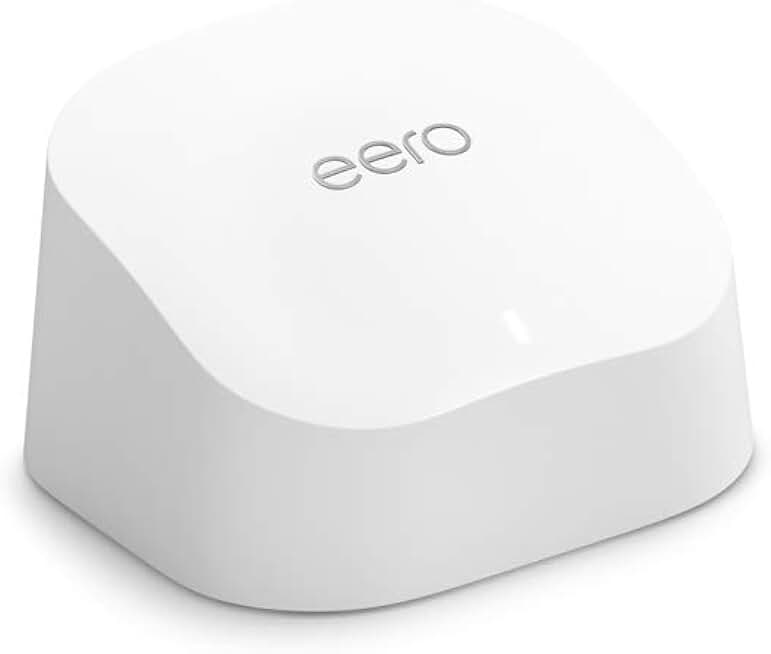
The world of home networking can be complex, but a reliable mesh WiFi system simplifies everything. In this comprehensive review, we dive deep into the Amazon eero 6 router, a device designed to bring fast, consistent internet to every corner of your home. We’ll explore its capabilities, performance, and overall value, especially considering its “Like-New” Amazon Renewed status.
Quick Summary: Amazon eero 6 Router
The Amazon eero 6 router offers a compelling blend of performance, simplicity, and value, particularly when purchased as a renewed unit. It provides robust whole-home coverage and supports impressive speeds, making it an excellent choice for many households.
- Rating: 4.5/5 Stars
- Price: ~$74.99 (for a single renewed unit)
- Key Pros:
- Exceptional whole-home WiFi coverage, eliminating dead zones.
- Incredibly easy setup and intuitive management via the eero app.
- Reliable and consistent performance for streaming, gaming, and smart home devices.
- Key Cons:
- Limited advanced features compared to some high-end, pro-grade routers.
- Some advanced security and parental control features require an optional eero Secure subscription.
Table of Contents
Amazon eero 6 Router Overview
The Amazon eero 6 router represents a significant step forward in home mesh networking, particularly for those seeking simplicity and robust performance. As part of the eero family, it focuses on delivering consistent, fast Wi-Fi throughout your entire living space, eliminating the frustrating dead spots common with traditional routers.
This particular unit, being an Amazon Renewed product, offers an attractive entry point into mesh WiFi technology at a reduced cost. “Like-New” means it has been professionally inspected, tested, and cleaned by Amazon-qualified suppliers, ensuring it works and looks like new.
The eero 6 utilizes Wi-Fi 6 (802.11ax) technology, which is designed to handle more devices and provide greater efficiency compared to older Wi-Fi 5 systems. This makes it ideal for modern smart homes filled with numerous connected gadgets, from smart speakers to security cameras.
A single eero 6 unit is rated to cover up to 1,500 square feet, making it suitable for apartments, smaller homes, or as an extension to an existing eero system. For larger homes, additional eero 6 units or beacons can be added to create a seamless, expansive mesh network.
Setup is a hallmark of the eero experience, guided entirely through a user-friendly mobile app. This removes the complexity often associated with network configuration, allowing even novice users to get their system up and running in minutes.
The eero 6 router prioritizes security, offering automatic software updates that patch vulnerabilities and introduce new features. This proactive approach to network maintenance ensures your home network remains protected against evolving online threats without requiring manual intervention.
Furthermore, eero systems are known for their TrueMesh technology, which intelligently routes traffic to avoid congestion and ensure optimal performance. This adaptive routing helps maintain high speeds and low latency, crucial for activities like online gaming and 4K video streaming.
While the eero 6 is a dual-band router, it efficiently manages both 2.4 GHz and 5 GHz frequencies to provide the best connection for each device. This automatic band steering simplifies device connectivity, as you only see one network name and your devices automatically connect to the optimal band.
Considering the strong performance and user-friendly design, the Amazon eero 6 router is a highly recommended option for those looking to upgrade their home network. Its renewed status makes it an even more compelling value proposition, offering premium performance without the premium price tag.
Amazon eero 6 Router Key Features & Specs
The Amazon eero 6 router is packed with features designed to deliver a superior WiFi experience. Understanding these specifications helps in appreciating its capabilities and how it stands out in the crowded mesh networking market. Let’s delve into the core aspects that make this router a powerful choice.
Wi-Fi 6 (802.11ax) Technology
The eero 6 incorporates the latest Wi-Fi 6 standard, which offers significant improvements over previous generations. This technology provides faster speeds, better efficiency, and increased capacity, crucial for homes with many connected devices.
Wi-Fi 6 is designed to handle network congestion more effectively, ensuring that each device gets a fair share of bandwidth. This means smoother streaming, faster downloads, and more responsive online gaming, even when multiple users are active.
Dual-Band Connectivity
The eero 6 operates on both the 2.4 GHz and 5 GHz bands. It intelligently steers devices to the optimal band for their needs, ensuring the best possible connection without manual intervention from the user.
The 2.4 GHz band offers wider coverage and better penetration through walls, ideal for smart home devices. The 5 GHz band provides faster speeds over shorter distances, perfect for high-bandwidth applications like video streaming and gaming.
TrueMesh Technology
eero’s proprietary TrueMesh technology is the backbone of its mesh networking capabilities. It intelligently routes network traffic to avoid interference and congestion, ensuring a fast and reliable connection to every corner of your home.
This adaptive routing capability means your devices are always connected to the strongest possible signal. It dynamically adjusts the network path to maintain optimal performance, even if one eero unit goes offline or experiences interference.
Coverage and Capacity
A single Amazon eero 6 router unit is designed to cover up to 1,500 square feet, providing ample range for many residential setups. It can also connect over 75 devices simultaneously without a noticeable drop in performance, thanks to its Wi-Fi 6 capabilities.
For larger homes, additional eero 6 units or eero 6 Extenders (beacons) can be seamlessly integrated into the existing network. This modular approach allows users to scale their WiFi coverage precisely to their home’s needs.
Easy Setup and Management
One of eero’s most praised features is its incredibly simple setup process. The entire installation and management are handled through the intuitive eero mobile app, available for both iOS and Android devices.
The app guides you step-by-step through the setup, from plugging in the unit to connecting your first device. Ongoing management, including guest networks, parental controls, and network insights, is also easily accessible within the app.
Integrated Smart Home Hub
The eero 6 includes a built-in Zigbee smart home hub, allowing it to connect directly to compatible smart home devices without needing a separate hub. This streamlines your smart home setup and reduces clutter.
This integration simplifies the management of Zigbee devices, allowing them to be controlled alongside your network settings within the eero app. It’s a convenient feature for users building or expanding their smart home ecosystem.
Security and Updates
eero places a strong emphasis on security, offering automatic over-the-air software updates to keep your network protected. These updates regularly introduce new features and security patches, ensuring your system remains up-to-date against emerging threats.
For enhanced security and parental control features, eero offers an optional subscription service called eero Secure. This provides advanced threat protection, content filtering, ad blocking, and detailed network activity reports.
Ports and Connectivity
The eero 6 router typically features two auto-sensing Gigabit Ethernet ports. One port is used to connect to your modem, while the other can be used for wired connections to devices like desktop computers, gaming consoles, or network-attached storage (NAS).
These physical ports ensure that devices requiring the most stable and fastest connections can bypass Wi-Fi altogether, providing maximum performance for critical applications. This flexibility is a key advantage for power users.
For more detailed technical specifications, you can always refer to the official eero website: eero.com.
Pros & Cons
Every product has its strengths and weaknesses, and the Amazon eero 6 router is no exception. Understanding these points helps potential buyers make an informed decision, weighing the benefits against any limitations to determine if it meets their specific needs.
Pros of the Amazon eero 6 Router
- Exceptional Whole-Home Coverage: The primary advantage of the eero 6, especially as part of a multi-unit system, is its ability to eliminate WiFi dead zones. It provides consistent and strong signal strength across large homes, ensuring connectivity in every room, basement, or attic. This is a game-changer for frustrating areas where WiFi previously struggled.
- Incredibly Easy Setup and Management: eero systems are renowned for their user-friendliness. The setup process, guided entirely by the intuitive eero app, takes mere minutes and requires no technical expertise. Managing your network, setting up guest access, or pausing internet for specific devices is equally straightforward within the app.
- Reliable and Consistent Performance: Thanks to TrueMesh technology and Wi-Fi 6, the eero 6 delivers stable and fast internet speeds. It intelligently optimizes network traffic, reducing latency and buffering for activities like 4K streaming, online gaming, and video conferencing. Users consistently report a noticeable improvement in network stability.
- Compact and Discreet Design: The eero 6 units are small, unobtrusive, and designed to blend seamlessly into any home decor. Unlike bulky traditional routers with external antennas, eero units are aesthetically pleasing, allowing them to be placed in optimal locations without being an eyesore.
- Automatic Updates for Security and Features: eero automatically pushes software updates, ensuring your network always has the latest security patches and new features. This hands-off approach to maintenance provides peace of mind, knowing your network is protected against evolving threats without manual intervention.
- Built-in Zigbee Smart Home Hub: The integration of a Zigbee hub is a significant convenience for smart home enthusiasts. It allows direct connection and control of compatible Zigbee devices, reducing the need for additional hubs and simplifying your smart home ecosystem.
- Excellent Value (Especially Renewed): Purchasing a “Like-New” Amazon eero 6 router offers outstanding value. You get the full performance and features of a new unit at a significantly reduced price, making advanced mesh WiFi accessible to a wider audience. The Amazon Renewed program provides confidence with its warranty.
- Scalability: The modular nature of the eero system means you can easily expand your network by adding more eero 6 units or beacons. This flexibility ensures your WiFi can grow with your home’s needs, whether you move to a larger space or simply want to extend coverage to an outdoor area.
Cons of the Amazon eero 6 Router
- Limited Advanced Features for Power Users: While the eero app excels in simplicity, it may lack the granular control and advanced configuration options that traditional high-end routers offer. Users looking for extensive port forwarding rules, VPN server capabilities, or highly customizable QoS (Quality of Service) settings might find it somewhat restrictive.
- Subscription Required for Premium Security: Basic security updates are free, but advanced features like threat detection, content filtering, and ad blocking fall under the optional eero Secure subscription. While not mandatory, some competitors offer similar features without an ongoing fee, which can be a consideration for budget-conscious users.
- Dual-Band Only (Not Tri-Band): The eero 6 is a dual-band router, meaning it has two radio bands (2.4 GHz and 5 GHz). Some higher-end mesh systems, like the eero Pro 6, are tri-band, featuring a dedicated third band for backhaul between mesh units. This dedicated backhaul can offer slightly better performance in very large homes or those with extremely high network traffic.
- Reliance on the Mobile App: While the app is a pro for ease of use, it’s also the sole method for setup and management. There’s no web interface for configuration, which might be a slight drawback for users who prefer a traditional browser-based management portal. This also means you need a smartphone or tablet to get started.
- Ethernet Ports are Limited: A single eero 6 unit typically comes with two Gigabit Ethernet ports. While sufficient for many, this might be limiting if you have multiple wired devices in one area, potentially requiring an additional Ethernet switch. Some competitor mesh units offer more ports.
Who Should Buy the Amazon eero 6 Router?
Deciding if the Amazon eero 6 router is the right fit for your home involves considering your specific networking needs, technical comfort level, and budget. This powerful yet simple mesh system caters to a broad audience, but it truly shines for certain types of users and household setups.
Homeowners with WiFi Dead Zones
If you constantly battle with inconsistent WiFi signals, dropped connections, or areas in your home where the internet simply doesn’t reach, the eero 6 is an ideal solution. Its mesh technology is specifically designed to blanket your entire home with strong, reliable WiFi, eliminating those frustrating dead spots.
This is particularly beneficial in multi-story homes, houses with thick walls, or properties with awkward layouts where a single traditional router struggles. Expanding coverage is as simple as adding more eero units.
Users Seeking Simplicity and Ease of Use
For those who find traditional router setups intimidating or overly complex, the eero 6 offers a breath of fresh air. The entire installation and management process is streamlined through a user-friendly mobile app, making it accessible even for those with minimal technical expertise.
You won’t need to delve into complex IP addresses or cryptic settings. The app guides you step-by-step, and daily management tasks are intuitive, from setting up a guest network to checking connected devices.
Households with Many Connected Devices
Modern homes are increasingly filled with smart devices, from thermostats and doorbells to smart speakers and light bulbs. The eero 6, with its Wi-Fi 6 technology, is built to handle a high density of connected devices (75+ devices) without sacrificing performance.
If your home is a hub for smart technology, gaming consoles, multiple streaming devices, and numerous laptops, the eero 6 can ensure all your gadgets stay connected and perform optimally without congestion or slowdowns.
Families Who Value Network Security and Parental Controls
While some advanced features require an eero Secure subscription, the eero 6 provides a solid foundation for network security with automatic updates. For families, the optional eero Secure offers robust parental controls, content filtering, and ad blocking, helping to create a safer online environment for children.
The peace of mind that comes with an automatically updated and protected network is a significant benefit, especially with the ever-increasing threats online. The ability to manage internet access for specific profiles or devices is also invaluable.
Budget-Conscious Buyers Looking for Premium Performance
Opting for an Amazon Renewed Amazon eero 6 router makes it an incredibly attractive proposition for those on a budget. You get the full performance and benefits of a new eero 6 unit at a reduced price, backed by Amazon’s Renewed Guarantee.
This allows you to experience top-tier mesh WiFi technology without the premium cost associated with brand-new devices. It’s an excellent way to get more bang for your buck.
Small to Medium-Sized Homes (or as an Expansion)
A single eero 6 unit is perfect for smaller homes, apartments, or as a central hub in a multi-unit system for medium to large homes. If you’re starting your mesh journey or looking to add another node to an existing eero network, this unit is a strong contender.
Its 1,500 sq. ft. coverage per unit is generous, and the ability to easily expand means it can adapt to almost any home size. Consider your home’s square footage and layout when deciding how many units you might need.
Ultimately, if you’re seeking a reliable, easy-to-manage, and highly performant mesh WiFi system that can handle the demands of a modern connected home, the Amazon eero 6 router is an excellent choice. Its value proposition is further enhanced by its availability as an Amazon Renewed product.
FAQ about Amazon eero 6 Router
Here are some frequently asked questions about the Amazon eero 6 router, providing further clarity on its functionality, setup, and compatibility. These answers address common concerns and help users make the most of their mesh WiFi system.
Q1: What does “Like-New” Amazon Renewed mean for the eero 6 router?
A: “Like-New” Amazon Renewed signifies that the eero 6 router has been professionally inspected, tested, and cleaned by Amazon-qualified suppliers. It is guaranteed to work and look like new, offering the same performance as a brand-new unit.
The product comes with the Amazon Renewed Guarantee, which means you can return it within 90 days of receipt if you are not satisfied. This program provides confidence in purchasing refurbished electronics at a lower price point.
Q2: Is the Amazon eero 6 router compatible with my existing modem?
A: Yes, the eero 6 router is designed to work with most existing modems provided by your Internet Service Provider (ISP). You simply connect the eero 6 to your modem using an Ethernet cable.
It acts as your primary WiFi router, broadcasting the network throughout your home, while your modem handles the connection to your ISP. This seamless integration makes upgrading your WiFi straightforward.
Q3: How many eero 6 units do I need for my home?
A: A single eero 6 router unit covers up to 1,500 square feet. For larger homes or those with multiple floors and dense construction, you may need additional eero 6 units or eero 6 Extenders (beacons).
A good rule of thumb is one unit for every 1,000-1,500 square feet, or one unit per floor in a multi-story home. The eero app can help you determine optimal placement during setup.
Q4: Does the eero 6 support Wi-Fi 6E?
A: No, the Amazon eero 6 router supports Wi-Fi 6 (802.11ax) but not Wi-Fi 6E. Wi-Fi 6E utilizes the 6 GHz band for even faster speeds and lower latency, while Wi-Fi 6 operates on the 2.4 GHz and 5 GHz bands.
While Wi-Fi 6E offers cutting-edge performance, Wi-Fi 6 is still a significant upgrade over older standards and provides excellent performance for most modern homes. The eero Pro 6E models offer the 6E capabilities if that’s a requirement.
Q5: Can I use eero 6 with other eero models?
A: Yes, all eero devices are compatible with each other, allowing you to mix and match different models to create a unified mesh network. For instance, you can use an eero 6 as your main router and add eero 5 (older generation) or eero Pro 6 units as extenders.
This flexibility allows you to customize your network based on specific needs and budget, leveraging the strengths of different eero generations. However, for best performance, it’s often recommended to use similar generation devices.
Q6: Is an eero Secure subscription necessary?
A: No, an eero Secure subscription is not necessary for the eero 6 router to function as a powerful mesh WiFi system. All core features, like whole-home coverage, fast speeds, and automatic updates, work without a subscription.
eero Secure is an optional service that provides additional premium features such as advanced security, parental controls, content filtering, and ad blocking. It’s a value-add for users who want enhanced protection and control over their network.
Q7: How does eero 6 handle guest networks?
A: The eero 6 allows you to easily create a separate guest network through the eero app. This network keeps your main network secure by isolating guest devices from your primary devices and files.
You can set a separate password for the guest network and even share it directly from the app. This feature is very convenient for visitors, ensuring your personal network remains private and secure.
Q8: Does the eero 6 collect my data?
A: eero states that it collects minimal data necessary to operate and improve its services, such as network performance data and diagnostic information. It does not track your online activities or sell your personal data to third parties.
You can review eero’s privacy policy for full details on data collection and usage. Transparency is a key focus for eero, and they aim to protect user privacy while providing effective network services.
For more general information on mesh networking, you can visit this Wikipedia page: Mesh Networking Explained.
Final Verdict
The Amazon eero 6 router stands out as an exceptional choice for anyone looking to upgrade their home WiFi experience. Its blend of cutting-edge Wi-Fi 6 technology, unparalleled ease of use, and robust mesh capabilities makes it a top contender in the home networking market.
The “Like-New” Amazon Renewed status of this particular unit further enhances its appeal, offering a significant cost saving without compromising on performance or reliability. You get the full benefits of a premium mesh system at a much more accessible price point, backed by Amazon’s guarantee.
For homeowners tired of WiFi dead zones, slow speeds, and complicated router setups, the eero 6 provides a seamless and powerful solution. Its ability to cover large areas, support numerous devices, and maintain consistent performance is truly impressive.
While power users might miss some deep-dive customization options, and premium security features require a subscription, these are minor trade-offs for the vast majority of users who prioritize simplicity and consistent connectivity. The built-in Zigbee hub is also a fantastic bonus for smart home enthusiasts.
In conclusion, if you’re seeking an ultimate mesh WiFi system that delivers on its promises of speed, coverage, and ease of use, the Amazon eero 6 router is undoubtedly worth the investment. It’s a smart, reliable, and future-ready choice for any modern connected home.