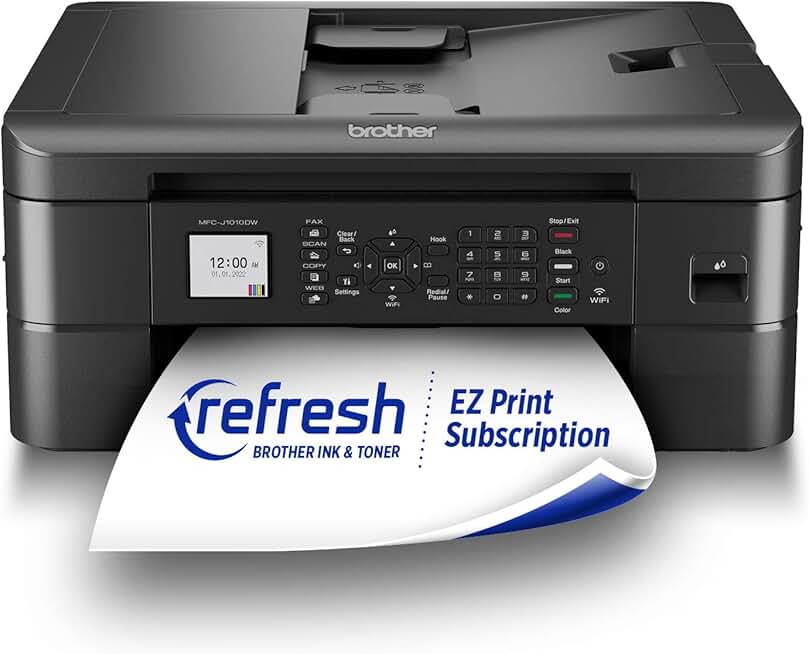
When it comes to finding a reliable and versatile printing solution for your home or small office, the Brother MFC-J1010DW Printer often stands out as a compelling option. This all-in-one wireless color inkjet device promises a blend of functionality, convenience, and affordability, especially when considering its capabilities like duplex printing and mobile connectivity. Our in-depth review will explore every facet of this printer to help you decide if it’s the right fit for your needs.
Quick Summary: Brother MFC-J1010DW Printer
Rating: 4.1/5 Stars (from 8959 reviews)
Price: ~$120.00 USD (at time of review)
Key Pros:
- Wireless & Mobile Connectivity: Seamless printing from various devices and cloud services.
- Automatic Duplex Printing: Saves paper and adds a professional touch to documents.
- Compact & User-Friendly Design: Fits well in small spaces and features an intuitive 1.8″ color display.
Key Cons:
- Ink Cartridge Costs: Replacements can be relatively expensive over time for high-volume users.
- No Automatic Document Feeder (ADF): Manual feeding required for multi-page scanning/copying.
Table of Contents
Brother MFC-J1010DW Printer Overview
The Brother MFC-J1010DW Printer is positioned as a versatile all-in-one solution designed to meet the diverse printing, scanning, copying, and faxing needs of modern households and small home offices. Its compact footprint ensures it won’t dominate your workspace, making it an ideal choice for environments where space is at a premium. This model aims to strike a balance between essential functionality and user convenience.
Brother has a strong reputation for producing reliable and cost-effective printing solutions, and the MFC-J1010DW continues this tradition. It’s built for users who require consistent performance for everyday tasks, from printing school assignments and personal documents to occasional color photos and professional reports. The intuitive design ensures that even less tech-savvy users can operate it with ease.
One of the standout aspects of the Brother MFC-J1010DW Printer is its commitment to wireless connectivity. In today’s interconnected world, the ability to print from various devices—be it a laptop, smartphone, or tablet—without the hassle of cables is paramount. This printer excels in this area, offering robust Wi-Fi capabilities that simplify the printing process for multiple users.
Beyond wireless, the inclusion of automatic duplex printing is a significant value-add for a printer in this price range. This feature allows the printer to automatically print on both sides of a page, effectively halving paper consumption and contributing to a more sustainable workflow. It’s an often-underestimated feature that can lead to substantial savings and a more professional output.
The 1.8-inch color display provides a straightforward interface for navigating the printer’s settings and functions. While not a large touchscreen, it’s perfectly adequate for managing print jobs, checking ink levels, and configuring wireless connections. Its simplicity contributes to the printer’s overall user-friendly appeal, reducing the learning curve for new owners.
Furthermore, the Brother MFC-J1010DW Printer boasts compatibility with Alexa, integrating seamlessly into smart home ecosystems. This allows for voice-activated printing commands, adding a layer of modern convenience. For busy individuals or families, being able to initiate print jobs with a simple voice command can be incredibly useful.
The printer’s EPEAT certification highlights its eco-friendly design and manufacturing processes. This means it meets specific environmental performance criteria, including energy efficiency and responsible material use. For consumers conscious about their ecological footprint, this certification provides an extra layer of assurance about the product’s sustainability.
Initial setup of the Brother MFC-J1010DW Printer is generally straightforward, guided by clear instructions and software prompts. Connecting to a wireless network and installing drivers typically takes only a few minutes, getting you up and running quickly. This ease of installation is a major plus for home users who may not have IT support readily available.
In terms of performance, the printer delivers respectable speeds for its class, ensuring that everyday print jobs are completed efficiently. While it may not compete with high-end business printers in terms of raw speed, its output quality for both text and graphics is more than sufficient for most home and small office applications. The overall design is practical, durable, and aesthetically pleasing enough to blend into most home decor.
Brother MFC-J1010DW Printer Key Features & Specifications
The Brother MFC-J1010DW Printer is packed with features designed to enhance productivity and convenience for its target audience. Understanding these specifications is crucial to appreciating its capabilities and how it might fit into your daily routine. This section delves into the core functionalities that make this printer a competitive option.
Wireless Connectivity and Mobile Printing
At the heart of the MFC-J1010DW’s appeal is its robust wireless connectivity. It supports 802.11b/g/n wireless networking, allowing for seamless integration into your home or office network without the clutter of cables. This enables printing from virtually any Wi-Fi-enabled device within range.
Mobile and cloud printing capabilities are extensive, including support for Brother Mobile Connect, Apple AirPrint, Mopria, and Wi-Fi Direct. These options provide unparalleled flexibility, enabling users to print documents and photos directly from their smartphones, tablets, or cloud storage services like Dropbox and Google Drive, even when away from their computer.
Automatic Duplex Printing
A significant advantage of the Brother MFC-J1010DW Printer is its automatic duplex (2-sided) printing feature. This functionality allows the printer to automatically flip pages and print on both sides, saving paper, reducing costs, and contributing to environmental sustainability. It’s an invaluable feature for reports, presentations, and everyday document printing.
Compact Design and Intuitive Display
With its compact dimensions, the MFC-J1010DW is designed to fit comfortably in smaller spaces, such as a home office desk or a shelf. Its sleek, modern aesthetic ensures it won’t look out of place in contemporary interiors. The thoughtful design extends to its user interface, centered around a clear 1.8-inch color display.
This LCD display, though not a touchscreen, provides easy navigation through menus and settings. Users can check ink levels, configure wireless settings, and initiate print jobs directly from the printer itself. The physical buttons accompanying the display are well-placed and responsive, ensuring a smooth user experience.
Print Speed and Quality
The Brother MFC-J1010DW Printer offers respectable print speeds for an inkjet in its category. It boasts speeds of up to 17 pages per minute (ppm) for black and white and 9.5 ppm for color, based on ISO/IEC 24734 standards. These speeds are more than adequate for typical home and small office printing volumes.
Print resolution reaches up to 6000 x 1200 dpi, ensuring crisp text and vibrant, accurate colors for both documents and photos. While not a dedicated photo printer, it produces high-quality images suitable for personal use and casual sharing. The print engine is optimized for clarity and detail across various media types.
Paper Handling and Ink System
The printer features a front-loading paper tray with a capacity of up to 150 sheets, accommodating various paper sizes up to legal (8.5″ x 14″). It also includes a single-sheet manual feed slot for specialty papers, envelopes, or thicker media. This flexibility in paper handling makes it suitable for diverse printing needs.
The MFC-J1010DW uses a 4-cartridge ink system (Cyan, Magenta, Yellow, Black), which means you only need to replace the color that runs out. This can be more economical than printers with tri-color cartridges. Brother offers standard and high-yield ink cartridges, allowing users to choose based on their printing volume and budget.
Alexa Compatibility and EPEAT Certification
Integration with Amazon Alexa allows for convenient voice-activated printing. Users can ask Alexa to print lists, reorder ink, or check ink levels, adding a futuristic touch to everyday tasks. This feature enhances the printer’s appeal for smart home enthusiasts and those looking for hands-free operation.
The EPEAT (Electronic Product Environmental Assessment Tool) certification signifies that the Brother MFC-J1010DW Printer meets stringent environmental criteria. This includes energy efficiency, reduced hazardous materials, and design for end-of-life recycling. It underscores Brother’s commitment to sustainability and provides peace of mind for eco-conscious consumers. More information on EPEAT can be found on the EPEAT official website.
Pros & Cons of the Brother MFC-J1010DW Printer
Every product has its strengths and weaknesses, and the Brother MFC-J1010DW Printer is no exception. A balanced perspective is essential for making an informed purchasing decision. Here, we delve into the notable advantages and potential drawbacks of this all-in-one inkjet printer.
Key Advantages (Pros)
Exceptional Wireless and Mobile Connectivity
One of the most significant strengths of the MFC-J1010DW is its comprehensive wireless and mobile printing capabilities. The ability to print effortlessly from smartphones, tablets, and laptops via Wi-Fi, AirPrint, Mopria, and Brother Mobile Connect is a huge convenience. This flexibility supports a modern, device-agnostic workflow, making it simple for everyone in a household or small office to print.
The setup for these connections is generally intuitive, allowing users to quickly integrate the printer into their digital ecosystem. This eliminates the need for constant cable connections and offers freedom in printer placement within the home or office. The convenience of cloud printing also means documents can be accessed and printed from virtually anywhere with an internet connection.
Automatic Duplex Printing for Efficiency
The inclusion of automatic two-sided printing is a major plus, especially at this price point. This feature not only conserves paper, leading to cost savings over time, but also contributes to a more professional presentation of documents. It’s an environmentally friendly option that streamlines the printing of multi-page reports and assignments.
Manual duplexing can be a tedious process, so having this automated capability significantly improves user experience and efficiency. For students or small businesses that print numerous documents, the paper savings alone can be substantial over the printer’s lifespan.
Compact Footprint and User-Friendly Interface
The printer’s sleek and compact design makes it an excellent choice for tight spaces, a common reality in many home offices and apartments. Its unobtrusive presence allows it to blend seamlessly into various environments without demanding excessive desk space. This thoughtful design is a practical benefit for many users.
The 1.8-inch color display, coupled with clearly labeled physical buttons, provides an accessible and intuitive control panel. Navigating through settings, checking status, and initiating tasks is straightforward, reducing frustration for users of all technical skill levels. The simplicity of the interface contributes to a positive overall user experience.
Affordable Initial Purchase Price
The Brother MFC-J1010DW Printer typically comes with an attractive upfront price, making it an accessible option for budget-conscious consumers. This initial affordability allows more users to access a multifunction device with advanced features like duplex printing and extensive wireless options without a significant investment.
Alexa Compatibility and EPEAT Certification
The integration with Amazon Alexa adds a layer of modern convenience, allowing for voice-activated commands. This smart home feature can streamline simple printing tasks and status checks. Furthermore, the EPEAT certification underscores Brother’s commitment to environmental responsibility, appealing to eco-conscious buyers.
Potential Drawbacks (Cons)
Ongoing Ink Cartridge Costs
While the initial purchase price is appealing, the ongoing cost of replacement ink cartridges can become a concern for high-volume users. Like many inkjet printers, the cost per page can add up, especially for color prints. Users with very frequent or large printing needs might find themselves replacing cartridges more often than desired.
It’s important for potential buyers to factor in the cost of consumables when evaluating the long-term value of the Brother MFC-J1010DW Printer. While individual cartridges are replaced, which is often more economical than tri-color cartridges, the overall expense for heavy printing can still be a consideration. Brother does offer high-yield options, which can mitigate this to some extent.
Lack of Automatic Document Feeder (ADF)
A notable omission for an all-in-one device is the absence of an Automatic Document Feeder (ADF). This means that for multi-page scanning or copying, users must manually place each page on the scanner glass. This can be time-consuming and inconvenient for tasks involving numerous pages.
For users who frequently scan or copy multi-page documents, the lack of an ADF might be a significant drawback. It requires more manual intervention and can slow down workflows that involve digitizing or duplicating lengthy reports or contracts. This is a common trade-off for compact and budget-friendly multifunction printers.
Modest Print Speeds for Heavy Use
While the print speeds (17 ppm black, 9.5 ppm color) are adequate for typical home and small office use, they might feel slow for environments with very high print volumes or urgent, large print jobs. Professional users accustomed to laser printer speeds might notice a difference, particularly with complex graphics or numerous color pages.
For casual or moderate printing, these speeds are perfectly acceptable, but it’s important to set realistic expectations. This printer is designed for general-purpose use rather than as a workhorse for a bustling corporate environment. Understanding your typical printing volume will help determine if these speeds are sufficient for your needs.
Who Should Buy the Brother MFC-J1010DW Printer?
The Brother MFC-J1010DW Printer is not a one-size-fits-all solution, but it excels for specific user profiles and environments. Understanding who this printer is best suited for can help you determine if its features align with your personal or professional requirements. It’s an ideal choice for those seeking a balance of functionality, convenience, and value.
Home Users and Families
For households with diverse printing needs, the MFC-J1010DW is an excellent fit. It handles everything from school projects and homework assignments to family photos and everyday document printing. Its wireless capabilities allow multiple family members to print from their own devices without hassle.
The automatic duplex printing feature is a boon for families looking to save on paper costs and reduce their environmental impact. Its compact size also means it won’t take up too much space in a busy home environment, easily fitting into a study nook, kitchen corner, or home office desk.
Small Home Office Owners and Freelancers
Individuals running a small business from home or working as freelancers will find the Brother MFC-J1010DW Printer a capable partner. It offers essential multifunctionality—printing, scanning, copying—needed for administrative tasks, client communications, and record-keeping.
The reliable wireless connectivity and mobile printing support are crucial for maintaining productivity in a dynamic work setting. While it lacks an ADF, for those who don’t frequently scan multi-page documents, its other features provide substantial value for the price. The ability to print professional-looking reports with duplex printing is also a significant advantage.
Students and Educators
Students often need a dependable printer for essays, research papers, and study materials. The MFC-J1010DW’s duplex printing helps manage textbook printing and note-taking efficiently, saving money on paper. Its compact design is perfect for dorm rooms or small student apartments.
Educators working from home or needing a personal printer for lesson plans and administrative tasks will appreciate its ease of use and wireless convenience. The ability to print from various devices makes it versatile for preparing classroom materials or personal academic work.
Users Prioritizing Space and Wireless Convenience
If your living or working space is limited, the compact design of this Brother MFC-J1010DW Printer makes it an attractive option. It delivers a full suite of features without demanding a large footprint. This is particularly appealing for urban dwellers or anyone with a minimalist aesthetic.
For those who value the freedom of printing from anywhere in their home without being tethered by cables, the robust wireless and mobile printing options are paramount. This printer liberates you from device-specific printing stations, enhancing overall convenience and flexibility.
Eco-Conscious Consumers and Smart Home Enthusiasts
The EPEAT certification of the MFC-J1010DW makes it a strong contender for environmentally conscious buyers. Its energy-efficient operation and sustainable design aspects align with a desire to reduce one’s ecological footprint. This commitment to green standards is a significant differentiator.
Furthermore, its compatibility with Amazon Alexa appeals to those who are building or already have a smart home ecosystem. The ability to control printing tasks with voice commands adds a layer of modern convenience and integration that many tech-savvy users will appreciate.
Budget-Conscious Buyers with Moderate Printing Needs
Given its affordable initial price point, the Brother MFC-J1010DW Printer is an excellent choice for buyers who need a reliable multifunction device but don’t want to break the bank. It offers a strong feature set for the investment, making it a high-value proposition.
However, it’s important that these users have moderate printing volumes. While the individual cartridge system helps manage ink costs, very heavy printing could make the long-term running expenses less competitive than ink tank printers. For typical home or small office use, where printing is consistent but not excessive, it offers a cost-effective solution.
In summary, if you’re looking for a compact, wireless, multifunction inkjet printer that offers automatic duplexing and smart home integration at an attractive price, and your scanning/copying needs don’t heavily rely on an ADF, the Brother MFC-J1010DW Printer is likely an excellent match. It delivers a solid performance for everyday tasks and provides modern conveniences that enhance the user experience.
FAQ about the Brother MFC-J1010DW Printer
Here are some frequently asked questions about the Brother MFC-J1010DW Printer, providing further insights into its functionality and user experience. These answers aim to address common concerns and clarify how this printer performs in various scenarios.
Q1: Is the Brother MFC-J1010DW Printer easy to set up for wireless printing?
A: Yes, the Brother MFC-J1010DW Printer is designed for straightforward wireless setup. The included quick setup guide walks you through connecting to your home Wi-Fi network. You can typically use the printer’s 1.8-inch color display to enter your network details or use the Brother Mobile Connect app for a guided setup from your smartphone. Many users report having it connected and printing within minutes.
Q2: What kind of ink cartridges does the Brother MFC-J1010DW Printer use, and are they expensive?
A: This printer uses a 4-cartridge ink system, meaning it has separate cartridges for black (LC401BK) and individual colors (LC401C, LC401M, LC401Y). This is generally more economical than printers with tri-color cartridges, as you only replace the specific color that runs out. Brother offers both standard and high-yield (LC401XL) cartridges. While individual cartridge prices are reasonable, the overall cost for very high-volume printing can add up over time, which is common for inkjet printers.
Q3: Can I print directly from my smartphone or tablet with this printer?
A: Absolutely. The Brother MFC-J1010DW Printer supports a wide range of mobile printing options. This includes Brother Mobile Connect, Apple AirPrint for iOS devices, and Mopria Print Service for Android. You can also use Wi-Fi Direct, which allows your mobile device to connect directly to the printer without needing a router. These features offer immense flexibility for printing documents and photos on the go.
Q4: Does the MFC-J1010DW have an Automatic Document Feeder (ADF) for scanning and copying?
A: No, the Brother MFC-J1010DW Printer does not feature an Automatic Document Feeder (ADF). This means that for multi-page scanning or copying tasks, you will need to manually place each page onto the flatbed scanner one by one. While this might be a minor inconvenience for occasional use, it can be a significant drawback for users who frequently need to scan or copy lengthy documents.
Q5: What is automatic duplex printing, and how does it benefit me?
A: Automatic duplex printing refers to the printer’s ability to automatically print on both sides of a sheet of paper without manual intervention. This feature is highly beneficial as it helps you save paper, thereby reducing costs and environmental impact. It also gives your documents a more professional and polished look, making it ideal for reports, presentations, and double-sided handouts.
Q6: How does the Alexa compatibility work with the Brother MFC-J1010DW Printer?
A: The Brother MFC-J1010DW Printer can be integrated with Amazon Alexa, allowing you to use voice commands for certain printing tasks. You can ask Alexa to print pre-formatted documents like shopping lists, calendars, or puzzles. Additionally, you can use voice commands to check your printer’s ink levels or reorder ink supplies directly through Amazon. This adds a layer of hands-free convenience for smart home users.
Q7: Is the Brother MFC-J1010DW Printer suitable for heavy-duty printing in a busy office?
A: The Brother MFC-J1010DW Printer is primarily designed for home use and small home offices with moderate printing volumes. While it offers reliable performance for everyday tasks, its print speeds (17 ppm black, 9.5 ppm color) and ink cartridge system are not optimized for heavy-duty, continuous printing found in busy corporate environments. For very high volumes, a laser printer or an ink tank system printer might be a more cost-effective and efficient long-term solution.
Q8: What does the EPEAT certification mean for this printer?
A: EPEAT (Electronic Product Environmental Assessment Tool) is a global rating system for greener electronics. The EPEAT certification for the Brother MFC-J1010DW Printer indicates that it meets specific environmental performance criteria, including energy efficiency, reduction of hazardous materials, and design for recyclability. This certification assures consumers that the product has been designed and manufactured with environmental sustainability in mind, aligning with eco-friendly purchasing choices. For more details, you can visit the Brother USA official website.
Final Verdict
The Brother MFC-J1010DW Printer emerges as a highly capable and value-driven all-in-one inkjet printer, particularly well-suited for home users, students, and small home offices. Its blend of essential functionality with modern conveniences makes it a strong contender in its price category. The robust wireless connectivity and automatic duplex printing are standout features that significantly enhance its appeal and utility.
Users will appreciate the compact design, which allows it to fit seamlessly into smaller spaces without compromising on features. The intuitive 1.8-inch color display ensures ease of use, even for those who are not particularly tech-savvy. Furthermore, the integration with Amazon Alexa adds a touch of smart home sophistication, making everyday printing tasks more convenient.
The EPEAT certification also highlights Brother’s commitment to environmental responsibility, which is a growing consideration for many consumers. This makes the MFC-J1010DW an attractive option for those looking to make a more sustainable purchase without sacrificing performance or features. It’s a printer that truly considers its impact.
However, it’s important to set realistic expectations regarding ongoing ink costs for very high-volume printing and the absence of an Automatic Document Feeder (ADF). For users who frequently need to scan or copy multi-page documents, the manual process can be time-consuming. These are common trade-offs for printers in this budget-friendly segment.
Considering its competitive price point, especially when found as an ‘Amazon Renewed’ product, the Brother MFC-J1010DW Printer offers an impressive array of features for the investment. It delivers reliable performance for everyday printing, scanning, and copying needs, making it a solid choice for moderate use. Its versatility and user-friendly design make it a highly recommended option for many households and small office environments.
In conclusion, if you’re seeking a compact, wireless, and feature-rich all-in-one printer that offers excellent value and smart home integration for moderate printing demands, the Brother MFC-J1010DW Printer is an outstanding choice. It strikes a commendable balance between affordability, functionality, and modern convenience, proving to be a truly worthwhile investment for its target audience.