The Fire HD 10 Keyboard Case is an essential accessory designed to significantly enhance the functionality and protection of your Amazon Fire HD 10 (13th Gen, 2023 release). This integrated solution transforms your tablet into a more versatile productivity tool, bridging the gap between a pure tablet experience and a lightweight laptop.
It combines a protective cover with a full-fledged Bluetooth keyboard, offering a seamless and portable setup for typing, browsing, and content creation. For anyone looking to get more out of their Fire HD 10, this accessory is a game-changer.
Quick Summary: Fire HD 10 Keyboard Case
Rating: 4.6/5.0 (Based on 1665 reviews)
Price: $54.99 USD
Key Pros:
- Transforms Fire HD 10 into a productivity powerhouse.
- Offers robust protection against drops and scratches.
- Excellent battery life for extended use.
Key Cons:
- Adds noticeable bulk and weight to the tablet.
- Keyboard layout can feel cramped for users with larger hands.
Table of Contents
Fire HD 10 Keyboard Case Overview
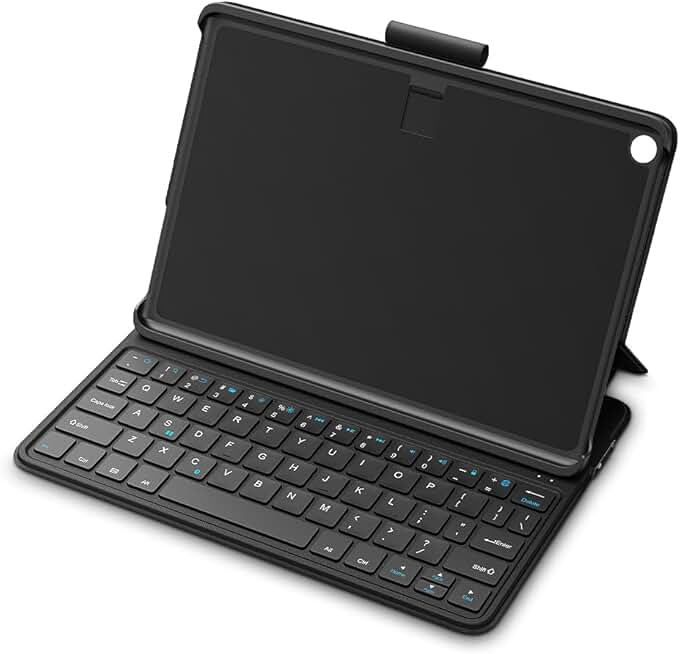
The Fire HD 10 Keyboard Case is specifically engineered for the latest 13th Generation Amazon Fire HD 10 tablet, ensuring a perfect fit and seamless integration. This accessory is not merely a keyboard; it’s a comprehensive solution that combines protection, portability, and enhanced functionality into one sleek package.
Its primary purpose is to transform the touch-centric tablet experience into one that’s more conducive to extended typing sessions and precise navigation. This makes the Fire HD 10 suitable for tasks that typically require a laptop, such as writing emails, drafting documents, or managing spreadsheets.
The design of this keyboard case prioritizes both form and function. It features a robust exterior that shields your Fire HD 10 from everyday bumps, scratches, and minor drops, preserving its pristine condition. The interior is often lined with a soft material to prevent scratching the tablet’s screen.
Bluetooth connectivity is at the heart of the keyboard’s operation, offering a wireless and hassle-free connection to your tablet. This eliminates the need for cumbersome cables, maintaining the tablet’s clean aesthetic and portability. The pairing process is typically straightforward, allowing users to get started quickly.
One of the most significant advantages of integrating a physical keyboard is the tactile feedback it provides, which is often preferred over on-screen typing for speed and accuracy. This can drastically improve productivity for students taking notes, professionals responding to communications, or anyone engaging in significant text input.
Beyond typing, the case usually incorporates a built-in stand, allowing the tablet to be propped up at an optimal viewing angle. This feature is invaluable for watching videos, participating in video calls, or simply reviewing documents hands-free. The versatility of the stand enhances the tablet’s utility in various environments.
The portability factor is also crucial. While adding some bulk, the keyboard case is designed to be lightweight enough to carry with ease, fitting into most bags and backpacks. This makes the Fire HD 10, paired with its keyboard case, an ideal companion for travel, commutes, or moving between different workspaces.
Compatibility is strictly limited to the Amazon Fire HD 10 (13th Gen, 2023 release), meaning users with older Fire tablets or different brands will need to look for alternative solutions. This specificity ensures an optimized fit and performance tailored to the device’s exact dimensions and port placements.
The Fire HD 10 Keyboard Case aims to unlock the full potential of your tablet, making it a more capable device for a wider range of activities. It’s an investment in efficiency and protection, offering a tangible upgrade to the standard tablet experience. Understanding these foundational aspects helps set the stage for a deeper dive into its specific features and benefits.
The design philosophy behind this accessory is to provide a seamless extension of the Fire HD 10 itself. It doesn’t just add a keyboard; it integrates a protective shell that feels like a natural part of the tablet. This thoughtful engineering contributes to a more cohesive user experience, rather than feeling like two separate pieces of hardware.
For many users, the Fire HD 10 is an entertainment device. However, with the addition of this keyboard case, its capabilities expand significantly into the realm of light productivity. This makes it an attractive option for those who need a device for both leisure and work, without carrying multiple gadgets.
Fire HD 10 Keyboard Case Key Features & Specs
The Fire HD 10 Keyboard Case boasts a range of features and specifications designed to maximize the utility and protection of your Amazon Fire HD 10 (13th Gen, 2023). Understanding these details is crucial for appreciating how this accessory enhances your tablet experience.
Integrated Bluetooth Keyboard
At the core of this accessory is its integrated Bluetooth keyboard. This full-size, island-style keyboard offers a comfortable and responsive typing experience, a significant upgrade from the on-screen keyboard. The keys are well-spaced, reducing typing errors and increasing overall efficiency.
The Bluetooth 5.0 connectivity ensures a stable and quick connection to your Fire HD 10, with minimal lag. Pairing is typically a one-time process, after which the keyboard connects automatically when in range. This wireless convenience is paramount for maintaining a clutter-free workspace.
Key travel and tactile feedback are often optimized to mimic a traditional laptop keyboard, providing a satisfying feel with each keystroke. Dedicated function keys for media control, volume, and screen brightness are typically included, further streamlining tablet operation.
Robust Protective Case Design
Beyond the keyboard, the case itself provides comprehensive protection for your Fire HD 10. It’s constructed from durable materials, often a combination of hard plastic and a synthetic leather-like exterior, designed to withstand daily wear and tear.
The case fully encases the tablet, protecting its back, sides, and corners from impacts, scratches, and dust. When closed, the keyboard acts as an additional layer of screen protection, safeguarding against accidental damage in transit.
Precise cutouts ensure full access to all ports, buttons, and cameras on the Fire HD 10 without needing to remove the tablet from the case. This thoughtful design maintains the tablet’s functionality while keeping it secure.
Adjustable Viewing Stand
A crucial feature for versatility is the integrated adjustable viewing stand. This allows you to prop your Fire HD 10 at multiple angles, transforming it into a mini-laptop or a media consumption device. The stability of the stand is key, preventing the tablet from wobbling during use.
Whether you’re typing, watching movies, video conferencing, or browsing, the stand provides an ergonomic viewing experience. Different angles cater to various activities, from upright for productivity to a more reclined position for casual viewing.
Long-Lasting Battery Life
The Bluetooth keyboard typically features its own rechargeable battery, separate from the Fire HD 10’s power source. This design ensures that using the keyboard doesn’t drain your tablet’s battery unnecessarily, allowing for longer usage times for both devices.
Many models boast impressive battery life, often lasting for weeks or even months on a single charge with moderate use. This eliminates the frequent need for recharging, making it ideal for travel or extended periods away from a power outlet. A common charging method is via a micro-USB or USB-C port on the keyboard itself.
Magnetic Closure and Auto Sleep/Wake
Many high-quality keyboard cases, including this Fire HD 10 Keyboard Case, incorporate magnetic elements. These magnets serve multiple purposes: securely holding the case closed to protect the tablet, and often triggering an auto sleep/wake function.
When you close the case, the tablet automatically goes to sleep, conserving battery life. Opening the case wakes the tablet instantly, allowing for quick access. This seamless interaction enhances the user experience and contributes to battery efficiency.
Optimized for Fire OS
Being ‘Made for Amazon,’ this keyboard case is optimized to work flawlessly with Fire OS, the operating system of the Fire HD 10. This means that all keyboard shortcuts and special function keys are designed to integrate perfectly with the tablet’s software, providing a truly native experience.
Users can expect smooth navigation, responsive text input, and full compatibility with Amazon’s ecosystem, including apps like Amazon Silk Browser, Kindle, and productivity suites available on the Appstore. This deep integration is a significant advantage over generic third-party keyboards.
The materials used in the construction of the case are chosen for durability and a premium feel. Often, a soft-touch finish is applied to the exterior for a comfortable grip, while the interior protects the tablet from scratches. This attention to detail ensures the case not only performs well but also looks good and feels pleasant to handle.
Pros & Cons
Evaluating any product requires a balanced look at its strengths and weaknesses. The Fire HD 10 Keyboard Case, while highly beneficial, also comes with its own set of advantages and potential drawbacks. Understanding these can help you determine if it’s the right accessory for your needs.
Pros
- Enhanced Productivity: The most significant advantage is the transformation of your Fire HD 10 into a more capable productivity machine. Typing on a physical keyboard is vastly superior for long emails, documents, or coding compared to an on-screen keyboard. This enables users to perform more complex tasks efficiently.
- Superior Protection: The robust case design offers excellent all-around protection for your tablet. It safeguards against everyday bumps, minor drops, scratches, and dust, significantly extending the lifespan and maintaining the aesthetic condition of your Fire HD 10.
- Seamless Integration: As a ‘Made for Amazon’ product, this keyboard case offers perfect compatibility and integration with the Fire HD 10 (13th Gen, 2023). This means reliable Bluetooth connectivity, optimized function keys, and a snug fit, ensuring a hassle-free user experience without compatibility issues.
- Excellent Battery Life: The keyboard’s independent battery boasts impressive longevity, often lasting for weeks or months on a single charge. This reduces the frequency of recharging and ensures the keyboard is ready whenever you need it, without draining your tablet’s power.
- Versatile Viewing Angles: The integrated stand allows for multiple stable viewing angles, catering to various activities such as typing, watching media, or video calls. This flexibility enhances the tablet’s usability in different settings and scenarios, improving comfort and ergonomics.
- Portability and Convenience: Despite adding some bulk, the overall design remains portable, making it easy to carry your Fire HD 10 and keyboard together. The magnetic closure and auto sleep/wake feature further add to the convenience, ensuring quick access and battery conservation.
- Improved User Experience: The tactile feedback of physical keys, combined with dedicated shortcut keys, makes navigating Fire OS and interacting with apps much more intuitive and efficient. This can reduce frustration and make the tablet a more enjoyable device for work and leisure.
Cons
- Added Bulk and Weight: Integrating a keyboard and a protective case inevitably adds significant bulk and weight to the slim Fire HD 10. This can detract from the tablet’s lightweight nature, making it less comfortable for extended handheld use or when portability is paramount.
- Price Point: As a premium, ‘Made for Amazon’ accessory, the Fire HD 10 Keyboard Case comes with a higher price tag compared to generic third-party alternatives. While the quality and integration often justify the cost, it represents a notable additional investment on top of the tablet itself.
- Cramped Keyboard Layout: Due to the 10-inch form factor of the tablet, the keyboard, while full-size, might still feel a bit cramped for users with larger hands or those accustomed to full-sized desktop keyboards. This can lead to a learning curve and potentially slower typing speeds initially.
- Limited Compatibility: This specific keyboard case is designed exclusively for the Amazon Fire HD 10 (13th Gen, 2023 release). This means it is not backward compatible with older Fire HD 10 models or other Fire tablets, limiting its versatility if you upgrade your tablet in the future.
- No Backlighting: Unlike some premium keyboard cases for other tablets, this Fire HD 10 Keyboard Case might lack backlighting for the keys. This can be a significant drawback for users who frequently work in dimly lit environments, making typing more challenging.
- No Trackpad/Mouse Support: The keyboard case typically does not include an integrated trackpad or mouse support. While Fire OS does support Bluetooth mice, the absence of an integrated solution means users will still rely on the touchscreen for navigation or carry a separate mouse, which can be less convenient.
Carefully weighing these pros and cons against your personal usage habits and priorities will help you make an informed decision about whether the Fire HD 10 Keyboard Case is the right accessory to enhance your tablet experience.
Who Should Buy the Fire HD 10 Keyboard Case?
The Fire HD 10 Keyboard Case isn’t for everyone, but for specific user profiles, it offers immense value and transforms the Fire HD 10 into a significantly more capable device. Understanding who benefits most from this accessory can help you decide if it’s a worthwhile investment.
Students and Academics
For students, the Fire HD 10 with a keyboard case becomes an excellent tool for note-taking, essay writing, and research. Its portability means it can easily be carried between classes, to the library, or to study groups. The physical keyboard allows for faster and more accurate typing during lectures or when working on assignments.
It’s a more affordable and lightweight alternative to a traditional laptop for basic academic tasks. Students can leverage the tablet for reading e-textbooks, accessing online resources, and collaborating on projects, all while having the convenience of a keyboard for substantial text input.
Light Productivity Users and Remote Workers
Individuals who primarily use their tablet for tasks like email management, document drafting, spreadsheet editing, and virtual meetings will find the keyboard case invaluable. It enables a more professional and efficient workflow, especially for those who don’t need the full power of a laptop.
For remote workers who occasionally need to work on the go or prefer a minimalist setup, the Fire HD 10 Keyboard Case provides a compact solution. It allows them to stay connected and productive without being weighed down by heavier equipment. Think of quick responses to clients or light editing tasks.
Travelers and Commuters
The combination of a lightweight tablet and a protective keyboard case is ideal for frequent travelers and daily commuters. It offers entertainment during transit, but also the capability to catch up on work, respond to messages, or write reports without needing to pull out a bulkier laptop.
The robust protection ensures the tablet survives the rigors of travel, while the long battery life of the keyboard means less worrying about finding power outlets. It’s a perfect blend of portability and functionality for those constantly on the move.
Content Creators and Bloggers (Light Usage)
While not a replacement for a powerful desktop, casual bloggers or those who create light content will appreciate the ability to type articles, social media posts, or even simple scripts on their Fire HD 10. The physical keyboard makes the writing process much more fluid and enjoyable.
For editing short videos or images, the tablet’s screen is adequate, and the keyboard can help with adding descriptions or managing files. It provides a mobile platform for creative expression without needing to be tethered to a desk.
Anyone Seeking Enhanced Tablet Functionality
Even for casual users who primarily consume media, there are benefits. Imagine wanting to quickly search for a movie, respond to a friend on social media, or write a detailed review – a physical keyboard speeds up all these interactions. It elevates the overall user experience.
If you find yourself frustrated with the on-screen keyboard for even moderately long typing sessions, this accessory is a direct solution. It makes the Fire HD 10 a more versatile device, capable of handling a broader spectrum of tasks with greater ease.
Ultimately, the Fire HD 10 Keyboard Case is for anyone who desires to unlock the full potential of their Amazon Fire HD 10 beyond simple media consumption. It transforms the tablet into a more robust and efficient tool for work, study, and communication, making it a truly versatile companion for a wide range of daily activities. If you frequently find yourself needing to type more than a few sentences on your tablet, this accessory is likely to be a worthwhile investment.
FAQ about Fire HD 10 Keyboard Case
Here are some frequently asked questions about the Fire HD 10 Keyboard Case to help you make an informed decision.
Q1: Is this keyboard case compatible with older Fire HD 10 models?
No, this particular keyboard case is specifically designed for the Amazon Fire HD 10 (13th Gen, 2023 release). Due to precise cutouts for ports, buttons, and camera placement, it will not fit older generations of the Fire HD 10 or any other Fire tablet models. Always double-check your tablet’s generation before purchasing to ensure perfect compatibility and a snug fit for your device.
Q2: How do I connect the keyboard to my Fire HD 10?
Connecting the keyboard is a straightforward process via Bluetooth. First, ensure the keyboard is charged and powered on. Then, on your Fire HD 10, go to Settings > Connected Devices > Bluetooth. Turn on Bluetooth, and the tablet will scan for nearby devices. Select the keyboard (it will usually appear with a recognizable name like ‘Amazon Keyboard’ or similar) from the list, and follow any on-screen prompts to complete the pairing. Once paired, it should automatically connect when both devices are on and within range.
Q3: What is the battery life of the keyboard, and how do I charge it?
The keyboard boasts an impressive battery life, often lasting for several weeks or even months on a single charge with moderate daily use. This longevity is a significant advantage, reducing the need for frequent recharging. The keyboard typically charges via a micro-USB or USB-C port, and a charging cable is usually included in the package. You can charge it using any standard USB wall adapter or by plugging it into a computer’s USB port. An indicator light often shows charging status and low battery warnings.
Q4: Does the case provide adequate protection for the Fire HD 10?
Yes, the Fire HD 10 Keyboard Case is designed to offer robust protection. It typically features a durable exterior shell that safeguards the tablet’s back and edges from impacts and scratches. When closed, the keyboard itself acts as an additional layer of protection for the screen, preventing scratches from objects in your bag. While it protects against everyday bumps and minor drops, it’s not designed for extreme conditions or heavy-duty impact resistance.
Q5: Can I use the Fire HD 10 Keyboard Case without the keyboard (i.e., just as a stand or protective case)?
While the keyboard is integrated into the case, you don’t always have to actively use the keyboard for typing. The case functions perfectly as a protective cover and a stand even when the keyboard is not in use or powered off. The tablet can be propped up for media consumption, and the case provides continuous protection. However, the keyboard component is fixed and cannot be detached to make the case lighter or thinner if you only want a simple cover.
Q6: Are there any special function keys on the keyboard?
Yes, being ‘Made for Amazon,’ the keyboard is optimized with a range of special function keys tailored for Fire OS. These often include dedicated keys for home, search, back, media control (play/pause, skip), volume control, and screen lock. These keys provide quick access to common tablet functions, enhancing efficiency and ease of use without needing to touch the screen as frequently. You can find more details on Amazon’s product page.
Q7: Does the keyboard support multiple languages or layouts?
The physical keyboard itself typically comes in a standard QWERTY layout, primarily designed for English input. However, your Fire HD 10 tablet supports multiple language inputs through its software settings. You can change the input language on the tablet, and the physical keyboard will type characters corresponding to the selected software layout. This means you can type in different languages, though the keycaps themselves will still show the original QWERTY English characters. For specific language layouts, you might need to check for regional versions of the product.
Q8: Does the case add significant bulk to the Fire HD 10?
Yes, adding a keyboard and a protective case will inevitably increase the overall thickness and weight of your Fire HD 10. While the design aims to be as slim and light as possible given its functionality, it will feel noticeably heavier and bulkier than the tablet on its own. This trade-off is common for keyboard cases, balancing enhanced functionality and protection against the tablet’s inherent portability. The exact dimensions and weight increase can usually be found in the product specifications. You can also check Amazon’s Fire Tablet support pages for general information.
These FAQs should address common concerns and provide a clearer picture of what to expect from the Fire HD 10 Keyboard Case.
Final Verdict
The Fire HD 10 Keyboard Case for the Amazon Fire HD 10 (13th Gen, 2023 release) stands out as an essential and excellent accessory for anyone looking to maximize their tablet’s potential. It expertly merges robust protection with enhanced productivity, transforming the Fire HD 10 from a pure media consumption device into a capable mini-laptop.
Its seamless ‘Made for Amazon’ integration ensures perfect compatibility, reliable Bluetooth connectivity, and optimized function keys that truly enhance the user experience. The impressive battery life, versatile viewing angles, and overall build quality contribute significantly to its value proposition, making it a compelling choice.
While the added bulk and weight are a consideration, and the price point is higher than generic alternatives, the benefits of superior protection, tactile typing, and extended functionality largely outweigh these minor drawbacks for the right user. It’s a premium accessory that delivers on its promises.
For students, light productivity users, travelers, or anyone who frequently types on their tablet, this keyboard case is an investment that pays dividends in efficiency and convenience. It unlocks new possibilities for your Fire HD 10, making it a more versatile and indispensable device in your daily life.
If you own the Amazon Fire HD 10 (13th Gen, 2023) and seek to elevate its capabilities beyond basic tablet functions, the Fire HD 10 Keyboard Case is highly recommended. It’s a well-engineered accessory that delivers a truly excellent experience.