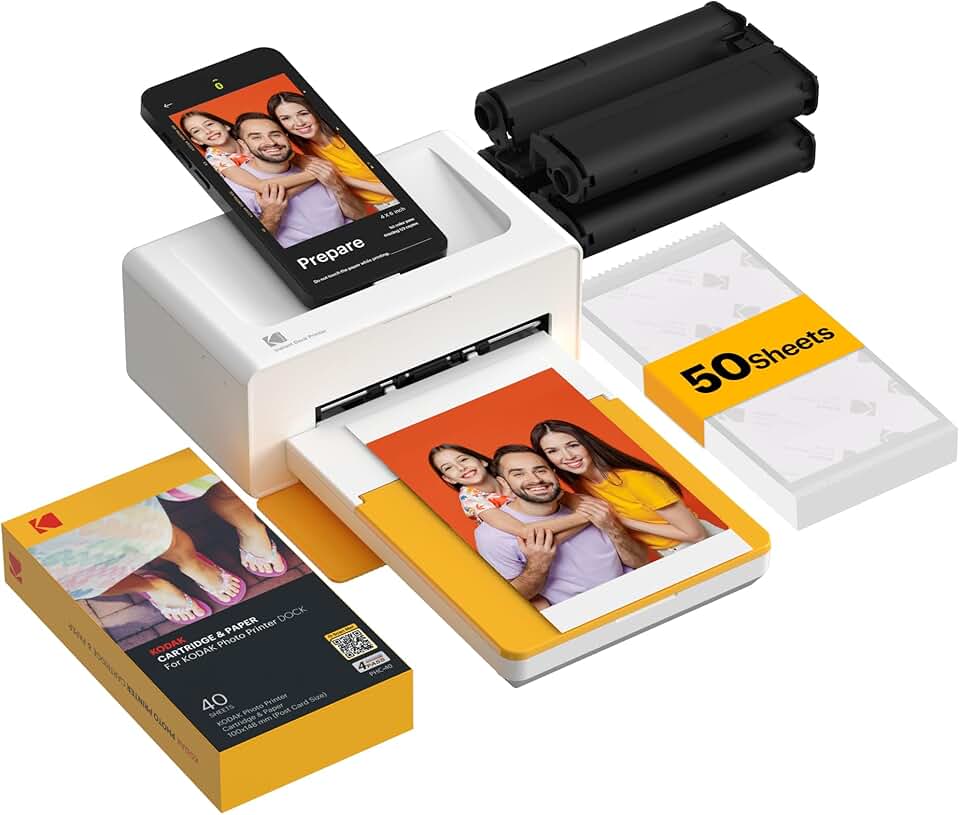
The KODAK Dock Plus 4×6 Photo Printer emerges as a standout solution for anyone seeking to bring their digital memories into the physical world with ease and exceptional quality. In a world increasingly dominated by digital screens, the tangible joy of holding a printed photograph remains unparalleled. This comprehensive review will delve into every aspect of this impressive device, from its innovative 4PASS dye-sublimation technology to its seamless smartphone integration, helping you determine if it’s the perfect addition to your home or creative toolkit.
Quick Summary: KODAK Dock Plus
- Rating: 4.2 out of 5 stars
- Price: $139.99
Key Pros:
- Exceptional Print Quality: Utilizes 4PASS dye-sublimation for vibrant, long-lasting 4×6 prints.
- Seamless Connectivity: Offers both direct docking for smartphones and Bluetooth for universal compatibility.
- User-Friendly Experience: Intuitive KODAK Photo Printer App for editing and printing, making it accessible for all skill levels.
Key Cons:
- Proprietary Consumables: Relies on specific KODAK paper and cartridges, which can add to long-term costs.
- App Dependency: Full functionality and editing capabilities are largely tied to the companion smartphone application.
Table of Contents
KODAK Dock Plus Overview
The KODAK Dock Plus is a compact and versatile 4×6 inch photo printer designed specifically for modern smartphone users. It bridges the gap between the vast collection of digital photos stored on our devices and the timeless appeal of physical prints. This printer aims to simplify the process of creating high-quality, tangible memories from your everyday moments.
At its core, the Dock Plus utilizes 4PASS dye-sublimation technology, a sophisticated printing method that sets it apart from conventional inkjet printers. This technology involves layering yellow, magenta, and cyan dyes, followed by a protective laminating coat, to produce prints that are not only vibrant and true to color but also resistant to water, fingerprints, and UV fading. This multi-layer process ensures the longevity and durability of your cherished photographs.
Designed for ultimate convenience, the KODAK Dock Plus offers dual connectivity options. It features a universal docking station that accommodates both Lightning (for iPhones) and USB-C (for modern Android phones) connections, allowing for direct printing and simultaneous charging. For other devices or a wireless experience, Bluetooth connectivity provides a seamless way to send photos from any compatible smartphone.
The printer’s primary appeal lies in its ability to deliver instant gratification. Within seconds, you can transform a favorite snapshot from your phone into a beautiful 4×6 inch print. This makes it an ideal companion for family gatherings, parties, travel adventures, or simply for those who love to adorn their homes with personal photographs.
Unlike traditional photo labs that require waiting times or complex ordering processes, the Dock Plus puts the power of instant printing directly into your hands. It removes the friction associated with getting physical copies of your photos, encouraging users to print more often and create more tangible keepsakes. This ease of use encourages spontaneous printing, turning digital moments into physical memories.
The compact footprint of the KODAK Dock Plus means it won’t occupy much space on your desk or shelf, making it suitable for any home environment. Its minimalist design ensures it blends in rather than stands out, while its functionality makes it a central hub for all your photo printing needs. The intuitive controls and clear indicator lights further enhance the user experience, ensuring that even novices can operate it without difficulty.
The importance of physical prints in an increasingly digital world cannot be overstated. They offer a tactile connection to memories, serve as decorative elements, and provide a reliable backup that isn’t dependent on cloud storage or device functionality. The Dock Plus facilitates this return to tangible photography, allowing for easy sharing and display of personal stories. For more details on dye-sublimation printing, you can refer to Wikipedia’s explanation of dye-sublimation printers.
Consider the scenarios: a child’s birthday party where guests can take home a printed photo as a party favor, a travel enthusiast instantly printing postcards from their adventures, or a grandparent receiving a fresh batch of family photos without needing to navigate complex digital albums. The KODAK Dock Plus makes these scenarios effortlessly achievable, fostering connection and preserving precious moments in a durable, high-quality format.
KODAK Dock Plus Key Features & Specs
The KODAK Dock Plus is packed with features designed to provide a superior and user-friendly printing experience. Understanding these specifications is key to appreciating its capabilities and how it stands out in the crowded market of portable photo printers.
4PASS Dye-Sublimation Technology: This is arguably the most crucial feature of the KODAK Dock Plus. Unlike inkjet printers that spray liquid ink, 4PASS (also known as dye diffusion thermal transfer) uses heat to transfer solid dyes onto photo paper in successive layers of yellow, magenta, and cyan. This process results in continuous-tone images with incredibly smooth color gradations and no visible dots. The final pass applies a clear protective layer, making prints resistant to water, fingerprints, and UV light, ensuring they last for decades without fading.
4×6 Inch Print Size: The printer produces standard 4×6 inch photographs, a popular size for framing, scrapbooking, and sharing. While some users might desire other sizes, this universal format ensures compatibility with most photo albums and frames. The consistent output size simplifies the process of organizing and displaying your prints.
Dual Connectivity: Docking & Bluetooth: The Dock Plus excels in connectivity options. It features a universal docking pin that supports both Apple Lightning and USB-C Android devices. This allows for direct, physical connection for printing and simultaneously charges your phone. For other devices or a wireless preference, Bluetooth 5.0 ensures a stable and quick connection to any compatible smartphone or tablet, offering maximum flexibility.
KODAK Photo Printer App: The dedicated KODAK Photo Printer App (available for iOS and Android) is central to the Dock Plus experience. This intuitive application allows users to select photos, apply filters, add frames, create collages, and make basic edits before printing. The app’s user-friendly interface makes photo customization accessible to everyone, enhancing the creative potential of your prints.
High-Quality Output: With its advanced dye-sublimation process, the KODAK Dock Plus delivers prints with vibrant colors, sharp details, and excellent tonal accuracy. The resolution ensures that even intricate details in your photos are reproduced faithfully, making your memories look as good on paper as they do on screen. This commitment to quality distinguishes it from many instant print alternatives.
Bundled Consumables: The printer often comes with an initial set of photo paper and a dye cartridge, typically enough for 10 prints. This allows users to start printing immediately upon unboxing, providing a taste of the print quality before needing to purchase refills. It’s a convenient way to get acquainted with the system without extra immediate purchases.
Compact and Portable Design: Weighing just over two pounds and featuring a sleek, minimalist design, the KODAK Dock Plus is easy to move around your home or even take to events. Its compact form factor means it won’t clutter your space, and its robust construction ensures durability. While not battery-powered, its portability for moving between rooms or locations is a definite advantage.
Easy Maintenance: Unlike inkjet printers that can suffer from clogged print heads or dried-up ink cartridges, dye-sublimation printers like the Dock Plus require minimal maintenance. The dye cartridge and paper are designed as an integrated unit, simplifying replacement and ensuring optimal performance with every change. This reduces the hassle often associated with printer upkeep.
User-Friendly Interface: Beyond the app, the printer itself features simple controls, typically a power button and an LED indicator for status. This straightforward design ensures that operating the printer is intuitive and accessible, even for those who are not tech-savvy. The focus remains on getting your photos printed quickly and easily.
Print Speed: Each 4×6 print takes approximately 50 seconds to complete from initiation to full lamination. While not instantaneous, this speed is very reasonable for a high-quality dye-sublimation print, especially considering the multiple passes required for the 4PASS technology. It’s fast enough for casual use and small batches of prints.
These features combine to make the KODAK Dock Plus a powerful tool for preserving and sharing memories. Its blend of advanced technology, user-centric design, and robust output quality positions it as a top contender for personal photo printing needs. For more information on Kodak’s product line, you can visit the Kodak Photo Printer official website.
Pros & Cons
Evaluating any product requires a balanced look at its strengths and weaknesses. The KODAK Dock Plus, while offering many compelling advantages, also comes with certain considerations that potential buyers should be aware of. Understanding these can help you make an informed decision.
Pros of the KODAK Dock Plus:
-
Exceptional Print Quality: The 4PASS dye-sublimation technology is a game-changer. It delivers truly stunning 4×6 prints with vivid colors, smooth gradients, and sharp details that are superior to many consumer-grade inkjet prints. The protective layer ensures prints are resistant to common damage, preserving memories for years.
This durability means your photos won’t fade or smudge easily, making them perfect for scrapbooks, albums, or displaying without fear of deterioration. The quality truly stands out, making each print feel professional and valuable.
-
Effortless Connectivity (Docking & Bluetooth): The dual connectivity options are incredibly convenient. The universal docking station for Lightning and USB-C phones simplifies direct printing and simultaneous charging. For other devices, Bluetooth pairing is quick and reliable, offering flexibility for all smartphone users.
This versatility means you’re not limited by your phone’s connection type, ensuring almost any modern smartphone can connect and print with ease. The ability to charge while printing is a small but significant detail that enhances the user experience.
-
User-Friendly App: The KODAK Photo Printer App is intuitive and robust, making the printing process enjoyable and straightforward. It offers a good range of editing tools, filters, frames, and collage options, allowing for creative customization before printing.
Even beginners will find the app easy to navigate, transforming a simple photo into a personalized keepsake with just a few taps. This ease of use encourages more frequent printing and creative expression.
-
Durable, Long-Lasting Prints: Thanks to the 4PASS technology’s final laminating layer, prints from the Dock Plus are inherently more durable than standard inkjet photos. They are water-resistant, fingerprint-proof, and protected against UV fading, ensuring your memories endure.
This archival quality is a significant advantage, especially for photos intended to be handled frequently or displayed in various environments. You can confidently share and store your prints without concern for rapid degradation.
-
Compact & Portable Design: The printer’s small footprint and relatively light weight make it highly portable. It can easily fit on a desk, shelf, or be packed away for travel or events. Its sleek design also ensures it doesn’t detract from your home decor.
While it requires an AC power source, its size makes it convenient to move between rooms or take to a friend’s house for a printing session. The design aesthetic is clean and modern, fitting into various settings.
-
Instant Gratification: The ability to print a high-quality 4×6 photo in under a minute provides instant satisfaction. This speed is perfect for capturing and sharing moments in real-time at parties, family gatherings, or during travel.
It transforms the experience of photography from a purely digital one to a tangible, immediate one, fostering a stronger connection to your memories. The quick turnaround makes it ideal for impromptu printing needs.
-
No Ink Cartridge Drying Issues: Unlike inkjet printers, dye-sublimation printers use solid dye ribbons, eliminating the common problem of ink cartridges drying out if not used regularly. This means less waste and more consistent performance over time.
You won’t have to worry about running cleaning cycles or replacing expensive cartridges due to infrequent use. The maintenance is simpler and more reliable, saving both time and potential frustration.
Cons of the KODAK Dock Plus:
-
Proprietary Consumables Can Be Costly: The KODAK Dock Plus requires specific KODAK 4PASS photo paper and integrated dye cartridges. These consumables are proprietary and can be more expensive per print compared to some bulk inkjet options or external photo printing services.
While the quality is high, the recurring cost of paper and cartridges is a factor to consider for heavy users. Budgeting for these refills is important to avoid unexpected expenses down the line.
-
App-Dependent for Most Features: While the app is excellent, the printer’s full functionality, including editing, filters, and collage creation, is heavily reliant on the smartphone application. Without the app, its capabilities are limited to basic direct printing.
This means that you’ll always need a smartphone or tablet to unlock the printer’s true potential. Users who prefer printing directly from a computer or without an app might find this restrictive.
-
Limited Print Size (4×6 Only): The KODAK Dock Plus is exclusively designed for 4×6 inch prints. While this is a popular size, it lacks the versatility to print smaller wallet-sized photos, larger prints, or specialty sizes for crafting projects.
Users needing varied print sizes will need a separate printer or service, making this a niche product for specific needs. Its specialization in 4×6 is a strength for consistency but a limitation for versatility.
-
No Battery for True Portability: The printer requires an AC power connection to operate, meaning it’s not truly portable in the sense of being able to print anywhere without an outlet. This limits its use in outdoor settings or locations without readily available power.
While it’s compact and easy to move, the lack of an integrated battery means you’re always tethered to a power source. This is a key distinction from smaller, battery-powered instant cameras or mini-printers.
-
Initial Setup Can Be Fiddly for Some: While generally user-friendly, some users might find the initial setup, including connecting via Bluetooth or correctly seating the paper and cartridge, a bit fiddly. The instructions are clear, but a small learning curve might exist.
This is a minor point, but it’s worth noting that the very first experience might require a moment of patience to get everything perfectly aligned and connected. Once set up, however, operation is smooth.
Who Should Buy the KODAK Dock Plus?
The KODAK Dock Plus is not just a gadget; it’s a tool for memory preservation and creative expression. Its specific features and functionalities make it ideal for certain demographics and use cases, while others might find alternatives more suitable. Understanding the target audience is crucial for potential buyers.
Parents and Families: For parents who want to capture and cherish every milestone, from first steps to school plays, the Dock Plus is invaluable. It allows for instant printing of family photos, creating tangible albums that children can flip through and enjoy. It’s a fantastic way to document growth and create lasting family heirlooms.
The ease of use means even busy parents can quickly print off a photo from their phone, rather than letting it sit forgotten in a digital album. It encourages creating physical photo collections that tell a family’s unique story, fostering a sense of history and connection.
Scrapbookers and Crafters: The consistent 4×6 print size and excellent quality make the Dock Plus a perfect companion for scrapbooking enthusiasts. Its durable, smudge-proof prints are ideal for adhesive applications and stand up well to handling within creative projects.
Crafters will appreciate the ability to print specific photos on demand for personalized cards, gifts, or home decor items. The app’s editing features further enhance creative control, allowing for unique artistic touches before printing.
Social Media Enthusiasts and Influencers: Those who live and breathe social media often have a desire to bridge the digital and physical worlds. The Dock Plus allows them to quickly print their favorite Instagram-worthy shots, creating physical mood boards, personalized gifts, or even props for their content.
It’s a great way to make digital content more tangible and shareable in person, adding a unique dimension to their online presence. The ability to instantly print photos taken with a smartphone aligns perfectly with the fast-paced nature of social media.
Event Organizers (Small Scale): For small parties, family reunions, or intimate wedding gatherings, the KODAK Dock Plus can be a delightful addition. Guests can instantly print photos taken during the event, creating personalized party favors or a collaborative photo wall.
It adds an interactive and memorable element to any gathering, providing instant keepsakes for attendees. The simplicity of operation means it can be easily set up and used by multiple people throughout an event.
Travelers and Adventurers: While it needs an AC power source, the compact size of the Dock Plus makes it feasible to bring on road trips or to vacation rentals. Imagine printing a stunning landscape photo or a fun group shot right after taking it, creating instant postcards or journal entries.
It allows travelers to immediately relive and share their experiences in a physical format, rather than waiting until they return home. The satisfaction of holding a fresh print of a recent adventure is a unique joy.
Anyone Who Values Tangible Photos: In an age where billions of photos exist solely on screens, the Dock Plus caters to those who appreciate the emotional weight and aesthetic appeal of a physical photograph. It’s for anyone who misses the feeling of flipping through a photo album.
It simplifies the process of creating a personal archive of memories that can be held, touched, and passed down. This printer provides a direct and enjoyable path to converting digital moments into cherished physical artifacts.
Gift Givers: The KODAK Dock Plus makes an excellent gift for tech-savvy teens, nostalgic grandparents, or any photo enthusiast. It’s a thoughtful present that encourages creativity and the preservation of memories.
Its ease of use and instant results make it a universally appealing gift for anyone who takes photos with their smartphone. It’s a gift that keeps on giving, providing countless opportunities for personal expression and memory sharing.
Ultimately, if you frequently take photos with your smartphone and desire a convenient, high-quality method to turn those digital images into durable, physical 4×6 prints, the KODAK Dock Plus is an outstanding choice. It streamlines the printing process, making it accessible and enjoyable for a wide range of users who cherish their memories.
It’s particularly well-suited for individuals or families who appreciate the tactile nature of photographs and want to integrate them into their daily lives, creative projects, or social interactions. The investment in the printer and its consumables is justified by the superior print quality and the unique experience it offers in a digital-first world.
FAQ about KODAK Dock Plus
To further assist potential buyers, here are answers to some of the most frequently asked questions about the KODAK Dock Plus photo printer.
Q1: What exactly is 4PASS technology, and why is it better?
A1: 4PASS, or Dye Diffusion Thermal Transfer (D2T2), is a dye-sublimation printing technology that applies color in four passes: yellow, magenta, cyan, and a final protective overcoat. This process creates continuous-tone images with smooth color transitions, free from the visible dots often seen in inkjet prints. The clear overcoat makes prints water-resistant, fingerprint-proof, and UV-protected, ensuring superior durability and longevity compared to typical inkjet photos. This means your prints will look vibrant and resist fading for decades.
Q2: Is the KODAK Dock Plus compatible with all smartphones?
A2: The KODAK Dock Plus offers broad compatibility. It features a universal docking station with interchangeable connectors for both Apple Lightning (for iPhones) and USB-C (for most modern Android phones), allowing for direct connection and charging. Additionally, it supports Bluetooth 5.0, enabling wireless printing from virtually any Bluetooth-enabled smartphone or tablet, regardless of its charging port type. This dual approach ensures almost universal smartphone compatibility.
Q3: How much do the photo paper and cartridges cost, and where can I buy them?
A3: The KODAK Dock Plus uses proprietary all-in-one photo paper and dye cartridge units. These are typically sold in packs that contain enough paper and a corresponding cartridge for a specific number of prints (e.g., 60 or 120 prints). The cost per print can vary but generally falls within a reasonable range for dye-sublimation quality. You can purchase these refills directly from Amazon, major electronics retailers, or the Kodak Photo Printer official website. It’s advisable to check current prices for consumables when considering the overall ownership cost.
Q4: Can I print photos directly from a computer with the KODAK Dock Plus?
A4: The KODAK Dock Plus is primarily designed for smartphone and tablet integration. It does not have direct PC connectivity via USB for printing. All printing is managed through the KODAK Photo Printer App on your mobile device, which connects either via the docking station or Bluetooth. If you wish to print photos from your computer, you would first need to transfer them to your smartphone or tablet and then use the app.
Q5: How durable are the prints from the KODAK Dock Plus?
A5: Prints produced by the KODAK Dock Plus are exceptionally durable due to the 4PASS dye-sublimation process. The final layer is a clear laminate that protects the image from environmental factors. This makes the prints resistant to water splashes, smudges from fingerprints, and fading from UV light exposure. They are designed to be archival quality, meaning they can last for many years without significant degradation, preserving your memories effectively.
Q6: Can I use different paper sizes with this printer, or is it only 4×6?
A6: The KODAK Dock Plus is specifically engineered to print standard 4×6 inch (10×15 cm) photos. It does not support other paper sizes or types. The paper and dye cartridges are designed as integrated units for this specific size, ensuring optimal quality and consistent performance. If you require different print sizes, you would need to consider a different photo printer model or utilize a professional printing service.
Q7: What kind of editing features does the KODAK Photo Printer App offer?
A7: The companion KODAK Photo Printer App is quite versatile. It allows users to perform basic photo edits such as cropping, rotating, and adjusting brightness, contrast, and saturation. It also includes a variety of creative features like filters, decorative frames, and collage templates. These tools enable you to enhance your photos and personalize them before printing, all from within the intuitive app interface.
Q8: Does the KODAK Dock Plus come with an internal battery for cordless operation?
A8: No, the KODAK Dock Plus does not include an internal, rechargeable battery. It operates solely via an AC power adapter, meaning it must be plugged into a wall outlet during use. While its compact size makes it highly portable to move between locations, it is not designed for completely cordless, on-the-go printing without access to an electrical source. This is an important distinction from smaller, battery-powered instant photo printers.
Final Verdict
The KODAK Dock Plus 4×6 Photo Printer stands out as an exceptional device for anyone looking to transform their digital smartphone photos into high-quality, tangible prints. Its blend of advanced 4PASS dye-sublimation technology, versatile smartphone connectivity, and user-friendly design creates a compelling package. It effectively addresses the modern need for instant gratification while delivering archival-grade physical memories.
The print quality is undeniably a major highlight, producing vibrant, detailed, and durable 4×6 photos that resist water, fingerprints, and fading. This ensures that your cherished moments are preserved with clarity and longevity. The convenience of both docking and Bluetooth connectivity, coupled with the intuitive KODAK Photo Printer App, makes the entire printing process seamless and enjoyable for users of all technical skill levels.
While the proprietary consumables represent a recurring cost and the printer is limited to a single 4×6 print size, these considerations are often outweighed by the superior print quality and the sheer ease of use. For families wanting to create photo albums, scrapbookers needing consistent prints, or individuals who simply prefer physical photos over digital files, the Dock Plus offers tremendous value.
It’s an ideal choice for bringing life to your smartphone camera roll, making it perfect for capturing special events, creating personalized gifts, or simply decorating your home with personal touches. The satisfaction of holding a freshly printed photograph, knowing it will last for years, is a unique experience that the KODAK Dock Plus delivers consistently.
In conclusion, if you prioritize print quality, ease of use, and the joy of instant physical photos from your smartphone, the KODAK Dock Plus is an amazing investment. It’s a reliable, high-performing printer that fulfills its promise of turning digital memories into beautiful, lasting keepsakes. It’s truly an ultimate photo printer for the modern home.