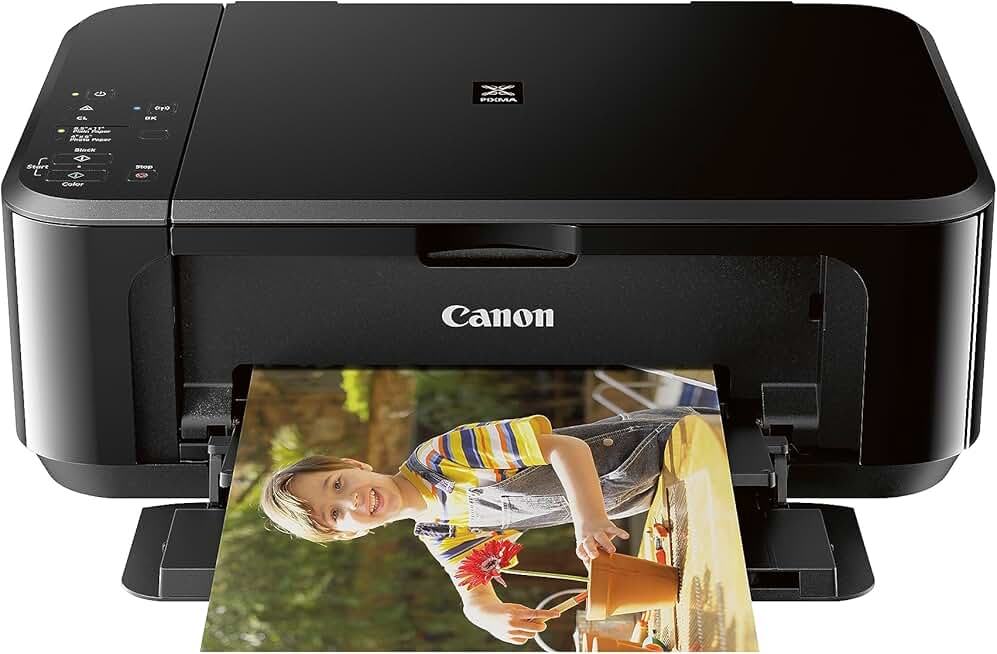
The Canon MG3620 Printer has long been a popular choice for home users seeking a versatile and affordable all-in-one device. This comprehensive review delves into its features, performance, and overall value, especially considering its availability through Amazon Renewed. We’ll explore whether this wireless inkjet printer still holds up in today’s fast-paced digital environment and if it’s a smart investment for your printing needs.
Quick Summary: Canon MG3620 Printer
- Rating: 3.9 out of 5 stars (30,562 reviews)
- Price: $92.81 (USD)
Key Pros:
- Wireless Connectivity: Seamless printing from multiple devices, including smartphones and tablets.
- Compact Design: Fits easily into small home office spaces without sacrificing functionality.
- Affordable Initial Cost: Excellent value, especially when purchased as a renewed product.
Key Cons:
- Ink Cost: Canon’s proprietary ink cartridges can be relatively expensive over time.
- Slower Print Speeds: Not ideal for high-volume printing tasks compared to business-grade models.
Table of Contents
Canon MG3620 Printer Overview
The Canon MG3620 Printer, often found in Amazon’s Renewed program, represents a compelling option for those seeking a budget-friendly yet capable all-in-one device. This printer, scanner, and copier is designed with the home user in mind, prioritizing ease of use and connectivity. Its compact footprint ensures it won’t dominate your desk space, making it suitable for smaller apartments or home offices.
Launched several years ago, the MG3620 quickly gained popularity for its robust feature set at an accessible price point. Its primary appeal lies in its wireless capabilities, allowing users to print directly from their computers, laptops, smartphones, and tablets without the hassle of cables. This flexibility is a significant advantage in modern households with multiple devices.
As a renewed product, the Canon MG3620 Printer undergoes a rigorous inspection and refurbishment process to ensure it meets original performance standards. This means you get a device that functions like new, often at a significantly reduced cost compared to buying new. Amazon Renewed products typically come with a warranty, providing peace of mind for your purchase.
Beyond its core functions, the MG3620 also offers duplex printing, a feature often reserved for more expensive models. This automatic double-sided printing helps save paper and contributes to a more eco-friendly printing habit. For students, remote workers, or families, this can translate to noticeable savings over time.
While it may not boast the lightning-fast speeds or advanced features of high-end business printers, the Canon MG3620 Printer excels in its intended role. It’s built for occasional to moderate printing volumes, handling documents, photos, and creative projects with respectable quality. Its print resolution is sufficient for crisp text and vibrant images, making it a versatile tool for various tasks.
The user interface is straightforward, typically involving a few buttons on the device itself and a comprehensive software suite for your computer. Mobile app integration further simplifies tasks, allowing for quick prints or scans directly from your phone. This accessibility makes it a great choice for users who aren’t particularly tech-savvy but still want modern conveniences.
Understanding the context of a renewed product is crucial. While the Canon MG3620 Printer itself is a solid piece of hardware, its renewed status means it’s been previously owned and restored. This often presents an excellent opportunity to acquire reliable technology at a fraction of the original price, aligning perfectly with sustainable consumption practices.
For anyone considering a versatile home printer without breaking the bank, the Canon MG3620 Printer offers a compelling blend of features, performance, and value. Its continued presence and popularity in the renewed market speak volumes about its enduring utility and reliability. We will delve deeper into its specific features and performance metrics in the following sections to give you a complete picture.
Canon MG3620 Printer Key Features & Specs
The Canon MG3620 Printer comes packed with features designed to enhance productivity and convenience for the home user. Understanding these specifications is key to determining if it meets your specific requirements. This section breaks down the core functionalities and technical details that make this all-in-one printer a notable contender.
At its heart, the MG3620 is an All-in-One Inkjet Printer, meaning it can print, scan, and copy. This multifunctionality is a major selling point, consolidating three essential office devices into one compact unit. For small spaces, this integration is invaluable, reducing clutter and simplifying your setup.
Wireless Connectivity is arguably its most significant feature. The Canon MG3620 Printer supports Wi-Fi, allowing for seamless connection to your home network. This enables printing from virtually any device connected to the same network, including desktop computers, laptops, smartphones, and tablets. Setup is generally straightforward, guided by Canon’s clear instructions.
For mobile users, the MG3620 offers robust support for various printing apps and services. It is compatible with Canon PRINT Inkjet/SELPHY app, Google Cloud Print, Apple AirPrint, and Mopria Print Service. These integrations make it incredibly easy to print documents and photos directly from your mobile device, whether you’re using iOS or Android.
Print quality for both documents and photos is commendable for a printer in its class. It boasts a maximum color print resolution of 4800 x 1200 dpi (dots per inch). This high resolution ensures crisp text and vibrant, detailed images, making it suitable for everything from school reports to family photo prints. Canon’s FINE (Full-photolithography Inkjet Nozzle Engineering) technology contributes to this impressive output.
In terms of speed, the Canon MG3620 Printer offers respectable performance for home use. It can print approximately 9.9 images per minute (ipm) for black and white documents and 5.7 ipm for color documents. While not the fastest on the market, these speeds are perfectly adequate for typical household printing volumes and occasional projects.
The printer utilizes a two-cartridge ink system: one black cartridge and one tri-color cartridge (cyan, magenta, yellow). This system is common in entry-level printers and simplifies ink replacement. Canon offers standard and XL capacity cartridges, with the XL options providing more prints per cartridge, potentially lowering the cost per page over time.
Automatic Duplex Printing is another standout feature. This allows the printer to automatically print on both sides of the paper, saving paper and reducing environmental impact. It’s a valuable addition that many competitors in this price range often omit, making the MG3620 a more efficient choice for everyday document printing.
The scanner component of the Canon MG3620 Printer offers an optical resolution of up to 1200 x 2400 dpi. This is more than sufficient for scanning documents, photos, and even old negatives with good clarity. The flatbed design accommodates various media types, from standard paper to books and fragile items.
Physical dimensions are approximately 17.7 inches (W) x 12.0 inches (D) x 6.0 inches (H) when trays are closed, and it weighs around 12 pounds. Its compact and lightweight design makes it easy to place on a desk or shelf without taking up excessive room. This makes the Canon MG3620 Printer an ideal fit for smaller living or working environments.
Finally, the printer supports various paper sizes, including Letter, Legal, A4, A5, B5, and envelopes. It also handles different paper types, from plain paper to glossy photo paper. This versatility ensures you can tackle a wide array of printing tasks without needing multiple devices. For a detailed list of specifications, you can always refer to the official Canon support page here.
Pros & Cons
Every product has its strengths and weaknesses, and the Canon MG3620 Printer is no exception. A balanced look at its pros and cons is crucial for making an informed purchase decision, especially when considering a renewed unit. Here, we delve into the specific advantages and disadvantages users commonly experience with this model.
Pros of the Canon MG3620 Printer:
Excellent Value for Money: When purchased renewed, the Canon MG3620 Printer offers an outstanding feature set for its price point. You get a reliable all-in-one device that handles printing, scanning, and copying without a hefty investment. This makes it an attractive option for budget-conscious consumers.
Seamless Wireless Connectivity: The ability to print wirelessly from almost any device is a major convenience. Support for AirPrint, Google Cloud Print, and Canon’s own mobile app ensures effortless printing from smartphones, tablets, and computers. This eliminates the need for messy cables and provides greater flexibility in placement.
Compact and Space-Saving Design: Its relatively small footprint means the MG3620 can fit comfortably in tight spaces, such as a dorm room, small home office, or a corner of a living room. This design consideration is vital for users with limited desk or shelf space.
Automatic Duplex Printing: The inclusion of automatic double-sided printing is a significant advantage, especially for a printer in this category. It helps conserve paper, reduces environmental impact, and saves time compared to manually flipping pages. This feature is particularly beneficial for students and those printing multi-page documents.
Good Print Quality for Home Use: For everyday documents, school projects, and casual photo printing, the MG3620 delivers crisp text and reasonably vibrant colors. The 4800 x 1200 dpi resolution is more than adequate for most non-professional applications, producing results that are clear and readable.
User-Friendly Setup and Operation: Setting up the Canon MG3620 Printer is generally straightforward, with clear instructions and intuitive software. The controls on the printer itself are minimal and easy to understand, and the mobile app further simplifies various tasks. This ease of use appeals to a broad range of users.
Reliable Performance (Especially Renewed): Many users report consistent and dependable performance from their MG3620 units, even renewed ones. The refurbishment process for Amazon Renewed products ensures that the device functions as expected, offering a reliable printing experience without the common pitfalls of used electronics.
Cons of the Canon MG3620 Printer:
High Ink Cartridge Costs: This is perhaps the most frequently cited drawback. While the initial printer cost is low, the price of replacement Canon ink cartridges can add up over time, especially if you print frequently. The two-cartridge system (one black, one tri-color) can sometimes lead to waste if one color runs out quickly.
Slower Print Speeds: The print speeds of 9.9 ipm for black and 5.7 ipm for color are acceptable for occasional home use but can feel slow for larger print jobs or users with high-volume needs. It’s not designed for rapid, continuous output like some office-grade printers.
No LCD Screen: The absence of an LCD screen or display can make certain operations, such as checking ink levels, troubleshooting, or changing settings, slightly less intuitive. Users often have to rely on their computer or mobile app for more detailed status updates and controls.
Limited Paper Capacity: The input paper tray typically holds around 100 sheets, which is standard for a home printer but might require more frequent reloading for users with heavier printing demands. There is no additional paper tray or automatic document feeder (ADF) for scanning multiple pages.
No Ethernet Port: While it offers Wi-Fi connectivity, the lack of an Ethernet port means it cannot be directly connected to a wired network. For some users who prefer the stability of a wired connection or operate in environments with unreliable Wi-Fi, this could be a minor inconvenience.
Photo Printing Quality is Good, Not Professional: While the photo quality is decent for casual prints, it won’t match the output of dedicated photo printers that use more ink colors or specialized paper paths. Serious photographers might find it falls short for professional-grade prints.
Considering these points, the Canon MG3620 Printer remains a strong contender for specific user profiles, balancing its cost-effectiveness and convenient features against its operational expenses and speed limitations. The decision often comes down to individual printing habits and budget constraints.
Who Should Buy the Canon MG3620 Printer?
Deciding if the Canon MG3620 Printer is the right fit for your needs involves evaluating your specific printing habits, budget, and technological requirements. This section will help you identify if you belong to the ideal target audience for this versatile all-in-one device, especially as a renewed product.
Students and Academics: If you’re a student living in a dorm or small apartment, the MG3620’s compact size and wireless capabilities are a huge plus. It can handle essays, research papers, and occasional color presentations with ease. The automatic duplex printing also helps save on paper costs, which is a common concern for students.
Home Users with Moderate Printing Needs: For families or individuals who primarily print documents, occasional photos, and school projects, the Canon MG3620 Printer is an excellent choice. It’s not designed for heavy, continuous printing but excels at handling intermittent tasks without fuss. Its all-in-one functionality means you have scanning and copying capabilities readily available.
Budget-Conscious Shoppers: The renewed status of the Canon MG3620 Printer makes it incredibly attractive for those looking to save money without compromising on quality. You get a fully functional, reliable printer at a significantly lower price than a brand-new model. This makes it an ideal entry-level option for first-time printer owners or those replacing an older, broken unit.
Users Prioritizing Wireless and Mobile Printing: If printing from your smartphone or tablet is a priority, the MG3620 shines. Its compatibility with AirPrint, Google Cloud Print, and Canon’s own app makes mobile printing effortless. This is perfect for tech-savvy individuals who prefer to manage tasks from their handheld devices.
Small Home Office or Side Hustle Owners: For very light home office use, such as printing invoices, shipping labels, or scanning documents for digital archiving, the MG3620 can serve adequately. Its compact nature means it won’t take up valuable desk space, and its core functions are sufficient for basic administrative tasks.
Eco-Conscious Consumers: Purchasing a renewed Canon MG3620 Printer aligns with sustainable consumption practices. By giving a product a second life, you contribute to reducing electronic waste and minimize your environmental footprint. The automatic duplex printing further supports this eco-friendly approach by saving paper.
However, if you fall into categories such as needing extremely fast print speeds for high-volume office work, requiring professional-grade photo output, or needing advanced features like an Automatic Document Feeder (ADF) for scanning multi-page documents frequently, this printer might not be your best option. For professional environments, you might need to look into more robust machines that offer higher duty cycles and lower cost-per-page.
For instance, laser printers generally offer faster speeds and lower per-page costs for monochrome documents, which can be a significant factor for businesses. You can learn more about different printer technologies on Wikipedia’s Inkjet Printer page to compare.
Ultimately, the Canon MG3620 Printer is an excellent choice for individuals or families seeking a reliable, multi-functional printer for everyday tasks. Its strengths lie in its affordability, wireless convenience, and respectable print quality for non-demanding use. If your printing volume is moderate and your budget is tight, a renewed MG3620 offers exceptional value.
It’s important to consider the long-term cost of ink, which can sometimes outweigh the initial savings on the printer itself. For very heavy users, an ink tank system printer might be more economical in the long run, despite a higher upfront cost. However, for most home users, the convenience and low initial investment of the MG3620 make it a very attractive proposition.
Consider your personal printing frequency: do you print a few pages a week, or dozens daily? This factor will heavily influence whether the Canon MG3620 Printer’s ink economy is acceptable for your budget. For sporadic use, the ink cost is less of a concern, but for consistent output, it becomes a significant operational expense.
If you value a compact design and the ability to print from any device in your home without wires, the MG3620 delivers. Its multi-functionality means you get a scanner and copier without needing separate devices. This integration simplifies your home office setup and reduces overall clutter, a benefit often underestimated.
In summary, the Canon MG3620 Printer is best suited for individuals or families who need a reliable, easy-to-use, and affordable all-in-one printer for moderate printing tasks. Its wireless capabilities and automatic duplex printing add significant value, particularly when purchased as a renewed unit. It represents a smart, economical choice for many home environments.
FAQ about Canon MG3620 Printer
Here are some frequently asked questions about the Canon MG3620 Printer, providing practical answers to common concerns and helping you maximize your device’s performance.
Q1: Is the Canon MG3620 Printer compatible with Windows 10/11 and macOS?
Yes, the Canon MG3620 Printer is compatible with most modern operating systems, including Windows 10, Windows 11, and recent versions of macOS. Canon provides drivers and software on their official support website. For mobile printing, it also supports iOS and Android devices through various apps.
Q2: What type of ink cartridges does the Canon MG3620 Printer use?
The MG3620 uses two FINE (Full-photolithography Inkjet Nozzle Engineering) cartridges: one PG-240 (black) and one CL-241 (color). Canon also offers XL versions (PG-240XL and CL-241XL) which contain more ink and can offer a lower cost per page for more frequent printing. It’s generally recommended to use genuine Canon ink for optimal performance and print quality.
Q3: How do I connect the Canon MG3620 Printer to Wi-Fi?
You can connect the MG3620 to Wi-Fi using the WPS (Wi-Fi Protected Setup) button method on your router or through a standard connection method via the printer’s utility software on your computer. The printer’s manual provides detailed, step-by-step instructions for both methods. Ensure your router supports the connection type you choose.
Q4: Can this printer print photos? What is the photo quality like?
Yes, the Canon MG3620 Printer can print photos. It delivers good quality photos for casual home use, with vibrant colors and decent detail, especially on Canon’s photo paper. While not a professional photo printer, it’s perfectly adequate for printing family pictures, school projects, and personal keepsakes. The 4800 x 1200 dpi resolution contributes to its capability.
Q5: Does the Canon MG3620 Printer have an automatic document feeder (ADF)?
No, the Canon MG3620 Printer does not feature an automatic document feeder (ADF). It has a flatbed scanner, which means you’ll need to place each page individually on the glass to scan or copy. If you frequently need to scan or copy multi-page documents, a printer with an ADF might be a more suitable option for you.
Q6: What does ‘Amazon Renewed’ mean for this printer?
An ‘Amazon Renewed’ Canon MG3620 Printer means it’s a pre-owned product that has been inspected, tested, and refurbished by Amazon-qualified suppliers to work and look like new. It comes with the Amazon Renewed Guarantee, which typically provides a 90-day replacement or refund if it doesn’t meet your expectations. This offers a cost-effective way to get a reliable product.
Q7: How do I resolve common printing issues like paper jams or offline status?
For paper jams, first turn off and unplug the printer, then carefully remove any jammed paper from the trays or internal compartments, following the manual’s instructions. For an offline status, check your Wi-Fi connection, ensure the printer is selected as the default, and restart both the printer and your computer. Canon’s support website also offers troubleshooting guides and tools for various issues. Sometimes, simply updating drivers can resolve connectivity problems.
Q8: Is the Canon MG3620 Printer difficult to set up or use for non-tech-savvy individuals?
The Canon MG3620 Printer is generally considered user-friendly for most individuals, even those who aren’t highly tech-savvy. The setup process is guided, and the mobile apps simplify many functions. While there isn’t an LCD screen, the basic controls are intuitive. Canon’s support resources and online tutorials are also very helpful for new users to get started.
Final Verdict
After a thorough examination of its features, performance, and user feedback, the Canon MG3620 Printer stands out as an excellent option for a specific segment of the market. Its blend of affordability, wireless convenience, and multi-functionality makes it a highly attractive choice for home users and students. When considering a renewed unit, the value proposition becomes even more compelling, offering a reliable device at a fraction of the cost of new.
The strengths of the Canon MG3620 Printer lie in its robust wireless capabilities, enabling seamless printing from a variety of devices, including smartphones and tablets. The automatic duplex printing feature is a significant bonus, helping users save on paper and contribute to a more environmentally conscious approach. Its compact design ensures it fits comfortably into most home environments without demanding excessive space.
While the ink costs can be a consideration for heavy users, and its print speeds are not designed for high-volume commercial tasks, these drawbacks are often outweighed by its initial low price, especially as a renewed product. For those who print moderately and prioritize convenience and budget, the MG3620 offers exceptional utility. The print quality for both documents and casual photos is more than adequate for everyday needs, producing crisp text and vibrant images.
The Amazon Renewed program adds another layer of appeal, providing a certified refurbished product that functions like new, backed by a guarantee. This mitigates many of the risks associated with buying used electronics, making the Canon MG3620 Printer an even safer and smarter investment. It’s a testament to its original design and durability that it continues to be a popular choice in the renewed market.
Ultimately, if you’re in search of a dependable all-in-one inkjet printer for your home or small office, primarily for moderate use, and you value wireless connectivity and cost-effectiveness, the Canon MG3620 Printer is an outstanding choice. It delivers on its promises and provides a solid printing, scanning, and copying experience without breaking the bank. It truly is an ultimate all-in-one that proves to be worth the investment for many users.