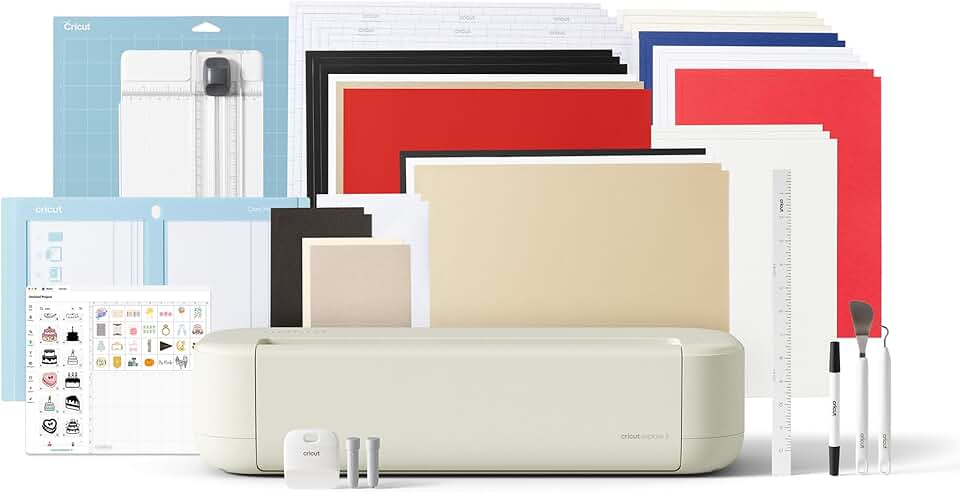
The Cricut Explore 5 Essential Bundle enters the crafting scene as a versatile and precise cutting machine designed to empower creators of all skill levels. This in-depth review will explore its capabilities, bundled accessories, and overall value proposition for hobbyists and small business owners alike. We aim to provide a comprehensive analysis to help you decide if this device is the right investment for your creative endeavors.
Quick Summary: Cricut Explore 5 Essential Bundle
Rating: 4.2/5
Price: $249.00
Key Pros:
- Exceptional material versatility, cutting over 100 different types.
- User-friendly design and intuitive Design Space software.
- Comprehensive bundle includes materials and digital content for immediate projects.
Key Cons:
- Occasional software connectivity issues can interrupt workflow.
- Requires a Cricut Access subscription for full potential and extensive design library.
Table of Contents
Cricut Explore 5 Overview
The Cricut Explore 5 represents a pivotal tool in the world of personal crafting and DIY projects, designed to bring professional-level precision to your home or small business. It is essentially a smart cutting machine that can cut, write, and score a vast array of materials, making it indispensable for many creative endeavors. This particular model, the Essential Bundle, aims to provide an all-encompassing package for users eager to dive into crafting immediately.
This machine is built for versatility, catering to everyone from beginner crafters taking their first steps, to seasoned hobbyists looking to expand their creative toolkit. Its intuitive interface and robust capabilities make it a popular choice for personalizing gifts, creating home decor, designing custom apparel, and much more. The Cricut Explore 5 streamlines many manual crafting processes, saving time and ensuring consistent, high-quality results.
The Explore series has evolved significantly over the years, with each iteration bringing improved performance, connectivity, and user experience. The Explore 5 continues this tradition, focusing on ease of use while maintaining the powerful cutting capabilities Cricut machines are known for. It bridges the gap between basic craft cutters and the more industrial-grade machines, offering a balanced solution for most users.
What truly sets the Cricut Explore 5 Essential Bundle apart is its commitment to providing a complete starter kit. Unlike purchasing the machine alone, this bundle includes a variety of materials, tools, and digital content. This means you can unbox your machine and immediately begin working on multiple projects, eliminating the need for separate purchases to get started.
While the Cricut Maker series offers even greater cutting power for thicker and more specialized materials, the Explore 5 is perfectly suited for the most common crafting materials. It handles everything from delicate paper and vinyl to cardstock, iron-on, and even some fabrics with remarkable precision. This makes it an excellent choice for a wide range of projects without the higher price point of the Maker machines.
The sleek, simplified design of the Cricut Explore 5 also makes it an attractive addition to any craft room or workspace. It’s compact enough not to overwhelm your area, yet robust enough to handle continuous use. Its aesthetic appeal is matched by its functional efficiency, making it a joy to operate for extended periods.
Understanding the core functionality of the Cricut Explore 5 is crucial for appreciating its value. It operates by connecting to Cricut’s Design Space software, either via Bluetooth or USB. This software acts as the brain of the operation, allowing you to design, upload, and manipulate images, text, and patterns before sending them to the machine for cutting, writing, or scoring. This digital integration is a cornerstone of its modern crafting appeal.
The machine’s ability to work with over 100 different materials opens up a world of creative possibilities. From creating personalized cards and intricate vinyl decals to designing custom t-shirts and party decorations, the Cricut Explore 5 handles it all. This versatility ensures that your investment continues to pay off across countless different projects and interests, adapting to your evolving creative needs. More information about Cricut machines and their capabilities can be found on the official Cricut website.
Cricut Explore 5 Key Features & Specs
The Cricut Explore 5 Essential Bundle boasts a robust set of features and specifications that make it a standout choice for crafters. Its core strength lies in its precision cutting capabilities, allowing users to create intricate designs with remarkable accuracy. This precision is vital for detailed projects like stencils, layered cardstock, and fine vinyl decals.
One of the most impressive features is its ability to cut over 100 different materials. This includes popular options like vinyl, iron-on, cardstock, poster board, and even some fabrics. The machine intelligently adjusts pressure and speed for each material type, ensuring optimal results without constant manual calibration. This wide material compatibility makes it incredibly versatile for a myriad of crafting projects.
At the heart of its cutting mechanism is the Fine-Point Blade, which comes standard and is excellent for most common materials. While the bundle usually focuses on general crafting, the Explore 5 series is compatible with various other tools, including a Deep-Point Blade for thicker materials (sold separately). This expandability means the machine can grow with your crafting needs.
The Smart Set Dial is a defining characteristic of the Cricut Explore 5, simplifying material selection. Instead of manually adjusting settings in software, users can simply turn a physical dial on the machine to choose their material type. This intuitive feature significantly reduces the learning curve, especially for beginners, making it easy to achieve perfect cuts every time.
Connectivity is seamless with Bluetooth technology, allowing for wireless design and cutting from your computer, tablet, or smartphone. This untethered operation provides flexibility in your workspace and enhances convenience. A USB connection is also available for those who prefer a wired setup or have specific system requirements.
The Design Space software is the command center for the Cricut Explore 5. This cloud-based software is where you create, upload, and organize your projects. It offers a vast library of images, fonts, and ready-to-make projects, constantly updated by Cricut. The software is available across multiple platforms, including desktop and mobile apps, ensuring you can design from almost anywhere.
The Essential Bundle lives up to its name by including a comprehensive set of accessories to get you started immediately. Typically, this includes various cutting mats (LightGrip, StandardGrip), a weeding tool, a scraper, and a selection of materials like vinyl, iron-on, and cardstock. These supplies are often sufficient for completing 65 or more diverse projects straight out of the box, offering incredible value.
Beyond physical supplies, the bundle also includes bonus digital content. This usually comprises a collection of exclusive images, fonts, and project ideas within Design Space. This digital bonus further enhances the initial value, providing inspiration and resources without additional purchases, allowing crafters to explore new techniques and designs instantly.
In terms of physical specifications, the Cricut Explore 5 is designed to be relatively compact and lightweight, making it easy to store and transport. Its footprint is suitable for most home craft spaces, and its sturdy construction ensures durability. Performance-wise, it offers impressive speed for most cuts while maintaining the precision necessary for intricate details, striking a balance between efficiency and quality.
The machine also features a dual tool carriage, allowing you to cut and write or cut and score in one go without changing tools manually. This multi-tasking capability significantly speeds up project completion, especially for complex designs involving multiple steps. It’s a thoughtful design element that enhances workflow efficiency for all users.
Pros & Cons
Evaluating the Cricut Explore 5 Essential Bundle involves weighing its numerous advantages against a few potential drawbacks. Understanding these points will help you determine if this machine aligns with your crafting expectations and needs. Overall, the positive aspects significantly outweigh the negatives for most users.
Pros:
-
Exceptional Material Versatility: The Cricut Explore 5 can precisely cut over 100 different materials, ranging from delicate tissue paper to thicker cardstock, vinyl, and iron-on. This extensive compatibility makes it incredibly adaptable for a vast array of projects, from custom decals to personalized apparel and intricate paper crafts. You won’t feel limited by your material choices.
-
User-Friendly Design and Software: Cricut’s Design Space software is intuitive and relatively easy to learn, even for beginners. The machine itself features a straightforward Smart Set Dial, simplifying material selection without complex digital adjustments. This ease of use lowers the barrier to entry for new crafters and speeds up workflow for experienced ones.
-
Comprehensive Bundle Value: The “Essential Bundle” truly delivers on its promise by including a generous assortment of tools, cutting mats, and various materials (vinyl, iron-on, cardstock). This means you can start creating immediately without needing to purchase additional supplies. The bonus digital content further enhances this value, providing instant access to new designs and inspiration.
-
High Precision Cutting: The Cricut Explore 5 is renowned for its accuracy, producing clean, crisp cuts even on intricate designs. This precision is crucial for professional-looking results, whether you’re making tiny text decals or complex layered paper art. The consistent quality of cuts sets it apart from many other personal cutting machines.
-
Strong Community Support and Resources: Cricut has a massive online community, including forums, social media groups, and countless tutorials. This robust support system means help and inspiration are always readily available. Beginners can quickly find answers to questions, and advanced users can discover new techniques and project ideas.
-
Wireless Convenience: With built-in Bluetooth connectivity, the Cricut Explore 5 offers the freedom to design and cut wirelessly from your computer, tablet, or smartphone. This eliminates cable clutter and allows for a more flexible crafting setup. The ability to work from different devices adds significant convenience to your creative process.
Cons:
-
Occasional Software Connectivity Issues: While generally reliable, some users occasionally report minor glitches or connectivity drops with the Design Space software, particularly via Bluetooth. These can sometimes interrupt a project, requiring a restart of the software or the machine. Regular software updates usually address these issues, but they can be a minor inconvenience.
-
Cricut Access Subscription for Full Potential: While Design Space is free to use with your own uploaded images, unlocking the full library of Cricut’s images, fonts, and ready-to-make projects often requires a paid Cricut Access subscription. This recurring cost can add up, especially if you rely heavily on their pre-designed content. It’s an important consideration for budget-conscious crafters.
-
Internet Dependency: Design Space, being cloud-based, requires an internet connection for full functionality, including saving projects and accessing the design library. While an offline mode exists for saved projects, it’s limited. This can be a drawback for users in areas with unreliable internet or those who prefer to work completely offline.
-
Proprietary Materials and Tools Encouraged: While the Cricut Explore 5 can use third-party materials, Cricut often promotes its own brand of vinyl, mats, and tools. While not strictly mandatory, using non-Cricut branded items can sometimes void warranties or lead to less optimal performance. This can feel restrictive for some users seeking more budget-friendly alternatives.
-
Noise Level: Like most cutting machines, the Cricut Explore 5 produces a noticeable amount of noise during operation, especially when cutting thicker materials or executing complex designs. While not excessively loud, it’s something to consider if you plan to use it in a shared living space or during quiet hours. It’s comparable to a small vacuum cleaner in terms of sound output.
Who Should Buy the Cricut Explore 5?
The Cricut Explore 5 Essential Bundle is an excellent investment for a specific demographic of crafters and small business owners. Its features and capabilities make it particularly well-suited for those who prioritize versatility, ease of use, and a comprehensive starter package. Understanding your own crafting habits and goals will help you determine if this machine is the right fit.
Beginner Crafters and DIY Enthusiasts:
If you’re new to the world of smart cutting machines, the Cricut Explore 5 is an ideal entry point. Its intuitive Design Space software and user-friendly Smart Set Dial make it easy to learn the ropes without feeling overwhelmed. The Essential Bundle ensures you have all the necessary materials and tools to start your first projects immediately, minimizing initial frustration.
Hobbyists Looking for Versatility:
For individuals who enjoy a wide range of crafting projects—from card making and scrapbooking to vinyl decals, iron-on transfers, and paper crafts—the Explore 5 offers unmatched versatility. Its ability to cut over 100 different materials means you won’t need multiple machines for different project types. This makes it a central hub for diverse creative pursuits.
Small Business Owners and Etsy Sellers:
Entrepreneurs creating custom products like personalized t-shirts, mugs, decals, greeting cards, or unique home decor items will find the Cricut Explore 5 invaluable. Its precision and efficiency allow for consistent production of high-quality goods, helping to streamline your manufacturing process and expand your product offerings. It’s a cost-effective solution for small-scale customization.
Educators and Community Leaders:
Teachers, librarians, or leaders of crafting groups will appreciate the Cricut Explore 5 for its ability to facilitate engaging and creative projects. It’s robust enough for repeated use and simple enough for students or group members to learn quickly. It can be used for classroom decorations, educational materials, or fun group crafting activities, fostering creativity in various settings.
Crafters Upgrading from Manual Cutters:
If you’re currently using scissors, craft knives, or basic manual die-cutting machines, the Cricut Explore 5 will be a revelation. It offers unparalleled precision, speed, and the ability to cut intricate designs that would be impossible or extremely time-consuming by hand. This upgrade significantly enhances efficiency and opens up new creative avenues.
Those Who Value a Complete Starter Package:
The “Essential Bundle” aspect is crucial here. If you want a machine that comes with virtually everything you need to start crafting right away, without the hassle of buying separate tools and materials, this bundle is perfect. It saves time and money on initial setup, allowing for immediate creative gratification.
Who Might Consider Other Options:
While highly versatile, the Cricut Explore 5 may not be the best choice for everyone. If your primary goal is to cut very thick materials like basswood, leather, or chipboard, you might find the Cricut Maker series more suitable due to its Adaptive Tool System and greater cutting force. The Explore 5 handles most common materials but has limitations on extreme thickness.
Similarly, if you are an advanced user whose projects consistently require highly specialized tools like engraving tips, perforating blades, or wavy blades, the Maker series might offer more advanced tool compatibility. The Explore 5 focuses on core cutting, writing, and scoring functions, which covers the vast majority of crafting needs for most users. For a deeper dive into crafting tools, you can explore resources like Wikipedia’s page on Craft.
FAQ about Cricut Explore 5
Here are some frequently asked questions about the Cricut Explore 5 Essential Bundle to help clarify common queries and ensure you make an informed decision.
1. What materials can the Cricut Explore 5 cut?
The Cricut Explore 5 is incredibly versatile, capable of cutting over 100 different materials. This includes popular crafting staples like vinyl (adhesive and iron-on), various weights of cardstock, paper, poster board, and even some fabrics like felt and bonded fabric. It also handles materials such as faux leather, glitter paper, and craft foam with precision.
2. Is a computer or internet connection required to use the Cricut Explore 5?
Yes, a computer or mobile device (tablet/smartphone) is required to design and send projects to the Cricut Explore 5 using the Design Space software. An internet connection is generally needed for full functionality, including accessing Cricut’s extensive image library, saving projects to the cloud, and performing software updates. An offline mode is available for previously saved projects, but it has limitations.
3. What is Cricut Design Space, and is it free?
Cricut Design Space is the free software that powers all Cricut machines, including the Cricut Explore 5. It’s where you design, upload, and organize your projects before sending them to the machine for cutting. While the software itself is free, accessing Cricut’s full library of images, fonts, and ready-to-make projects often requires a paid monthly subscription called Cricut Access. You can, however, upload your own images and fonts for free.
4. What’s the difference between the Explore 5 and other Cricut machines like the Maker?
The Cricut Explore 5 is a highly capable machine for cutting, writing, and scoring a wide range of popular crafting materials. The Cricut Maker series, on the other hand, is Cricut’s most advanced line, featuring an Adaptive Tool System that allows it to use more specialized tools (like knife blades for thicker materials, engraving tools, and debossing tips) and cut over 300 materials, including wood and metal. The Explore 5 is generally more affordable and sufficient for most crafters, while the Maker is for those needing industrial-level versatility.
5. Does the Essential Bundle include everything I need to start crafting immediately?
Yes, the Cricut Explore 5 Essential Bundle is specifically curated to provide a comprehensive starter kit. It typically includes the machine, various cutting mats, a selection of essential tools (like a weeding tool and scraper), and a variety of materials (such as vinyl, iron-on, and cardstock) for numerous projects. It also comes with bonus digital content, ensuring you can begin creating as soon as you unbox it.
6. Are Cricut Explore 5 accessories compatible with other Cricut models?
Many accessories, such as cutting mats and standard blades (like the Fine-Point Blade), are often interchangeable across different Cricut Explore and Maker models. However, specialized tools like the Deep-Point Blade and specific housing units might have model-specific compatibility. Always check the product description for compatibility information before purchasing accessories for your Cricut Explore 5.
7. How precise is the cutting on the Cricut Explore 5?
The Cricut Explore 5 offers remarkable cutting precision, making it suitable for intricate designs and small details. It utilizes a finely calibrated blade and motor system to ensure clean, accurate cuts on a wide array of materials. This precision is one of its key selling points, allowing crafters to achieve professional-looking results consistently, even with complex patterns and tiny fonts.
8. Can I use my own designs with the Cricut Explore 5?
Absolutely! The Cricut Explore 5, through Design Space, allows you to upload your own images (.svg, .png, .jpg, .gif, .bmp, .dxf) and fonts. This feature is completely free and enables endless customization possibilities, ensuring your creative vision isn’t limited by Cricut’s pre-existing library. You can also import designs from other software and modify them within Design Space.
Final Verdict
The Cricut Explore 5 Essential Bundle stands out as an incredibly capable and valuable machine for anyone passionate about crafting and DIY projects. It successfully balances powerful cutting capabilities with an exceptionally user-friendly experience, making it accessible to both novices and seasoned crafters alike. The inclusion of a comprehensive bundle further enhances its appeal, providing immediate gratification and minimizing additional initial purchases.
Its ability to precisely cut over 100 different materials ensures that your creative horizons are virtually limitless, from personalized gifts and home decor to custom apparel and intricate paper crafts. The intuitive Design Space software, coupled with Bluetooth connectivity, offers a seamless and flexible design experience. While minor software quirks and the optional Cricut Access subscription are considerations, they do not significantly detract from the overall value.
For those seeking a versatile, reliable, and easy-to-use smart cutting machine that comes with everything needed to start crafting right away, the Cricut Explore 5 Essential Bundle is an outstanding choice. It delivers exceptional precision, broad material compatibility, and a supportive ecosystem, making it a truly worthwhile investment for anyone looking to bring their creative visions to life with professional results. This machine is a fantastic stepping stone into the world of digital crafting, offering robust performance without the complexity or higher price tag of more industrial machines.
Ultimately, if you’re ready to elevate your crafting game, streamline your projects, and explore a vast array of creative possibilities, the Cricut Explore 5 Essential Bundle is a brilliant tool that will undoubtedly pay dividends in creative output and enjoyment. It’s a smart choice for making your ideas tangible and beautiful, proving itself to be an invaluable asset in any craft room.