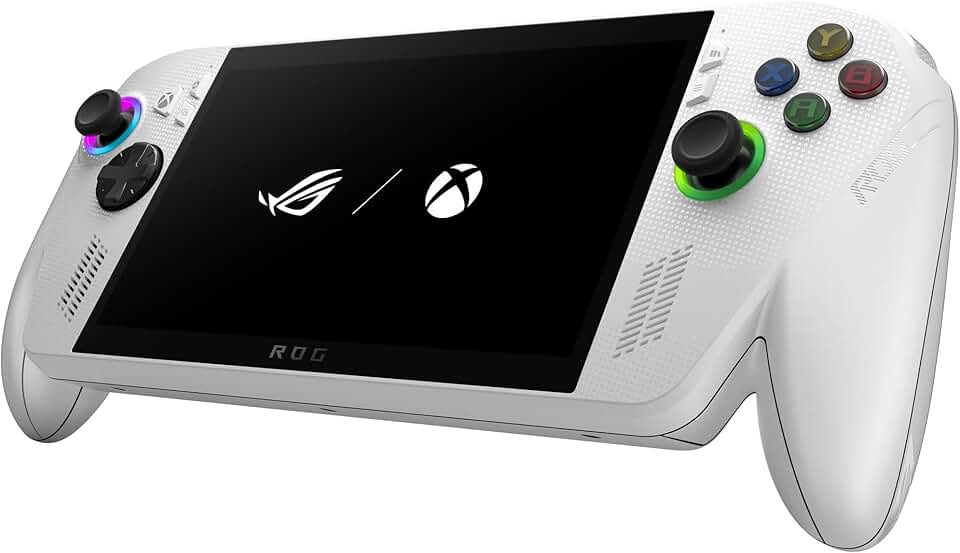
The ASUS ROG Xbox Ally has burst onto the scene, promising a revolutionary portable gaming experience that aims to challenge traditional handheld consoles and even entry-level gaming laptops. This device is designed for gamers who crave high-performance PC gaming on the go, blending powerful hardware with a sleek, ergonomic design.
It stands out with its vibrant 7-inch 1080p 120Hz touchscreen, delivering incredibly smooth visuals and responsive gameplay. Powered by the AMD Ryzen Z2 A processor, it offers a formidable punch, enabling users to play a wide array of modern AAA titles as well as indie gems. The inclusion of 16GB RAM and a 512GB SSD ensures quick loading times and ample storage for a growing game library.
Quick Summary: ASUS ROG Xbox Ally
- Rating: 4.2 out of 5 stars (329 reviews)
- Price: $528.65 USD
- Key Pros:
- Powerful AMD Ryzen Z2 A performance for AAA gaming.
- Smooth 120Hz 1080p touchscreen display.
- Excellent ergonomics and lightweight design for portability.
- Key Cons:
- Battery life can be short under heavy load.
- Windows OS can be less optimized for handheld use than dedicated console OS.
Table of Contents
ASUS ROG Xbox Ally Overview
The ASUS ROG Xbox Ally represents a significant leap forward in the realm of portable gaming, offering a full Windows 11 experience in a compact handheld form factor. This device is not merely a console; it’s a portable PC that gives users access to their entire game library from various platforms, including Steam, Epic Games Store, Xbox Game Pass, and more.
Its design philosophy focuses on both power and portability, aiming to provide an uncompromised gaming experience on the go. The white chassis and ergonomic grips make it visually appealing and comfortable for extended play sessions. With its robust hardware, the ASUS ROG Xbox Ally positions itself as a premium choice for enthusiasts who demand flexibility and performance.
Unlike traditional handhelds that run proprietary operating systems, the ASUS ROG Xbox Ally leverages the versatility of Windows. This means users aren’t limited to a specific storefront or a curated selection of games, opening up a vast universe of PC titles. The inclusion of a 3-month Xbox Game Pass Premium subscription further enhances its value proposition, providing immediate access to hundreds of high-quality games.
The integration of the AMD Ryzen Z2 A processor is central to the Ally’s appeal, delivering impressive computational and graphical power. This custom-designed chip allows the device to handle graphically intensive games at respectable frame rates, a feat previously difficult to achieve in such a small form factor. This processor is optimized for efficiency, balancing performance with power consumption to maximize battery life during gameplay.
ASUS has also paid close attention to the cooling system, which is crucial for a high-performance portable device. The ROG Ally features a sophisticated thermal design with dual fans and multiple heat pipes to dissipate heat effectively, preventing throttling and ensuring consistent performance even under heavy loads. This engineering precision contributes significantly to the device’s reliability and longevity.
Furthermore, the device offers extensive connectivity options, including a USB-C port that supports power delivery, display output, and data transfer. This versatility allows users to connect external monitors, keyboards, mice, and even eGPUs (external graphics processing units) to transform the handheld into a more powerful desktop gaming rig when at home. This dockability expands the device’s utility far beyond simple handheld play.
The software experience is streamlined through ASUS’s Armoury Crate SE, a custom overlay designed to simplify game launching and system settings management. This interface provides quick access to performance profiles, control customization, and library organization, making the Windows environment more user-friendly for a gaming handheld. It attempts to bridge the gap between a traditional PC and a dedicated gaming console interface.
In essence, the ASUS ROG Xbox Ally is a bold statement from ASUS, pushing the boundaries of what’s possible in portable gaming. It’s a device built for the modern gamer who values freedom, performance, and the ability to play their favorite games anywhere, anytime. Its comprehensive feature set and powerful specifications make it a compelling option in a rapidly evolving market, offering a truly amazing value for its capabilities.
ASUS ROG Xbox Ally Key Features & Specs
The ASUS ROG Xbox Ally is packed with impressive hardware and innovative features designed to deliver a top-tier portable gaming experience. Its specifications are competitive with many entry-level gaming laptops, optimized for its handheld form factor. Understanding these key features is essential to appreciating the device’s capabilities and its place in the gaming market.
Powerful AMD Ryzen Z2 A Processor
At the heart of the ASUS ROG Xbox Ally is the custom-designed AMD Ryzen Z2 A processor. This APU (Accelerated Processing Unit) combines a powerful Zen 4 CPU architecture with RDNA 3 graphics, providing exceptional performance for both processing and rendering. It allows the Ally to run demanding AAA titles smoothly, adapting its power consumption based on the game’s requirements and the chosen performance profile.
This processor is specifically engineered for handheld devices, focusing on high performance per watt. It enables the Ally to deliver frame rates that were previously unimaginable on a portable device of this size. The synergy between the CPU and GPU cores ensures a balanced and efficient gaming experience, crucial for battery-powered operation.
Stunning 7-inch 1080p 120Hz Touchscreen
The visual centerpiece of the ASUS ROG Xbox Ally is its 7-inch Full HD (1920 x 1080) IPS-level touchscreen display. With a refresh rate of 120Hz and a response time of 7ms, it offers incredibly fluid motion and sharp, vibrant images. This high refresh rate is a significant advantage for fast-paced games, providing a competitive edge and a more immersive experience.
The display also boasts FreeSync Premium technology, which eliminates screen tearing and stuttering by synchronizing the display’s refresh rate with the GPU’s frame rate. Its brightness and color accuracy further enhance the visual fidelity, making every game look its best. The touchscreen functionality adds another layer of interaction, particularly useful for navigating Windows or playing touch-optimized games.
Ample Memory and Storage
Equipped with 16GB of LPDDR5 RAM running at a high frequency, the ASUS ROG Xbox Ally ensures smooth multitasking and efficient game loading. This generous amount of RAM is critical for modern games, which often require substantial memory resources. It helps prevent bottlenecks and keeps the system responsive even when multiple applications are running in the background.
For storage, the device includes a 512GB NVMe PCIe Gen4 SSD. This ultra-fast storage solution dramatically reduces game load times and system boot-up times, providing a seamless user experience. The SSD is also upgradeable, allowing users to expand their storage capacity if their game library grows beyond the initial 512GB, offering future-proofing and flexibility.
Ergonomic Design and Robust Controls
The physical design of the ASUS ROG Xbox Ally is meticulously crafted for comfort and intuitive control. Its lightweight chassis (approximately 608g or 1.34 lbs) and ergonomic grips make it comfortable to hold for extended gaming sessions. The layout of the buttons, joysticks, and triggers is familiar to console gamers, ensuring a smooth transition.
It features dual analog sticks with Hall effect sensors for precision and longevity, a responsive D-pad, ABXY face buttons, and customizable rear paddle buttons. These controls are highly responsive and provide tactile feedback, enhancing the overall gaming immersion. The inclusion of a gyroscope also allows for motion controls in supported titles, adding another dimension to gameplay.
Advanced Cooling System
To maintain peak performance, the ASUS ROG Xbox Ally incorporates a sophisticated thermal solution called ROG Intelligent Cooling. This system utilizes a dual-fan design, ultra-thin heatsink fins, and multiple heat pipes to efficiently dissipate heat away from the AMD Ryzen Z2 A processor. The fans are designed to operate quietly, minimizing distraction during gameplay.
Effective cooling prevents thermal throttling, which can degrade performance in high-demand scenarios. This ensures that the Ally can sustain its high frame rates and graphical fidelity even during intense gaming sessions, making it a reliable performer. The intelligent cooling system dynamically adjusts fan speeds based on temperature and workload, optimizing both performance and noise levels.
Comprehensive Connectivity and Expandability
The ASUS ROG Xbox Ally offers a versatile range of connectivity options. It includes a USB 3.2 Gen 2 Type-C port that supports DisplayPort 1.4 for external monitor output, power delivery, and high-speed data transfer. This single port greatly expands the device’s utility, allowing it to connect to a variety of peripherals and external displays.
Wireless connectivity is handled by Wi-Fi 6E, providing ultra-fast and stable internet connections for online gaming and downloads. Bluetooth 5.2 enables seamless connection to wireless headphones, controllers, and other accessories. For even greater performance, the Ally supports the ROG XG Mobile external GPU, transforming it into a formidable desktop gaming machine for home use.
Pros & Cons of the ASUS ROG Xbox Ally
The ASUS ROG Xbox Ally brings a lot to the table for portable gaming, but like any device, it has its strengths and weaknesses. A balanced perspective is crucial for potential buyers to make an informed decision. Here, we delve into the key advantages and disadvantages of this impressive handheld PC.
Key Pros
- Exceptional Performance: The AMD Ryzen Z2 A processor is a game-changer, offering desktop-level performance in a handheld form. This allows the Ally to run demanding AAA titles at playable frame rates, providing a truly high-fidelity portable gaming experience. Users can enjoy a vast library of PC games without significant compromises in visual quality or performance.
- Stunning 120Hz VRR Display: The 7-inch 1080p 120Hz display with FreeSync Premium is a standout feature. It delivers incredibly smooth and tear-free visuals, which is especially noticeable in fast-paced action games. The vibrant colors and crisp resolution make games look fantastic, enhancing immersion and overall enjoyment.
- Versatile Windows 11 Experience: Running on Windows 11 means the Ally is not just a gaming device but a full-fledged portable PC. This opens up possibilities for productivity tasks, emulation, and access to any PC game launcher or application. The flexibility to use it like a mini-laptop with external peripherals is a significant advantage over closed-system handhelds.
- Ergonomic and Comfortable Design: ASUS has done an excellent job with the Ally’s ergonomics. The device feels good in the hands, with well-placed controls and a balanced weight distribution. This comfort is vital for long gaming sessions, preventing hand fatigue and allowing players to stay immersed for longer periods.
- Expandable Storage and External GPU Support: The inclusion of an M.2 SSD slot for easy storage upgrades and support for the ROG XG Mobile external GPU dock ensures future-proofing. Users can expand their game library or boost graphical performance significantly, extending the device’s lifespan and utility. This modularity adds incredible value.
- Comprehensive Game Pass Inclusion: The 3-month Xbox Game Pass Premium subscription is a fantastic bonus, immediately providing access to a massive library of games. This allows new owners to dive into gaming without immediately purchasing new titles, showcasing the device’s capabilities right out of the box.
Key Cons
- Sub-par Battery Life Under Load: While powerful, the AMD Ryzen Z2 A can be quite power-hungry. Under heavy gaming loads, the battery life of the ASUS ROG Xbox Ally can be as short as 1-2 hours, which is a significant drawback for extended portable sessions. Users will often need to carry a power bank or stay near an outlet.
- Windows OS Optimization Challenges: Windows 11, while versatile, is not inherently designed for a handheld touch-first interface. This can lead to occasional frustrations with navigation, scaling issues, and performance inconsistencies compared to a dedicated console OS. While Armoury Crate SE helps, it doesn’t fully eliminate these quirks.
- Thermal Management Under Extreme Stress: Although the cooling system is effective, running the most demanding AAA titles for extended periods can still push the thermals. While it rarely throttles severely, the device can become noticeably warm, particularly in the upper rear section, which might be uncomfortable for some users.
- Speaker Quality Could Be Better: While the Ally’s speakers are decent, they don’t quite match the immersive audio experience provided by some competitors or high-end gaming laptops. For the best audio, external headphones are highly recommended, which adds another accessory to carry.
- Initial Setup and Software Learning Curve: As a Windows PC, the initial setup process for the ASUS ROG Xbox Ally can be more involved than a typical console. Users might need to install drivers, update Windows, and configure various settings, which could be daunting for those less familiar with PC gaming.
Who Should Buy the ASUS ROG Xbox Ally?
The ASUS ROG Xbox Ally is not for everyone, but for a specific segment of the gaming community, it represents an ideal solution. Understanding its target audience helps clarify whether this powerful handheld PC aligns with your gaming habits and expectations. This device caters to users who prioritize flexibility, performance, and access to a vast PC game library on the go.
First and foremost, the ROG Ally is perfect for PC gamers who desire portability without sacrificing performance. If you have a large Steam, Epic Games, GOG, or Xbox Game Pass library and wish you could play those titles comfortably on your couch, during commutes, or while traveling, this device is tailor-made for you. It frees you from your desktop, allowing you to continue your PC gaming adventures anywhere.
It’s also an excellent choice for tech enthusiasts and tinkerers who appreciate the open nature of a Windows-based system. Unlike closed consoles, the Ally allows for deep customization, from installing various launchers to running emulation software and even using it for light productivity tasks. If you enjoy optimizing settings, experimenting with different software, and having full control over your device, the Ally offers that freedom.
Gamers who travel frequently will find the ASUS ROG Xbox Ally incredibly appealing. Its compact size and ability to play a wide range of games make it a much more versatile travel companion than a bulky gaming laptop. Whether you’re on a long flight, in a hotel room, or visiting friends, the Ally ensures your favorite games are always within reach, providing entertainment on demand.
Furthermore, if you’re a subscriber to Xbox Game Pass Ultimate, the Ally becomes an even more attractive proposition. The device is perfectly suited to leverage the extensive Game Pass library, offering a seamless experience for downloading and playing hundreds of titles. The included 3-month Game Pass Premium is a strong incentive, letting you jump straight into gaming.
The ASUS ROG Xbox Ally also appeals to those who might be looking for a single device to bridge the gap between console and PC gaming. It offers the plug-and-play convenience of a handheld while retaining the versatility and game library of a PC. This makes it a compelling option for those who want the best of both worlds without investing in multiple expensive systems.
However, it’s important to note that if you are a casual gamer primarily interested in simple, pick-up-and-play experiences with minimal setup, the Ally might be overkill. Its Windows environment can have a steeper learning curve than dedicated handheld consoles. Similarly, if battery life is your absolute top priority for long, unplugged sessions, you might need to manage expectations or invest in a robust power bank.
Ultimately, the ASUS ROG Xbox Ally is best suited for the discerning gamer who values performance, versatility, and access to a vast PC game library in a portable format. It’s for those who are comfortable with a Windows environment and are willing to manage its quirks for the sheer power and flexibility it offers. It’s an amazing piece of technology for the right user, transforming how and where PC games can be played.
FAQ about the ASUS ROG Xbox Ally
Here are some frequently asked questions about the ASUS ROG Xbox Ally, providing detailed answers to common queries from potential buyers and users.
Q1: What operating system does the ASUS ROG Xbox Ally run?
The ASUS ROG Xbox Ally runs on a full version of Windows 11 Home. This means it functions exactly like a compact Windows PC, allowing users to install any compatible software, game launchers (Steam, Epic Games, GOG, Xbox, etc.), and even productivity applications. This open ecosystem is a major distinguishing factor compared to dedicated gaming consoles, offering unparalleled flexibility.
While it runs Windows, ASUS includes its Armoury Crate SE software overlay to provide a more console-like, gaming-focused interface. This helps streamline game launching, performance profile selection, and controller customization, making the Windows experience more palatable for a handheld device. However, users can always switch to the standard Windows desktop experience for full control.
Q2: Can I play AAA games on the ASUS ROG Xbox Ally?
Yes, absolutely. The ASUS ROG Xbox Ally is specifically designed to handle modern AAA games, thanks to its powerful AMD Ryzen Z2 A processor with integrated RDNA 3 graphics. While you might not always be able to run games on ultra settings, it is capable of achieving playable frame rates (often 30-60+ FPS) at its native 1080p resolution, or even higher by lowering the resolution to 720p or adjusting graphic settings.
Performance will vary depending on the specific game and your chosen power profile (e.g., Silent, Performance, Turbo). Many demanding titles like Cyberpunk 2077, Forza Horizon 5, and Elden Ring are perfectly playable on the Ally, offering a truly impressive portable experience. The 120Hz display also makes a significant difference in how smooth these games feel.
Q3: What is the battery life like on the ASUS ROG Xbox Ally?
Battery life is one of the more variable aspects of the ASUS ROG Xbox Ally, heavily depending on the game and performance settings. For demanding AAA games running on the ‘Turbo’ power profile, you can expect around 1 to 2 hours of gameplay. Less demanding titles or lower power modes (‘Performance’ or ‘Silent’) can extend this to 3-5 hours or even more for indie games or media consumption.
ASUS has equipped the Ally with a 40Wh battery, which is standard for a device of this type. To mitigate shorter battery life during heavy gaming, many users opt for a portable power bank or play while connected to power when possible. The device supports fast charging, allowing you to quickly top up the battery when an outlet is available.
Q4: Is the storage upgradeable on the ASUS ROG Xbox Ally?
Yes, the internal storage on the ASUS ROG Xbox Ally is easily upgradeable. It comes with a 512GB NVMe PCIe Gen4 SSD, which is a good starting point for many users. However, if you find yourself needing more space for your growing game library, you can replace the existing SSD with a larger 2230 M.2 NVMe SSD.
The upgrade process is relatively straightforward for those comfortable with opening electronic devices, requiring only a few screws to access the M.2 slot. This expandability is a significant advantage, ensuring the device can grow with your storage needs over time without relying solely on external drives or cloud solutions.
Q5: Can I connect the ASUS ROG Xbox Ally to a TV or external monitor?
Absolutely. The ASUS ROG Xbox Ally features a USB 3.2 Gen 2 Type-C port that supports DisplayPort 1.4. This allows you to connect the device to an external monitor or TV using a compatible USB-C to DisplayPort or USB-C to HDMI adapter/dock. When connected, the Ally can output video at resolutions up to 4K at 60Hz, or 1080p at 120Hz or higher.
This capability transforms the Ally into a versatile mini-desktop PC or a console for big-screen gaming. You can connect external controllers, a keyboard, and a mouse to create a full desktop experience. For even more power, it’s compatible with the proprietary ROG XG Mobile external GPU, which offers a significant boost in graphical performance for a true desktop gaming setup.
Q6: Does the ASUS ROG Xbox Ally support Xbox Game Pass?
Yes, the ASUS ROG Xbox Ally fully supports Xbox Game Pass. Since it runs Windows 11, you can simply download and install the Xbox app from the Microsoft Store, just like on any other PC. The device even comes with a 3-month subscription to Xbox Game Pass Premium (or Ultimate in some regions), allowing you to immediately dive into hundreds of games available through the service.
The integration with Game Pass is seamless, making the Ally an excellent device for Game Pass subscribers who want to access their library on the go. This also includes cloud streaming for Game Pass titles, though performance will depend on your internet connection.
Q7: How does the ASUS ROG Xbox Ally handle emulation?
Due to its powerful AMD Ryzen Z2 A processor and Windows 11 operating system, the ASUS ROG Xbox Ally is an excellent device for emulation. It can comfortably run emulators for a wide range of older consoles, from retro systems like NES, SNES, and PlayStation 1, all the way up to more demanding platforms like PlayStation 2, Nintendo Switch, and even some PlayStation 3 titles (depending on the emulator and game).
The Ally’s robust hardware ensures that emulation runs smoothly, often with enhancements like higher resolutions and improved textures. Its integrated controls and 120Hz display further enhance the emulation experience, making it a fantastic portable retro gaming machine for enthusiasts. Users simply need to install their preferred emulators and ROMs, adhering to legal ownership of game copies.
Final Verdict
The ASUS ROG Xbox Ally stands as a formidable contender in the portable gaming market, offering an incredibly powerful and versatile experience that blurs the lines between handheld console and gaming PC. Its core strength lies in the combination of the AMD Ryzen Z2 A processor and the vibrant 120Hz 1080p display, delivering amazing performance and stunning visuals for a truly immersive gaming journey on the go.
While the battery life under heavy load and the occasional Windows OS quirks are notable drawbacks, they are often outweighed by the sheer flexibility and power the device offers. The ability to access your entire PC game library, from Steam to Xbox Game Pass, on a single portable device is a game-changer for many. Its ergonomic design ensures comfort during extended play, making it a joy to use.
For PC gamers seeking true portability without compromising on performance, or for those who desire a versatile device capable of both high-fidelity gaming and light productivity, the ASUS ROG Xbox Ally is an outstanding choice. It’s an investment in freedom, allowing you to take your gaming adventures wherever life leads you. The included Xbox Game Pass Premium subscription further sweetens the deal, offering immediate value.
Ultimately, the ASUS ROG Xbox Ally isn’t just a gaming handheld; it’s a statement about the future of portable PC gaming. It’s a device that caters to the enthusiast who wants power, choice, and a premium experience in a compact form factor. Despite its minor imperfections, its overall package is compelling and represents an amazing value for what it delivers, making it an ultimate choice for many.