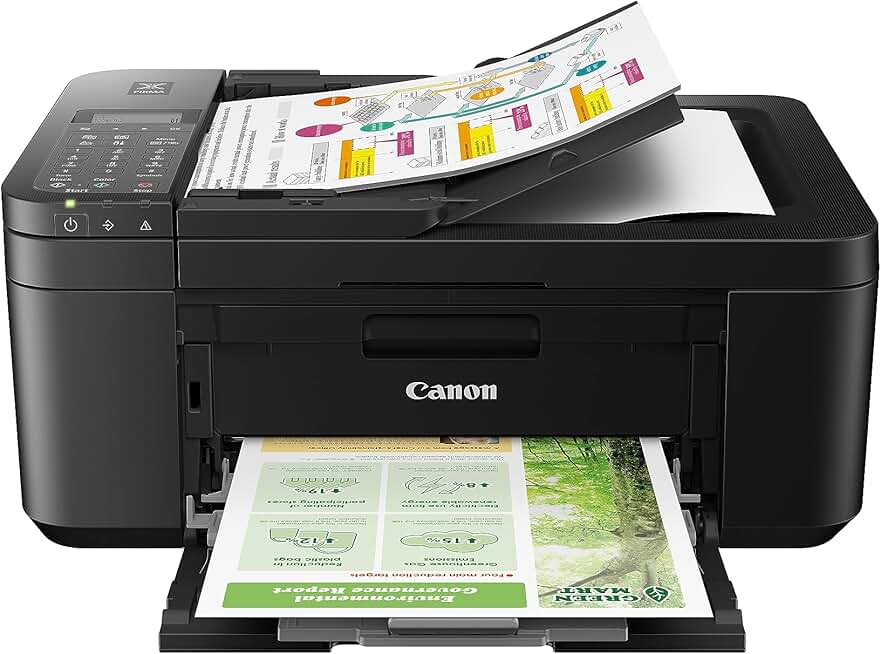
The Canon PIXMA TR4720 Printer stands out as a versatile all-in-one solution designed specifically for home offices and personal use, offering a blend of printing, scanning, copying, and faxing capabilities. This wireless device aims to simplify everyday document management with its user-friendly features and compact footprint.
Quick Summary: Canon PIXMA TR4720 Printer
Rating: 3.9/5 (15589 Reviews)
Price: $79.00 USD
Key Pros:
- All-in-One Functionality: Offers print, scan, copy, and fax, making it a comprehensive solution for home office needs.
- Wireless Connectivity: Seamless mobile printing and scanning from various devices, enhancing convenience and flexibility.
- Auto Document Feeder (ADF): Simplifies multi-page scanning and copying tasks, saving significant time and effort.
Key Cons:
- Ink Costs: Cartridges can be relatively expensive, potentially increasing long-term operating costs for heavy users.
- Print Speed: Not the fastest printer on the market, which might be a concern for users with high-volume printing requirements.
Table of Contents
Canon PIXMA TR4720 Printer Overview
The Canon PIXMA TR4720 Printer is positioned as a budget-friendly, all-in-one inkjet printer tailored for home users and small home offices. It integrates printing, scanning, copying, and faxing into a single, relatively compact unit, making it a versatile addition to any workspace where space might be a premium.
This model emphasizes ease of use and connectivity, offering robust wireless capabilities that allow users to print from various devices including smartphones, tablets, and computers without the need for direct cabling. Its design is sleek and unobtrusive, fitting well into modern home aesthetics.
One of the key selling points of the Canon PIXMA TR4720 Printer is its inclusion of an Auto Document Feeder (ADF). This feature significantly streamlines the process of scanning or copying multi-page documents, a common requirement in many home office settings, saving users valuable time and effort.
The printer supports a range of paper sizes and types, from standard letter and legal documents to photo paper, providing flexibility for different printing needs. It uses a two-cartridge ink system, which includes one black ink cartridge and one color ink cartridge, simplifying replacement.
While designed for convenience, it’s important for potential buyers to consider their specific usage patterns. For instance, those with very high print volumes might find the ink economy less favorable compared to tank-based systems, but for moderate home use, it offers a good balance.
The setup process for the Canon PIXMA TR4720 Printer is generally straightforward, guided by clear instructions and user-friendly software. Wireless setup is typically hassle-free, connecting quickly to home networks and mobile devices.
Beyond basic functionality, the printer also includes features like automatic duplex printing, which helps save paper by printing on both sides of a sheet. This is an environmentally conscious feature that also contributes to cost savings over time for document-heavy users.
Faxing capabilities, while less common in modern home use, remain a valuable addition for certain scenarios, especially for those who still interact with businesses requiring faxed documents. The built-in fax function on the Canon PIXMA TR4720 Printer ensures comprehensive communication options.
Overall, the Canon PIXMA TR4720 Printer aims to be a reliable workhorse for families and individuals needing a consolidated device for their printing, scanning, copying, and occasional faxing tasks. Its blend of features and affordability makes it a strong contender in the entry-level all-in-one market.
It carries certifications like EPEAT and ENERGY STAR, indicating its commitment to environmental sustainability and energy efficiency. This can translate to lower electricity bills and a reduced carbon footprint for environmentally conscious consumers.
The printer’s interface is intuitive, typically featuring a small LCD screen and physical buttons for easy navigation through its various functions. This design choice prioritizes user accessibility over complex digital touchscreens, which can sometimes be less responsive.
For more technical details, users can often find comprehensive specifications on the manufacturer’s official website, which provides in-depth information about print resolutions, speeds, and software compatibility. For general printer knowledge, Wikipedia’s printer page offers a good starting point.
Canon PIXMA TR4720 Printer Key Features & Specs
The Canon PIXMA TR4720 Printer is packed with features designed to enhance productivity and convenience for home users. Understanding these specifications is crucial for determining if this printer aligns with your specific needs.
All-in-One Functionality: This printer offers four core functions: print, scan, copy, and fax. This comprehensive suite makes it a central hub for various document management tasks, eliminating the need for separate devices.
Wireless Connectivity: One of its strongest selling points is its robust wireless capabilities. It supports Wi-Fi connectivity, allowing for seamless printing and scanning from laptops, desktops, smartphones, and tablets. This includes support for mobile printing apps like Canon PRINT Inkjet/SELPHY and Apple AirPrint.
Auto Document Feeder (ADF): The integrated 20-sheet ADF is a significant time-saver for anyone dealing with multi-page documents. It allows users to scan or copy up to 20 pages consecutively without manual intervention, which is invaluable for home office tasks.
Automatic Duplex Printing: The TR4720 can automatically print on both sides of the paper. This auto-duplex feature helps conserve paper, reduces costs, and is an environmentally friendly option for everyday document printing.
Compact Design: With dimensions typically around 17.2 inches (W) x 14.3 inches (D) x 7.5 inches (H) and weighing approximately 13 pounds, the Canon PIXMA TR4720 Printer is designed to fit comfortably in smaller spaces, making it ideal for home desks or shelves.
Print Resolution: It offers a maximum print resolution of 4800 x 1200 dpi (dots per inch) for color prints, ensuring sharp text and vibrant images. Black and white documents also benefit from a high resolution for clear, professional-looking output.
Print Speed: While not a speed demon, the TR4720 offers decent speeds for home use. It typically prints at around 8.8 images per minute (ipm) for black and white documents and 4.4 ipm for color documents, which is adequate for occasional printing.
Ink System: The printer uses a 2-cartridge FINE (Full-photolithography Inkjet Nozzle Engineering) system: one black pigment ink cartridge for crisp text and one color dye-based ink cartridge for vivid images. This system is easy to replace and maintain.
Paper Handling: It features a rear paper tray that can hold up to 100 sheets of plain paper or 20 sheets of 4×6 photo paper. This versatility allows users to switch between different media types easily.
Scanning Capabilities: The flatbed scanner offers an optical resolution of 600 x 1200 dpi, suitable for scanning documents and photos with good detail. The ADF further enhances scanning efficiency for multi-page documents.
Fax Functionality: The built-in fax modem operates at 33.6 kbps and includes memory for up to 50 pages. This feature provides a reliable option for sending and receiving faxes when needed, supporting traditional communication methods.
EPEAT and ENERGY STAR Certified: These certifications highlight the printer’s commitment to environmental responsibility. It meets stringent energy efficiency guidelines, helping to reduce power consumption and operating costs.
User Interface: A small, clear LCD display (often a 2-line mono LCD) combined with intuitive physical buttons provides a straightforward user experience. This design makes it easy to navigate menus and initiate tasks without complex digital screens.
Software Compatibility: The Canon PIXMA TR4720 Printer comes with a suite of software for setup, maintenance, and creative projects. It is compatible with both Windows and macOS operating systems, offering broad support for most home computers.
These features collectively make the Canon PIXMA TR4720 Printer a well-rounded choice for individuals and families seeking an affordable, functional, and user-friendly all-in-one printer for their everyday tasks. For official product details, visit the Canon USA website.
Pros & Cons
Evaluating the strengths and weaknesses of the Canon PIXMA TR4720 Printer is essential for making an informed purchase decision. No product is perfect, and understanding its limitations alongside its benefits helps set realistic expectations.
Pros:
- All-in-One Versatility: The ability to print, scan, copy, and fax from a single device is incredibly convenient for home users. This eliminates the need for multiple machines, saving space and simplifying workflow. It truly acts as a central command center for document tasks.
- Integrated Auto Document Feeder (ADF): The 20-sheet ADF is a standout feature, especially at this price point. It dramatically speeds up the process of scanning or copying multi-page contracts, school assignments, or family documents without manual page-by-page feeding.
- Excellent Wireless Connectivity: Setting up the TR4720 for wireless use is generally straightforward, supporting Wi-Fi, Apple AirPrint, and the Canon PRINT Inkjet/SELPHY app. This allows for flexible printing from virtually any device in your home, including smartphones and tablets, enhancing mobility.
- Automatic Duplex Printing: The automatic two-sided printing function is a valuable addition for both cost savings and environmental reasons. It reduces paper consumption and makes printing multi-page documents more professional and efficient.
- Compact and Space-Saving Design: Its relatively small footprint means the printer can easily fit onto a desk, shelf, or in a small home office nook without dominating the space. This is a significant advantage for users with limited room.
- Good Print Quality for Text and Photos: For an inkjet printer in its class, the TR4720 delivers crisp black text and reasonably vibrant color graphics and photos. It’s perfectly suitable for school projects, family photos, and everyday document printing.
- Affordable Initial Purchase Price: The upfront cost of the Canon PIXMA TR4720 Printer is highly competitive, making it an accessible option for budget-conscious consumers who need a full-featured home printer without a hefty investment.
- Easy Setup and User-Friendly Interface: Users often praise the intuitive setup process and the straightforward control panel. The simple LCD screen and clear buttons ensure that even less tech-savvy individuals can operate it effectively.
Cons:
- High Ink Cartridge Costs: This is a common complaint for many inkjet printers, and the TR4720 is no exception. The cost of replacement ink cartridges, especially for moderate to heavy use, can quickly accumulate and potentially outweigh the initial savings on the printer itself.
- Slower Print Speeds: While adequate for occasional home printing, the print speeds (8.8 ipm black, 4.4 ipm color) are not ideal for high-volume environments. Users needing to print large documents quickly might find themselves waiting longer than desired.
- Small Paper Capacity: The 100-sheet rear paper tray is sufficient for light use but requires frequent refilling for heavier printing tasks. This can be an inconvenience in busy periods, breaking the workflow.
- No Ethernet Port: The printer relies solely on Wi-Fi for network connectivity. While wireless is convenient, the absence of an Ethernet port means it cannot be directly wired into a network for more stable connections or in environments where Wi-Fi is unreliable or unavailable.
- Limited LCD Screen: The 2-line mono LCD screen is functional but basic. It lacks the advanced touch capabilities and larger display of more premium models, which can sometimes make navigation or troubleshooting less intuitive.
- Build Quality is Basic: While functional, the overall build quality feels somewhat lightweight compared to more robust office printers. This is typical for budget-friendly models but might be a concern for those seeking a more durable, heavy-duty machine.
- Two-Cartridge System Limitations: The two-cartridge system (one black, one tri-color) means that if one color runs out, you might need to replace the entire color cartridge. This can lead to wasted ink if you primarily use one or two colors more than others.
Who Should Buy the Canon PIXMA TR4720 Printer?
Understanding the target audience for the Canon PIXMA TR4720 Printer is key to determining if it’s the right fit for your specific needs. This printer excels in certain environments and for particular user profiles, while others might find its features or limitations less suitable.
Home Users and Students: This printer is an excellent choice for individuals and families who need a reliable, multi-functional device for everyday tasks. It handles homework assignments, printing recipes, concert tickets, or occasional photos with ease. Its affordability also makes it attractive for students on a budget.
Small Home Office Owners: For those running a small business from home or needing a dedicated device for occasional work-related documents, the TR4720 offers great value. The ADF and fax capabilities are particularly beneficial for managing invoices, contracts, and other professional documents.
Users with Limited Space: Given its compact footprint, the Canon PIXMA TR4720 Printer is ideal for apartments, dorm rooms, or small home offices where desk space is at a premium. It consolidates multiple functions into one device, reducing clutter.
Individuals Seeking Wireless Convenience: If you frequently print from your smartphone, tablet, or laptop without wanting to deal with cables, the TR4720’s robust wireless features are a major advantage. Its compatibility with various mobile printing apps ensures seamless connectivity.
Budget-Conscious Buyers: The initial purchase price of this printer is very attractive, making it accessible to a wide range of consumers. It offers a comprehensive set of features without requiring a significant upfront investment, which is a common priority for many home users.
Occasional Fax Users: While faxing is less common now, some individuals or small businesses still require it for specific legal or medical documents. The TR4720’s built-in fax function provides this capability without needing a separate machine.
Environmentally Conscious Consumers: With EPEAT and ENERGY STAR certifications, this printer is designed to be energy-efficient and environmentally responsible. This aligns well with users who prioritize eco-friendly products and lower their carbon footprint.
Users Who Value Ease of Use: The straightforward setup process, intuitive control panel, and simple ink cartridge replacement make the TR4720 a good option for those who prefer a no-fuss, user-friendly device. It doesn’t require extensive technical knowledge to operate.
However, if you print hundreds of pages daily, require lightning-fast speeds, or manage a large office with complex networking needs, this printer might fall short. For average home use, the Canon PIXMA TR4720 Printer offers a fantastic balance of features and affordability.
It’s designed for users who need a reliable workhorse for everyday tasks, prioritizing convenience and versatility within a home setting. Its ability to handle diverse document types, from school projects to scanned receipts, makes it a valuable asset for busy households.
Consider your average monthly print volume and the types of documents you typically handle. If these align with moderate, varied tasks, then the TR4720 is likely an excellent candidate for your home or small office environment. Its strengths lie in its comprehensive functionality and user-centric design.
Ultimately, the Canon PIXMA TR4720 Printer provides a compelling package for those seeking a practical, all-in-one solution without breaking the bank. Its combination of features caters well to the typical demands of a modern home or small personal office setup.
FAQ about Canon PIXMA TR4720 Printer
Here are some frequently asked questions about the Canon PIXMA TR4720 Printer, providing further clarity on its operation, maintenance, and capabilities.
Q1: Is the Canon PIXMA TR4720 Printer easy to set up for wireless printing?
A1: Yes, the Canon PIXMA TR4720 Printer is generally considered very easy to set up for wireless printing. Canon provides clear instructions and a user-friendly setup wizard. You can typically connect it to your home Wi-Fi network directly from the printer’s control panel or via the Canon PRINT Inkjet/SELPHY app on your smartphone, which guides you through the process step-by-step.
Q2: Does this printer support automatic double-sided (duplex) printing?
A2: Yes, the Canon PIXMA TR4720 Printer supports automatic duplex printing. This means it can automatically print on both sides of a page without you having to manually flip the paper. This feature is excellent for saving paper and creating professional-looking documents efficiently.
Q3: What type of ink cartridges does the Canon PIXMA TR4720 Printer use?
A3: The Canon PIXMA TR4720 Printer uses two FINE (Full-photolithography Inkjet Nozzle Engineering) ink cartridges. These are typically the PG-275 black ink cartridge and the CL-276 color ink cartridge. XL versions (PG-275XL and CL-276XL) are also available for higher yield and potentially better value over time.
Q4: Can I print directly from my smartphone or tablet with the TR4720?
A4: Absolutely. The TR4720 is designed for mobile printing convenience. It supports Canon’s free PRINT Inkjet/SELPHY app, Apple AirPrint for iOS devices, and Mopria Print Service for Android devices. This allows you to print documents and photos directly from your mobile devices without needing a computer.
Q5: Does the Canon PIXMA TR4720 Printer have an Auto Document Feeder (ADF)?
A5: Yes, it does. The Canon PIXMA TR4720 Printer is equipped with a 20-sheet Auto Document Feeder (ADF). This feature is invaluable for scanning or copying multi-page documents efficiently, as it automatically feeds each page into the scanner without manual intervention.
Q6: What are the main differences between the TR4720 and other Canon PIXMA printers?
A6: The TR4720 is an entry-level all-in-one designed for home use, emphasizing affordability and wireless convenience with an ADF. Higher-end PIXMA models might offer faster print speeds, larger touchscreens, more advanced paper handling (like multiple trays), individual ink tanks, or enhanced photo printing capabilities. Lower-end models might lack the ADF or fax function.
Q7: Is the Canon PIXMA TR4720 Printer suitable for heavy-duty printing?
A7: The Canon PIXMA TR4720 Printer is best suited for light to moderate home printing needs. Its print speeds and ink cartridge yields are not designed for very high volumes. For heavy-duty printing, a business-oriented inkjet or a laser printer would likely be a more cost-effective and efficient choice due to lower cost per page and faster speeds.
Q8: Does the TR4720 support cloud printing services?
A8: While it integrates well with mobile apps for direct printing, the Canon PIXMA TR4720 Printer generally focuses on direct wireless connectivity from devices on your local network. It might not support direct integration with all third-party cloud printing services as extensively as some higher-end models, but you can typically print cloud documents by opening them on your mobile device or computer and then using the standard print function.
Final Verdict
The Canon PIXMA TR4720 Printer emerges as an incredibly compelling option for individuals and families seeking a versatile, all-in-one printing solution for their home or small office. Its blend of core functionalities, ease of use, and competitive pricing makes it an outstanding value proposition in the entry-level printer market.
With its ability to print, scan, copy, and fax, coupled with convenient wireless connectivity and an Auto Document Feeder, this printer addresses the majority of common document management needs. It truly simplifies tasks that would otherwise require multiple devices or tedious manual processes.
While acknowledging its limitations, such as potentially higher ink costs for heavy users and moderate print speeds, these are common trade-offs for printers in this price category. For the typical home user, these drawbacks are often outweighed by the printer’s overall utility and affordability.
The commitment to energy efficiency, reflected in its EPEAT and ENERGY STAR certifications, further enhances its appeal to environmentally conscious consumers. Its compact design ensures it won’t overwhelm your workspace, making it a practical choice for modern living.
Ultimately, if you’re in search of a reliable, feature-rich, and budget-friendly all-in-one printer that can handle everything from school projects to occasional faxes, the Canon PIXMA TR4720 Printer is an excellent investment. It delivers essential functionality with impressive convenience.
It stands as a testament to Canon’s ability to produce dependable home office equipment that meets the demands of everyday use without compromising on quality for its intended purpose. We highly recommend the Canon PIXMA TR4720 Printer for its amazing value and essential features.