The Brother DCP-L2640DW Printer stands out as a highly capable and versatile monochrome multi-function laser printer, designed to meet the demanding needs of both home offices and small businesses. This comprehensive review delves into its core functionalities, performance, and overall value proposition, helping you determine if it’s the right printing solution for your setup. We’ll explore its wireless capabilities, efficient duplex printing, and robust scanning features that contribute to its impressive reputation.
Quick Summary: Brother DCP-L2640DW Printer
- Rating: 4.3/5.0 (Based on 3194 reviews)
- Price: $209.99 USD (as of review date)
- Key Pros:
- Fast, high-quality monochrome laser printing.
- Automatic duplex printing saves paper and time.
- Versatile multi-functionality (print, copy, scan).
- Reliable wireless connectivity and mobile printing support.
- Key Cons:
- Monochrome only (no color printing).
- Initial toner cartridge has limited yield.
Table of Contents
- Brother DCP-L2640DW Printer Overview
- Brother DCP-L2640DW Printer Key Features & Specifications
- Performance and Efficiency with the DCP-L2640DW
- Connectivity and Mobile Printing Options
- Pros & Cons of the Brother DCP-L2640DW
- Who Should Buy the Brother DCP-L2640DW Printer?
- FAQ about the Brother DCP-L2640DW Printer
- Final Verdict on the Brother DCP-L2640DW
Brother DCP-L2640DW Printer Overview
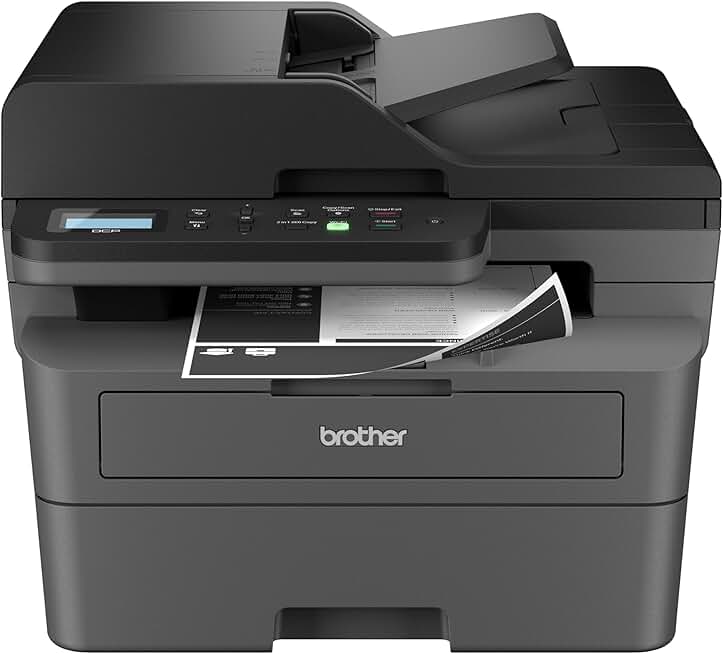
The Brother DCP-L2640DW Printer emerges as a formidable contender in the monochrome laser multi-function printer market, specifically targeting users who demand efficiency, reliability, and cost-effectiveness. This device is not just a printer; it integrates copying and scanning capabilities into a single compact unit, making it a versatile asset for any workspace. Its design prioritizes a smaller footprint, ensuring it fits comfortably in home offices or small business environments where space is often at a premium.
At its core, the DCP-L2640DW is built for productivity. It boasts impressive print speeds and features automatic duplex (two-sided) printing, which significantly reduces paper consumption and enhances professionalism for documents. The inclusion of wireless connectivity means flexible placement and easy access from multiple devices, catering to modern, dynamic work setups. This printer is an ideal solution for individuals or teams with a high volume of black-and-white document printing needs.
Beyond its core functions, the Brother DCP-L2640DW comes with thoughtful additions like a Refresh Subscription Trial, offering a convenient way to manage toner supplies. It also includes compatibility with Alexa, allowing for voice-activated printing commands, which adds a layer of modern convenience. The printer’s EPEAT certification underscores Brother’s commitment to environmental responsibility, a growing concern for many consumers and businesses.
Users consistently praise this model for its straightforward setup and intuitive operation, making it accessible even for those who are not particularly tech-savvy. The combination of speed, quality, and multi-functionality in a robust laser package positions the Brother DCP-L2640DW Printer as an excellent investment for sustained document output. It serves as a reliable workhorse, minimizing downtime and maximizing efficiency for daily printing, scanning, and copying tasks.
For anyone seeking a dedicated monochrome printer that can handle diverse document tasks with ease, the DCP-L2640DW presents a compelling argument. Its laser technology ensures sharp text and consistent output, a crucial factor for professional documents. This printer is designed to deliver consistent results day in and day out, proving its worth in busy environments.
The overall user experience, from installation to daily use, is designed to be seamless, reducing potential frustrations often associated with new office equipment. Its robust build quality suggests longevity, promising years of dependable service. This makes the Brother DCP-L2640DW Printer a smart, long-term choice for productivity.
Brother DCP-L2640DW Printer Key Features & Specifications
The Brother DCP-L2640DW Printer is packed with features designed to enhance productivity and streamline document management. Understanding its core specifications is crucial for appreciating its capabilities and determining if it aligns with your specific needs. This section details the technical aspects that make this printer a standout choice for monochrome laser printing.
Print Speed and Quality
One of the most impressive specifications of the DCP-L2640DW is its rapid print speed, capable of reaching up to 32 pages per minute (ppm). This speed is particularly beneficial in fast-paced environments where waiting for documents can hinder workflow. The laser printing technology ensures crisp, professional-quality text output with a resolution of up to 2400 x 600 dpi, making every document clear and legible.
Automatic Duplex Printing
Automatic two-sided (duplex) printing is a standard feature on this model, offering significant advantages in terms of cost savings and environmental impact. By automatically printing on both sides of a page, users can halve their paper consumption. This also contributes to creating more professional-looking reports and presentations without manual intervention.
Copy and Scan Functionality
As a multi-function device, the DCP-L2640DW excels in copying and scanning. It includes a convenient 50-sheet Automatic Document Feeder (ADF), allowing users to scan or copy multi-page documents quickly and efficiently without having to feed each page individually. The flatbed scanner is ideal for scanning delicate items, books, or irregularly shaped documents, providing versatility for various tasks.
Scanning capabilities extend to multiple destinations, including email, file, image, and optical character recognition (OCR), facilitating easy digital archiving and document management. The quality of scanned images and documents is consistently high, ensuring clarity and accuracy for digital records. This comprehensive scanning suite is a major advantage for administrative tasks.
Connectivity Options
The Brother DCP-L2640DW Printer offers robust connectivity, primarily focusing on wireless technology. Built-in Wi-Fi allows for seamless integration into home and small office networks, enabling multiple users to print from various devices without cables. For direct connection, a high-speed USB 2.0 interface is also available, ensuring reliability when a wired connection is preferred or necessary.
Mobile Printing Support
Modern workflows demand mobile accessibility, and the DCP-L2640DW delivers with extensive mobile printing support. It is compatible with popular services like Apple AirPrint, Mopria, and Brother’s own iPrint&Scan app. This allows users to print directly from their smartphones, tablets, and other mobile devices, offering unparalleled convenience and flexibility for printing on the go or from different locations within the office.
Paper Handling
The printer features a generous 250-sheet adjustable paper tray, capable of handling letter and legal-sized paper, reducing the frequency of paper refills. A manual feed slot provides flexibility for printing on various media types, including envelopes, labels, and thicker paper stocks. The output tray can hold up to 100 sheets, preventing stacks of printed documents from falling over.
Toner System and Yield
Brother’s intelligent toner system, which separates the toner cartridge (TN830/TN830XL) from the drum unit (DR830), is a key feature for cost efficiency. This design means you only replace the component that’s depleted, reducing waste and overall running costs. High-yield toner cartridges are available, significantly lowering the cost per page for high-volume users, making the Brother DCP-L2640DW Printer an economical choice in the long run.
Display and Control
The printer is equipped with a 1-line LCD display, providing clear status updates and facilitating navigation through menus and settings. While not a touchscreen, the intuitive button layout makes operating the printer straightforward. This simple interface ensures that users can quickly set up and manage printing, copying, and scanning tasks with minimal fuss.
Dimensions and Weight
Measuring approximately 16.1 x 15.7 x 12.5 inches (W x D x H) and weighing around 24.9 lbs, the DCP-L2640DW is designed to be compact enough for most desks or shared workspaces. Its relatively small footprint ensures it doesn’t dominate the area, making it suitable for environments where space optimization is important. This compact design does not compromise its robust functionality.
Additional Features
The inclusion of a Refresh Subscription Trial offers a convenient way to manage toner supplies, ensuring you never run out unexpectedly. Alexa compatibility adds a modern touch, allowing for voice-activated commands for common printing tasks. Furthermore, its EPEAT certification highlights its energy efficiency and reduced environmental impact, appealing to eco-conscious users.
These detailed specifications underscore the DCP-L2640DW’s capability as a versatile and efficient monochrome laser multi-function printer. From its speed and duplex printing to its comprehensive scanning and wireless connectivity, it offers a robust solution for diverse document needs. The thoughtful design and cost-saving features make it a strong contender in its category.
Performance and Efficiency with the DCP-L2640DW
The practical performance and operational efficiency of a printer are paramount to its overall value, and the Brother DCP-L2640DW Printer truly shines in these aspects. This section will delve deeper into how this multi-function device performs in real-world scenarios, from its printing prowess to its energy consumption and user experience. Understanding these details helps paint a complete picture of its capabilities.
Detailed Print Performance
The advertised print speed of 32 pages per minute for the DCP-L2640DW is not just a number; it translates into tangible productivity gains. For text-heavy documents, the printer consistently delivers at or near this speed, making short work of large reports or multiple handouts. The first-page-out time is also remarkably quick, typically under 8.5 seconds, which means less waiting for your print jobs to begin, especially crucial for quick, single-page prints.
Print quality remains consistently high across various paper types. Text is sharp, dark, and clear, even at smaller font sizes, which is a hallmark of Brother’s laser technology. While it’s a monochrome printer, basic graphics and charts also reproduce well, with good distinction between shades of gray. This makes it suitable for internal reports, invoices, and other business documents where clarity is key.
Copying and Scanning Efficiency
The copying function of the DCP-L2640DW is highly efficient, benefiting greatly from the 50-sheet Automatic Document Feeder (ADF). This allows for unattended copying of multi-page documents, saving significant time compared to manual placement on a flatbed. Copy speeds are competitive, mirroring print speeds for single-sided documents and slightly reduced for duplex copies.
Scanning performance is equally robust. The ADF facilitates rapid scanning of numerous pages, converting physical documents into digital files with ease. The scan resolution is excellent, capturing fine details and ensuring that digitized documents are clear and readable. Users can scan to various destinations directly from the printer’s control panel, including email, network folders, or cloud services, enhancing document workflow and accessibility.
Energy Efficiency and Noise Levels
In terms of energy consumption, the Brother DCP-L2640DW Printer is designed with efficiency in mind. Laser printers are generally more energy-efficient than inkjet printers for high-volume printing, and this model is no exception. Its EPEAT certification is a testament to its reduced environmental footprint and lower power usage, especially in standby and deep sleep modes. This translates to lower electricity bills over time.
Noise levels during operation are also an important consideration for home and small office environments. The DCP-L2640DW operates relatively quietly for a laser printer, particularly when printing single-sided documents. While there is a noticeable hum during active printing, it is generally not disruptive, allowing for comfortable use in shared workspaces or quiet home office settings. The noise reduces significantly when the printer is in standby mode.
User Experience and Software Integration
The user experience with the DCP-L2640DW is largely positive, owing to its straightforward setup and intuitive control panel. The 1-line LCD display, while basic, provides all necessary information and navigation options clearly. Brother’s accompanying software suite, including the iPrint&Scan application, enhances usability by offering advanced scanning features, document management tools, and easy mobile printing.
The printer’s drivers are stable and compatible with a wide range of operating systems, including Windows, macOS, and various Linux distributions, ensuring broad accessibility. Firmware updates are regularly provided by Brother, which helps maintain security and optimize performance over the printer’s lifespan. This commitment to ongoing support adds to the printer’s long-term value and reliability.
Long-Term Toner Costs
One of the most significant efficiency advantages of the Brother DCP-L2640DW Printer is its cost-effective toner system. The separation of the toner cartridge and drum unit means you only replace the component that’s exhausted, preventing unnecessary waste and expense. High-yield toner cartridges (TN830XL) offer a substantially lower cost per page compared to standard yield, making it an economical choice for high-volume printing.
The Refresh Subscription Trial further enhances cost predictability by automatically shipping toner when needed, often at a discounted rate. This eliminates the need to monitor toner levels manually and ensures a continuous supply, preventing interruptions to your workflow. This smart approach to consumables significantly reduces the total cost of ownership over the life of the printer.
Connectivity and Mobile Printing Options
In today’s interconnected world, a printer’s versatility often hinges on its connectivity options, and the Brother DCP-L2640DW Printer offers a compelling array of choices. From traditional wired connections to advanced wireless and mobile printing capabilities, this device is designed to integrate seamlessly into diverse tech ecosystems. This section explores how these connectivity features enhance user flexibility and productivity.
Robust Wireless Connectivity
The cornerstone of the DCP-L2640DW’s connectivity is its built-in Wi-Fi. This allows the printer to join your existing home or office network without the need for cumbersome cables, offering flexible placement options. Setting up the wireless connection is typically straightforward, often guided by the printer’s display or Brother’s intuitive setup utility. Once connected, multiple devices on the same network can access the printer.
Wireless stability is a key factor for uninterrupted printing, and the DCP-L2640DW generally provides a reliable connection. This minimizes frustrating dropped print jobs or connection errors, ensuring a smooth workflow for all networked users. The convenience of wireless printing from anywhere within your Wi-Fi range is a significant advantage for modern, flexible workspaces.
Wi-Fi Direct and USB Interface
For situations where a network connection isn’t available or preferred, the DCP-L2640DW also supports Wi-Fi Direct. This feature allows compatible devices to connect directly to the printer without needing a router, creating a peer-to-peer wireless connection. It’s particularly useful for guests or for printing from devices not on the main network, offering an additional layer of flexibility.
Furthermore, a high-speed USB 2.0 port is included for a direct wired connection to a single computer. This ensures reliable printing even if network issues arise or for users who prefer a dedicated connection. While the Brother DCP-L2640DW Printer is primarily designed for wireless use, the USB option provides essential fallback and direct connectivity for specific needs.
Comprehensive Mobile Printing Solutions
The DCP-L2640DW is fully equipped to handle mobile printing demands, supporting a variety of popular platforms and apps. This includes Apple AirPrint, which allows iPhone, iPad, and Mac users to print effortlessly without installing additional drivers. Mopria Print Service offers similar driverless printing capabilities for Android devices, ensuring broad compatibility across mobile operating systems.
Brother’s proprietary iPrint&Scan app further enhances mobile functionality. Available for both iOS and Android, this app allows users to print directly from their mobile devices and also to scan documents directly to their phones or cloud services. The app provides additional control over print settings and document management, making it a powerful tool for mobile users.
Cloud Integration and Alexa Compatibility
Beyond direct mobile printing, the DCP-L2640DW can integrate with various cloud services through Brother’s software, facilitating scanning to and printing from popular platforms. This cloud connectivity supports remote work and easy document sharing, making the printer a more central part of a digital workflow. This feature is invaluable for those who rely on cloud storage for their documents.
Adding a futuristic touch, the Brother DCP-L2640DW Printer is compatible with Amazon Alexa. This allows users to issue voice commands to initiate printing tasks, check toner levels, or even reorder supplies. This hands-free operation adds a layer of convenience, particularly in a smart home or office environment, demonstrating Brother’s commitment to modern technology integration.
Ease of Setup Across Operating Systems
Brother has made significant strides in ensuring that the DCP-L2640DW is easy to set up across different operating systems. Whether you’re running Windows, macOS, or a common Linux distribution, the installation process is typically smooth, with drivers and utilities readily available. This broad compatibility ensures that almost any user can get the printer up and running quickly, minimizing setup frustrations.
The combination of versatile wireless options, direct connectivity, and extensive mobile and smart home integration makes the DCP-L2640DW a highly adaptable printer. It meets the demands of a diverse user base, from those who prefer traditional wired connections to those who rely heavily on mobile devices and voice commands for their printing needs. This comprehensive connectivity suite ensures that the printer is always accessible and ready for action.
Pros & Cons of the Brother DCP-L2640DW
Every product has its strengths and weaknesses, and the Brother DCP-L2640DW Printer is no exception. A balanced look at its advantages and disadvantages is essential for making an informed purchasing decision. This section provides a detailed breakdown of what makes this printer shine and where it might fall short for certain users.
Key Pros of the Brother DCP-L2640DW Printer
- High Print Speed: With up to 32 ppm, this printer quickly handles large print jobs, significantly boosting productivity in busy environments. The rapid output means less waiting and more efficient use of time for documents.
- Excellent Monochrome Print Quality: Laser technology ensures crisp, sharp text and clear graphics, making it ideal for professional documents, reports, and forms. The resolution of 2400 x 600 dpi delivers consistently high-quality output.
- Automatic Duplex Printing: The ability to print automatically on both sides of a page saves paper, reduces costs, and creates professional-looking double-sided documents with ease. This feature is a major convenience for eco-conscious users.
- Reliable Wireless Connectivity: Built-in Wi-Fi and Wi-Fi Direct provide flexible placement options and easy access from multiple devices without the clutter of cables. The connection is generally stable, ensuring uninterrupted printing.
- Cost-Effective Toner System: Brother’s separate toner and drum unit design allows users to replace only the component that’s depleted, reducing waste and lowering the overall cost per page. High-yield toner options further enhance these savings.
- Comprehensive Multi-Functionality: Combining printing, copying, and scanning capabilities with a 50-sheet Automatic Document Feeder (ADF) makes it a versatile all-in-one solution. This streamlines various office tasks within a single device.
- Compact Design: Its relatively small footprint means it fits comfortably on most desks or in tight office spaces, making it suitable for home offices and small businesses where space is often limited. It integrates well into existing setups.
- User-Friendly Setup and Operation: The printer is generally easy to set up, with intuitive drivers and a straightforward control panel. This minimizes installation headaches and allows users to get started quickly, even without extensive technical knowledge.
- Refresh Subscription Option: The availability of Brother’s Refresh toner subscription service offers convenience and cost predictability, ensuring you always have toner when you need it. This can prevent unexpected interruptions to your workflow.
- Alexa Integration: Compatibility with Amazon Alexa adds a modern convenience, allowing for voice-activated commands for printing tasks. This hands-free operation can be a significant time-saver and enhances the smart office experience.
Key Cons of the Brother DCP-L2640DW Printer
- Monochrome Only: The most significant limitation is its inability to print in color. For users who frequently need color documents, marketing materials, or photos, this printer will not suffice. It is strictly for black-and-white output.
- Limited Starter Toner Cartridge Yield: Like many new printers, the DCP-L2640DW comes with a starter toner cartridge that has a lower page yield than standard replacement cartridges. Users will need to purchase a full-yield cartridge sooner than anticipated.
- Small LCD Display: The 1-line LCD display is functional but basic. It lacks the visual appeal and ease of use of a larger, color touchscreen, which some users might prefer for more complex operations or settings adjustments.
- No Ethernet Port: For some small office environments or users who prefer the stability and security of a wired network connection over Wi-Fi, the absence of an Ethernet port might be a drawback. It relies solely on wireless or USB for connectivity.
- Scan Speed with ADF: While the 50-sheet ADF is very convenient, its scanning speed for multi-page documents might not be as fast as dedicated, higher-end scanners. For extremely high-volume, rapid scanning needs, it might feel slightly slower.
Overall, the pros of the Brother DCP-L2640DW Printer heavily outweigh its cons for its intended target audience. Its efficiency, cost-effectiveness, and robust feature set make it an excellent choice for monochrome document handling. However, acknowledging its limitations, particularly the lack of color printing, is crucial for potential buyers.
Who Should Buy the Brother DCP-L2640DW Printer?
Determining if the Brother DCP-L2640DW Printer is the right fit for your needs involves understanding its ideal user base. This printer excels in specific scenarios and caters to individuals and small organizations with particular requirements. This detailed breakdown will help you identify if you are among its target audience, ensuring your investment aligns perfectly with your printing, copying, and scanning demands.
Home Office Users
For individuals running a home office, the DCP-L2640DW is an outstanding choice. It offers the perfect balance of speed, multi-functionality, and a compact footprint that doesn’t overwhelm a limited workspace. Its reliable wireless connectivity means you can place it almost anywhere within your home network, providing flexibility for your setup.
Home office users often require fast, high-quality document printing for reports, invoices, and contracts, which this monochrome laser printer delivers flawlessly. The integrated scanner and copier, especially with the 50-sheet ADF, are invaluable for digitizing documents, managing paperwork, and occasional copying tasks without needing separate devices. This consolidates equipment and saves space.
Small Businesses and Startups
Small businesses and startups with a high volume of black-and-white document printing will find the DCP-L2640DW to be a cost-effective workhorse. Its robust design and high-yield toner options ensure a low cost per page, which is crucial for managing operational expenses. The fast print speed keeps up with demand, preventing bottlenecks during busy periods.
The multi-function capabilities, including duplex printing and an efficient ADF, support various administrative tasks, from processing client documents to archiving records. Its network capabilities allow multiple employees to share the printer, making it a central hub for document processing in a small team environment. The reliability of a Brother laser printer reduces IT overhead and maintenance concerns.
Students and Educators
Students and educators often print numerous research papers, assignments, handouts, and study materials. The Brother DCP-L2640DW Printer is an excellent companion for these academic needs, offering rapid printing of text documents with crisp quality. Its duplex printing feature is particularly useful for saving paper and printing double-sided notes or essays.
The scanning function allows for easy digitization of textbook pages, handwritten notes, or articles for personal study or sharing. Its compact size means it can easily fit into a dorm room or a small study area. The low running costs associated with laser toner also make it an economical choice for budget-conscious students over the long term.
Users Prioritizing Low Per-Page Costs
Anyone who prints frequently and wants to minimize their ongoing expenses will appreciate the DCP-L2640DW. Laser printers are inherently more cost-effective per page than most inkjet printers, especially when using high-yield toner cartridges. The separate toner and drum system further optimizes costs by allowing individual component replacement, reducing waste and expense.
The Refresh Subscription Trial also contributes to cost predictability and convenience, ensuring that toner is delivered exactly when needed. This makes the printer a smart financial choice for high-volume monochrome printing, where long-term running costs can quickly add up. Understanding the total cost of ownership is key, and this printer excels in that metric.
Individuals Who Print Primarily Black and White
This printer is specifically designed for monochrome output. If your printing needs consist almost entirely of black-and-white documents, such as letters, reports, invoices, or academic papers, then the DCP-L2640DW is an ideal choice. You won’t be paying for color ink cartridges that you don’t need, making it a more focused and efficient solution.
However, if you frequently need to print color photos, graphics, or presentations, this printer will not meet those requirements. It’s crucial to acknowledge this limitation and ensure your primary needs align with monochrome printing. For dedicated black-and-white tasks, its performance and clarity are unmatched.
Environmentally Conscious Consumers
With its EPEAT certification, the Brother DCP-L2640DW Printer appeals to users who are mindful of their environmental impact. Its energy-efficient design, duplex printing capabilities (reducing paper use), and the separate toner/drum system (reducing waste) contribute to a greener printing solution. Choosing this printer supports more sustainable practices in your home or office.
Brother’s commitment to eco-friendly features makes this printer a responsible choice for those looking to minimize their carbon footprint. The EPEAT certification indicates that the product meets stringent environmental performance criteria, covering aspects like materials selection, energy efficiency, and end-of-life management. This provides assurance about its overall environmental profile.
Users Seeking Smart Home Integration
The Alexa compatibility of the DCP-L2640DW makes it an attractive option for those who are building or already have a smart home ecosystem. The ability to control printing tasks with simple voice commands adds a layer of modern convenience and hands-free operation. This integration streamlines daily routines and enhances the overall smart home experience.
Whether you’re asking Alexa to print a shopping list, check toner levels, or initiate a document scan, the smart features of this printer blend seamlessly into a connected lifestyle. This makes it more than just a functional device; it becomes an integrated part of your digital environment. The convenience of voice commands can truly transform how you interact with your printer.
In summary, the Brother DCP-L2640DW is an excellent investment for anyone who needs a fast, reliable, and cost-effective monochrome multi-function laser printer. It caters to a wide range of users, from busy home offices to small businesses, students, and environmentally aware consumers. Its robust feature set and efficiency make it a highly recommended choice within its category.
Learn more about the Brother DCP-L2640DW Printer on Brother’s Official Website.
FAQ about the Brother DCP-L2640DW Printer
To further assist potential buyers and existing users, we’ve compiled a list of frequently asked questions about the Brother DCP-L2640DW Printer. These answers aim to clarify common queries and provide deeper insights into the printer’s functionality, maintenance, and compatibility. Understanding these details can enhance your experience and help resolve common issues.
Q1: Is the Brother DCP-L2640DW Printer difficult to set up?
A: No, setting up the DCP-L2640DW is generally straightforward. Brother provides clear instructions and often includes a quick setup guide. For wireless connectivity, the printer can be easily connected to your Wi-Fi network using the control panel or through Brother’s setup utility on your computer. Drivers are readily available for Windows, macOS, and Linux, ensuring broad compatibility and a smooth installation process. Most users report being able to get the printer up and running within minutes.
Q2: What kind of toner does the DCP-L2640DW use?
A: The DCP-L2640DW uses Brother TN830 series toner cartridges (standard yield TN830 and high-yield TN830XL) and a separate DR830 drum unit. This two-part system is a significant advantage, as you only need to replace the toner cartridge when it’s empty, and the drum unit less frequently. This design minimizes waste and reduces overall running costs compared to models where the toner and drum are combined into a single, more expensive cartridge. Always ensure you purchase genuine Brother supplies for optimal performance and print quality.
Q3: Can I print from my smartphone or tablet with this printer?
A: Absolutely. The Brother DCP-L2640DW Printer offers extensive mobile printing support. It is compatible with popular services like Apple AirPrint for iOS devices, Mopria Print Service for Android, and Brother’s own free iPrint&Scan app. The iPrint&Scan app allows you to print and scan directly from your mobile device, offering flexibility and convenience. You can also print from various cloud services through the app, enhancing its utility for modern workflows.
Q4: Does the DCP-L2640DW have an Automatic Document Feeder (ADF)?
A: Yes, it does. The Brother DCP-L2640DW is equipped with a 50-sheet Automatic Document Feeder (ADF). This feature is incredibly useful for scanning or copying multi-page documents quickly and efficiently without having to manually place each page on the flatbed scanner. The ADF significantly boosts productivity for tasks like digitizing reports, archiving documents, or creating multiple copies of a presentation. It saves a considerable amount of time and effort.
Q5: What is the Refresh Subscription Trial mentioned in the product description?
A: The Refresh Subscription Trial refers to Brother’s toner subscription service. This service automatically monitors your toner levels and ships new toner cartridges to you before you run out, ensuring you never face unexpected printing interruptions. The trial allows you to experience the convenience and potential cost savings of this service. It’s designed to provide a hassle-free way to manage your printer consumables, often at a discounted rate compared to one-off purchases. You can learn more about it on Brother’s official website.
Q6: Is this printer good for photo printing?
A: No, the Brother DCP-L2640DW Printer is not recommended for photo printing. It is a monochrome laser printer, meaning it only prints in black and white. While it excels at producing crisp text and clear basic graphics, it is not designed to reproduce color images or high-quality photographs. For photo printing, an inkjet printer specifically designed for photographic output would be a much more suitable choice. This printer’s strength lies in document production.
Q7: What is the typical cost per page for the DCP-L2640DW?
A: The cost per page for the DCP-L2640DW is typically very low, especially when using high-yield toner cartridges (TN830XL). While exact figures can vary based on toner purchase price and page coverage, laser printers like this one are known for their economical operation. The separate toner and drum system also contributes to lower costs, as you only replace the expended component. This makes it a very cost-effective option for high-volume monochrome printing over the long term.
Q8: Does it support scanning to email or cloud services directly from the printer?
A: Yes, the DCP-L2640DW supports scanning to various destinations, including email and popular cloud services. You can often configure these options through Brother’s software utilities or the iPrint&Scan mobile app. This functionality allows you to digitize documents and send them directly to an email address or upload them to cloud storage platforms like Dropbox, Google Drive, or Evernote, streamlining your digital workflow and document management processes.
Explore the technology behind laser printers on Wikipedia.
Final Verdict on the Brother DCP-L2640DW
After a thorough examination of its features, performance, and user benefits, the Brother DCP-L2640DW Printer stands out as an exceptionally capable and valuable multi-function monochrome laser printer. It successfully balances speed, quality, and cost-effectiveness, making it a compelling choice for a wide array of users. This printer is truly an impressive piece of office equipment that delivers on its promises.
Its high print speed of 32 ppm, combined with automatic duplex printing, ensures that productivity remains high, whether you’re tackling large reports or daily documents. The crisp, professional text quality, a hallmark of Brother’s laser technology, guarantees that every printout is clear and legible. This is crucial for any professional or academic environment.
The integrated copying and scanning functionalities, enhanced by a 50-sheet Automatic Document Feeder, transform this device into a versatile document management hub. From digitizing old records to quickly copying multi-page contracts, the DCP-L2640DW handles these tasks with remarkable efficiency. Its compact design ensures it fits comfortably in most workspaces, from a dedicated home office to a bustling small business environment.
Connectivity options are robust, with reliable wireless capabilities, Wi-Fi Direct, and comprehensive mobile printing support via AirPrint, Mopria, and Brother’s iPrint&Scan app. The added convenience of Alexa compatibility brings a modern, hands-free dimension to daily printing tasks. These features ensure seamless integration into any contemporary digital ecosystem.
Perhaps one of its most significant advantages is its cost-effective operation. The separate toner and drum system, combined with available high-yield toner cartridges and the Refresh Subscription Trial, translates to a very low cost per page. This makes the Brother DCP-L2640DW Printer an economical choice for those with high-volume black-and-white printing needs, offering substantial savings over its lifespan.
While it is strictly a monochrome printer and unsuitable for color photo printing, this limitation is well-understood within its category. For its intended purpose — fast, reliable, and economical black-and-white document production — it performs exceptionally well. Its EPEAT certification also appeals to environmentally conscious consumers, adding another layer of value.
In conclusion, if you are a home office user, a small business owner, a student, or simply someone who requires a dependable, feature-rich, and budget-friendly monochrome multi-function laser printer, the Brother DCP-L2640DW is an outstanding investment. It provides an ultimate impressive value proposition, delivering consistent performance and efficiency that will undoubtedly streamline your document-related tasks for years to come.