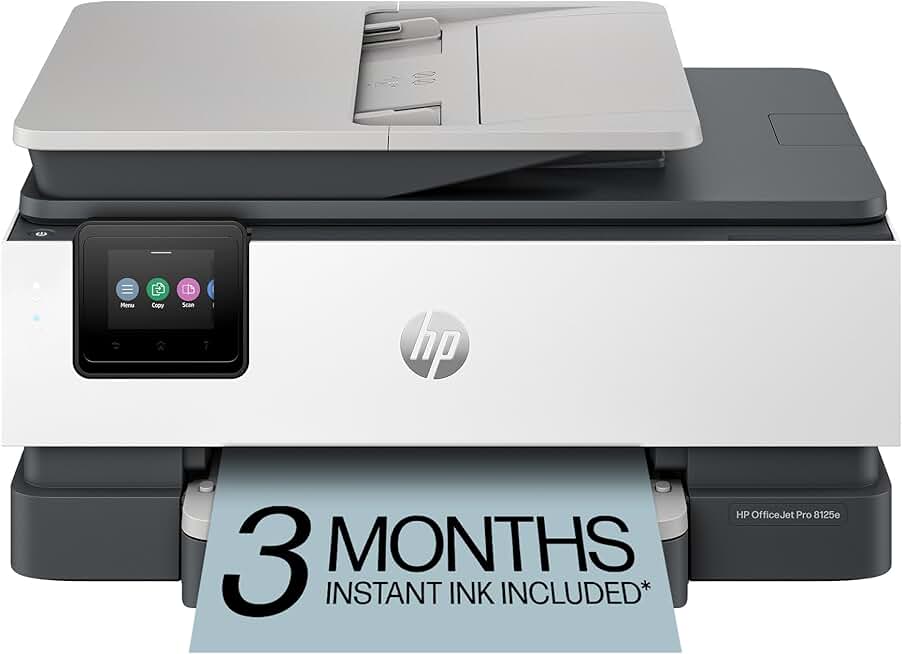
The HP OfficeJet Pro 8125e stands out as a versatile all-in-one color inkjet printer, designed to meet the diverse needs of home office environments. This robust device combines printing, scanning, and copying functionalities, offering a comprehensive solution for productivity.
With features like automatic document feeding (ADF), duplex printing, and robust wireless connectivity, it aims to streamline your daily tasks. The inclusion of a 3-month Instant Ink trial and AI-enabled capabilities further enhances its appeal, promising convenience and efficiency for users.
Quick Summary: HP OfficeJet Pro 8125e
Overall Rating: 3.8/5 (Based on 3106 reviews)
Price: $139.89 USD
Key Pros:
- All-in-One Versatility: Seamlessly handles printing, scanning, and copying tasks, making it ideal for multifaceted home office needs.
- Wireless Connectivity: Offers reliable Wi-Fi and mobile printing options, enabling flexible placement and convenient printing from various devices.
- Duplex Printing & ADF: Automates two-sided printing and multi-page scanning/copying, significantly boosting efficiency and saving paper.
Key Cons:
- Ink Cost Concerns: While Instant Ink helps, long-term cartridge costs can still be a consideration for high-volume users if not managed properly.
- Setup Complexity: Some users report initial setup and driver installation can be less intuitive than desired, requiring patience.
Table of Contents
HP OfficeJet Pro 8125e Overview
The HP OfficeJet Pro 8125e is engineered to be a central hub for document management in a modern home office. This all-in-one inkjet printer provides a comprehensive suite of functions, including high-quality color printing, precise scanning, and efficient copying capabilities.
Its design prioritizes user convenience and productivity, making it an excellent choice for individuals who require a reliable and versatile device without the bulk of separate machines. The printer’s compact footprint also ensures it fits comfortably into various workspace configurations, from dedicated offices to shared family areas.
One of the defining characteristics of the HP OfficeJet Pro 8125e is its commitment to connectivity. With robust wireless features, users can print from virtually anywhere within their network, whether from a desktop computer, laptop, or mobile device. This flexibility is crucial in today’s dynamic work environments.
The printer also boasts an automatic document feeder (ADF), which is invaluable for handling multi-page documents for scanning or copying. This feature eliminates the need for manual page placement, saving significant time and effort when processing large reports or forms.
Furthermore, the inclusion of automatic duplex printing allows for two-sided printing, reducing paper consumption and promoting more sustainable practices. This not only helps the environment but also cuts down on ongoing operational costs for home office users.
HP has also integrated what they refer to as ‘AI-enabled’ features into the 8125e. While the specifics can vary, this typically points to smart functionalities like predictive ink ordering through Instant Ink or advanced diagnostic tools that help maintain printer performance and troubleshoot issues proactively.
The accompanying 3-month Instant Ink trial is a significant benefit, providing a cost-effective way to manage ink supplies. This subscription service ensures that new cartridges are delivered to your door before you run out, based on your actual printing volume.
Understanding the overall user experience, it’s important to note the product’s 3.8-star rating from over 3,000 reviews. This indicates that while many users find the printer satisfactory, there are areas where some have encountered challenges. These often revolve around setup, long-term ink costs if not on Instant Ink, or specific connectivity nuances.
However, for its price point, the HP OfficeJet Pro 8125e offers a compelling package of features that cater directly to the needs of a busy home office. It balances advanced functionalities with an accessible price, making it a strong contender in its category for those seeking an all-encompassing printing solution.
Its blend of efficiency, connectivity, and smart features positions it as a practical tool for anyone looking to optimize their document workflow. The emphasis on wireless capabilities and automated tasks truly sets it apart for modern users.
HP OfficeJet Pro 8125e Key Features & Specs
The HP OfficeJet Pro 8125e comes packed with a range of features and specifications designed to enhance productivity and user convenience in a home office setting. Understanding these details is crucial for assessing its suitability for your specific needs.
At its core, this is an All-in-One Inkjet Printer, meaning it handles print, scan, and copy functions. This consolidation saves space and provides a single, integrated solution for various document tasks, which is ideal for compact workspaces.
Printing Capabilities
The printer delivers vibrant color and crisp black and white prints, suitable for a range of documents from reports to presentations. While exact print speeds can vary, OfficeJet Pro models are generally known for their respectable output, often ranging from 15-22 pages per minute (ppm) for black and white, and 8-15 ppm for color.
Print resolution is typically high enough for professional-looking documents, ensuring text is sharp and images are clear. The ability to print wirelessly from various devices, including smartphones and tablets via the HP Smart app, offers immense flexibility.
Scanning Functionality
Equipped with both a flatbed scanner and an Automatic Document Feeder (ADF), the 8125e makes scanning multi-page documents effortless. The ADF usually supports around 35 pages, allowing users to scan entire reports without manual intervention.
Scanning resolution is generally good, preserving detail for archiving important documents or creating digital copies. Scanned files can typically be saved to various formats and destinations, including email, cloud services, or network folders.
Copying Features
Copying is also streamlined with the ADF, enabling quick duplication of multiple pages. Users can adjust settings such as size, quality, and number of copies directly from the printer’s control panel or through the HP Smart app.
The copying function benefits from the same color and resolution capabilities as printing, ensuring faithful reproductions of original documents. This is invaluable for administrative tasks and document sharing.
Duplex Printing
A standout feature is its automatic duplex printing, which allows the printer to print on both sides of a page without manual flipping. This not only conserves paper but also contributes to a more professional presentation for reports and brochures.
The efficiency gained from duplex printing is significant, especially for users who frequently print multi-page documents. It reduces the time spent managing print jobs and minimizes paper waste.
Wireless Connectivity
The HP OfficeJet Pro 8125e offers robust wireless options, including Wi-Fi connectivity. This enables easy network integration, allowing multiple users to access the printer from different devices within the home office network.
Support for mobile printing solutions like Apple AirPrint and the HP Smart App further enhances its accessibility. This means you can print documents or photos directly from your smartphone or tablet, even when you’re not physically near your computer.
Instant Ink Trial and AI-Enabled Features
Included with the purchase is a 3-month Instant Ink trial. This subscription service monitors your ink levels and automatically orders replacement cartridges, which are then shipped directly to your door. This helps ensure you never run out of ink unexpectedly and can potentially save on ink costs depending on your usage.
The ‘AI-enabled’ aspect often refers to smart features that optimize performance, improve security, or enhance user experience. This could include predictive maintenance, intelligent ink management, or advanced threat detection for networked printing. For more details on HP’s smart features, you can visit the official HP website.
Design and Build
The printer typically features a compact and functional design, fitting well into various home office setups. Its intuitive control panel, often a touchscreen, provides easy access to various functions and settings, making operation straightforward.
Input tray capacity is generally sufficient for home office use, usually around 225 sheets, reducing the frequency of paper refills. The output tray can hold a reasonable number of printed pages, preventing jams.
Understanding these features allows potential buyers to gauge how well the HP OfficeJet Pro 8125e aligns with their specific printing, scanning, and copying requirements. It’s a comprehensive tool designed for efficiency and convenience.
Pros & Cons
Evaluating the HP OfficeJet Pro 8125e involves a careful look at its strengths and weaknesses. This balanced perspective helps potential buyers make an informed decision, understanding what the printer excels at and where it might fall short.
Pros of the HP OfficeJet Pro 8125e
One of the most significant advantages of the 8125e is its all-in-one versatility. The seamless integration of printing, scanning, and copying functions into a single device is highly convenient for home office users, eliminating the need for multiple machines and saving valuable desk space.
The robust wireless connectivity is another major plus. With reliable Wi-Fi and support for mobile printing apps, users can print from almost any device within their network, offering unparalleled flexibility. This is especially beneficial in households with multiple users or diverse devices.
Automatic duplex printing is a valuable feature that promotes efficiency and cost savings. By automatically printing on both sides of a page, the printer significantly reduces paper consumption. This also gives documents a more professional and polished appearance.
The inclusion of an Automatic Document Feeder (ADF) is a huge time-saver for anyone dealing with multi-page documents. Scanning or copying stacks of papers becomes a quick, hands-free operation, greatly improving productivity for tasks like digitizing records or preparing reports.
The 3-month Instant Ink trial provides an excellent opportunity to experience HP’s ink subscription service. This can lead to significant savings on ink costs, as cartridges are delivered automatically based on usage, helping to prevent unexpected ink shortages and budget overruns.
HP’s commitment to security is evident in the AI-enabled features, which often include advanced threat detection and secure boot options. These measures help protect your network and data from potential vulnerabilities, a growing concern for home office users.
For its price point, the HP OfficeJet Pro 8125e offers a strong feature set that delivers excellent value. It provides professional-grade capabilities without the premium price tag typically associated with higher-end office equipment, making it accessible for many home users.
Cons of the HP OfficeJet Pro 8125e
Despite its many advantages, the HP OfficeJet Pro 8125e does have some drawbacks, as reflected in its 3.8-star average rating. One common concern revolves around long-term ink costs, even with the Instant Ink program.
If users print sporadically or in very high volumes outside of a carefully chosen Instant Ink plan, traditional cartridge replacements can become expensive. It’s crucial to select the right Instant Ink plan or be prepared for potentially higher costs if not subscribed.
Another area where some users report challenges is the initial setup and driver installation. While HP aims for user-friendliness, the process can sometimes be less intuitive, particularly for those less technologically inclined. This might require patience or referring to online guides.
While wireless connectivity is a pro, some users occasionally report intermittent Wi-Fi connection issues or difficulties maintaining a stable link. These instances can be frustrating and may require troubleshooting network settings or printer placement.
For users accustomed to laser printers, the inkjet print speed of the 8125e might feel slower, especially for large print jobs. While adequate for most home office tasks, it may not satisfy those with extremely high-volume printing demands.
The ‘AI-enabled’ features, while promising, can sometimes be vague in their direct benefits or implementation for the average user. Some might find these advanced functionalities to be more marketing buzz than tangible, everyday improvements without deeper technical understanding.
The plastic construction, while contributing to a lighter device, may not feel as robust or premium as some higher-end office machines. While generally durable for home use, it might not withstand the rigors of a very demanding, high-traffic office environment.
Careful consideration of these pros and cons will help determine if the HP OfficeJet Pro 8125e is the right fit for your specific home office needs and usage patterns.
Who Should Buy the HP OfficeJet Pro 8125e?
The HP OfficeJet Pro 8125e is designed to cater to a specific demographic, offering a blend of features that appeal to various types of users. Understanding its target audience can help you determine if this printer is the right investment for your needs.
Home Office Professionals
This printer is an excellent choice for individuals running a home-based business or working remotely. Its all-in-one functionality means you can print reports, scan client documents, and copy invoices all from a single device, streamlining administrative tasks.
The automatic document feeder (ADF) and duplex printing capabilities are particularly beneficial for professionals who handle multi-page documents regularly. These features save time and improve efficiency, allowing you to focus on core business activities rather than manual document handling.
Small Business Owners
For very small businesses or startups that require reliable printing, scanning, and copying without a large upfront investment, the HP OfficeJet Pro 8125e offers a cost-effective solution. Its ability to handle both color and black-and-white documents makes it versatile for various business needs.
The wireless connectivity allows multiple users within a small office environment to easily access the printer from their workstations. This eliminates the need for direct cabling and provides greater flexibility in office layout.
Students and Educators
Students, particularly those in higher education, and educators who frequently need to print assignments, research papers, or educational materials will find the 8125e highly useful. Its ability to print double-sided helps conserve paper and reduce costs over the academic year.
Scanning capabilities are also valuable for digitizing notes, textbook pages, or handwritten assignments for online submission or personal archives. The wireless printing feature is convenient for printing from dorm rooms or home study areas.
Families with Diverse Printing Needs
Households that require a printer for a mix of personal, school, and occasional work-related tasks will appreciate the versatility of the HP OfficeJet Pro 8125e. It can handle everything from school projects and family photos to tax documents and work-from-home materials.
The Instant Ink trial can be a major benefit for families, ensuring that ink is always available when needed, especially during critical moments like homework deadlines. Its user-friendly interface makes it accessible for various family members.
Users Seeking Cost-Effective Ink Management
Individuals who are conscious about ink costs and prefer a managed approach to supplies will find the Instant Ink program appealing. The 3-month trial provides a risk-free way to test the service, which can lead to predictable monthly ink expenses.
For those who print a consistent volume each month, Instant Ink can offer significant savings compared to purchasing traditional cartridges individually. This removes the worry of running out of ink at inconvenient times.
Anyone Needing Reliable Wireless Printing
If you value the convenience of printing from multiple devices without the hassle of cables, the 8125e’s strong wireless capabilities make it an ideal choice. Its compatibility with various operating systems and mobile apps ensures seamless integration into most modern tech ecosystems.
The ability to place the printer almost anywhere within your Wi-Fi range without being tethered to a computer offers significant spatial flexibility. This is especially useful in smaller homes or dynamic office setups.
Considerations for Potential Buyers
However, if you require extremely high-volume printing at very fast speeds, a laser printer might be a more suitable option. The HP OfficeJet Pro 8125e, while efficient for an inkjet, is not designed for industrial-level output.
Also, if you are completely averse to subscription services, the Instant Ink program, while beneficial for many, might not appeal to you. In such cases, you would need to factor in the cost of traditional ink cartridges.
Ultimately, the HP OfficeJet Pro 8125e is best suited for users who need a versatile, connected, and reasonably priced all-in-one printer for moderate to heavy home office or small business use. Its feature set is robust for its category, providing a strong value proposition for the right user.
FAQ about HP OfficeJet Pro 8125e
Here are some frequently asked questions regarding the HP OfficeJet Pro 8125e, providing detailed answers to common inquiries from potential and current users.
Q1: Is the HP OfficeJet Pro 8125e difficult to set up?
A1: Initial setup of the HP OfficeJet Pro 8125e generally involves connecting the printer to power, loading ink cartridges, and installing the HP Smart app on your computer or mobile device. While the process is designed to be straightforward, some users have reported minor difficulties with wireless connectivity setup or driver installation.
It’s recommended to follow the step-by-step instructions provided in the quick start guide and on the HP Smart app. Ensuring your Wi-Fi network is stable and that you have the correct network password can help smooth the process. HP’s support website also offers extensive troubleshooting resources.
Q2: Does the HP OfficeJet Pro 8125e come with ink?
A2: Yes, the HP OfficeJet Pro 8125e typically comes with a set of starter ink cartridges to get you started. Additionally, it includes a 3-month trial of HP Instant Ink, which is a subscription service that automatically delivers new ink cartridges to your door before you run out.
The starter cartridges are usually not full-capacity, so the Instant Ink trial is a valuable addition to ensure continuous printing. After the trial, you can choose to continue with a paid Instant Ink plan or purchase standard replacement cartridges.
Q3: What kind of connectivity options does this printer offer?
A3: The HP OfficeJet Pro 8125e offers robust wireless connectivity, primarily through Wi-Fi. This allows you to connect the printer to your home network and print from multiple devices such as laptops, desktops, smartphones, and tablets.
It supports mobile printing solutions like Apple AirPrint and the HP Smart app, making it easy to print from your mobile devices. While primarily wireless, it usually also includes a USB port for a direct wired connection, which can be useful for initial setup or in environments without Wi-Fi.
Q4: Can the HP OfficeJet Pro 8125e print double-sided automatically?
A4: Yes, one of the key features of the HP OfficeJet Pro 8125e is its automatic duplex printing capability. This means the printer can automatically print on both sides of a page without you having to manually flip the paper.
This feature significantly saves paper, reduces costs, and is environmentally friendly. It also makes printing multi-page documents, such as reports or brochures, much more efficient and professional-looking.
Q5: Is the HP Instant Ink service mandatory for the 8125e?
A5: No, the HP Instant Ink service is not mandatory for the HP OfficeJet Pro 8125e, although a 3-month trial is typically included. You have the option to continue with a paid Instant Ink subscription after the trial period, or you can choose to purchase standard HP ink cartridges as needed.
Instant Ink can be a cost-effective solution for users with consistent printing volumes, as it bases charges on pages printed rather than ink consumed. However, if your printing habits are very sporadic or extremely low volume, traditional cartridges might be more economical.
Q6: What does ‘AI-enabled’ mean for this printer?
A6: The term ‘AI-enabled’ for the HP OfficeJet Pro 8125e typically refers to smart features that enhance the printer’s functionality and security. This can include intelligent ink management (especially with Instant Ink), where the printer communicates its ink levels to HP to ensure timely delivery of replacements.
It may also encompass advanced security features that use AI to detect and prevent cyber threats to your network and data. Additionally, AI could be used for predictive maintenance, alerting you to potential issues before they become critical, thereby improving reliability and uptime. For general information on printer technology, you can refer to Wikipedia’s Printer page.
Q7: How is the print quality for photos and graphics?
A7: As an OfficeJet Pro series printer, the HP OfficeJet Pro 8125e is optimized for business documents, which include text and graphics. It delivers very good quality for reports, presentations, and documents with embedded images, producing vibrant colors and sharp text.
While it can print photos, it may not match the specialized photo quality of dedicated photo printers that use more ink colors or advanced paper handling. For casual photo printing, it performs admirably, but for professional-grade photo output, other options might be superior.
Q8: What operating systems are compatible with the HP OfficeJet Pro 8125e?
A8: The HP OfficeJet Pro 8125e is designed to be compatible with a wide range of popular operating systems. This typically includes various versions of Windows (e.g., Windows 10, 11), macOS (e.g., macOS Ventura, Monterey), and common mobile operating systems like Android and iOS for mobile printing.
HP provides drivers and software, primarily through the HP Smart app, that ensure seamless integration with these platforms. Always check the official HP support page for the latest compatibility information and driver downloads for your specific OS version.
Final Verdict
The HP OfficeJet Pro 8125e emerges as a highly capable and versatile all-in-one color inkjet printer, perfectly suited for the demands of a modern home office or small business. Its comprehensive feature set, including printing, scanning, copying, ADF, and automatic duplexing, makes it a productivity powerhouse.
The robust wireless connectivity and mobile printing options provide unparalleled flexibility, allowing users to print from virtually any device within their network. The inclusion of the 3-month Instant Ink trial is a significant bonus, offering a convenient and potentially cost-saving approach to ink management.
While some users may encounter minor challenges with initial setup or long-term ink costs if not utilizing Instant Ink optimally, the overall value proposition of the HP OfficeJet Pro 8125e is strong. It balances advanced functionalities with an accessible price point, making professional-grade document handling achievable for many.
For those seeking a reliable, efficient, and feature-rich printer that can handle a diverse range of tasks, this model is an excellent contender. It simplifies complex workflows and ensures your document needs are met with precision and convenience, making it a truly valuable addition to any workspace.