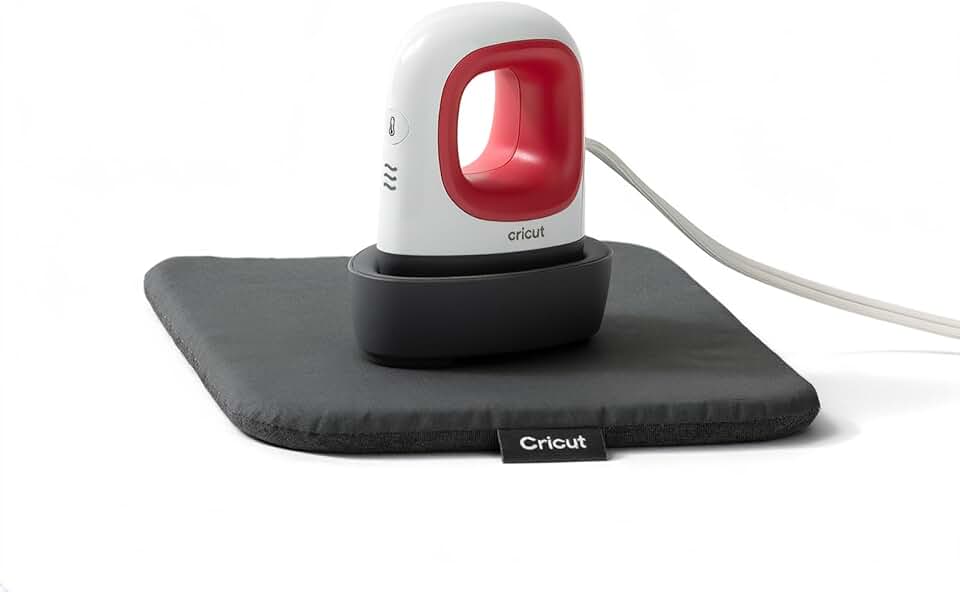
The Cricut EasyPress Mini is a game-changer for crafters looking to tackle small or intricate heat transfer projects with professional results. This compact and lightweight heat press offers precise control and even heat distribution, making it an indispensable tool for customizing items that larger heat presses or traditional irons struggle with.

Quick Summary
Rating: 4.8 out of 5 stars
Price: ~$54.00 USD
Key Pros:
- Exceptional Portability: Its compact size allows for easy storage and transport, perfect for crafters on the go or with limited workspace.
- Precision Tip Design: Ideal for intricate designs, small garments, curved surfaces, and hard-to-reach areas where larger presses fail.
- Even Heat Distribution: Ceramic-coated heat plate ensures consistent results, preventing scorching and uneven transfers.
Key Cons:
- Limited Project Size: Not suitable for large-scale heat transfer projects, requiring multiple passes for anything beyond small items.
- Manual Pressure Application: Requires user to apply pressure, which might be less consistent than an automatic or clam-shell press.
Table of Contents
Cricut EasyPress Mini Overview
The Cricut EasyPress Mini represents a significant leap forward for crafters who often find themselves working on items that are too small or awkwardly shaped for traditional heat presses. Designed with portability and precision in mind, this compact device brings professional-grade heat transfer capabilities to a new range of projects.
Unlike its larger EasyPress siblings or bulky clam-shell presses, the EasyPress Mini’s diminutive size makes it perfect for customizing baby bodysuits, shoes, hats, stuffed animals, and even intricate details on larger garments. Its ergonomic design fits comfortably in the hand, allowing for easy maneuverability around curves and seams.
This innovative tool eliminates the guesswork associated with household irons, which often lack consistent heat and pressure across their soleplate. The EasyPress Mini features a ceramic-coated heat plate that ensures dry, even heat from edge to edge, crucial for achieving flawless, long-lasting transfers with various materials like Heat Transfer Vinyl (HTV) and Infusible Ink.
Cricut has positioned the EasyPress Mini as an essential companion for any crafter, whether they are just starting out or are seasoned veterans. It complements larger presses by handling the detailed work, or it can serve as a primary heat press for those whose crafting focus is exclusively on smaller, personalized items.
The device heats up quickly, saving valuable crafting time, and its simple three-setting temperature control makes it user-friendly for all skill levels. This simplicity belies its powerful performance, as it consistently delivers durable, high-quality results that stand up to washing and wear.
Its lightweight nature means it can be easily stored in a craft bag, drawer, or shelf, making it ideal for crafters with limited workspace or those who frequently attend craft fairs or workshops. The included insulated safety base provides a secure resting place during and after use, enhancing overall safety.
For anyone looking to expand their creative horizons into customizing small accessories or adding intricate embellishments, the Cricut EasyPress Mini offers an unparalleled combination of convenience, precision, and professional output. It truly fills a niche that was previously underserved in the heat transfer market, making detailed customization accessible to everyone.
The overall design aesthetic, with its vibrant Raspberry color, also makes it an attractive addition to any crafting space. It’s not just a functional tool; it’s also a stylish one that reflects the creative spirit of its users. This thoughtful design contributes to a more enjoyable crafting experience.
Understanding its specific applications is key to appreciating its value. While it won’t press a full-size t-shirt in one go, its ability to tackle collars, pockets, sleeves, and tiny patches is unmatched. This focused capability makes it a specialized tool that excels where general-purpose heat presses fall short.
Considering its price point, the EasyPress Mini offers tremendous value, especially when compared to the frustration and inconsistent results often encountered when trying to use a household iron for similar projects. It bridges the gap between casual crafting and professional-looking finished products.
Cricut EasyPress Mini Key Features & Specs
The Cricut EasyPress Mini is packed with features specifically designed to optimize small-scale heat transfer projects. Its thoughtful engineering addresses the common challenges crafters face when working with delicate or unusually shaped items, ensuring professional and durable results every time.
Compact and Lightweight Design
Weighing in at just over half a pound, the EasyPress Mini is incredibly light and portable. Its small footprint, approximately 3.4 inches by 2.1 inches, makes it easy to store in any craft drawer or carry bag, ideal for crafters who travel or have limited workspace. This portability means you can take your projects anywhere.
The ergonomic handle ensures a comfortable grip, allowing for precise control and maneuverability during application. This design consideration is crucial when working on intricate details or navigating around seams and curves on various items.
Precision Heat Plate with Ceramic Coating
One of the standout features is its small, ceramic-coated heat plate. This plate is engineered to provide edge-to-edge consistent dry heat, which is vital for proper adhesion of heat transfer materials. The ceramic coating also ensures smooth gliding over surfaces and prevents materials from sticking.
The precision tip design of the heat plate is particularly useful. It allows crafters to easily reach into tight spots, press seams, or apply designs to small, curved surfaces like shoe tongues or hat brims. This level of detail is simply not achievable with larger, flat heat presses or standard household irons.
Three Simple Heat Settings
The EasyPress Mini offers three distinct heat settings: Low, Medium, and High. While Cricut does not provide exact temperature degrees for these settings on the device itself, they are calibrated to work perfectly with the most common heat transfer materials.
- Low Setting: Ideal for more delicate materials like some types of vinyl or specific fabrics that require lower temperatures.
- Medium Setting: The go-to for standard Heat Transfer Vinyl (HTV) and many Infusible Ink projects on compatible blanks.
- High Setting: Reserved for Infusible Ink on tougher materials or specific types of HTV that demand higher heat for optimal adhesion.
These settings are easily selected with a single button, and the device quickly heats up to the desired temperature, indicated by a changing light. This intuitive control system makes it accessible even for beginners.
Insulated Safety Base and Auto-Shutoff
Safety is a paramount concern with any heat tool, and the EasyPress Mini addresses this with an insulated safety base. This base provides a secure spot to rest the hot press during use and after projects, protecting your work surface from heat damage.
Furthermore, the device includes an automatic shut-off feature. If left inactive for a period, typically around 10 minutes, the EasyPress Mini will automatically power down. This prevents overheating and provides peace of mind, especially for busy crafters who might get sidetracked.
Included Heat Press Mat
The bundle often includes a Cricut Heat Press Mat, which is an essential accessory. This mat provides a firm, even pressing surface and helps to absorb and evenly distribute heat, protecting your work surface and ensuring optimal transfer results. It’s designed to wick moisture and direct heat to your project.
Using a dedicated heat press mat significantly improves the quality and longevity of your heat transfers. It prevents issues like scorching or uneven adhesion that can occur when pressing on an unsuitable surface like an ironing board.
Quick Heat-Up Time
The EasyPress Mini heats up remarkably fast, often reaching its target temperature in under two minutes. This rapid heating allows crafters to get started on their projects almost immediately, minimizing downtime and increasing productivity, which is a huge benefit for busy individuals.
This quick heat-up time is particularly beneficial for those who only need to press a few small items or add a quick detail to a larger project. You don’t have to wait long for the tool to be ready.
Versatile Application
While small, its capabilities are vast. It works seamlessly with Cricut’s entire range of Iron-On (HTV) and Infusible Ink products, as well as other compatible heat transfer materials from various brands. This versatility allows crafters to explore a wide array of personalization options.
The design and functionality of the Cricut EasyPress Mini make it a highly specialized yet incredibly versatile tool. It’s engineered to perform specific tasks with excellence, making it an invaluable addition to any crafting toolkit.
Pros & Cons
Understanding the strengths and weaknesses of any tool is crucial for making an informed purchasing decision. The Cricut EasyPress Mini, while an exceptional device for specific tasks, also comes with its own set of limitations that potential buyers should consider.
Pros of the Cricut EasyPress Mini
- Unmatched Portability: Its incredibly small size and lightweight nature make it the most portable heat press on the market. It’s perfect for taking to craft shows, workshops, or simply moving between different crafting stations at home. This convenience allows for crafting on the go.
- Precision for Small & Intricate Designs: The compact heat plate with its pointed tip is a dream come true for intricate details. It excels at applying HTV or Infusible Ink to small items like baby clothes, shoes, hats, stuffed animals, pockets, sleeves, and even doll clothes. Traditional irons or larger presses simply cannot achieve this level of accuracy.
- Even and Consistent Heat: Unlike household irons, which often have cold spots or inconsistent temperatures, the EasyPress Mini provides uniform heat across its ceramic-coated plate. This ensures that your transfers adhere perfectly and last longer, without scorching or peeling.
- User-Friendly Operation: With only three simple heat settings and a single button control, the EasyPress Mini is incredibly easy to use, even for beginners. There’s no complex programming or steep learning curve, allowing you to focus on your creativity.
- Quick Heat-Up Time: The device heats up rapidly, typically within 1-2 minutes, which means less waiting and more crafting. This efficiency is a huge advantage when you’re working on multiple small projects or need a quick touch-up.
- Enhanced Safety Features: Equipped with an insulated safety base and an automatic shut-off feature after 10 minutes of inactivity, the EasyPress Mini prioritizes user safety and prevents accidents. This provides peace of mind during crafting sessions.
- Versatile Material Compatibility: It works effectively with a wide range of heat transfer materials, including all types of Heat Transfer Vinyl (HTV), Infusible Ink sheets, and even some sublimation papers. This versatility allows for diverse creative projects.
- Excellent for Touch-Ups: Beyond primary applications, it’s also perfect for fixing small areas that might not have adhered properly after a larger press, or for adding small details to pre-made items. It serves as a fantastic secondary tool.
- Great Value for Specific Use Cases: Considering its specialized capabilities and consistent results, the price point for the EasyPress Mini is highly competitive. It offers professional output for a fraction of the cost of a full-size heat press, especially for those focused on small items.
Cons of the Cricut EasyPress Mini
- Limited to Small Projects: The most significant limitation is its small size. It is not designed for large-scale projects like adult t-shirts, tote bags, or large wall decals. For anything larger than a small patch, you’ll need to make multiple passes, which can be time-consuming and potentially lead to uneven results if not done carefully.
- Requires Manual Pressure: Unlike automatic or clam-shell heat presses that provide consistent, even pressure, the EasyPress Mini requires the user to apply manual pressure. This means the consistency of pressure can vary from person to person, or even from one application to the next, potentially impacting transfer quality if not applied correctly.
- Slower for Larger “Small” Items: While it excels at truly tiny objects, for items like small adult t-shirt sleeves or larger baby bodysuits, you will need to press in sections. This can make the process slower than using a medium-sized EasyPress or a full-size heat press, even if the item itself isn’t massive.
- No Exact Temperature Display: The three heat settings (Low, Medium, High) are convenient but lack the precise digital temperature display found on larger EasyPress models. This means you rely on Cricut’s recommended settings rather than being able to dial in an exact temperature for obscure materials.
- Not a Replacement for a Full-Size Press: It’s crucial to understand that the EasyPress Mini is a specialized tool, not a universal replacement for a larger heat press. If your primary goal is to press adult apparel or large flat items, you will eventually need a bigger machine.
- Can Be Overlooked by Beginners: Some beginners might mistakenly purchase this as their only heat press, only to realize its limitations for standard projects. It’s best understood as an addition to a crafting arsenal or for very specific niche projects.
Who Should Buy the Cricut EasyPress Mini?
The Cricut EasyPress Mini is a highly specialized tool, and while it’s incredibly effective within its niche, it’s not the ideal choice for every crafter. Understanding its target audience helps potential buyers determine if this compact heat press is the right addition to their creative toolkit.
Crafters Focusing on Small and Intricate Projects
This is the primary group for whom the EasyPress Mini is indispensable. If your crafting passion involves personalizing items like baby bodysuits, socks, shoes, hats, gloves, headbands, or even small stuffed animals, then this device is perfectly suited for your needs. Its precision tip and small size allow you to reach areas that are impossible with larger presses.
Think about customizing doll clothes, adding monograms to pockets, or applying small logos to sleeves. The EasyPress Mini makes these tasks not just possible, but easy and efficient, delivering professional results on items that demand meticulous attention to detail.
Those with Limited Workspace
For individuals living in apartments, dorms, or simply with a dedicated small craft corner, the EasyPress Mini is a space-saving marvel. Its compact footprint means it takes up minimal room on your desk or shelf, and it’s easy to tuck away when not in use. This makes it an excellent option for urban crafters.
You don’t need a large, dedicated pressing station to use this tool effectively. Its small size means you can set up a temporary crafting area almost anywhere, from a kitchen counter to a small side table, making crafting more accessible.
Crafters Needing Portability
If you frequently attend craft fairs, markets, or workshops, the EasyPress Mini is an invaluable travel companion. Its lightweight design makes it effortless to pack and transport, allowing you to create personalized items on the go or offer on-the-spot customization services. This mobility is a significant advantage.
Imagine being able to personalize a hat or a small tote bag directly at a market stall. The EasyPress Mini makes this a reality, expanding your business opportunities or crafting capabilities outside of your home studio.
Beginners to Heat Transfer Crafting
For those new to the world of heat transfer vinyl or Infusible Ink, the EasyPress Mini offers a gentle entry point. Its simple controls and straightforward operation mean there’s a minimal learning curve. This allows beginners to focus on mastering the basics of design and application without being overwhelmed by complex machinery.
It’s an excellent way to get a feel for how heat transfer materials react and adhere, building confidence before potentially investing in a larger, more complex heat press. Its affordability also makes it a low-risk first investment.
As a Complementary Tool for Existing Crafters
Even if you already own a larger EasyPress or a traditional clam-shell heat press, the Mini can be an incredibly useful secondary tool. It excels at tackling the small, tricky areas that your main press might struggle with, saving you time and frustration. Many experienced crafters use it for details and touch-ups.
For example, you might use your large EasyPress for the main design on a t-shirt, but then grab the Mini to add a small logo to the sleeve or a custom tag to the collar. This combination provides ultimate versatility and efficiency for a wide range of projects.
Anyone Looking to Customize Unique Items
Beyond traditional garments, the EasyPress Mini opens up possibilities for customizing unique items like plush toys, delicate fabric ornaments, baby shoes, or even intricate parts of larger DIY projects. Its ability to maneuver around unconventional shapes is its greatest asset.
If you have a creative vision that involves personalizing objects with challenging surfaces or small dimensions, the EasyPress Mini is likely the tool that will help you bring those ideas to life with precision and ease. It truly expands the scope of what’s possible in heat transfer crafting.
In summary, if your crafting involves precision, portability, and working with smaller items, or if you need a reliable secondary tool for detailed work, the Cricut EasyPress Mini is an investment that will undoubtedly enhance your creative process and the quality of your finished products. It’s a specialized tool that performs its specific functions exceptionally well, making it a valuable asset for the right user.
FAQ about Cricut EasyPress Mini
Here are some frequently asked questions about the Cricut EasyPress Mini, providing detailed answers to help you understand its capabilities and how to best use this versatile crafting tool.
Q1: What materials can the Cricut EasyPress Mini be used with?
The Cricut EasyPress Mini is highly versatile and compatible with a wide array of heat transfer materials. It works exceptionally well with all types of Cricut Iron-On (HTV), including everyday iron-on, glitter iron-on, foil iron-on, and sportflex iron-on. It’s also perfectly suited for Cricut Infusible Ink sheets and pens, enabling vibrant, seamless transfers.
Beyond Cricut’s own brand, it can be used with most other brands of heat transfer vinyl and even some sublimation papers, provided you follow the manufacturer’s recommended time and temperature settings. Always perform a test on a scrap piece of fabric if you’re unsure about a new material. The key is consistent heat and proper pressure, which the Mini delivers for small areas.
Q2: How does the Cricut EasyPress Mini compare to a traditional household iron for heat transfer?
The Cricut EasyPress Mini offers significant advantages over a traditional household iron for heat transfer projects. Household irons typically have uneven heat distribution, often with hotter spots in the center and cooler edges, leading to inconsistent adhesion and potential scorching. They also produce steam, which is detrimental to heat transfer materials.
In contrast, the EasyPress Mini provides dry, even heat across its entire ceramic-coated plate, ensuring a professional and long-lasting transfer. It also maintains a consistent temperature throughout the pressing process, which is critical for proper material bonding. Its precision tip is also far superior for intricate designs compared to a bulky iron soleplate.
Q3: Can the Cricut EasyPress Mini be used for larger projects?
While the Cricut EasyPress Mini excels at small and intricate projects, it is not designed as a primary tool for large items like adult t-shirts or large tote bags. Its small heat plate (approximately 3.4 inches by 2.1 inches) would require numerous overlapping passes to cover a large surface area.
Making multiple passes increases the risk of uneven heating, lines from overlapping presses, or over-processing certain areas, which can damage the material or the garment. For larger projects, it is highly recommended to use a larger Cricut EasyPress model (like the EasyPress 2 or 3) or a traditional clam-shell heat press for optimal and consistent results. The Mini is best kept for its intended purpose: small, detailed work.
Q4: What are the temperature settings for the Cricut EasyPress Mini?
The Cricut EasyPress Mini features three simple heat settings: Low, Medium, and High. Cricut has designed these settings to correspond with common heat transfer material requirements without needing a specific digital temperature display.
- Low Setting: Generally suitable for delicate fabrics or heat-sensitive materials.
- Medium Setting: The most commonly used setting for standard HTV and Infusible Ink on compatible blanks.
- High Setting: Used for thicker materials, or specific types of Infusible Ink projects that require higher temperatures for full activation and transfer.
You should always refer to the Cricut Heat Guide online or the specific material manufacturer’s recommendations for the precise settings (including time and pressure) for your project. This guide will tell you exactly which EasyPress Mini setting to use.
Q5: Is the Cricut EasyPress Mini safe to use?
Yes, safety was a key consideration in the design of the Cricut EasyPress Mini. It comes with an insulated safety base that provides a secure resting place for the hot press during and after use, protecting your work surfaces from heat damage. This base is designed to dissipate heat safely.
Additionally, the EasyPress Mini includes an automatic shut-off feature. If the device is left idle for approximately 10 minutes, it will automatically power down, preventing potential overheating or accidental burns. Always use the press on a heat-resistant surface, preferably with a Cricut Heat Press Mat, and keep it away from flammable materials.
Q6: Do I need the Cricut Heat Press Mat with the EasyPress Mini?
While technically you can use the EasyPress Mini without the specific Cricut Heat Press Mat, it is highly recommended and often bundled for a reason. The mat provides a firm, flat, and heat-resistant surface that is crucial for achieving optimal heat transfer results. It helps to absorb and evenly distribute heat, protecting your work surface and ensuring your material adheres properly.
Using an uneven or non-heat-resistant surface (like an ironing board with mesh) can lead to poor adhesion, scorching, or damage to your project and workspace. The mat also helps to draw moisture away from your design, which is important for certain transfer types like Infusible Ink. For consistent, professional results, the mat is a worthwhile investment.
Q7: How do I clean the heat plate of the Cricut EasyPress Mini?
Cleaning the heat plate of your Cricut EasyPress Mini is straightforward. Ensure the device is unplugged and completely cool before cleaning. Use a soft, damp cloth to gently wipe down the ceramic-coated plate. For stubborn residue, such as melted vinyl, you can try using a small amount of rubbing alcohol on a cloth, but avoid abrasive cleaners or harsh chemicals, which can damage the coating.
Never use sharp objects or metal brushes, as these can scratch the ceramic surface. Regular, gentle cleaning will help maintain the longevity and performance of your EasyPress Mini, ensuring it continues to provide even heat for your projects.
Q8: What is the warranty for the Cricut EasyPress Mini?
Cricut typically offers a limited warranty on its EasyPress machines, which generally covers defects in materials and workmanship under normal use. The exact duration and terms of the warranty can vary by region and purchase date, but it’s usually one year from the date of purchase.
It’s always best to register your product on the official Cricut website after purchase and retain your proof of purchase. For specific warranty details and to initiate a claim, you should consult the official Cricut warranty information page or contact Cricut customer support directly. They can provide the most accurate and up-to-date information regarding your specific device.
Final Verdict
After a thorough review of its features, performance, and user feedback, the Cricut EasyPress Mini stands out as an absolutely amazing and essential tool for any crafter focused on small, intricate, or uniquely shaped projects. It expertly fills a critical gap in the heat transfer market, offering precision and portability that larger machines simply cannot match.
Its compact size, ergonomic design, and precision tip make it effortless to customize items like baby clothing, shoes, hats, and stuffed animals, turning ordinary objects into personalized treasures. The consistent, even heat distribution from its ceramic-coated plate ensures professional, long-lasting results that far surpass what a household iron can achieve.
The three simple heat settings and rapid heat-up time contribute to a user-friendly experience, making it accessible for both beginners and seasoned crafters. Furthermore, the inclusion of an insulated safety base and an auto-shutoff feature underscores Cricut’s commitment to user safety and peace of mind.
While it’s important to acknowledge its limitations—primarily its unsuitability for large-scale projects—these are not flaws but rather inherent characteristics of a specialized tool. The EasyPress Mini is not designed to replace a full-size heat press but rather to complement it, or to serve as the primary press for those whose crafting niche perfectly aligns with its capabilities.
For crafters who value precision, portability, and the ability to customize items with challenging surfaces, the Cricut EasyPress Mini offers incredible value. It empowers creativity by making detailed personalization effortless and delivers impressive, durable results that elevate any handmade item.
Its positive sentiment from users, reflected in its high rating, speaks volumes about its effectiveness and reliability. It’s a testament to how well Cricut understood the specific needs of crafters who felt limited by existing heat press options.
Whether you’re a hobbyist looking to expand your creative repertoire, a small business owner offering personalized gifts, or an experienced crafter seeking a highly specialized tool for intricate work, the EasyPress Mini is a fantastic investment. It’s a small device that delivers big results.
In conclusion, if your crafting journey involves small details, unique items, or a need for portability, the Cricut EasyPress Mini is an outstanding choice. It’s an indispensable tool that will undoubtedly enhance your crafting experience and the quality of your finished projects, making it an amazing value for its specific purpose.